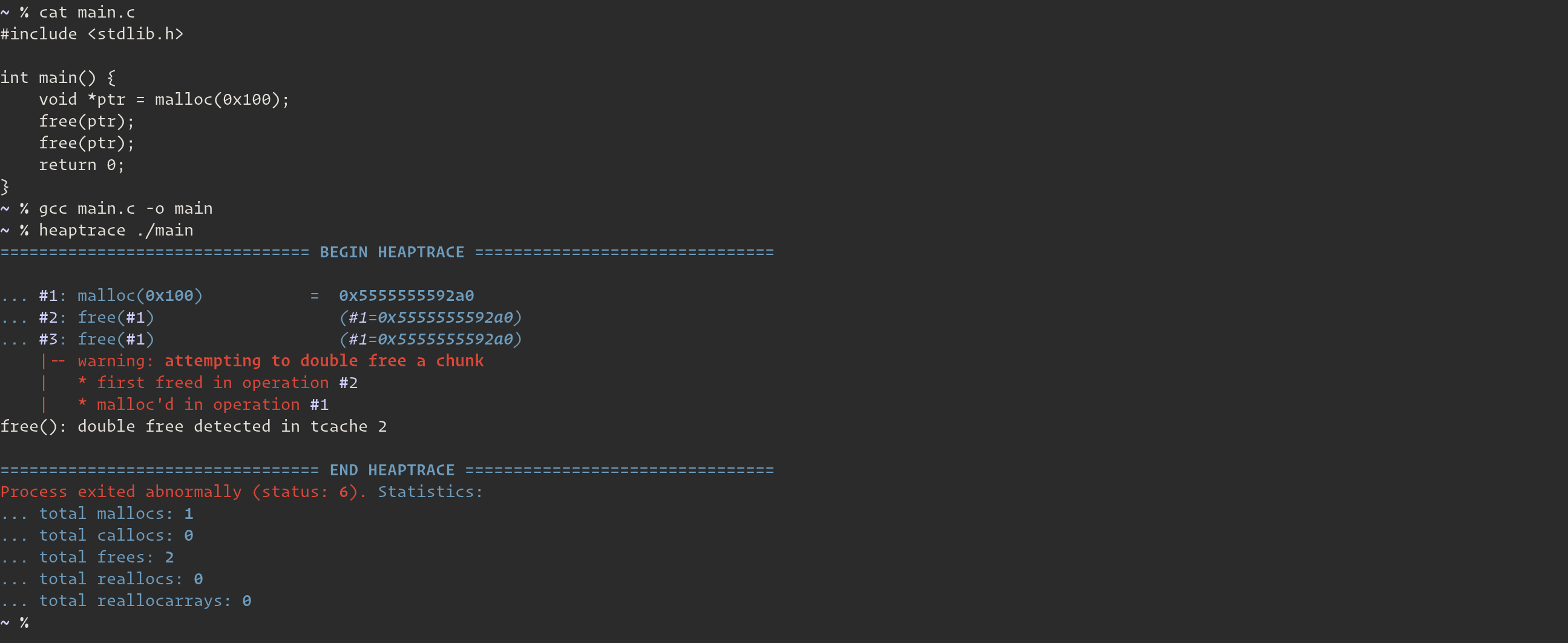

heaptrace は、ELF64 (x86_64) バイナリにおける glibc ヒープ操作を追跡するためのヒープデバッガです。その目的は、バイナリのデバッグ時やヒープ pwn を行う際に、ヒープ操作を可視化するのに役立てることです。
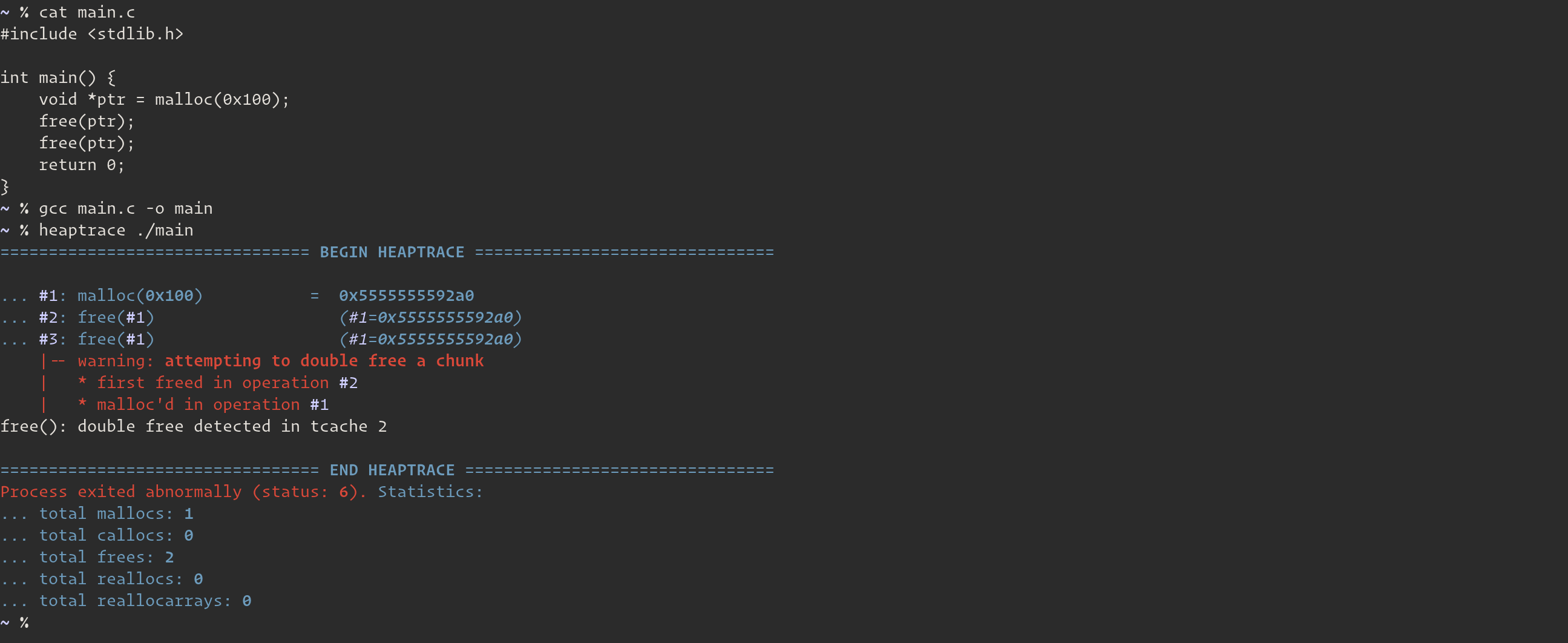
--break)heaptrace と valgrind の違いは何ですか?
.deb ファイル、.rpm ファイル、およびプリコンパイル済みバイナリは、リリースページ をご覧ください。
$ sudo add-apt-repository ppa:arinerron/heaptrace
$ sudo apt-get update
$ sudo apt-get install heaptrace
お好みの AUR ヘルパーを使用して、以下の2つのパッケージのいずれかをインストールしてください:
heaptrace-git — ソースパッケージ (PKGBUILD)heaptrace — バイナリパッケージ (PKGBUILD)$ trizen -S heaptrace-git
... または ...
$ trizen -S heaptrace
$ git clone https://github.com/Arinerron/heaptrace.git && cd heaptrace
$ make
$ sudo make install
...
$ heaptrace ./target
heaptrace の引数は、バイナリ名の前に指定します:
Usage:
  heaptrace [options...] <target> [args...]
  heaptrace [options...] --attach <pid>

Options:
  -p <pid>, --attach <pid>, --pid <pid>
	 Tells heaptrace to attach to the specified pid
	 instead of running the binary from the `target`
	 argument. Note that if you specify this argument
	 you do not have to specify `target`.


  -b <expression>, --break=<expression>, --break-at=<expression>
	 Send SIGSTOP to the process when the specified
	 `expression` is satisfied and attach the GNU debugger
	 (gdb) to the process.

	 This argument supports complex expressions. Please
	 See the documentation for more information:
	 https://github.com/Arinerron/heaptrace/wiki/How-to-Create-Breakpoints


  -B <expression>, --break-after=<expression>
	 Similar to `--break`. Replaces the tracer
	 process with gdb, but only after the heap function
	 returns. See the documentation for more information:
	 https://github.com/Arinerron/heaptrace/wiki/How-to-Create-Breakpoints


  -e <name=value>, --environ=<name=value>, --environment=<name=value>
	 Sets a single environmental variable. Useful for
	 setting runtime settings for the target such as
	 LD_PRELOAD=./libc.so.6 without having them affect
	 heaptrace's runtime configuration. This option can
	 be used multiple times.


  -s <sym_defs>, --symbols=<sym_defs>
	 Override the values heaptrace detects for the
	 malloc/calloc/free/realloc/reallocarray symbols.
	 Useful if heaptrace fails to automatically
	 identify heap functions in a stripped binary. See
	 the wiki for more info.


  -F, --follow-fork, --follow
	 Tells heaptrace to detach the parent and follow
	 the child if the target calls fork(), vfork(), or
	 clone().

	 The default behavior is to detach the child and
	 only trace the parent.


  -G <path>, --gdb-path <path>
	 Tells heaptrace to use the path to gdb specified
	 in `path` instead of /usr/bin/gdb (default).


  -w <width>, --width=<width>, --term-width=<width>
	 Force a certain terminal width.


  -o <file>, --output=<file>
	 Write the heaptrace output to `file` instead of
	 /dev/stderr (which is the default output path).


  -v, --verbose
	 Prints verbose information such as line numbers in
	 source code given the required debugging info is
	 stored in the ELF.


  -V, --version
	 Displays the current heaptrace version.


  -h, --help
	 Shows this help menu.
heaptrace --break=3 ./my-binary を実行します。この引数の使い方の詳細については、wiki ドキュメント を参照してください。-s/--symbol 引数の使い方については、wiki ドキュメント を参照してください。$NO_COLOR 引数を設定してください。このオプションは現在開発中で、まもなく引数に変更される予定です。バグが発生した場合やフィードバックがあれば、喜んでサポートします。GitHub Issues ページをご覧ください。

