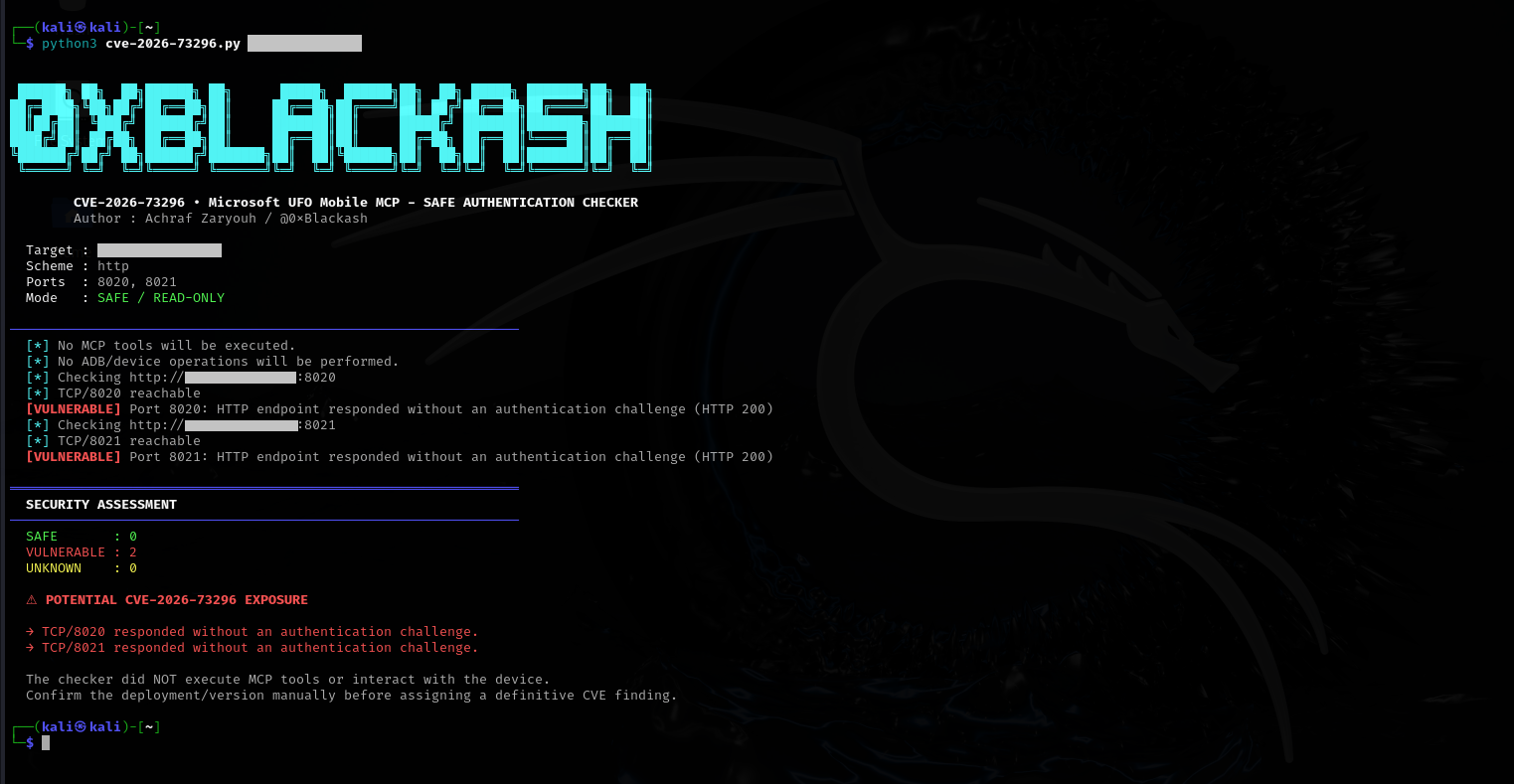
 0xblackash/cve-2026-73296
CVE-2026-73296向けの非破壊的セキュリティ評価ツール。公開されたMobile MCP HTTPサーバー(ポート8020/8021)上の認証境界をチェックし、不正なAndroidデバイスアクセスの可能性を検出します。

UFO-Vuln 💥





認証されていないMobile MCPアクセスにより、Android画面データが露出し、ADBを介したリモートUI制御機能が提供される可能性があります。
このリポジトリは、許可されたセキュリティ研究、脆弱性検証、防御的テスト、および管理された実験室環境のみを対象としています。
同梱のチェッカーは、非破壊的な認証境界チェックを実行するように設計されています。
以下のことは行いません:
CVE: CVE-2026-73296
製品: Microsoft UFO
コンポーネント: Mobile MCP HTTPサーバー
深刻度: Critical
CVSS v3.1: 9.4
影響を受けるバージョン: <= v3.0.7
公式にパッチ適用済みのバージョン: 本ドキュメント作成時点で、Microsoft UFOのアドバイザリによりリストされたものはありません。
CWE:
この脆弱性は、UFOのMobile MCPデータ収集サーバーおよびアクションサーバーが、適切な認証なしにネットワーク上に公開された場合に影響を及ぼします。
公式アドバイザリは、脆弱な実装を次のように特定しています:```text ufo/client/mcp/http_servers/mobile_mcp_server.py
影響を受けるサービスは、ADB接続されたAndroidデバイスと対話できるStreamable HTTP MCPインターフェースを公開します。

サービスがリモートから到達可能で、認証が強制されていない場合、認証されていないネットワーククライアントが機密のデバイス情報にアクセスし、AndroidのUI制御機能を呼び出せる可能性があります。

---

# 🎯 エグゼクティブサマリー

Microsoft UFOは、インテリジェントな自動化とマルチデバイスオーケストレーション向けに設計されたAIエージェントフレームワークです。

そのMobile MCP機能は、ADBを通じてAndroidデバイスと対話するためのMCPサーバーを提供します。

脆弱な構成では、2つの重要なネットワークサービスが公開されます:

| サービス                    |   ポート | 機能                            |
| -------------------------- | -----: | ----------------------------------- |
| Mobile Data Collection MCP | `8020` | Android情報および画面データ |
| Mobile Action MCP          | `8021` | Androidの操作および制御     |

影響を受けるバージョンでは、Mobile MCPサーバーは認証プロバイダーやリクエストレベルの認可チェックなしで作成される可能性がありました。

その結果:```text
Remote Client
      │
      │ HTTP / MCP
      ▼
┌──────────────────────┐
│ Mobile MCP Server    │
│                      │
│ Authentication:      │
└──────────┬───────────┘
           │
           ▼
      ADB Interface
           │
           ▼
    Android Device
リモートネットワーククライアントとADBバックエンド機能の間のセキュリティ境界は、したがって十分に保護されていません。
9.4 CRITICAL
ベクター:```py
CVSS:3.1/AV:N/AC:L/PR:N/UI:N/S:U/C:H/I:H/A:L
この脆弱性は、悪用に以下のものが本質的に必要ないため、特に重大です。
公式アドバイザリによると、公開されたサービスに到達できるネットワーククライアントは、資格情報を提示せずにMCPセッションを初期化し、そのツールを呼び出すことができます。
公式のMicrosoft UFOセキュリティアドバイザリによると、以下が該当します。```py Affected: <= v3.0.7
Patched: None listed
The official repository currently lists `3.0.7` as a release.

> **Important:** Do not claim that `3.0.8` is an officially patched release unless Microsoft publishes that information. The official security advisory currently lists no patched version.

---

# 🏗️ Vulnerable Architecture

The vulnerable functionality is implemented in:```py
ufo/client/mcp/http_servers/mobile_mcp_server.py
公式のアドバイザリで特定された重要な機能には以下が含まれます:
create_mobile_data_collection_server capture_screenshot get_ui_tree get_device_info get_mobile_app_target_info get_app_window_controls_target_info
### モバイルアクション```py
create_mobile_action_server
tap
swipe
type_text
launch_app
press_key
click_control
2つのHTTPサービスは、以下に関連付けられています。```py TCP/8020 TCP/8021
このアドバイザリは、特にこれらのサービスをモバイルデータ収集・アクションMCPサーバーとして特定しています。

---

# 🔬 根本原因

根本的なセキュリティ問題は以下の通りです。```py
Powerful functionality
        +
Network exposure
        +
Missing authentication
        =
Unauthorized access
影響を受ける実装では、Mobile MCP FastMCP サーバーは、認証プロバイダーや同等のリクエストレベルの認可強制なしに構築されていました。
概念的には:```python mcp = FastMCP( "Mobile MCP Server", host=host, port=port, )
問題は、単にMCPが存在することではない。

問題は、ネットワークからアクセス可能なインターフェースが、呼び出し元に認証済みの身元の確立を要求せずに、セキュリティ上重要な操作を公開していることである。

---

# 🔗 攻撃フロー

簡略化した攻撃チェーンは次のようになる:```py
┌───────────────────┐
│ Unauthenticated   │
│ Network Client    │
└─────────┬─────────┘
          │
          │ HTTP
          ▼
┌─────────────────────────┐
│ Mobile MCP :8020/:8021  │
│                         │
│ Authentication missing  │
└───────────┬─────────────┘
            │
            │ MCP Tool
            ▼
┌─────────────────────────┐
│ Mobile MCP Tool         │
└───────────┬─────────────┘
            │
            │ ADB operation
            ▼
┌─────────────────────────┐
│ Android Device / ADB    │
└─────────────────────────┘
重要なセキュリティ上の移行は次のとおりです。```py Unauthenticated network request ↓ MCP functionality ↓ ADB-backed action ↓ Android device
---

# 📡 公開サービス

## ポート8020 — データ収集

データ収集サーバーは、以下に関連する機能を公開する可能性があります。```py
capture_screenshot
get_ui_tree
get_device_info
get_mobile_app_target_info
get_app_window_controls_target_info
潜在的に露出する情報には以下が含まれます:
これにより、重大な機密性リスクが生じます。
アクションサーバーは、以下に関連する機能を公開します:```text tap swipe type_text launch_app press_key click_control
これらの操作により、リモートの呼び出し元にAndroid UI操作機能を提供できる可能性があります。

デバイスの状態やアクセス可能なアプリケーションによっては、これにより以下のことが可能になる可能性があります:```text
Remote input
     ↓
UI navigation
     ↓
Application interaction
     ↓
Device-state modification
公式のアドバイザリでは、これらの機能はリモートで注入可能なAndroid UIアクションとして具体的に説明されています。
画面およびUI情報への不正アクセスにより、以下が漏えいする可能性があります:
正確な影響は、接続されたADB環境を通じてアクセス可能なAndroidデバイスおよびアプリケーションによって異なります。
不正なモバイル操作により、攻撃者は以下を行う可能性があります:```text Tap Swipe Type text Press keys Launch applications Click UI controls
これは、デバイス上で実行中のワークフローと対話したり、アプリケーションの状態を変更したりする可能性があります。

---

# 💥 可用性への影響

自動化されたアクションを繰り返すと、以下の可能性があります:

* 自動化の中断
* アプリケーションの切り替え
* ワークフローからの離脱
* 予期しないUIアクションのトリガー
* テスト環境への干渉
* Android自動化セッションの妨害

CVSS評価では、**可用性への影響は低**と判定され、機密性と完全性は**高**と評価されています。

---

# 🧪 安全な検出

このリポジトリには以下が含まれています:```text
cve-2026-73296.py
チェッカーは意図的に非破壊的なセキュリティ評価ツールとして設計されています。
チェックする項目は以下の通りです。```text TCP reachability ↓ HTTP response ↓ Authentication boundary ↓ SAFE / VULNERABLE / UNKNOWN
**not** モバイルMCPツールを呼び出しません。

---

# 🟢 SAFE

`SAFE` の結果は、テストしたHTTPエンドポイントが、以下のような認証・認可のバリアを返したことを意味します:```text
HTTP 401
HTTP 403
例:
# 例
``````text
[SAFE] Port 8020: authentication/authorization
       barrier detected
VULNERABLE の結果は、テストした HTTP エンドポイントが認証チャレンジを提示せずに正常に応答したことを意味します。
例:```text [VULNERABLE] Port 8021: HTTP endpoint responded without an authentication challenge
これは**確認が必要な潜在的な露出**として扱うべきです。

---

# 🟡 不明

`UNKNOWN` の結果は、チェッカーが認証状態を確実に判定できなかったことを意味します。

例:```text
TCP unreachable
TLS error
HTTP timeout
Unexpected HTTP response
Redirect
UNKNOWN は、安全とも脆弱とも解釈されるべきではありません。
このチェッカーは、意図的に悪用の証明を主張するものではありません。
緑の結果は、以下を意味します:
テストしたHTTP境界で認証保護が確認されました。
これは、UFOデプロイ全体が安全であることを数学的に証明するものではありません。
同様に、赤の結果は、以下を示します:
テストしたエンドポイントは、認証チャレンジなしで応答しました。
これは、以下と関連付けて確認する必要があります:
リポジトリをクローンします:```bash git clone https://github.com/0xBlackash/CVE-2026-73296.git cd CVE-2026-73296
依存関係をインストール:```bash
python3 -m pip install requests
構文チェック:```bash python3 -m py_compile cve-2026-73296.py
承認されたテストシステムに対して実行します:```bash
python3 cve-2026-73296.py 127.0.0.1
例: ラボのターゲット:```bash python3 cve-2026-73296.py 192.168.56.10
HTTPSとラボ用/自己署名証明書を使用する場合:```bash
python3 cve-2026-73296.py https://192.168.56.10 --no-verify-tls
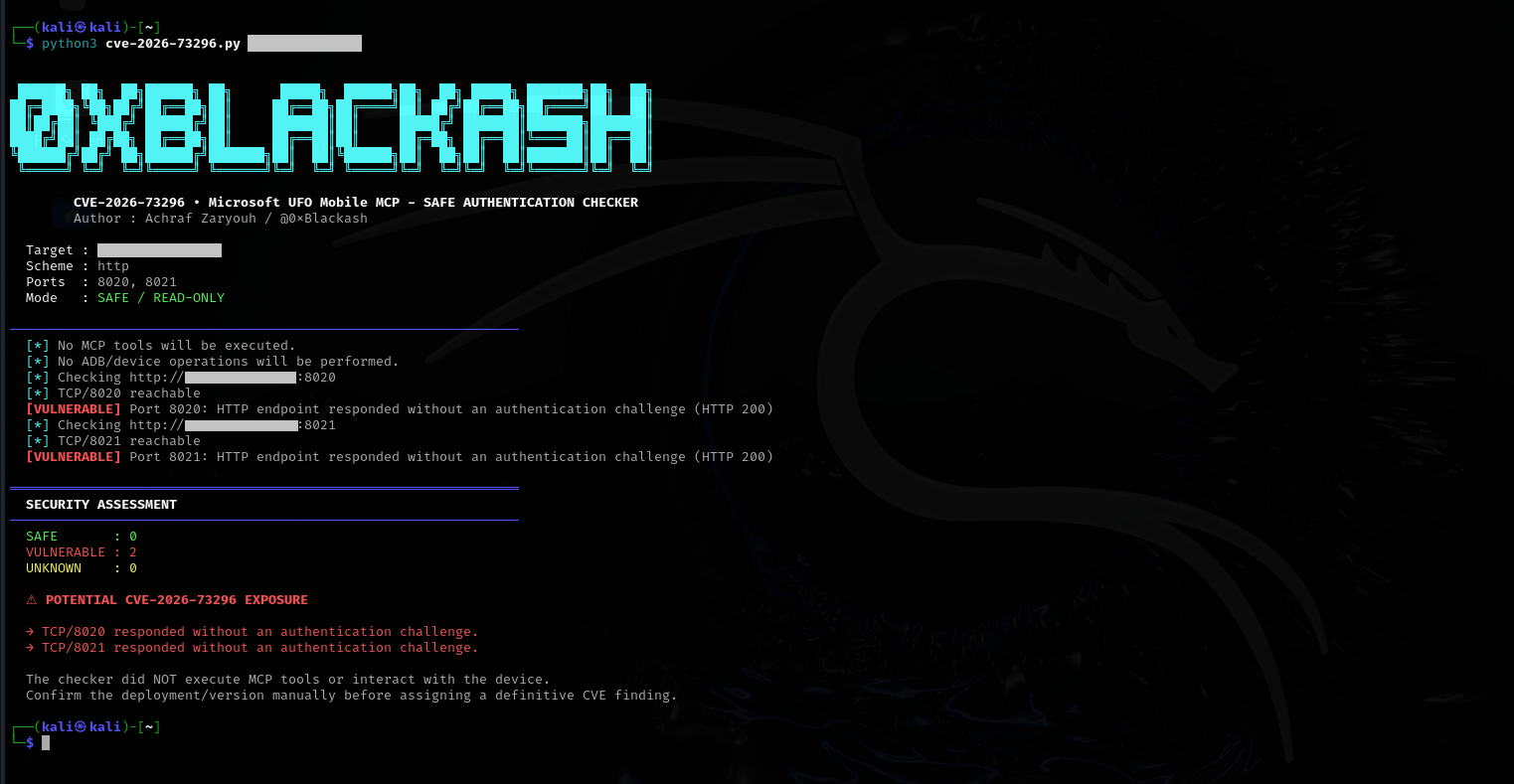
════════════════════════════════════════════════════════ SECURITY ASSESSMENT ────────────────────────────────────────────────────────
SAFE : 2 VULNERABLE : 0 UNKNOWN : 0
✓ AUTHENTICATION CHECK PASSED
### 潜在的な露出```py
════════════════════════════════════════════════════════
  SECURITY ASSESSMENT
────────────────────────────────────────────────────────

  SAFE       : 0
  VULNERABLE : 2
  UNKNOWN    : 0

  ⚠ POTENTIAL CVE-2026-73296 EXPOSURE

  → TCP/8020 responded without an authentication challenge.
  → TCP/8021 responded without an authentication challenge.
この脆弱性は、ソースからシンクへのセキュリティ上の欠陥として理解できます。```py SOURCE │ │ Unauthenticated network request ▼ MCP HTTP Server │ │ Missing authentication/authorization ▼ MCP Tool │ ▼ ADB-backed operation │ ▼ ANDROID DEVICE
意図されたセキュリティ境界は、代わりに次のようにすべきです:```py
Network Request
      │
      ▼
Authentication
      │
      ├──── INVALID ────► REJECT
      │
      ▼
Authorization
      │
      ├──── DENIED ─────► REJECT
      │
      ▼
MCP Tool
      │
      ▼
ADB
主な修復策は、Mobile MCP HTTP トランスポート境界で認証を強制することです。
推奨されるセキュリティアーキテクチャは以下のとおりです。```py
┌──────────────────┐
│ Authorized MCP │
│ Client │
└────────┬─────────┘
│
Bearer Token
│
▼
┌──────────────────┐
│ Authentication │
│ Middleware │
└────────┬─────────┘
│
Authorized?
/
NO YES
│ │
▼ ▼
REJECT MCP Tool
│
▼
ADB
---

# 🔑 APIキー保護

公式の勧告では、以下を中心とした認証設計を推奨しています:```py
UFO_MCP_API_KEY
セキュリティモデルは以下を保証する必要があります:
以下を公開しないでください:```py 0.0.0.0:8020 0.0.0.0:8021
信頼できないネットワークに直接接続しないでください。

推奨:```py
127.0.0.1
ローカル専用のデプロイメント向けです。
正当なリモートアクセスには、以下を検討してください:```py Client │ ▼ TLS / Private Tunnel │ ▼ Authenticated Reverse Proxy │ ▼ UFO MCP │ ▼ ADB
考えられるセキュリティ制御には以下が含まれます:

* TLS
* 認証付きリバースプロキシ
* VPN
* プライベートネットワーク
* SSHトンネル
* ネットワークACL
* ファイアウォール制限
* 強力なAPI認証情報

---

# 🧪 回帰テスト

適切なセキュリティ回帰スイートは以下を検証する必要があります:

### テスト1 — 認証情報なし```py
Request
   ↓
No Authorization header
   ↓
REJECT
   ↓
ADB not reached
The -p flag is used to specify the port number, and the -h flag is used to specify the hostname or IP address. The -t flag is used to specify the timeout value in seconds. The -v flag is used to enable verbose output. The -q flag is used to enable quiet mode, which suppresses all output except for the final result. The -o flag is used to specify the output file for the results. The -f flag is used to specify the format of the output file, which can be either txt or json. The -c flag is used to specify the number of concurrent connections to use. The -r flag is used to specify the number of retries for each connection. The -d flag is used to specify the delay between each connection attempt. The -s flag is used to specify the source IP address for the connections. The flag is used to specify the network interface to use for the connections. The flag is used to specify the log file for the tool. The flag is used to specify the exclude list of ports to skip. The flag is used to specify the include list of ports to scan. The flag is used to specify the number of threads to use for the scan. The flag is used to specify the window size for the TCP connections. The flag is used to specify the maximum number of packets to send. The flag is used to specify the buffer size for the packets. The flag is used to specify the keep-alive interval for the connections. The flag is used to specify the proxy server to use for the connections. The flag is used to specify the proxy port. The flag is used to specify the proxy type, which can be either , , or . The flag is used to specify the username for the proxy authentication. The flag is used to specify the password for the proxy authentication. The flag is used to display the help message. The flag is used to display the version of the tool. The flag is used to enable quiet mode, which suppresses all output except for the final result. The flag is used to specify the output file for the results. The flag is used to specify the format of the output file, which can be either or . The flag is used to specify the number of concurrent connections to use. The flag is used to specify the number of retries for each connection. The flag is used to specify the delay between each connection attempt. The flag is used to specify the source IP address for the connections. The flag is used to specify the network interface to use for the connections. The flag is used to specify the log file for the tool. The flag is used to specify the exclude list of ports to skip. The flag is used to specify the include list of ports to scan. The flag is used to specify the number of threads to use for the scan. The flag is used to specify the window size for the TCP connections. The flag is used to specify the maximum number of packets to send. The flag is used to specify the buffer size for the packets. The flag is used to specify the keep-alive interval for the connections. The flag is used to specify the proxy server to use for the connections. The flag is used to specify the proxy port. The flag is used to specify the proxy type, which can be either , , or . The flag is used to specify the username for the proxy authentication. The flag is used to specify the password for the proxy authentication. The flag is used to display the help message. The flag is used to display the version of the tool. The flag is used to enable quiet mode, which suppresses all output except for the final result. The flag is used to specify the output file for the results. The flag is used to specify the format of the output file, which can be either or . The flag is used to specify the number of concurrent connections to use. The flag is used to specify the number of retries for each connection. The flag is used to specify the delay between each connection attempt. The flag is used to specify the source IP address for the connections. The flag is used to specify the network interface to use for the connections. The flag is used to specify the log file for the tool. The flag is used to specify the exclude list of ports to skip. The flag is used to specify the include list of ports to scan. The flag is used to specify the number of threads to use for the scan. The flag is used to specify the window size for the TCP connections. The flag is used to specify the maximum number of packets to send. The flag is used to specify the buffer size for the packets. The flag is used to specify the keep-alive interval for the connections. The flag is used to specify the proxy server to use for the connections. The flag is used to specify the proxy port. The flag is used to specify the proxy type, which can be either , , or . The flag is used to specify the username for the proxy authentication. The flag is used to specify the password for the proxy authentication. The flag is used to display the help message. The flag is used to display the version of the tool. The flag is used to enable quiet mode, which suppresses all output except for the final result. The flag is used to specify the output file for the results. The flag is used to specify the format of the output file, which can be either or . The flag is used to specify the number of concurrent connections to use. The flag is used to specify the number of retries for each connection. The flag is used to specify the delay between each connection attempt. The flag is used to specify the source IP address for the connections. The flag is used to specify the network interface to use for the connections. The flag is used to specify the log file for the tool. The flag is used to specify the exclude list of ports to skip. The flag is used to specify the include list of ports to scan. The flag is used to specify the number of threads to use for the scan. The flag is used to specify the window size for the TCP connections. The flag is used to specify the maximum number of packets to send. The flag is used to specify the buffer size for the packets. The flag is used to specify the keep-alive interval for the connections. The flag is used to specify the proxy server to use for the connections. The flag is used to specify the proxy port. The flag is used to specify the proxy type, which can be either , , or . The flag is used to specify the username for the proxy authentication. The flag is used to specify the password for the proxy authentication. The flag is used to display the help message. The flag is used to display the version of the tool. The flag is used to enable quiet mode, which suppresses all output except for the final result. The flag is used to specify the output file for the results. The flag is used to specify the format of the output file, which can be either or . The flag is used to specify the number of concurrent connections to use. The flag is used to specify the number of retries for each connection. The flag is used to specify the delay between each connection attempt. The flag is used to specify the source IP address for the connections. The flag is used to specify the network interface to use for the connections. The flag is used to specify the log file for the tool. The flag is used to specify the exclude list of ports to skip. The flag is used to specify the include list of ports to scan. The flag is used to specify the number of threads to use for the scan. The flag is used to specify the window size for the TCP connections. The flag is used to specify the maximum number of packets to send. The flag is used to specify the buffer size for the packets. The flag is used to specify the keep-alive interval for the connections. The flag is used to specify the proxy server to use for the connections. The flag is used to specify the proxy port. The flag is used to specify the proxy type, which can be either , , or . The flag is used to specify the username for the proxy authentication. The flag is used to specify the password for the proxy authentication. The flag is used to display the help message. The flag is used to display the version of the tool. The flag is used to enable quiet mode, which suppresses all output except for the final result. The flag is used to specify the output file for the results. The flag is used to specify the format of the output file, which can be either or . The flag is used to specify the number of concurrent connections to use. The flag is used to specify the number of retries for each connection. The flag is used to specify the delay between each connection attempt. The flag is used to specify the source IP address for the connections. The flag is used to specify the network interface to use for the connections. The flag is used to specify the log file for the tool. The flag is used to specify the exclude list of ports to skip. The flag is used to specify the include list of ports to scan. The flag is used to specify the number of threads to use for the scan. The flag is used to specify the window size for the TCP connections. The flag is used to specify the maximum number of packets to send. The flag is used to specify the buffer size for the packets. The flag is used to specify the keep-alive interval for the connections. The flag is used to specify the proxy server to use for the connections. The flag is used to specify the proxy port. The flag is used to specify the proxy type, which can be either , , or . The flag is used to specify the username for the proxy authentication. The flag is used to specify the password for the proxy authentication. The flag is used to display the help message. The flag is used to display the version of the tool. The flag is used to enable quiet mode, which suppresses all output except for the final result. The flag is used to specify the output file for the results. The flag is used to specify the format of the output file, which can be either or . The flag is used to specify the number of concurrent connections to use. The flag is used to specify the number of retries for each connection. The flag is used to specify the delay between each connection attempt. The flag is used to specify the source IP address for the connections. The flag is used to specify the network interface to use for the connections. The flag is used to specify the log file for the tool. The flag is used to specify the exclude list of ports to skip. The flag is used to specify the include list of ports to scan. The flag is used to specify the number of threads to use for the scan. The flag is used to specify the window size for the TCP connections. The flag is used to specify the maximum number of packets to send. The flag is used to specify the buffer size for the packets. The flag is used to specify the keep-alive interval for the connections. The flag is used to specify the proxy server to use for the connections. The flag is used to specify the proxy port. The flag is used to specify the proxy type, which can be either , , or . The flag is used to specify the username for the proxy authentication. The flag is used to specify the password for the proxy authentication. The flag is used to display the help message. The flag is used to display the version of the tool. The flag is used to enable quiet mode, which suppresses all output except for the final result. The flag is used to specify the output file for the results. The flag is used to specify the format of the output file, which can be either or . The flag is used to specify the number of concurrent connections to use. The flag is used to specify the number of retries for each connection. The flag is used to specify the delay between each connection attempt. The flag is used to specify the source IP address for the connections. The flag is used to specify the network interface to use for the connections. The flag is used to specify the log file for the tool. The flag is used to specify the exclude list of ports to skip. The flag is used to specify the include list of ports to scan. The flag is used to specify the number of threads to use for the scan. The flag is used to specify the window size for the TCP connections. The flag is used to specify the maximum number of packets to send. The flag is used to specify the buffer size for the packets. The flag is used to specify the keep-alive interval for the connections. The flag is used to specify the proxy server to use for the connections. The flag is used to specify the proxy port. The flag is used to specify the proxy type, which can be either , , or . The flag is used to specify the username for the proxy authentication. The flag is used to specify the password for the proxy authentication. The flag is used to display the help message. The flag is used to display the version of the tool. The flag is used to enable quiet mode, which suppresses all output except for the final result. The flag is used to specify the output file for the results. The flag is used to specify the format of the output file, which can be either or . The flag is used to specify the number of concurrent connections to use. The flag is used to specify the number of retries for each connection. The flag is used to specify the delay between each connection attempt. The flag is used to specify the source IP address for the connections. The flag is used to specify the network interface to use for the connections. The flag is used to specify the log file for the tool. The flag is used to specify the exclude list of ports to skip. The flag is used to specify the include list of ports to scan. The flag is used to specify the number of threads to use for the scan. The flag is used to specify the window size for the TCP connections. The flag is used to specify the maximum number of packets to send. The flag is used to specify the buffer size for the packets. The flag is used to specify the keep-alive interval for the connections. The flag is used to specify the proxy server to use for the connections. The flag is used to specify the proxy port. The flag is used to specify the proxy type, which can be either , , or . The flag is used to specify the username for the proxy authentication. The flag is used to specify the password for the proxy authentication. The flag is used to display the help message. The flag is used to display the version of the tool. The flag is used to enable quiet mode, which suppresses all output except for the final result. The flag is used to specify the output file for the results. The flag is used to specify the format of the output file, which can be either or . The flag is used to specify the number of concurrent connections to use. The flag is used to specify the number of retries for each connection. The flag is used to specify the delay between each connection attempt. The flag is used to specify the source IP address for the connections. The flag is used to specify the network interface to use for the connections. The flag is used to specify the log file for the tool. The flag is used to specify the exclude list of ports to skip. The flag is used to specify the include list of ports to scan. The flag is used to specify the number of threads to use for the scan. The flag is used to specify the window size for the TCP connections. The flag is used to specify the maximum number of packets to send. The flag is used to specify the buffer size for the packets. The flag is used to specify the keep-alive interval for the connections. The flag is used to specify the proxy server to use for the connections. The flag is used to specify the proxy port. The flag is used to specify the proxy type, which can be either , , or . The flag is used to specify the username for the proxy authentication. The flag is used to specify the password for the proxy authentication. The flag is used to display the help message. The flag is used to display the version of the tool. The flag is used to enable quiet mode, which suppresses all output except for the final result. The flag is used to specify the output file for the results. The flag is used to specify the format of the output file, which can be either or . The flag is used to specify the number of concurrent connections to use. The flag is used to specify the number of retries for each connection. The flag is used to specify the delay between each connection attempt. The flag is used to specify the source IP address for the connections. The flag is used to specify the network interface to use for the connections. The flag is used to specify the log file for the tool. The flag is used to specify the exclude list of ports to skip. The flag is used to specify the include list of ports to scan. The flag is used to specify the number of threads to use for the scan. The flag is used to specify the window size for the TCP connections. The flag is used to specify the maximum number of packets to send. The flag is used to specify the buffer size for the packets. The flag is used to specify the keep-alive interval for the connections. The flag is used to specify the proxy server to use for the connections. The flag is used to specify the proxy port. The flag is used to specify the proxy type, which can be either , , or . The flag is used to specify the username for the proxy authentication. The flag is used to specify the password for the proxy authentication. The flag is used to display the help message. The flag is used to display the version of the tool. The flag is used to enable quiet mode, which suppresses all output except for the final result. The flag is used to specify the output file for the results. The flag is used to specify the format of the output file, which can be either or . The flag is used to specify the number of concurrent connections to use. The flag is used to specify the number of retries for each connection. The flag is used to specify the delay between each connection attempt. The flag is used to specify the source IP address for the connections. The flag is used to specify the network interface to use for the connections. The flag is used to specify the log file for the tool. The flag is used to specify the exclude list of ports to skip. The flag is used to specify the include list of ports to scan. The flag is used to specify the number of threads to use for the scan. The flag is used to specify the window size for the TCP connections. The flag is used to specify the maximum number of packets to send. The flag is used to specify the buffer size for the packets. The flag is used to specify the keep-alive interval for the connections. The flag is used to specify the proxy server to use for the connections. The flag is used to specify the proxy port. The flag is used to specify the proxy type, which can be either , , or . The flag is used to specify the username for the proxy authentication. The flag is used to specify the password for the proxy authentication. The flag is used to display the help message. The flag is used to display the version of the tool. The flag is used to enable quiet mode, which suppresses all output except for the final result. The flag is used to specify the output file for the results. The flag is used to specify the format of the output file, which can be either or . The flag is used to specify the number of concurrent connections to use. The flag is used to specify the number of retries for each connection. The flag is used to specify the delay between each connection attempt. The flag is used to specify the source IP address for the connections. The flag is used to specify the network interface to use for the connections. The flag is used to specify the log file for the tool. The flag is used to specify the exclude list of ports to skip. The flag is used to specify the include list of ports to scan. The flag is used to specify the number of threads to use for the scan. The flag is used to specify the window size for the TCP connections. The flag is used to specify the maximum number of packets to send. The flag is used to specify the buffer size for the packets. The flag is used to specify the keep-alive interval for the connections. The flag is used to specify the proxy server to use for the connections. The flag is used to specify the proxy port. The flag is used to specify the proxy type, which can be either , , or . The flag is used to specify the username for the proxy authentication. The flag is used to specify the password for the proxy authentication. The flag is used to display the help message. The flag is used to display the version of the tool. The flag is used to enable quiet mode, which suppresses all output except for the final result. The flag is used to specify the output file for the results. The flag is used to specify the format of the output file, which can be either or . The flag is used to specify the number of concurrent connections to use. The flag is used to specify the number of retries for each connection. The flag is used to specify the delay between each connection attempt. The flag is used to specify the source IP address for the connections. The flag is used to specify the network interface to use for the connections. The flag is used to specify the log file for the tool. The flag is used to specify the exclude list of ports to skip. The flag is used to specify the include list of ports to scan. The flag is used to specify the number of threads to use for the scan. The flag is used to specify the window size for the TCP connections. The flag is used to specify the maximum number of packets to send. The flag is used to specify the buffer size for the packets. The flag is used to specify the keep-alive interval for the connections. The flag is used to specify the proxy server to use for the connections. The flag is used to specify the proxy port. The flag is used to specify the proxy type, which can be either , , or . The flag is used to specify the username for the proxy authentication. The flag is used to specify the password for the proxy authentication. The flag is used to display the help message. The flag is used to display the version of the tool. The flag is used to enable quiet mode, which suppresses all output except for the final result. The flag is used to specify the output file for the results. The flag is used to specify the format of the output file, which can be either or . The flag is used to specify the number of concurrent connections to use. The flag is used to specify the number of retries for each connection. The flag is used to specify the delay between each connection attempt. The flag is used to specify the source IP address for the connections. The flag is used to specify the network interface to use for the connections. The flag is used to specify the log file for the tool. The flag is used to specify the exclude list of ports to skip. The flag is used to specify the include list of ports to scan. The flag is used to specify the number of threads to use for the scan. The flag is used to specify the window size for the TCP connections. The flag is used to specify the maximum number of packets to send. The flag is used to specify the buffer size for the packets. The flag is used to specify the keep-alive interval for the connections. The flag is used to specify the proxy server to use for the connections. The flag is used to specify the proxy port. The flag is used to specify the proxy type, which can be either , , or . The flag is used to specify the username for the proxy authentication. The flag is used to specify the password for the proxy authentication. The flag is used to display the help message. The flag is used to display the version of the tool. The flag is used to enable quiet mode, which suppresses all output except for the final result. The flag is used to specify the output file for the results. The flag is used to specify the format of the output file, which can be either or . The flag is used to specify the number of concurrent connections to use. The flag is used to specify the number of retries for each connection. The flag is used to specify the delay between each connection attempt. The flag is used to specify the source IP address for the connections. The flag is used to specify the network interface to use for the connections. The flag is used to specify the log file for the tool. The flag is used to specify the exclude list of ports to skip. The flag is used to specify the include list of ports to scan. The flag is used to specify the number of threads to use for the scan. The flag is used to specify the window size for the TCP connections. The flag is used to specify the maximum number of packets to send. The flag is used to specify the buffer size for the packets. The flag is used to specify the keep-alive interval for the connections. The flag is used to specify the proxy server to use for the connections. The flag is used to specify the proxy port. The flag is used to specify the proxy type, which can be either , , or . The flag is used to specify the username for the proxy authentication. The flag is used to specify the password for the proxy authentication. The flag is used to display the help message. The flag is used to display the version of the tool. The flag is used to enable quiet mode, which suppresses all output except for the final result. The flag is used to specify the output file for the results. The flag is used to specify the format of the output file, which can be either or . The flag is used to specify the number of concurrent connections to use. The flag is used to specify the number of retries for each connection. The flag is used to specify the delay between each connection attempt. The flag is used to specify the source IP address for the connections. The flag is used to specify the network interface to use for the connections. The flag is used to specify the log file for the tool. The flag is used to specify the exclude list of ports to skip. The flag is used to specify the include list of ports to scan. The flag is used to specify the number of threads to use for the scan. The flag is used to specify the window size for the TCP connections. The flag is used to specify the maximum number of packets to send. The flag is used to specify the buffer size for the packets. The flag is used to specify the keep-alive interval for the connections. The flag is used to specify the proxy server to use for the connections. The flag is used to specify the proxy port. The flag is used to specify the proxy type, which can be either , , or . The flag is used to specify the username for the proxy authentication. The flag is used to specify the password for the proxy authentication. The flag is used to display the help message. The flag is used to display the version of the tool. The flag is used to enable quiet mode, which suppresses all output except for the final result. The flag is used to specify the output file for the results. The flag is used to specify the format of the output file, which can be either or . The flag is used to specify the number of concurrent connections to use. The flag is used to specify the number of retries for each connection. The flag is used to specify the delay between each connection attempt. The flag is used to specify the source IP address for the connections. The flag is used to specify the network interface to use for the connections. The flag is used to specify the log file for the tool. The flag is used to specify the exclude list of ports to skip. The flag is used to specify the include list of ports to scan. The flag is used to specify the number of threads to use for the scan. The flag is used to specify the window size for the TCP connections. The flag is used to specify the maximum number of packets to send. The flag is used to specify the buffer size for the packets. The flag is used to specify the keep-alive interval for the connections. The flag is used to specify the proxy server to use for the connections. The flag is used to specify the proxy port. The flag is used to specify the proxy type, which can be either , , or . The flag is used to specify the username for the proxy authentication. The flag is used to specify the password for the proxy authentication. The flag is used to display the help message. The flag is used to display the version of the tool. The flag is used to enable quiet mode, which suppresses all output except for the final result. The flag is used to specify the output file for the results. The flag is used to specify the format of the output file, which can be either or . The flag is used to specify the number of concurrent connections to use. The flag is used to specify the number of retries for each connection. The flag is used to specify the delay between each connection attempt. The flag is used to specify the source IP address for the connections. The flag is used to specify the network interface to use for the connections. The flag is used to specify the log file for the tool. The flag is used to specify the exclude list of ports to skip. The flag is used to specify the include list of ports to scan. The flag is used to specify the number of threads to use for the scan. The flag is used to specify the window size for the TCP connections. The flag is used to specify the maximum number of packets to send. The flag is used to specify the buffer size for the packets. The flag is used to specify the keep-alive interval for the connections. The flag is used to specify the proxy server to use for the connections. The flag is used to specify the proxy port.```py
PASS
### テスト2 — 無効な資格情報```py
Bearer: invalid-token
        ↓
      REJECT
        ↓
   ADB not reached
# リポジトリをクローン
git clone https://github.com/yourusername/yourproject.git

# ディレクトリに移動
cd yourproject

# 依存関係をインストール
pip install -r requirements.txt
python main.py --help
MIT```py PASS
### テスト3 — 有効な認証情報```py
Bearer: valid-token
        ↓
     ACCEPT
        ↓
     MCP Tool
        ↓
       ADB
--no-verify フラグを指定すると、コミット前フックとコミットメッセージフックをスキップできます。これは、フックが失敗している場合や、フックを実行せずにコミットしたい場合に便利です。
git commit --no-verify -m "コミットメッセージ"
--no-verify フラグは、コミット前フックとコミットメッセージフックの両方をスキップします。これは、フックが失敗している場合や、フックを実行せずにコミットしたい場合に便利です。
git commit --amend コマンドを使用すると、直前のコミットを修正できます。これは、コミットメッセージの修正や、ファイルの追加・削除を直前のコミットに含めたい場合に便利です。
git commit --amend -m "新しいコミットメッセージ"
--amend フラグは、直前のコミットを新しいコミットで置き換えます。これは、コミットメッセージの修正や、ファイルの追加・削除を直前のコミットに含めたい場合に便利です。
git reset コマンドを使用すると、コミットを取り消すことができます。これは、誤ってコミットした場合や、コミットをやり直したい場合に便利です。
git reset HEAD~1
HEAD~1 は、直前のコミットを指します。git reset コマンドは、コミットを取り消し、変更をステージングエリアに戻します。これは、誤ってコミットした場合や、コミットをやり直したい場合に便利です。
git reset --hard コマンドを使用すると、コミットを完全に削除できます。これは、誤ってコミットした場合や、コミットを完全に削除したい場合に便利です。
git reset --hard HEAD~1
--hard フラグは、コミットを取り消し、変更を完全に削除します。これは、誤ってコミットした場合や、コミットを完全に削除したい場合に便利です。
git diff コマンドを使用すると、コミット間の差分を確認できます。これは、変更内容を確認したい場合や、変更をレビューしたい場合に便利です。
git diff HEAD~1 HEAD
HEAD~1 と HEAD は、比較するコミットを指します。git diff コマンドは、コミット間の差分を表示します。これは、変更内容を確認したい場合や、変更をレビューしたい場合に便利です。
git log コマンドを使用すると、コミット履歴を確認できます。これは、コミットの履歴を確認したい場合や、コミットを検索したい場合に便利です。
git log --oneline
--oneline フラグは、コミット履歴を1行で表示します。これは、コミットの履歴を確認したい場合や、コミットを検索したい場合に便利です。
git log --grep コマンドを使用すると、コミットメッセージを検索できます。これは、特定のコミットを検索したい場合や、コミットメッセージを検索したい場合に便利です。
git log --grep="コミットメッセージ"
--grep フラグは、コミットメッセージを検索します。これは、特定のコミットを検索したい場合や、コミットメッセージを検索したい場合に便利です。
git show コマンドを使用すると、コミットの詳細を表示できます。これは、コミットの詳細を確認したい場合や、コミットの変更内容を確認したい場合に便利です。
git show HEAD
HEAD は、最新のコミットを指します。git show コマンドは、コミットの詳細を表示します。これは、コミットの詳細を確認したい場合や、コミットの変更内容を確認したい場合に便利です。
git tag コマンドを使用すると、コミットにタグを付けることができます。これは、特定のコミットにタグを付けたい場合や、リリースを管理したい場合に便利です。
git tag v1.0.0
v1.0.0 は、タグ名です。git tag コマンドは、コミットにタグを付けます。これは、特定のコミットにタグを付けたい場合や、リリースを管理したい場合に便利です。
git branch コマンドを使用すると、ブランチを作成・管理できます。これは、ブランチを作成したい場合や、ブランチを管理したい場合に便利です。
git branch feature
feature は、ブランチ名です。git branch コマンドは、ブランチを作成します。これは、ブランチを作成したい場合や、ブランチを管理したい場合に便利です。
git merge コマンドを使用すると、ブランチをマージできます。これは、ブランチをマージしたい場合や、変更を統合したい場合に便利です。
git merge feature
feature は、マージするブランチ名です。git merge コマンドは、ブランチをマージします。これは、ブランチをマージしたい場合や、変更を統合したい場合に便利です。
git rebase コマンドを使用すると、ブランチをリベースできます。これは、ブランチをリベースしたい場合や、コミット履歴を整理したい場合に便利です。
git rebase main
main は、リベースするブランチ名です。git rebase コマンドは、ブランチをリベースします。これは、ブランチをリベースしたい場合や、コミット履歴を整理したい場合に便利です。
git cherry-pick コマンドを使用すると、コミットをチェリーピックできます。これは、特定のコミットを別のブランチに適用したい場合に便利です。
git cherry-pick <コミットハッシュ>
<コミットハッシュ> は、チェリーピックするコミットのハッシュです。git cherry-pick コマンドは、コミットをチェリーピックします。これは、特定のコミットを別のブランチに適用したい場合に便利です。
git stash コマンドを使用すると、変更を一時的に退避できます。これは、変更を一時的に退避したい場合や、ブランチを切り替えたい場合に便利です。
git stash
git stash コマンドは、変更を一時的に退避します。これは、変更を一時的に退避したい場合や、ブランチを切り替えたい場合に便利です。
git stash pop コマンドを使用すると、退避した変更を復元できます。これは、退避した変更を復元したい場合や、変更を再適用したい場合に便利です。
git stash pop
git stash pop コマンドは、退避した変更を復元します。これは、退避した変更を復元したい場合や、変更を再適用したい場合に便利です。
git clean コマンドを使用すると、未追跡のファイルを削除できます。これは、未追跡のファイルを削除したい場合や、作業ディレクトリをクリーンにしたい場合に便利です。
git clean -f
-f フラグは、未追跡のファイルを強制的に削除します。これは、未追跡のファイルを削除したい場合や、作業ディレクトリをクリーンにしたい場合に便利です。
git remote コマンドを使用すると、リモートリポジトリを管理できます。これは、リモートリポジトリを追加したい場合や、リモートリポジトリを管理したい場合に便利です。
git remote add origin <リモートURL>
origin は、リモートリポジトリの名前です。<リモートURL> は、リモートリポジトリのURLです。git remote コマンドは、リモートリポジトリを管理します。これは、リモートリポジトリを追加したい場合や、リモートリポジトリを管理したい場合に便利です。
git push コマンドを使用すると、コミットをリモートリポジトリにプッシュできます。これは、コミットをリモートリポジトリにプッシュしたい場合や、変更を共有したい場合に便利です。
git push origin main
origin は、リモートリポジトリの名前です。main は、プッシュするブランチ名です。git push コマンドは、コミットをリモートリポジトリにプッシュします。これは、コミットをリモートリポジトリにプッシュしたい場合や、変更を共有したい場合に便利です。
git pull コマンドを使用すると、リモートリポジトリから変更を取得できます。これは、リモートリポジトリから変更を取得したい場合や、変更を更新したい場合に便利です。
git pull origin main
origin は、リモートリポジトリの名前です。main は、プルするブランチ名です。git pull コマンドは、リモートリポジトリから変更を取得します。これは、リモートリポジトリから変更を取得したい場合や、変更を更新したい場合に便利です。
git fetch コマンドを使用すると、リモートリポジトリから変更を取得できます。これは、リモートリポジトリから変更を取得したい場合や、変更を確認したい場合に便利です。
git fetch origin
origin は、リモートリポジトリの名前です。git fetch コマンドは、リモートリポジトリから変更を取得します。これは、リモートリポジトリから変更を取得したい場合や、変更を確認したい場合に便利です。
git clone コマンドを使用すると、リモートリポジトリをクローンできます。これは、リモートリポジトリをクローンしたい場合や、リポジトリをコピーしたい場合に便利です。
git clone <リモートURL>
<リモートURL> は、リモートリポジトリのURLです。git clone コマンドは、リモートリポジトリをクローンします。これは、リモートリポジトリをクローンしたい場合や、リポジトリをコピーしたい場合に便利です。
git fork コマンドを使用すると、リポジトリをフォークできます。これは、リポジトリをフォークしたい場合や、リポジトリをコピーしたい場合に便利です。
git fork <リポジトリ名>
<リポジトリ名> は、フォークするリポジトリの名前です。git fork コマンドは、リポジトリをフォークします。これは、リポジトリをフォークしたい場合や、リポジトリをコピーしたい場合に便利です。
git pull-request コマンドを使用すると、プルリクエストを作成できます。これは、プルリクエストを作成したい場合や、変更を提案したい場合に便利です。
git pull-request
git pull-request コマンドは、プルリクエストを作成します。これは、プルリクエストを作成したい場合や、変更を提案したい場合に便利です。
git review コマンドを使用すると、コードレビューを実施できます。これは、コードレビューを実施したい場合や、変更をレビューしたい場合に便利です。
git review
git review コマンドは、コードレビューを実施します。これは、コードレビューを実施したい場合や、変更をレビューしたい場合に便利です。
git test コマンドを使用すると、テストを実行できます。これは、テストを実行したい場合や、変更をテストしたい場合に便利です。
git test
git test コマンドは、テストを実行します。これは、テストを実行したい場合や、変更をテストしたい場合に便利です。
git deploy コマンドを使用すると、デプロイを実行できます。これは、デプロイを実行したい場合や、変更をデプロイしたい場合に便利です。
git deploy
git deploy コマンドは、デプロイを実行します。これは、デプロイを実行したい場合や、変更をデプロイしたい場合に便利です。
git rollback コマンドを使用すると、ロールバックを実行できます。これは、ロールバックを実行したい場合や、変更を元に戻したい場合に便利です。
git rollback
git rollback コマンドは、ロールバックを実行します。これは、ロールバックを実行したい場合や、変更を元に戻したい場合に便利です。
git audit コマンドを使用すると、監査を実行できます。これは、監査を実行したい場合や、変更を監査したい場合に便利です。
git audit
git audit コマンドは、監査を実行します。これは、監査を実行したい場合や、変更を監査したい場合に便利です。
git security コマンドを使用すると、セキュリティチェックを実行できます。これは、セキュリティチェックを実行したい場合や、変更をセキュリティチェックしたい場合に便利です。
git security
git security コマンドは、セキュリティチェックを実行します。これは、セキュリティチェックを実行したい場合や、変更をセキュリティチェックしたい場合に便利です。
git compliance コマンドを使用すると、コンプライアンスチェックを実行できます。これは、コンプライアンスチェックを実行したい場合や、変更をコンプライアンスチェックしたい場合に便利です。
git compliance
git compliance コマンドは、コンプライアンスチェックを実行します。これは、コンプライアンスチェックを実行したい場合や、変更をコンプライアンスチェックしたい場合に便利です。
git docs コマンドを使用すると、ドキュメントを生成できます。これは、ドキュメントを生成したい場合や、ドキュメントを更新したい場合に便利です。
git docs
git docs コマンドは、ドキュメントを生成します。これは、ドキュメントを生成したい場合や、ドキュメントを更新したい場合に便利です。
git release コマンドを使用すると、リリースを作成できます。これは、リリースを作成したい場合や、リリースを管理したい場合に便利です。
git release
git release コマンドは、リリースを作成します。これは、リリースを作成したい場合や、リリースを管理したい場合に便利です。
git version コマンドを使用すると、バージョンを管理できます。これは、バージョンを管理したい場合や、バージョンを更新したい場合に便利です。
git version
git version コマンドは、バージョンを管理します。これは、バージョンを管理したい場合や、バージョンを更新したい場合に便利です。
git log コマンドを使用すると、ログを確認できます。これは、ログを確認したい場合や、ログを検索したい場合に便利です。
git log --oneline
--oneline フラグは、ログを1行で表示します。これは、ログを確認したい場合や、ログを検索したい場合に便利です。
git status コマンドを使用すると、ステータスを確認できます。これは、ステータスを確認したい場合や、変更を確認したい場合に便利です。
git status
git status コマンドは、ステータスを確認します。これは、ステータスを確認したい場合や、変更を確認したい場合に便利です。
git diff コマンドを使用すると、差分を確認できます。これは、差分を確認したい場合や、変更を確認したい場合に便利です。
git diff
git diff コマンドは、差分を確認します。これは、差分を確認したい場合や、変更を確認したい場合に便利です。
git branch コマンドを使用すると、ブランチを確認できます。これは、ブランチを確認したい場合や、ブランチを管理したい場合に便利です。
git branch
git branch コマンドは、ブランチを確認します。これは、ブランチを確認したい場合や、ブランチを管理したい場合に便利です。
git tag コマンドを使用すると、タグを確認できます。これは、タグを確認したい場合や、タグを管理したい場合に便利です。
git tag
git tag コマンドは、タグを確認します。これは、タグを確認したい場合や、タグを管理したい場合に便利です。
git remote コマンドを使用すると、リモートを確認できます。これは、リモートを確認したい場合や、リモートを管理したい場合に便利です。
git remote -v
-v フラグは、リモートの詳細を表示します。これは、リモートを確認したい場合や、リモートを管理したい場合に便利です。
git config コマンドを使用すると、設定を確認できます。これは、設定を確認したい場合や、設定を管理したい場合に便利です。
git config --list
--list フラグは、設定の一覧を表示します。これは、設定を確認したい場合や、設定を管理したい場合に便利です。
git help コマンドを使用すると、ヘルプを確認できます。これは、ヘルプを確認したい場合や、コマンドを検索したい場合に便利です。
git help
git help コマンドは、ヘルプを表示します。これは、ヘルプを確認したい場合や、コマンドを検索したい場合に便利です。
git version コマンドを使用すると、バージョンを確認できます。これは、バージョンを確認したい場合や、バージョンを管理したい場合に便利です。
git version
git version コマンドは、バージョンを表示します。これは、バージョンを確認したい場合や、バージョンを管理したい場合に便利です。
git license コマンドを使用すると、ライセンスを確認できます。これは、ライセンスを確認したい場合や、ライセンスを管理したい場合に便利です。
git license
git license コマンドは、ライセンスを表示します。これは、ライセンスを確認したい場合や、ライセンスを管理したい場合に便利です。
git contribution コマンドを使用すると、コントリビューションを確認できます。これは、コントリビューションを確認したい場合や、コントリビューションを管理したい場合に便利です。
git contribution
git contribution コマンドは、コントリビューションを表示します。これは、コントリビューションを確認したい場合や、コントリビューションを管理したい場合に便利です。
git sponsor コマンドを使用すると、スポンサーを確認できます。これは、スポンサーを確認したい場合や、スポンサーを管理したい場合に便利です。
git sponsor
git sponsor コマンドは、スポンサーを表示します。これは、スポンサーを確認したい場合や、スポンサーを管理したい場合に便利です。
git support コマンドを使用すると、サポートを確認できます。これは、サポートを確認したい場合や、サポートを管理したい場合に便利です。
git support
git support コマンドは、サポートを表示します。これは、サポートを確認したい場合や、サポートを管理したい場合に便利です。
git community コマンドを使用すると、コミュニティを確認できます。これは、コミュニティを確認したい場合や、コミュニティを管理したい場合に便利です。
git community
git community コマンドは、コミュニティを表示します。これは、コミュニティを確認したい場合や、コミュニティを管理したい場合に便利です。
git ecosystem コマンドを使用すると、エコシステムを確認できます。これは、エコシステムを確認したい場合や、エコシステムを管理したい場合に便利です。
git ecosystem
git ecosystem コマンドは、エコシステムを表示します。これは、エコシステムを確認したい場合や、エコシステムを管理したい場合に便利です。
git roadmap コマンドを使用すると、ロードマップを確認できます。これは、ロードマップを確認したい場合や、ロードマップを管理したい場合に便利です。
git roadmap
git roadmap コマンドは、ロードマップを表示します。これは、ロードマップを確認したい場合や、ロードマップを管理したい場合に便利です。
git changelog コマンドを使用すると、チャンログを確認できます。これは、チャンログを確認したい場合や、チャンログを管理したい場合に便利です。
git changelog
git changelog コマンドは、チャンログを表示します。これは、チャンログを確認したい場合や、チャンログを管理したい場合に便利です。
git release-notes コマンドを使用すると、リリースノートを確認できます。これは、リリースノートを確認したい場合や、リリースノートを管理したい場合に便利です。
git release-notes
git release-notes コマンドは、リリースノートを表示します。これは、リリースノートを確認したい場合や、リリースノートを管理したい場合に便利です。
git docs コマンドを使用すると、ドキュメントを確認できます。これは、ドキュメントを確認したい場合や、ドキュメントを管理したい場合に便利です。
git docs
git docs コマンドは、ドキュメントを表示します。これは、ドキュメントを確認したい場合や、ドキュメントを管理したい場合に便利です。
git tutorial コマンドを使用すると、チュートリアルを確認できます。これは、チュートリアルを確認したい場合や、チュートリアルを管理したい場合に便利です。
git tutorial
git tutorial コマンドは、チュートリアルを表示します。これは、チュートリアルを確認したい場合や、チュートリアルを管理したい場合に便利です。
git guide コマンドを使用すると、ガイドを確認できます。これは、ガイドを確認したい場合や、ガイドを管理したい場合に便利です。
git guide
git guide コマンドは、ガイドを表示します。これは、ガイドを確認したい場合や、ガイドを管理したい場合に便利です。
git reference コマンドを使用すると、リファレンスを確認できます。これは、リファレンスを確認したい場合や、リファレンスを管理したい場合に便利です。
git reference
git reference コマンドは、リファレンスを表示します。これは、リファレンスを確認したい場合や、リファレンスを管理したい場合に便利です。
git manual コマンドを使用すると、マニュアルを確認できます。これは、マニュアルを確認したい場合や、マニュアルを管理したい場合に便利です。
git manual
git manual コマンドは、マニュアルを表示します。これは、マニュアルを確認したい場合や、マニュアルを管理したい場合に便利です。
git faq コマンドを使用すると、FAQを確認できます。これは、FAQを確認したい場合や、FAQを管理したい場合に便利です。
git faq
git faq コマンドは、FAQを表示します。これは、FAQを確認したい場合や、FAQを管理したい場合に便利です。
git troubleshooting コマンドを使用すると、トラブルシューティングを確認できます。これは、トラブルシューティングを確認したい場合や、トラブルシューティングを管理したい場合に便利です。
git troubleshooting
git troubleshooting コマンドは、トラブルシューティングを表示します。これは、トラブルシューティングを確認したい場合や、トラブルシューティングを管理したい場合に便利です。
git best-practices コマンドを使用すると、ベストプラクティスを確認できます。これは、ベストプラクティスを確認したい場合や、ベストプラクティスを管理したい場合に便利です。
git best-practices
git best-practices コマンドは、ベストプラクティスを表示します。これは、ベストプラクティスを確認したい場合や、ベストプラクティスを管理したい場合に便利です。
git patterns コマンドを使用すると、パターンを確認できます。これは、パターンを確認したい場合や、パターンを管理したい場合に便利です。
git patterns
git patterns コマンドは、パターンを表示します。これは、パターンを確認したい場合や、パターンを管理したい場合に便利です。
git anti-patterns コマンドを使用すると、アンチパターンを確認できます。これは、アンチパターンを確認したい場合や、アンチパターンを管理したい場合に便利です。
git anti-patterns
git anti-patterns コマンドは、アンチパターンを表示します。これは、アンチパターンを確認したい場合や、アンチパターンを管理したい場合に便利です。
git case-studies コマンドを使用すると、ケーススタディを確認できます。これは、ケーススタディを確認したい場合や、ケーススタディを管理したい場合に便利です。
git case-studies
git case-studies コマンドは、ケーススタディを表示します。これは、ケーススタディを確認したい場合や、ケーススタディを管理したい場合に便利です。
git use-cases コマンドを使用すると、ユースケースを確認できます。これは、ユースケースを確認したい場合や、ユースケースを管理したい場合に便利です。
git use-cases
git use-cases コマンドは、ユースケースを表示します。これは、ユースケースを確認したい場合や、ユースケースを管理したい場合に便利です。
git scenarios コマンドを使用すると、シナリオを確認できます。これは、シナリオを確認したい場合や、シナリオを管理したい場合に便利です。
git scenarios
git scenarios コマンドは、シナリオを表示します。これは、シナリオを確認したい場合や、シナリオを管理したい場合に便利です。
git workflows コマンドを使用すると、ワークフローを確認できます。これは、ワークフローを確認したい場合や、ワークフローを管理したい場合に便利です。
git workflows
git workflows コマンドは、ワークフローを表示します。これは、ワークフローを確認したい場合や、ワークフローを管理したい場合に便利です。
git processes コマンドを使用すると、プロセスを確認できます。これは、プロセスを確認したい場合や、プロセスを管理したい場合に便利です。
git processes
git processes コマンドは、プロセスを表示します。これは、プロセスを確認したい場合や、プロセスを管理したい場合に便利です。
git procedures コマンドを使用すると、手順を確認できます。これは、手順を確認したい場合や、手順を管理したい場合に便利です。
git procedures
git procedures コマンドは、手順を表示します。これは、手順を確認したい場合や、手順を管理したい場合に便利です。
git policies コマンドを使用すると、ポリシーを確認できます。これは、ポリシーを確認したい場合や、ポリシーを管理したい場合に便利です。
git policies
git policies コマンドは、ポリシーを表示します。これは、ポリシーを確認したい場合や、ポリシーを管理したい場合に便利です。
git standards コマンドを使用すると、標準を確認できます。これは、標準を確認したい場合や、標準を管理したい場合に便利です。
git standards
git standards コマンドは、標準を表示します。これは、標準を確認したい場合や、標準を管理したい場合に便利です。
git guidelines コマンドを使用すると、ガイドラインを確認できます。これは、ガイドラインを確認したい場合や、ガイドラインを管理したい場合に便利です。
git guidelines
git guidelines コマンドは、ガイドラインを表示します。これは、ガイドラインを確認したい場合や、ガイドラインを管理したい場合に便利です。
git rules コマンドを使用すると、ルールを確認できます。これは、ルールを確認したい場合や、ルールを管理したい場合に便利です。
git rules
git rules コマンドは、ルールを表示します。これは、ルールを確認したい場合や、ルールを管理したい場合に便利です。
git conventions コマンドを使用すると、規約を確認できます。これは、規約を確認したい場合や、規約を管理したい場合に便利です。
git conventions
git conventions コマンドは、規約を表示します。これは、規約を確認したい場合や、規約を管理したい場合に便利です。
git best-practices コマンドを使用すると、ベストプラクティスを確認できます。これは、ベストプラクティスを確認したい場合や、ベストプラクティスを管理したい場合に便利です。
git best-practices
git best-practices コマンドは、ベストプラクティスを表示します。これは、ベストプラクティスを確認したい場合や、ベストプラクティスを管理したい場合に便利です。
git patterns コマンドを使用すると、パターンを確認できます。これは、パターンを確認したい場合や、パターンを管理したい場合に便利です。
git patterns
git patterns コマンドは、パターンを表示します。これは、パターンを確認したい場合や、パターンを管理したい場合に便利です。
git anti-patterns コマンドを使用すると、アンチパターンを確認できます。これは、アンチパターンを確認したい場合や、アンチパターンを管理したい場合に便利です。
git anti-patterns
git anti-patterns コマンドは、アンチパターンを表示します。これは、アンチパターンを確認したい場合や、アンチパターンを管理したい場合に便利です。
git case-studies コマンドを使用すると、ケーススタディを確認できます。これは、ケーススタディを確認したい場合や、ケーススタディを管理したい場合に便利です。
git case-studies
git case-studies コマンドは、ケーススタディを表示します。これは、ケーススタディを確認したい場合や、ケーススタディを管理したい場合に便利です。
git use-cases コマンドを使用すると、ユースケースを確認できます。これは、ユースケースを確認したい場合や、ユースケースを管理したい場合に便利です。
git use-cases
git use-cases コマンドは、ユースケ```py
PASS
### テスト4 — サーバーシークレットの欠落```py
UFO_MCP_API_KEY = missing
# リポジトリをクローン
git clone https://github.com/example/tool.git
cd tool

# 依存関係をインストール
pip install -r requirements.txt
python tool.py --target example.com
| オプション | 説明 | デフォルト |
|---|---|---|
--target |
# 基本的なスキャン
python tool.py --target example.com

# 詳細モードで出力をファイルに保存
python tool.py --target example.com --verbose --output results.txt
問題が発生した場合は、GitHub Issues を確認するか、新しいイシューを作成してください。```py Server fails closed
### テスト5 — 認証情報プレースホルダー

未解決の環境変数が誤って認証情報になるべきではありません。

期待される結果:```py
Client initialization fails
認証だけでは十分と見なすべきではありません。
推奨される対策:
---```py Internet │ X │ Firewall/VPN │ ▼ TLS / Proxy │ ▼ API Authentication │ ▼ Authorization │ ▼ MCP Server │ ▼ ADB │ ▼ Android Device
---

# 🔎 検出とモニタリング

セキュリティチームは、以下への予期しないアクセスを監視する必要があります:```text
TCP/8020
TCP/8021
探すべき項目:
有用なネットワークテレメトリ:```text source_ip destination_ip destination_port timestamp HTTP_method HTTP_status user_agent authorization_present request_frequency
---

# 📋 インシデントレスポンスチェックリスト

公開された脆弱なインスタンスが発見された場合:

### 1. ネットワークアクセスを制限する

直ちに以下へのアクセスを制限します:```text
8020
8021
サービスが不要な場合は、関連するADBデバイスを切断します。
以下を確認します:```text Unknown source IPs Unexpected MCP sessions Unexpected device interactions Unexpected application launches
### 4. 認証情報のローテーション

認証シークレットが漏えいした可能性がある場合:```text
Generate a new high-entropy API key
確認事項:
最新のMicrosoft UFOセキュリティアドバイザリとリリース情報に従ってください。
修復後にセーフチェッカーを再度実行してください。
このプロジェクトは、防御的な脆弱性検証方法論に従います。```py
---

# 📂 リポジトリ構造

推奨されるプロジェクト構造:```py
CVE-2026-73296/
│
├── README.md
│
├── poc/
│   └── cve-2026-73296.py
│
├── docs/
│   ├── technical-analysis.md
│   ├── remediation.md
│   └── detection.md
│
├── screenshots/
│   ├── safe.png
│   └── vulnerable.png
│
├── tests/
│   └── README.md
│
├── LICENSE
└── .gitignore
MCP サーバーは、ネットワーク上で強力な操作を公開する場合、無害なローカルユーティリティとして扱うべきではありません。
ADB に接続された MCP エンドポイントは、以下の間の橋渡しとなる可能性があります:```text Network ↓ Agent protocol ↓ ADB ↓ Android
セキュリティ要件は、したがってチェーン全体をカバーする必要があります。

---

## 3. ローカルホストのデフォルト設定が重要

以下にバインドされたサービスは:```text
127.0.0.1
は、以下のものとは根本的に異なる露出プロファイルを持つ:```text 0.0.0.0
ネットワークバインドは、したがってセキュリティ設定として扱うべきです。

---

## 4. 認証はシンクの前に行われなければならない

重要な不変条件は次のとおりです。```text
UNTRUSTED REQUEST
       ↓
 AUTHENTICATION
       ↓
 AUTHORIZATION
       ↓
   MCP TOOL
       ↓
      ADB
決して:```text UNTRUSTED REQUEST ↓ MCP TOOL ↓ ADB
---

# 📊 脆弱性サマリー

| プロパティ               | 値                        |
| ------------------------ | ------------------------- |
| CVE                      | CVE-2026-73296            |
| 製品                     | Microsoft UFO             |
| コンポーネント           | Mobile MCP                |
| 深刻度                   | Critical                  |
| CVSS                     | 9.4                       |
| 攻撃ベクトル             | Network                   |
| 複雑性                   | Low                       |
| 特権                     | None                      |
| ユーザー操作             | None                      |
| 機密性                   | High                      |
| 完全性                   | High                      |
| 可用性                   | Low                       |
| CWE-306                  | 認証の欠如                |
| CWE-862                  | 認可の欠如                |
| Data MCP                 | TCP/8020                  |
| Action MCP               | TCP/8021                  |
| 影響を受けるバージョン   | ≤ v3.0.7                  |
| 公式パッチ適用バージョン | 記載なし                  |

---

# 🏁 結論

CVE-2026-73296は、強力なエージェント自動化インターフェースが、適切な認証および認可の境界なしにネットワーク上に公開された場合に生じるセキュリティリスクを示しています。

脆弱なMobile MCPアーキテクチャは、以下からの経路を作り出します:```text
Unauthenticated Network Client
              ↓
          MCP Server
              ↓
          MCP Tools
              ↓
             ADB
              ↓
       Android Device
結果として生じる影響には、機密性の喪失(画面/UI/デバイス情報を通じたもの)と、完全性への影響(リモートでのAndroid UI操作を通じたもの)の両方が含まれます。
最も重要な防御策は以下のとおりです。```text Authentication Authorization TLS Network isolation Least privilege Secure defaults Continuous monitoring Regression testing
---

# 📚 参考文献

* Microsoft UFO セキュリティアドバイザリ — CVE-2026-73296 / GHSA-24fq-m9rr-g3mm
* Microsoft UFO リポジトリ
* Microsoft UFO リリース履歴
* CWE-306 — 重要な機能に対する認証の欠如
* CWE-862 — 認可の欠如
* CVSS v3.1

Microsoft UFO 公式リポジトリ:

https://github.com/microsoft/UFO

公式セキュリティアドバイザリ:

https://github.com/microsoft/UFO/security/advisories/GHSA-24fq-m9rr-g3mm

---

# ⚖️ 責任ある使用

このプロジェクトは以下を目的として提供されています:

* 許可を得たペネトレーションテスト
* セキュリティ研究
* CTF 環境
* 脆弱性の検証
* 防御エンジニアリング
* セキュリティ教育
* 検知の開発

明示的な許可なしにシステムやデバイスをテストしないでください。

セーフチェッカーは、実際の Android デバイスに対して脆弱な Mobile MCP 機能を実行しないよう意図的に回避しています。

---

<p align="center">

**CVE-2026-73296 • Microsoft UFO • Mobile MCP セキュリティ研究**

</p>
| メトリクス | 値 |
|---|
| 攻撃元(Attack Vector) | ネットワーク |
| 攻撃複雑性(Attack Complexity) | 低 |
| 必要な権限(Privileges Required) | なし |
| ユーザー操作(User Interaction) | なし |
| スコープ(Scope) | 変更なし |
| 機密性(Confidentiality) | 高 |
| 完全性(Integrity) | 高 |
| 可用性(Availability) | 低 |
-i-l-e-a-n-w-m-b-k-x-y-zhttpsocks4socks5-u-p-h-v-q-o-ftxtjson-c-r-d-s-i-l-e-a-n-w-m-b-k-x-y-zhttpsocks4socks5-u-p-h-v-q-o-ftxtjson-c-r-d-s-i-l-e-a-n-w-m-b-k-x-y-zhttpsocks4socks5-u-p-h-v-q-o-ftxtjson-c-r-d-s-i-l-e-a-n-w-m-b-k-x-y-zhttpsocks4socks5-u-p-h-v-q-o-ftxtjson-c-r-d-s-i-l-e-a-n-w-m-b-k-x-y-zhttpsocks4socks5-u-p-h-v-q-o-ftxtjson-c-r-d-s-i-l-e-a-n-w-m-b-k-x-y-zhttpsocks4socks5-u-p-h-v-q-o-ftxtjson-c-r-d-s-i-l-e-a-n-w-m-b-k-x-y-zhttpsocks4socks5-u-p-h-v-q-o-ftxtjson-c-r-d-s-i-l-e-a-n-w-m-b-k-x-y-zhttpsocks4socks5-u-p-h-v-q-o-ftxtjson-c-r-d-s-i-l-e-a-n-w-m-b-k-x-y-zhttpsocks4socks5-u-p-h-v-q-o-ftxtjson-c-r-d-s-i-l-e-a-n-w-m-b-k-x-y-zhttpsocks4socks5-u-p-h-v-q-o-ftxtjson-c-r-d-s-i-l-e-a-n-w-m-b-k-x-y-zhttpsocks4socks5-u-p-h-v-q-o-ftxtjson-c-r-d-s-i-l-e-a-n-w-m-b-k-x-y-zhttpsocks4socks5-u-p-h-v-q-o-ftxtjson-c-r-d-s-i-l-e-a-n-w-m-b-k-x-y-zhttpsocks4socks5-u-p-h-v-q-o-ftxtjson-c-r-d-s-i-l-e-a-n-w-m-b-k-x-y-zhttpsocks4socks5-u-p-h-v-q-o-ftxtjson-c-r-d-s-i-l-e-a-n-w-m-b-k-x-y-zhttpsocks4socks5-u-p-h-v-q-o-ftxtjson-c-r-d-s-i-l-e-a-n-w-m-b-k-x-y-zhttpsocks4socks5-u-p-h-v-q-o-ftxtjson-c-r-d-s-i-l-e-a-n-w-m-b-k-x-y-zhttpsocks4socks5-u-p-h-v-q-o-ftxtjson-c-r-d-s-i-l-e-a-n-w-m-b-k-x-y-zhttpsocks4socks5-u-p-h-v-q-o-ftxtjson-c-r-d-s-i-l-e-a-n-w-m-b-k-x-y| スキャン対象のターゲット |
| なし |
--verbose | 詳細な出力を有効化 | false |
--output | 結果の出力ファイル | stdout |
