vigolium v0.4.8
Vigolium - エージェント型AIとネイティブな速度、モジュール性、精度を融合した高忠実度の脆弱性スキャナ

Vigolium - 高精度脆弱性スキャナー。エージェント型AIとネイティブの速度、モジュール性、精度を融合
Vigoliumは2つの補完的なスキャンモードを提供します:
-
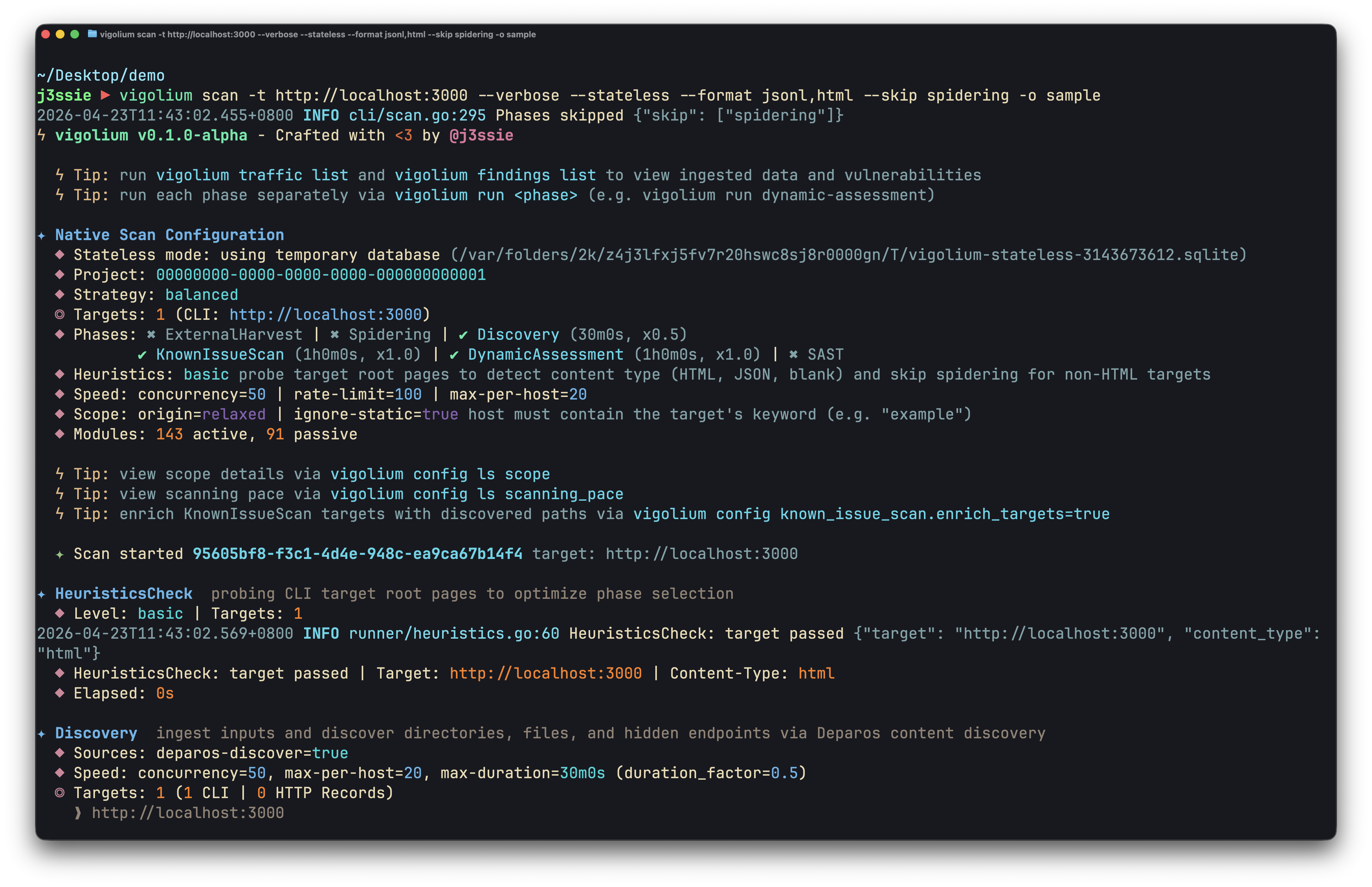
ネイティブスキャン (
vigolium scan): 高速、強力、そして柔軟。 コンテンツディスカバリー、ブラウザ/SPAスパイダリング、アクティブ/パッシブ監査にわたる317のモジュールによる決定論的なマルチフェーズスキャンで、インジェクション、アクセス制御、ファイル/パス、API/プロトコル、フレームワーク固有、クラウド/インフラ、およびアウトオブバンド(OAST)の脆弱性クラスをカバーします。 -
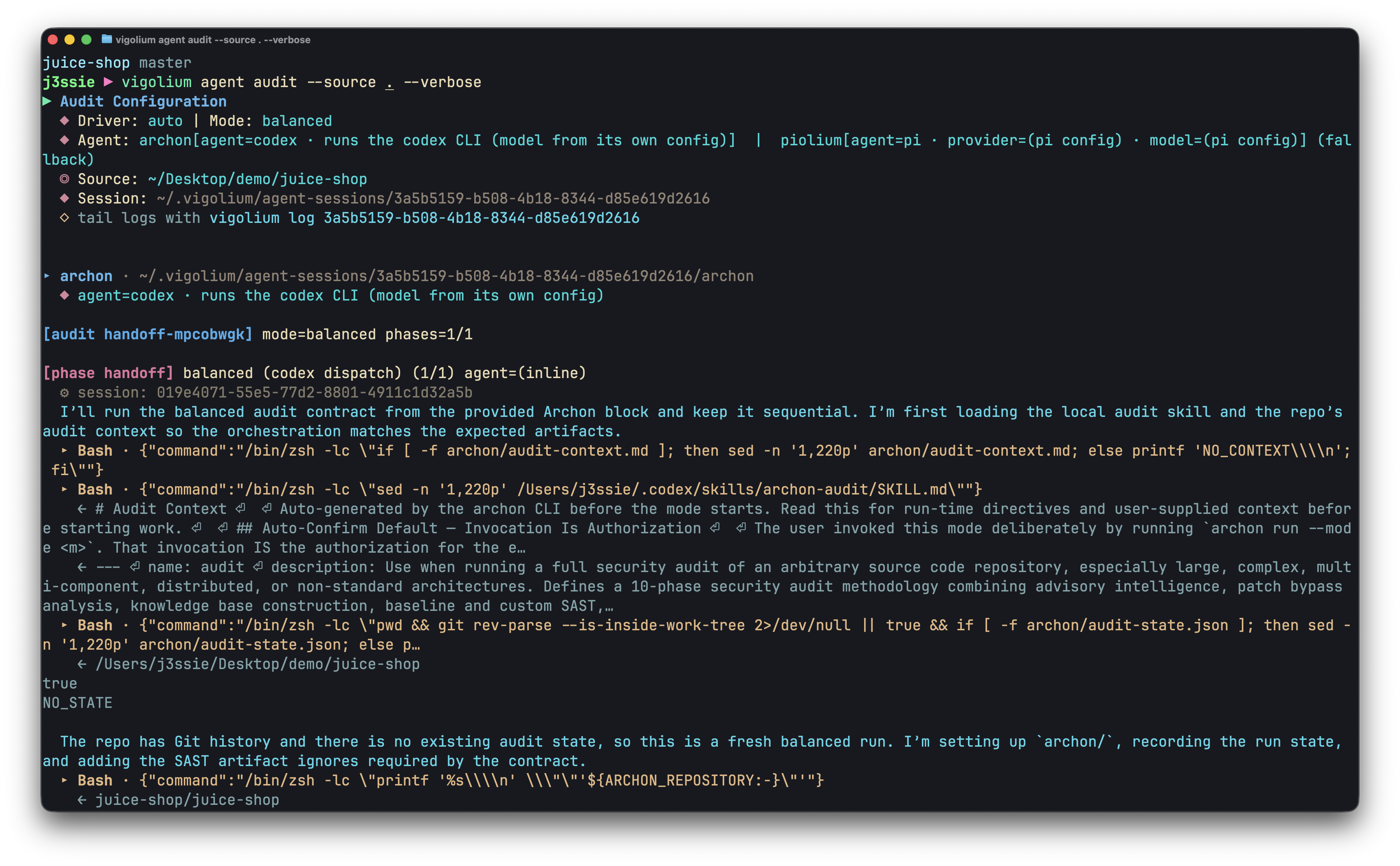
エージェントスキャン (
vigolium agent): コードベースを徹底的に監査。 AI駆動のスキャンで、攻撃を自律的に計画し、モジュールを選択し、カスタム拡張を生成し、結果をトリアージします。深いソースコード監査と自律的かつ標的を絞った脆弱性スキャンを組み合わせています。
インストール
クイックインストール(推奨)```bash
curl -fsSL https://vigolium.com/install.sh | bash
### [npm](https://www.npmjs.com/package/@vigolium/vigolium)```bash
npm install -g @vigolium/vigolium
Windows
上記の npm install は Windows でも動作します。あるいは、
releases ページから
vigolium_<version>_windows_amd64.zip をダウンロードして展開し、
vigolium.exe を PATH の通った場所に配置してください。
Windows は x64 のみで提供されます。Windows ARM ではエミュレーションで動作します。上記のシェル インストーラーは POSIX 専用のため、Windows では
vigolium updateは利用できません — アップグレードするには npm install を再実行するか、新しい zip をダウンロードしてください。
Docker やソースからのビルドなどの他の方法
Docker```bash
docker pull j3ssie/vigolium:latest docker run --rm j3ssie/vigolium:latest scan -h
### ソースからのビルド```bash
git clone https://github.com/vigolium/vigolium.git
cd vigolium
make build # build and install to $GOPATH/bin
Go 1.27+ と bun 1.3.11+ が必要です。前提条件とビルドの詳細については HACKING.md を参照してください。
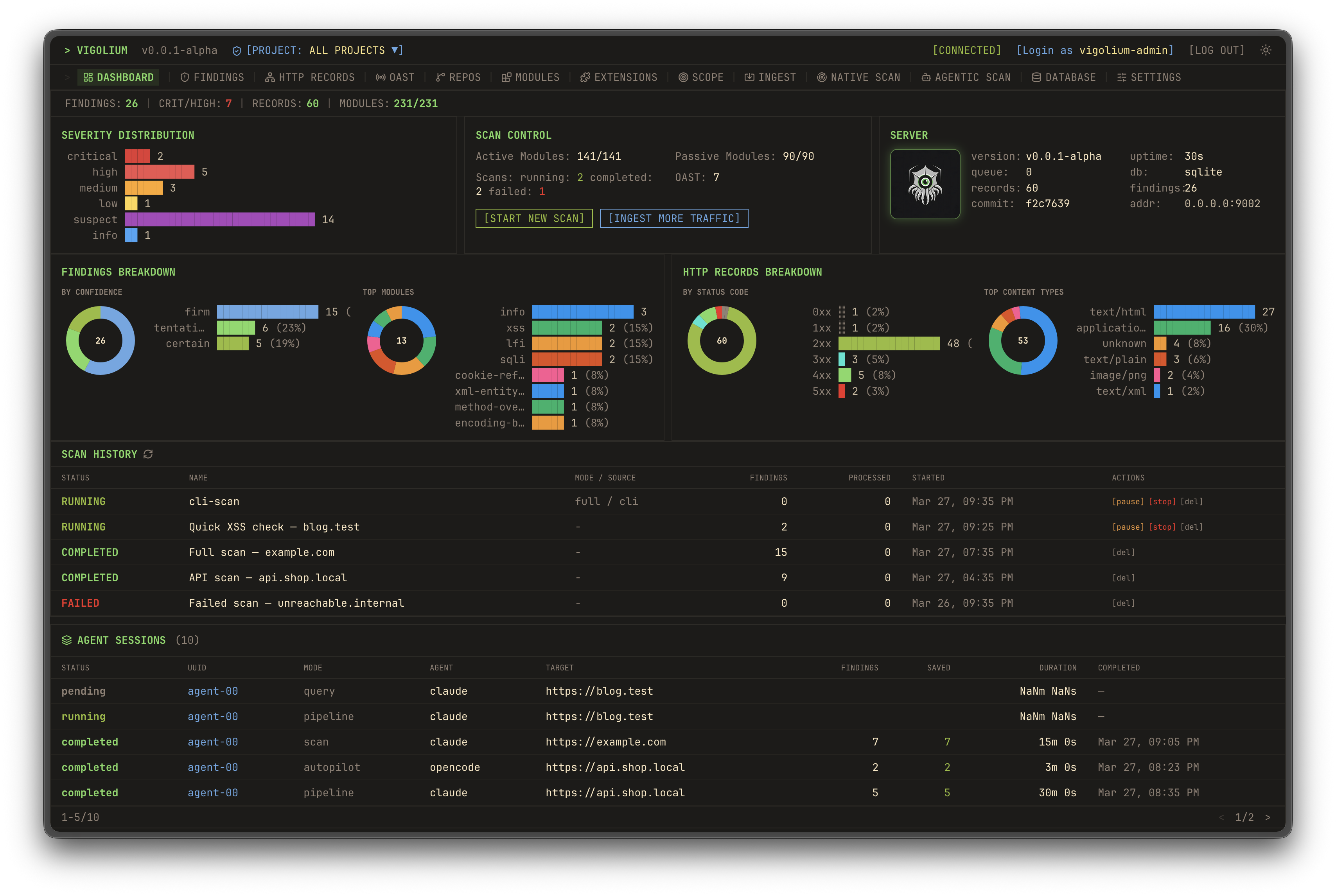
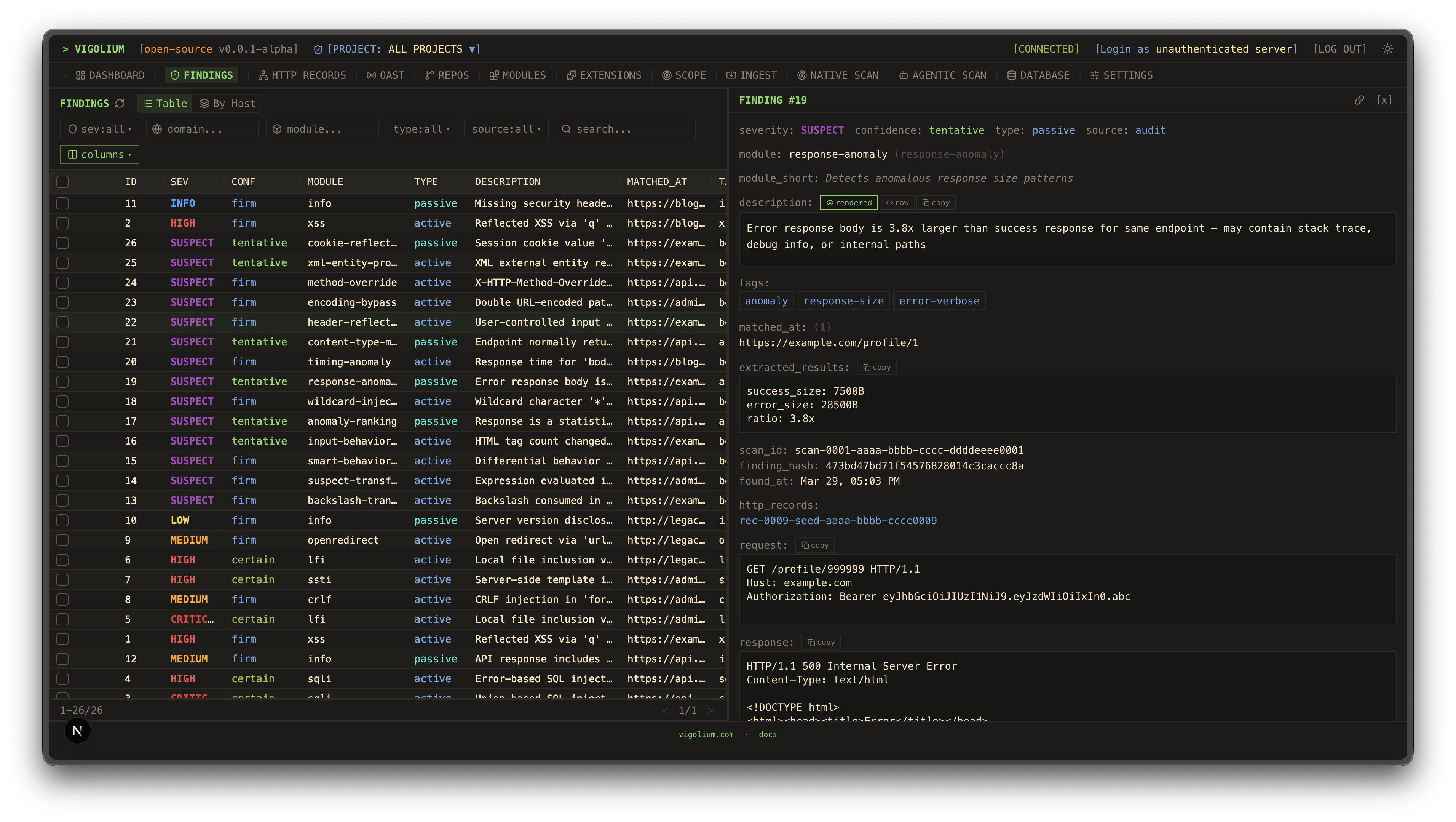
| UI ダッシュボード | トラフィックダッシュボード |
|---|---|
![]() | ![]() |
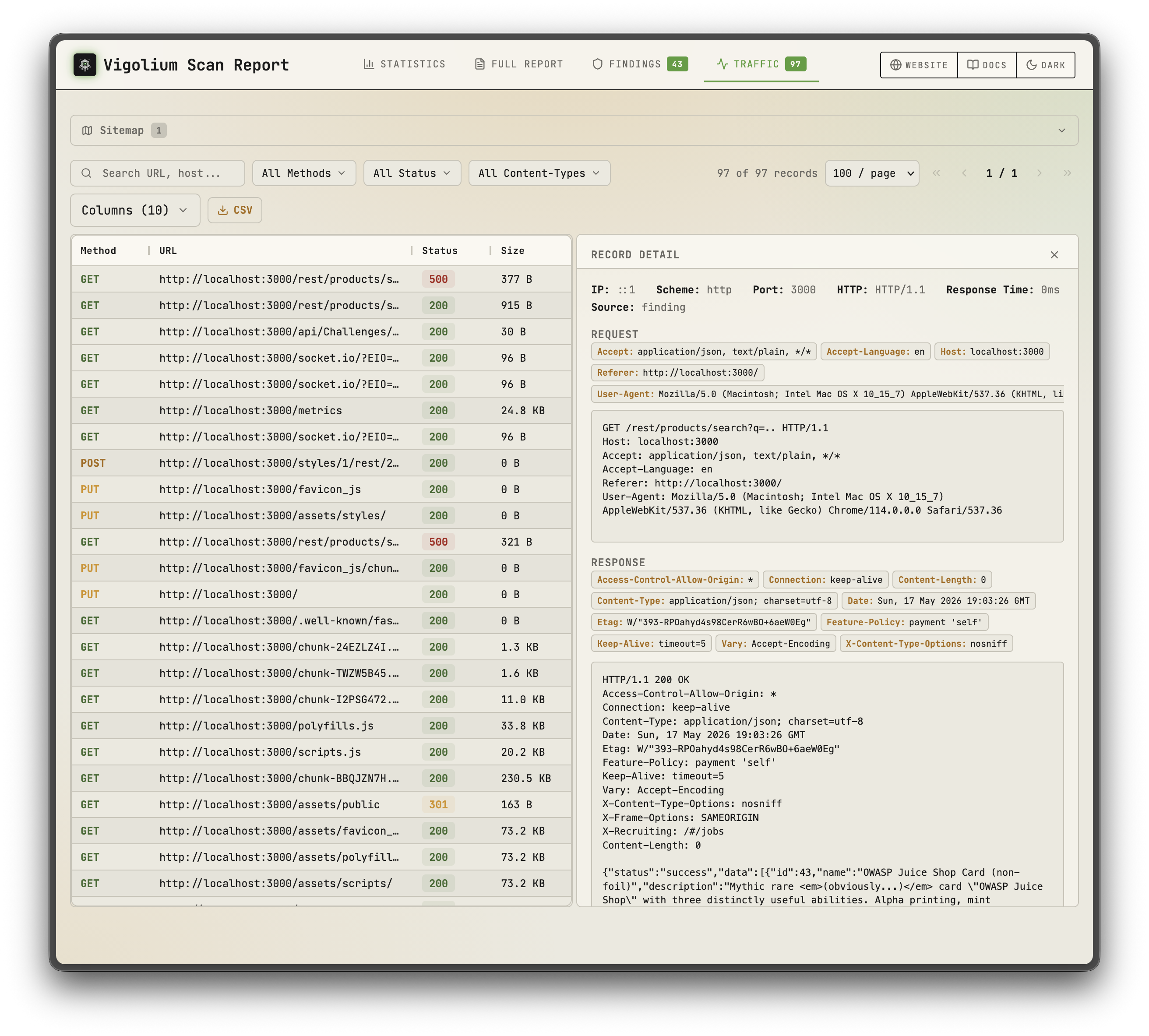
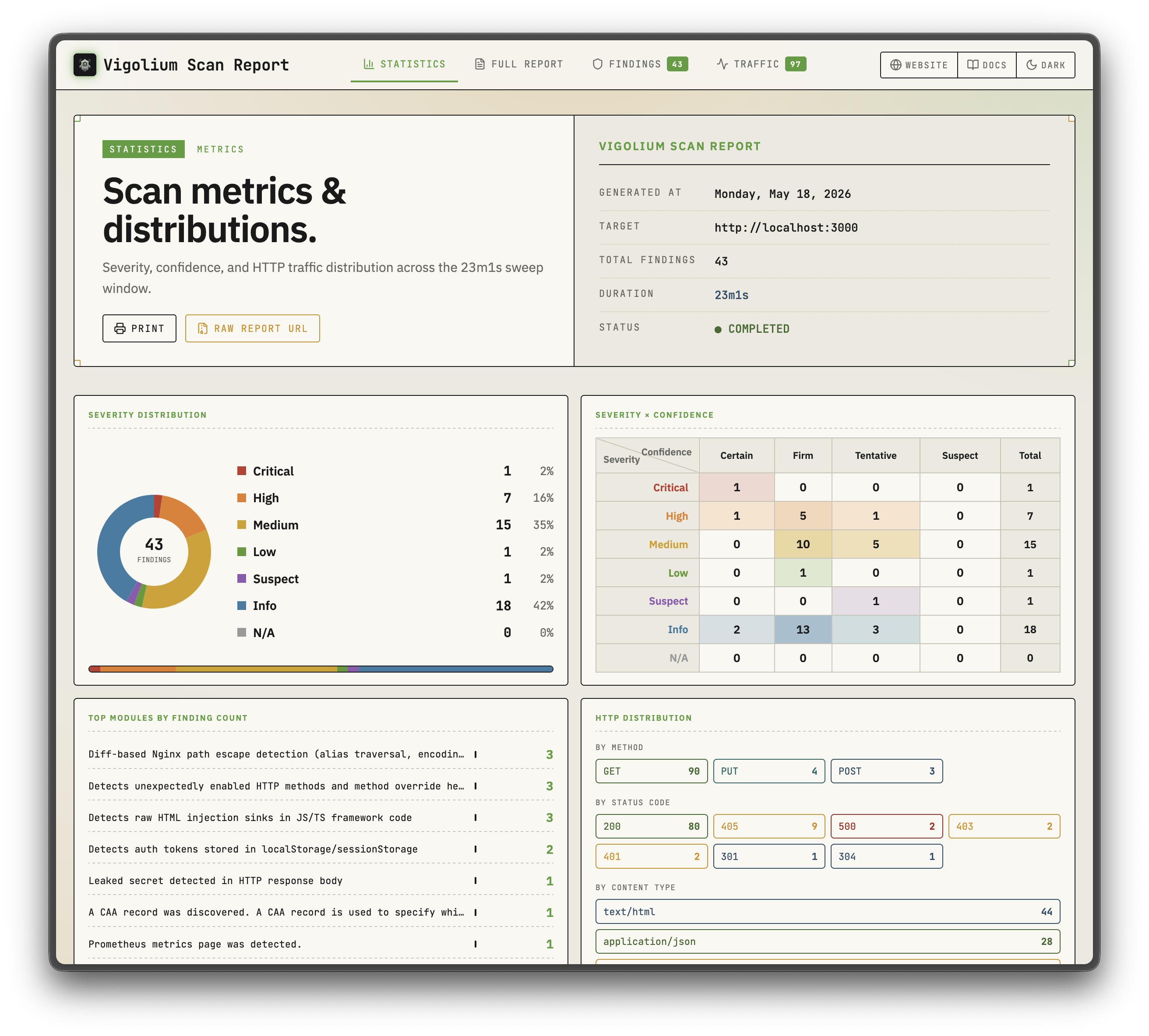
| 静的レポート | 静的レポート |
|---|---|
![]() | ![]() |
| ネイティブスキャン | エージェントスキャン |
|---|---|
![]() | ![]() |
スポンサー
サンドボックスインフラをスポンサーしてくださった Daytona に感謝します
主な機能
ネイティブスキャン
- 324 個のスキャナモジュール: 207 個のアクティブ(ファジング)+ 117 個のパッシブ(パターンマッチング)、OWASP Top 10 以上をカバー
- アウトオブバンドテスト(OAST): interactsh コールバックによるブラインド XSS/SSRF/コマンドインジェクションと自動ペイロード相関
- 値認識型ミューテーション: パラメータを意味論的な型(integer、UUID、JWT、email)で分類し、意図に応じてミューテーション
- マルチフェーズパイプライン: 外部ハーベスティング、コンテンツディスカバリ(Deparos)、ブラウザ/SPA スパイダリング(Spitolas)、および監査を、戦略プリセットとスキャンプロファイルで制御
- 柔軟な入力: URL、OpenAPI/Swagger、Postman、Burp Suite、cURL、Nuclei JSONL
- マルチセッション認証: インラインセッション、セッションファイル、またはログインフロー・トークン抽出・IDOR/BOLA テストを備えた完全な認証設定
- JavaScript 拡張: 組み込み JS エンジンによるカスタムモジュールとフック、セッション対応 HTTP API
- スケーラブルかつレポート可能: ホストごとのレート制限を備えた並行ワーカープール、ハイブリッドなインメモリ/ディスク/Redis キュー、自己完結型 HTML レポート
エージェントスキャン
- インプロセス olium ランタイム: すべてのエージェントモードはネイティブ Go の
pkg/oliumエンジン上で動作: ターンベースループ、組み込みツールレジストリ、スキルサポート、プラグイン可能なプロバイダドライバ(サブプロセス SDK プールなし) - Autopilot: エージェントが自律的にエンドポイントを発見し、スキャンを実行し、検出結果をトリアージ。オプションのマルチスペシャリストパイプラインとセッション再開に対応
- Swarm: マスターエージェントがモジュールを選択し、カスタム JS 攻撃拡張を生成し、コード監査 + SAST を実行し、スキャンを実行して結果をトリアージ。ターゲット指定またはフルスコープ(
--discover)、変更に焦点を当てた実行のための--diff/--last-commitsに対応 - ソース監査ドライバ:
audit、piolium、および統合auditディスパッチャが、単一の検出スキーマと DB タグ付けを共有するフォアグラウンドのソースコード監査を実行 - クエリモード: コードレビュー、エンドポイント発見、シークレット検出のための単発プロンプト
- プラグイン可能なプロバイダ:
openai-compatible(デフォルト)、openai-codex-oauth、openai-api-key、openai-responses、anthropic-api-key、anthropic-oauth、anthropic-cli、anthropic-compatible、anthropic-vertex、google-vertex。同じモードが REST API 経由で SSE ストリーミングと OpenAI 互換チャットエンドポイントとして公開
クイックスタート: ネイティブスキャン```bash
Scan a single target (default: balanced strategy)
vigolium scan -t https://example.com
Scan with a strategy preset
vigolium scan -t https://example.com --strategy deep
Scan specific modules only
vigolium scan -t https://example.com -m xss-reflected,sqli-error
Scan from an OpenAPI spec
vigolium scan -T openapi.yaml -I openapi
Pipe URLs from stdin
cat urls.txt | vigolium scan
Run a single phase directly
vigolium run discovery -t https://example.com
Generate an HTML report
vigolium scan -t https://example.com --only discovery --format html -o report.html
完全なパイプラインについては[アーキテクチャの概要](https://docs.vigolium.com/architecture/overview)を、戦略、プロファイル、ペース設定については[戦略ガイド](https://docs.vigolium.com/native-scan/strategies)を参照してください。コマンドのクイックリファレンスについては、[docs.vigolium.com/getting-started/cheat-sheet](https://docs.vigolium.com/getting-started/cheat-sheet)を参照してください。
## サーバーモード```bash
# Start API server with authentication
vigolium server -k my-secret-key
# Enable transparent HTTP proxy for traffic recording
vigolium server -k my-key --ingest-proxy-port 9003
# Auto-scan ingested traffic
vigolium server -k my-key --scan-on-receive
クイックスタート
インストール
# リポジトリをクローン
git clone https://github.com/yourusername/kitploit.git
cd kitploit
# 依存関係をインストール
pip install -r requirements.txt
# 設定をセットアップ
cp config.example.yaml config.yaml
# config.yaml を編集して、APIキーと設定を追加
基本的な使用方法
from kitploit import Scanner, Reporter
# スキャナーを初期化
scanner = Scanner(config_path="config.yaml")
# スキャンを実行
results = scanner.scan(target="https://example.com")
# レポートを生成
reporter = Reporter(format="html")
reporter.generate(results, output="report.html")
コマンドラインインターフェース
# 基本的なスキャン
kitploit scan --target https://example.com
# 特定のモジュールを使用
kitploit scan --target https://example.com --modules xss,sqli
# 異なる形式で出力
kitploit scan --target https://example.com --output json
# 詳細な出力
kitploit scan --target https://example.com --verbose
設定
設定ファイル (config.yaml) は以下のオプションをサポートしています:
# スキャン設定
scan:
timeout: 30
threads: 10
user_agent: "Kitploit/1.0"
follow_redirects: true
# モジュール設定
modules:
xss:
enabled: true
payloads: "default"
sqli:
enabled: true
level: 3
# 出力設定
output:
format: "html"
directory: "./reports"
verbose: false
# APIキー (オプション)
api_keys:
shodan: "YOUR_API_KEY"
virustotal: "YOUR_API_KEY"
モジュール
XSSスキャナー
クロスサイトスクリプティング (XSS) の脆弱性を検出します。
kitploit scan --target https://example.com --modules xss
機能:
- 反射型XSS検出
- 格納型XSS検出
- DOMベースXSS検出
- カスタムペイロードのサポート
- コンテキスト対応のペイロード生成
SQLインジェクションスキャナー
SQLインジェクションの脆弱性を検出します。
kitploit scan --target https://example.com --modules sqli
機能:
- エラーベース検出
- ブラインドSQLインジェクション
- 時間ベース検出
- ユニオンベース検出
- データベースフィンガープリンティング
ディレクトリブルートフォーサー
隠されたディレクトリやファイルを発見します。
kitploit scan --target https://example.com --modules dirb
機能:
- カスタムワードリスト
- 再帰的スキャン
- 拡張子の検出
- レスポンスコードフィルタリング
- レート制限のサポート```bash
Ingest traffic to a running server
cat urls.txt | vigolium ingest -s http://localhost:9002
Ingest an OpenAPI spec
vigolium ingest -s http://localhost:9002 -i api.yaml -I openapi
サーバーのセットアップについては[サーバーの実行](https://docs.vigolium.com/server-mode/running-the-server)を、インジェストのワークフローについては[インジェスト](https://docs.vigolium.com/server-mode/ingestion)を、完全な REST API リファレンスについては [API の概要](https://docs.vigolium.com/api-overview)を参照してください。
> **プロキシ統合**: Burp Suite 用の [burp-vigolium](https://github.com/vigolium/burp-vigolium) 拡張機能または Caido 用の [caido-vigolium](https://github.com/vigolium/caido-vigolium) プラグインを使用して、ライブプロキシトラフィックを実行中の Vigolium サーバーに転送します。どちらも同じブリッジプロトコル (`-B/--burp-bridge-url`、エイリアス `--caido-bridge-url`) を提供し、インジェストされたトラフィックには送信元のプロキシがラベル付けされます。
## 認証済みスキャン
Vigolium は、IDOR/BOLA テストおよび権限昇格チェックのためのマルチセッション認証済みスキャンをサポートしています:```bash
# Inline session via CLI flag (name:Header:value)
vigolium scan -t https://example.com \
--auth "admin:Cookie:session_id=abc123" \
--auth "user:Cookie:session_id=xyz789"
# Load session(s) from a YAML/JSON file
vigolium scan -t https://example.com --auth-file ./admin-session.yaml
# Auth file with an automated login flow (token extraction, etc.)
vigolium scan -t https://example.com --auth-file ./login-flow.yaml
# Add custom headers (works with sessions)
vigolium scan -t https://example.com -H "Authorization: Bearer token123"
認証ファイルは静的ヘッダー、ベアラートークン、およびCookie、JSONレスポンス、ヘッダーからのトークン抽出を伴う自動ログインフローをサポートします。プリセットの例は public/presets/sessions/ で利用可能です。完全なガイドについては認証ガイドを参照してください。
--auth/--auth-fileフラグは以前は--session/--session-fileという名前でした。古い名前も非推奨のエイリアスとして引き続き機能します。
Agentic Scan
AI駆動のスキャンでは、エージェントがネイティブスキャンエンジンを基盤として、脆弱性評価を自律的に計画、実行、トリアージします:```bash
Autopilot: autonomous AI-driven scanning (in-process olium engine)
vigolium agent autopilot -t https://example.com vigolium agent autopilot -t https://example.com --source ./src --prompt "focus on auth bypass" vigolium agent autopilot -t https://example.com --diff main...feature/auth # diff-focused vigolium agent autopilot -t https://example.com --intensity deep # preset bundle
Swarm: AI-guided targeted or full-scope vulnerability scanning
vigolium agent swarm -t https://example.com/api/users --vuln-type sqli vigolium agent swarm -t https://example.com --discover # full-scope vigolium agent swarm -t https://example.com --source ./src --discover # source-aware full-scope vigolium agent swarm --input "curl -X POST https://example.com/api/login -d '{"user":"admin"}'"
Source-audit drivers (separate harness, do not route through olium)
vigolium agent audit --source ./src # default: auto (audit, fall back to piolium) vigolium agent audit --source ./src --driver audit --mode deep # vigolium-audit only (claude/codex) vigolium agent audit --source ./src --driver piolium --mode balanced # Pi-native (pi extension) only vigolium agent audit --source ./src --driver both # audit then piolium, back-to-back vigolium agent audit --source ./src --modes deep,confirm # chain modes (same as --intensity deep) vigolium agent audit --source ./src -S --output-dir ./audit-out # throwaway DB + bundled HTML report vigolium audit --source ./src # top-level alias
Direct olium access (TUI or headless)
vigolium ol # launch the olium TUI vigolium ol --prompt "..." # one-shot prompt (-p implies headless)
エージェント型スキャンモード:
- **Autopilot**: 自律スキャン。CLI は `pkg/olium/autopilot.Run` を直接呼び出す。サーバーは同じループの周囲に vigolium-audit の準備、認証設定、および凍結されたコンテキストバンドルを追加する
- **Swarm**: 標的を絞った単一リクエストおよびフルスコープ (`--discover`) をサポートする AI 誘導の脆弱性スキャン。マスターエージェントが入力を分析し、モジュールを選択し、カスタム JS 拡張を生成し、コード監査と SAST を実行し、スキャンを実行し、結果をトリアージする
- **Audit**: `vigolium agent audit` によるソースコード監査 — 組み込みの **vigolium-audit** (claude/codex) および/または **piolium** (Pi ネイティブ) ハーネスを実行する統合ディスパッチャであり、`--driver {auto|both|audit|piolium}` で選択する (デフォルトは `auto`: audit レッグをプリフライトし、解決された `claude`/`codex` CLI が PATH 上にあり、バイナリが埋め込まれており、チェーンに audit がサポートするモードがある場合に実行する。それ以外の場合は audit を起動せずに piolium にフォールバックする。実行中の audit 失敗はドライバを切り替えるのではなく表面化する)。ハーネスは分離されている。**olium を経由させないこと**。1 つの親 AgenticScan の下にドライバごとの子行があり、ポストパスの検出結果は重複排除される。スタンドアロンの `agent piolium` サブコマンドは存在しない — piolium は `--driver=piolium` 経由で実行される
> **スタンドアロン audit CLI**: エージェント型セキュリティ監査は、Vigolium とは独立して実行できるスタンドアロン CLI としても提供されている: [vigolium-audit](https://github.com/vigolium/vigolium-audit) (`vigolium agent audit` の背後にあるハーネス) および [piolium](https://github.com/vigolium/piolium) (`vigolium agent audit --driver=piolium` の背後にある Pi ネイティブドライバ)。
完全なガイドについては [エージェントモードガイド](https://docs.vigolium.com/agentic-scan/agent-mode) を参照。
## ⚡ Vigolium Cloud Console
インフラを管理せずに Vigolium のパワーを求めるチーム向けのクラウドベースソリューション。Console は **Vigolium のアップグレードされたフル機能版**であり、エンゲージメント全体を推進する**高度な自律エージェント**が主導する — ターゲットについて推論し、独自の攻撃パスを選択し、発見した内容を確認する — さらにホスト型スキャンと共有結果がオープンソースコアの上に重ねられるため、ツールの保守ではなく脆弱性の修正に集中できる。
> 興味がありますか? [デモのお問い合わせ](https://www.vigolium.com/request-demo)。
## ネイティブスキャンレイヤー
ネイティブスキャンパイプラインはモジュール式のレイヤーで構成されており、それぞれ個別に文書化されている:
| レイヤー | 説明 | ドキュメント |
|-------|-------------|------|
| **Content Discovery (Deparos)** | フィンガープリントベースのソフト 404 検出を備えた適応型ディレクトリ/ファイル列挙 | [docs.vigolium.com/native-scan/phases/discovery](https://docs.vigolium.com/native-scan/phases/discovery) |
| **Browser Spider (Spitolas)** | CDP トラフィックキャプチャを備えた Chromium 駆動のステートマシンクローラー | [docs.vigolium.com/native-scan/phases/spidering](https://docs.vigolium.com/native-scan/phases/spidering) |
| **Audit** | 挿入ポイント抽出と DiffScan フレームワークを備えたアクティブ/パッシブ脆弱性スキャン | [docs.vigolium.com/native-scan/phases/audit](https://docs.vigolium.com/native-scan/phases/audit) |
| **Scanner Modules** | OWASP Top 10 以降をカバーする 207 のアクティブおよび 117 のパッシブモジュール | [docs.vigolium.com/native-scan/modules-reference](https://docs.vigolium.com/native-scan/modules-reference) |
## ドキュメント
完全なドキュメントは [docs.vigolium.com](https://docs.vigolium.com/) にある。リリースノートとバージョン履歴は [CHANGELOG](https://github.com/vigolium/vigolium/blob/main/CHANGELOG.md) にある。クイックリンク:
| トピック | リンク |
|-------|------|
| エージェントのセットアップ | [docs.vigolium.com/getting-started/setup-agent](https://docs.vigolium.com/getting-started/setup-agent) |
| ネイティブスキャンの開始 | [docs.vigolium.com/getting-started/native-scan](https://docs.vigolium.com/getting-started/native-scan) |
| エージェント型スキャンの開始 | [docs.vigolium.com/getting-started/agentic-scan](https://docs.vigolium.com/getting-started/agentic-scan) |
| エージェント型監査の開始 | [docs.vigolium.com/getting-started/agentic-security-audit](https://docs.vigolium.com/getting-started/agentic-security-audit) |
| クイックスタート | [docs.vigolium.com/getting-started/quickstart](https://docs.vigolium.com/getting-started/quickstart) |
| チートシート | [docs.vigolium.com/getting-started/cheat-sheet](https://docs.vigolium.com/getting-started/cheat-sheet) |
| サーバーと取り込み | [docs.vigolium.com/getting-started/server-and-ingestion](https://docs.vigolium.com/getting-started/server-and-ingestion) |
| 拡張の作成 | [docs.vigolium.com/customization/writing-extensions](https://docs.vigolium.com/customization/writing-extensions) |
## JavaScript エンジン
JavaScript/TypeScript コードを直接実行したり、再コンパイルせずにカスタムスキャンモジュールやフックを記述したりできる:```bash
# Execute inline JavaScript
vigolium js --code 'let r = vigolium.http.get(TARGET); console.log(r.status)' -t https://example.com
# Run a JS file with timeout
vigolium js --code-file ./my-script.js -t https://example.com --timeout 60s
# Manage extensions
vigolium ext ls # list loaded extensions
vigolium ext docs --example # browse API with code examples
vigolium ext preset # install starter scripts
JSエンジンは、認証済みテスト用のセッション対応HTTP APIを公開しています:```javascript // Create a persistent session with shared cookie jar. // post() takes a string body — serialize objects yourself. let session = vigolium.http.session(); session.post( "https://app.example.com/login", JSON.stringify({ user: "admin", pass: "secret" }), { headers: { "Content-Type": "application/json" } } ); session.get("https://app.example.com/dashboard"); // cookies auto-sent
// Automated login flow with token extraction let authed = vigolium.http.login({ url: "https://app.example.com/api/auth", method: "POST", body: JSON.stringify({ username: "admin", password: "pass" }), extract: [{ source: "json", path: "$.token", apply_as: "Authorization: Bearer {value}" }] });
// IDOR/BOLA testing across multiple sessions let results = vigolium.http.authTest({ sessions: { admin: adminSession, user: userSession }, requests: [{ method: "GET", url: "https://app.example.com/api/users/1" }] });
// Multi-step authentication sequences let result = vigolium.http.sequence([ { url: "/csrf", extract: [{ source: "cookie", name: "csrf_token", as: "token" }] }, { url: "/login", method: "POST", body: "csrf={token}&user=admin" } ]);
// Parallel request batching (race conditions, IDOR) let responses = vigolium.http.batch([req1, req2, req3], { concurrency: 10 });
// CSRF token extraction let csrf = vigolium.http.csrf("https://app.example.com/form");
// HTTP request replay with variations let varied = vigolium.http.replay(rawRequest, [ { headers: { "Authorization": "Bearer admin_token" } }, { headers: { "Authorization": "Bearer user_token" } } ]);
拡張機能の作成ガイドについては[writing extensions](https://docs.vigolium.com/customization/writing-extensions)を、完全なTypeScript API定義については`pkg/jsext/vigolium.d.ts`を参照してください。
## CLIリファレンス
<details>
<summary>コマンドとフラグの完全なリファレンスを展開する</summary>
### コマンド```
Scanning:
vigolium scan Run a native scan (deterministic multi-phase vulnerability scanning)
vigolium run <phase> Run a single native scan phase (alias for scan --only <phase>)
vigolium scan-url <url> Quick native scan of a single URL
vigolium scan-request Native scan from a raw HTTP request
Agentic scan (in-process olium engine):
vigolium agent autopilot Autonomous AI-driven vulnerability scanning
vigolium agent swarm AI-guided targeted or full-scope vulnerability scanning
vigolium agent query Single-shot prompt (code review, endpoint discovery)
vigolium agent olium Direct olium TUI (or one-shot non-interactive via -p)
vigolium agent audit Unified driver dispatcher (vigolium-audit and/or piolium, --driver=auto|both|audit|piolium)
vigolium agent session Browse/replay agent session artifacts
vigolium olium | vigolium ol Top-level alias for `vigolium agent olium`
Server & ingestion:
vigolium server Start the API server with traffic ingestion
vigolium ingest Ingest traffic to a running server
vigolium storage Interact with cloud object storage (uploads, downloads)
Data & projects:
vigolium db Database operations (list, stats, export, clean, seed)
vigolium finding Browse and manage findings (load, tui)
vigolium traffic Browse and replay HTTP records (tui, replay)
vigolium replay Mutate a stored/supplied HTTP request and diff baseline vs replay
vigolium project Manage projects (create, list, use, config)
vigolium scope Manage scope rules
vigolium import Import findings/data from external sources
vigolium export Export scan results
Extensions & auth:
vigolium js Execute JavaScript/TypeScript code
vigolium ext Manage JavaScript extensions (eval, lint)
vigolium auth Manage authentication sessions (list, load, lint, totp)
Setup & introspection:
vigolium init Initialize a Vigolium workspace
vigolium config Manage configuration (ls, set, path, clean)
vigolium strategy Inspect scanning strategies and phases
vigolium module Inspect/enable scanner modules
vigolium doctor Diagnose environment & dependencies
vigolium version Show version info
フラグ```
Native Scan (vigolium scan / run): -t, --target Target URL -T, --target-file File containing target URLs -i, --input Input file path (- for stdin) -I, --input-mode Input format: urls, openapi, swagger, burp, curl, nuclei, har -m, --modules Modules to run (comma-separated or 'all') --strategy Strategy preset: lite, balanced, deep --scanning-profile Scanning profile name or YAML path --only Phases to run (comma-separated): ingestion, discovery (deparos), external-harvest, spidering (spitolas), known-issue-scan, dynamic-assessment, extension --skip Phases to skip (repeatable, same names as --only) -S, --stateless Use a throwaway temp database, discarded after the scan --fail-on Exit non-zero when a finding at/above this severity is present
Authentication: --auth Inline session definition (name:Header:value, repeatable) --auth-file Session YAML/JSON file path, supports login flows (repeatable) -H, --header Custom HTTP header (repeatable)
Performance: -c, --concurrency Concurrent workers (default: 25) -r, --rate-limit Max requests/sec (default: 0 = unlimited) --max-per-host Per-host concurrency cap (default: 2) --proxy HTTP/SOCKS5 proxy URL --timeout HTTP request timeout (default: 15s)
Agentic Scan (vigolium agent autopilot / swarm / query):
--source Path to source code for source-aware scanning
--files Specific files to include relative to --source
--source-label Label for source code ingestion
--provider Olium provider: openai-compatible (default), openai-codex-oauth,
openai-api-key, openai-responses, anthropic-api-key,
anthropic-oauth, anthropic-cli, anthropic-compatible,
anthropic-claude-sdk-bridge, anthropic-vertex, google-vertex
--model Model ID override
--oauth-token OAuth bearer token (anthropic-oauth)
--oauth-cred OAuth/SA file path (openai-codex-oauth, anthropic-vertex,
google-vertex)
--llm-api-key API key (anthropic-api-key, openai-api-key)
--vuln-type Vulnerability type focus (sqli, xss, ssrf, ...)
--prompt Free-text task guidance (same as the positional [prompt])
--plan-file Plan file mixing guidance + raw seed HTTP request(s)
--knowledge-base File/dir describing the app; prose is distilled, traffic
exports (HAR/Burp/curl/OpenAPI/Postman) are ingested
--prior-context Front-load existing project traffic/findings: auto, summary, off
--intensity Preset bundle: quick, balanced, deep
--diff Diff range / PR URL / HEADN for change-focused scans
--last-commits Shorthand for --diff HEADN
--code-audit Enable AI code audit (default: on with --source)
--discover Run discovery+spidering before planning (swarm)
--audit vigolium-audit mode: lite, balanced, deep, mock, off
--piolium Piolium audit mode (empty = auto-pick)
--resume Resume a durable-autopilot run by agentic-scan UUID
--session-dir Pin the session dir for this run's debug artifacts
--transcript Copy transcript.jsonl out after the run
--max-iterations Max triage-rescan iterations
--max-commands Cap on agent tool calls
--token-budget Cap on aggregate tokens
--max-duration Max agent wall-clock time (0 = no limit)
--only / --skip / --start-from Phase control (swarm)
Source audit (vigolium agent audit / vigolium audit): --driver auto (default), both, audit, piolium --intensity Preset: quick, balanced, deep (deep = modes deep,confirm) --mode Mode override: lite, balanced, deep, revisit, confirm, merge, ... --modes Chain modes back-to-back (e.g. deep,confirm) --list-modes Print the audit mode graph and exit --agent Coding agent for the audit leg: claude or codex --keep-raw Keep raw output under /vigolium-results/ (on by default) --clean-raw Remove the source-tree raw copy after the run -S, --stateless Run into a throwaway DB and auto-render an HTML report --output-dir Bundle the HTML report + raw results into one folder (needs -S) --no-dedup Skip the post-pass project-wide findings dedup --no-preflight Skip the pre-audit auth/model roundtrip checks -i, --interactive Drive the audit yourself in the coding agent (audit driver only)
JavaScript: --code Inline JavaScript to execute --code-file Path to JS/TS file to execute --timeout Execution timeout (default: 30s)
Output: -j, --json Compact, token-aware JSON output (read/query commands) --format Output format (comma-separated for multiple): console, jsonl, html, sqlite (needs -S), fs (flat traffic/finding tree) -o, --output Output file path --silent Suppress all output except findings -v, --verbose Verbose logging
</details>
## リポジトリ構成
`platform/` ディレクトリには外部ツールと UI ダッシュボードが含まれており、コアスキャナの一部ではありません。これに変更を加えるべきではありません。
## ベンチマーク
Vigolium は、意図的に脆弱性を持たせたアプリケーションに対して継続的にベンチマークされ、さらにバグバウンティや責任ある開示プログラムを通じて実世界のターゲットに対しても重点的にテストされています。
- **セルフホスト (Docker):** [DVWA](https://github.com/digininja/DVWA)、[OWASP Juice Shop](https://github.com/juice-shop/juice-shop)、[VAmPI](https://github.com/erev0s/VAmPI)、[crAPI](https://github.com/OWASP/crAPI)、[Vulnerable Java App](https://github.com/DataDog/vulnerable-java-application)、[Vulnerable Nginx](https://github.com/detectify/vulnerable-nginx)、[OopsSec Store](https://github.com/kOaDT/oss-oopssec-store) (カスタム Next.js アプリ)
- **外部 (ホスト型):** [Acunetix TestPHP](http://testphp.vulnweb.com)、[Gin & Juice Shop](https://ginandjuice.shop)、[Testfire](http://demo.testfire.net)
- **XSS & 複数脆弱性:** [BruteLogic XSS](https://github.com/vigolium/vigolium/blob/main/test/benchmark/xss_scanner)、[XBOW](https://github.com/vigolium/vigolium/blob/main/test/benchmark/definitions/xbow) (XSS、SQLi、SSTI、LFI、SSRF、XXE、コマンドインジェクション)
ベンチマークは `make test-canary` (Docker アプリ) または `make test-integration` (XSS) で実行します。
## 開発```bash
make build # build and install
make test # run all tests (auto-installs gotestsum)
make test-unit # fast unit tests (-short, no external deps)
make test-e2e # E2E tests (requires Docker)
make lint # run linter
make fmt # format code
完全なビルドガイド、コードベースマップ、モジュール開発ガイドについては HACKING.md を参照してください。
セキュリティ
Vigolium はオフェンシブセキュリティツールであり、そのうち2つの部分は意図的に寛容な設計になっています。エージェントモードはサンドボックスなしで実行されます(LLM はホスト上のシェル、ファイル、ネットワークに完全にアクセスできます)。また、拡張機能は任意のコマンドを実行できます。エージェントモードはエンゲージメントにスコープされた使い捨てのコンテナ/VM で実行し、信頼できない拡張機能は信頼できないコードとして扱ってください。開始する前に SECURITY.md を参照し、Vigolium 自体の脆弱性は [email protected] に非公開で報告してください。
ライセンス
Vigolium は MIT License の下でリリースされています。
♥ を込めて @j3ssie が作成、@theblackturtle が初期のコアコントリビューターです。