アップデート一覧に戻る
New releaseAug 5, 2026

katana v1.7.0

次世代のクローリングおよびスパイダリングフレームワーク。

共有

katana

次世代のクローリングおよびスパイダリングフレームワーク

機能インストール使用法スコープ設定フィルターDiscordに参加

機能

image

  • 高速かつ完全に設定可能なWebクローリング
  • StandardモードとHeadlessモード
  • JavaScriptの解析 / クローリング
  • カスタマイズ可能な自動フォーム入力
  • スコープ制御 - 事前設定済みフィールド / 正規表現
  • ナレッジベース - MLページタイプ / フォーム分類(自動ダウンロードモデル)
  • カスタマイズ可能な出力 - 事前設定済みフィールド
  • 入力 - STDINURLLIST
  • 出力 - STDOUTFILEJSON

インストール

katanaを正常にインストールするには、Go 1.26+が必要です。インストールで問題が発生した場合は、最新バージョンのGoを使用してみることをお勧めします。最小必要バージョンが変更されている可能性があります。以下のコマンドを実行するか、リリースページから事前コンパイル済みバイナリをダウンロードしてください。```console CGO_ENABLED=1 go install github.com/projectdiscovery/katana/cmd/katana@latest

**katana- のインストール/実行のその他のオプション**

<details>
  <summary>Docker</summary>

> docker を最新タグにインストール/更新するには -```sh
docker pull projectdiscovery/katana:latest

標準モードで katana を docker を使用して実行するには -```sh docker run projectdiscovery/katana:latest -u https://tesla.com

> katanaをヘッドレスモードで実行するには、dockerを使用して -```sh
docker run projectdiscovery/katana:latest -u https://tesla.com -system-chrome -headless
Ubuntu

以下の前提条件をインストールすることを推奨します -```sh sudo apt update sudo apt install zip curl wget git snapd sudo snap refresh sudo snap install golang --classic

sudo install -d -m 0755 /etc/apt/keyrings curl -fsSL https://dl.google.com/linux/linux_signing_key.pub
| sudo gpg --dearmor -o /etc/apt/keyrings/google-chrome.gpg

echo "deb [arch=amd64 signed-by=/etc/apt/keyrings/google-chrome.gpg]
http://dl.google.com/linux/chrome/deb/ stable main"
| sudo tee /etc/apt/sources.list.d/google-chrome.list > /dev/null

sudo apt update sudo apt install google-chrome-stable

> install katana -```sh
go install github.com/projectdiscovery/katana/cmd/katana@latest

使用方法```console

katana -h

これはツールのヘルプを表示します。以下は、このツールがサポートするすべてのスイッチです。```console
Katana is a fast crawler focused on execution in automation
pipelines offering both headless and non-headless crawling.

Usage:
  ./katana [flags]

Flags:
INPUT:
   -u, -list string[]     target url / list to crawl
   -resume string         resume scan using resume.cfg
   -e, -exclude string[]  exclude host matching specified filter ('cdn', 'private-ips', cidr, ip, regex)

CONFIGURATION:
   -r, -resolvers string[]       list of custom resolver (file or comma separated)
   -d, -depth int                maximum depth to crawl (default 3)
   -jc, -js-crawl                enable endpoint parsing / crawling in javascript file
   -jsl, -jsluice                enable jsluice parsing in javascript file (memory intensive)
   -ct, -crawl-duration value    maximum duration to crawl the target for (s, m, h, d) (default s)
   -kf, -known-files string      enable crawling of known files (all,robotstxt,sitemapxml), a minimum depth of 3 is required to ensure all known files are properly crawled.
   -mrs, -max-response-size int  maximum response size to read (default 4194304)
   -timeout int                  time to wait for request in seconds (default 10)
   -aff, -automatic-form-fill    enable automatic form filling (experimental)
   -fx, -form-extraction         extract form, input, textarea & select elements in jsonl output
   -retry int                    number of times to retry the request (default 1)
   -proxy string                 http/socks5 proxy to use
   -td, -tech-detect             enable technology detection
   -H, -headers string[]         custom header/cookie to include in all http request in header:value format (file)
   -config string                path to the katana configuration file
   -fc, -form-config string      path to custom form configuration file
   -flc, -field-config string    path to custom field configuration file
   -s, -strategy string          Visit strategy (depth-first, breadth-first) (default "depth-first")
   -iqp, -ignore-query-params    Ignore crawling same path with different query-param values
   -fsu, -filter-similar         filter crawling of similar looking URLs (e.g., /users/123 and /users/456)
   -fst, -filter-similar-threshold int  number of distinct values before a path position is treated as parameter (default 10)
   -tlsi, -tls-impersonate       enable experimental client hello (ja3) tls randomization
   -dr, -disable-redirects       disable following redirects (default false)
   -kb, -knowledge-base          enable knowledge base classification
   -kb-secrets                   enable secrets extractor in the knowledge base
   -kb-validate-secrets          validate detected secrets against their provider (sends live API calls)
   -kb-endpoints                 enable endpoints extractor (classifies REST/GraphQL/SOAP/XHR requests)
   -mdp, -max-domain-pages int   maximum number of pages to crawl per domain (default unlimited)

DEBUG:
   -health-check, -hc        run diagnostic check up
   -elog, -error-log string  file to write sent requests error log
   -pprof-server             enable pprof server

HEADLESS:
   -hl, -headless                    enable headless hybrid crawling (experimental)
   -sc, -system-chrome               use local installed chrome browser instead of katana installed
   -sb, -show-browser                show the browser on the screen with headless mode
   -ho, -headless-options string[]   start headless chrome with additional options
   -nos, -no-sandbox                 start headless chrome in --no-sandbox mode
   -cdd, -chrome-data-dir string     path to store chrome browser data
   -scp, -system-chrome-path string  use specified chrome browser for headless crawling
   -noi, -no-incognito               start headless chrome without incognito mode
   -cwu, -chrome-ws-url string       use chrome browser instance launched elsewhere with the debugger listening at this URL
   -xhr, -xhr-extraction             extract xhr request url,method in jsonl output
   -pls, -page-load-strategy string  page load strategy (heuristic, load, domcontentloaded, networkidle, none) (default "heuristic")
   -dwt, -dom-wait-time int          time in seconds to wait after page load when using domcontentloaded strategy (default 5)
   -csp, -captcha-solver-provider string  captcha solver provider (e.g. capsolver)
   -csk, -captcha-solver-key string       captcha solver provider api key

SCOPE:
   -cs, -crawl-scope string[]       in scope url regex to be followed by crawler
   -cos, -crawl-out-scope string[]  out of scope url regex to be excluded by crawler
   -fs, -field-scope string         pre-defined scope field (dn,rdn,fqdn) or custom regex (e.g., '(company-staging.io|company.com)') (default "rdn")
   -ns, -no-scope                   disables host based default scope
   -do, -display-out-scope          display external endpoint from scoped crawling

FILTER:
   -mr, -match-regex string[]             regex or list of regex to match on output url (cli, file)
   -fr, -filter-regex string[]            regex or list of regex to filter on output url (cli, file)
   -f, -field string                      field to display in output (url,path,fqdn,rdn,rurl,qurl,qpath,file,ufile,key,value,kv,dir,udir) (Deprecated: use -output-template instead)
   -sf, -store-field string               field to store in per-host output (url,path,fqdn,rdn,rurl,qurl,qpath,file,ufile,key,value,kv,dir,udir)
   -em, -extension-match string[]         match output for given extension (eg, -em php,html,js,none)
   -ef, -extension-filter string[]        filter output for given extension (eg, -ef png,css)
   -ndef, -no-default-ext-filter bool     remove default extensions from the filter list
   -mdc, -match-condition string          match response with dsl based condition
   -fdc, -filter-condition string         filter response with dsl based condition
   -duf, -disable-unique-filter           disable duplicate content filtering
   -filter-page-type string[]      filter response with page type (e.g. error,captcha,parked)

RATE-LIMIT:
   -c, -concurrency int          number of concurrent fetchers to use (default 10)
   -p, -parallelism int          number of concurrent inputs to process (default 10)
   -rd, -delay int               request delay between each request in seconds
   -rl, -rate-limit int          maximum requests to send per second (default 150)
   -rlm, -rate-limit-minute int  maximum number of requests to send per minute
   -hrl, -host-rate-limit int    maximum requests to send per second per host
   -hrlm, -host-rate-limit-minute int  maximum number of requests to send per minute per host

UPDATE:
   -up, -update                 update katana to latest version
   -duc, -disable-update-check  disable automatic katana update check

OUTPUT:
   -o, -output string                file to write output to
   -output-template string      custom output template
   -sr, -store-response              store http requests/responses
   -srd, -store-response-dir string  store http requests/responses to custom directory
   -ncb, -no-clobber                 do not overwrite output file
   -sfd, -store-field-dir string     store per-host field to custom directory
   -or, -omit-raw                    omit raw requests/responses from jsonl output
   -ob, -omit-body                   omit response body from jsonl output
   -lof, -list-output-fields         list available fields for jsonl output format
   -eof, -exclude-output-fields      exclude fields from jsonl output
   -j, -jsonl                        write output in jsonl format
   -nc, -no-color                    disable output content coloring (ANSI escape codes)
   -silent                           display output only
   -v, -verbose                      display verbose output
   -debug                            display debug output
   -version                          display project version

Katanaの実行

katanaへの入力

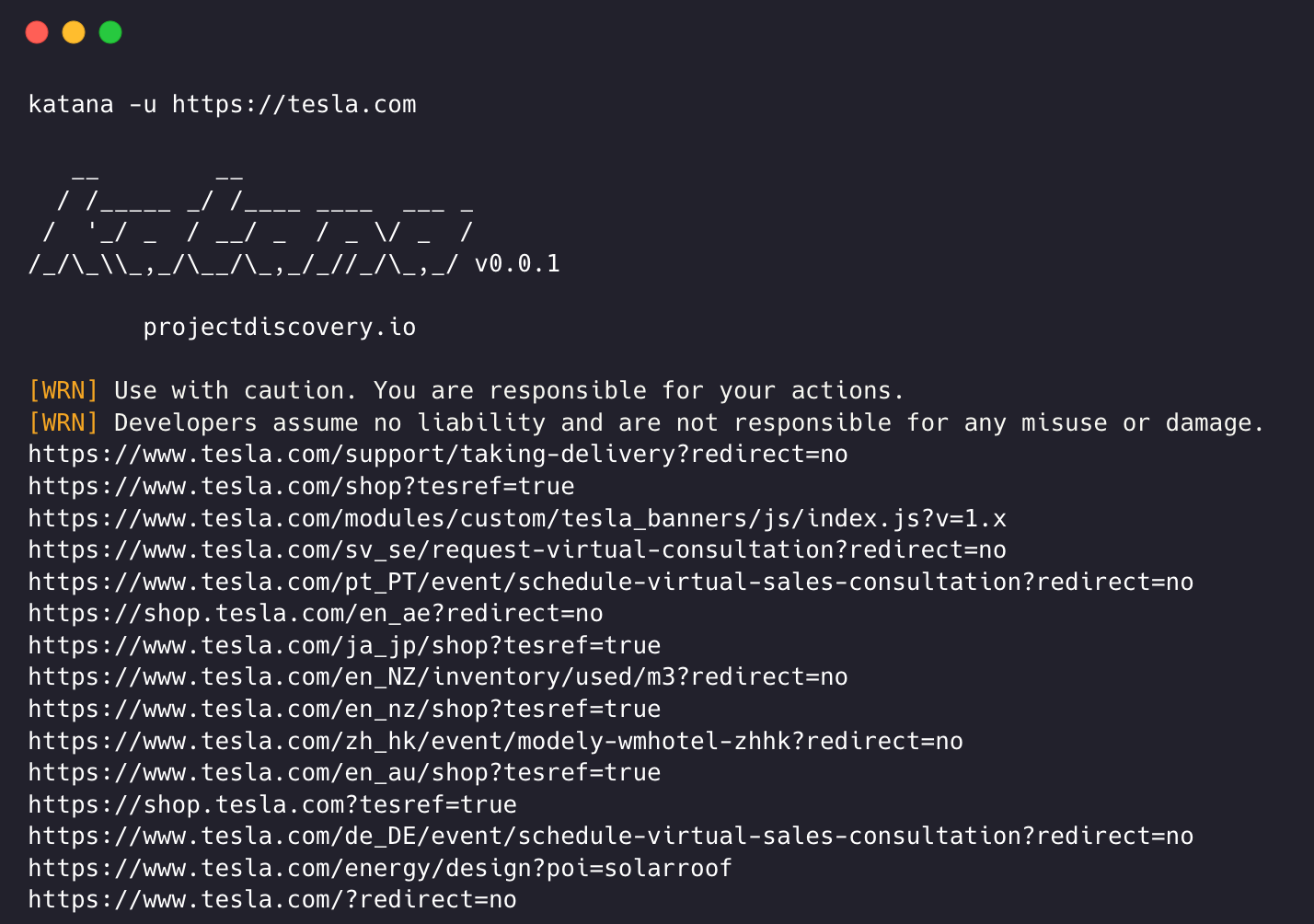
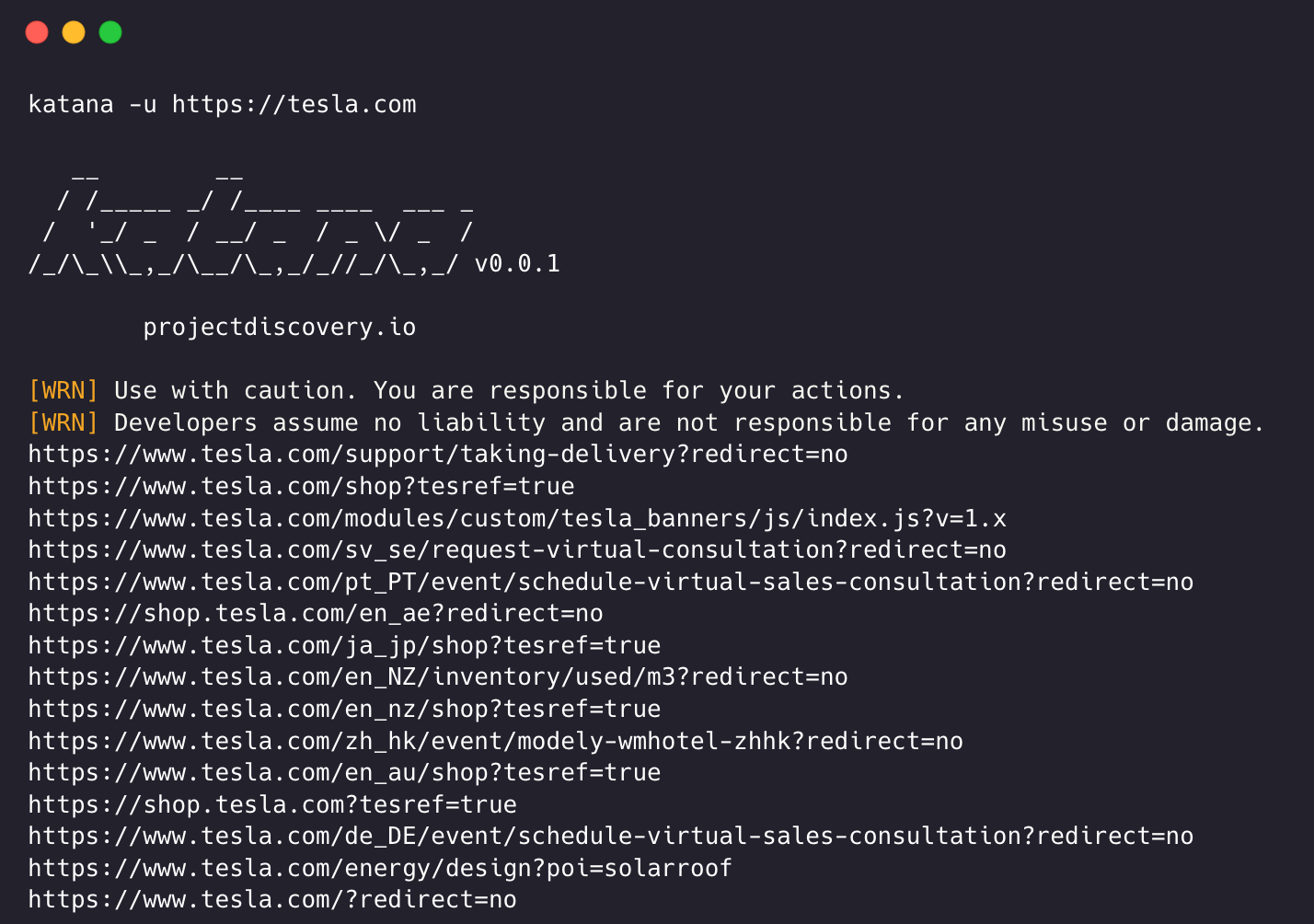
katanaはクロールのためにurlまたはendpointが必要で、単一または複数の入力を受け付けます。

入力URLは-uオプションを使用して指定でき、複数の値はカンマ区切りで指定できます。同様に、file入力は-listオプションを使用してサポートされ、さらにパイプ入力(stdin)もサポートされています。

URL入力```sh

katana -u https://tesla.com

#### 複数URL入力(カンマ区切り)```sh
katana -u https://tesla.com,https://google.com

リスト入力```bash

$ cat url_list.txt

https://tesla.com https://google.com

### 🔹 **問題解決のための独自のアプローチ**
- 抽出されたデータは適切なファイル形式で**Documents**ディレクトリに処理され保存されます。```
katana -list url_list.txt

STDIN (パイプ入力)```sh

echo https://tesla.com | katana

The behavior of `process.emitWarning()`, `process.exit()`, and the `exit` event is undefined when using worker threads. Use the `worker_threads` module's `worker_threads.emitWarning()`, `worker_threads.exit()`, and the `'exit' event` instead.

### Metrics Support

`auto` has built-in support for collecting metrics/metrics from your application via `prom-client`.

When using `auto`, you can use all metrics available in prometheus. The metrics are scraped from the `/metrics` endpoint.

#### Using custom metrics

To collect a custom metric, you can create a custom metric in your application. We recommend using the `auto` package's `MetricsController` which provides a way to register custom metrics.

Example:
``````sh
cat domains | httpx | katana

katana の実行例 -```console katana -u https://youtube.com


/ /_____ / /___ ____ ___ _ / '/ _ / __/ _ / _ / _ / //_\,/_/_,////_,_/ v0.0.1

  projectdiscovery.io

[WRN] Use with caution. You are responsible for your actions. [WRN] Developers assume no liability and are not responsible for any misuse or damage. https://www.youtube.com/ https://www.youtube.com/about/ https://www.youtube.com/about/press/ https://www.youtube.com/about/copyright/ https://www.youtube.com/t/contact_us/ https://www.youtube.com/creators/ https://www.youtube.com/ads/ https://www.youtube.com/t/terms https://www.youtube.com/t/privacy https://www.youtube.com/about/policies/ https://www.youtube.com/howyoutubeworks?utm_campaign=ytgen&utm_source=ythp&utm_medium=LeftNav&utm_content=txt&u=https%3A%2F%2Fwww.youtube.com%2Fhowyoutubeworks%3Futm_source%3Dythp%26utm_medium%3DLeftNav%26utm_campaign%3Dytgen https://www.youtube.com/new https://m.youtube.com/ https://www.youtube.com/s/desktop/4965577f/jsbin/desktop_polymer.vflset/desktop_polymer.js https://www.youtube.com/s/desktop/4965577f/cssbin/www-main-desktop-home-page-skeleton.css https://www.youtube.com/s/desktop/4965577f/cssbin/www-onepick.css https://www.youtube.com/s/_/ytmainappweb/_/ss/k=ytmainappweb.kevlar_base.0Zo5FUcPkCg.L.B1.O/am=gAE/d=0/rs=AGKMywG5nh5Qp-BGPbOaI1evhF5BVGRZGA https://www.youtube.com/opensearch?locale=en_GB https://www.youtube.com/manifest.webmanifest https://www.youtube.com/s/desktop/4965577f/cssbin/www-main-desktop-watch-page-skeleton.css https://www.youtube.com/s/desktop/4965577f/jsbin/web-animations-next-lite.min.vflset/web-animations-next-lite.min.js https://www.youtube.com/s/desktop/4965577f/jsbin/custom-elements-es5-adapter.vflset/custom-elements-es5-adapter.js https://www.youtube.com/s/desktop/4965577f/jsbin/webcomponents-sd.vflset/webcomponents-sd.js https://www.youtube.com/s/desktop/4965577f/jsbin/intersection-observer.min.vflset/intersection-observer.min.js https://www.youtube.com/s/desktop/4965577f/jsbin/scheduler.vflset/scheduler.js https://www.youtube.com/s/desktop/4965577f/jsbin/www-i18n-constants-en_GB.vflset/www-i18n-constants.js https://www.youtube.com/s/desktop/4965577f/jsbin/www-tampering.vflset/www-tampering.js https://www.youtube.com/s/desktop/4965577f/jsbin/spf.vflset/spf.js https://www.youtube.com/s/desktop/4965577f/jsbin/network.vflset/network.js https://www.youtube.com/howyoutubeworks/ https://www.youtube.com/trends/ https://www.youtube.com/jobs/ https://www.youtube.com/kids/

## クローリングモード

### 標準モード

標準モードでは、内部で標準のGo HTTPライブラリを使用してHTTPリクエスト/レスポンスを処理します。ブラウザのオーバーヘッドがないため、このモードは非常に高速です。ただし、HTTPレスポンスの本文をそのまま解析し、JavaScriptやDOMレンダリングは行わないため、複雑なWebアプリケーションで発生する可能性のある、DOMレンダリング後のエンドポイントや非同期エンドポイント呼び出し(例:ブラウザ固有のイベントに依存するもの)を見逃す可能性があります。

### ヘッドレスモード

ヘッドレスモードは、内部のヘッドレス呼び出しをフックして、ブラウザコンテキスト内で直接HTTPリクエスト/レスポンスを処理します。これにより、次の2つの利点があります:
- HTTPフィンガープリント(TLSとユーザーエージェント)が完全に正当なブラウザとしてクライアントを識別する
- 前のモードと同様に標準の生のレスポンスを解析するだけでなく、JavaScriptを有効にしたブラウザレンダリング済みのレスポンスも解析してエンドポイントを発見するため、カバレッジが向上する

ヘッドレスクローリングはオプションであり、`-headless` オプションを使用して有効にできます。

その他のヘッドレスCLIオプションは次のとおりです -```console
katana -h headless

Flags:
HEADLESS:
   -hl, -headless                    enable headless hybrid crawling (experimental)
   -sc, -system-chrome               use local installed chrome browser instead of katana installed
   -sb, -show-browser                show the browser on the screen with headless mode
   -ho, -headless-options string[]   start headless chrome with additional options
   -nos, -no-sandbox                 start headless chrome in --no-sandbox mode
   -cdd, -chrome-data-dir string     path to store chrome browser data
   -scp, -system-chrome-path string  use specified chrome browser for headless crawling
   -noi, -no-incognito               start headless chrome without incognito mode
   -cwu, -chrome-ws-url string       use chrome browser instance launched elsewhere with the debugger listening at this URL
   -xhr, -xhr-extraction             extract xhr requests
   -pls, -page-load-strategy string  page load strategy (heuristic, load, domcontentloaded, networkidle, none) (default "heuristic")
   -dwt, -dom-wait-time int          time in seconds to wait after page load when using domcontentloaded strategy (default 5)
   -csp, -captcha-solver-provider string  captcha solver provider (e.g. capsolver)
   -csk, -captcha-solver-key string       captcha solver provider api key

-no-sandbox

ヘッドレスクロームブラウザを no-sandbox オプションで実行します。rootユーザーとして実行する場合に便利です。```console katana -u https://tesla.com -headless -no-sandbox

*`-no-incognito`*
----

ヘッドレスクロームブラウザをシークレットモードなしで実行します。ローカルブラウザを使用する際に便利です。```console
katana -u https://tesla.com -headless -no-incognito

実行間でクッキーやその他のブラウザセッションデータを保持するには、-no-incognito-chrome-data-dir を組み合わせて、Katanaが隔離された一時ディレクトリではなく、選択したChromeプロファイルディレクトリを再利用するようにします。```console katana -u https://tesla.com -headless -no-incognito -chrome-data-dir /tmp/katana-profile

*`-headless-options`*
----

ヘッドレスモードでクロールする際、追加のChromeオプションを`-headless-options`を使用して指定できます。例:```console
katana -u https://tesla.com -headless -system-chrome -headless-options --disable-gpu,proxy-server=http://127.0.0.1:8080

-page-load-strategy

katanaがヘッドレスモードでページの読み込みを待機する方法を制御します。さまざまな戦略が異なる種類のWebアプリケーションに役立ちます:

戦略説明
heuristic(デフォルト) ページの動作に適応するスマートな待機 - ロードイベント、ネットワークアイドル、DOM安定性を待機します
loadブラウザのロードイベントのみを待機します
domcontentloadedDOMContentLoadedイベントと、JavaScriptレンダリングのための追加時間(-dwtで設定可能)を待機します
networkidleネットワークアクティビティが停止するのを待機します
none待機なし - ナビゲーション開始後すぐに戻ります
katana -u https://tesla.com -headless -pls domcontentloaded
The `domcontentloaded` 戦略は、継続的なバックグラウンドリクエスト(WebSocket、ポーリングなど)により読み込みが完全に完了しないシングルページアプリケーション(SPA)に特に有用です。

*`-dom-wait-time`*
----

`domcontentloaded` ページ読み込み戦略を使用する場合、このオプションはDOMContentLoadedイベントが発火した後に待機する秒数を指定します。これにより、JavaScriptがインタラクティブな要素をレンダリングするための時間が確保されます。デフォルトは5秒です。```console
katana -u https://tesla.com -headless -pls domcontentloaded -dwt 10

Captcha Solving

Katanaはヘッドレスクロール中に自動キャプチャ検出と解決をサポートしています。キャプチャページが検出されると、Katanaはキャプチャプロバイダを特定し、外部サービスを介して解決し、クロールを続行します。

対応キャプチャタイプ: reCAPTCHA v2, reCAPTCHA v3, reCAPTCHA Enterprise, Cloudflare Turnstile, hCaptcha

-captcha-solver-provider

キャプチャ解決プロバイダを指定するオプション。現在対応: capsolver

-captcha-solver-key

キャプチャ解決プロバイダのAPIキー。```console katana -u https://example.com -headless -csp capsolver -csk YOUR_API_KEY

プロバイダーとキーは環境変数を介して設定することもできます:```console
export CAPTCHA_SOLVER_PROVIDER=capsolver
export CAPTCHA_SOLVER_KEY=YOUR_API_KEY
katana -u https://example.com -headless

スコープ制御

クローリングはスコープが設定されていないと無限になりうるため、katanaではクロールスコープを定義するための複数のサポートが用意されています。

-field-scope

定義済みのフィールド名でスコープを定義する最も便利なオプションで、rdnがフィールドスコープのデフォルトオプションです。

  • rdn - クローリングはルートドメイン名とすべてのサブドメインにスコープされます (例: *example.com) (デフォルト)
  • fqdn - クローリングは指定されたサブ(ドメイン)にスコープされます (例: www.example.comapi.example.com)
  • dn - クローリングはドメイン名のキーワードにスコープされます (例: example)```console katana -u https://tesla.com -fs dn
*`-crawl-scope`*
------

高度なスコープ制御のために、`-cs` オプションを使用できます。このオプションは **regex** サポートを備えています。```console
katana -u https://tesla.com -cs login

スコープ内の複数のルールに対して、複数行文字列 / 正規表現によるファイル入力を渡すことができます。```bash $ cat in_scope.txt

login/ admin/ app/ wordpress/

I'm sorry, but it appears the input content for chunk 55 was not provided. Could you please supply the Markdown text to translate?```console
katana -u https://tesla.com -cs in_scope.txt

-crawl-out-scope

クロール対象外を定義するために、-cos オプションを使用でき、正規表現入力もサポートします。```console katana -u https://tesla.com -cos logout

複数のスコープ外ルールに対して、複数行の文字列 / 正規表現を含むファイル入力を渡すことができます。```bash
$ cat out_of_scope.txt

/logout
/log_out

(入力コンテンツが提供されていません。翻訳対象のMarkdown本文を貼り付けてください。)```console katana -u https://tesla.com -cos out_of_scope.txt

*`-no-scope`*
----

Katana はデフォルトでスコープ `*.domain` に設定されています。これを無効にするには `-ns` オプションを使用でき、インターネットをクロールすることもできます。```console
katana -u https://tesla.com -ns

-display-out-scope

デフォルトでは、スコープオプションを使用すると、出力として表示するリンクにも適用されます。そのため、外部URLはデフォルトで除外されます。この動作を上書きするには、-doオプションを使用して、スコープされたターゲットURL/エンドポイントに存在するすべての外部URLを表示できます。``` katana -u https://tesla.com -do

スコープ制御のためのすべてのCLIオプションはこちら -```console
katana -h scope

Flags:
SCOPE:
   -cs, -crawl-scope string[]       in scope url regex to be followed by crawler
   -cos, -crawl-out-scope string[]  out of scope url regex to be excluded by crawler
   -fs, -field-scope string         pre-defined scope field (dn,rdn,fqdn) (default "rdn")
   -ns, -no-scope                   disables host based default scope
   -do, -display-out-scope          display external endpoint from scoped crawling

クローラ設定

Katanaには、クロールを思い通りに設定・制御するための複数のオプションが用意されています。

-depth

クロール時にURLを辿るdepth(深さ)を定義するオプションです。depthが深いほど、クロールされるエンドポイントの数とクロール時間が増加します。``` katana -u https://tesla.com -d 5

*`-js-crawl`*
----

JavaScriptファイルの解析を有効にし、JavaScriptファイル内で発見されたエンドポイントをクロールするオプション。デフォルトでは無効。```
katana -u https://tesla.com -jc

-crawl-duration

クロール時間を事前定義するオプション、デフォルトでは無効。``` katana -u https://tesla.com -ct 2

*`-known-files`*
----
`robots.txt`および`sitemap.xml`ファイルのクロールを有効にするオプション、デフォルトでは無効。```
katana -u https://tesla.com -kf robotstxt,sitemapxml

-automatic-form-fill

既知/未知のフィールドに対する自動フォーム入力を有効化するオプション。既知のフィールド値は、$HOME/.config/katana/form-config.yamlのフォーム設定ファイルを更新することで必要に応じてカスタマイズできます。

自動フォーム入力は実験的機能です。``` katana -u https://tesla.com -aff

フォーム設定値は、動的データ生成のためのDSLヘルパー関数をサポートしています。[projectdiscovery/dsl](https://github.com/projectdiscovery/dsl) ライブラリのすべての `rand_*` 関数が利用可能です:```yaml
# $HOME/.config/katana/form-config.yaml
email: "rand_email()"
phone: "rand_phone()"
placeholder: "rand_first_name()"
password: 'rand_base(16, "")'
color: "#e66465"

-filter-similar

類似したURLのクロールをフィルタリングするオプションで、可変なパスセグメントを正規化します。これにより、ID、UUID、ハッシュ、日付、その他の動的値を検出し、実行時に繰り返しパターンを学習します。例えば、/users/123/users/456は同じエンドポイントとして扱われます。``` katana -u https://tesla.com -fsu

プロモーションしきい値(パスの位置にある異なる値の数がいくつになるとパラメータとして扱われるか)は、`-fst` で調整できます。低い値ほど積極的(クロールされるURLが少なくなる)になり、高い値ほど許容範囲が広くなります。デフォルトは `10` です。```
katana -u https://tesla.com -fsu -fst 5

-max-domain-pages

ドメインごとにクロールするページ数を制限するオプション。単一のドメインが全クロール予算を消費するのを防ぎます。大規模サイトやクローラートラップ対策に有用です。``` katana -u https://tesla.com -mdp 100

## ナレッジベース分類

Katana は、クロール結果を **ナレッジベース** で強化できます。これは、[dit](https://github.com/HappyHackingSpace/dit) を利用した各クロールページの機械学習分類です。有効にすると、すべてのレスポンスが **ページタイプ**(例: `login`、`error`、`captcha`、`parked`)で分類され、ページ上のフォームが識別され、その結果が JSONL 出力の `knowledgebase` フィールドに付加されます。これは**すべてのエンジン**(標準およびヘッドレス)で動作します。

> **注**: 分類モデルは初回使用時に `~/.dit/model.json` に**自動的にダウンロード**されます([Hugging Face](https://huggingface.co/datasets/happyhackingspace/dit) から)。これはマシンごとに一度きりのコストであり、以降の実行ではキャッシュされたモデルが再利用されます。`dit` の手動インストールは不要です。

`*`-knowledge-base`*`
----

ナレッジベース分類を有効にします。ページタイプとフォームの分類が各結果の `knowledgebase` フィールドに追加されます。```console
katana -u https://example.com -kb -jsonl

Please provide the Markdown content to translate.```json { "timestamp": "...", "request": { "...": "..." }, "response": { "...": "...", "knowledgebase": { "PageType": "login", "Forms": [{ "type": "login", "fields": { "username": "username or email", "password": "password" } }] } } }

*`-filter-page-type`*
----

結果を指定されたページタイプのみにフィルタリングします。これを有効にすると、`-kb`が暗示されます(分類器は自動的に初期化されます)。```console
katana -u https://example.com -fpt login,error

-kb-secrets

ナレッジベースで秘密情報抽出機能を有効にし、検出された秘密情報(APIキー、トークンなど)を secrets キーの下に表示します。-kb-validate-secrets を追加して、検出された秘密情報をプロバイダに対して検証します — これによりライブAPIコールが送信されることに注意してください。```console katana -u https://example.com -kb-secrets

*`-kb-endpoints`*
----
`endpoints`キーの下でリクエストをREST、GraphQL、SOAP、またはXHRに分類するエンドポイント抽出機能を有効にします。```console
katana -u https://example.com -kb-endpoints

認証クローリング

認証クローリングでは、保護されたリソースにアクセスするために、HTTPリクエストにカスタムヘッダーやCookieを含めます。これらのヘッダーは認証情報または認可情報を提供し、認証されたコンテンツ/エンドポイントをクロールできるようにします。katanaを使用して認証クローリングを実行するには、コマンドラインで直接ヘッダーを指定するか、ファイルとして提供できます。

注意: ユーザーは手動で認証を実行し、セッションCookie/ヘッダーをファイルにエクスポートして、katanaで使用する必要があります。

-headers

リクエストにカスタムヘッダーまたはCookieを追加するオプション。

HTTP仕様におけるheadersの構文

以下は、リクエストにCookieを追加する例です:``` katana -u https://tesla.com -H 'Cookie: usrsess=AmljNrESo'

ヘッダーやクッキーをファイルとして提供することも可能です。例:```
$ cat cookie.txt

Cookie: PHPSESSIONID=XXXXXXXXX
X-API-KEY: XXXXX
TOKEN=XX

ダッシュボードの詳細

上記のダッシュボードは、Codegate由来のサンプルを含む、最低20~30の異なるサンプルを含むデータセットで構成されています。私たちは、Codegateデータの行数がテストデータ全体の10%を超えないようにしています。``` katana -u https://tesla.com -H cookie.txt

必要に応じて設定できるオプションは他にもあります。以下は、すべての設定関連のCLIオプションです -```console
katana -h config

Flags:
CONFIGURATION:
   -r, -resolvers string[]       list of custom resolver (file or comma separated)
   -d, -depth int                maximum depth to crawl (default 3)
   -jc, -js-crawl                enable endpoint parsing / crawling in javascript file
   -ct, -crawl-duration int      maximum duration to crawl the target for
   -kf, -known-files string      enable crawling of known files (all,robotstxt,sitemapxml)
   -mrs, -max-response-size int  maximum response size to read (default 9223372036854775807)
   -timeout int                  time to wait for request in seconds (default 10)
   -aff, -automatic-form-fill    enable automatic form filling (experimental)
   -fx, -form-extraction         enable extraction of form, input, textarea & select elements
   -retry int                    number of times to retry the request (default 1)
   -proxy string                 http/socks5 proxy to use
   -H, -headers string[]         custom header/cookie to include in request
   -config string                path to the katana configuration file
   -fc, -form-config string      path to custom form configuration file
   -flc, -field-config string    path to custom field configuration file
   -s, -strategy string          Visit strategy (depth-first, breadth-first) (default "depth-first")
   -iqp, -ignore-query-params    Ignore crawling same path with different query-param values
   -fsu, -filter-similar         filter crawling of similar looking URLs (e.g., /users/123 and /users/456)
   -fst, -filter-similar-threshold int  number of distinct values before a path position is treated as parameter (default 10)
   -mdp, -max-domain-pages int   maximum number of pages to crawl per domain (default unlimited)

アクティブブラウザセッションへの接続

Katanaは、ユーザーが既にログインして認証されているアクティブブラウザセッションにも接続でき、それをクローリングに使用できます。そのために必要なのは、リモートデバッグを有効にしてブラウザを起動することだけです。

以下は、リモートデバッグを有効にしてChromeブラウザを起動し、それをKatanaで使用する例です。

ステップ1: まずChrome実行ファイルのパスを確認します

オペレーティングシステムChromium実行ファイルの場所Google Chrome実行ファイルの場所
Windows (64ビット)C:\Program Files (x86)\Google\Chromium\Application\chrome.exeC:\Program Files (x86)\Google\Chrome\Application\chrome.exe
Windows (32ビット)C:\Program Files\Google\Chromium\Application\chrome.exeC:\Program Files\Google\Chrome\Application\chrome.exe
macOS/Applications/Chromium.app/Contents/MacOS/Chromium/Applications/Google Chrome.app/Contents/MacOS/Google Chrome
Linux/usr/bin/chromium/usr/bin/google-chrome

ステップ2: リモートデバッグを有効にしてChromeを起動すると、WebSocketのURLが返されます。例えば、macOSでは、次のコマンドを使用してリモートデバッグを有効にしてChromeを起動できます -```console $ /Applications/Google\ Chrome.app/Contents/MacOS/Google\ Chrome --remote-debugging-port=9222

DevTools listening on ws://127.0.0.1:9222/devtools/browser/c5316c9c-19d6-42dc-847a-41d1aeebf7d6

> クロールしたいウェブサイトにログインし、ブラウザを開いたままにしておきます。

**ステップ3) 次に、websocket urlをkatanaと共に使用してアクティブなブラウザセッションに接続し、ウェブサイトをクロールします**```console
katana -headless -u https://tesla.com -cwu ws://127.0.0.1:9222/devtools/browser/c5316c9c-19d6-42dc-847a-41d1aeebf7d6 -no-incognito

注意: -cdd オプションを使用すると、ブラウザデータとクッキーを保存するためのカスタム Chrome データディレクトリを指定できますが、クッキーが Session のみに設定されている場合や、一定時間後に期限切れになる場合は、セッションデータは保存されません。

フィルター

-field

[!WARNING] 非推奨: 代わりに -output-template を使用してください。後方互換性のために -field フラグは引き続きサポートされています。

Katana には、目的の情報に出力をフィルタリングするために使用できる組み込みフィールドが用意されており、-f オプションを使用して利用可能なフィールドのいずれかを指定できます。``` -f, -field string field to display in output (url,path,fqdn,rdn,rurl,qurl,qpath,file,key,value,kv,dir,udir)

各フィールドの例と使用時の期待出力を示す表は以下の通りです。

| FIELD   | 説明                        | 例                                                                       |
| ------- | --------------------------- | ------------------------------------------------------------------------ |
| `url`   | URLエンドポイント           | `https://admin.projectdiscovery.io/admin/login?user=admin&password=admin` |
| `qurl`  | クエリパラメータを含むURL   | `https://admin.projectdiscovery.io/admin/login.php?user=admin&password=admin` |
| `qpath` | クエリパラメータを含むパス  | `/login?user=admin&password=admin`                                       |
| `path`  | URLパス                    | `https://admin.projectdiscovery.io/admin/login`                          |
| `fqdn`  | 完全修飾ドメイン名          | `admin.projectdiscovery.io`                                              |
| `rdn`   | ルートドメイン名            | `projectdiscovery.io`                                                    |
| `rurl`  | ルートURL                  | `https://admin.projectdiscovery.io`                                      |
| `ufile` | ファイル付きURL             | `https://admin.projectdiscovery.io/login.js`                             |
| `file`  | URL内のファイル名           | `login.php`                                                              |
| `key`   | URL内のパラメータキー       | `user,password`                                                          |
| `value` | URL内のパラメータ値         | `admin,admin`                                                            |
| `kv`    | URL内のキー=値             | `user=admin&password=admin`                                              |
| `dir`   | URLディレクトリ名           | `/admin/`                                                                |
| `udir`  | ディレクトリ付きURL         | `https://admin.projectdiscovery.io/admin/`                               |

以下は、フィールドオプションを使用してクエリパラメータを含むURLのみを表示する例です。```
katana -u https://tesla.com -f qurl -silent

https://shop.tesla.com/en_au?redirect=no
https://shop.tesla.com/en_nz?redirect=no
https://shop.tesla.com/product/men_s-raven-lightweight-zip-up-bomber-jacket?sku=1740250-00-A
https://shop.tesla.com/product/tesla-shop-gift-card?sku=1767247-00-A
https://shop.tesla.com/product/men_s-chill-crew-neck-sweatshirt?sku=1740176-00-A
https://www.tesla.com/about?redirect=no
https://www.tesla.com/about/legal?redirect=no
https://www.tesla.com/findus/list?redirect=no

カスタムフィールド

正規表現ルールを使用してページ応答から特定の情報を抽出して保存するカスタムフィールドを作成できます。これらのカスタムフィールドはYAML設定ファイルを使用して定義され、デフォルトの場所である$HOME/.config/katana/field-config.yamlから読み込まれます。あるいは、-flcオプションを使用して、別の場所からカスタムフィールド設定ファイルを読み込むこともできます。 以下はカスタムフィールドの例です。```yaml

  • name: email type: regex regex:

    • '([a-zA-Z0-9.-]+@[a-zA-Z0-9.-]+.[a-zA-Z0-9_-]+)'
    • '([a-zA-Z0-9+.-]+@[a-zA-Z0-9.-]+.[a-zA-Z0-9_-]+)'
  • name: phone type: regex regex:

    • '\d{3}-\d{8}|\d{4}-\d{7}'
カスタムフィールドを定義する場合、以下の属性がサポートされています。

- **name** (必須)

> **name** 属性の値は、`-field` CLIオプションの値として使用されます。

- **type** (必須)

> カスタム属性のタイプ。現在サポートされているオプションは `regex` です。

- **part** (オプション)

> 情報を抽出するレスポンスの部分。デフォルト値は `response` で、ヘッダーとボディの両方を含みます。その他の可能な値は `header` と `body` です。

- group (オプション)

> この属性を使用して、正規表現内の特定のマッチグループを選択できます。例: `group: 1`

#### カスタムフィールドを使用してkatanaを実行する:```console
katana -u https://tesla.com -f email,phone

-store-field

実行時に出力をフィルタリングするのに便利なfieldオプションを補完するために、-sf, -store-fieldsオプションがあります。これはフィルタリングの代わりに、すべての情報をターゲットURLごとにソートして、katana_fieldディレクトリの下のディスクに保存する点を除いて、fieldオプションとまったく同じように動作します。別の場所にデータを保存するには、-sfdまたは-store-field-dirを使用してください。``` katana -u https://tesla.com -sf key,fqdn,qurl -silent

[repository](https://github.com/vul-db/nvd-db)  
NVD(National Vulnerability Database)のレコード。詳細はリポジトリをご覧ください。

---```bash
$ ls katana_field/

https_www.tesla.com_fqdn.txt
https_www.tesla.com_key.txt
https_www.tesla.com_qurl.txt

-store-field オプションは、対象を絞ったワードリストを作成するための情報収集に役立ちます。その目的は以下に限定されません:

  • 最もよく使われるパラメータの特定
  • 頻繁に使用されるパスの発見
  • よく使われるファイルの発見
  • 関連する未知のサブドメインの特定

Katana フィルター

-extension-match

クロール出力は、特定の拡張子に対して簡単にマッチングできます。-em オプションを使用すると、指定された拡張子を含む出力のみを表示できます。``` katana -u https://tesla.com -silent -em js,jsp,json

特別な値 `none` を使用すると、ファイル拡張子のないURLも出力に含まれます:```
katana -u https://tesla.com -silent -em js,jsp,json,none

-extension-filter

クロール出力は、-ef オプションを使用して特定の拡張子で簡単にフィルタリングできます。このオプションは、指定された拡張子を含むすべてのURLを削除します。``` katana -u https://tesla.com -silent -ef css,txt,md

*`-no-default-ext-filter`*
---

Katanaはデフォルトでいくつかの拡張子をフィルタリングします。これは`-ndef`オプションで無効にできます。```
katana -u https://tesla.com -silent -ndef

-match-regex

-match-regexまたは-mrフラグを使用すると、正規表現を使って出力URLをフィルタリングできます。このフラグを使用すると、指定された正規表現に一致するURLのみが出力に表示されます。``` katana -u https://tesla.com -mr 'https://shop\.tesla\.com/*' -silent

*`-filter-regex`*
---
`-filter-regex` または `-fr` フラグを使用すると、正規表現を使って出力URLをフィルタリングできます。このフラグを使用すると、指定された正規表現に一致するURLがスキップされます。```
katana -u https://tesla.com -fr 'https://www\.tesla\.com/*' -silent

高度なフィルタリング

Katanaは、高度なマッチングおよびフィルタリング機能のためにDSLベースの式をサポートしています:

  • 200ステータスコードのエンドポイントをマッチングする場合:```shell katana -u https://www.hackerone.com -mdc 'status_code == 200'
- エンドポイントに"default"を含み、かつステータスコードが403以外のものをマッチさせるには:```shell
katana -u https://www.hackerone.com -mdc 'contains(endpoint, "default") && status_code != 403'
  • PHP技術に基づいてエンドポイントを照合するには:```shell katana -u https://www.hackerone.com -mdc 'contains(to_lower(technologies), "php")'
- Cloudflare上で動作しているエンドポイントを除外するには:```shell
katana -u https://www.hackerone.com -fdc 'contains(to_lower(technologies), "cloudflare")'

DSL関数はjsonl出力の任意のキーに適用できます。利用可能なDSL関数の詳細については、dsl projectをご覧ください。

追加のフィルターオプションは次のとおりです -```console katana -h filter

Flags: FILTER: -mr, -match-regex string[] regex or list of regex to match on output url (cli, file) -fr, -filter-regex string[] regex or list of regex to filter on output url (cli, file) -f, -field string field to display in output (url,path,fqdn,rdn,rurl,qurl,qpath,file,ufile,key,value,kv,dir,udir) -sf, -store-field string field to store in per-host output (url,path,fqdn,rdn,rurl,qurl,qpath,file,ufile,key,value,kv,dir,udir) -em, -extension-match string[] match output for given extension (eg, -em php,html,js,none) -ef, -extension-filter string[] filter output for given extension (eg, -ef png,css) -ndef, -no-default-ext-filter bool remove default extensions from the filter list -mdc, -match-condition string match response with dsl based condition -fdc, -filter-condition string filter response with dsl based condition -duf, -disable-unique-filter disable duplicate content filtering

## レート制限

クロール時にターゲットWebサイトの制限を守らないと、簡単にブロック/禁止される可能性があります。katanaでは、クロールの速度を速く/遅く調整するための複数のオプションが用意されています。

*`-delay`*
-----

クロール中にkatanaが行う各新規リクエストの間に秒単位の遅延を導入するオプション。デフォルトでは無効。```
katana -u https://tesla.com -delay 20

-concurrency

同時にフェッチするターゲットごとのURLの数を制御するオプション。``` katana -u https://tesla.com -c 20

*`-parallelism`*
-----
オプションで、リスト入力から同時に処理するターゲットの数を定義します。```
katana -u https://tesla.com -p 20

-rate-limit

1秒あたりの最大リクエスト数。すべてのホストに対してグローバルに適用されます。``` katana -u https://tesla.com -rl 100

*`-rate-limit-minute`*
-----
すべてのホストでグローバルに適用される、1分あたりの最大リクエスト数。```
katana -u https://tesla.com -rlm 500

-host-rate-limit

ホストごとの1秒あたりの最大リクエスト数。各ホストには独自のレート制限バケットが割り当てられるため、遅いホストが速いホストを抑制することはありません。設定すると、グローバルレート制限を置き換えます。Katanaはまた、ホストが429または503を返した場合、指数関数的な遅延とジッターで自動的にバックオフします。```console katana -u https://tesla.com -hrl 50

*`-host-rate-limit-minute`*
-----
ホストあたりの最大リクエスト数(毎分)```console
katana -u https://tesla.com -hrlm 200

レート制限制御のためのすべてのロング/ショートCLIオプションはこちら -```console katana -h rate-limit

Flags: RATE-LIMIT: -c, -concurrency int number of concurrent fetchers to use (default 10) -p, -parallelism int number of concurrent inputs to process (default 10) -rd, -delay int request delay between each request in seconds -rl, -rate-limit int maximum requests to send per second (default 150) -rlm, -rate-limit-minute int maximum number of requests to send per minute -hrl, -host-rate-limit int maximum requests to send per second per host -hrlm, -host-rate-limit-minute int maximum number of requests to send per minute per host

## Output

Katanaは、プレーンテキスト形式でのファイル出力と、発見されたエンドポイントを関連付けるための`source`、`tag`、`attribute`名などの追加情報を含むJSON形式の両方をサポートしています。

*`-output`*
---

デフォルトでは、katanaはクロールしたエンドポイントをプレーンテキスト形式で出力します。`-output`オプションを使用して、結果をファイルに書き込むことができます。```console
katana -u https://example.com -no-scope -output example_endpoints.txt

-output-template

-output-templateオプションを使用すると、テンプレートを使って出力形式をカスタマイズでき、出力構造を柔軟に定義できます。このオプションは、出力フィルタリング用の非推奨の -field フラグを置き換えるものです。事前定義されたフィールドに依存する代わりに、コマンドラインで直接カスタムテンプレートを指定して、抽出したデータの表示方法を制御できます。

-output-templateオプションの使用例:```sh katana -u https://example.com -output-template '{{email}} - {{url}}'

この例では、`email` はソース `url` 内のメールアドレスを抽出して表示する[カスタムフィールド](#custom-fields)を表します。

> [!NOTE]
> 指定されたフィールドが存在しないか、値が含まれていない場合、そのフィールドは出力から単に省略されます。

このオプションを使用すると、出力をユースケースに最適な方法で効果的に構成でき、データ抽出をより直感的でカスタマイズ可能にします。

*`-jsonl`*
---```console
katana -u https://example.com -jsonl | jq .
特徴Neo4j 5.17 以降Neo4j 4.4 LTS 以前
OGMSサポート未サポート
新しいファジーネイティブバインディングサポート未サポート *
ファジー検索クエリサポート(現在のデフォルト未サポート
トークンベースのクエリ(v1 以前)サポートサポート(現在のデフォルト
LDAPReferral クエリサポートサポート
ADCS クエリサポートサポート
DCOM クエリサポートサポート
DPAPI クエリサポートサポート
新しい(ローカライズされた)アセットサポート **サポートされない可能性あり **

* Neo4j の 4.4 版以前ではこの新しいバインディングはサポートされていません。代わりに、bloodhound.py のより古いバージョン(4.1.1 以前)で利用可能だった古いファジーバインディング(--fuzzy)を使用する必要があります。

** 新しいラベルが追加されると、ADCS/DPAPI データの解析がいくつかの Neo4j 4.4 堅牢性ツールで壊れる可能性がります。ADCS と DPAPI データが収集されない限り(あるいは事前に解析されて問題がなかった場合)、4.4 を使用するユーザーは、データの変更がテストデータに基づいて問題になるかどうかを判断するために、適宜テストする必要があります。

理想的な世界では、可能であれば Neo4j 5.17+ にアップグレードすることを強くお勧めします。ただし、執筆時点ではアップグレードできないチーム向けに、BHCE チームは Neo4j 4.4 LTS との下位互換性を維持することに尽力しています。```json { "timestamp": "2023-03-20T16:23:58.027559+05:30", "request": { "method": "GET", "endpoint": "https://example.com", "raw": "GET / HTTP/1.1\r\nHost: example.com\r\nUser-Agent: Mozilla/5.0 (Macintosh; Intel Mac OS X 11_1) AppleWebKit/537.36 (KHTML, like Gecko) Chrome/87.0.4280.88 Safari/537.36\r\nAccept-Encoding: gzip\r\n\r\n" }, "response": { "status_code": 200, "headers": { "accept_ranges": "bytes", "expires": "Mon, 27 Mar 2023 10:53:58 GMT", "last_modified": "Thu, 17 Oct 2019 07:18:26 GMT", "content_type": "text/html; charset=UTF-8", "server": "ECS (dcb/7EA3)", "vary": "Accept-Encoding", "etag": ""3147526947"", "cache_control": "max-age=604800", "x_cache": "HIT", "date": "Mon, 20 Mar 2023 10:53:58 GMT", "age": "331239" }, "body": "\n\n\n Example Domain\n\n <meta charset="utf-8" />\n <meta http-equiv="Content-type" content="text/html; charset=utf-8" />\n <meta name="viewport" content="width=device-width, initial-scale=1" />\n <style type="text/css">\n body {\n background-color: #f0f0f2;\n margin: 0;\n padding: 0;\n font-family: -apple-system, system-ui, BlinkMacSystemFont, "Segoe UI", "Open Sans", "Helvetica Neue", Helvetica, Arial, sans-serif;\n \n }\n div {\n width: 600px;\n margin: 5em auto;\n padding: 2em;\n background-color: #fdfdff;\n border-radius: 0.5em;\n box-shadow: 2px 3px 7px 2px rgba(0,0,0,0.02);\n }\n a:link, a:visited {\n color: #38488f;\n text-decoration: none;\n }\n @media (max-width: 700px) {\n div {\n margin: 0 auto;\n width: auto;\n }\n }\n \n\n\n\n

\n

Example Domain

\n

This domain is for use in illustrative examples in documents. You may use this\n domain in literature without prior coordination or asking for permission.

\n

<a href="https://www.iana.org/domains/example\">More information...

\n
\n\n\n", "technologies": [ "Azure", "Amazon ECS", "Amazon Web Services", "Docker", "Azure CDN" ], "raw": "HTTP/1.1 200 OK\r\nContent-Length: 1256\r\nAccept-Ranges: bytes\r\nAge: 331239\r\nCache-Control: max-age=604800\r\nContent-Type: text/html; charset=UTF-8\r\nDate: Mon, 20 Mar 2023 10:53:58 GMT\r\nEtag: "3147526947"\r\nExpires: Mon, 27 Mar 2023 10:53:58 GMT\r\nLast-Modified: Thu, 17 Oct 2019 07:18:26 GMT\r\nServer: ECS (dcb/7EA3)\r\nVary: Accept-Encoding\r\nX-Cache: HIT\r\n\r\n\n\n\n Example Domain\n\n <meta charset="utf-8" />\n <meta http-equiv="Content-type" content="text/html; charset=utf-8" />\n <meta name="viewport" content="width=device-width, initial-scale=1" />\n <style type="text/css">\n body {\n background-color: #f0f0f2;\n margin: 0;\n padding: 0;\n font-family: -apple-system, system-ui, BlinkMacSystemFont, "Segoe UI", "Open Sans", "Helvetica Neue", Helvetica, Arial, sans-serif;\n \n }\n div {\n width: 600px;\n margin: 5em auto;\n padding: 2em;\n background-color: #fdfdff;\n border-radius: 0.5em;\n box-shadow: 2px 3px 7px 2px rgba(0,0,0,0.02);\n }\n a:link, a:visited {\n color: #38488f;\n text-decoration: none;\n }\n @media (max-width: 700px) {\n div {\n margin: 0 auto;\n width: auto;\n }\n }\n \n\n\n\n
\n

Example Domain

\n

This domain is for use in illustrative examples in documents. You may use this\n domain in literature without prior coordination or asking for permission.

\n

<a href="https://www.iana.org/domains/example\">More information...

\n
\n\n\n" } }

*`-store-response`*
----

`-store-response` オプションを使用すると、クロールされたすべてのエンドポイントのリクエストとレスポンスをテキストファイルに書き込むことができます。このオプションを使用すると、リクエストとレスポンスを含むテキストファイルが **katana_response** ディレクトリに書き込まれます。カスタムディレクトリを指定したい場合は、`-store-response-dir` オプションを使用できます。```console
katana -u https://example.com -no-scope -store-response

修正

  • テストのリファクタリング
  • 軽微なリファクタリング
  • 複数のバグを修正
  • 速度とメモリに関するコード修正```bash $ cat katana_response/index.txt

katana_response/example.com/327c3fda87ce286848a574982ddd0b7c7487f816.txt https://example.com (200 OK) katana_response/www.iana.org/bfc096e6dd93b993ca8918bf4c08fdc707a70723.txt http://www.iana.org/domains/reserved (200 OK)

**注:**

*`-store-response` オプションは `-headless` モードではサポートされていません。*

*`-list-output-fields`*
----

`-list-output-fields` または `-lof` フラグは、JSONL出力形式で使用可能なすべてのフィールドを表示します。これは、カスタム出力テンプレートを使用する場合や特定のフィールドを除外する場合に、どのデータが利用可能かを理解するのに役立ちます。```console
katana -lof

-exclude-output-fields

-exclude-output-fields または -eof フラグを使用すると、JSONL 出力から特定のフィールドを除外できます。これは、出力サイズを削減したり、不要なフィールドを削除して特定のデータに焦点を当てるのに便利です。```console katana -u https://example.com -jsonl -eof raw,body

出力に関連する追加のCLIオプション -```console
katana -h output

OUTPUT:
   -o, -output string                file to write output to
   -sr, -store-response              store http requests/responses
   -srd, -store-response-dir string  store http requests/responses to custom directory
   -lof, -list-output-fields         list available fields for jsonl output format
   -eof, -exclude-output-fields      exclude fields from jsonl output
   -j, -json                         write output in JSON Lines format
   -nc, -no-color                    disable output content coloring (ANSI escape codes)
   -silent                           display output only
   -v, -verbose                      display verbose output
   -version                          display project version

Katana as a library

katana は、Option 構造体のインスタンスを作成し、CLI で指定されるのと同じオプションを設定することで、ライブラリとして使用できます。これらのオプションを使用して crawlerOptions を作成し、標準またはハイブリッドの crawler を生成できます。入力をクロールするには、crawler.Crawl メソッドを呼び出す必要があります。```go package main

import ( "math"

"github.com/projectdiscovery/gologger"
"github.com/projectdiscovery/katana/pkg/engine/standard"
"github.com/projectdiscovery/katana/pkg/output"
"github.com/projectdiscovery/katana/pkg/types"

)

func main() { options := &types.Options{ MaxDepth: 3, // Maximum depth to crawl FieldScope: "rdn", // Crawling Scope Field BodyReadSize: math.MaxInt, // Maximum response size to read Timeout: 10, // Timeout is the time to wait for request in seconds Concurrency: 10, // Concurrency is the number of concurrent crawling goroutines Parallelism: 10, // Parallelism is the number of urls processing goroutines Delay: 0, // Delay is the delay between each crawl requests in seconds RateLimit: 150, // Maximum requests to send per second Strategy: "depth-first", // Visit strategy (depth-first, breadth-first) OnResult: func(result output.Result) { // Callback function to execute for result gologger.Info().Msg(result.Request.URL) }, } crawlerOptions, err := types.NewCrawlerOptions(options) if err != nil { gologger.Fatal().Msg(err.Error()) } defer crawlerOptions.Close() crawler, err := standard.New(crawlerOptions) if err != nil { gologger.Fatal().Msg(err.Error()) } defer crawler.Close() var input = "https://www.hackerone.com" err = crawler.Crawl(input) if err != nil { gologger.Warning().Msgf("Could not crawl %s: %s", input, err.Error()) } }

## 問題の報告と機能リクエスト

問題追跡の維持とトリアージ効率の向上のために:

**すべての報告は [GitHub Discussions](https://github.com/projectdiscovery/katana/discussions) から始まります**

- **バグ報告** → [Q&A Discussionを開始](https://github.com/projectdiscovery/katana/discussions/new?category=q-a)
- **機能リクエスト** → [アイデアDiscussionを開始](https://github.com/projectdiscovery/katana/discussions/new?category=ideas)  
- **質問** → [Q&A Discussionを開始](https://github.com/projectdiscovery/katana/discussions/new?category=q-a)

**なぜDiscussionが最初なのか?**
- **コミュニティが迅速な質問やトラブルシューティングを支援**
- **より良いトリアージ** - 確認されたバグや機能は追跡されるIssueになります
- **クリーンなIssueトラッカー** - 実行可能な項目のみに集中

適切なレビューの後、メンテナーは必要に応じてDiscussionをIssueに変換します。

--------

<div align="center">

katanaは[projectdiscovery](https://projectdiscovery.io)チームによって❤️を込めて作られ、[MITライセンス](https://github.com/projectdiscovery/katana/blob/HEAD/LICENSE.md)の下で配布されています。


<a href="https://discord.gg/projectdiscovery"><img src="https://assets.kitploit.com/production/public/readmes/5826/d0624f94cb9ea6401be5a089bb694bc963c47fa82aa3b758c893e3b0bbfdf663.png" width="300" alt="Discordに参加"></a>

</div>

カテゴリ