
pingtunnel master-a0d08ec7d44f4829c543416542ef3734453a4a55
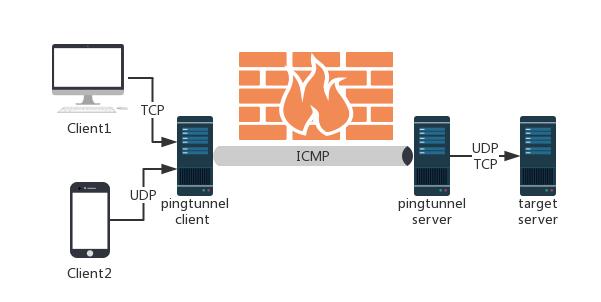
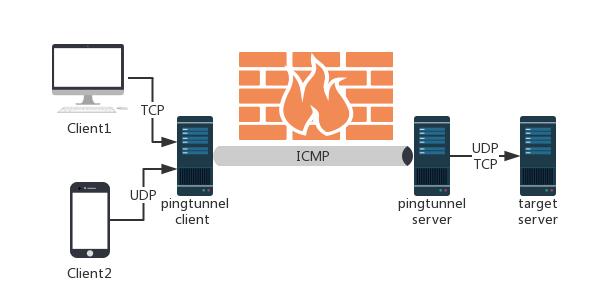
Pingtunnelは、TCP/UDPトラフィックをICMP経由で送信するツールです。
Pingtunnel







Pingtunnel is a network tool that tunnels TCP/UDP/SOCKS5 traffic over ICMP Echo (Ping) packets to bypass strict network firewalls or throttled TCP/UDP traffic.
⚠️ Note: This tool is strictly intended for study and research purposes. Do not use it for any illegal purpose.
🌟 Features
- Unified v3 security architecture: the old numeric key and separate encryption switches are gone. A single shared password (
-password) drives mutual authentication and end-to-end AEAD encryption (defaultchacha20-poly1305, optionalaes256/aes128). - Multiple modes:
- SOCKS5 proxy: start a local SOCKS5 proxy with one command, with optional username/password authentication;
- TCP port forwarding: reach a specific remote TCP port (e.g. SSH, web, RDP);
- UDP port forwarding: forward game UDP traffic, DNS 53, etc.;
- Server-side secondary forwarding (
-forward): the server can relay incoming traffic through an upstream SOCKS5/HTTP proxy.
- Flexible configuration (config file mode recommended):
- Run directly with a config file:
pingtunnel config.jsonorpingtunnel -c config.json; config.jsonin the current directory is loaded automatically by default;- Command-line flags always override the matching config file values.
- Run directly with a config file:
- Resilient on poor networks: a built-in bandwidth-adaptive congestion control algorithm (
bb) suppresses bufferbloat and packet-loss-induced stalls.
🚀 Quick Start
Option 1: Config file mode (Recommended)
Sample files ship with the repository. Just fill in your server IP and a strong password:
1. Server config (config-server.json)
{
  "type": "server",
  "password": "YOUR_STRONG_PASSWORD_HERE",
  "encrypt": "chacha20",
  "icmp_listen": "0.0.0.0"
}
Start the server (requires root / administrator privileges):
sudo ./pingtunnel config-server.json
# or: sudo ./pingtunnel -c config-server.json
2. Client config (SOCKS5 proxy mode, config-client-socks5.json)
{
  "type": "client",
  "listen": "127.0.0.1:1080",
  "server": "YOUR_SERVER_IP",
  "socks5": true,
  "password": "YOUR_STRONG_PASSWORD_HERE",
  "encrypt": "chacha20"
}
Start the client:
./pingtunnel config-client-socks5.json
# or: ./pingtunnel -c config-client-socks5.json
Then set your browser or system proxy to SOCKS5 127.0.0.1:1080.
Option 2: Command line (CLI)
1. Start the server
Run on a machine with a public IP:
sudo ./pingtunnel -type server -password YOUR_STRONG_PASSWORD_HERE
(Optional) Disable the Linux kernel's default ICMP echo replies to avoid interference:
echo 1 > /proc/sys/net/ipv4/icmp_echo_ignore_all
2. Start the client
- SOCKS5 proxy mode:
./pingtunnel -type client -l 127.0.0.1:1080 -s YOUR_SERVER_IP -socks5 -password YOUR_STRONG_PASSWORD_HERE - TCP port forwarding (default mode, e.g. map remote internal 192.168.1.100:22 to local port 2222):
./pingtunnel -type client -l :2222 -s YOUR_SERVER_IP -t 192.168.1.100:22 -password YOUR_STRONG_PASSWORD_HERE - UDP forwarding (e.g. local port 5353 to public DNS 8.8.8.8:53):
./pingtunnel -type client -l :5353 -s YOUR_SERVER_IP -t 8.8.8.8:53 -udp -password YOUR_STRONG_PASSWORD_HERE
🐳 Docker
Run the server
docker run --name pingtunnel-server -d \
  --restart=always \
  --privileged \
  --network host \
  esrrhs/pingtunnel ./pingtunnel -type server -password YOUR_STRONG_PASSWORD_HERE
Run with a mounted config file
docker run --name pingtunnel-server -d \
  --restart=always \
  --privileged \
  --network host \
  -v /etc/pingtunnel/server.json:/app/server.json:ro \
  esrrhs/pingtunnel ./pingtunnel /app/server.json
📖 Detailed Usage and Tuning Guide
For more advanced options and topologies (server-side secondary proxy, port forwarding, SOCKS5 authentication, flow control and congestion tuning), see: 👉 USAGE.md - Pingtunnel Usage and Configuration Guide