vqkro/higernes
पायथन में एक निष्क्रिय OSINT टूलकिट: उपयोगकर्ता नाम, ईमेल, डोमेन, आईपी, फ़ोन, हैश। कोई कुंजी नहीं, कोई लॉगिन नहीं।
python में passive osint टूलकिट। कोई api keys नहीं, कोई accounts नहीं, किसी चीज़ में लॉगिन नहीं। इसे एक handle, एक email, एक domain, एक ip, एक phone number या एक hash दें और यह जो पहले से सार्वजनिक है उसी में से खोजता है।
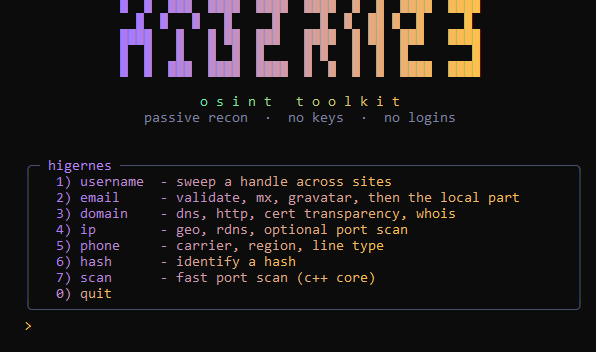
username एक handle को लगभग 700 साइटों पर sweep करता है, community की WhatsMyName सूची का उपयोग करके। उस सूची की प्रत्येक entry जानती है कि hit को miss से कैसे अलग किया जाए, इसलिए परिणाम अनुमान नहीं होते। email syntax और mx की जाँच करता है, disposable domains खोजता है, gravatar आज़माता है, फिर @ से पहले वाले हिस्से को username sweep से गुज़ारता है। domain dns records, http status और title, certificate transparency से subdomains और whois निकालता है। ip geo और asn, reverse dns देता है, और अगर आप कहें तो ports scan करता है। phone carrier, region, line type और timezone बताता है। hash बस बताता है कि यह संभवतः क्या है।
यह सब सार्वजनिक डेटा है। dns, whois, profile pages, cert logs।
python 3.9 या नया चाहिए। फिर:
pip install -r requirements.txt
इससे आपको rich, requests, dnspython और aiohttp मिल जाते हैं। phonenumbers भी साथ आता है लेकिन केवल phone module इसे छूता है, इसलिए अगर चाहें तो इसे फ़ाइल से हटा सकते हैं। aiohttp के बिना username sweep threads पर fallback कर जाता है और बहुत धीमा हो जाता है, इसलिए इसे रखें।
windows पर, अगर python अभी आपके path पर नहीं है:
winget install --id Python.Python.3.13 -e
git clone https://gitlab.com/vqkro/higernes
cd higernes
pip install -r requirements.txt
python higernes.py
linux और mac वही चीज़ हैं बस python3 के साथ:
git clone https://gitlab.com/vqkro/higernes
cd higernes
python3 -m pip install -r requirements.txt
python3 higernes.py
freebsd पर पहले pkg install -y python3 करें।
अगर pip externally managed environment की शिकायत करे, तो या तो venv बनाएँ
python3 -m venv .venv && . .venv/bin/activate && pip install -r requirements.txt
या --break-system-packages पास करें और आगे बढ़ें।
कोई arguments नहीं तो आपको menu मिलता है। या सीधे किसी चीज़ पर जाएँ:
python higernes.py username vqkro
python higernes.py username vqkro --cat coding
python higernes.py email [email protected]
python higernes.py domain example.com
python higernes.py ip 1.1.1.1 --ports
python higernes.py phone +14155552671
python higernes.py hash 5f4dcc3b5aa765d61d8327deb882cf99
python higernes.py scan example.com
python higernes.py scan example.com --all
एक category केवल username sweep को सीमित करती है। इसे छोड़ दें तो यह सभी 700 पर हमला करता है।
data/wmn-data.json WhatsMyName dataset है। कभी भी नई copy बदल सकते हैं, यह startup पर पढ़ी जाती है। अगर फ़ाइल वहाँ नहीं है तो यह script में baked एक छोटी सूची पर fallback करता है ताकि चीज़ें फिर भी चलें।
python में port scanner धीमा है, इसलिए वह हिस्सा core/hcore.cpp में रहता है और एक छोटे binary में compile होता है। higernes इसे अपने पास, core/ में, या path पर खोजता है, और shell out करता है। अगर यह वहाँ नहीं है, तो ip --ports धीमे python संस्करण पर fallback करता है। इसे बनाने की ज़रूरत आपको केवल तब है जब आप source से चला रहे हों और fast path चाहते हों:
# windows
g++ -O2 -std=c++17 -static -o core/hcore.exe core/hcore.cpp -lws2_32

# linux / mac
g++ -O2 -std=c++17 -o core/hcore core/hcore.cpp -pthread
यह अपने आप में भी खड़ा है:
hcore dns github.com
hcore ports example.com --banners
hcore ports example.com --all --threads 1024
releases page पर मौजूद exe में यह पहले से अंदर है।
dnspython और requests रखने लायक हैं। dnspython के बिना केवल A record resolve होता है, बाकी सब skip हो जाता है। ip-api का free endpoint लगभग 45 lookups प्रति मिनट throttle करता है। crt.sh आधे समय धीमा या down रहता है, और जब ऐसा होता है तो domain scan बस बता देता है और आगे बढ़ जाता है।
pip install pyinstaller
pyinstaller --onefile --name higernes --console higernes.py
releases page पर जो है वह इसी तरह बनाया गया था।
MIT, LICENSE देखें।