 xcapri/subdosec
तेज़, सटीक सबडोमेन टेकओवर स्कैनर जिसमें शून्य गलत सकारात्मक परिणाम होते हैं। यह संवेदनशील सबडोमेन का पता लगाता है, मेटाडेटा (IP, CNAME, शीर्षक, स्थिति कोड) एकत्र करता है, और टोही के लिए AI-सहायित विश्लेषण प्रदान करता है।

Subdosec
सबडोमेन टेकओवर स्कैनर और टोही उपकरण।
स्थापना • उपयोग • वेब आधारित • योगदान • ऑनलाइन स्कैन • आभार
Subdosec एक तेज़ और सटीक सबडोमेन टेकओवर स्कैनर है जिसमें कोई गलत सकारात्मक परिणाम नहीं होते, जिसमें कमजोर सबडोमेन का एक सार्वजनिक डेटाबेस और टोही के लिए विस्तृत गैर-कमजोर मेटाडेटा (IP, CNAME, शीर्षक, और स्थिति कोड) शामिल है।
subdosec को स्थापित या अपग्रेड करें
pipx install git+https://github.com/xcapri/subdosec.git
pipx upgrade subdosec
फिर हर बार जब आप एक नया टर्मिनल सत्र शुरू करें तो इसे चलाएं ("server started successfully" होने तक)।
$ subdosec -ins

Starting Node.js server...
Node.js server started successfully.
[चेतावनी] test.txt में सभी सबडोमेन को टेकओवर न करें, इसे सभी को डेमो के लिए उपयोग करने दें।
[जानकारी] साथ ही रिलीज़ अनुभाग देखें। आपको दिलचस्प जानकारी मिल सकती है।
$ subdosec -h
   _____       __        __
  / ___/__  __/ /_  ____/ /___  ________  _____
  \__ \/ / / / __ \/ __  / __ \/ ___/ _ \/ ___/
 ___/ / /_/ / /_/ / /_/ / /_/ (__  )  __/ /__
/____/\__,_/_.___/\__,_/\____/____/\___/\___/


usage: subdosec [-h] [-mode {private,public}] [-initkey INITKEY] [-vo] [-pe] [-ins] [-pf PF] [-subfng SUBFNG] [-lf LF] [-sfid] [-ks] [-o O] [-su] [-lu LU] [-lm] [-uf] [-unai UNAI] [-v] [-t THREADS]

Subdomain takeover scanner.

options:
  -h, --help            show this help message and exit
  -mode {private,public}
                        Mode of operation (private/public)
  -initkey INITKEY      Initialize the API key
  -vo                   VULN Only: Hide UNDETECT messages
  -pe                   Print Error: When there are problems detecting your target
  -ins                  Prepar node & start server
  -pf PF                Private Fingerprint: uses your local fingerprint. Example: -pf /path/to/tko.json
  -subfng SUBFNG        Submit fingerprint: submit local fingerprint to admin. Example: -subfng localfinger.json
  -lf LF                Fingerprint lock: to focus on one or multiple fingerprints. (-lf github.io,surge.sh) and leave this arg to scan all fingerprints
  -sfid                 To view all available fingerprint ids.
  -ks                   To shut down the server node if you want to not use subdosec for a long time.
  -o O                  Save result locally to the specified path. Example: -o /path/to/dir
  -su                   Skip undetect will not stored to server (https://subdosec.vulnshot.com/result/undetected)
  -lu LU                Undetec stored localy to the specified path. Example: -lu /path/to/dir
  -lm                   Local Mode: Save vuln and undetect to default inside tools directory (auto -su)
  -uf                   Update Fingerprint
  -unai UNAI            Analyze undetected subdomains using AI. Example: -unai /path/to/undetect.json
  -v, --verbose         Show progress count (e.g. [1/10])
  -t THREADS, --threads THREADS
                        Number of threads to use for scanning (default: 10)
सूची तैयार करें
प्रोटोकॉल के बिना समर्थन करता है
cat list

https://careers.rotacloud.com
http://creators.thinkorion.com
https://docs.polygon-nightfall.technology
a.anchorsawaytpt.com
help.oceges.com
CMD 1
सर्वर पर संग्रहीत undetect को छोड़ें और स्थानीय रूप से सहेजें
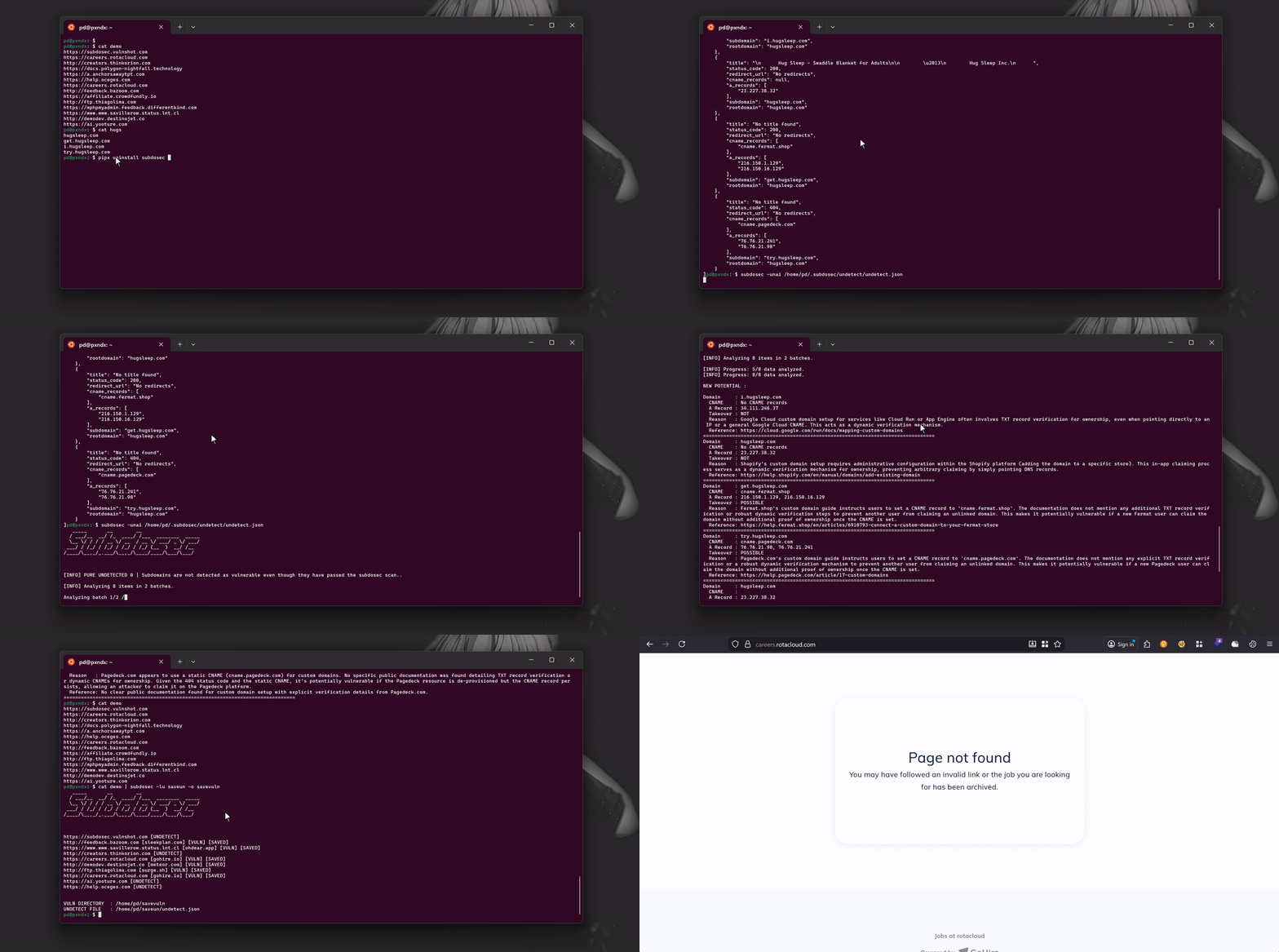
cat test.txt | subdosec -lm

https://subdosec.vulnshot.com [UNDETECT]
http://feedback.bazoom.com [sleekplan.com] [VULN] [SAVED]
http://demodev.destinojet.co [meteor.com] [VULN] [SAVED]
http://creators.thinkorion.com [UNDETECT]
https://www.www.savillerow.status.lnt.cl [ohdear.app] [VULN] [SAVED]
https://careers.rotacloud.com [gohire.io] [VULN] [SAVED]
https://careers.rotacloud.com [gohire.io] [VULN] [SAVED]
https://ai.yooture.com [UNDETECT]
https://help.oceges.com [UNDETECT]
http://ftp.thiagolima.com [surge.sh] [VULN] [SAVED]


VULN DIRECTORY  : /home/alice/.subdosec/vulns
UNDETECT FILE   : /home/alice/.subdosec/undetect/undetect.json
आउटपुट पढ़ें
~$ ls /home/alice/.subdosec/vulns
gohire.io_tko.txt  meteor.com_tko.txt  ohdear.app_tko.txt  sleekplan.com_tko.txt  surge.sh_tko.txt
~$ cat /home/alice/.subdosec/vulns/gohire.io_tko.txt
careers.rotacloud.com
undetect पढ़ें और -unai के साथ स्वचालित रूप से नए संभावित कमजोरियों का विश्लेषण करें
cat /home/alice/.subdosec/undetect/undetect.json
[
    {
        "title": "No title found",
        "status_code": 404,
        "redirect_url": "No redirects",
        "cname_records": [
            "cname.redacted.com"
        ],
        "a_records": [
            "76.76.21.98",
            "76.76.21.241"
        ],
        "subdomain": "try.redacted.com",
        "rootdomain": "redacted.com"
    },
    {
        "title": "No title found",
        "status_code": 200,
        "redirect_url": "No redirects",
        "cname_records": [
            "cname.fermat.shop"
        ],
        "a_records": [
            "216.150.16.129",
            "216.150.1.129"
        ],
        "subdomain": "get.redacted.com",
        "rootdomain": "redacted.com"
    }
]
subdosec -unai /home/pd/.subdosec/undetect/undetect.json

[INFO] PURE UNDETECTED 0 | Subdomains are not detected as vulnerable even though they have passed the subdosec scan..

[INFO] Analyzing 8 items in 2 batches.

[INFO] Progress: 5/8 data analyzed.

NEW POTENTIAL :


Domain     : try.redacted.com
  CNAME    : cname.redacted-service.com
  A Record : 76.76.21.98, 76.76.21.241
  Takeover : NOT
  Reason   : The redacted-service custom domain setup guide explicitly states the requirement of adding a TXT record (e.g., 'redacted-service-verification=<your_site_id>') for domain ownership verification. The presence of a TXT record verification step makes it not vulnerable.
  Reference: https://www.redacted-service.com/blog/how-to-setup-custom-domain/
================================================================================
Domain     : get.redacted.com
  CNAME    : cname.fermat.shop
  A Record : 216.150.16.129, 216.150.1.129
  Takeover : POSSIBLE
  Reason   : The service uses a static CNAME (cname.fermat.shop) for custom domain setup. Publicly available documentation for Fermat's custom domain setup does not clearly specify a requirement for a TXT record or any dynamic verification method for domain ownership. Without such verification, a static CNAME makes the subdomain potentially vulnerable if the corresponding Fermat account is deleted or becomes unlinked.
  Reference: https://fermat.shop/
================================================================================
CMD 2
रूट डोमेन और पाइपलाइन सबडोमेन खोज उपकरण जैसे (subfinder, assetfinder, amass, आदि) का उपयोग करें
cat list
example.com
cat list | subfinder -silent | subdosec -lm

https://subdosec.vulnshot.com [UNDETECT]
http://feedback.bazoom.com [sleekplan.com] [VULN] [SAVED]
http://demodev.destinojet.co [meteor.com] [VULN] [SAVED]
http://creators.thinkorion.com [UNDETECT]
https://www.www.savillerow.status.lnt.cl [ohdear.app] [VULN] [SAVED]
https://careers.rotacloud.com [gohire.io] [VULN] [SAVED]
https://careers.rotacloud.com [gohire.io] [VULN] [SAVED]
https://ai.yooture.com [UNDETECT]
https://help.oceges.com [UNDETECT]
http://ftp.thiagolima.com [surge.sh] [VULN] [SAVED]


VULN DIRECTORY  : /home/alice/.subdosec/vulns
UNDETECT FILE   : /home/alice/.subdosec/undetect/undetect.json
CMD 3
(परिणाम notify को अग्रेषित करें)
cat list | subdosec -lm -vo | notify -silent
