 threatunknown/jsubfinder
गो-आधारित उपकरण जो वेबपेजों और जावास्क्रिप्ट फ़ाइलों को स्कैन करके छिपे हुए उपडोमेन और रहस्यों का पता लगाता है, जिसमें बग बाउंटी और पेनिट्रेशन टेस्टिंग वर्कफ़्लो के लिए वैकल्पिक क्रॉलिंग और रीयल-टाइम प्रॉक्सी विश्लेषण शामिल है।


JSubFinder एक उपकरण है जो गोलांग में लिखा गया है, जो दिए गए URL में वेबपेजों और जावास्क्रिप्ट में छिपे उपडोमेन और रहस्यों (secrets) की खोज करता है। BugBounty शिकारियों को ध्यान में रखकर विकसित, JSubFinder Go की अद्भुत प्रदर्शन का लाभ उठाता है, जिससे यह बड़े डेटा सेटों का उपयोग कर सकता है और अन्य उपकरणों के साथ आसानी से जोड़ा जा सकता है।
एप्लिकेशन स्थापित करें और रहस्यों (secrets) को खोजने के लिए आवश्यक हस्ताक्षर (signatures) डाउनलोड करें
GO का उपयोग करते हुए:
go install github.com/ThreatUnkown/jsubfinder@latest
wget https://raw.githubusercontent.com/ThreatUnkown/jsubfinder/master/.jsf_signatures.yaml && mv .jsf_signatures.yaml ~/.jsf_signatures.yaml
या
दिए गए URL में उपडोमेन और रहस्यों (secrets) की खोज करें
$ jsubfinder search -h

Execute the command specified

Usage:
  JSubFinder search [flags]

Flags:
  -c, --crawl              Enable crawling
  -g, --greedy             Check all files for URL's not just Javascript
  -h, --help               help for search
  -f, --inputFile string   File containing domains
  -t, --threads int        Ammount of threads to be used (default 5)
  -u, --url strings        Url to check

Global Flags:
  -d, --debug               Enable debug mode. Logs are stored in log.info
  -K, --nossl               Skip SSL cert verification (default true)
  -o, --outputFile string   name/location to store the file
  -s, --secrets             Check results for secrets e.g api keys
      --sig string          Location of signatures for finding secrets
  -S, --silent              Disable printing to the console
उदाहरण (इस मामले में परिणाम समान हैं):
$ jsubfinder search -u www.google.com
$ jsubfinder search -f file.txt
$ echo www.google.com | jsubfinder search
$ echo www.google.com | httpx --silent | jsubfinder search$

apis.google.com
ogs.google.com
store.google.com
mail.google.com
accounts.google.com
www.google.com
policies.google.com
support.google.com
adservice.google.com
play.google.com
ध्यान दें --secrets="" रहस्य परिणामों को secrets.txt फ़ाइल में सहेजेगा
$ echo www.youtube.com | jsubfinder search --secrets=""
www.youtube.com
youtubei.youtube.com
payments.youtube.com
2Fwww.youtube.com
252Fwww.youtube.com
m.youtube.com
tv.youtube.com
music.youtube.com
creatoracademy.youtube.com
artists.youtube.com

Google Cloud API Key <redacted> found in content of https://www.youtube.com
Google Cloud API Key <redacted> found in content of https://www.youtube.com
Google Cloud API Key <redacted> found in content of https://www.youtube.com
Google Cloud API Key <redacted> found in content of https://www.youtube.com
Google Cloud API Key <redacted> found in content of https://www.youtube.com
Google Cloud API Key <redacted> found in content of https://www.youtube.com
$ echo www.google.com | jsubfinder search -crawl -s "google_secrets.txt" -S -o jsf_google.txt -t 10 -g
-crawl डिफ़ॉल्ट क्रॉलर का उपयोग करके विश्लेषण के लिए अन्य URL के लिए पेजों को क्रॉल करें-s JSubFinder को रहस्यों (secrets) की खोज के लिए सक्षम करता है-S कंसोल पर आउटपुट को शांत करें-o <file> आउटपुट को निर्दिष्ट फ़ाइल में सहेजें-t 10 10 थ्रेड का उपयोग करें-g हर URL में JS खोजें, यहां तक कि उनमें भी जिनमें हमें लगता है कि कोई नहीं हैTLS MITM समर्थन के साथ अपस्ट्रीम HTTP प्रॉक्सी को सक्षम करता है। यह आपको निम्न की अनुमति देता है:
$ JSubFinder proxy -h

Execute the command specified

Usage:
  JSubFinder proxy [flags]

Flags:
  -h, --help                    help for proxy
  -p, --port int                Port for the proxy to listen on (default 8444)
      --scope strings           Url's in scope seperated by commas. e.g www.google.com,www.netflix.com
  -u, --upstream-proxy string   Adress of upsteam proxy e.g http://127.0.0.1:8888 (default "http://127.0.0.1:8888")

Global Flags:
  -d, --debug               Enable debug mode. Logs are stored in log.info
  -K, --nossl               Skip SSL cert verification (default true)
  -o, --outputFile string   name/location to store the file
  -s, --secrets             Check results for secrets e.g api keys
      --sig string          Location of signatures for finding secrets
  -S, --silent              Disable printing to the console
$ jsubfinder proxy
Proxy started on :8444
Subdomain: out.reddit.com
Subdomain: www.reddit.com
Subdomain: 2Fwww.reddit.com
Subdomain: alb.reddit.com
Subdomain: about.reddit.com
Burp Suite अब इसके माध्यम से प्रॉक्सी किए गए सभी ट्रैफ़िक को JSubFinder को अग्रेषित करेगा। JSubFinder प्रतिक्रिया प्राप्त करेगा, इसे burp पर वापस करेगा और दूसरे थ्रेड में उपडोमेन और रहस्यों की खोज करेगा।
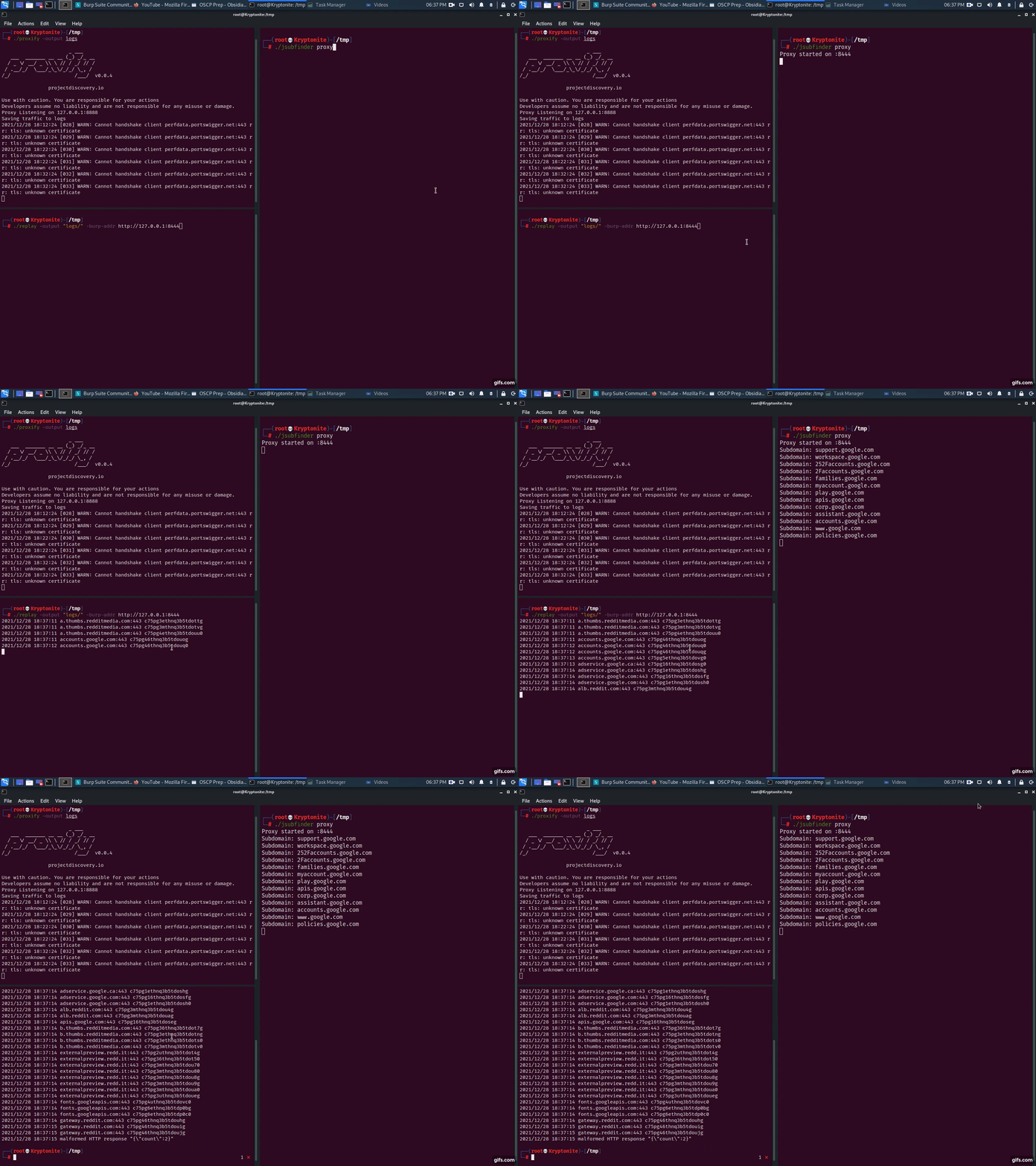
proxify -output logsjsubfinder proxy -u http://127.0.0.1:8443replay -output logs -burp-addr http://127.0.0.1:8444सरल, JSubFinder को किसी अन्य सर्वर पर प्रॉक्सी मोड में चलाएँ, जैसे 192.168.1.2। ऊपर दिए गए प्रॉक्सी चरणों का पालन करें, लेकिन अपने एप्लिकेशन के अपस्ट्रीम प्रॉक्सी को 192.168.1.2:8443 पर सेट करें।
$ jsubfinder proxy --scope www.reddit.com -p 8081 -S -o jsf_reddit.txt
--scope JSubFinder को केवल www.reddit.com से प्रतिक्रियाओं का विश्लेषण करने तक सीमित करता है-p वह पोर्ट जिस पर JSubFinder का प्रॉक्सी सर्वर चल रहा है-S कंसोल/स्टडआउट पर आउटपुट शांत करें-o <file> आउटपुट उदाहरणों को इस फ़ाइल में सहेजें