stillbigjosh/adaptix-serverless-c2
AdaptixC2 v1.2 के लिए सर्वरलेस C2 ट्रांसपोर्ट प्लगइन, जो रिले इंफ्रास्ट्रक्चर के रूप में AWS Lambda + DynamoDB का उपयोग करता है।

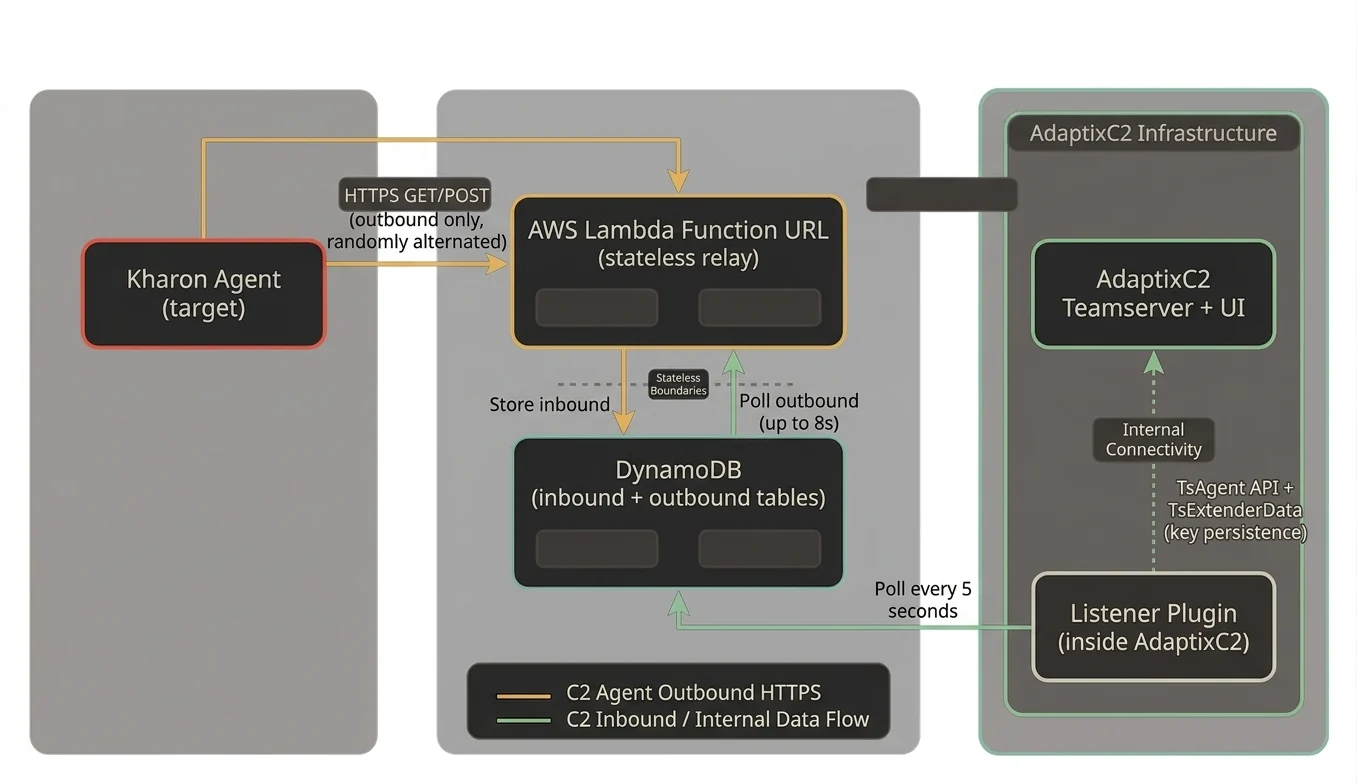
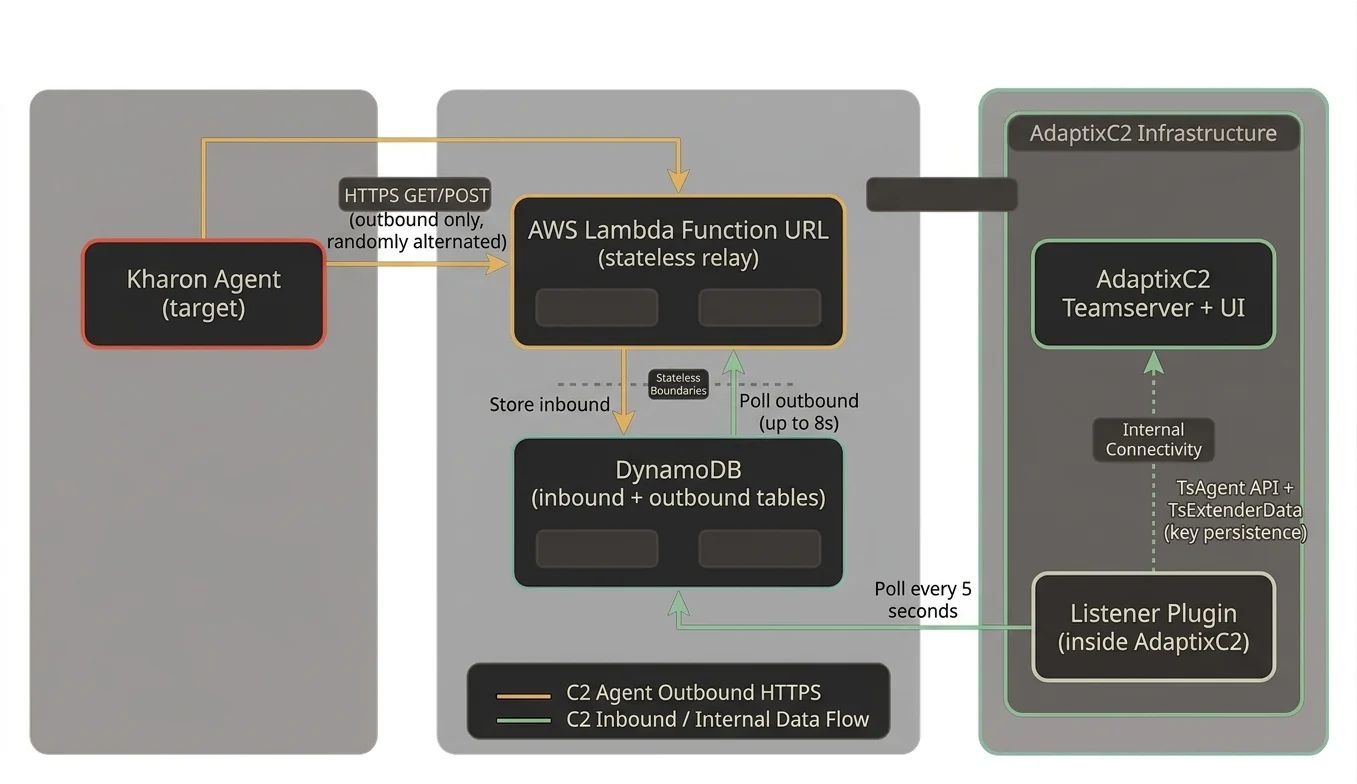
AdaptixC2 v1.2 के लिए Serverless C2 ट्रांसपोर्ट प्लगइन, जो रिले इंफ्रास्ट्रक्चर के रूप में AWS Lambda + DynamoDB का उपयोग करता है। एजेंट ट्रैफ़िक AWS एंडपॉइंट्स के लिए आउटबाउंड HTTPS के रूप में दिखाई देता है, जिसके लिए C2 सर्वर पर किसी इनबाउंड पोर्ट या पब्लिक IP की आवश्यकता नहीं होती।
Kharon Agent (target)
    |
    | HTTPS GET/POST (outbound only, randomly alternated)
    v
AWS Lambda Function URL (stateless relay)
    |
    | Store inbound / Poll outbound (up to 8s)
    v
DynamoDB (inbound + outbound tables)
    ^
    | Poll every 5 seconds
    |
Listener Plugin (inside AdaptixC2)
    |
    | TsAgent API + TsExtenderData (key persistence)
    v
AdaptixC2 Teamserver + UI
डेटा फ़्लो:
inbound टेबल में रॉ डेटा संग्रहीत करता हैoutbound टेबल को पोल करता है (रजिस्ट्रेशन के लिए async गैप को ब्रिज करता है)inbound टेबल को पोल करता हैoutbound में संग्रहीत करता है| Component | Path | Purpose |
|---|---|---|
| Kharon agent | agent/ | Bundled Kharon implant (C++ source) |
| Terraform | deploy/aws/ | Lambda + DynamoDB + IAM + KMS infrastructure |
| Lambda relay | deploy/aws/lambda/ | Stateless HTTP-to-DynamoDB proxy with outbound polling |
| Listener plugin | listener/ | AdaptixC2 plugin, DynamoDB polling, Kharon protocol bridge |
| Kharon configs | kharon/ | AXS command registration and config for agent/listener extenders |
| Patches | patches/ | AdaptixC2 source patches for BeaconServerless support |
| Profiles | profiles/ | Malleable HTTP profile for Lambda URL |
| Scripts | scripts/ | Install, build, deploy, uninstall |
aws configure)apt install clang lldapt install nasmapt install binutils-mingw-w64-x86-64AWS Console में:
adaptix-deployer रखेंAmazonDynamoDBFullAccessAWSLambda_FullAccessIAMFullAccessCloudWatchLogsFullAccess{"Version":"2012-10-17","Statement":[{"Effect":"Allow","Action":"kms:*","Resource":"*"}]}KMSFullAccess रखेंaws configure
# AWS Access Key ID: <paste access key>
# AWS Secret Access Key: <paste secret key>
# Default region: us-east-1
# Default output format: json
सत्यापित करें:
aws sts get-caller-identity
# Build the Lambda relay binary (cross-compiled for Amazon Linux)
./scripts/build_relay.sh

# Deploy Lambda + DynamoDB + IAM with Terraform
./scripts/deploy_infra.sh

# Note the Lambda Function URL from the output, e.g.:
# lambda_function_url = "https://xxxxx.lambda-url.us-east-1.on.aws"
./scripts/install.sh /path/to/AdaptixC2
यह स्क्रिप्ट निम्न कार्य करेगी:
dist/ डायरेक्टरी का बैकअप लेगी (certs, database, profile)GOEXPERIMENT फ़्लैग्स का पता लगाएगी.so) बनाएगीBeaconServerless लिसनर बनाएँrelay_api_key से मेल खाना चाहिए)profiles/lambda_default.json से malleable प्रोफ़ाइल अपलोड करेंBeaconServerless लिसनर चुनकर एक Kharon एजेंट जनरेट करेंdeploy/aws/terraform.tfvars)region = "us-east-1"
function_name = "adaptix-relay"
relay_api_key = "your-secret-key-here"
tags = {
Project = "adaptix-serverless"
}
| Field | Description | Default |
|---|---|---|
| AWS Region | Region where infra is deployed | us-east-1 |
| Lambda URL | Function URL from Terraform output | (required) |
| Relay API Key | Must match Terraform's relay_api_key | (optional) |
| Inbound Table | DynamoDB table for agent check-ins | adaptix-inbound |
| Outbound Table | DynamoDB table for server responses | adaptix-outbound |
| Poll Interval | How often to check DynamoDB (seconds) | 5 |
| TTL Hours | DynamoDB record expiry | 24 |
Kharon एजेंट HTTP पर एक कस्टम बाइनरी प्रोटोकॉल का उपयोग करता है:
[36-byte UUID][encrypted_checkin_data][16-byte LokyCrypt key][36-byte UUID][encrypted_payload] (कोई ट्रेलिंग key नहीं)TotalLen-16 पर 16-byte key UUID क्षेत्र में ओवरलैप हो जाती है। 44-byte पैकेट के लिए, key offset 28 पर शुरू होती है, UUID बाइट्स 28-35 और सभी एन्क्रिप्टेड डेटा को स्टॉम्प करती है।लिसनर तीनों फॉर्मेट्स का पता लगाता है और उन्हें सही ढंग से हैंडल करता है।
Lambda + DynamoDB की async प्रकृति का मतलब है कि जब Lambda पहली बार प्रतिक्रिया के लिए जाँच करता है, तब लिसनर ने inbound रिकॉर्ड को प्रोसेस नहीं किया होता। Lambda एक inbound रिकॉर्ड संग्रहीत करने के बाद अधिकतम 8 सेकंड तक outbound टेबल को पोल करता है, जिससे लिसनर को प्रतिक्रिया प्रोसेस करने और क्यू करने का समय मिलता है। यह रजिस्ट्रेशन के लिए महत्वपूर्ण है (Checkin प्रतिक्रिया Checkin चरण के दौरान आनी चाहिए, बाद के GetTask में नहीं)।
एजेंट एन्क्रिप्शन keys TsExtenderDataSave/TsExtenderDataLoad (SQLite-बैक्ड) के माध्यम से पर्सिस्ट की जाती हैं। यह सर्विस रीस्टार्ट्स में बनी रहती है। रीस्टार्ट पर, लिसनर ज्ञात एजेंट ID का सामना करने पर पर्सिस्टेंट स्टोर से keys रिकवर करता है।