 sajibuu/upload_bypass
फ़ाइल अपलोड प्रतिबंधों को बायपास करने के लिए एक सरल उपकरण।

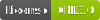

Upload Bypass एक सरल उपकरण है जो पेनिट्रेशन टेस्टर और बग हंटर को फ़ाइल अपलोड तंत्र के परीक्षण में सहायता करने के लिए डिज़ाइन किया गया है। यह विभिन्न बग बाउंटी तकनीकों का उपयोग करता है ताकि कमजोरियों की पहचान करने और उनका शोषण करने की प्रक्रिया को सरल बनाया जा सके, जिससे वेब अनुप्रयोगों का व्यापक मूल्यांकन सुनिश्चित हो सके।
यह उपकरण OSCP परीक्षा में प्रतिबंधित है!
वास्तविक दुनिया के पेनिट्रेशन परीक्षणों के लिए उपयुक्त। यह मोड हानिरहित फ़ाइलें अपलोड करेगा और लक्ष्य का शोषण करने का प्रयास नहीं करेगा।
नया - यदि अपलोड की गई फ़ाइलों के लिए गंतव्य फ़ोल्डर प्रदान किया जाता है, तो प्रोग्राम यह निर्धारित करेगा कि अपलोड की गई नमूना फ़ाइल प्रस्तुत की गई है या नहीं। उदाहरण के लिए, यदि आपने PHP चुना है, तो प्रोग्राम यह निर्धारित करने का प्रयास करेगा कि क्या कोई echo कमांड निष्पादित और सफलतापूर्वक प्रस्तुत किया गया है, यदि ऐसा होता है, तो यह इंटरैक्टिव शेल में प्रवेश करने का सुझाव देगा।
उपयुक्त जब आप लक्ष्य का शोषण करना चाहते हैं और एक इंटरैक्टिव वेब-शेल अपलोड करना चाहते हैं (यदि कोई गंतव्य अपलोड निर्देशिका प्रदान की गई है), यह फ़ाइल को यादृच्छिक UUID के साथ अपलोड करेगा, जिससे फज़र के लिए अनुमान लगाना कठिन हो जाएगा।
एंटी-मैलवेयर उपस्थिति परीक्षण के लिए उपयुक्त। सिस्टम पर Eicar (एंटी-मैलवेयर परीक्षण फ़ाइल) अपलोड करें, और यदि उपयोगकर्ता अपलोड की गई फ़ाइल का स्थान निर्दिष्ट करता है, तो प्रोग्राम जांच करेगा कि फ़ाइल सफलतापूर्वक अपलोड हुई और सिस्टम में मौजूद है या नहीं, ताकि यह निर्धारित किया जा सके कि सिस्टम पर एंटी-मैलवेयर मौजूद है या नहीं।
lib निर्देशिका में config.py देखें, आप नए एक्सटेंशन, माइमटाइप, मैजिकबाइट्स जोड़ सकते हैं, HTTP/HTTPS प्रोटोकॉल के उपयोग को कॉन्फ़िगर कर सकते हैं आदि...
एक नया मॉड्यूल जोड़ने के लिए, बस अपनी इच्छित कार्यक्षमता के साथ एक फ़ंक्शन को modules.py में जोड़ें, फिर config.py में "active_modules" सूची में फ़ंक्शन का नाम जोड़ें।
एक नया फ़ाइल एक्सटेंशन जोड़ने के लिए, assets/sample_files में एक sample.{ext} फ़ाइल जोड़ें, फिर config.py में एक्सटेंशन और उसके माइमटाइप/मैजिक बाइट्स जोड़ें।
git clone https://github.com/sAjibuu/Upload_Bypass.git
pip install -r requirements.txt
sudo docker pull sajibuu/upload_bypass
sudo docker build -t sajibuu/upload_bypass .
sudo docker run -v $(pwd)/request:/Upload_Bypass/{your_request_file} -it sajibuu/upload_bypass -r request -s 'file was uploaded successfully' -E php -e
सुनिश्चित करें कि आप सभी इंटरफेस पर पोर्ट 8080 पर सुन रहे हैं!
sudo docker run -v $(pwd)/request:/Upload_Bypass/{your_request_file} -it sajibuu/upload_bypass -r request -s 'file was uploaded successfully' -E php -e -p http://{docker_interface_IP}:8080
यह उपकरण निम्नलिखित के साथ ठीक से काम नहीं करेगा:
कृपया ध्यान दें कि Upload Bypass का उपयोग और इसके साथ की गई कोई भी कार्रवाई पूरी तरह से आपके अपने जोखिम पर है। यह उपकरण केवल शैक्षिक और परीक्षण उद्देश्यों के लिए प्रदान किया गया है। Upload Bypass का डेवलपर इसके उपयोग से होने वाले किसी भी दुरुपयोग, क्षति या अवैध गतिविधियों के लिए जिम्मेदार नहीं है।
प्रोग्राम केवल प्रॉक्सी टूल जैसे Burp Suite और ZAP OWASP द्वारा उत्पन्न अनुरोध फ़ाइलों के साथ काम करता है।
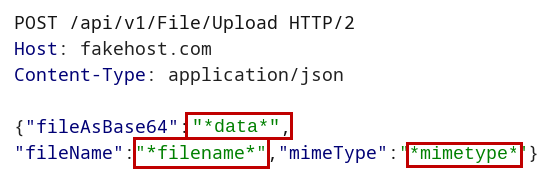
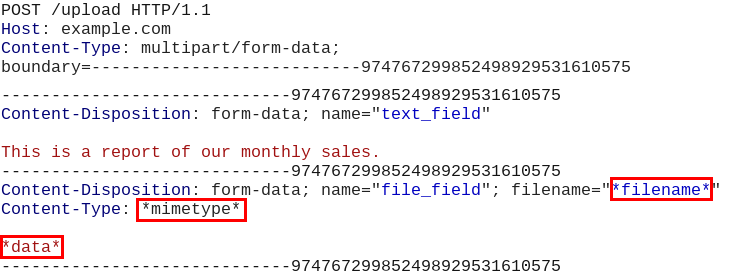
आप जिस प्रॉक्सी का उपयोग कर रहे हैं, उदाहरण के लिए Burp Suite, से अनुरोध फ़ाइल को सहेजने से पहले, निम्नलिखित पैरामीटर मानों को उनके संबंधित मार्करों से बदलें:
फ़ाइल सामग्री: *data*
उदाहरण: इमेज बाइनरी डेटा को स्ट्रिंग *data* से बदलें
फ़ाइलनाम: *filename*
उदाहरण: फ़ाइलनाम को उसके एक्सटेंशन सहित स्ट्रिंग *filename* से बदलें
Content-Type हेडर: *mimetype*
उदाहरण: फ़ाइल के content-type (mimetype) को स्ट्रिंग *mimetype* से बदलें
JSON अनुरोध में यह कैसा दिखना चाहिए:
मल्टी-पार्ट डेटा अनुरोध में यह कैसा दिखना चाहिए:
Usage: Upload Bypass [OPTIONS]

Options:
  -h, --help     Print help (see more with '--help')
  -U, --usage   Print the how to save the request file instructions.
  -v, --version  Print version

Required Arguments:
  -r, --request_file <REQUEST_FILE>    Provide a request file to be proccessed
  -E, --extension    <EXTENSION>       Forbidden extension to check (ex: php)
  -A, --allowed      <EXTENSION>       Allowed extension (ex: jpeg) - Optional - if not set the program will auto-detect the extension

  Choose only one from the options below:
  -s, --success      <MESSAGE>         Provide a success message when a file is uploaded (ex: File was uploaded successfully)
  -f, --failure      <MESSAGE>         Provide a failure message when a file is uploaded (ex: File is not allowed!)
  -S, --status_code  <STATUS_CODE>     Provide a status code for a success upload (ex: 200)

Mode Settings:
  -d, --detect          Upload harmless sample files (Suitable for a real penetration test)
  -e, --exploit         Upload Web-Shells files when testing
  -a, --anti_malware    Upload Anti-Malware Test file (Eicar) when testing
      I.  If set with -E flag the program will test with the Eicar string along with the choosen extension
      II. If set without the -E flag the program will test with Eicar string and a com extension

Modules Settings:
  -l, --list            List all modules
  -i, --include_only <MODULES>   Include only modules to test from (ex: extension_shuffle, double_extension)
  -x, --exclude      <MODULES>   Exclude modules (ex: svg_xxe, svg_xss)

Request Settings:
  --base64              Encode the file data with Base64 algorithm
  --allow_redirects     Follow redirects
  -P, --put             Use the HTTP PUT method for the requests (Default is POST)
  -Pa, --patch          Use the HTTP Patch method for the requests (Default is POST)
  -R, --response        Print the response to the screen
  -c, --continue        Continue testing all files, even if a few uploads encountered success
  -t, --time_out <NUM>  Set the request timeout (Default is 8)
  -rl, --rate_limit <NUMBER>  Set a rate-limit with a delay in milliseconds between each request
