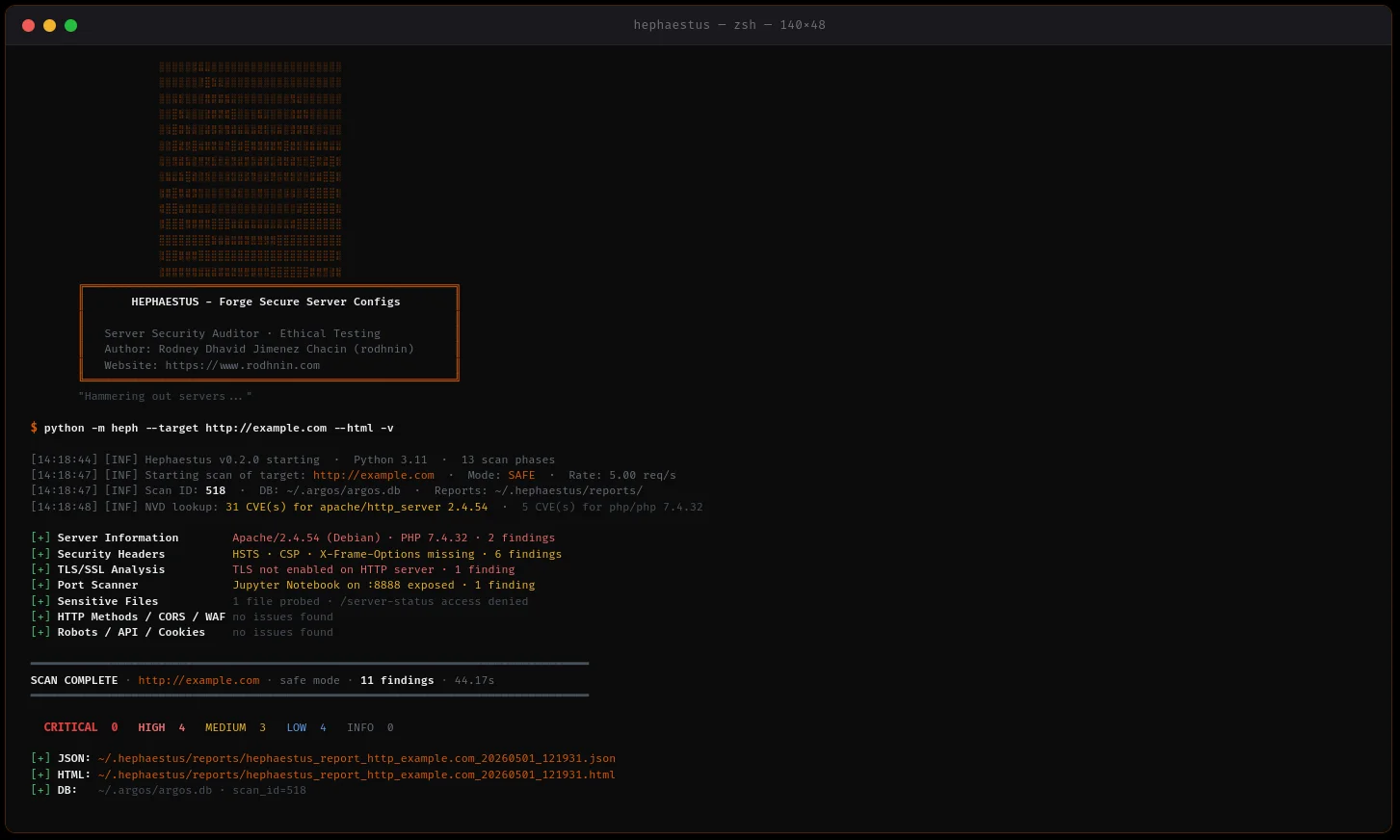

सर्वर सुरक्षा ऑडिटर जो Apache, Nginx, और IIS कॉन्फ़िगरेशन को स्कैन करता है, AI-संचालित हार्डनिंग गाइड और पेशेवर रिपोर्टिंग के साथ।
Apache, Nginx और IIS के लिए सर्वर सुरक्षा ऑडिटर — 13 स्कैन चरण, 70+ फाइंडिंग कोड, AI-संचालित हार्डनिंग गाइड।
त्वरित प्रारंभ · दस्तावेज़ीकरण · Docker · AI विश्लेषण · GitHub पर स्टार करें
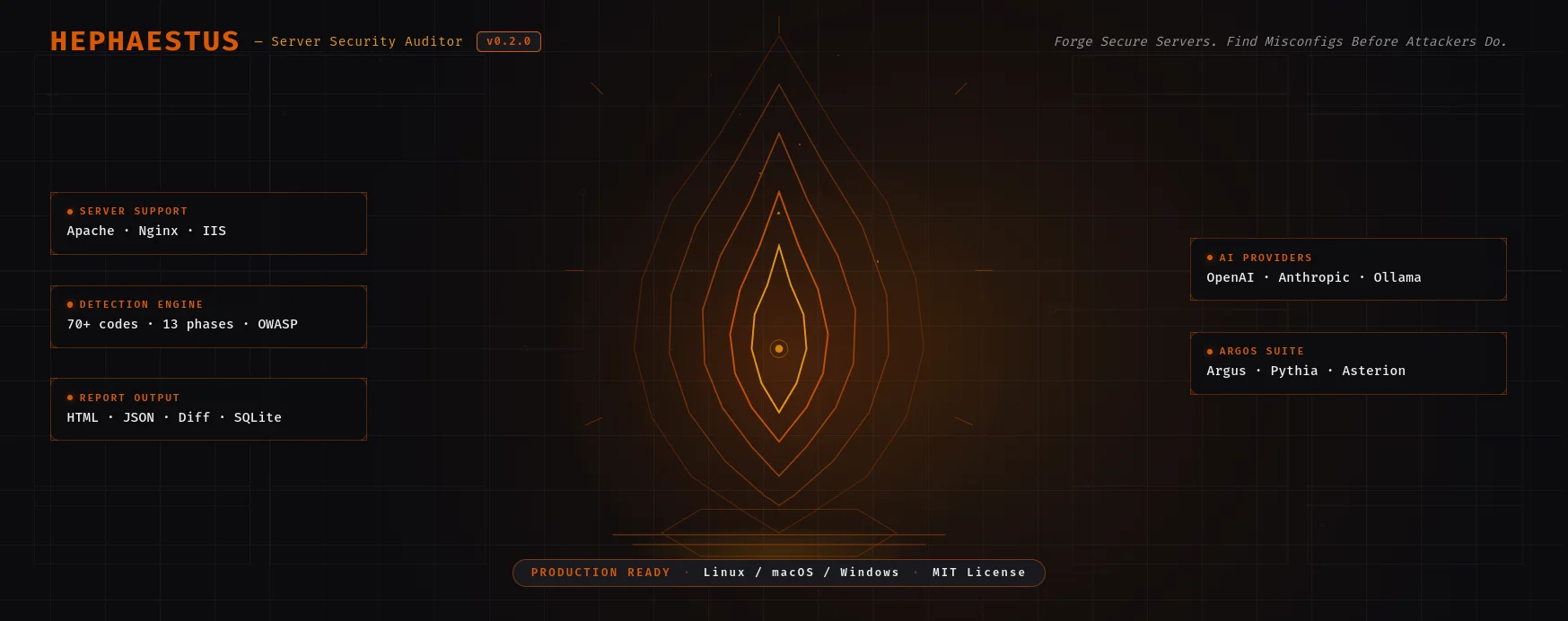
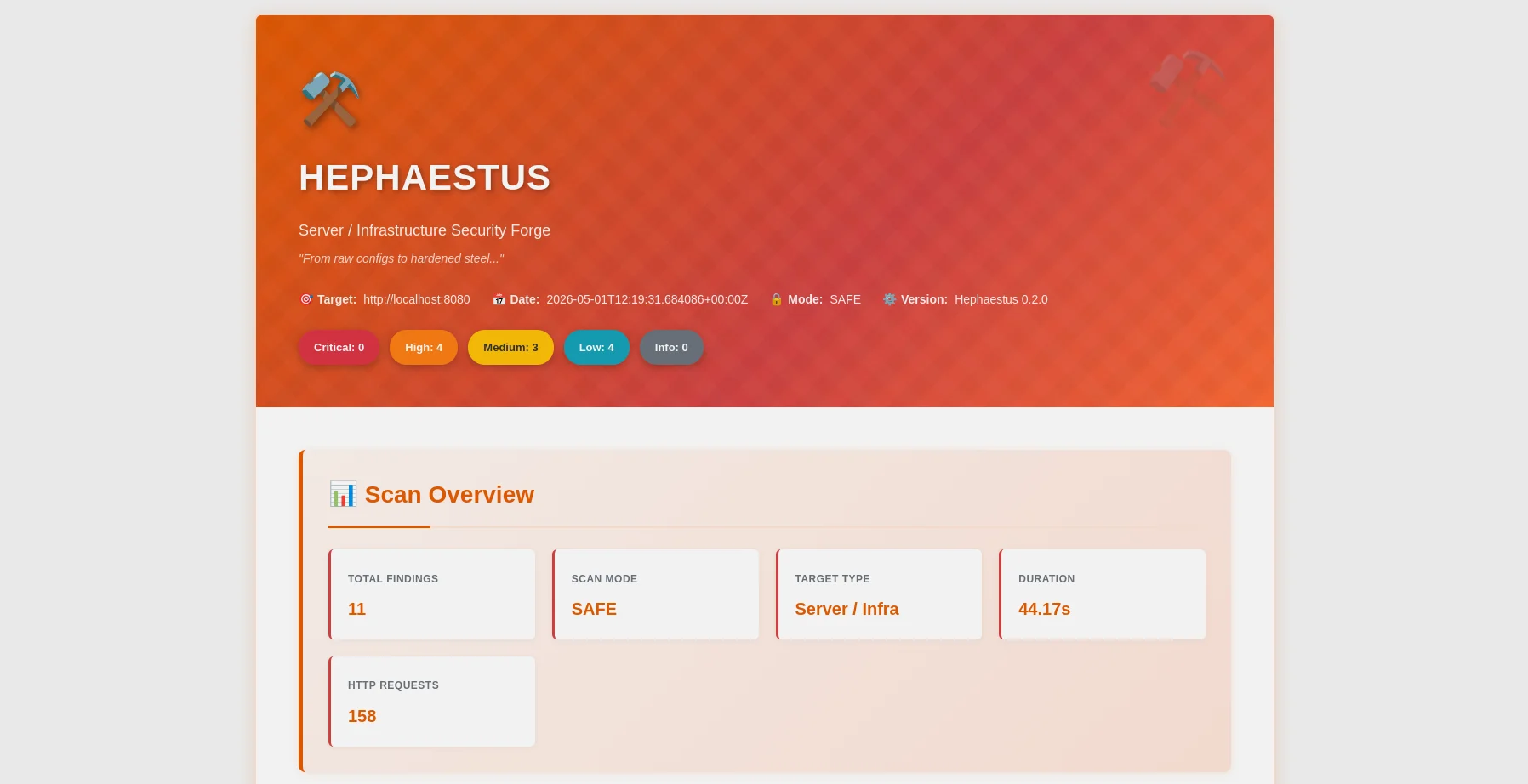
HTML रिपोर्ट — गंभीरता विवरण, OWASP मैपिंग, फ़िल्टर बार |
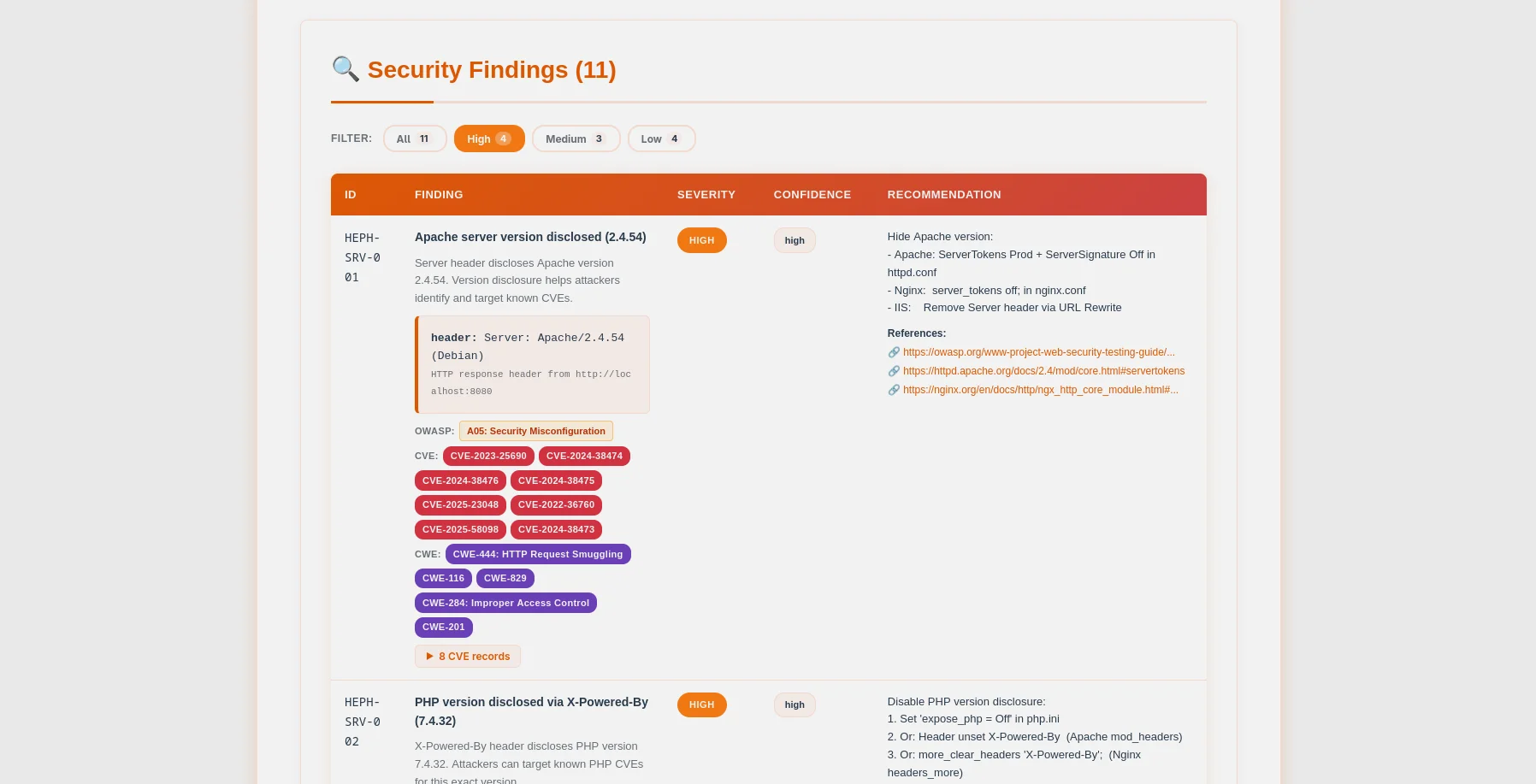
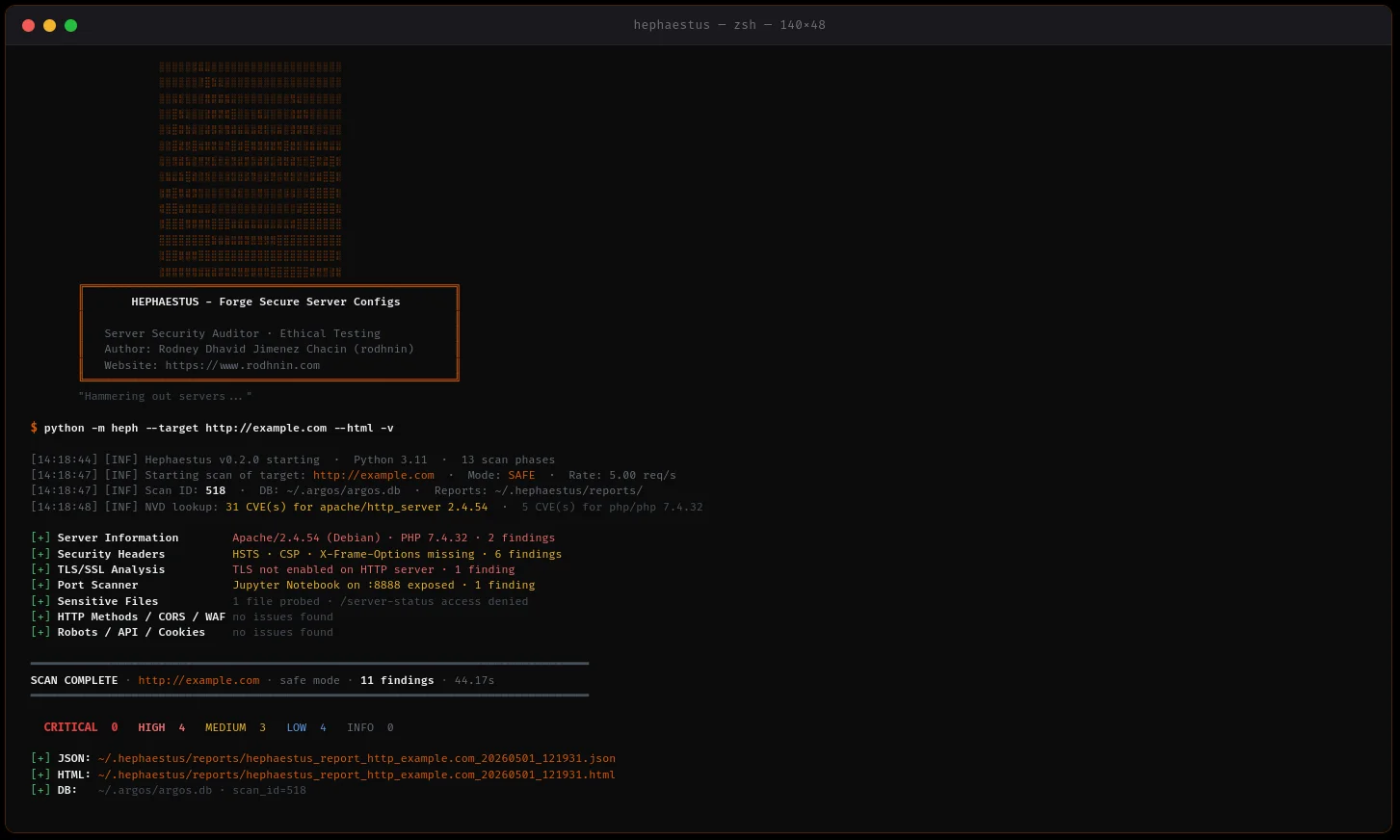
फाइंडिंग तालिका — CVE/CWE बैज, विस्तार योग्य साक्ष्य, कॉन्फ़िग स्निपेट |
Hephaestus एक प्रोडक्शन-रेडी सर्वर सुरक्षा ऑडिटर है जो नैतिकता को सर्वोपरि रखता है। सिस्टम एडमिनिस्ट्रेटर, DevOps इंजीनियरों और पेनिट्रेशन टेस्टरों के लिए निर्मित, यह वेब सर्वर कॉन्फ़िगरेशन (Apache, Nginx, IIS) को स्कैन करता है ताकि हमलावरों द्वारा उनका शोषण करने से पहले महत्वपूर्ण गलत कॉन्फ़िगरेशन की पहचान की जा सके।
~/.argos/argos.db)| जाँच श्रेणी | विवरण |
|---|---|
| सर्वर जानकारी | हेडर और त्रुटि पृष्ठों के माध्यम से Apache/Nginx/IIS संस्करण प्रकटीकरण |
| संवेदनशील फ़ाइलें | .env, .git, phpinfo.php, server-status, बैकअप, कॉन्फ़िग फ़ाइलें (70+ पथ) |
| HTTP विधियाँ | असुरक्षित विधियाँ (PUT, DELETE, TRACE, OPTIONS) |
| सुरक्षा हेडर | HSTS, CSP, X-Frame-Options, X-Content-Type-Options, Referrer-Policy, Permissions-Policy |
| TLS/SSL कॉन्फ़िगरेशन | गहन विश्लेषण: सिफर सुइट, प्रोटोकॉल संस्करण, प्रमाणपत्र वैधता, CVE सहसंबंध |
| डायरेक्टरी लिस्टिंग | संवेदनशील डायरेक्टरियों पर Apache/Nginx autoindex सक्षम है |
| CORS पहचान | वाइल्डकार्ड, null-origin, रिफ्लेक्शन प्रोब (COR-001 से COR-006) |
| Robots.txt | निषिद्ध पथ विश्लेषण, आक्रामक मोड में लाइव एक्सेसिबिलिटी प्रोब |
| WAF पहचान | Cloudflare, Sucuri, ModSecurity, AWS WAF, Imperva सहित 13 सिग्नेचर |
| API खोज | Swagger/OpenAPI स्पेक एक्सपोज़र, GraphQL इंट्रोस्पेक्शन, बिना प्रमाणीकरण वाले एंडपॉइंट |
| कुकी सुरक्षा | प्रमाणित पाथों में प्रति-कुकी HttpOnly/Secure/SameSite विश्लेषण |
| phpinfo() विश्लेषण | 9 खतरनाक PHP सेटिंग्स: display_errors, allow_url_include, open_basedir, और अन्य |
| कॉन्फ़िग फ़ाइल पार्सर | गलत कॉन्फ़िगरेशन के लिए httpd.conf / nginx.conf का ऑफ़लाइन विश्लेषण |
| पोर्ट स्कैनर | बैनर ग्रैबिंग और CVE संवर्धन के साथ 37 सामान्य पोर्ट |
python -m heph --target https://example.com --html
- **मल्टी-सर्वर समर्थन**: Apache, Nginx, IIS का पता लगाना और हार्डनिंग
- **समवर्ती स्कैनिंग**: तेज़ और विनम्र स्कैन के लिए थ्रेड पूल + रेट लिमिटिंग
- **साक्ष्य संग्रहण**: HTTP प्रतिक्रियाएँ, हेडर, फ़ाइल सामग्री संरक्षित
- **सुगम त्रुटि प्रबंधन**: टाइमआउट, DNS विफलताएँ, कनेक्शन अस्वीकार को मज़बूती से संभाला जाता है
### 🤖 AI-संचालित हार्डनिंग गाइड
अपनी आवश्यकताओं के अनुसार अपना AI प्रदाता चुनें:
| प्रदाता | किसके लिए सर्वोत्तम | गति | लागत | गोपनीयता |
| -------------------- | ------------------ | --------------- | ------------- | --------------- |
| **OpenAI GPT-4** | उत्पादन गुणवत्ता | ⚡ तेज़ (35s) | 💰 $0.25/scan | 🔒 मानक |
| **Anthropic Claude** | गोपनीयता-केंद्रित | ⚡ तेज़ (45s) | 💰 $0.30/scan | 🔒 उन्नत |
| **Ollama (Local)** | पूर्ण गोपनीयता | 🐢 धीमा (28min) | 💰 मुफ़्त | 🔐 100% ऑफ़लाइन |
**दो विश्लेषण मोड:**
- **तकनीकी**: Apache/Nginx कॉन्फ़िग स्निपेट, CLI कमांड, चरण-दर-चरण हार्डनिंग
- **कार्यकारी**: हितधारकों और प्रबंधन के लिए सरल भाषा में जोखिम मूल्यांकन
### 📊 पेशेवर रिपोर्टिंग
**JSON रिपोर्ट** (मशीन-पठनीय)```json
{
"tool": "hephaestus",
"version": "0.2.0",
"target": "https://example.com",
"mode": "safe",
"summary": {
"critical": 3,
"high": 2,
"medium": 5,
"low": 3,
"info": 0
},
"findings": [...],
"diff": {...}
}
एचटीएमएल रिपोर्ट (मानव-अनुकूल)
आक्रामक स्कैनिंग और एआई विश्लेषण के लिए स्वामित्व का प्रमाण आवश्यक है:```bash
python -m heph --gen-consent example.com
echo "verify-abc123..." > .well-known/verify-abc123.txt
python -m heph --verify-consent http --domain example.com --token verify-abc123
python -m heph --target https://example.com --aggressive --use-ai
### 💾 डेटाबेस स्थायित्व
SQLite डेटाबेस **Argos सुइट के साथ साझा** (`~/.argos/argos.db`):
- **स्कैन इतिहास**: दिनांक, अवधि, निष्कर्षों की संख्या, गंभीरता का विवरण
- **निष्कर्ष भंडार**: खोजने योग्य भेद्यता डेटाबेस (1159+ निष्कर्ष संग्रहीत)
- **सत्यापित डोमेन**: समाप्ति के साथ सहमति टोकन ट्रैकिंग
- **क्रॉस-टूल एकीकरण**: Argus, Pythia और भविष्य के टूल्स के साथ सहज रूप से काम करता है```bash
# Query recent scans
sqlite3 ~/.argos/argos.db "SELECT * FROM scans WHERE tool='hephaestus' ORDER BY scan_id DESC LIMIT 10"
# Find critical issues
sqlite3 ~/.argos/argos.db "SELECT * FROM findings WHERE severity='critical' AND tool='hephaestus'"
Hephaestus v0.2.0 को नियंत्रित Docker-आधारित असुरक्षित लैब्स (Apache और Nginx) का उपयोग करके अनुभवजन्य रूप से मान्य किया गया है।
| मीट्रिक | परिणाम |
|---|---|
| परीक्षण सूट | 55/55 परीक्षण पास (13 चरण) |
| Apache पहचान | सभी 13 स्कैन चरणों में 42 निष्कर्ष |
| Nginx पहचान | सभी 13 स्कैन चरणों में 25 निष्कर्ष |
| परिशुद्धता | 100% (शून्य गलत सकारात्मक) |
| रिकॉल | 100% (शून्य गलत नकारात्मक) |
| F1-स्कोर | 100% (पूर्ण संतुलन) |
| औसत स्कैन अवधि | 30-35 सेकंड |
| डेटाबेस संचालन | 80 स्कैन ट्रैक किए गए, 1159+ निष्कर्ष संग्रहीत |
परीक्षण कवरेज (13 चरण):
मुख्य निष्कर्ष:
--diff last) स्कैन इतिहास में कार्यशीलनिर्णय: Hephaestus सर्वर सुरक्षा मूल्यांकन के लिए प्रोडक्शन-तैयार है।
1. रिपॉजिटरी क्लोन करें```bash git clone https://github.com/rodhnin/hephaestus-server-forger.git cd hephaestus-server-forger
**2. (वैकल्पिक) यदि पहले से उपलब्ध नहीं है तो `venv` इंस्टॉल करें**```bash
# Debian/Ubuntu
sudo apt update && sudo apt install -y python3-venv
# Fedora/RHEL
sudo dnf install python3-virtualenv
# macOS (via Homebrew)
brew install [email protected]
3. वर्चुअल वातावरण बनाएं और सक्रिय करें```bash python3 -m venv .venv source .venv/bin/activate
**4. pip को अपग्रेड करें**```bash
python -m pip install --upgrade pip
5. निर्भरताएँ स्थापित करें```bash python -m pip install -r requirements.txt
**6. API कुंजियाँ कॉन्फ़िगर करें (यदि क्लाउड AI का उपयोग कर रहे हैं)**```bash
# OpenAI
export OPENAI_API_KEY="sk-..."
# Anthropic
export ANTHROPIC_API_KEY="sk-ant-..."
7. स्थापना सत्यापित करें```bash python -m heph --version
### आपका पहला स्कैन```bash
# Basic scan (safe mode, no consent required)
python -m heph --target https://example.com
# With HTML report
python -m heph --target https://example.com --html
# With AI hardening guide (requires consent)
python -m heph --target https://example.com --use-ai --html
cd docker && ./deploy.sh
docker compose exec hephaestus python -m heph --target http://vulnerable-apache
🎉 सफलता! अपनी रिपोर्ट के लिए ~/.hephaestus/reports/ देखें।
python -m heph --target https://example.com
python -m heph --target https://example.com --html
python -m heph --target https://example.com -vv
python -m heph --target https://example.com -q
### उन्नत स्कैनिंग```bash
# Control scan speed (1-20 req/s)
python -m heph --target https://example.com --rate 10
# Control concurrency (1-20 threads)
python -m heph --target https://example.com --threads 8
# Custom timeout (useful for slow servers)
python -m heph --target https://example.com --timeout 60
# Custom output directory
python -m heph --target https://example.com --report-dir ./my-reports
# Custom User-Agent
python -m heph --target https://example.com --user-agent "MyBot/1.0"
# Disable SSL verification (testing only)
python -m heph --target https://self-signed.badssl.com --no-verify-ssl
चरण 1: अपने प्रदाता को कॉन्फ़िगर करें
संपादित करें config/defaults.yaml:```yaml
ai:
langchain:
provider: "openai" # Options: openai, anthropic, ollama
model: "gpt-4o-mini-2024-07-18"
temperature: 0.3
**चरण 2: अपने सेटअप का परीक्षण करें**```bash
# Verify AI provider works
python -m heph.core.ai openai
चरण 3: AI-संचालित स्कैन चलाएँ```bash
python -m heph --target https://example.com
--use-ai
--ai-tone technical
--html
python -m heph --target https://example.com
--use-ai
--ai-tone non_technical
--html
python -m heph --target https://example.com
--use-ai
--ai-tone both
--html
python -m heph --target https://example.com
--use-ai
--ai-stream
--html
python -m heph --target https://example.com
--use-ai
--ai-compare openai,anthropic
--html
python -m heph --target https://example.com
--use-ai
--ai-agent
--html
python -m heph --target https://example.com
--use-ai
--ai-budget 0.50
--html
### आक्रामक मोड (सहमति आवश्यक है)```bash
# Step 1: Generate consent token
python -m heph --gen-consent example.com
# Output: Token: verify-a3f9b2c1d8e4...
# Step 2: Place token on your server
# Create: https://example.com/.well-known/verify-a3f9b2c1d8e4.txt
# Content: verify-a3f9b2c1d8e4
# Step 3: Verify consent
python -m heph --verify-consent http \
--domain example.com \
--token verify-a3f9b2c1d8e4
# Step 4: Run aggressive scan (deeper checks, higher rate limit)
python -m heph --target https://example.com --aggressive
Hephaestus LangChain 1.0.0 का उपयोग करता है, जिसमें कई AI प्रदाताओं के लिए समर्थन है।
सर्वोत्तम: प्रोडक्शन उपयोग के लिए
#### Anthropic Claude
**सबसे उपयुक्त: बेहतर गोपनीयता**
- ⭐ गुणवत्ता: उत्कृष्ट (5/5)
- ⚡ गति: ~45 सेकंड
- 💰 लागत: ~$0.30 प्रति स्कैन
- 🔒 गोपनीयता: उन्नत (Anthropic का गोपनीयता-प्रथम दृष्टिकोण)```bash
export ANTHROPIC_API_KEY="sk-ant-..."
python -m pip install langchain-anthropic==1.0.0
सबसे अच्छा: पूर्ण गोपनीयता
ollama pull llama3.2 python -m pip install "langchain-ollama>=0.3.0,<0.4.0"
### Privacy & Security
**स्वचालित सैनिटाइज़ेशन**
AI प्रदाताओं को भेजने से पहले, Hephaestus स्वचालित रूप से हटाता है:
- ✅ सहमति टोकन
- ✅ API कुंजियाँ और क्रेडेंशियल
- ✅ निजी कुंजियाँ और प्रमाणपत्र
- ✅ आंतरिक IP पते
- ✅ डेटाबेस क्रेडेंशियल
**केवल ऑप्ट-इन**
- AI विश्लेषण के लिए स्पष्ट `--use-ai` फ्लैग आवश्यक है
- आक्रामक स्कैनिंग के लिए सत्यापित सहमति टोकन आवश्यक है
- आप नियंत्रित करते हैं कि कौन सा प्रदाता आपका डेटा देखता है
**अधिकतम गोपनीयता के लिए**: Ollama को स्थानीय रूप से उपयोग करें।
---
## 🧪 सुरक्षित टेस्टिंग लैब
**⚠️ बिना लिखित अनुमति के कभी भी प्रोडक्शन साइट्स को स्कैन न करें!**
सुरक्षित अभ्यास के लिए हमारे Docker लैब का उपयोग करें:
### टेस्ट वातावरण सेट अप करें
### विकल्प 1: इंटरैक्टिव स्क्रिप्ट (अनुशंसित)```bash
# Run the interactive deployment script
cd docker && ./deploy.sh
स्क्रिप्ट 5 विकल्प प्रदान करती है:
केवल टेस्टिंग लैब:```bash
docker compose -f docker/compose.testing.yml up -d
sleep 15
docker compose -f docker/compose.testing.yml ps curl -I http://localhost:8080 # Apache curl -I http://localhost:8081 # Nginx
**उत्पादन स्कैनर:**```bash
# Start Hephaestus scanner service
docker compose -f docker/compose.yml up -d
# Run a scan
docker compose -f docker/compose.yml exec hephaestus heph --target https://example.com
# View reports
ls -lh docker/reports/
दोनों वातावरण:```bash
docker compose -f docker/compose.yml up -d docker compose -f docker/compose.testing.yml up -d
python -m heph --target http://localhost:8080 --html python -m heph --target http://localhost:8081 --html
### लैब्स को स्कैन करें```bash
# Scan Apache lab (from host)
python -m heph --target http://localhost:8080 --html
# Scan Nginx lab (from host)
python -m heph --target http://localhost:8081 --html
# AI-powered analysis (requires OPENAI_API_KEY)
python -m heph --target http://localhost:8080 --use-ai --html
# OR from inside production container (using container name)
docker compose -f docker/compose.yml exec hephaestus python -m heph --target http://hephaestus-vulnerable-apache --html
Apache लैब (localhost:8080):
Nginx लैब (localhost:8081):
सेवाएँ बंद करें:```bash
cd docker && ./deploy.sh # Choose option 4 (Stop All)
docker compose -f docker/compose.yml down docker compose -f docker/compose.testing.yml down
**सब कुछ हटाएँ (चेतावनी: डेटा और रिपोर्ट हटा देता है):**```bash
# Using script (with confirmation)
cd docker && ./deploy.sh # Choose option 5 (Remove All)
# OR manually
docker compose -f docker/compose.yml down -v
docker compose -f docker/compose.testing.yml down -v
rm -rf docker/data docker/reports
हेफेस्टस दो डॉकर परिनियोजन विकल्प प्रदान करता है:
प्रोडक्शन स्कैनर सेवा:```bash
docker compose -f docker/compose.yml up -d
docker compose -f docker/compose.yml exec hephaestus heph --target https://example.com --html
ls -lh docker/reports/
docker compose -f docker/compose.yml down
**टेस्टिंग लैब (असुरक्षित सर्वर):**```bash
# Start Apache + Nginx vulnerable servers
docker compose -f docker/compose.testing.yml up -d
# Scan from host
python -m heph --target http://localhost:8080 --html
# Stop lab
docker compose -f docker/compose.testing.yml down
इंटरैक्टिव डिप्लॉयमेंट स्क्रिप्ट:```bash
cd docker && ./deploy.sh
### विकल्प 2: डायरेक्ट डॉकर रन
**इमेज बनाएँ:**```bash
docker build -f docker/Dockerfile -t hephaestus:0.2.0 .
एक बार का स्कैन चलाएं:```bash
docker run --rm
-v $(pwd)/docker/reports:/reports
-v $(pwd)/docker/data:/data
hephaestus:0.2.0
--target https://example.com
--html
**AI विश्लेषण के साथ:**```bash
docker run --rm \
-v $(pwd)/docker/reports:/reports \
-e OPENAI_API_KEY="$OPENAI_API_KEY" \
hephaestus:0.2.0 \
--target https://example.com \
--use-ai \
--ai-tone both \
--html
स्थानीय परीक्षण लैब स्कैन करें:```bash
docker compose -f docker/compose.testing.yml up -d
docker run --rm
--network hephaestus-lab
hephaestus:0.2.0
--target http://hephaestus-vulnerable-apache
---
## 📊 रिपोर्ट्स को समझना
### रिपोर्ट संरचना```
~/.hephaestus/
├── reports/
│ ├── hephaestus_report_example_20251021_143022.json
│ └── hephaestus_report_example_20251021_143022.html
└── (shared with Argos)
~/.argos/
├── argos.db # Shared database
└── logs/
└── hephaestus.log
HEPH-SRV-001: Server version disclosed (Apache/Nginx/IIS) HEPH-SRV-004: Server disclosed in error page HEPH-SRV-016: PHP version disclosed in Server header HEPH-SRV-017: OpenSSL version disclosed in Server header HEPH-FILE-001: Environment file exposed (.env) HEPH-FILE-002: Git repository exposed HEPH-FILE-003: PHP information page exposed HEPH-FILE-004: Apache server-status exposed HEPH-HTTP-003: Unsafe HTTP method in OPTIONS (TRACE) HEPH-HTTP-008: TRACE method enabled (XST vulnerability) HEPH-HDR-001: Missing security header: HSTS HEPH-HDR-002: Missing security header: CSP HEPH-HDR-003: Missing security header: X-Frame-Options HEPH-HDR-004: Missing security header: X-Content-Type-Options HEPH-HDR-005: Missing security header: Referrer-Policy HEPH-HDR-006: Missing security header: Permissions-Policy HEPH-CFG-001: Directory listing enabled HEPH-TLS-000: TLS not enabled HEPH-TLS-001: Weak TLS protocol (SSLv3, TLS 1.0) HEPH-TLS-002: Weak cipher suite enabled COR-001 to COR-006: CORS misconfiguration findings ROB-001/002/003: Robots.txt intelligence findings WAF-001/002: WAF detection findings API-001 to API-005: API discovery findings COO-001 to COO-005: Cookie security findings PHP-001 to PHP-009: phpinfo() dangerous settings
### गंभीरता मैपिंग
- **CRITICAL**: .env उजागर, .git सुलभ, phpinfo, server-status, SQL डंप
- **HIGH**: सर्वर संस्करण प्रकट, कमज़ोर TLS, TLS अनुपस्थित, असुरक्षित HTTP विधियाँ
- **MEDIUM**: महत्वपूर्ण हेडर का अभाव (HSTS, CSP, X-Frame-Options), डायरेक्टरी लिस्टिंग, त्रुटि पृष्ठ प्रकटीकरण
- **LOW**: मामूली हेडर (X-Content-Type-Options, Referrer-Policy, Permissions-Policy)
- **INFO**: सूचनात्मक निष्कर्ष (सर्वर का पता चला, TLS 1.2 OK)
---
## 📁 प्रोजेक्ट संरचना```
hephaestus-server-forger/
│
├── heph/ # Main application package
│ ├── checks/ # Security check modules (13 phases)
│ │ ├── __init__.py
│ │ ├── api_discovery.py # Phase 11: Swagger/OpenAPI/GraphQL exposure
│ │ ├── config.py # Phase 5: Directory listing detection
│ │ ├── config_file.py # Phase 14: Offline httpd.conf/nginx.conf parser
│ │ ├── cookies.py # Phase 12: HttpOnly/Secure/SameSite analysis
│ │ ├── cors.py # Phase 8: CORS wildcard & reflection probes
│ │ ├── files.py # Phase 2: 70+ sensitive file paths
│ │ ├── headers.py # Phase 4: Security headers analysis
│ │ ├── http_methods.py # Phase 3: Unsafe HTTP methods (PUT/DELETE/TRACE)
│ │ ├── phpinfo.py # Phase 13: phpinfo() dangerous settings
│ │ ├── ports.py # Phase 7: 37-port scanner with banner grabbing
│ │ ├── robots.py # Phase 9: robots.txt disallowed path analysis
│ │ ├── server_info.py # Phase 1: Apache/Nginx/IIS fingerprinting
│ │ ├── tls.py # Phase 6: Deep TLS/SSL + CVE correlation
│ │ └── waf.py # Phase 10: 13 WAF signatures detection
│ │
│ ├── core/ # Core infrastructure
│ │ ├── __init__.py
│ │ ├── ai.py # LangChain AI (GPT-4/Claude/Ollama) + cost tracking
│ │ ├── config.py # Configuration loader
│ │ ├── consent.py # Consent token system (HTTP + DNS)
│ │ ├── cve_lookup.py # NVD CVE API integration
│ │ ├── db.py # SQLite — shared with Argos suite (~/.argos/argos.db)
│ │ ├── diff.py # Scan diff engine (--diff last / --diff <id>)
│ │ ├── http_client.py # Token-bucket rate-limited HTTP client
│ │ ├── logging.py # Structured logging
│ │ ├── owasp.py # HEPH-* code → OWASP Top 10 2021 mapper
│ │ └── report.py # JSON + HTML report generation
│ │
│ ├── __init__.py # Package metadata
│ ├── __main__.py # Entry point
│ ├── cli.py # CLI (30+ flags incl. --use-ai, --diff, --config-file)
│ └── scanner.py # Orchestrator — 13 parallel phases
│
├── assets/
│ └── ascii.txt # Hephaestus braille ASCII art
│
├── config/ # Configuration files
│ ├── defaults.yaml # Default settings
│ └── prompts/ # AI prompt templates
│ ├── technical.txt # Technical hardening prompt
│ └── non_technical.txt # Executive summary prompt
│
├── db/
│ └── migrate.sql # Shared database schema (Argos suite)
│
├── docker/ # Docker deployment
│ ├── vulnerable-apache/ # Vulnerable Apache lab (port 8080/8443)
│ │ └── docker-entrypoint.sh
│ ├── vulnerable-nginx/ # Vulnerable Nginx lab (port 8081/8444)
│ │ └── docker-entrypoint.sh
│ ├── compose.yml # Production stack
│ ├── compose.testing.yml # Vulnerable lab stack
│ ├── deploy.sh # Interactive deployment script
│ └── Dockerfile # Production image
│
├── docs/ # Documentation
│ ├── media/ # README visual assets
│ │ ├── hephaestus-banner.webp # Banner 1280×400
│ │ ├── hephaestus-hero.webp # Hero 1600×640
│ │ ├── console.webp # Terminal scan output
│ │ ├── report_html.webp # HTML report header
│ │ └── report_findings.webp # Findings table with CVE badges
│ ├── AI_INTEGRATION.md # AI providers setup guide
│ ├── CONSENT.md # Consent system details
│ ├── DATABASE_GUIDE.md # Shared database reference
│ ├── ETHICS.md # Ethical use guidelines
│ ├── REPORT_FORMAT.md # JSON/HTML report specification
│ ├── ROADMAP.md # v0.3.0 tickets and priorities
│ └── TESTING_GUIDE.md # Safe testing practices
│
├── schema/
│ └── report.schema.json # JSON report schema (OWASP + CVE fields)
│
├── scripts/
│ └── cli-examples.md # CLI usage examples
│
├── templates/
│ └── report.html.j2 # HTML report template — forge theme
│
├── CHANGELOG.md # Version history
├── CODE_OF_CONDUCT.md # Community guidelines
├── CONTRIBUTING.md # Contribution guide
├── LICENSE # MIT License
├── README.md # This file
├── requirements.txt # Python dependencies
└── setup.py # Package installer
स्थिति: 🎉 रिलीज़ किया गया (v0.2.0 द्वारा प्रतिस्थापित)
~/.argos/argos.db)स्थिति: 🎉 रिलीज़ किया गया
--config-file): httpd.conf/nginx.conf का ऑफ़लाइन विश्लेषण--ai-budget): बजट सीमाएँ, costs.json, ai_costs तालिका--ai-stream): वास्तविक समय में टोकन-दर-टोकन आउटपुट--ai-compare): दो प्रदाताओं को समानांतर चलाएँ--ai-agent): NVD CVE लुकअप के साथ LangChain एजेंट--diff last / --diff SCAN_ID): नए/ठीक किए गए/स्थायी निष्कर्षफोकस: उपयोगिता, स्केल, इंटरैक्टिव AI
heph --show-options, heph --set)heph db scans list, heph db findings search)फोकस: ML, स्वचालन, उन्नत AI
उद्यमों के लिए व्यावसायिक उत्पाद
प्रगति में
विस्तृत सुविधा विवरण के लिए, देखें ROADMAP.md
केवल उन्हीं सिस्टम को स्कैन करें जिनके आप मालिक हैं या जिनके परीक्षण के लिए आपके पास स्पष्ट लिखित अनुमति है।
Hephaestus दुरुपयोग को रोकने के लिए तकनीकी नियंत्रण लागू करता है:
| मोड | जाँच | सहमति आवश्यक | दर सीमा |
|---|---|---|---|
| सुरक्षित | गैर-हस्तक्षेपी | ❌ नहीं | 5 req/s |
| आक्रामक | गहन जाँच | ✅ हाँ | 12 req/s |
| AI विश्लेषण | हार्डनिंग गाइड | ✅ हाँ | N/A |
कंप्यूटर सिस्टम तक अनधिकृत पहुँच अधिकांश न्यायक्षेत्रों में अवैध है:
संपूर्ण नैतिक दिशानिर्देशों के लिए, देखें docs/ETHICS.md
हम योगदान का स्वागत करते हैं! चाहे वह हो:
git checkout -b feature/amazing-feature)git commit -m 'Add amazing feature')git push origin feature/amazing-feature)git clone https://github.com/YOUR-USERNAME/hephaestus-server-forger.git cd hephaestus-server-forger
python -m pip install -r requirements.txt python -m pip install pytest black flake8 mypy
black heph/
flake8 heph/ mypy heph/
pytest tests/
### समस्याओं की रिपोर्ट करना
कोई बग मिला? कोई फीचर अनुरोध है?
**एक इश्यू खोलें**: https://github.com/rodhnin/hephaestus-server-forger/issues
कृपया शामिल करें:
- Hephaestus संस्करण (`python -m heph --version`)
- Python संस्करण (`python --version`)
- ऑपरेटिंग सिस्टम
- पुनरुत्पादन के चरण (बग के लिए)
- अपेक्षित बनाम वास्तविक व्यवहार
---
## 📚 दस्तावेज़ीकरण
`docs/` निर्देशिका में व्यापक दस्तावेज़ीकरण उपलब्ध है:
| दस्तावेज़ | विवरण |
| ------------------------------------------- | ----------------------------------------- |
| [AI_INTEGRATION.md](https://github.com/rodhnin/hephaestus-server-forger/blob/main/docs/AI_INTEGRATION.md) | संपूर्ण AI सेटअप गाइड (सभी 3 प्रदाताओं के लिए) |
| [CONSENT.md](https://github.com/rodhnin/hephaestus-server-forger/blob/main/docs/CONSENT.md) | सहमति टोकन प्रणाली के तकनीकी विवरण |
| [DATABASE_GUIDE.md](https://github.com/rodhnin/hephaestus-server-forger/blob/main/docs/DATABASE_GUIDE.md) | SQLite स्कीमा, क्वेरी, प्रबंधन |
| [ETHICS.md](https://github.com/rodhnin/hephaestus-server-forger/blob/main/docs/ETHICS.md) | कानूनी ढांचा और नैतिक दिशानिर्देश |
| [REPORT_FORMAT.md](https://github.com/rodhnin/hephaestus-server-forger/blob/main/docs/REPORT_FORMAT.md) | JSON स्कीमा और HTML विनिर्देश |
| [TESTING_GUIDE.md](https://github.com/rodhnin/hephaestus-server-forger/blob/main/docs/TESTING_GUIDE.md) | Docker लैब्स के साथ सुरक्षित परीक्षण |
| [ROADMAP.md](https://github.com/rodhnin/hephaestus-server-forger/blob/main/docs/ROADMAP.md) | भविष्य की सुविधाएँ और विकास योजनाएँ |
### त्वरित लिंक
- **चेंजलॉग**: [CHANGELOG.md](https://github.com/rodhnin/hephaestus-server-forger/blob/main/CHANGELOG.md)
- **लाइसेंस**: [LICENSE](https://github.com/rodhnin/hephaestus-server-forger/blob/main/LICENSE)
- **CLI उदाहरण**: [scripts/cli-examples.md](https://github.com/rodhnin/hephaestus-server-forger/blob/main/scripts/cli-examples.md)
---
## ⚖️ लाइसेंस
यह प्रोजेक्ट **MIT लाइसेंस** के तहत लाइसेंस प्राप्त है - विवरण के लिए [LICENSE](https://github.com/rodhnin/hephaestus-server-forger/blob/main/LICENSE) फ़ाइल देखें।```
MIT License
Copyright (c) 2026 Rodney Dhavid Jimenez Chacin
Permission is hereby granted, free of charge, to any person obtaining a copy
of this software and associated documentation files (the "Software"), to deal
in the Software without restriction, including without limitation the rights
to use, copy, modify, merge, publish, distribute, sublicense, and/or sell
copies of the Software, and to permit persons to whom the Software is
furnished to do so, subject to the following conditions:
The above copyright notice and this permission notice shall be included in all
copies or substantial portions of the Software.
THE SOFTWARE IS PROVIDED "AS IS", WITHOUT WARRANTY OF ANY KIND, EXPRESS OR
IMPLIED, INCLUDING BUT NOT LIMITED TO THE WARRANTIES OF MERCHANTABILITY,
FITNESS FOR A PARTICULAR PURPOSE AND NONINFRINGEMENT.
महत्वपूर्ण: यह टूल केवल अधिकृत सुरक्षा परीक्षण के लिए है।
Hephaestus का उपयोग करके, आप स्वीकार करते हैं और सहमत होते हैं कि:
यदि आप Hephaestus का उपयोग करके कमजोरियाँ खोजते हैं:
स्कैन न करें। यदि आपको यकीन नहीं है कि आपके पास अनुमति है, तो संभवतः आपके पास नहीं है।
Hephaestus दिग्गजों के कंधों पर खड़ा है:
उन सभी सुरक्षा शोधकर्ताओं का विशेष धन्यवाद जो नैतिक हैकिंग का अभ्यास और प्रचार करते हैं।
Rodney Dhavid Jimenez Chacin (rodhnin)
प्रश्नों, प्रतिक्रिया या सहयोग संबंधी पूछताछ के लिए, कृपया मुझसे संपर्क करने हेतु rodhnin.com पर जाएँ।
दुनिया भर के नैतिक हैकर्स और सिस्टम एडमिन के लिए ❤️ से निर्मित
⭐ यदि आपको यह उपयोगी लगे तो इस repo को स्टार करें! ⭐
बग रिपोर्ट करें • सुविधा अनुरोध करें • दस्तावेज़ीकरण
Hephaestus v0.2.0 — मई 2026