
Skip to content
KitploitKITPLOIT
उपकरणब्लॉग
जमा करें
उपकरणब्लॉग
जमा करें

हैकिंग, पेनटेस्ट और साइबर सुरक्षा उपकरण आपके सुरक्षा शस्त्रागार के लिए!

Kitploit हैकिंग, साइबर सुरक्षा और पेंटेस्टिंग टूल्स की एक निर्देशिका है। कमजोरियों को खोजने, सिस्टम का विश्लेषण करने, परीक्षण को स्वचालित करने और अपनी सुरक्षा को मजबूत करने के लिए नवीनतम प्रोजेक्ट अपडेट खोजें।

··फ़ीड·संपर्क·गोपनीयता·© 2026 Kitploit

टूल निर्देशिका

श्रेणियाँ

सभी श्रेणियाँ देखें
Loading categories
asterion-network-minotaur — नेटवर्क और डोमेन सुरक्षा ऑडिटर जो विंडोज एक्टिव डायरेक्टरी, लिनक्स सिस्टम और नेटवर्क बुनियादी ढांचे को स्कैन करता है, AI-संचालित सख्तीकरण गाइड और पेशेवर रिपोर्टिंग के साथ। | Kitploit
उपकरण/GitHubGitHub/rodhnin/asterion-network-minotaur
टोहीभेद्यता स्कैनरकॉन्फ़िगरेशन ऑडिटिंगजानकारी एकत्र करनानेटवर्क सुरक्षापेनिट्रेशन टेस्टिंगक्लाउड सुरक्षाAI सुरक्षा

सबसे लोकप्रिय

सभी देखें →

हमारे समुदाय द्वारा सबसे अधिक उपयोग किए जाने वाले उपकरण खोजें।

सभी उपकरण खोजें

हमारे उपकरणों का संग्रह ब्राउज़ करें

सभी उपकरण देखें →
साझा करें
GitHub
rodhnin/asterion-network-minotaur

asterion-network-minotaur

नेटवर्क और डोमेन सुरक्षा ऑडिटर जो विंडोज एक्टिव डायरेक्टरी, लिनक्स सिस्टम और नेटवर्क बुनियादी ढांचे को स्कैन करता है, AI-संचालित सख्तीकरण गाइड और पेशेवर रिपोर्टिंग के साथ।

रिपॉजिटरी देखें
313 महीने पहलेअभी तक समीक्षित नहीं
Asterion — नेटवर्क मिनोटॉर

संस्करण .NET पायथन लाइसेंस डॉकर नैतिक


नैतिक नेटवर्क सुरक्षा ऑडिटर — SMB, RDP, LDAP, SSH, Kerberos और अधिक पर 50+ जांच, AI-संचालित CVE विश्लेषण और OWASP/CIS/NIST अनुपालन मैपिंग के साथ।


त्वरित आरंभ  ·  दस्तावेज़ीकरण  ·  डॉकर  ·  AI विशेषताएँ  ·  GitHub पर स्टार करें
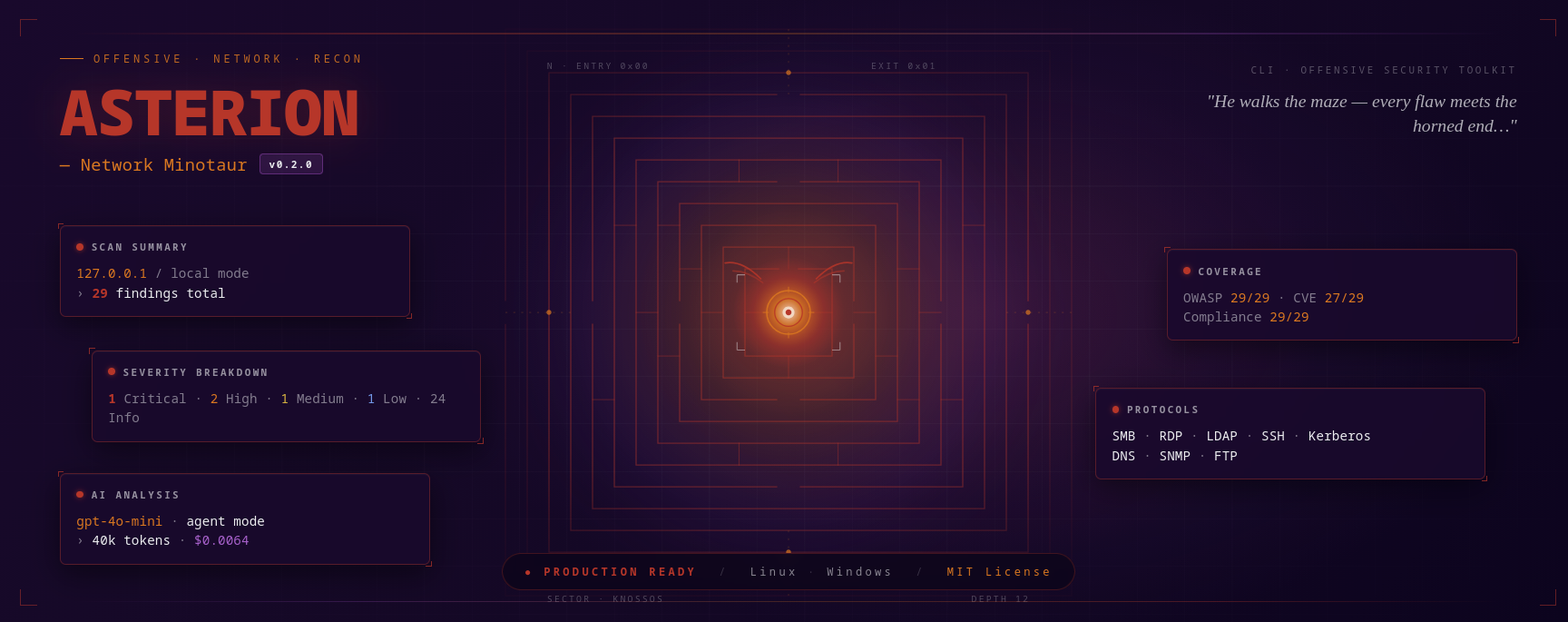

Asterion — वह भूलभुलैया में चलता है, हर दोष का अंत सींग वाले सिरे पर होता है

कार्य में

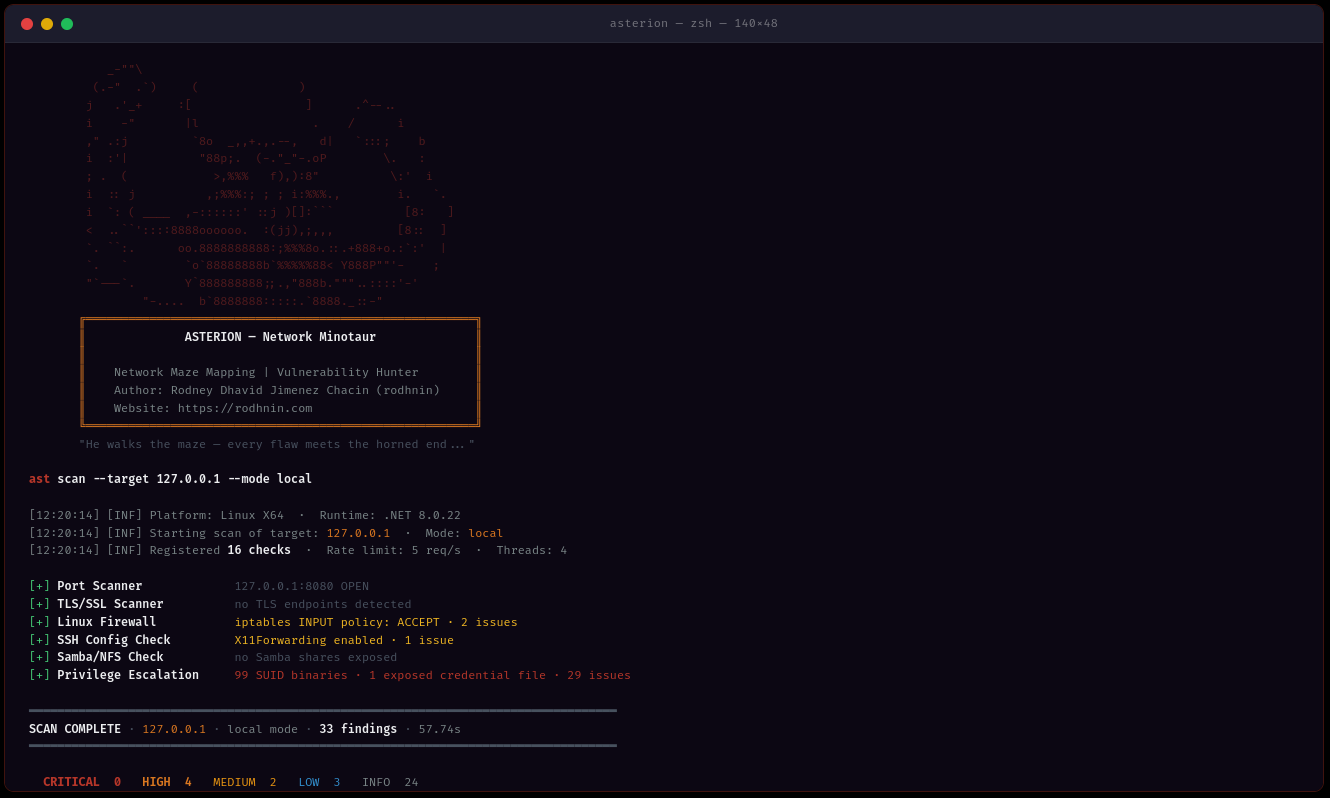
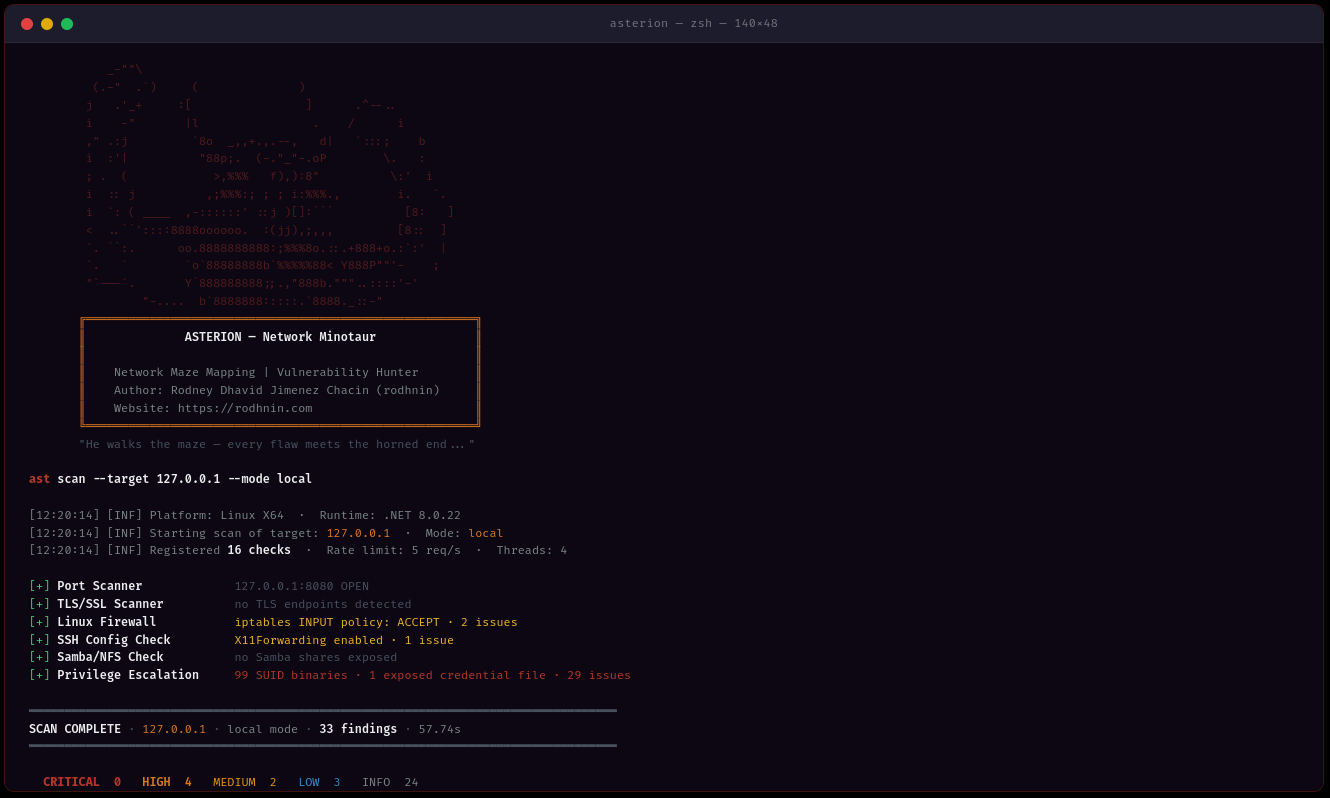
Asterion — वास्तविक स्कैन आउटपुट
स्थानीय स्कैन · 127.0.0.1 · 33 निष्कर्ष (0C/4H/2M/3L/24I) · 16 जाँच · 57.74s · .NET 8.0.22

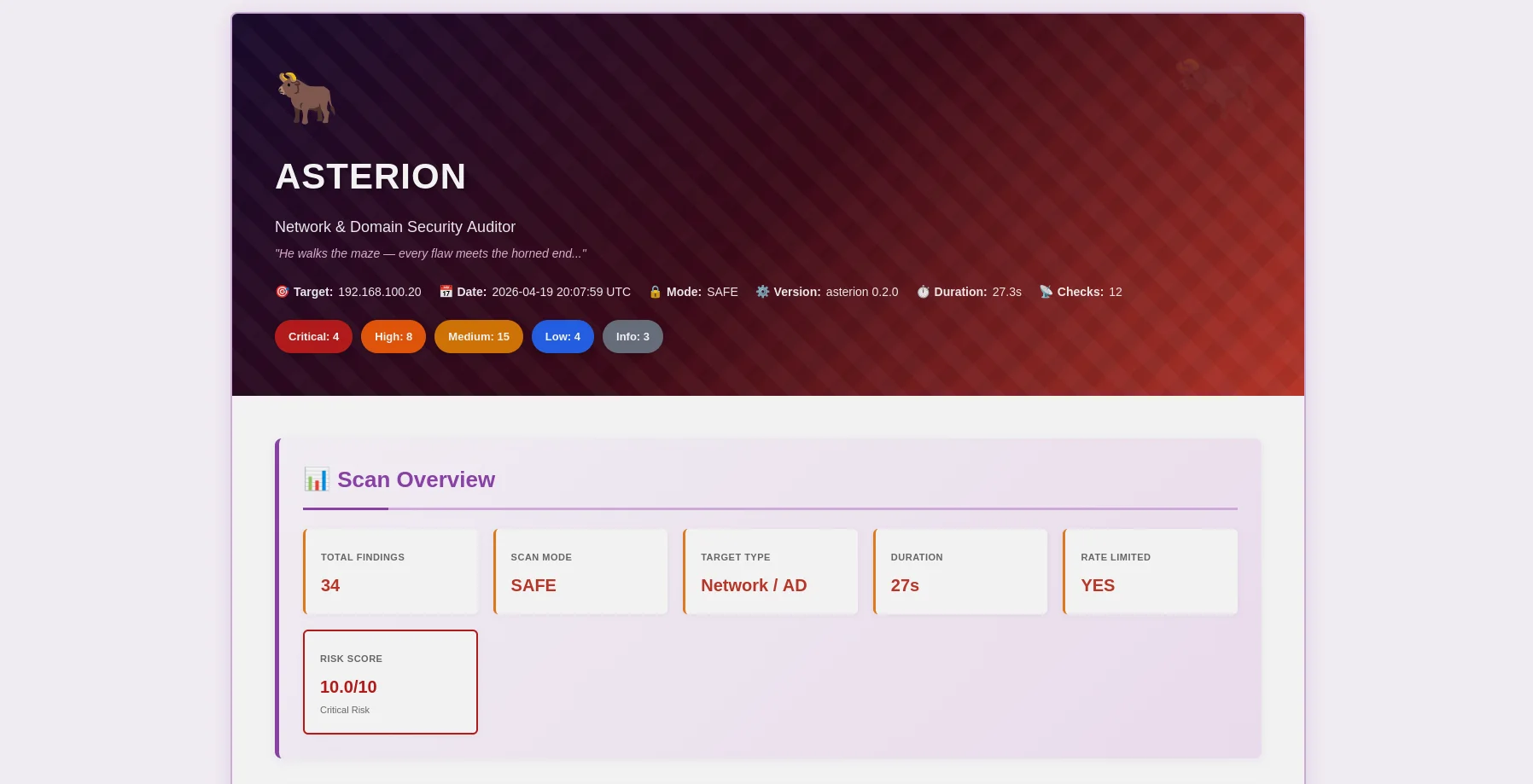
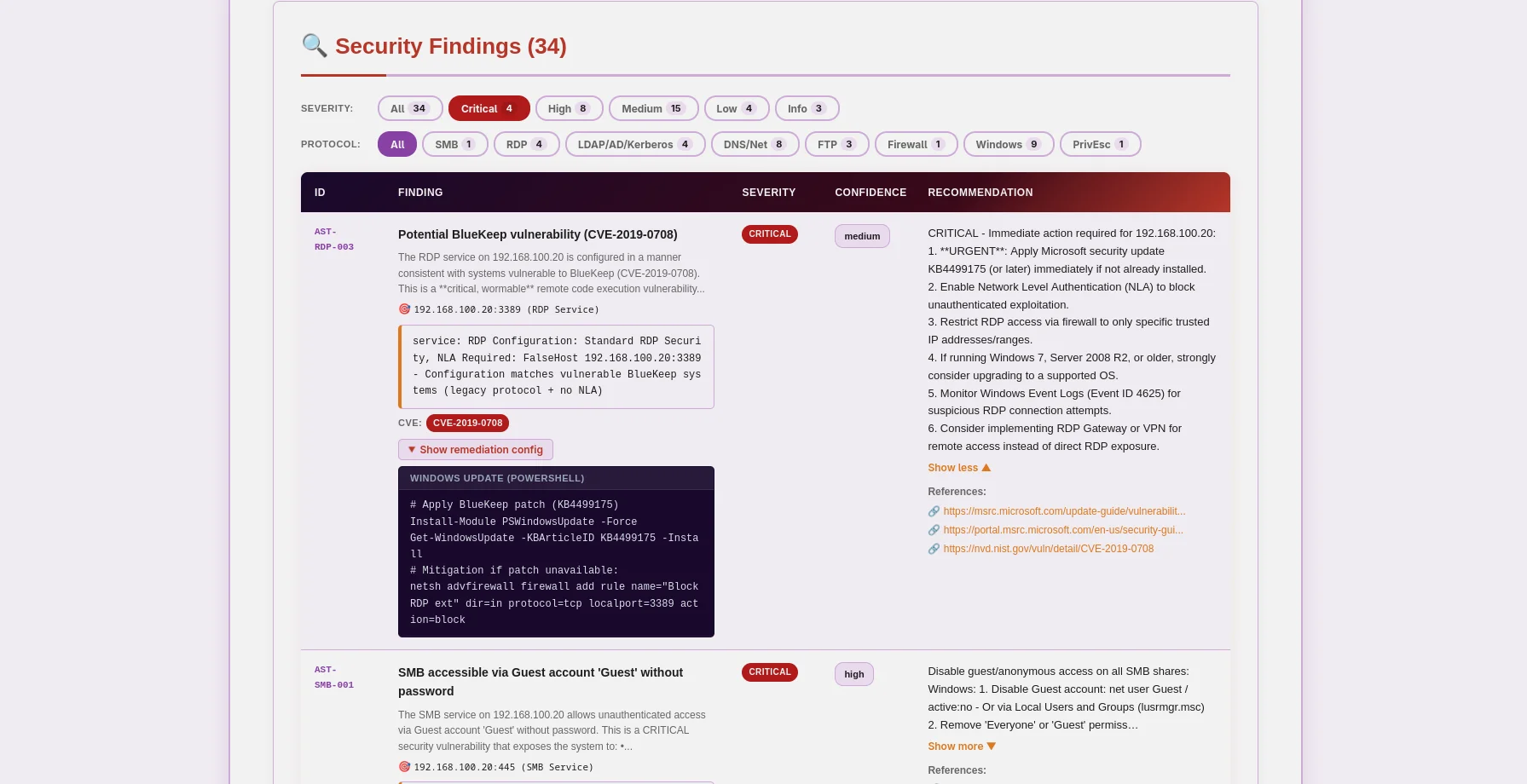
Asterion — गंभीरता बैज और AI विश्लेषण के साथ HTML रिपोर्ट
मिनोटॉर-थीम वाली HTML रिपोर्ट — गंभीरता बैज, विस्तार योग्य साक्ष्य, AI उपचार
Asterion — स्वचालन के लिए JSON रिपोर्ट
JSON रिपोर्ट — OWASP/CIS/NIST/PCI मैपिंग, CVE डेटा, मशीन-पठनीय

🎯 Asterion क्या है?

Asterion एक उत्पादन-तैयार नेटवर्क और डोमेन सुरक्षा ऑडिटर है जो नैतिकता को पहले रखता है। पैठ परीक्षकों, सुरक्षा शोधकर्ताओं और एंटरप्राइज़ सुरक्षा टीमों के लिए निर्मित, यह पारंपरिक भेद्यता स्कैनिंग को अत्याधुनिक AI विश्लेषण के साथ जोड़ता है ताकि Windows Active Directory, Linux सिस्टम और नेटवर्क इंफ्रास्ट्रक्चर के लिए कार्रवाई योग्य अंतर्दृष्टि प्रदान कर सके।

Asterion क्यों?

  • 🔒 डिज़ाइन से नैतिक: सहमति टोकन प्रणाली अनधिकृत स्कैनिंग को रोकती है
  • 🤖 AI-संचालित: बुद्धिमान उपचार गाइड के लिए GPT-4, Claude, या स्थानीय Ollama
  • 📊 पेशेवर रिपोर्ट: सुंदर HTML (मिनोटॉर-थीम) + मशीन-पठनीय JSON
  • 🚀 तेज़ और कुशल: बुद्धिमान दर सीमा के साथ मल्टी-थ्रेडेड स्कैनिंग
  • 💾 स्थायी ट्रैकिंग: स्कैन इतिहास के लिए Argos Suite के साथ साझा SQLite डेटाबेस
  • 🐳 Docker तैयार: CI/CD एकीकरण के लिए कंटेनरीकृत स्कैनिंग

यह क्या स्कैन करता है


✨ विशेषताएँ

🛡️ मुख्य नेटवर्क सुरक्षा स्कैनिंग```bash

One command, comprehensive network analysis

ast scan --target 10.0.0.0/24 --output html

root@kitploit:~
- **बहु-विधि पहचान**: SMB, RDP, LDAP, Kerberos, SSH, FTP, DNS, SNMP प्रोटोकॉल विश्लेषण
- **बहु-थ्रेडिंग**: 1-20 कार्यकर्ता थ्रेड के साथ समवर्ती स्कैनिंग
- **स्मार्ट दर सीमा**: पहचान से बचने के लिए कॉन्फ़िगर करने योग्य अनुरोध थ्रॉटलिंग (1-20 अनुरोध/सेकंड)
- **साक्ष्य संग्रह**: SMB शेयर, LDAP क्वेरी, PowerShell आउटपुट संरक्षित

### 🤖 AI-संचालित विश्लेषण

अपनी आवश्यकताओं के आधार पर अपना AI प्रदाता चुनें:

| प्रदाता             | सबसे उपयुक्त           | गति              | लागत            | गोपनीयता         |
| -------------------- | ---------------------- | ---------------- | --------------- | ----------------- |
| **OpenAI GPT-4**     | उत्पादन गुणवत्ता       | ⚡ तेज़ (40s)    | 💰 $0.30/स्कैन  | 🔒 मानक          |
| **Anthropic Claude** | गोपनीयता-केंद्रित      | ⚡ तेज़ (50s)    | 💰 $0.35/स्कैन  | 🔒 उन्नत          |
| **Ollama (स्थानीय)** | पूर्ण गोपनीयता        | 🐢 धीमी (30 मिनट)| 💰 मुफ़्त       | 🔐 100% ऑफ़लाइन  |

**दो विश्लेषण मोड:**

- **तकनीकी**: PowerShell/GPO कमांड और कॉन्फ़िगरेशन स्निपेट के साथ चरण-दर-चरण सुधार
- **कार्यकारी**: हितधारकों और प्रबंधन के लिए सरल भाषा में सारांश

### 📊 पेशेवर रिपोर्टिंग

**JSON रिपोर्ट** (मशीन-पठनीय)```json
{
  "tool": "asterion",
  "version": "0.2.0",
  "target": "192.168.1.10",
  "riskScore": 10.0,
  "summary": {
    "critical": 3,
    "high": 8,
    "medium": 16,
    "low": 5,
    "info": 2
  },
  "findings": [
    {
      "id": "AST-SMB-003",
      "title": "SMBv1 protocol enabled (EternalBlue vector)",
      "severity": "high",
      "owasp": { "id": "A06", "name": "Vulnerable and Outdated Components" },
      "vulnerabilities": [
        {
          "cve_id": "CVE-2017-0143",
          "cvss_score": 9.8,
          "cwe_id": "CWE-119"
        }
      ],
      "cvss": 9.8
    }
  ],
  "attackChains": [...],
  "diff": { "refScanId": 41, "new": [...], "fixed": [...], "persisting": [...] }
}

HTML रिपोर्ट (मानव-अनुकूल)

  • 🎨 Minotaur-थीम वाला डिज़ाइन (लाल/नारंगी/बैंगनी रंग योजना)
  • 🏷️ रंग-कोडित गंभीरता बैज
  • 📝 विस्तार योग्य साक्ष्य अनुभाग (SMB शेयर, LDAP क्वेरी, PowerShell आउटपुट)
  • 🤖 AI विश्लेषण सुंदर रूप से स्वरूपित
  • 📱 मोबाइल-अनुकूल उत्तरदायी डिज़ाइन

🔐 सहमति टोकन प्रणाली

Asterion तकनीक के माध्यम से नैतिक हैकिंग को लागू करता है। आक्रामक स्कैनिंग और AI विश्लेषण के लिए स्वामित्व का प्रमाण आवश्यक है:```bash

1. Generate token

ast consent generate --domain corp.local

2. Place token (choose one method)

HTTP: Upload to https://corp.local/.well-known/verify-abc123.txt

DNS: Add TXT record: corp.local = "asterion-verify=verify-abc123"

SSH: Create file /tmp/consent_verify-abc123 with token content

3. Verify ownership

ast consent verify --method http --domain corp.local --token verify-abc123

4. Now you can use aggressive mode

ast scan --target corp.local --mode aggressive --use-ai

root@kitploit:~
### 💾 डेटाबेस स्थायित्व

Argos Suite के साथ साझा SQLite डेटाबेस सब कुछ ट्रैक करता है:

- **स्कैन इतिहास**: दिनांक, अवधि, निष्कर्षों की संख्या, गंभीरता विभाजन
- **निष्कर्ष भंडार**: सभी Argos टूल्स में खोजने योग्य कमजोरी डेटाबेस
- **सत्यापित डोमेन**: समाप्ति के साथ सहमति टोकन ट्रैकिंग
- **प्रवृत्ति विश्लेषण**: समय के साथ स्कैन की तुलना करें```bash
# Query recent scans (works for all Argos Suite tools)
sqlite3 ~/.argos/argos.db "SELECT * FROM scans WHERE tool='asterion' ORDER BY started_at DESC LIMIT 10"

# Find critical issues
sqlite3 ~/.argos/argos.db "SELECT * FROM v_critical_findings WHERE tool='asterion'"

🚀 त्वरित आरंभ

पूर्वापेक्षाएँ

सभी प्लेटफ़ॉर्म:

  • .NET 8.0 SDK (डाउनलोड)
  • Python 3.10+ (डाउनलोड)
  • git (रिपॉजिटरी क्लोन करने के लिए)

वैकल्पिक:

  • Docker (कंटेनरीकृत स्कैनिंग के लिए)
  • API Keys (AI विश्लेषण के लिए - OpenAI या Anthropic)

स्थापना — स्वचालित सेटअप (अनुशंसित)

Linux / macOS```bash

Clone repository

git clone https://github.com/rodhnin/asterion-network-minotaur.git cd asterion-network-minotaur

Run setup script

chmod +x scripts/setup.py python3 scripts/setup.py

root@kitploit:~
**स्क्रिप्ट निम्नलिखित कार्य करेगी:**

1. ✅ पूर्वापेक्षाएँ जाँचें (.NET, Python)
2. ✅ Python निर्भरताएँ स्थापित करें
3. ✅ साझा Argos Suite डेटाबेस सेटअप करें
4. ✅ Asterion को Release मोड में बनाएँ
5. ✅ निर्देशिकाएँ बनाएँ (~/.asterion, ~/.argos)
6. ✅ रैपर स्क्रिप्ट बनाएँ `/usr/local/bin/ast` (वैकल्पिक)

#### Windows (PowerShell)```powershell
# Clone repository
git clone https://github.com/rodhnin/asterion-network-minotaur.git
cd asterion-network-minotaur

# Run setup (right-click PowerShell > Run as Administrator)
.\scripts\setup.ps1

स्क्रिप्ट निम्नलिखित करेगी:

  1. ✅ पूर्वापेक्षाएँ जाँचें (.NET, Python)
  2. ✅ Python निर्भरताएँ स्थापित करें
  3. ✅ साझा Argos Suite डेटाबेस सेटअप करें
  4. ✅ रिलीज़ मोड में Asterion बनाएँ
  5. ✅ निर्देशिकाएँ बनाएँ (%USERPROFILE%.asterion, %USERPROFILE%.argos)

स्थापना — मैन्युअल सेटअप

यदि आपके सिस्टम पर स्वचालित स्क्रिप्ट काम नहीं करती हैं, तो इन चरणों का पालन करें:

चरण 1: रिपॉजिटरी को क्लोन करें```bash

git clone https://github.com/rodhnin/asterion-network-minotaur.git cd asterion-network-minotaur

root@kitploit:~
#### चरण 2: निर्भरताएँ स्थापित करें

**लिनक्स/मैकओएस:**```bash
pip3 install -r scripts/requirements.txt

विंडोज (कमांड प्रॉम्प्ट):```cmd pip install -r scripts\requirements.txt

root@kitploit:~
#### चरण 3: डेटाबेस सेटअप करें

**Linux/macOS:**```bash
python3 scripts/db_migrate.py

विंडोज़:```cmd python scripts\db_migrate.py

root@kitploit:~
#### चरण 4: Asterion बनाएँ

**सभी प्लेटफ़ॉर्म:**```bash
dotnet build -c Release

चरण 5: कॉन्फ़िग निर्देशिकाएँ बनाएं

Linux/macOS:```bash mkdir -p ~/.asterion/reports mkdir -p ~/.asterion/consent-proofs mkdir -p ~/.argos

root@kitploit:~
**Windows (PowerShell):**```powershell
New-Item -ItemType Directory -Force -Path "$env:USERPROFILE\.asterion\reports" | Out-Null
New-Item -ItemType Directory -Force -Path "$env:USERPROFILE\.asterion\consent-proofs" | Out-Null
New-Item -ItemType Directory -Force -Path "$env:USERPROFILE\.argos" | Out-Null

चरण 6: (केवल Linux/macOS) ग्लोबल कमांड बनाएँ```bash

Create wrapper script

sudo nano /usr/local/bin/ast

Paste this content:

#!/bin/bash exec dotnet "$(cd "$(dirname "${BASH_SOURCE[0]}")/.." && pwd)/src/Asterion/bin/Release/net8.0/Asterion.dll" "$@"

Make executable

sudo chmod +x /usr/local/bin/ast

root@kitploit:~
#### चरण 7: API कुंजी कॉन्फ़िगर करें (वैकल्पिक)

एक एकल पर्यावरण चर सभी AI प्रदाताओं (OpenAI, Anthropic) के लिए काम करता है:

**Linux/macOS:**```bash
export AI_API_KEY="sk-proj-..."   # OpenAI key
# or
export AI_API_KEY="sk-ant-..."    # Anthropic key
# Add to ~/.bashrc or ~/.zshrc to make permanent

Windows (PowerShell):```powershell $env:AI_API_KEY = "sk-proj-..."

Or permanently:

[Environment]::SetEnvironmentVariable("AI_API_KEY", "sk-proj-...", [System.EnvironmentVariableTarget]::User)

root@kitploit:~
#### Step 8: स्थापना सत्यापित करें

**Linux/macOS (यदि symlink बनाया गया था):**```bash
ast version

Windows या सीधा आह्वान:```cmd .\src\Asterion\bin\Release\net8.0\ast.exe version

Or with dotnet

dotnet .\src\Asterion\bin\Release\net8.0\Asterion.dll version

root@kitploit:~
### आपका पहला स्कैन

#### स्थानीय नेटवर्क का स्वचालित स्कैन

**Asterion स्वचालित रूप से आपके स्थानीय नेटवर्क को खोज और स्कैन कर सकता है!**

**विंडोज (PowerShell) — सेटअप के बाद (अनुशंसित):**```powershell
# Test on localhost (simple)
ast scan --target localhost --output html

# Scan local subnet with AI analysis
ast scan --target 192.168.1.0/24 --output both --threads 10 --rate 5 --use-ai --ai-tone both

# Domain scan with authentication
ast scan --target corp.local --auth "CORP\admin:Password123" --use-ai

Windows (PowerShell) — बिना PATH सेटअप के:```powershell

Scan localhost (full path)

.\src\Asterion\bin\Release\net8.0\ast.exe scan --target localhost --output html --use-ai --ai-tone both

Scan local subnet (full path)

.\src\Asterion\bin\Release\net8.0\ast.exe scan --target 192.168.1.0/24 --output both --threads 10 --rate 5

root@kitploit:~
**Linux/macOS:**```bash
# Scan localhost
ast scan --target localhost \
  --output html \
  --use-ai \
  --ai-tone both

# Scan local subnet (e.g., 192.168.1.0/24)
ast scan --target 192.168.1.0/24 \
  --output both \
  --threads 10 \
  --rate 5

# Scan domain
ast scan --target corp.local \
  --auth "CORP\admin:Password123" \
  --output html \
  --use-ai

आउटपुट प्रारूप

Asterion --output का उपयोग करके तीन आउटपुट प्रारूपों का समर्थन करता है:

AI टोन विकल्प

--ai-tone का उपयोग करके AI विश्लेषण को कैसे स्वरूपित किया जाए, इसे नियंत्रित करें:

टोनउपयोग केसआउटपुट
technicalसुरक्षा टीमें

बुनियादी उदाहरण

सरल नेटवर्क स्कैन (कोई प्रमाणीकरण नहीं):```bash ast scan --target 10.0.0.0/24

root@kitploit:~
**HTML रिपोर्ट के साथ:**```bash
ast scan --target 192.168.1.0/24 --output html

प्रमाणित स्कैन (विंडोज डोमेन):```bash ast scan --target dc01.corp.local
--auth "CORP\Administrator:P@ssw0rd"
--output html

root@kitploit:~
**AI विश्लेषण के साथ (तकनीकी + कार्यकारी):**```bash
ast scan --target 10.0.0.0/24 \
  --use-ai \
  --ai-tone both \
  --output html

तेज़ स्कैनिंग (10 थ्रेड्स, 10 अनुरोध/सेकंड):```bash ast scan --target 10.0.0.0/24
--threads 10
--rate 10
--output json

root@kitploit:~
#### रिपोर्ट स्थान

**नेटिव इंस्टॉलेशन:**

- रिपोर्ट: `~/.asterion/reports/`
- डेटाबेस: `~/.argos/argos.db`

**विंडोज़:**

- रिपोर्ट: `%USERPROFILE%\.asterion\reports\`
- डेटाबेस: `%USERPROFILE%\.argos\argos.db`

**डॉकर डिप्लॉयमेंट:**

- रिपोर्ट: `docker/reports/`
- डेटाबेस: `docker/data/argos.db`

**🎉 सफलता!** JSON और HTML आउटपुट फ़ाइलों के लिए रिपोर्ट निर्देशिका जांचें।

---

### डॉकर पर चलाना

**स्वचालित डिप्लॉयमेंट:**```bash
cd docker
./deploy.sh    # Linux/macOS
.\deploy.ps1   # Windows

मैन्युअल Docker परिनियोजन:```bash

Build and start

docker compose up -d

Run a scan

docker compose exec asterion dotnet /app/ast.dll scan
--target 192.168.1.0/24
--output html

View logs

docker compose logs -f asterion

Stop services

docker compose down

root@kitploit:~
---

## 📘 उपयोग गाइड

### कमांड संरचना```bash
ast <command> [options]

उपलब्ध कमांड्स:

  • scan — सुरक्षा स्कैन चलाएँ
  • consent — सहमति टोकन प्रबंधित करें
  • version — संस्करण जानकारी प्रदर्शित करें

स्कैन कमांड विकल्प

मुख्य फ़्लैग्स

क्रेडेंशियल फ़्लैग्स

AI फ़्लैग्स

त्वरित संदर्भ उदाहरण

बुनियादी स्कैनिंग```bash

Scan local subnet (default: JSON output, safe mode)

ast scan --target 192.168.1.0/24

Scan with HTML report

ast scan --target 192.168.1.0/24 --output html

Scan specific IP

ast scan --target 10.0.0.5 --output both

root@kitploit:~
#### नेटवर्क लक्ष्यीकरण```bash
# CIDR notation
ast scan --target 10.0.0.0/24

# IP range
ast scan --target 192.168.1.10-50

# Domain name
ast scan --target corp.local

# Single host
ast scan --target 192.168.1.1

प्रदर्शन ट्यूनिंग```bash

Slow, stealthy scan (3 threads, 2 req/s)

ast scan --target 10.0.0.0/24 --threads 3 --rate 2

Fast scan (15 threads, 15 req/s)

ast scan --target 10.0.0.0/24 --threads 15 --rate 15

Specific ports only

ast scan --target 10.0.0.0/24 --ports 445,3389,22,139

root@kitploit:~
#### विंडोज डोमेन स्कैनिंग```bash
# Network + LDAP/Kerberos/AD checks
ast scan --target dc01.corp.local \
  --auth "CORP\Administrator:P@ssw0rd"

# WinRM: remote firewall, registry, services, privesc
ast scan --target 192.168.1.10 \
  --winrm "CORP\admin:P@ssw0rd"

# Full Windows audit: auth + WinRM + AI + HTML
ast scan --target 192.168.1.10 \
  --auth "CORP\admin:P@ssw0rd" \
  --winrm "CORP\admin:P@ssw0rd" \
  --use-ai --ai-tone technical -o both -v

# With NTLM hash (Pass-the-Hash)
ast scan --target 10.0.0.5 \
  --auth-ntlm "admin:aad3b435b51404eeaad3b435b51404ee:8846f7eaee8fb117ad06bdd830b7586c"

# Diff against last scan (track security changes)
ast scan --target 192.168.1.10 --winrm "CORP\admin:P@ssw0rd" --diff last -o both

लिनक्स सिस्टम ऑडिटिंग```bash

Remote Linux SSH scan (password)

ast scan --target 10.0.0.25 --ssh "admin:password"

SSH with sudo elevation (for privileged checks)

ast scan --target 10.0.0.25 --ssh "admin:password" --sudo-password "sudopass"

SSH key authentication

ast scan --target 10.0.0.25 --ssh-key "admin:~/.ssh/id_rsa"

Via bastion host

ast scan --target internal.corp.local
--bastion "bastion.corp.local:jumpuser:~/.ssh/bastion_key"
--ssh "admin:password"

Full Linux audit: SSH + sudo + AI + HTML

ast scan --target 10.0.0.25
--ssh "root:toor"
--use-ai --ai-tone technical -o both -v

root@kitploit:~
#### AI-संचालित विश्लेषण```bash
# Technical remediation (default, for security teams)
ast scan --target 10.0.0.5 \
  --ssh "root:pass" \
  --use-ai --ai-tone technical -o html

# Executive summary (for management)
ast scan --target 10.0.0.5 \
  --use-ai --ai-tone non_technical -o html

# Both formats + streaming output
ast scan --target 10.0.0.5 --use-ai --ai-tone both --ai-stream -o both

# Agent mode (NVD CVE lookup tool enabled)
ast scan --target 10.0.0.5 --ssh "root:pass" --use-ai --ai-agent -v

# Compare two models
ast scan --target 10.0.0.5 --use-ai \
  --ai-compare "openai/gpt-4o-mini-2024-07-18,anthropic/claude-3-5-haiku-20241022"

# Enforce cost budget
ast scan --target 10.0.0.5 --winrm "admin:pass" --use-ai --ai-budget 0.05

डिबगिंग```bash

Verbose output

ast scan --target 10.0.0.5 -v

Verbose + custom timeout

ast scan --target 10.0.0.5 -v --timeout 20

Test connectivity only (timeout 5s)

ast scan --target 10.0.0.5 --timeout 5

root@kitploit:~
### सहमति टोकन प्रबंधन

#### सहमति टोकन उत्पन्न करें```bash
ast consent generate --domain corp.local
# Output: Token: verify-a3f9b2c1d8e4f5a6

सहमति सत्यापित करें (3 विधियाँ)

HTTP Method (वेब सर्वर पर फ़ाइल रखें):```bash

1. Create file at: https://corp.local/.well-known/verify-a3f9b2c1d8e4f5a6.txt

2. Verify:

ast consent verify
--method http
--domain corp.local
--token verify-a3f9b2c1d8e4f5a6

root@kitploit:~
**DNS Method** (TXT रिकॉर्ड जोड़ें):```bash
# 1. Add DNS TXT record: corp.local = "asterion-verify=verify-a3f9b2c1d8e4f5a6"
# 2. Verify:
ast consent verify \
  --method dns \
  --domain corp.local \
  --token verify-a3f9b2c1d8e4f5a6

SSH विधि (सिस्टम पर फ़ाइल बनाएं):```bash

1. Create file: /tmp/consent_verify-a3f9b2c1d8e4f5a6

2. Verify:

ast consent verify
--method ssh
--domain corp.local
--token verify-a3f9b2c1d8e4f5a6
--ssh "user:password"

root@kitploit:~
#### आक्रामक मोड चलाएं```bash
# After verifying consent token:
ast scan --target corp.local --mode aggressive

वास्तविक विश्व परिदृश्य

परिदृश्य 1: त्वरित नेटवर्क मूल्यांकन```bash

Fast, no-auth scan with HTML report

ast scan --target 192.168.1.0/24 --output html --threads 10 --rate 10

root@kitploit:~
#### परिदृश्य 2: पूर्ण डोमेन ऑडिट```bash
# Complete Windows AD assessment with AI analysis
ast scan --target corp.local \
  --auth "CORP\admin:P@ssw0rd" \
  --use-ai \
  --ai-tone both \
  --output both \
  --threads 8 \
  --rate 8

परिदृश्य 3: गुप्त स्कैनिंग```bash

Slow, careful scan to avoid detection

ast scan --target 10.0.0.0/24
--threads 2
--rate 1
--timeout 20
--output json

root@kitploit:~
#### परिदृश्य 4: प्रवेश परीक्षण```bash
# Generate consent first
ast consent generate --domain internal.corp

# Place token and verify
ast consent verify --method http --domain internal.corp --token <token>

# Run aggressive assessment
ast scan --target internal.corp \
  --mode aggressive \
  --auth "CORP\pentest:P@ssw0rd" \
  --use-ai \
  --output both

🤖 AI-संचालित विश्लेषण

Asterion Python ब्रिज के माध्यम से कई AI प्रदाताओं के समर्थन के साथ LangChain 1.0.0 का उपयोग करता है, जो आपको आपकी सुरक्षा, गोपनीयता और बजट आवश्यकताओं के आधार पर लचीलापन प्रदान करता है।

समर्थित प्रदाता

OpenAI GPT-4 Turbo

सर्वोत्तम: उत्पादन उपयोग के लिए

  • ⭐ गुणवत्ता: उत्कृष्ट (5/5)
  • ⚡ गति: ~60–80 सेकंड (gpt-4o-mini, डिफ़ॉल्ट)
  • 💰 लागत: ~$0.004–0.009 प्रति स्कैन (gpt-4o-mini के साथ ~30 निष्कर्ष)
  • 🔒 गोपनीयता: मानक (डेटा ट्रांज़िट में एन्क्रिप्टेड)```bash export AI_API_KEY="sk-proj-..." # Use AI_API_KEY for all providers
root@kitploit:~
#### Anthropic Claude

**सर्वोत्तम: उन्नत गोपनीयता**

- ⭐ गुणवत्ता: उत्कृष्ट (5/5)
- ⚡ गति: ~50–70 सेकंड
- 💰 लागत: ~$0.007–0.015 प्रति स्कैन (claude-3-5-haiku)
- 🔒 गोपनीयता: उन्नत (Anthropic का गोपनीयता-प्रथम दृष्टिकोण)```bash
export AI_API_KEY="sk-ant-..."   # Same variable, Anthropic key format

ओलामा (स्थानीय मॉडल)

सर्वोत्तम: पूर्ण गोपनीयता

  • ⭐ गुणवत्ता: अच्छा (3/5)
  • 🐢 गति: ~30 मिनट (CPU) या ~90 सेकंड (GPU)
  • 💰 लागत: मुफ्त
  • 🔐 गोपनीयता: 100% ऑफलाइन (डेटा कभी भी आपकी मशीन से बाहर नहीं जाता)```bash

Install Ollama: https://ollama.ai

ollama pull llama3.2

root@kitploit:~
### गोपनीयता और सुरक्षा

**स्वचालित स्वच्छता**
AI प्रदाताओं को डेटा भेजने से पहले, Asterion स्वचालित रूप से हटाता है:

- ✅ सहमति टोकन
- ✅ डोमेन क्रेडेंशियल्स (पासवर्ड, NTLM हैश)
- ✅ व्यक्तिगत पहचान योग्य जानकारी (PII)
- ✅ आंतरिक IP पते (अनुरोध करने पर)
- ✅ संवेदनशील डेटा वाले SMB शेयर पथ

**केवल ऑप्ट-इन**

- AI विश्लेषण के लिए स्पष्ट `--use-ai` ध्वज की आवश्यकता है
- आक्रामक स्कैनिंग के लिए सत्यापित सहमति टोकन की आवश्यकता है
- आप नियंत्रित करते हैं कि कौन सा प्रदाता आपका डेटा देखे

**अधिकतम गोपनीयता के लिए**
स्थानीय रूप से Ollama का उपयोग करें। धीमा और कम सटीक होने पर भी, आपका स्कैन डेटा आपकी मशीन से कभी बाहर नहीं जाता।

### प्रदाता बदलना

**वर्तमान विधि (v0.2.0):** `config/defaults.yaml` संपादित करें```yaml
ai:
    langchain:
        provider: "ollama" # Changed from "openai"
        model: "llama3.2" # Ollama model
        ollama_base_url: "http://localhost:11434"

v0.3.0 में आ रहा है: इंटरैक्टिव कॉन्फ़िगरेशन मेनू (Metasploit-style)```bash

Future feature

ast --show-options ast --set ai.provider=anthropic ast --save-profile privacy-mode

root@kitploit:~
---

## 🧪 सुरक्षित परीक्षण प्रयोगशाला

**⚠️ बिना लिखित अनुमति के उत्पादन नेटवर्क को कभी स्कैन न करें!**

सुरक्षित रूप से अभ्यास करने के लिए हमारी डॉकर प्रयोगशाला का उपयोग करें:

### परीक्षण वातावरण सेट अप करें```bash
# Navigate to docker directory
cd docker

# Deploy vulnerable network lab
docker-compose -f compose.testing.yml up -d

# Wait for services to start (~60 seconds)
docker-compose -f compose.testing.yml logs -f

# Create vulnerable conditions
docker-compose -f compose.testing.yml exec windows-target powershell -c "Disable-NetFirewallProfile -All"

प्रयोगशाला को स्कैन करें```bash

Return to project root

cd ..

Run scan against lab network

ast scan --target 172.20.0.0/24 --output html

Try authenticated scan

ast scan --target 172.20.0.2 --auth "LAB\admin:P@ssw0rd123" --output both

Try AI analysis (requires API key)

ast scan --target 172.20.0.0/24 --use-ai --output html

root@kitploit:~
### सफाई```bash
cd docker
docker-compose -f compose.testing.yml down -v  # -v removes all data

विस्तृत परीक्षण परिदृश्यों के लिए, docs/TESTING_GUIDE.md देखें


🔒 नैतिकता और कानूनी

सुनहरा नियम

केवल उन नेटवर्क और सिस्टम को स्कैन करें जिनके आप मालिक हैं या जिनके परीक्षण के लिए आपके पास स्पष्ट लिखित अनुमति है।

सहमति प्रवर्तन

Asterion दुरुपयोग को रोकने के लिए तकनीकी नियंत्रण लागू करता है:

कानूनी ढाँचा

कंप्यूटर सिस्टम तक अनधिकृत पहुँच अधिकांश न्यायक्षेत्रों में अवैध है:

  • 🇺🇸 यूएसए: कंप्यूटर धोखाधड़ी और दुरुपयोग अधिनियम (CFAA)
  • 🇬🇧 यूके: कंप्यूटर दुरुपयोग अधिनियम 1990
  • 🇪🇺 यूरोपीय संघ: निर्देश 2013/40/EU
  • 🌍 अंतर्राष्ट्रीय: विभिन्न साइबर अपराध कानून

सर्वोत्तम अभ्यास

  1. ✅ लिखित प्राधिकरण प्राप्त करें स्कैन करने से पहले
  2. ✅ स्पष्ट रूप से दायरा निर्धारित करें (कौन से नेटवर्क/डोमेन/आईपी)
  3. ✅ सब कुछ दस्तावेज़ित करें (सहमति, निष्कर्ष, सुधार)
  4. ✅ आधार रेखा स्थापित करने के लिए पहले सुरक्षित मोड का उपयोग करें
  5. ✅ निष्कर्षों की जिम्मेदारी से रिपोर्ट करें (समन्वित प्रकटीकरण)
  6. ❌ स्पष्ट अनुमति के बिना कभी भी भेद्यता का शोषण न करें (जैसे, कोई EternalBlue शोषण नहीं)
  7. ❌ कभी भी तृतीय-पक्ष नेटवर्क स्कैन न करें (जैसे, google.com, microsoft.com)

पूर्ण नैतिक दिशानिर्देशों के लिए, docs/ETHICS.md देखें


🐳 डॉकर डिप्लॉयमेंट

इंटरैक्टिव डिप्लॉयमेंट स्क्रिप्ट (अनुशंसित)

Asterion क्रॉस-प्लेटफ़ॉर्म डिप्लॉयमेंट स्क्रिप्ट प्रदान करता है:

लिनक्स/macOS:```bash cd docker ./deploy.sh

root@kitploit:~
**विंडोज़ (PowerShell):**```powershell
cd docker
.\deploy.ps1

तैनाती विकल्प:

  1. उत्पादन - Asterion Scanner तैनात करें
  2. सभी सेवाएँ बंद करें
  3. सभी कंटेनर और डेटा हटाएँ (रीसेट)

मैन्युअल Docker तैनाती

Linux/macOS:```bash cd docker docker compose up -d

Execute scans (note the dotnet wrapper)

docker compose exec asterion dotnet /app/ast.dll scan --target 10.0.0.0/24

View logs

docker compose logs -f asterion

Stop service

docker compose down

root@kitploit:~
**Windows (PowerShell):**```powershell
cd docker
docker compose up -d

# Execute scans (note the dotnet wrapper)
docker compose exec asterion dotnet /app/ast.dll scan --target 10.0.0.0/24

# View logs
docker compose logs -f asterion

# Stop service
docker compose down

स्थायी डेटा:

  • रिपोर्ट्स: ./reports/ → होस्ट डायरेक्टरी docker/reports/
  • डेटाबेस: ./data/argos.db → होस्ट डायरेक्टरी docker/data/argos.db (साझा Argos Suite DB)
  • लॉग्स: ./logs/asterion.log → होस्ट डायरेक्टरी docker/logs/asterion.log

नोट: Asterion स्वचालित रूप से ASTERION_IN_DOCKER एनवायरनमेंट वेरिएबल के माध्यम से Docker वातावरण का पता लगाता है।

पूर्ण Docker दस्तावेज़ीकरण (Linux/Windows) के लिए देखें: docker/README.md


📊 रिपोर्ट्स को समझना

रिपोर्ट संरचना

नेटिव इंस्टॉलेशन:``` ~/.asterion/ ├── reports/ │ ├── asterion_report_10_0_0_0_24_20260419_143000.json # Machine-readable │ └── asterion_report_10_0_0_0_24_20260419_143000.html # Human-friendly (Minotaur-themed) └── consent-proofs/ └── corp_local_verify-abc123_20260419.txt

~/.argos/ ├── argos.db # Shared Argos Suite database └── logs/ └── argos.log # Shared log file

root@kitploit:~
**Docker तैनाती:**```
asterion-network-minotaur/
├── docker/
│   ├── reports/
│   │   ├── asterion_report_10_0_0_0_24_20260419_143000.json
│   │   └── asterion_report_10_0_0_0_24_20260419_143000.html
│   ├── data/
│   │   └── argos.db          # Shared Argos Suite database (Docker)
│   ├── logs/
│   │   └── asterion.log
│   └── workspace/
│       └── consent-proofs/

नोट: Docker वातावरण स्वचालित रूप से ASTERION_IN_DOCKER पर्यावरण चर के माध्यम से पता लगाया जाता है।

JSON रिपोर्ट स्कीमा```json

{ "tool": "asterion", "version": "0.2.0", "target": "10.0.0.0/24", "date": "2026-04-13T14:30:00Z", "mode": "safe", "summary": { "critical": 12, "high": 8, "medium": 15, "low": 5, "info": 20 }, "findings": [ { "id": "AST-SMB-003", "title": "SMBv1 enabled (EternalBlue vulnerability)", "severity": "critical", "confidence": "high", "description": "SMBv1 is enabled on this system. This protocol is vulnerable to EternalBlue (CVE-2017-0143), a critical remote code execution vulnerability exploited by WannaCry ransomware.", "evidence": { "type": "smb", "value": "SMBv1 negotiated successfully", "context": "Port 445/tcp open, SMB signing not required" }, "recommendation": "URGENT - Disable SMBv1 immediately:\n\nPowerShell:\nDisable-WindowsOptionalFeature -Online -FeatureName SMB1Protocol -NoRestart\n\nGroup Policy:\nComputer Configuration → Administrative Templates → MS Security Guide\n→ Configure SMBv1 client driver startup = Disabled\n→ Configure SMBv1 server = Disabled\n\nVerify:\nGet-SmbServerConfiguration | Select EnableSMB1Protocol", "references": [ "https://docs.microsoft.com/en-us/windows-server/storage/file-server/troubleshoot/detect-enable-and-disable-smbv1-v2-v3", "https://nvd.nist.gov/vuln/detail/CVE-2017-0143" ], "affected_component": "SMB Server" }, { "id": "AST-LDAP-001", "title": "LDAP anonymous bind allowed", "severity": "high", "confidence": "high", "description": "LDAP server allows anonymous bind, permitting unauthenticated enumeration of domain users, groups, and configuration.", "evidence": { "type": "ldap", "value": "Anonymous bind successful to port 389/tcp", "context": "Retrieved domain base DN: DC=corp,DC=local" }, "recommendation": "Disable LDAP anonymous bind:\n\nGroup Policy:\nComputer Configuration → Policies → Windows Settings → Security Settings → Local Policies → Security Options\n→ Network access: Allow anonymous SID/Name translation = Disabled\n→ Network access: Do not allow anonymous enumeration of SAM accounts = Enabled\n→ Network access: Do not allow anonymous enumeration of SAM accounts and shares = Enabled\n\nRegistry:\nreg add "HKLM\SYSTEM\CurrentControlSet\Control\Lsa" /v RestrictAnonymous /t REG_DWORD /d 1 /f", "affected_component": "LDAP Server" }, { "id": "AST-RDP-001", "title": "RDP without Network Level Authentication (NLA)", "severity": "high", "confidence": "high", "description": "Remote Desktop Protocol (RDP) is configured without Network Level Authentication (NLA). This allows unauthenticated attackers to reach the login screen and attempt brute-force attacks.", "evidence": { "type": "rdp", "value": "RDP port 3389/tcp open, NLA not required", "context": "Encryption level: High" }, "recommendation": "Enable Network Level Authentication:\n\nPowerShell:\n(Get-WmiObject -class Win32_TSGeneralSetting -Namespace root\cimv2\terminalservices -Filter "TerminalName='RDP-tcp'").SetUserAuthenticationRequired(1)\n\nGroup Policy:\nComputer Configuration → Administrative Templates → Windows Components → Remote Desktop Services → Remote Desktop Session Host → Security\n→ Require user authentication for remote connections by using Network Level Authentication = Enabled", "affected_component": "RDP Server" } ], "notes": { "scan_duration_seconds": 67.5, "targets_scanned": 12, "rate_limit_applied": true, "scope_limitations": "Scan limited to network services. Local system checks require SSH/WinRM credentials.", "false_positive_disclaimer": "Manual verification recommended for all findings before remediation." }, "aiAnalysis": { "executiveSummary": "The network scan identified 12 critical security vulnerabilities requiring immediate attention...", "technicalRemediation": "### Critical Issues\n\n1. \n - Affected systems: 10.0.0.5, 10.0.0.10\n - Remediation: Disable SMBv1...", "generatedAt": "2026-04-19T14:35:00Z", "modelUsed": "gpt-4o-mini-2024-07-18", "provider": "openai" } }

root@kitploit:~
### HTML रिपोर्ट सुविधाएँ

- **📊 कार्यकारी डैशबोर्ड**: गंभीरता गणना और Minotaur ब्रांडिंग के साथ सारांश कार्ड
- **🤖 AI विश्लेषण**: कार्यकारी और तकनीकी अंतर्दृष्टि के लिए विस्तार योग्य अनुभाग
- **🔍 विस्तृत निष्कर्ष**: PowerShell/GPO सुधार आदेशों के साथ गंभीरता के अनुसार व्यवस्थित
- **📋 साक्ष्य**: SMB शेयर, LDAP क्वेरी, RDP कॉन्फ़िगरेशन, PowerShell आउटपुट
- **🔗 बाहरी संदर्भ**: CVE, Microsoft दस्तावेज़ीकरण, OWASP गाइड के लिंक
- **📱 मोबाइल रिस्पॉन्सिव**: सभी उपकरणों पर काम करता है
- **🎨 Minotaur थीम**: लाल/नारंगी/बैंगनी रंग योजना

---

## 📁 प्रोजेक्ट संरचना```
asterion-network-minotaur/
│
├── src/
│   ├── Asterion/                     # Main C# application
│   │   ├── Asterion.csproj           # .NET project file
│   │   │
│   │   ├── Checks/                   # Security check modules
│   │   │   ├── ICheck.cs             # Check interface
│   │   │   ├── BaseCheck.cs          # Abstract base class (350 lines)
│   │   │   ├── CheckCategory.cs      # Check category enum
│   │   │   │
│   │   │   ├── CrossPlatform/        # Network service scanners (work from any OS)
│   │   │   │   ├── PortScanner.cs    # TCP port scanning
│   │   │   │   ├── SmbScanner.cs     # SMB/CIFS security (42KB)
│   │   │   │   ├── RdpScanner.cs     # RDP configuration (24KB)
│   │   │   │   ├── LdapScanner.cs    # LDAP/AD security (38KB)
│   │   │   │   ├── KerberosScanner.cs # Kerberos security (22KB)
│   │   │   │   ├── SnmpScanner.cs    # SNMP vulnerabilities (21KB)
│   │   │   │   ├── DnsScanner.cs     # DNS misconfigurations (14KB)
│   │   │   │   ├── FtpScanner.cs     # FTP security (27KB)
│   │   │   │   ├── TlsScanner.cs     # TLS/SSL certificate checks
│   │   │   │   ├── SysvolCheck.cs    # SYSVOL/GPP password exposure
│   │   │   │   ├── AdAggressiveCheck.cs # AS-REP roasting, delegation, weak ACLs
│   │   │   │   └── WinRmChecks.cs    # Remote Windows audit via WS-Man
│   │   │   │
│   │   │   ├── Windows/              # Local Windows system checks
│   │   │   │   ├── WinFirewallCheck.cs # Firewall configuration
│   │   │   │   ├── WinRegistryCheck.cs # Registry security
│   │   │   │   ├── AdPolicyCheck.cs    # Active Directory policies
│   │   │   │   ├── WinServicesCheck.cs # Service misconfigurations
│   │   │   │   └── PrivEscCheckWin.cs  # Windows privilege escalation
│   │   │   │
│   │   │   └── Linux/                # Local/remote Linux checks (via SSH)
│   │   │       ├── LinuxFirewallCheck.cs # iptables/nftables/ufw
│   │   │       ├── SshConfigCheck.cs     # SSH hardening
│   │   │       ├── SambaNfsCheck.cs      # Samba/NFS security
│   │   │       └── PrivEscCheckLinux.cs  # SUID, sudo misconfig
│   │   │
│   │   ├── Core/                     # Core infrastructure
│   │   │   ├── Orchestrator.cs       # Main execution engine (1,243 lines)
│   │   │   ├── Config.cs             # YAML configuration loader
│   │   │   ├── ScanOptions.cs        # Scan configuration
│   │   │   ├── Database.cs           # SQLite operations
│   │   │   ├── ConsentValidator.cs   # Consent token verification
│   │   │   ├── SshConnectionManager.cs  # SSH.NET wrapper (password/key/bastion)
│   │   │   ├── WinRmConnectionManager.cs # WS-Man HTTP/NTLM (Linux → Windows)
│   │   │   ├── AttackChainAnalyzer.cs   # Multi-step attack chain correlation
│   │   │   ├── NtlmSpnego.cs         # NTLM/SPNEGO auth implementation
│   │   │   ├── NtlmV2Auth.cs         # NTLMv2 auth implementation
│   │   │   │
│   │   │   ├── Output/
│   │   │   │   └── ReportBuilder.cs  # Report generation (risk score, labels)
│   │   │   │
│   │   │   └── Utils/
│   │   │       ├── NetworkUtils.cs   # Network operations
│   │   │       ├── CidrParser.cs     # CIDR/IP range parsing
│   │   │       ├── AuthenticationManager.cs # Credential handling
│   │   │       └── OsDetector.cs     # Per-target OS detection (SSH/SMB/TTL)
│   │   │
│   │   ├── Models/                   # Data models
│   │   │   ├── Report.cs             # Main report structure
│   │   │   ├── Finding.cs            # Security finding (OWASP/CVE/Compliance)
│   │   │   ├── Evidence.cs           # Finding proof
│   │   │   ├── ConsentInfo.cs        # Consent verification
│   │   │   └── AiAnalysis.cs         # AI-generated content (cost tracking)
│   │   │
│   │   ├── Program.cs                # Application entry point
│   │   └── Cli.cs                    # CLI argument parser (all flags)
│   │
│   └── Asterion.sln                  # Visual Studio solution
│
├── scripts/                          # Python bridge scripts
│   ├── ai_analyzer.py                # LangChain AI integration (stream/agent/compare)
│   ├── cve_lookup.py                 # NVD API v2 CVE enrichment
│   ├── owasp.py                      # OWASP Top 10 mapping (139 entries)
│   ├── compliance.py                 # CIS/NIST/PCI mapping (95 entries)
│   ├── db_migrate.py                 # Database setup
│   ├── render_html.py                # HTML report generation (Jinja2)
│   ├── setup.sh                      # Linux/macOS installation script
│   ├── setup.ps1                     # Windows PowerShell setup
│   └── requirements.txt              # Python dependencies
│
├── config/                           # Configuration files
│   ├── defaults.yaml                 # Default settings
│   └── prompts/                      # AI prompt templates
│       ├── technical.txt             # Technical remediation prompts
│       └── non_technical.txt         # Executive summary prompts
│
├── db/
│   └── migrate.sql                   # Database schema (shared with Argos Suite)
│
├── docker/                           # Docker deployment
│   ├── Dockerfile                    # Production image
│   ├── docker-compose.yml            # Production deployment
│   ├── compose.testing.yml           # Vulnerable lab environment
│   ├── .dockerignore
│   ├── .env.example
│   └── README.md                     # Docker instructions
│
├── docs/                             # Documentation
│   ├── AI_INTEGRATION.md             # AI setup guide
│   ├── CONSENT.md                    # Consent token system
│   ├── DATABASE_GUIDE.md             # SQLite schema and queries
│   ├── ETHICS.md                     # Ethical guidelines
│   ├── NETWORK_CHECKS.md             # Complete check catalog (50+ checks)
│   └── ROADMAP.md                    # Development roadmap
│
├── schema/
│   └── report.schema.json            # Argos Suite unified schema
│
├── templates/
│   └── report.html.j2                # HTML report template (35KB, Minotaur-themed)
│
├── assets/
│   └── ascii.txt                     # Minotaur ASCII art banner
│
├── CHANGELOG.md                      # Version history
├── README_PATTERN.md                 # README visual branding guide
├── LICENSE                           # MIT License
└── README.md                         # This file

सांख्यिकी:

  • कुल C# फ़ाइलें: ~46 फ़ाइलें
  • कुल Python फ़ाइलें: 6 स्क्रिप्ट
  • प्लेटफ़ॉर्म: क्रॉस-प्लेटफ़ॉर्म (.NET 8.0)
  • भाषा: C# (प्राथमिक), Python (AI ब्रिज)

🗺️ रोडमैप

v0.1.0 — प्रारंभिक रिलीज़ ✅ (नवंबर 2025)

  • ✅ 50+ सुरक्षा जाँच (SMB, RDP, LDAP, Kerberos, Windows, Linux)
  • ✅ AI-संचालित विश्लेषण (OpenAI, Anthropic, Ollama)
  • ✅ सहमति टोकन प्रणाली (HTTP + DNS + SSH सत्यापन)
  • ✅ JSON + HTML रिपोर्ट (Minotaur थीम), साझा Argos Suite डेटाबेस
  • ✅ Docker समर्थन, क्रॉस-प्लेटफ़ॉर्म (.NET 8.0)

v0.2.0 — रिमोट सिस्टम ऑडिटिंग ✅ (मई 2026)

स्थिति: 🎉 जारी

  • ✅ WinRM रिमोट विंडोज जाँच: Linux/macOS से विंडोज सर्वर का ऑडिट करें (--winrm)
  • ✅ उन्नत SSH: कुंजी प्रमाणीकरण, बास्टियन होस्ट, sudo एलिवेशन (--ssh-key, --bastion, --sudo-password)
  • ✅ OS पहचान: प्रति-लक्ष्य पहचान (SSH बैनर + SMB/RDP पोर्ट + TTL)
  • ✅ आक्रामक मोड: AS-REP रोस्टिंग, प्रतिनिधिमंडल, कमज़ोर ACL, LAPS, AdminCount
  • ✅ TLS स्कैनर: एक्सपायर्ड/सेल्फ-साइन्ड प्रमाणपत्र, TLS 1.0/1.1, कमज़ोर सिफर
  • ✅ SYSVOL/GPP जाँच: ग्रुप पॉलिसी प्राथमिकताओं में पासवर्ड एक्सपोज़र
  • ✅ अटैक चेन सहसंबंध: MITRE आईडी के साथ 8 बहु-चरणीय वेक्टर
  • ✅ अंतर रिपोर्ट: --diff last / --diff <id> — सुरक्षा प्रतिगमन ट्रैक करें
  • ✅ मल्टी-क्रेड फ़ाइल: --creds-file credentials.yaml
  • ✅ AI लागत ट्रैकिंग: --ai-budget, लागत DB + costs.json में सहेजी गई
  • ✅ AI स्ट्रीमिंग / एजेंट मोड / तुलना मोड: --ai-stream, ,

v0.3.0 — एंटरप्राइज़ सुविधाएं (Q3 2026)

फोकस: उपयोगिता, पैमाना, इंटरएक्टिव AI

  • 🔜 मेटास्प्लॉइट-शैली CLI: इंटरैक्टिव कॉन्फ़िगरेशन प्रबंधन (--show-options, --set)
  • 🔜 डेटाबेस CLI: बिना SQL के (ast db scans list, ast db findings search)
  • 🔜 मल्टी-नेटवर्क स्कैनिंग: फ़ाइल से बैच प्रोसेसिंग
  • 🔜 AI चैट इंटरफ़ेस: BloodHound एकीकरण के साथ संवादात्मक भेद्यता विश्लेषण
  • 🔜 CI/CD एकीकरण: GitHub Actions, Jenkins, GitLab टेम्पलेट
  • 🔜 REST API सर्वर: ऑटोमेशन के लिए ASP.NET Core API

v0.4.0 — खुफिया और ऑटोमेशन (Q4 2026)

फोकस: स्वचालित सुधार, ML पहचान, वितरित स्कैनिंग

  • 🔜 स्वचालित सुधार: PowerShell DSC + Ansible प्लेबुक जनरेशन
  • 🔜 ML-आधारित पहचान: विसंगति पहचान, गलत सकारात्मक कमी
  • 🔜 वितरित स्कैनिंग: बड़े पैमाने के वातावरण के लिए वर्कर नोड
  • 🔜 उन्नत AI एजेंट: BloodHound क्वेरी जनरेशन, अटैक पथ विश्लेषण

विस्तृत सुविधा विवरण के लिए, देखें docs/ROADMAP.md


🤝 योगदान

हम योगदान का स्वागत करते हैं! चाहे वह हो:

  • 🐛 बग रिपोर्ट
  • 💡 सुविधा अनुरोध
  • 📝 दस्तावेज़ीकरण में सुधार
  • 🔧 कोड योगदान

योगदान कैसे करें

  1. रिपॉजिटरी को फोर्क करें
  2. एक फीचर ब्रांच बनाएं (git checkout -b feature/amazing-feature)
  3. अपने बदलाव करें
  4. टेस्ट लिखें/अपडेट करें (जहाँ लागू हो)
  5. अपने बदलाव कमिट करें (git commit -m 'Add amazing feature')
  6. ब्रांच को पुश करें (git push origin feature/amazing-feature)
  7. एक पुल रिक्वेस्ट खोलें

विकास सेटअप```bash

Clone your fork

git clone https://github.com/YOUR-USERNAME/asterion-network-minotaur.git cd asterion-network-minotaur

Install dependencies

pip install -r scripts/requirements.txt dotnet restore

Build solution

dotnet build

Run with debugging

dotnet run --project src/Asterion -- scan --target 192.168.1.1 -v

root@kitploit:~
### कोड शैली

- **C# फ़ॉर्मेटिंग**: Microsoft C# कोडिंग कन्वेंशन का पालन करें
- **Python फ़ॉर्मेटिंग**: हम [Black](https://github.com/psf/black) का उपयोग करते हैं (लाइन लंबाई: 88)
- **XML दस्तावेज़ीकरण**: सभी सार्वजनिक क्लास/विधियों के लिए आवश्यक
- **कोड टिप्पणियाँ**: इनलाइन टिप्पणियों के लिए `//` का उपयोग करें, XML दस्तावेज़ों के लिए `///`

### समस्या रिपोर्ट करना

एक बग मिला? कोई फीचर अनुरोध है?

**एक इश्यू खोलें**: https://github.com/rodhnin/asterion-network-minotaur/issues

कृपया शामिल करें:

- Asterion संस्करण (`ast version`)
- .NET संस्करण (`dotnet --version`)
- Python संस्करण (`python --version`)
- ऑपरेटिंग सिस्टम
- पुनः उत्पन्न करने के लिए कदम (बग्स के लिए)
- अपेक्षित बनाम वास्तविक व्यवहार

---

## 📚 दस्तावेज़ीकरण

पूर्ण दस्तावेज़ीकरण `docs/` निर्देशिका में उपलब्ध है:

| दस्तावेज़                                    | विवरण                               |
| ------------------------------------------- | ----------------------------------------- |
| [AI_INTEGRATION.md](https://github.com/rodhnin/asterion-network-minotaur/blob/HEAD/docs/AI_INTEGRATION.md) | पूर्ण AI सेटअप गाइड (सभी 3 प्रदाता) |
| [CONSENT.md](https://github.com/rodhnin/asterion-network-minotaur/blob/HEAD/docs/CONSENT.md)               | सहमति टोकन प्रणाली के तकनीकी विवरण    |
| [DATABASE_GUIDE.md](https://github.com/rodhnin/asterion-network-minotaur/blob/HEAD/docs/DATABASE_GUIDE.md) | SQLite स्कीमा, क्वेरी, प्रबंधन        |
| [ETHICS.md](https://github.com/rodhnin/asterion-network-minotaur/blob/HEAD/docs/ETHICS.md)                 | कानूनी ढांचा और नैतिक दिशानिर्देश    |
| [NETWORK_CHECKS.md](https://github.com/rodhnin/asterion-network-minotaur/blob/HEAD/docs/NETWORK_CHECKS.md) | 50+ सुरक्षा जांचों की पूर्ण सूची   |
| [ROADMAP.md](https://github.com/rodhnin/asterion-network-minotaur/blob/HEAD/docs/ROADMAP.md)               | भविष्य की सुविधाएँ और विकास योजनाएँ     |

### त्वरित लिंक

- **चेंजलॉग**: [CHANGELOG.md](https://github.com/rodhnin/asterion-network-minotaur/blob/HEAD/CHANGELOG.md)
- **लाइसेंस**: [LICENSE](https://github.com/rodhnin/asterion-network-minotaur/blob/HEAD/LICENSE)
- **ASCII कला**: [assets/ascii.txt](https://github.com/rodhnin/asterion-network-minotaur/blob/HEAD/assets/ascii.txt)

---

## 🤝 Argos सूट का हिस्सा

Asterion **Argos Security Suite** का चौथा घटक है:

| उपकरण           | भाषा    | लक्ष्य                  | स्थिति      |
| -------------- | ----------- | ----------------------- | ----------- |
| **Argus**      | Python      | WordPress               | ✅ स्थिर   |
| **Hephaestus** | Python      | सर्वर (Linux/Windows) | ✅ स्थिर   |
| **Pythia**     | Python      | SQL इंजेक्शन           | ✅ स्थिर   |
| **Asterion**   | C# + Python | नेटवर्क/डोमेन/AD     | 🎉 जारी |

**साझा बुनियादी ढांचा:**

- SQLite डेटाबेस (`~/.argos/argos.db`)
- एकीकृत JSON रिपोर्ट स्कीमा
- सहमति टोकन प्रणाली
- LangChain के माध्यम से AI विश्लेषण

---

## ⚖️ लाइसेंस

यह प्रोजेक्ट **MIT लाइसेंस** के तहत लाइसेंस प्राप्त है - विवरण के लिए [LICENSE](https://github.com/rodhnin/asterion-network-minotaur/blob/HEAD/LICENSE) फ़ाइल देखें।```
MIT License

Copyright (c) 2025-2026 Rodney Dhavid Jimenez Chacin

Permission is hereby granted, free of charge, to any person obtaining a copy
of this software and associated documentation files (the "Software"), to deal
in the Software without restriction, including without limitation the rights
to use, copy, modify, merge, publish, distribute, sublicense, and/or sell
copies of the Software, and to permit persons to whom the Software is
furnished to do so, subject to the following conditions:

The above copyright notice and this permission notice shall be included in all
copies or substantial portions of the Software.

THE SOFTWARE IS PROVIDED "AS IS", WITHOUT WARRANTY OF ANY KIND, EXPRESS OR
IMPLIED, INCLUDING BUT NOT LIMITED TO THE WARRANTIES OF MERCHANTABILITY,
FITNESS FOR A PARTICULAR PURPOSE AND NONINFRINGEMENT.

⚠️ अस्वीकरण

महत्वपूर्ण: यह उपकरण केवल अधिकृत सुरक्षा परीक्षण के लिए है।

कानूनी नोटिस

Asterion का उपयोग करके, आप स्वीकार करते हैं और सहमत हैं कि:

  1. ✅ आप केवल उन नेटवर्क/सिस्टम को स्कैन करेंगे जो आपके स्वामित्व में हैं या जिनके परीक्षण की स्पष्ट लिखित अनुमति आपके पास है
  2. ✅ आप सभी लागू कानूनों और विनियमों का पालन करेंगे
  3. ✅ आप समझते हैं कि अनधिकृत पहुँच अवैध है (CFAA, कंप्यूटर मिसयूज़ एक्ट, आदि)
  4. ✅ लेखक और योगदानकर्ता दुरुपयोग के लिए कोई देयता नहीं लेते
  5. ✅ यह सॉफ्टवेयर किसी भी प्रकार की वारंटी के बिना "जैसा है" प्रदान किया जाता है

जिम्मेदार प्रकटीकरण

यदि आप Asterion का उपयोग करके कमजोरियाँ खोजते हैं:

  • 📧 पहले निजी तौर पर नेटवर्क/सिस्टम के स्वामी से संपर्क करें
  • ⏰ सुधार के लिए उचित समय दें (आमतौर पर 90 दिन)
  • 🤝 प्रकटीकरण समयरेखा का समन्वय करें
  • 📝 अपने निष्कर्षों का पेशेवर दस्तावेज़ीकरण करें

संदेह की स्थिति में

स्कैन न करें। यदि आप अनिश्चित हैं कि आपके पास अनुमति है, तो संभवतः आपके पास नहीं है।


🙏 आभार

Asterion दिग्गजों के कंधों पर खड़ा है:

  • माइक्रोसॉफ्ट — .NET प्लेटफ़ॉर्म और सुरक्षा दस्तावेज़ीकरण
  • BloodHound — AD सुरक्षा अनुसंधान और हमला पथ विश्लेषण
  • OWASP — सुरक्षा मानक (Top 10, टेस्टिंग गाइड, ASVS)
  • SMBLibrary — ताल अलोनी द्वारा शुद्ध C# SMB कार्यान्वयन
  • SSH.NET — .NET के लिए SSH प्रोटोकॉल कार्यान्वयन
  • DnsClient.NET — माइकल कॉनराड द्वारा DNS क्लाइंट लाइब्रेरी
  • LangChain — AI फ्रेमवर्क जो बुद्धिमान विश्लेषण को शक्ति प्रदान करता है
  • Anthropic & OpenAI — भेद्यता विश्लेषण के लिए AI मॉडल
  • Ollama — गोपनीयता-केंद्रित स्कैनिंग के लिए स्थानीय AI अनुमान

उन सभी सुरक्षा शोधकर्ताओं का विशेष धन्यवाद जो नैतिक हैकिंग का अभ्यास और प्रचार करते हैं।


👤 लेखक

रॉडनी डेविड जिमेनेज चैसिन (rodhnin)

  • 🌐 वेबसाइट और संपर्क: rodhnin.com
  • 💼 GitHub: @rodhnin
  • 🐦 Twitter: @rodhnin

प्रश्नों, प्रतिक्रिया या सहयोग पूछताछ के लिए, कृपया rodhnin.com पर जाएँ


💬 समुदाय

  • चर्चाएँ: GitHub Discussions
  • मुद्दे: GitHub Issues
  • रिलीज़: GitHub Releases

दुनिया भर के सुरक्षा पेशेवरों और एंटरप्राइज़ नेटवर्क प्रशासकों के लिए ❤️ से निर्मित

⭐ यदि यह उपयोगी लगे तो इस रेपो को स्टार करें! ⭐

बग रिपोर्ट करें • सुविधा का अनुरोध करें • दस्तावेज़ीकरण


🐂 Asterion — नेटवर्क भूलभुलैया में नेविगेट करना 🐂

Asterion v0.2.0 — मई 2026

rodhnin द्वारा ❤️ से निर्मित | Argos सुरक्षा सूट का हिस्सा

टूल डाउनलोड करें
चेक श्रेणीविवरण
SMB/CIFS सुरक्षाअनाम शेयर, SMB साइनिंग, SMBv1 (EternalBlue), NTLMv1, लिखने योग्य शेयर
RDP सुरक्षानेटवर्क स्तर प्रमाणीकरण (NLA), एन्क्रिप्शन स्तर, उजागर RDP
LDAP/Active Directoryअनाम बाइंड, LDAP साइनिंग, पासवर्ड नीतियां, Kerberos पूर्व-प्रमाणीकरण
Kerberos सुरक्षाAS-REP रोस्टिंग, केरबेरोस्टिंग, अत्यधिक टिकट जीवनकाल
SNMPडिफ़ॉल्ट कम्युनिटी स्ट्रिंग्स, SNMPv1/v2c, लेखन पहुंच
DNS/NetBIOSज़ोन ट्रांसफर (AXFR), LLMNR/NetBIOS पॉइज़निंग, mDNS
Windows सिस्टमफायरवॉल, रजिस्ट्री (UAC, LSA), सेवाएं, विशेषाधिकार वृद्धि
Linux सिस्टमiptables/nftables, SSH, Samba/NFS, SUID बाइनरी, sudo गलत कॉन्फ़िगरेशन
प्रारूपकमांडआउटपुट
JSON--output jsonमशीन-पठनीय रिपोर्ट (डिफ़ॉल्ट)
HTML--output htmlसुंदर Minotaur-थीम वाली रिपोर्ट
दोनों--output bothJSON और HTML दोनों जनरेट करें
PowerShell/GPO कमांड के साथ चरण-दर-चरण सुधार
non_technicalकार्यकारी सारांशप्रबंधन के लिए सरल भाषा में विवरण
bothपूर्ण विश्लेषणतकनीकी और कार्यकारी दोनों प्रारूप
OptionValuesDefaultDescription
--target, -tIP/CIDR/domainआवश्यकलक्ष्य: 192.168.1.0/24, 10.0.0.1, corp.local, अल्पविराम-सूची
--mode, -msafe, aggressivesafeस्कैन मोड (aggressive के लिए सहमति टोकन आवश्यक है)
--output, -ojson, html, bothjsonआउटपुट प्रारूप
--ports, -pport listस्वतः पता लगाएँस्कैन करने के लिए पोर्ट (उदा., 22,80,443 या 8000-9000)
--threads1-205समवर्ती थ्रेड्स की संख्या
--rate1-205अनुरोध दर सीमा (अनुरोध/सेकंड)
--timeoutseconds10कनेक्शन टाइमआउट
--verify-sslflagtrueSSL/TLS प्रमाणपत्र सत्यापित करें (स्व-हस्ताक्षरित प्रमाणपत्रों के लिए अक्षम करें)
--verbose, -vflagfalseविस्तृत लॉगिंग सक्षम करें
--difflast / scan_id-पिछले स्कैन से तुलना करें (--diff last या --diff 42)
--creds-filepath to YAML-YAML फ़ाइल से सभी क्रेडेंशियल लोड करें
OptionValuesDescription
--authDOMAIN\user:passLDAP/Kerberos/SMB/AD जाँच के लिए डोमेन क्रेडेंशियल
--auth-ntlmuser:hashपास-द-हैश NTLM प्रमाणीकरण
--kerberosuser:pass@REALMKerberos क्रेडेंशियल
--winrmDOMAIN\user:passWinRM रिमोट विंडोज जाँच (फ़ायरवॉल, रजिस्ट्री, सेवाएँ, AD)
--sshuser:passरिमोट लिनक्स जाँच के लिए SSH पासवर्ड प्रमाणीकरण
--ssh-keyuser:/path/keySSH कुंजी-आधारित प्रमाणीकरण
--sudo-passwordpassलिनक्स विशेषाधिकार जाँच के लिए sudo एलिवेशन पासवर्ड
--bastionhost:user:keyमल्टी-हॉप SSH के लिए जंप/बैस्टियन होस्ट
OptionValuesDefaultDescription
--use-aiflagfalseAI-संचालित विश्लेषण सक्षम करें
--ai-tonetechnical, non_technical, bothtechnicalAI विश्लेषण प्रारूप
--ai-provideropenai, anthropic, ollamaopenaiAI प्रदाता
--ai-modelmodel namegpt-4o-mini-2024-07-18उपयोग करने के लिए AI मॉडल
--ai-budgetUSD amount-यदि अनुमानित लागत इस मान से अधिक हो तो AI को रोकें
--ai-streamflagfalseAI टोकन को रीयल-टाइम में stdout पर स्ट्रीम करें
--ai-agentflagfalseNVD CVE लुकअप टूल के साथ LangChain एजेंट मोड
--ai-compareprov/model,prov/model-मल्टी-मॉडल तुलना
मोडजाँचसहमति आवश्यकदर सीमा
सुरक्षितगैर-आक्रामक नेटवर्क जाँच❌ नहीं5 अनुरोध/सेकंड
आक्रामकगहन AD/सिस्टम परीक्षण✅ हाँ10 अनुरोध/सेकंड
AI विश्लेषणभेद्यता विश्लेषण✅ हाँN/A
SMBv1 Enabled (EternalBlue)
--ai-agent
--ai-compare
  • ✅ CVE संवर्धन: प्रति खोज NVD API v2 जिसमें CVE/CWE/CVSS डेटा शामिल
  • ✅ OWASP + अनुपालन मैपिंग: सभी खोज OWASP Top 10, CIS, NIST, PCI से टैग की गई
  • ✅ उन्नत HTML: फ़िल्टर बार, CVE/CWE बैज, अटैक चेन अनुभाग, AI टैब