 quahac/azure-ad-password-checker
# Azure AD पासवर्ड जाँचकर्ता

Azure AD वातावरण में, बिना किसी विशेष विशेषाधिकार की आवश्यकता के यह निर्धारित करना संभव है कि किसी उपयोगकर्ता के लिए बहु-कारक प्रमाणीकरण (MFA) अक्षम है या नहीं। यह खाते की निर्माण तिथि और अंतिम पासवर्ड परिवर्तन तिथि का विश्लेषण करके पूरा किया जा सकता है।
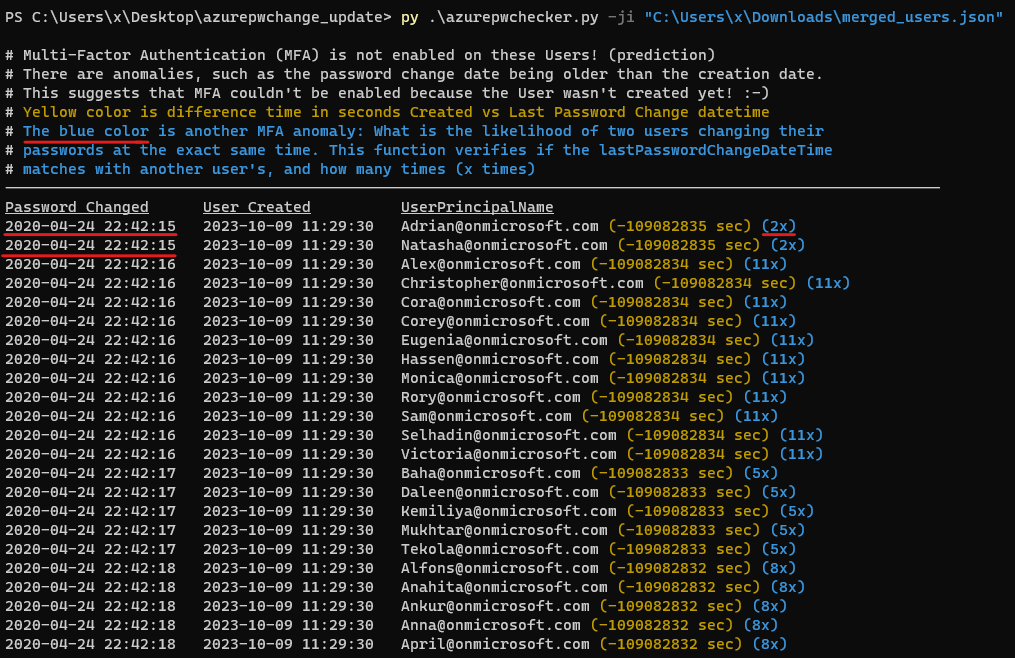
यदि किसी खाते की निर्माण तिथि और समय उसके अंतिम पासवर्ड परिवर्तन तिथि और समय से मेल खाता है, तो यह संकेत दे सकता है कि खाता बनाए जाने के बाद से कोई मानवीय संपर्क नहीं हुआ है, और उपयोगकर्ता बहु-कारक प्रमाणीकरण (MFA) सक्षम करने या अपना पासवर्ड बदलने में सक्षम नहीं रहा है। और अन्य 'विसंगतियाँ' भी हैं जैसे पासवर्ड परिवर्तन तिथि का निर्माण तिथि से पुराना होना। यह इस बात का भी सुझाव देता है कि बहु-कारक प्रमाणीकरण (MFA) सक्षम नहीं किया जा सका क्योंकि उपयोगकर्ता अभी तक बनाया ही नहीं गया था!
अद्यतन 16-10-2023:
अद्यतन 18-02-2024:
यह जानकारी संभावित सुरक्षा जोखिमों की पहचान करने के लिए उपयोगी हो सकती है, जिसे रेड और ब्लू दोनों टीमों के उपयोग के लिए डिज़ाइन किया गया है।
इस टूल के लिए roadrecon डेटाबेस फ़ाइल या JSON फ़ाइल की आवश्यकता होती है जिसे --code-javascript विकल्प की सहायता से निकाला गया है।
Roadrecon टूल dirkjanm द्वारा विकसित किया गया है और इसे github https://github.com/dirkjanm/ROADtools पर डाउनलोड किया जा सकता है या pip install roadrecon।
उपयोग कैसे करें देखें:
python3 azurepwchecker.py
usage: azurepwchecker.py [-h] [--roadrecon-dump] [--roadrecon-dump-mfa] [-d DB] [-m] [-l] [-ll] [-lll] [-la] [-lo]
                         [-ji JSON_INPUT] [-c]

Azure AD Password Checker - This is a parser for generated JSON file or the roadrecon database file designed for use by both red and blue teams.
Database can be created when using --code-javascript option to extract 'merged_users.json' file with be created to later input this file with --json-input argument.
And roadrecon generated roadrecon.db file can be used! roadrecon is developed by https://github.com/dirkjanm credits to him!

options:
  -h, --help            show this help message and exit
  -d DB, --db DB        Specify the path to the 'roadrecon.db' database file, default is this location
  -m, --mfa-list        User Accounts without MFA (No privileged user required)! This argument helps identify user
                        accounts that have not enabled Multi-Factor Authentication (MFA). If an account's creation
                        date and time match its last password change date and time, it may indicate that no human
                        interaction has occurred since the account was created, and the user has not been able to
                        enable MFA or change their password. And there are other 'anomalies' such as the password
                        change date being older than the creation date. This suggests also that Multi-Factor
                        Authentication (MFA) couldn't be enabled because the User wasn't created yet! :-]
  -mo OUTFILE, --outfile OUTFILE
                        Output users with MFA anomalies to file
  -l, --pw-month        User accounts that had their passwords changed last month
  -ll, --pw-year        User accounts that had their passwords changed last year
  -lll, --pw-older      User accounts that haven't changed their passwords in a long time, oldest first
  -la, --admin          User accounts that are members of 'Admin' named groups, including 'Global Reader'
  -lo, --out-of-hours   User password change that occurred outside of office hours, specifically between 5:00 PM
                        (17:00) and 8:00 AM (08:00) on weekdays, as well as on Saturdays and Sundays
  -ji JSON_INPUT, --json-input JSON_INPUT
                        Provide the JSON file imported from your web browser's console using JavaScript. For
                        'createdDateTime' and 'lastPasswordChange' details, ensure you download the JSON output using
                        the '--code-javascript' option.
  -c, --code-javascript
                        Perform extraction even if 'azurepwchecker.py' or 'roadrecon' is unavailable. This script
                        enables extraction through the JavaScript console of a web browser. To proceed, ensure you
                        have a valid account to log in at https://portal.azure.com/#view/Microsoft_AAD_UsersAndTenants
                        /UserManagementMenuBlade/~/AllUsers or an active session on a computer. Copy and paste the
                        provided JavaScript code into the browser's console. Once the session is validated and you
                        have the necessary permissions, a JSON file named 'merged_users.json' will be generated. You
                        can then import it using the following command as example: 'azurepwchecker.py --json-input
                        merged_users.json -m'
  -v, --version         show program's version number and exit

run roadrecon first:
  (Run the following command to install the tool "pip install roadrecon)"

  --roadrecon-dump      "roadrecon dump" command or do it with roadrecon
  --roadrecon-dump-mfa  "roadrecon dump --mfa" command (requires privileged access) or do it with roadrecon
azurepwchecker.py --code-javascript जनरेट करें और कॉपी करें या फ़ोल्डर में js फ़ाइल:प्रदान की गई स्क्रिप्ट का उपयोग करके उनके खाते की जानकारी के साथ उपयोगकर्ताओं की सूची प्राप्त करने के लिए इन चरणों का पालन करें।
Azure Portal में लॉगिन करें
उपयोगकर्ता प्रबंधन तक पहुंचें
डेवलपर टूल खोलें
F12 दबाएं।स्क्रिप्ट निष्पादित करें
UsersList और UserInfo प्राप्त करें
मर्ज की गई उपयोगकर्ता जानकारी डाउनलोड करें
merged_users.json नामक एक फ़ाइल जनरेट होगी।Azure AD Password Checker पर चलाएं
azurepwchecker.py --json-input merged_users.jsonउदाहरण देखें:
परिचय देखें:
अद्यतन 16-10-2023:
