 projectdiscovery/urlfinder
निष्क्रिय रूप से URL एकत्र करने के लिए एक उच्च-गति उपकरण, जिसे सक्रिय स्कैनिंग के बिना कुशल और व्यापक वेब एसेट खोज के लिए अनुकूलित किया गया है।

एक उच्च-गति वाला टूल जो निष्क्रिय रूप से URL एकत्र करता है, बिना सक्रिय स्कैनिंग के कुशल वेब एसेट डिस्कवरी के लिए अनुकूलित।




विशेषताएँ • स्थापना • उपयोग • उदाहरण • Discord से जुड़ें
URLFinder एक उच्च-गति, निष्क्रिय URL खोज टूल है जिसे वेब एसेट डिस्कवरी को सरल और तेज़ बनाने के लिए डिज़ाइन किया गया है, जो पेनेट्रेशन टेस्टरों, सुरक्षा शोधकर्ताओं और डेवलपर्स के लिए आदर्श है जो बिना सक्रिय स्कैनिंग के URL एकत्र करना चाहते हैं।
URLFinder के लिए Go 1.21 आवश्यक है। इसे निम्न कमांड का उपयोग करके इंस्टॉल करें या रिलीज़ पेज से प्री-कंपाइल बाइनरी डाउनलोड करें।
go install -v github.com/projectdiscovery/urlfinder/cmd/urlfinder@latest
urlfinder -h
यह कमांड URLFinder के लिए सहायता प्रदर्शित करता है। नीचे कुछ सामान्य स्विच और विकल्प दिए गए हैं।
A streamlined tool for discovering associated URLs.

Usage:
  ./urlfinder [flags]

Flags:
INPUT:
   -d, -list string[]  target domain or list of domains

SOURCE:
   -s, -sources string[]           specific sources for discovery (e.g., -s alienvault,commoncrawl)
   -es, -exclude-sources string[]   sources to exclude (e.g., -es alienvault,commoncrawl)
   -all                             use all sources (may be slower)
SCOPE:
   -us, -url-scope string[]       in scope url regex to be followed by urlfinder
   -uos, -url-out-scope string[]  out of scope url regex to be excluded by urlfinder
   -fs, -field-scope string       pre-defined scope field (dn,rdn,fqdn) or custom regex (e.g., '(company-staging.io|company.com)') (default "rdn")
   -ns, -no-scope                 disables host based default scope
   -do, -display-out-scope        display external endpoint from scoped crawling

FILTER:
   -m, -match string[]       URLs or list to match (file or comma-separated)
   -f, -filter string[]      URLs or list to filter (file or comma-separated)

RATE-LIMIT:
   -rl, -rate-limit int      max HTTP requests per second (global)
   -rls, -rate-limits value  per-provider HTTP request limits (e.g., -rls waybackarchive=15/m)

UPDATE:
   -up, -update              update URLFinder to the latest version
   -duc, -disable-update-check  disable automatic update checks

OUTPUT:
   -o, -output string       specify output file
   -j, -jsonl               JSONL output format
   -od, -output-dir string  specify output directory
   -cs, -collect-sources    include all sources in JSON output

CONFIGURATION:
   -config string           config file (default "$CONFIG/urlfinder/config.yaml")
   -pc, -provider-config string  provider config file (default "$CONFIG/urlfinder/provider-config.yaml")
   -proxy string            HTTP proxy

DEBUG:
   -silent                  show only URLs in output
   -version                 display URLFinder version
   -v                       verbose output
   -nc, -no-color           disable colored output
   -ls, -list-sources       list all available sources
   -stats                   display source statistics

OPTIMIZATION:
   -timeout int   timeout in seconds (default 30)
   -max-time int  max time in minutes for enumeration (default 10)
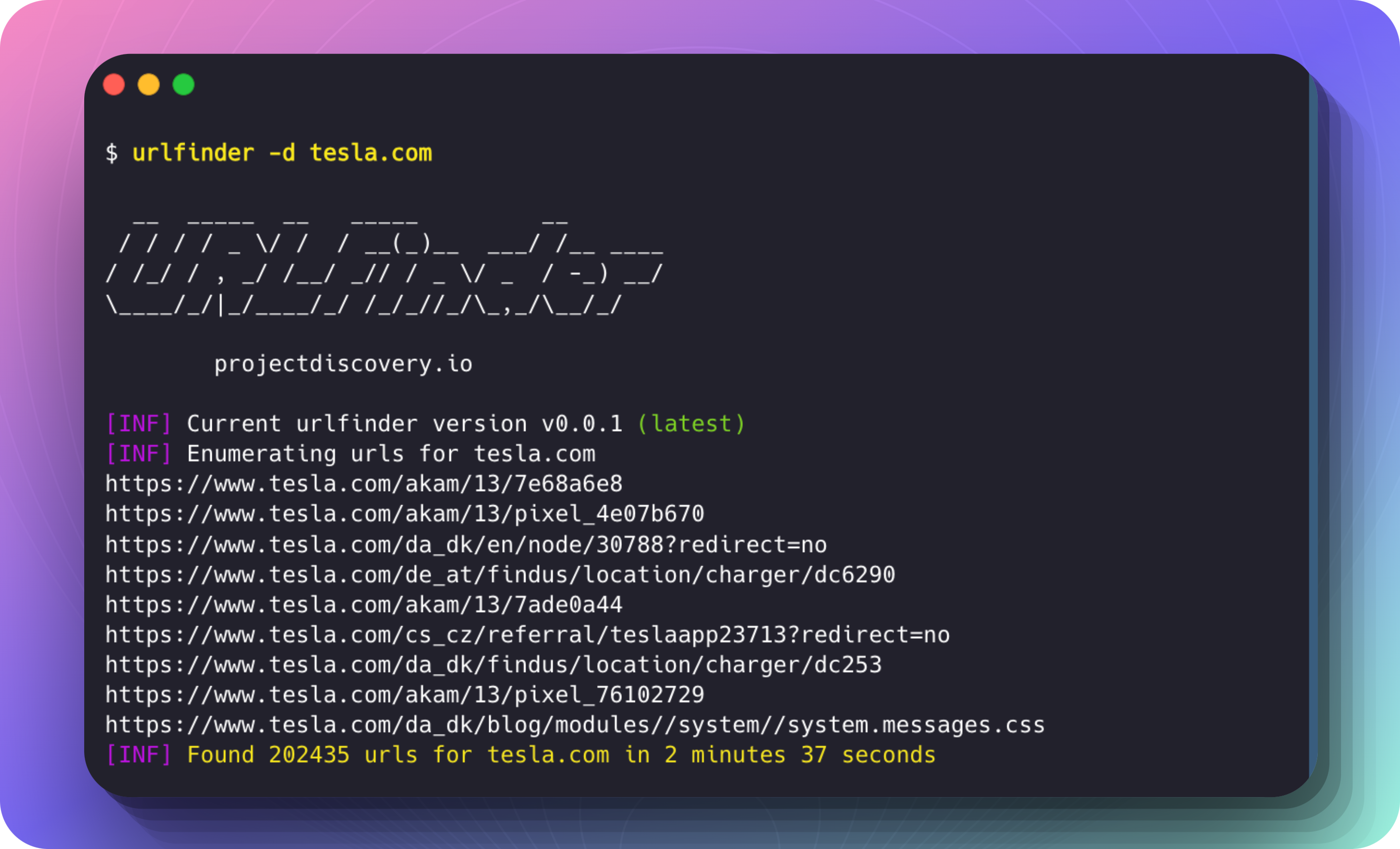
urlfinder -d tesla.com
यह कमांड लक्ष्य डोमेन tesla.com के लिए URL की गणना (enumerate) करता है।
उदाहरण रन:
$ urlfinder -d tesla.com

  __  _____  __   _____         __
 / / / / _ \/ /  / __(_)__  ___/ /__ ____
/ /_/ / , _/ /__/ _// / _ \/ _  / -_) __/
\____/_/|_/____/_/ /_/_//_/\_,_/\__/_/

		projectdiscovery.io

[INF] Current urlfinder version v0.0.1 (latest)
[INF] Enumerating urls for tesla.com
https://www.tesla.com/akam/13/7e68a6e8
https://www.tesla.com/akam/13/pixel_4e07b670
https://www.tesla.com/da_dk/en/node/30788?redirect=no
https://www.tesla.com/de_at/findus/location/charger/dc6290
https://www.tesla.com/akam/13/7ade0a44
https://www.tesla.com/cs_cz/referral/teslaapp23713?redirect=no
https://www.tesla.com/da_dk/findus/location/charger/dc253
https://www.tesla.com/akam/13/pixel_76102729
https://www.tesla.com/da_dk/blog/modules//system/system.messages.js
...
[INF] Found 202435 urls for tesla.com in 2 minutes 37 seconds
URL पैटर्न के आधार पर परिणामों को परिष्कृत करने के लिए -m (मिलान) और -f (फ़िल्टर) विकल्पों का उपयोग करें।
विशिष्ट पैटर्न से मेल खाने वाले URL शामिल करें
केवल "shop" या "model" वाले URL शामिल करने के लिए:
urlfinder -d tesla.com -m shop,model
विशिष्ट पैटर्न से मेल खाने वाले URL बाहर करें
"privacy" या "terms" वाले URL बाहर करने के लिए:
urlfinder -d tesla.com -f privacy,terms
मिलान और फ़िल्टर का संयोजन
"support" वाले URL खोजने के लिए लेकिन "faq" वाले को बाहर करने के लिए:
urlfinder -d tesla.com -m support -f faq
पैटर्न फ़ाइलों में प्रदान करें:
urlfinder -d tesla.com -m include-patterns.txt -f exclude-patterns.txt
परिणामों को JSONL (JSON Lines) प्रारूप में आउटपुट करने के लिए -j या --jsonl फ़्लैग का उपयोग करें, जहाँ प्रत्येक पंक्ति एक अलग JSON ऑब्जेक्ट होती है। यह प्रारूप बड़े आउटपुट को संरचित तरीके से संसाधित करने के लिए उपयोगी है।
urlfinder -d tesla.com -j
{"url":"https://shop.tesla.com/product/model-s-plaid","input":"tesla.com","source":"waybackarchive"}
{"url":"https://www.tesla.com/inventory/used/ms","input":"tesla.com","source":"waybackarchive"}
{"url":"https://forums.tesla.com/discussion/101112/model-3-updates","input":"tesla.com","source":"waybackarchive"}
प्रत्येक JSON ऑब्जेक्ट में शामिल है:
url: खोजा गया URL।input: लक्ष्य डोमेन (जैसे, tesla.com)।source: URL खोज के लिए डेटा स्रोत (जैसे, waybackarchive)।