
Skip to content
KitploitKITPLOIT
उपकरणब्लॉग
जमा करें
उपकरणब्लॉग
जमा करें

हैकिंग, पेनटेस्ट और साइबर सुरक्षा उपकरण आपके सुरक्षा शस्त्रागार के लिए!

Kitploit हैकिंग, साइबर सुरक्षा और पेंटेस्टिंग टूल्स की एक निर्देशिका है। कमजोरियों को खोजने, सिस्टम का विश्लेषण करने, परीक्षण को स्वचालित करने और अपनी सुरक्षा को मजबूत करने के लिए नवीनतम प्रोजेक्ट अपडेट खोजें।

··फ़ीड·संपर्क·गोपनीयता·© 2026 Kitploit

टूल निर्देशिका

श्रेणियाँ

सभी श्रेणियाँ देखें
Loading categories
Steganography-Online-Codec-JavaScript — स्टेग्नोग्राफ़िक ऑनलाइन कोडेक आपको AES एन्क्रिप्शन एल्गोरिदम का उपयोग करके 256-बिट PBKDF2 व्युत्पन्न कुंजी के साथ छवियों और फ़ोटो के भीतर पासवर्ड-एन्क्रिप्टेड संदेश छिपाने की अनुमति देता है। | Kitploit
उपकरण/GitHubGitHub/pelock/steganography-online-codec-javascript
एन्क्रिप्शन/डिक्रिप्शन उपकरणवेब सुरक्षास्टेग्नोग्राफीक्रिप्टोग्राफीगोपनीयता
GitHubpelock/steganography-online-codec-javascript

Steganography-Online-Codec-JavaScript

स्टेग्नोग्राफ़िक ऑनलाइन कोडेक आपको AES एन्क्रिप्शन एल्गोरिदम का उपयोग करके 256-बिट PBKDF2 व्युत्पन्न कुंजी के साथ छवियों और फ़ोटो के भीतर पासवर्ड-एन्क्रिप्टेड संदेश छिपाने की अनुमति देता है।

रिपॉजिटरी देखें

सबसे लोकप्रिय

सभी देखें →

हमारे समुदाय द्वारा सबसे अधिक उपयोग किए जाने वाले उपकरण खोजें।

सभी उपकरण खोजें

हमारे उपकरणों का संग्रह ब्राउज़ करें

सभी उपकरण देखें →
साझा करें
वेबसाइट
354 महीने पहलेअभी तक समीक्षित नहीं

JavaScript और NPM के लिए स्टेग्नोग्राफी ऑनलाइन कोडेक SDK

स्टेग्नोग्राफिक ऑनलाइन कोडेक आपको AES एन्क्रिप्शन एल्गोरिदम के साथ 256-बिट PBKDF2 व्युत्पन्न कुंजी का उपयोग करके छवियों और फ़ोटो के भीतर पासवर्ड-एन्क्रिप्टेड संदेश छिपाने की अनुमति देता है।

आप इसे निःशुल्क उपयोग कर सकते हैं:

https://www.pelock.com/products/steganography-online-codec

यह SDK WebAPI इंटरफ़ेस के माध्यम से कोडेक और इसके एन्कोडिंग और डिकोडिंग फ़ंक्शन तक प्रोग्रामिंग पहुंच प्रदान करता है।

स्टेग्नोग्राफी क्या है और यह कैसे काम करती है?

स्टेग्नोग्राफी एक शब्द है जो अन्य, प्रतीत होने वाली हानिरहित छवि फ़ाइलों के भीतर संदेशों को एम्बेड करके जानकारी छिपाने की कला और विज्ञान का वर्णन करता है।

इस मामले में, एन्क्रिप्टेड छिपे हुए संदेश के अलग-अलग बिट्स को चयनित छवि के पिक्सेल में RGB रंग घटकों में सबसे कम महत्वपूर्ण (LSB) बिट्स के रूप में सहेजा जाता है।
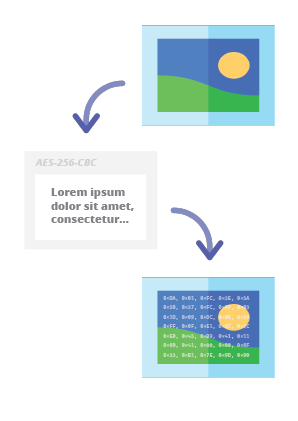
स्टेग्नोग्राफी ऑनलाइन कोडेक - छवि में संदेश छिपाएं

हमारे स्टेग्नोग्राफिक एन्कोडर के साथ आप किसी भी टेक्स्ट संदेश को छवि में सुरक्षित तरीके से छिपा सकेंगे और बिना किसी संदेह के भेज सकेंगे। वैध डिक्रिप्शन पासवर्ड प्रदान करने के बाद ही संदेश को पढ़ना संभव होगा।

स्थापना

Web API SDK स्थापना का पसंदीदा तरीका NPM (Node Package Manager) के माध्यम से है।

चलाएं:

root@kitploit:~
npm i steganography-online-codec

या यह प्रविष्टि जोड़ें:

root@kitploit:~
  "dependencies": {
    "steganography-online-codec": "latest"
  },

सीधे अपने package.json में dependencies अनुभाग में।

स्थापना पैकेज https://www.npmjs.com/package/steganography-online-codec पर उपलब्ध है

अन्य प्रोग्रामिंग भाषाओं के लिए पैकेज

स्थापना पैकेज कई लोकप्रिय प्रोग्रामिंग भाषाओं के रिपॉजिटरी में अपलोड किए गए हैं और उनके स्रोत कोड GitHub पर प्रकाशित किए गए हैं:

वैकल्पिक उपयोग

यदि आप Python मॉड्यूल का उपयोग नहीं करना चाहते हैं, तो आप सीधे फ़ाइल से आयात कर सकते हैं:

root@kitploit:~
from pelock.steganography_online_codec import *

छवि फ़ाइल के भीतर गुप्त संदेश कैसे छिपाएं

root@kitploit:~
"use strict";

/******************************************************************************
 *
 * Steganography Online Codec WebApi interface usage example.
 *
 * In this example shows how to hide an encrypted secret message in an image file.
 *
 * Version      : v1.00
 * Language     : JavaScript
 * Author       : Bartosz Wójcik (original example)
 * Project      : https://www.pelock.com/products/steganography-online-codec
 * Homepage     : https://www.pelock.com
 *
 * @link https://www.pelock.com/products/steganography-online-codec
 * @copyright Copyright (c) 2020-2025 PELock LLC
 * @license Apache-2.0
 *
/*****************************************************************************/

// include Steganography Online Codec module
import { SteganographyOnlineCodec, Errors } from 'steganography-online-codec';
// or if tested locally use:
//import { SteganographyOnlineCodec, Errors } from '../src/SteganographyOnlineCodec.mjs';

// create Steganography Online Codec class instance (we are using our activation key)
const mySteganographyOnlineCodec = new SteganographyOnlineCodec('YOUR-WEB-API-KEY');

// encode a hidden message (encrypted with your password) within an image file
(async () => {

	const inputFile = 'input_file.jpg';
	const secretMessage = 'Secret message';
	const password = 'Pa$$word';
	const outputFile = 'output_file_with_hidden_secret_message.png';

	try {
		const result = await mySteganographyOnlineCodec.encode(inputFile, secretMessage, password, outputFile);

		// result object holds the encoding results as well as other information
		console.log('Secret messaged encoded and saved to the output PNG file.');
	} catch (err) {
		console.error('Encoding failed:', err.error_message || err.message || String(err));
	}
})();

बेहतर स्पष्टीकरण और उचित त्रुटि कोड जांच के साथ अधिक जटिल उदाहरण

root@kitploit:~
"use strict";

/******************************************************************************
 *
 * Steganography Online Codec WebApi interface usage example.
 *
 * In this example, we will see how to hide an encrypted message in an
 * image file using our codec.
 *
 * Version      : v1.00
 * Language     : JavaScript
 * Author       : Bartosz Wójcik
 * Project      : https://www.pelock.com/products/steganography-online-codec
 * Homepage     : https://www.pelock.com
 *
 * @link https://www.pelock.com/products/steganography-online-codec
 * @copyright Copyright (c) 2020-2025 PELock LLC
 * @license Apache-2.0
 *
 /*****************************************************************************/

// include Steganography Online Codec module
import { SteganographyOnlineCodec, Errors } from 'steganography-online-codec';
// or if tested locally use:
//import { SteganographyOnlineCodec, Errors } from '../src/SteganographyOnlineCodec.mjs';


// create Steganography Online Codec class instance (we are using our activation key)
const mySteganographyOnlineCodec = new SteganographyOnlineCodec('YOUR-WEB-API-KEY');

// encode a hidden message within the source image file
(async () => {
	// full version image size limit is set to 10 MB (demo 50 kB max)
	// supported image formats are PNG, JPG, GIF, BMP, WBMP, GD2, AVIF, WEBP (mail me for more)
	const inputFilePath = 'input_file.webp';

	// full version message size is unlimited (demo 16 chars max)
	const secretMessage = 'Secret message';

	// full version password length is 128 characters max (demo 8 chars max)
	const password = 'Pa$$word';

	// where to save encoded image with the secret message
	const outputFilePath = 'output_file_with_hidden_secret_message.png';

	try {
		// encode a hidden message (encrypted with your password) within an image file
		const result = await mySteganographyOnlineCodec.encode(inputFilePath, secretMessage, password, outputFilePath);

		// result object holds the encoding results as well as other information
		const versionType = result.license && result.license.activationStatus ? 'full' : 'demo';
		console.log(`You are running in ${versionType} version`);

		console.log(`Secret messaged encoded and saved to ${outputFilePath}`);
		if (result.license && result.license.usagesCount !== undefined) {
			console.log(`Remaining number of usage credits - ${result.license.usagesCount}`);
		}
	} catch (err) {
		const errorCode = err.error;

		switch (errorCode) {
			case Errors.INVALID_INPUT:
				console.log(`Invalid input file ${inputFilePath} or file doesn't exist`);
				break;
			case Errors.MESSAGE_TOO_LONG:
				console.log('Message is too long for the provided image file, use larger file');
				break;
			case Errors.IMAGE_TOO_BIG:
				console.log(`Image file is too big, current limit is set to ${err.raw?.limits?.maxFileSize ?? 'unknown'}`);
				break;
			case Errors.LIMIT_MESSAGE:
				console.log(`Message is too long, current limit is set to ${err.raw?.limits?.maxMessageLen ?? 'unknown'}`);
				break;
			case Errors.LIMIT_PASSWORD:
				console.log(`Password is too long, current limit is set to ${err.raw?.limits?.maxPasswordLen ?? 'unknown'}`);
				break;
			case Errors.INVALID_PASSWORD:
				console.log('Invalid password');
				break;
			default:
				console.log(`An error occurred: ${err.error_message ?? `Error code ${errorCode}`}`);
		}
	}
})();

छवि फ़ाइल से एन्कोडेड गुप्त संदेश कैसे निकालें

root@kitploit:~
"use strict";

/******************************************************************************
 *
 * Steganography Online Codec WebApi interface usage example.
 *
 * In this example, we will see how to extract a previously encrypted & hidden
 * secret message from an image file.
 *
 * Version      : v1.00
 * Language     : JavaScript
 * Author       : Bartosz Wójcik
 * Project      : https://www.pelock.com/products/steganography-online-codec
 * Homepage     : https://www.pelock.com
 *
 * @link https://www.pelock.com/products/steganography-online-codec
 * @copyright Copyright (c) 2020-2025 PELock LLC
 * @license Apache-2.0
 *
 /*****************************************************************************/

// include Steganography Online Codec module
import { SteganographyOnlineCodec, Errors } from 'steganography-online-codec';
// or if tested locally use:
//import { SteganographyOnlineCodec, Errors } from '../src/SteganographyOnlineCodec.mjs';

// create Steganography Online Codec class instance (we are using our activation key)
const mySteganographyOnlineCodec = new SteganographyOnlineCodec('YOUR-WEB-API-KEY');

// extract a hidden message from the previously encoded image file
(async () => {
	// full version image size limit is set to 10 MB (demo 50 kB max)
	// supported image format is PNG and only PNG!
	const inputFilePath = 'output_file_with_hidden_secret_message.png';

	// full version password length is 128 characters max (demo 8 chars max)
	const password = 'Pa$$word';

	try {
		// extract a hidden message from the image (PNG files only)
		const result = await mySteganographyOnlineCodec.decode(inputFilePath, password);

		// result object holds the decoding results as well as other information
		console.log(`You are running in ${result.license?.activationStatus ? 'full' : 'demo'} version`);

		console.log(`Secret message is "${result.message}"`);

		if (result.license && result.license.usagesCount !== undefined) {
			console.log(`Remaining number of usage credits - ${result.license.usagesCount}`);
		}
	} catch (err) {
		switch (err.error) {
			case Errors.INVALID_INPUT:
				console.log(`Invalid input file ${inputFilePath} or file doesn't exist`);
				break;
			case Errors.IMAGE_TOO_BIG:
				console.log(`Image file is too big, current limit is set to ${err.raw?.limits?.maxFileSize ?? 'unknown'}`);
				break;
			case Errors.LIMIT_MESSAGE:
				console.log(`Extracted message is too long, current limit is set to ${err.raw?.limits?.maxMessageLen ?? 'unknown'}`);
				break;
			case Errors.LIMIT_PASSWORD:
				console.log(`Password is too long, current limit is set to ${err.raw?.limits?.maxPasswordLen ?? 'unknown'}`);
				break;
			case Errors.INVALID_PASSWORD:
				console.log('Invalid password');
				break;
			default:
				console.log(`An error occurred: ${err.error_message ?? String(err)}`);
		}
	}
})();

लाइसेंस कुंजी स्थिति और वर्तमान सीमाएं कैसे जांचें

root@kitploit:~
"use strict";

/******************************************************************************
 *
 * Steganography Online Codec WebApi interface usage example.
 *
 * In this example we will verify our activation key status.
 *
 * Version      : v1.00
 * Language     : JavaScript
 * Author       : Bartosz Wójcik
 * Project      : https://www.pelock.com/products/steganography-online-codec
 * Homepage     : https://www.pelock.com
 *
 * @link https://www.pelock.com/products/steganography-online-codec
 * @copyright Copyright (c) 2020-2025 PELock LLC
 * @license Apache-2.0
 *
 /*****************************************************************************/

// include Steganography Online Codec module
import { SteganographyOnlineCodec, Errors } from 'steganography-online-codec';
// or if tested locally use:
//import { SteganographyOnlineCodec, Errors } from '../src/SteganographyOnlineCodec.mjs';

// create Steganography Online Codec class instance (we are using our activation key)
const mySteganographyOnlineCodec = new SteganographyOnlineCodec('YOUR-WEB-API-KEY');

// login to the service
(async () => {
	try {
		const result = await mySteganographyOnlineCodec.login();

		// result object holds the information about the license & current limits
		const versionType = result.license && result.license.activationStatus ? 'full' : 'demo';
		console.log(`You are running in ${versionType} version`);

		// information about the current license
		if (result.license && result.license.activationStatus) {
			console.log(`Registered for - ${result.license.userName}`);
			const licenseType = result.license.type === 0 ? 'personal' : 'company';
			console.log(`License type - ${licenseType}`);
			console.log(`Total number of purchased usage credits - ${result.license.usagesTotal}`);
			console.log(`Remaining number of usage credits - ${result.license.usagesCount}`);
		}

		// current limits (different for DEMO and FULL versions)
		if (result.limits) {
			console.log(`Max. password length - ${result.limits.maxPasswordLen}`);
			const msgLen = result.limits.maxMessageLen === -1 ? 'unlimited' : result.limits.maxMessageLen;
			console.log(`Max. message length - ${msgLen}`);
			console.log(`Max. input image file size - ${mySteganographyOnlineCodec.convert_size(result.limits.maxFileSize)}`);
		}
	} catch (err) {
		console.error(`Login failed: ${err.error_message || String(err)}`);
	}
})();

प्रश्न हैं?

यदि आप स्टेग्नोग्राफी ऑनलाइन कोडेक Web API में रुचि रखते हैं या SDK पैकेज, तकनीकी या कुछ और के बारे में कोई प्रश्न हैं जो स्पष्ट नहीं है, तो कृपया मुझसे संपर्क करें। मुझे आपके सभी प्रश्नों का उत्तर देने में खुशी होगी।

Bartosz Wójcik

  • मेरी साइट पर जाएं — https://www.pelock.com
  • X — https://x.com/PELock
  • GitHub — https://github.com/PELock
टूल डाउनलोड करें
रिपॉजिटरीभाषास्थापनापैकेजGitHub
Python के लिए PyPI रिपॉजिटरीPythonचलाएं pip install steganography-online-codecPyPIस्रोत
JavaScript और TypeScript के लिए NPM रिपॉजिटरीJavaScript, TypeScriptचलाएं npm i steganography-online-codec या package.json में dependencies के अंतर्गत "steganography-online-codec": "latest" जोड़ेंNPMस्रोत
Rust crates.ioRustचलाएं cargo add steganography-online-codec या Cargo.toml में steganography-online-codec = "1" जोड़ें (वैकल्पिक: अप्रकाशित या वेंडर किए गए बिल्ड के लिए git / path)crates.ioस्रोत