
PowerShell स्क्रिप्ट सोर्स कोड ऑबफस्केशन और वर्चुअलाइजेशन को Python (pip पैकेज) के लिए एक लचीले Web API के साथ स्वचालित करें।
PowerShell Pro Obfuscator मालिकाना .ps1 स्क्रिप्ट्स को renaming, polymorphic string और integer encryption, control-flow flattening, finite-state automata (FSA), एक VM engine, self-defending integrity checks, एक protection linker, और anti-debugging probes के साथ सुरक्षित करता है।
PowerShell .ps1 स्क्रिप्ट्स को polymorphic string encryption, VM engine, finite-state automata transforms, self-integrity और anti-debugging checks के साथ obfuscate, virtualize और सुरक्षित करें — GUI, CLI, online tool, या API के माध्यम से।
अधिक तकनीकी विवरण, डाउनलोड, दस्तावेज़ीकरण यहाँ उपलब्ध है:
https://www.pelock.com/products/powershell-pro-obfuscator
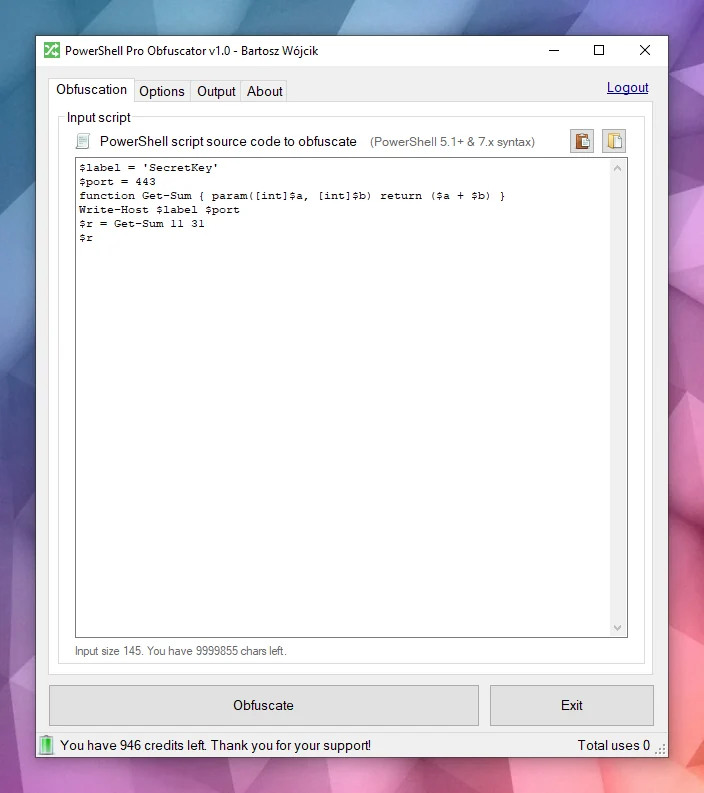
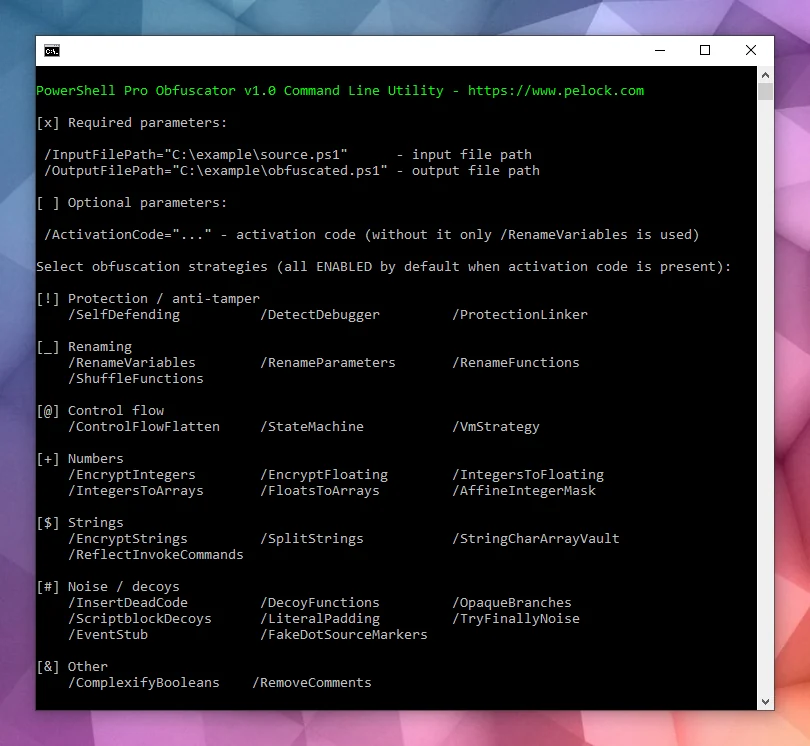
यह Windows और Linux के लिए उपलब्ध है:
कई प्रोग्रामिंग APIs उपलब्ध हैं:
एक ऑनलाइन obfuscator इंटरफ़ेस:
स्क्रिप्ट्स आमतौर पर सादे .ps1 फ़ाइलों के रूप में या मॉड्यूल में एम्बेडेड वितरित की जाती हैं। इस सुविधा का मतलब है कि फ़ाइल तक पहुंच रखने वाला कोई भी व्यक्ति पूरा लॉजिक पढ़ सकता है, स्ट्रिंग्स में क्रेडेंशियल्स या API keys खोज सकता है, और आपके एल्गोरिदम चुरा सकता है, जब तक कि आप इरादे को छिपाने के लिए अतिरिक्त कदम नहीं उठाते।
PowerShell .NET पर निर्मित एक क्रॉस-प्लेटफ़ॉर्म शेल और स्क्रिप्टिंग भाषा है। इसका व्यापक रूप से Windows और Linux पर स्वचालन, कॉन्फ़िगरेशन, DevOps पाइपलाइनों और एंडपॉइंट प्रबंधन के लिए उपयोग किया जाता है।
PowerShell Pro Obfuscator कई उन्नत obfuscation, virtualization और सुरक्षा रणनीतियों के साथ आता है। आप आकार और प्रदर्शन के सापेक्ष सुरक्षा को आसानी से समायोजित कर सकते हैं।
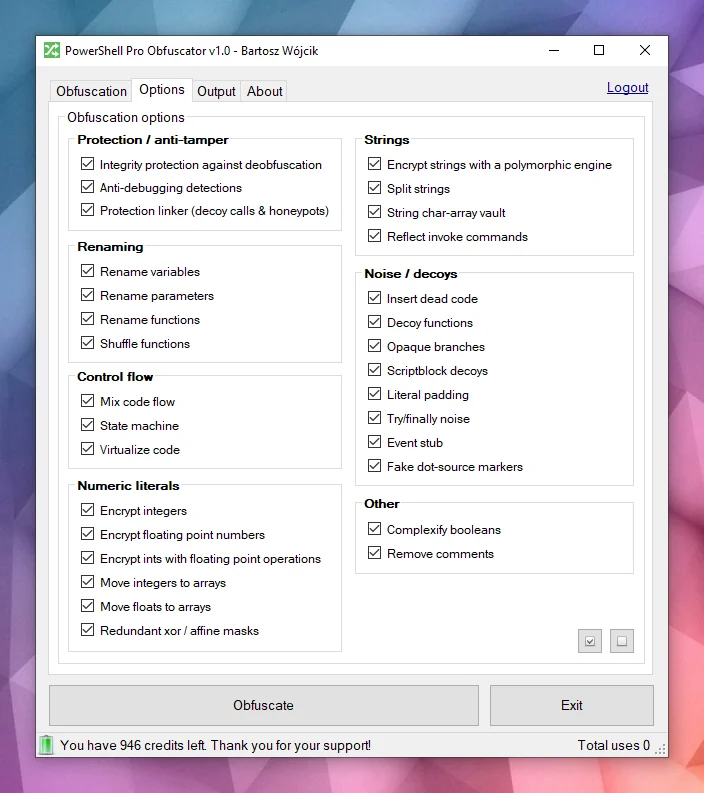
शक्तिशाली obfuscationPowerShell Pro Obfuscator अत्याधुनिक obfuscation रणनीतियों जैसे polymorphic string encryption, integers और floats encryption, और decoy noise का उपयोग करता है। परिणाम परीक्षण किए गए रनटाइम व्यवहार को संरक्षित करते हुए literals और संरचना को छुपाता है।
कोड virtualizationचयनित स्टेटमेंट्स को shuffled switch cases, decoy opcodes, और एक obfuscated dispatcher loop के साथ एक यादृच्छिक रूप से उत्पन्न VM engine opcodes में उठाया जाता है। विश्लेषकों को सादा PowerShell पढ़ने के बजाय वर्चुअल मशीन की व्याख्या करनी होती है।
Finite-state automata (FSA)Finite-state automata (FSA) obfuscation रैखिक PowerShell स्टेटमेंट ब्लॉक्स को opaque schedulers और shuffled dispatch handlers के साथ dual-state automata में फिर से लिखता है। ऊपर से नीचे कोड पढ़ने के बजाय, विश्लेषकों को मूल क्रम को फिर से बनाने के लिए संख्यात्मक states, transition tables, और decoy paths का पालन करना होता है।
Anti-debuggingAnti-debugging सुरक्षा polymorphic probes डालती है जो संलग्न debuggers, PowerShell breakpoints, debug preference और tracing modes, और संबंधित host signals का पता लगाती है। जब कोई जांच सक्रिय होती है, तो obfuscated स्क्रिप्ट इंटरैक्टिव विश्लेषण के तहत सुरक्षित लॉजिक को प्रकट करने के बजाय चुपचाप बाहर निकल जाती है।
Self-integrity checksएक bootstrap probe डिस्क पर स्क्रिप्ट के आकार (function counts और integrity tokens) को सत्यापित करता है और जब फ़ाइल obfuscated build से मेल नहीं खाती है तो एक tamper key सेट करता है। String decryptors उस key का उपभोग करते हैं, इसलिए patched scripts plaintext के बजाय garbage लौटाती हैं। यह self-defending परत आकस्मिक deobfuscation और फ़ाइल संपादन की लागत बढ़ाती है।
Protection linkerएक देर से पास honeypot resolvers, यादृच्छिक तर्कों के साथ bogus helper calls, और shallow-stack tripwires जोड़ता है जो केवल bootstrap पूरा होने से पहले सक्रिय रहते हैं। निकाले गए स्निपेट्स शोरगुल वाले call surfaces बनाए रखते हैं जो स्थिर समीक्षा के तहत वास्तविक दिखते हैं। सफल integrity check के बाद सामान्य निष्पादन अपरिवर्तित रहता है।
इस उदाहरण को देखें — obfuscation के बाद वही स्क्रिप्ट एक नज़र में पढ़ना कठिन हो जाती है।
function Get-Greeting {
param([string]$Name)
Write-Host "Hello World from $Name!"
}
Get-Greeting "PowerShell Pro Obfuscator"
$script:_HnJTskg = 0
$jwNTQ = 297 * 400 + 36
$x4e8bfda = [Math]::Abs($jwNTQ - 8074)
$_EvKocNn = [Math]::Max($jwNTQ, $x4e8bfda) - [Math]::Min($jwNTQ, $x4e8bfda)
[void]$_EvKocNn
$script:_jUoXkBYh = 0
function gnJjzMCN3V8P {
param([int]$slot, [int]$salt, [int]$guard)
if (-not ((Get-Variable -Name _HnJTskg -Scope Script -ErrorAction SilentlyContinue).Value)) { return '' }
@('JFE', 'm0ao', 'R8Ysw') | ForEach-Object { $_.ToUpper() } | Out-Null
if ((((($slot * 31) + $salt) -band 65535) -ne $guard)) { return '' }
$tk = (Get-Variable -Name _jUoXkBYh -Scope Script -ErrorAction SilentlyContinue).Value
$IEm39CSpDOEFp = @{ 'Ouj1' = 455; 'vjzO' = 170; 'IQNV' = 291 }
$IEm39CSpDOEFp['R5LrM'] = $IEm39CSpDOEFp['Ouj1'] + $IEm39CSpDOEFp['vjzO']
$YWxSO = ($IEm39CSpDOEFp.Values | Measure-Object -Sum).Sum
[void]$YWxSO
if ($null -eq $tk) { [long]$tk = 0 }
$v93a130f2e4 = 508
switch ($v93a130f2e4) {
524 { $_GYF7IA14Go = 'H1Vph' }
561 { $_GYF7IA14Go = 'HAWoB' }
default { $_GYF7IA14Go = $v93a130f2e4 * 2 }
}
[void]$_GYF7IA14Go
$dk = (Get-Variable -Name vb6a18ffee4 -Scope Script -ErrorAction SilentlyContinue).Value
try { $xgLN5KZyEusFo7 = [Math]::Sqrt(850) } finally { [void]$xgLN5KZyEusFo7 }
if ($null -eq $dk) { [long]$dk = 0 }
$d = @(46866, 46865)
if ((((-not 113))-and(([int](272 -ne 272) -eq 21)))-and(([Math]::Sign(-12) -eq 4))) { $w4iTzi2hooy1GW = @(711, 562, 665); $w4iTzi2hooy1GW = ($w4iTzi2hooy1GW | Measure-Object -Sum).Sum }
$r = ''
for ($s9qOSpiZzufQlVyV = 0; $s9qOSpiZzufQlVyV -lt $d.Length; $s9qOSpiZzufQlVyV++) {
[long]$v = [long]$d[$s9qOSpiZzufQlVyV]
for ($jL9gL7PEtQeIS = 2; $jL9gL7PEtQeIS -ge 0; $jL9gL7PEtQeIS--) {
for ($PsbomDHxAy = 2; $PsbomDHxAy -ge 0; $PsbomDHxAy--) {
[long]$v = [long]$v + ([long](https://github.com/pelock/powershell-pro-obfuscator-python/blob/HEAD/230))
}
}
for ($zhH33vzxjIzegl9 = 0; $zhH33vzxjIzegl9 -ge 0; $zhH33vzxjIzegl9--) {
[long]$v = [long]$v + ([long]([int]((((((236 + (-3 * $s9qOSpiZzufQlVyV) + (3 * $zhH33vzxjIzegl9))) % 256) + 256) % 256))))
[long]$v = [long]$v -bxor ([long](https://github.com/pelock/powershell-pro-obfuscator-python/blob/HEAD/53766))
}
[long]$v = [long]$v - ([long]($salt + $slot + $tk + $dk + 0))
if ([long]$v -ge 0 -and [long]$v -le 0xFFFF) { $r += [char][int][long]$v }
elseif ([long]$v -ge 0x10000 -and [long]$v -le 0x10FFFF) { $r += [System.Char]::ConvertFromUtf32([int][long]$v) }
}
return $r
}
and more...
क्या आप अभी भी मूल इरादे को पहचान पाएंगे यदि आपके पास केवल obfuscated टेक्स्ट हो और स्क्रिप्ट की कोई पूर्व प्रति न हो?

इंजन PowerShell स्रोत को AST ट्री में पार्स करता है, फिर चयन योग्य transforms लागू करता है: identifier renaming, control-flow flattening, finite-state automata (FSA), VM virtualization, polymorphic string और integer encryption, noise और decoy insertion, self-defending integrity probes, protection linker, और anti-debugging checks। कई तकनीकें इस उत्पाद के लिए विशिष्ट हैं; कुछ विचार हमारे अन्य सुरक्षा टूल्स के साथ साझा किए गए हैं।

जब सभी पास पूरे हो जाते हैं, इंजन एक नया .ps1 उत्सर्जित करता है। PowerShell व्याकरण और होस्टिंग वातावरण में edge cases का मतलब है कि आपको हमेशा अपने लक्षित रनटाइम में आउटपुट का परीक्षण करना चाहिए।
कोई जोखिम न लें, अपनी PowerShell स्क्रिप्ट्स और एल्गोरिदम को obfuscate, virtualize और सुरक्षित करने के लिए PowerShell Pro Obfuscator का उपयोग करें।
हमारी कंपनी का obfuscation तकनीकों और कोड obfuscators में एक लंबा इतिहास है (हमारे x86 Assembly, AutoIt और Java obfuscators देखें)।
हम सक्रिय रूप से अपने टूल्स के लिए bugfix, research और नई obfuscation रणनीतियाँ विकसित करते हैं।
आप इस क्षेत्र में हमारी विशेषज्ञता और समर्थन पर भरोसा कर सकते हैं।
WebApi इंटरफ़ेस स्थापना का पसंदीदा तरीका pip के माध्यम से है।
चलाएँ:
pip install powershell-pro-obfuscator
या
python3 -m pip install powershell-pro-obfuscator
और फिर अपने स्रोत कोड में यह import जोड़ें:
from powershellproobfuscator import PowerShellProObfuscator
स्थापना पैकेज https://pypi.org/project/powershell-pro-obfuscator/ पर उपलब्ध है
#!/usr/bin/env python
###############################################################################
#
# PowerShell Pro Obfuscator WebApi interface usage example.
#
# In this example we will obfuscate sample source with default options.
#
# Version : v1.0.0
# Language : Python
# Author : Bartosz Wójcik
# Web page : https://www.pelock.com
#
###############################################################################
#
# include PowerShell Pro Obfuscator module
#
from powershellproobfuscator import PowerShellProObfuscator
#
# if you don't want to use Python module, you can import directly from the file
#
#from pelock.powershellproobfuscator import PowerShellProObfuscator
#
# create PowerShell Pro Obfuscator class instance (we are using our activation key)
#
myPowerShellProObfuscator = PowerShellProObfuscator("ABCD-ABCD-ABCD-ABCD")
#
# source code in PowerShell format
#
scriptSourceCode = """function Get-Greeting {
param([string]$Name)
Write-Host "Hello World from $Name!"
}
Get-Greeting "PowerShell Pro Obfuscator\""""
#
# by default all obfuscation options are enabled, so we can just simply call
#
result = myPowerShellProObfuscator.obfuscate_script_source(scriptSourceCode)
#
# it's also possible to pass a PowerShell script file path instead of a string with the source e.g.
#
# result = myPowerShellProObfuscator.obfuscate_script_file("/path/to/project/script.ps1")
#
# result[] array holds the obfuscation results as well as other information
#
# result["error"] - error code
# result["output"] - obfuscated code
# result["demo"] - was it used in demo mode (invalid or empty activation key was used)
# result["credits_left"] - usage credits left after this operation
# result["credits_total"] - total number of credits for this activation code
# result["expired"] - if this was the last usage credit for the activation key it will be set to True
#
if result and "error" in result:
# display obfuscated code
if result["error"] == PowerShellProObfuscator.ERROR_SUCCESS:
# format output code for HTML display
print(result["output"])
else:
print(f'An error occurred, error code: {result["error"]}')
else:
print("Something unexpected happen while trying to obfuscate the code.")
#!/usr/bin/env python
###############################################################################
#
# PowerShell Pro Obfuscator WebApi interface usage example.
#
# In this example we will obfuscate sample source with custom options.
#
# Version : v1.0.0
# Language : Python
# Author : Bartosz Wójcik
# Web page : https://www.pelock.com
#
###############################################################################
#
# include PowerShell Pro Obfuscator module
#
from powershellproobfuscator import PowerShellProObfuscator
#
# if you don't want to use Python module, you can import directly from the file
#
#from pelock.powershellproobfuscator import PowerShellProObfuscator
#
# create PowerShell Pro Obfuscator class instance (we are using our activation key)
#
myPowerShellProObfuscator = PowerShellProObfuscator("ABCD-ABCD-ABCD-ABCD")
#
# should the source code be compressed (both input & compressed)
#
myPowerShellProObfuscator.enableCompression = False
#
# global obfuscation options
#
# you can disable a particular obfuscation strategy globally if it
# fails or you don't want to use it without modifying the source codes
#
# by default all obfuscation strategies are enabled
#
#
# protection against tampering with protected code (integrity verification)
#
myPowerShellProObfuscator.selfDefending = True
#
# protection linker (decoy call graph)
#
myPowerShellProObfuscator.protectionLinker = True
#
# rename variable names to random string values
#
myPowerShellProObfuscator.renameVariables = True
#
# rename parameter names to random string values
#
myPowerShellProObfuscator.renameParameters = True
#
# rename function names to random string values
#
myPowerShellProObfuscator.renameFunctions = True
#
# shuffle function order in the output source
#
myPowerShellProObfuscator.shuffleFunctions = True
#
# change linear code execution flow via control-flow flattening
#
myPowerShellProObfuscator.controlFlowFlatten = True
#
# rewrite statement blocks into finite-state automata (state-machine obfuscation)
#
myPowerShellProObfuscator.stateMachine = True
#
# lift selected statements into a VM engine (virtualized statements)
#
myPowerShellProObfuscator.vmStrategy = True
#
# encrypt integers
#
myPowerShellProObfuscator.encryptIntegers = True
#
# split strings into concatenated chunks
#
myPowerShellProObfuscator.splitStrings = True
#
# encrypt strings using randomly generated polymorphic encryption algorithms
#
myPowerShellProObfuscator.encryptStrings = True
#
# move integers to arrays
#
myPowerShellProObfuscator.integersToArrays = True
#
# move floats to arrays
#
myPowerShellProObfuscator.floatsToArrays = True
#
# insert dead code
#
myPowerShellProObfuscator.insertDeadCode = True
#
# replace boolean conditions with equivalent complex expressions
#
myPowerShellProObfuscator.complexifyBooleans = True
#
# represent integers via floating-point math
#
myPowerShellProObfuscator.integersToFloating = True
#
# encrypt floating point numbers
#
myPowerShellProObfuscator.encryptFloating = True
#
# insert decoy functions
#
myPowerShellProObfuscator.decoyFunctions = True
#
# insert anti-debugging detections
#
myPowerShellProObfuscator.detectDebugger = True
#
# insert fake dot-source comment markers
#
myPowerShellProObfuscator.fakeDotSourceMarkers = True
#
# insert opaque predicate branches
#
myPowerShellProObfuscator.opaqueBranches = True
#
# insert scriptblock decoys
#
myPowerShellProObfuscator.scriptblockDecoys = True
#
# insert here-string padding
#
myPowerShellProObfuscator.literalPadding = True
#
# use indirect command invocation
#
myPowerShellProObfuscator.reflectInvokeCommands = True
#
# store string fragments in char-code array vaults
#
myPowerShellProObfuscator.stringCharArrayVault = True
#
# wrap code in try/finally blocks with dead noise
#
myPowerShellProObfuscator.tryFinallyNoise = True
#
# apply redundant xor / affine integer masks
#
myPowerShellProObfuscator.affineIntegerMask = True
#
# insert dead event/timer stubs
#
myPowerShellProObfuscator.eventStub = True
#
# strip comments from the output source
#
myPowerShellProObfuscator.removeComments = True
#
# source code in PowerShell format
#
scriptSourceCode = """function Get-Greeting {
param([string]$Name)
Write-Host "Hello World from $Name!"
}
Get-Greeting "PowerShell Pro Obfuscator\""""
#
# by default all obfuscation options are enabled, so we can just simply call
#
result = myPowerShellProObfuscator.obfuscate_script_source(scriptSourceCode)
#
# it's also possible to pass a PowerShell script file path instead of a string with the source e.g.
#
# result = myPowerShellProObfuscator.obfuscate_script_file("/path/to/project/script.ps1")
#
# result[] array holds the obfuscation results as well as other information
#
# result["error"] - error code
# result["output"] - obfuscated code
# result["demo"] - was it used in demo mode (invalid or empty activation key was used)
# result["credits_left"] - usage credits left after this operation
# result["credits_total"] - total number of credits for this activation code
# result["expired"] - if this was the last usage credit for the activation key it will be set to True
#
if result and "error" in result:
# display obfuscated code
if result["error"] == PowerShellProObfuscator.ERROR_SUCCESS:
# format output code for HTML display
print(result["output"])
else:
print(f'An error occurred, error code: {result["error"]}')
else:
print("Something unexpected happen while trying to obfuscate the code.")
#!/usr/bin/env python
###############################################################################
#
# PowerShell Pro Obfuscator WebApi interface usage example.
#
# In this example we will verify our activation key status.
#
# Version : v1.0.0
# Language : Python
# Author : Bartosz Wójcik
# Web page : https://www.pelock.com
#
###############################################################################
#
# include PowerShell Pro Obfuscator module
#
from powershellproobfuscator import PowerShellProObfuscator
#
# if you don't want to use Python module, you can import directly from the file
#
#from pelock.powershellproobfuscator import PowerShellProObfuscator
#
# create PowerShell Pro Obfuscator class instance (we are using our activation key)
#
myPowerShellProObfuscator = PowerShellProObfuscator("ABCD-ABCD-ABCD-ABCD")
#
# login to the service
#
result = myPowerShellProObfuscator.login()
#
# result[] array holds the information about the license
#
# result["demo"] - is it a demo mode (invalid or empty activation key was used)
# result["credits_left"] - usage credits left after this operation
# result["credits_total"] - total number of credits for this activation code
# result["string_limit"] - max. source code size allowed (it's 1000 bytes for demo mode)
#
if result:
print(f'Demo version status - {"True" if result["demo"] else "False"}')
print(f'Usage credits left - {result["credits_left"]}')
print(f'Total usage credits - {result["credits_total"]}')
print(f'Max. source code size - {result["string_limit"]}')
else:
print("Something unexpected happen while trying to login to the service.")
PowerShell Pro Obfuscator के लिए ऑनलाइन इंटरफ़ेस यहाँ उपलब्ध है:
https://www.pelock.com/powershell-pro-obfuscator/


आप इसे यहाँ डाउनलोड कर सकते हैं:
https://www.pelock.com/products/powershell-pro-obfuscator/download
स्थापना पैकेज में एक अतिरिक्त कमांड लाइन इंटरफ़ेस शामिल है:

PowerShell Pro Obfuscator Windows और Linux स्वचालन के लिए एक कमांड-लाइन इंटरफ़ेस के साथ आता है।
इसे build servers, CI jobs, या batch packaging में obfuscation एकीकृत करने के लिए उपयोग करें।
Bartosz Wójcik