 owasp-dep-scan/dep-scan
अगली पीढ़ी का निर्भरता भेद्यता स्कैनर जिसमें पहुँच विश्लेषण, SBOM जनरेशन, लाइसेंस ऑडिट, और CI/CD एकीकरण के लिए कंटेनर इमेज स्कैनिंग शामिल है।

# परिचय
OWASP dep-scan परियोजना निर्भरताओं के लिए ज्ञात कमज़ोरियों, सलाहों और लाइसेंस सीमाओं पर आधारित एक अगली पीढ़ी का सुरक्षा और जोखिम ऑडिट टूल है। इनपुट के रूप में स्थानीय रिपॉज़िटरी और कंटेनर इमेज दोनों समर्थित हैं, और यह टूल ASPM/VM प्लेटफ़ॉर्म के साथ एकीकरण और CI वातावरण में उपयोग के लिए आदर्श है।
<img src="https://assets.kitploit.com/production/public/readmes/6282/1f4ac5f4ee45d7e9ba8026acc4ae2458bdf23f5e9119eb9f85536cf101d0e56f.png" width="200" height="auto" />
[](https://github.com/cdxgen/cdxgen) [](https://github.com/owasp-dep-scan/dep-scan/actions/workflows/pythonpublish.yml)
## विषय-सूची
- [विशेषताएँ](#features)
- [सटीक पहुँच-योग्य डेटा-प्रवाह](#precise-reachable-data-flows)
- [पहुँच-योग्यता मैट्रिक्स](#reachability-matrix)
- [Rust पहुँच-योग्यता (rusi के माध्यम से)](#rust-reachability-via-rusi)
- [Go पहुँच-योग्यता (golem के माध्यम से)](#go-reachability-via-golem)
- [.NET पहुँच-योग्यता (dosai के माध्यम से)](#net-reachability-via-dosai)
- [JVM, JavaScript, Python, और PHP पहुँच-योग्यता (atom के माध्यम से)](#jvm-javascript-python-and-php-reachability-via-atom)
- [कमज़ोरी डेटा स्रोत](#vulnerability-data-sources)
- [Linux डिस्ट्रोस](#linux-distros)
- [त्वरित शुरुआत](#quick-start)
- [परियोजनाओं को स्थानीय रूप से स्कैन करना (Python संस्करण)](#scanning-projects-locally-python-version)
- [Homebrew (macOS और Linux)](#homebrew-macos-and-linux)
- [स्टैंडअलोन बाइनरी (Python या Node.js की आवश्यकता नहीं)](#standalone-binaries-no-python-or-nodejs-required)
- [कंटेनरों को स्थानीय रूप से स्कैन करना (Python संस्करण)](#scanning-containers-locally-python-version)
- [परियोजनाओं को स्थानीय रूप से स्कैन करना (Docker कंटेनर)](#scanning-projects-locally-docker-container)
- [सर्वर मोड](#server-mode)
- [स्थानीय विकास](#local-development)
- [प्रलेखन (depscan.readthedocs.io)](https://depscan.readthedocs.io)
- [लाइसेंस](#license)
## विशेषताएँ
- ज्ञात CVE की पहचान और प्राथमिकता निर्धारण के लिए अधिकांश एप्लिकेशन कोड (स्थानीय रिपॉज़, Linux कंटेनर इमेज, Kubernetes मैनिफ़ेस्ट, और OS) को स्कैन करें
- कई भाषाओं के लिए उन्नत पहुँच-योग्यता विश्लेषण करें (नीचे [पहुँच-योग्यता मैट्रिक्स](#reachability-matrix) देखें)
- पैकेज कमज़ोरी स्कैनिंग स्थानीय रूप से की जाती है और काफ़ी तेज़ है। कोई सर्वर उपयोग नहीं किया जाता
- Vulnerability Disclosure Report (VDR) जानकारी के साथ Software Bill-of-Materials (SBOM) उत्पन्न करें
- Common Security Advisory Framework (CSAF) 2.0/2.1 VEX दस्तावेज़ उत्पन्न करें ([CSAF Readme](https://github.com/owasp-dep-scan/dep-scan/blob/master/contrib/CSAF_README.md) देखें)
- निर्भरता भ्रम (dependency confusion) हमलों और रखरखाव जोखिमों के लिए गहन पैकेज जोखिम ऑडिट करें ([जोखिम ऑडिट दस्तावेज़](https://depscan.readthedocs.io/adv-usage#package-risk-audit) देखें)
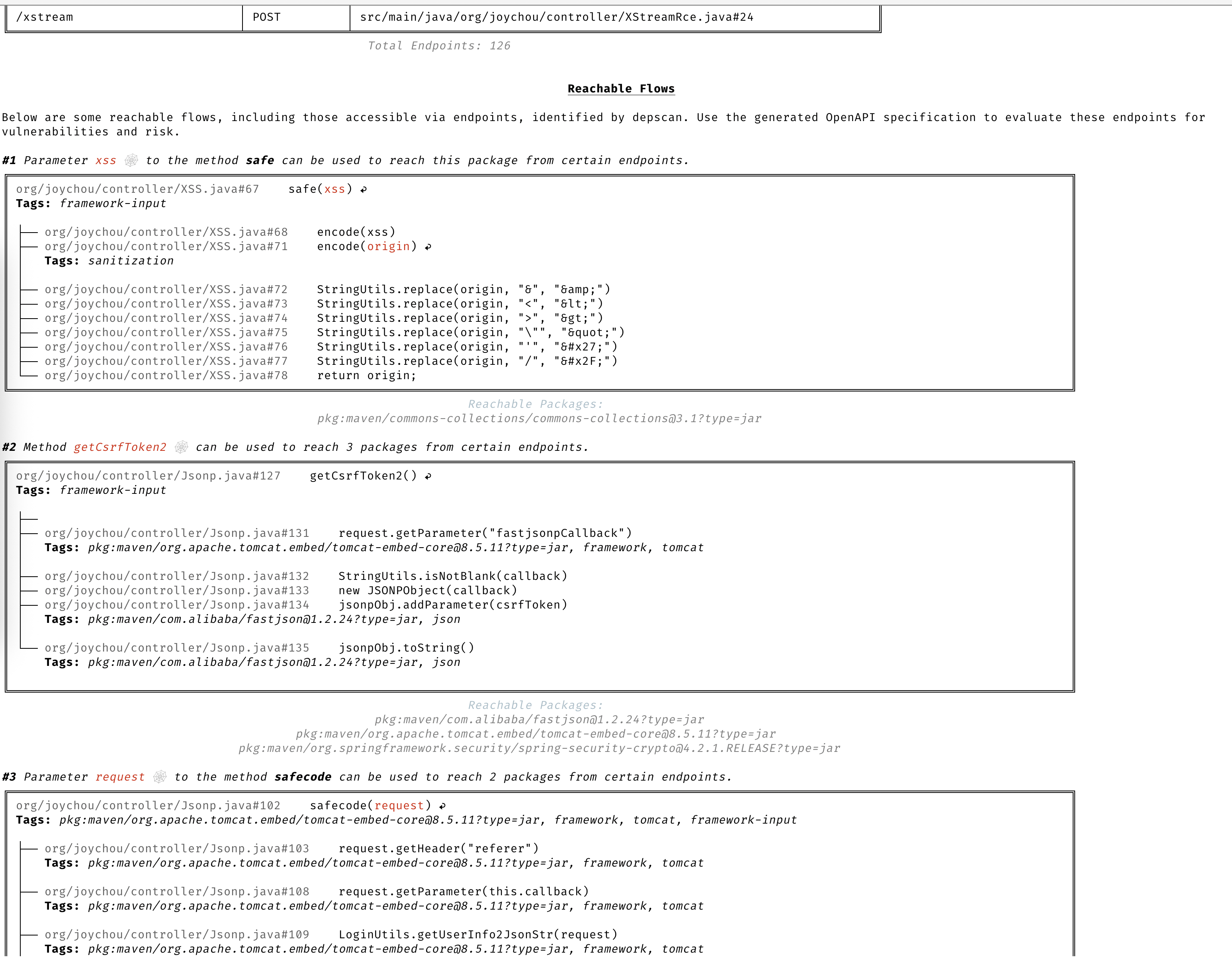
### सटीक पहुँच-योग्य डेटा-प्रवाह
पूर्ण संदर्भ के आधार पर आपके एप्लिकेशन में पहुँच-योग्य और गैर-पहुँच-योग्य दोनों पथों की पहचान करने के लिए विस्तृत डेटा प्रवाह।
### पहुँच-योग्यता मैट्रिक्स
dep-scan चार स्लाइसर के माध्यम से सात भाषा पारिस्थितिकी तंत्रों के लिए पहुँच-योग्यता की गणना करता है। जिस कमज़ोर पैकेज का कोड वास्तव में किसी निष्पादित पथ पर होता है, उसे **Reachable** के रूप में चिह्नित किया जाता है, जबकि जो पैकेज केवल BOM में घोषित है लेकिन कभी कॉल नहीं किया जाता, उसे नहीं। प्रत्येक स्लाइसर एक ही साझा, purl-कीड पहुँच-योग्यता इंजन को फ़ीड करता है, इसलिए व्यवहार सभी भाषाओं में एक समान रहता है। पहुँच-योग्यता डिफ़ॉल्ट रूप से चालू है (`--reachability-analyzer FrameworkReachability`); `SemanticReachability` इसके अतिरिक्त पहुँचे गए सेवाओं, एंडपॉइंट्स, और बिल्ड-पश्चात (बाइनरी/कंटेनर) पहुँच-योग्यता का श्रेय देता है।
| भाषा / पारिस्थितिकी तंत्र | रीचेबिलिटी इंजन | डिफ़ॉल्ट विश्लेषक |
| ---------------------------------- | ----------------------------------------------------- | ----------------------- |
| Java / JVM (Groovy, Kotlin, Scala) | [atom](https://github.com/AppThreat/atom) | `FrameworkReachability` |
| JavaScript / TypeScript | atom | `FrameworkReachability` |
| Python | atom | `FrameworkReachability` |
| PHP | atom | `FrameworkReachability` |
| Rust | [rusi](https://github.com/cdxgen/cdxgen-plugins-bin) | `FrameworkReachability` |
| Go | [golem](https://github.com/cdxgen/cdxgen-plugins-bin) | `FrameworkReachability` |
| .NET (C#, VB, F#, R) | [dosai](https://github.com/owasp-dep-scan/dosai) | `FrameworkReachability` |
रीचेबिलिटी और प्राथमिकता के पीछे की अवधारणाओं के लिए, [रीचेबिलिटी मॉडल](https://depscan.readthedocs.io/concepts/reachability-model) और [प्राथमिकता](https://depscan.readthedocs.io/concepts/prioritization) अध्याय पढ़ें। प्रति-भाषा कार्यरत उदाहरणों के लिए, [भाषा गाइड](https://depscan.readthedocs.io/languages/rust-reachability) देखें। अनुपालन कहानी (VDR और CSAF VEX) के लिए, [VDR गाइड](https://depscan.readthedocs.io/output/vdr-guide) और [CSAF VEX गाइड](https://depscan.readthedocs.io/output/vex-csaf-guide) देखें।
रीचेबिलिटी `--profile research` के अंतर्गत डिफ़ॉल्ट रूप से चालू रहती है, जिसका उपयोग dep-scan तब करता है जब रीचेबिलिटी चालू होती है। आरंभ करने के लिए नीचे दिए गए कमांड पर्याप्त हैं; प्रति-भाषा गाइड बाइनरी रिज़ॉल्यूशन, बैकएंड और नेटवर्क सुरक्षा, रिस्टोर आवश्यकताओं, और इन-रेपो फ़िक्स्चर पर कार्यरत उदाहरणों को कवर करते हैं।
**Rust (rusi)।** cdxgen [rusi](https://github.com/cdxgen/cdxgen-plugins-bin) चलाता है और उसकी रिपोर्ट को सहेजता है, जिसे dep-scan साझा पाइपलाइन में परिवर्तित करता है, इसलिए जिस crate को वास्तव में कॉल किया जाता है (उदाहरण के लिए RUSTSEC-2020-0071 के लिए `time::now()`) वह Reachable होता है, जबकि केवल मौजूद रहने वाला नहीं। [Rust रीचेबिलिटी गाइड](https://depscan.readthedocs.io/languages/rust-reachability) देखें।
```bash
depscan -i ./my-rust-app -o ./reports --profile research
```
**Go (golem)।** dep-scan Go प्रोजेक्ट्स के लिए सीधे [golem](https://github.com/cdxgen/cdxgen-plugins-bin) को इनवोक करता है (`PATH` पर `go` की आवश्यकता होती है), किसी मॉड्यूल को Reachable के रूप में चिह्नित करता है जब उसके फ़ंक्शन किसी traced पथ पर होते हैं। वार्म मॉड्यूल कैश वाले अविश्वसनीय रिपॉज़ के लिए `--go-analyzer-network offline` का उपयोग करें। [Go reachability गाइड](https://depscan.readthedocs.io/languages/go-reachability) देखें।
```bash
depscan -i ./my-go-app -o ./reports -t go
```
**.NET (dosai)।** cdxgen [dosai](https://github.com/owasp-dep-scan/dosai) चलाता है, जो प्रति-पैकेज एक स्पष्ट रीचेबिलिटी निर्णय (`ReachabilityKind` और `Confidence` के साथ `PackageReachability`) उत्पन्न करता है जिसे dep-scan आधिकारिक मानता है, इसलिए वास्तव में कॉल किया गया NuGet पैकेज (उदाहरण के लिए नियंत्रित इनपुट पर `JsonConvert.DeserializeObject`) Reachable है। संस्करणित purls के लिए एक रिस्टोर किए गए ट्री को स्कैन करें। [.NET रीचेबिलिटी गाइड](https://depscan.readthedocs.io/languages/dotnet-reachability) देखें।
```bash
depscan -i ./my-dotnet-app -o ./reports -t dotnet
```
**JVM, JavaScript/TypeScript, Python, और PHP (atom)।** ये चारों इकोसिस्टम [atom](https://github.com/AppThreat/atom) स्लाइसर को साझा करते हैं, जो एक भाषा-अज्ञेयवादी इंटरमीडिएट रिप्रेज़ेंटेशन बनाता है और स्टैटिक स्लाइसिंग करता है। [JVM, JS, Python, और PHP रीचेबिलिटी गाइड](https://depscan.readthedocs.io/languages/jvm-js-python-php-reachability) देखें।
```bash
depscan --profile research -t java -i ./my-java-app -o ./reports --explain
```
फ्रेमवर्क-फॉरवर्ड रीचेबिलिटी से आगे बढ़कर एंडपॉइंट, सर्विस और पोस्ट-बिल्ड टियर तक जाने के लिए, `--reachability-analyzer SemanticReachability` के साथ लाइफसाइकिल BOMs का `--bom-dir` पास करें। [semantic reachability गाइड](https://depscan.readthedocs.io/analyzers/semantic-reachability) देखें।
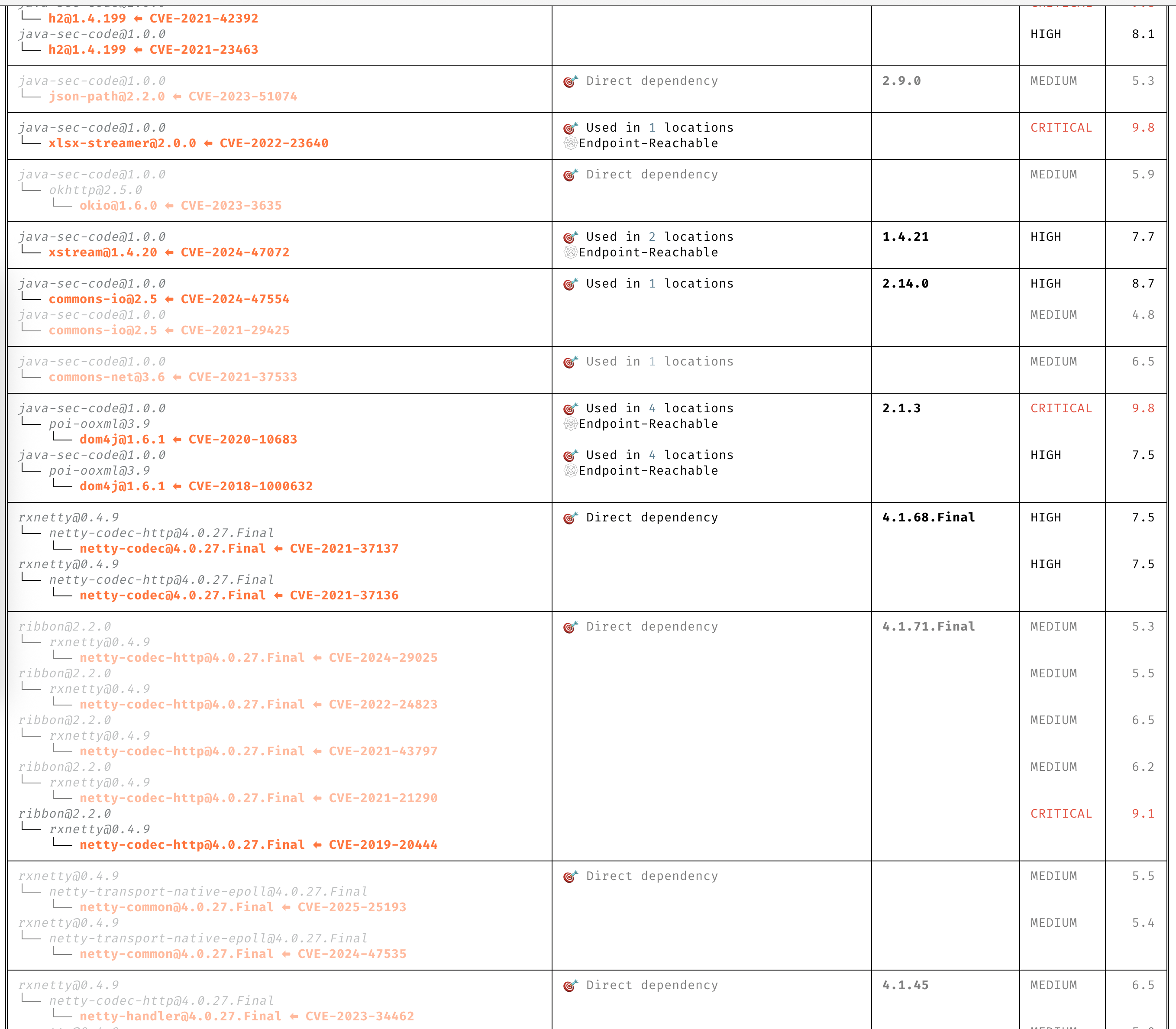
### CVEs के बारे में स्पष्ट जानकारी
विवरण पढ़ने की आवश्यकता के बिना CVEs को स्पष्ट रूप से समझें।
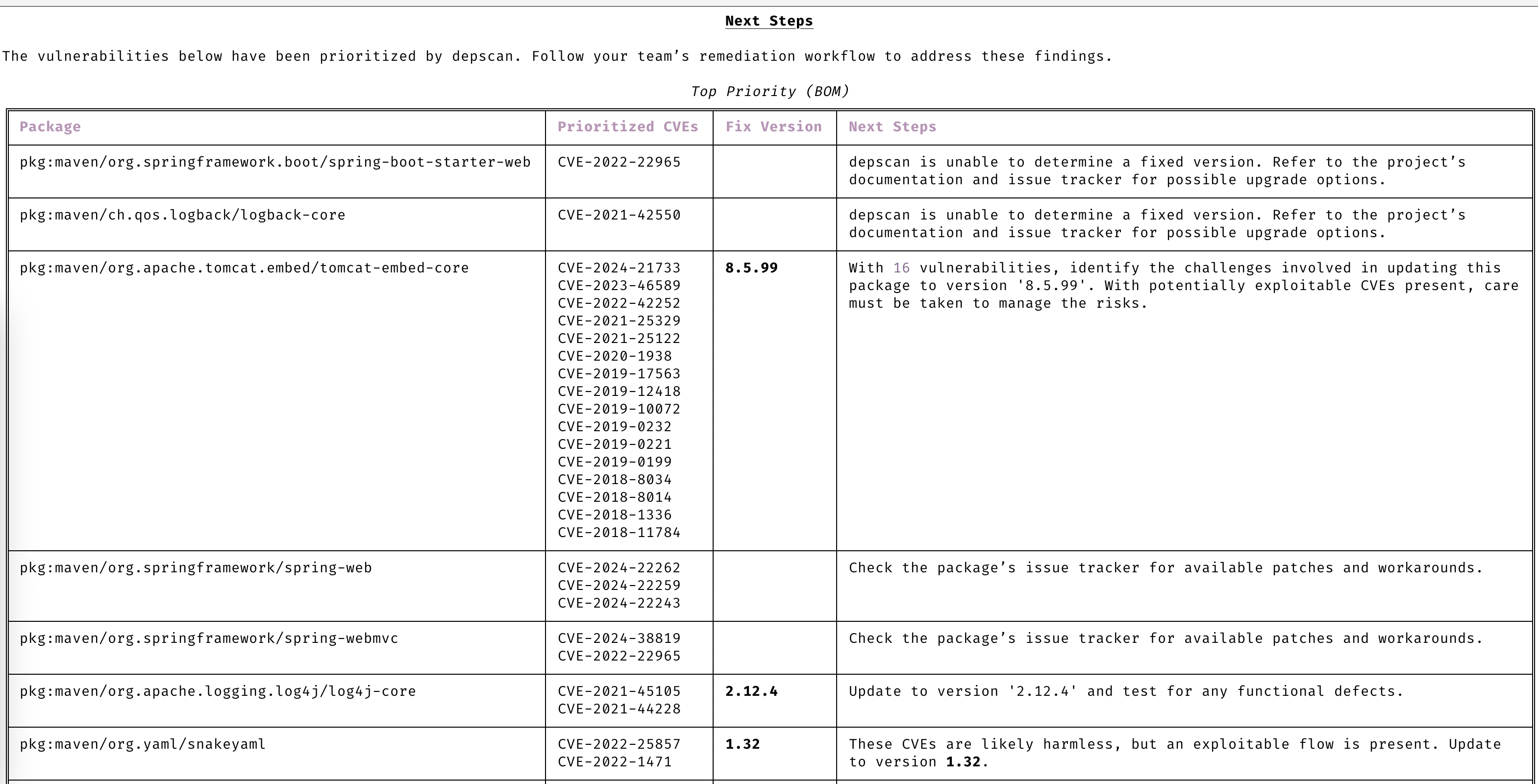
### स्वचालित प्राथमिकता
केवल उन CVEs पर ध्यान केंद्रित करें जिन पर आपके ध्यान की आवश्यकता है।
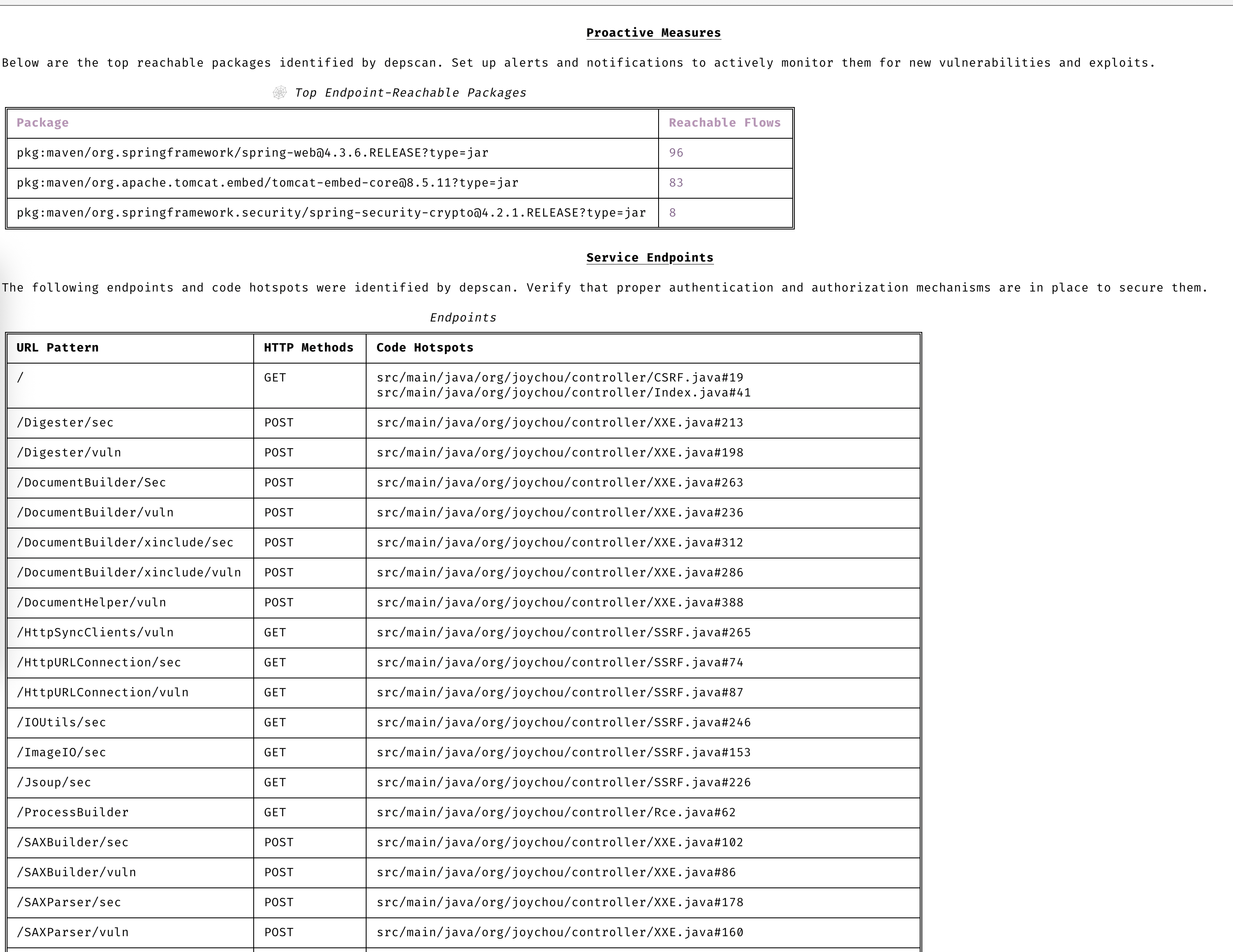
### सक्रिय रहें
उन्नत भेद्यता और शोषण पूर्वानुमान के साथ हमेशा एक कदम आगे रहें।
### भेद्यता डेटा स्रोत
- OSV
- NVD
- GitHub
- NPM
- Linux [vuln-list](https://github.com/appthreat/vuln-list)
### Linux डिस्ट्रोस
- AlmaLinux
- Debian
- Alpine
- Amazon Linux
- Arch Linux
- RHEL/CentOS
- Rocky Linux
- Ubuntu
- OpenSUSE/SLES
- Photon
- Chainguard
- Wolfi OS
## त्वरित शुरुआत
dep-scan निरंतर एकीकरण (CI) के दौरान उपयोग और एक स्थानीय विकास उपकरण के रूप में आदर्श है।
### स्थानीय रूप से प्रोजेक्ट्स स्कैन करना (Python संस्करण)
```bash
sudo npm install -g @cyclonedx/cdxgen
# Normal version recommended for most users (MIT)
pip install owasp-depscan
# For a full version with all extensions and server mode (Multiple Licenses)
pip install owasp-depscan[all]
```
इससे `cdxgen` और `depscan` नामक दो कमांड इंस्टॉल हो जाएंगे।
आप विभिन्न विकल्पों के साथ स्कैन कमांड को सीधे चला सकते हैं।
```bash
cd <project to scan>
depscan --src $PWD --reports-dir $PWD/reports
```
विकल्पों की पूरी सूची नीचे दी गई है:
```text
usage: depscan [-h] [--config CONFIG] [--no-banner] [-i SRC_DIR_IMAGE] [-o REPORTS_DIR] [--csaf]
[--profile {appsec,research,operational,threat-modeling,license-compliance,generic,machine-learning,ml,deep-learning,ml-deep,ml-tiny}]
[--lifecycle {pre-build,build,post-build} [{pre-build,build,post-build} ...]]
[--technique {auto,source-code-analysis,binary-analysis,manifest-analysis,hash-comparison,instrumentation,filename} [{auto,source-code-analysis,binary-analysis,manifest-analysis,hash-comparison,instrumentation,filename} ...]]
[--bom-engine {auto,CdxgenGenerator,CdxgenServerGenerator,CdxgenImageBasedGenerator,BlintGenerator} |
--vulnerability-analyzer {auto,VDRAnalyzer,LifecycleAnalyzer}] [--reachability-analyzer {off,FrameworkReachability,SemanticReachability}] [--no-suggest]
[--risk-audit] [--cdxgen-args CDXGEN_ARGS] [--private-ns PRIVATE_NS] [-t PROJECT_TYPE [PROJECT_TYPE ...]] [--bom BOM | --bom-dir BOM_DIR | --purl SEARCH_PURL]
[--report-template REPORT_TEMPLATE] [--report-name REPORT_NAME] [--deep] [--fuzzy-search] [--search-order {purl,pcu,cpe,cpu,url}] [--no-universal]
[--no-vuln-table] [--server] [--server-host SERVER_HOST] [--server-port SERVER_PORT] [--cdxgen-server CDXGEN_SERVER] [--debug] [-q | --explain] [-v]
Fully open-source security and license audit for application dependencies and container images based on known vulnerabilities and advisories.
options:
-h, --help show this help message and exit
--config CONFIG Path to the configuration file. Default: $PWD/.config/depscan.toml
--no-banner Do not display the logo and donation banner. Please make a donation to OWASP before using this argument.
-i, --src SRC_DIR_IMAGE
Source directory or container image or binary file
-o, --reports-dir REPORTS_DIR
Reports directory
--csaf Generate a OASIS CSAF VEX document
--profile {appsec,research,operational,threat-modeling,license-compliance,generic,machine-learning,ml,deep-learning,ml-deep,ml-tiny}
Profile to use while generating the BOM. For granular control, use the arguments --bom-engine, --vulnerability-analyzer, or --reachability-analyzer.
--lifecycle {pre-build,build,post-build} [{pre-build,build,post-build} ...]
Product lifecycle for the generated BOM. Multiple values allowed.
--technique {auto,source-code-analysis,binary-analysis,manifest-analysis,hash-comparison,instrumentation,filename} [{auto,source-code-analysis,binary-analysis,manifest-analysis,hash-comparison,instrumentation,filename} ...]
Analysis technique to use for BOM generation. Multiple values allowed.
--bom-engine {auto,CdxgenGenerator,CdxgenServerGenerator,CdxgenImageBasedGenerator,BlintGenerator}
BOM generation engine to use. Defaults to automatic selection based on project type and lifecycle.
--vulnerability-analyzer {auto,VDRAnalyzer,LifecycleAnalyzer}
Vulnerability analyzer to use. Defaults to automatic selection based on bom_dir argument.
--reachability-analyzer {off,FrameworkReachability,SemanticReachability}
Reachability analyzer to use. Default FrameworkReachability.
--no-suggest Disable suggest mode
--risk-audit Perform package risk audit (slow operation). Npm only.
--cdxgen-args CDXGEN_ARGS
Additional arguments to pass to cdxgen
--private-ns PRIVATE_NS
Private namespace to use while performing oss risk audit. Private packages should not be available in public registries by default. Comma separated
values accepted.
-t, --type PROJECT_TYPE [PROJECT_TYPE ...]
Override project types if auto-detection is incorrect. Multiple values supported.
--bom BOM Examine using the given Software Bill-of-Materials (SBOM) file in CycloneDX format. Use cdxgen command to produce one.
--bom-dir BOM_DIR Examine all the Bill-of-Materials (BOM) files in the given directory.
--purl SEARCH_PURL Scan a single package url.
--custom-data CUSTOM_DATA
Path to directory containing custom vulnerability data (JSON/YAML/TOML) to override/augment results.
--report-template REPORT_TEMPLATE
Jinja template file used for rendering a custom report
--report-name REPORT_NAME
Filename of the custom report written to the --reports-dir
--deep Perform deep scan by passing this --deep argument to cdxgen. Useful while scanning docker images and OS packages.
--fuzzy-search Perform fuzzy search by creating variations of package names. Use this when the input SBOM lacks a PURL.
--search-order {purl,pcu,cpe,cpu,url}
Attributes to use while searching for vulnerabilities. Default: PURL, CPE, URL (pcu).
--no-universal Depscan would attempt to perform a single universal scan instead of individual scans per language type.
--no-vuln-table Do not print the table with the full list of vulnerabilities. This can help reduce console output.
--server Run depscan as a server
--server-host SERVER_HOST
depscan server host
--server-port SERVER_PORT
depscan server port
--server-allowed-hosts [SERVER_ALLOWED_HOSTS ...]
List of allowed hostnames or IPs that can access the server (e.g., 'localhost 192.168.1.10'). If unspecified, no host allowlist is
enforced.
--server-allowed-paths [SERVER_ALLOWED_PATHS ...]
List of allowed filesystem paths that can be scanned by the server. Restricts `path` parameter in /scan requests.
--cdxgen-server CDXGEN_SERVER
cdxgen server url. Eg: http://cdxgen:9090
--debug Run depscan in debug mode.
-q, --quiet Makes depscan quiet.
--explain Makes depscan to explain the various analysis. Useful for creating detailed reports.
--explanation-mode {Endpoints,EndpointsAndReachables,NonReachables,LLMPrompts}
Style of explanation needed. Defaults to Endpoints and Reachables.
--annotate Include the generated text VDR report as an annotation. Defaults to true when explain is enabled; false otherwise.
-v, --version Display the version
```
### Homebrew (macOS और Linux)
Homebrew [OWASP dep-scan tap](https://github.com/owasp-dep-scan/homebrew-tap) से [standalone binary](#standalone-binaries-no-python-or-nodejs-required) को `depscan` के रूप में इंस्टॉल करता है, जिसमें cdxgen बंडल किया गया है और Python या Node.js की आवश्यकता नहीं है। `brew trust` tap को स्वीकार करता है, जिसकी आवश्यकता Homebrew को तब होती है जब `HOMEBREW_REQUIRE_TAP_TRUST` सेट होने पर तीसरे पक्ष के tap से formulae लोड करने से पहले:
```bash
brew tap owasp-dep-scan/tap
brew trust --tap owasp-dep-scan/tap
brew install dep-scan
depscan --src $PWD --reports-dir $PWD/reports
```
### स्टैंडअलोन बाइनरीज़ (Python या Node.js की आवश्यकता नहीं)
प्रत्येक [GitHub रिलीज़](https://github.com/owasp-dep-scan/dep-scan/releases) के साथ पहले से बनी सिंगल-फ़ाइल एक्ज़ीक्यूटेबल्स संलग्न होती हैं। ये एक मेल खाती [cdxgen](https://github.com/cdxgen/cdxgen) SEA बाइनरी को बंडल करती हैं, इसलिए Python, Node.js, या cdxgen इंस्टॉल किए बिना BOM जनरेशन सीधे काम करता है।
| प्लेटफ़ॉर्म | आर्किटेक्चर | एसेट |
| --------------------- | ------------- | --------------------------- |
| Linux (glibc) | x86_64 | `depscan-linux-amd64` |
| Linux (glibc) | arm64 | `depscan-linux-arm64` |
| Linux (musl / Alpine) | x86_64 | `depscan-linux-amd64-musl` |
| Linux (musl / Alpine) | arm64 | `depscan-linux-arm64-musl` |
| macOS | Apple silicon | `depscan-darwin-arm64` |
| macOS | Intel | `depscan-darwin-amd64` |
| Windows | x86_64 | `depscan-windows-amd64.exe` |
प्रत्येक एसेट के साथ सत्यापन के लिए एक मेल खाती `.sha256` फ़ाइल होती है।
```bash
# Example: Linux x86_64
curl -LO https://github.com/owasp-dep-scan/dep-scan/releases/latest/download/depscan-linux-amd64
curl -LO https://github.com/owasp-dep-scan/dep-scan/releases/latest/download/depscan-linux-amd64.sha256
sha256sum -c depscan-linux-amd64.sha256
chmod +x depscan-linux-amd64
./depscan-linux-amd64 --src $PWD --reports-dir $PWD/reports
```
> [!NOTE]
> macOS बाइनरीज़ वर्तमान में अहस्ताक्षरित हैं। पहली बार चलाने पर macOS Gatekeeper उन्हें ब्लॉक कर सकता है; `xattr -d com.apple.quarantine ./depscan-darwin-arm64` के साथ quarantine विशेषता हटाएँ (या System Settings, Privacy & Security में बाइनरी को अनुमति दें)।
> [!NOTE]
> vulnerability डेटाबेस अभी भी पहली बार चलाने पर डाउनलोड होता है। केवल cdxgen बंडल किया गया है, vuln DB नहीं। किसी विशिष्ट डेटाबेस वेरिएंट का चयन करने के लिए `depscan-vdb` कमांड का उपयोग करें, उदाहरण के लिए छोटे ऐप-केवल डेटाबेस के लिए `depscan-vdb download --scope app`। पूर्ण इमेज मैट्रिक्स के लिए [vulnerability database गाइड](https://depscan.readthedocs.io/vulnerability-database) देखें।
सभी स्टैंडअलोन बाइनरीज़ `blint` को बंडल करती हैं, लेकिन इसके वैकल्पिक `nyxstone` डिसअसेम्बली बैकएंड को नहीं (जिसके कोई wheels नहीं हैं और Windows समर्थन नहीं है)। इसलिए स्टैंडअलोन बाइनरीज़ में गहन डिसअसेम्बली-आधारित बाइनरी विश्लेषण उपलब्ध नहीं है; यदि आपको इसकी आवश्यकता हो तो Python पैकेज (`pip install owasp-depscan[all]`) का उपयोग करें।
### कंटेनरों को स्थानीय रूप से स्कैन करना (Python संस्करण)
एक Java प्रोजेक्ट स्कैन करें।
```bash
depscan --src <path> -o containertests -t java
```
`shiftleft/scan-slim` कंटेनर के `latest` टैग को स्कैन करें
```bash
depscan --src shiftleft/scan-slim -o containertests -t docker
```
`license` को प्रकार में शामिल करें ताकि लाइसेंस ऑडिट किया जा सके।
```bash
depscan --src shiftleft/scan-slim -o containertests -t docker license
```
आप sha256 डाइजेस्ट का उपयोग करके भी इमेज निर्दिष्ट कर सकते हैं
```bash
depscan --src redmine@sha256:a5c5f8a64a0d9a436a0a6941bc3fb156be0c89996add834fe33b66ebeed2439e -o containertests -t docker
```
आप docker या podman save कमांड का उपयोग करके कंटेनर इमेज भी सहेज सकते हैं और स्कैनिंग के लिए आर्काइव को depscan को पास कर सकते हैं।
```bash
docker save -o /tmp/scanslim.tar shiftleft/scan-slim:latest
# podman save --format oci-archive -o /tmp/scanslim.tar shiftleft/scan-slim:latest
depscan --src /tmp/scanslim.tar -o reports -t docker
```
इस रेपो के GitHub action workflow के अंतर्गत docker टेस्ट देखें, अधिक उदाहरणों के लिए।
### प्रोजेक्ट्स को स्थानीय रूप से स्कैन करना (Docker कंटेनर)
स्कैन करने के लिए `ghcr.io/owasp-dep-scan/dep-scan` कंटेनर इमेज का उपयोग किया जा सकता है।
डिफ़ॉल्ट सेटिंग्स के साथ स्कैन करने के लिए
```bash
docker run --rm -v $PWD:/app ghcr.io/owasp-dep-scan/dep-scan depscan --src /app --reports-dir /app/reports
```
कस्टम एनवायरनमेंट वेरिएबल्स आधारित कॉन्फ़िगरेशन के साथ स्कैन करने के लिए
```bash
docker run --rm \
-e VDB_HOME=/db \
-e GITHUB_TOKEN=<token> \
-v /tmp:/db \
-v $PWD:/app ghcr.io/owasp-dep-scan/dep-scan depscan --src /app --reports-dir /app/reports
```
उपरोक्त उदाहरण में, `/tmp` को कंटेनर में `/db` के रूप में माउंट किया गया है। इस निर्देशिका को फिर भेद्यता जानकारी को कैश करने के लिए `VDB_HOME` के रूप में निर्दिष्ट किया गया है। इस तरह डेटाबेस को कैश किया जा सकता है और प्रदर्शन को बेहतर बनाने के लिए पुनः उपयोग किया जा सकता है।
### सर्वर मोड
dep-scan और cdxgen को सर्वर मोड में चलाया जा सकता है। आरंभ करने के लिए शामिल docker-compose फ़ाइल का उपयोग करें।
```bash
git clone https://github.com/owasp-dep-scan/dep-scan
docker compose up
```
बंडल की गई compose फ़ाइल डिफ़ॉल्ट रूप से `DEPSCAN_SERVER_API_KEY` को एक विकास प्लेसहोल्डर पर सेट करती है ताकि dep-scan सेवा `0.0.0.0` से बाइंड हो सके। सेवा को स्थानीय लैब के बाहर उजागर करने से पहले इस मान को ओवरराइड करें।
```bash
depscan --server --server-host 127.0.0.1 --server-port 7070
```
यदि आपको dep-scan को किसी गैर-स्थानीय पते से बाइंड करना है, तो पहले एक API कुंजी सेट करें:
```bash
export DEPSCAN_SERVER_API_KEY="change-this-before-production"
depscan --server --server-host 0.0.0.0 --server-port 7070
```
> [!IMPORTANT]
> dep-scan बिना `DEPSCAN_SERVER_API_KEY` या `DEPSCAN_SERVER_ALLOW_UNAUTHENTICATED_BIND=true` के माध्यम से स्पष्ट opt-in के, किसी भी non-local address से bind होने से इंकार करता है।
---
[Read more](https://github.com/owasp-dep-scan/dep-scan)
