 n1ght-w0lf/uchihash
मैलवेयर एम्बेडेड हैश से निपटने के लिए एक छोटी उपयोगिता।

Uchihash एक छोटा टूल है जो मैलवेयर विश्लेषकों का समय बचा सकता है जब वे विभिन्न उद्देश्यों के लिए उपयोग किए जाने वाले एम्बेडेड हैश मानों से निपटते हैं, जैसे:
$ git clone https://github.com/N1ght-W0lf/Uchihash.git
$ pip install -r requirements.txt
usage: uchihash.py [-h] [--algo ALGO] [--apis] [--keywords] [--list LIST] [--script SCRIPT] [--search SEARCH]
                   [--hashes HASHES] [--idaidc] [--idapython]

options:
  -h, --help       show this help message and exit
  --algo ALGO      Hashing algorithm
  --apis           Calculate hashes of APIs
  --keywords       Calculate hashes of keywords
  --list LIST      Calculate hashes of your own word list
  --script SCRIPT  Script file containing your custom hashing algorithm
  --search SEARCH  Search a JSON File containing hashes mapped to words
  --hashes HASHES  File containing list of hashes to search for
  --idaidc         Generate an IDC script to annotate hash values in IDA Pro
  --idapython      Generate an IDAPython script to annotate hash values in IDA Pro
  --ghidra         Generate a python script to annotate hash values in Ghidra

Examples:
    * python uchihash.py --algo crc32 --apis
    * python uchihash.py --algo murmur3 --list mywords.txt
    * python uchihash.py --script myalgo.py --apis --idapython
    * python uchihash.py --search hashmap.txt --hashes myhashes.txt
--algo: उपलब्ध हैशिंग एल्गोरिदम में से एक
--apis: विंडोज API की एक बड़ी सूची को हैश करता है (देखें data/apis_list.txt)
--keywords: मैलवेयर परिवारों द्वारा उपयोग किए जाने वाले सामान्य कीवर्ड की सूची को हैश करता है, जैसे कि विश्लेषण उपकरण और VM/एंटीवायरस/EDR आर्टिफैक्ट्स (देखें data/keywords_list.txt)
--list : शब्द एक नई पंक्ति द्वारा अलग किए जाते हैं (देखें examples/mywords.txt)
--script: हैशिंग फ़ंक्शन का नाम hashme होना चाहिए और यह एक आर्गुमेंट लेता है जो एक बाइट स्ट्रिंग है, जो उस मान को दर्शाता है जिसके लिए हम हैश की गणना करना चाहते हैं, और रिटर्न वैल्यू हेक्स प्रारूप में होनी चाहिए (देखें examples/custom_algo.txt)
--search: खोजने के लिए फ़ाइल JSON प्रारूप में होनी चाहिए (देखें examples/searchme.txt)
--hashes: हैश मान एक नई पंक्ति द्वारा अलग किए जाते हैं और वे हेक्स प्रारूप में होने चाहिए (देखें examples/myhashes.txt)
अधिक स्पष्टीकरण के लिए examples फ़ोल्डर देखें
आइए एक वास्तविक मैलवेयर परिवार के साथ एक उदाहरण लें, इस मामले में हमारे पास BuerLoader है जो गतिशील रूप से API आयात करने के लिए हैश मानों का उपयोग कर रहा है और यह एक कस्टम हैशिंग एल्गोरिदम का उपयोग कर रहा है।
पहले हमें पायथन में हैशिंग एल्गोरिदम को लागू करना होगा:
def ROR4(val, bits, bit_size=32):
    return ((val & (2 ** bit_size - 1)) >> bits % bit_size) | \
           (val << (bit_size - (bits % bit_size)) & (2 ** bit_size - 1))

def hashme(s):
    res = 0
    for c in s:
        v3 = ROR4(res, 13)
        v4 = c - 32
        if c < 97:
            v4 = c
        res = v4 + v3
    return hex(res)
फिर हम निम्नलिखित कमांड का उपयोग करके सभी API के हैश की गणना करते हैं:
$ python uchihash.py --script custom_algo.py --apis --idapython
यह कमांड दो फ़ाइलें उत्पन्न करेगा, पहली फ़ाइल "output/search_hashmap.txt" है जो हैश मानों को उनके संबंधित API नामों से मैप करती है जैसा कि नीचे दिया गया है:
{
  "0x8a8b468c": "LoadLibraryW",
  "0x302ebe1c": "VirtualAlloc",
  "0x1803b7e3": "VirtualProtect",
  "0xe183277b": "VirtualFree",
  "0x24e2968d": "GetComputerNameW",
  "0xab489125": "GetNativeSystemInfo",
  .......
}
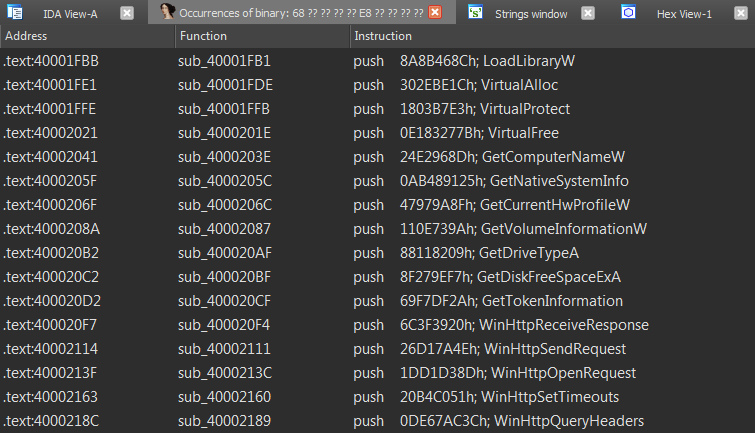
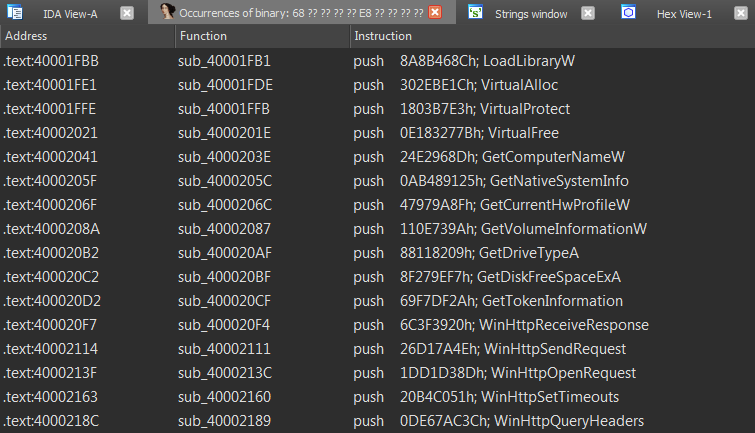
दूसरी फ़ाइल "output/idapython_script.py" है जिसे आप IDA Pro में चला सकते हैं और स्क्रिप्ट आपके IDB में हैश टिप्पणियाँ जोड़ देगी जैसा कि नीचे देखा गया है: