mrexodia/ida-pro-mcp
AI-संचालित रिवर्स इंजीनियरिंग सहायक जो IDA Pro को MCP के माध्यम से भाषा मॉडलों से जोड़ता है।
[!IMPORTANT] मैं इसके बजाय आधिकारिक Hex-Rays IDA MCP सर्वर का उपयोग करने की सलाह देता हूँ!
अधिक जानकारी के लिए घोषणा ब्लॉग पोस्ट देखें।
IDA Pro में वाइब रिवर्सिंग की अनुमति देने के लिए सरल MCP सर्वर।
https://github.com/user-attachments/assets/6ebeaa92-a9db-43fa-b756-eececce2aca0
वीडियो के लिए बाइनरीज़ और प्रॉम्प्ट mcp-reversing-dataset रिपॉज़िटरी में उपलब्ध हैं।
idapyswitch का उपयोग करेंida-pro-mcp --config चलाएँ।नोट: इसके लिए idalib को वैश्विक रूप से सक्रिय करना और uv इंस्टॉल होना आवश्यक है:```bash
uv run "C:\Program Files\IDA Professional 9.3\idalib\python\py-activate-idalib.py"
uv run "/Applications/IDA Professional 9.3.app/Contents/MacOS/idalib/python/py-activate-idalib.py"
uv run "/path/to/idapro-9.3/idalib/python/py-activate-idalib.py"
## इंस्टॉलेशन (Claude Code)

Claude Code में नवीनतम IDA Pro MCP इंस्टॉल करने के लिए:```bash
claude plugin marketplace add mrexodia/claude-marketplace
claude plugin uninstall ida-pro-mcp@mrexodia
claude plugin install ida-pro-mcp@mrexodia
Codex में नवीनतम IDA Pro MCP इंस्टॉल करने के लिए:```bash codex plugin marketplace add mrexodia/codex-marketplace codex plugin remove ida-pro-mcp@mrexodia codex plugin add ida-pro-mcp@mrexodia
## इंस्टॉलेशन (Kimi Code)

Kimi Code में नवीनतम IDA Pro MCP इंस्टॉल करने के लिए, चैट में यह स्लैश कमांड चलाएँ:```
/plugins install https://github.com/mrexodia/ida-pro-mcp/tree/main
/reload
यह idalib MCP सर्वर और idapython स्किल इंस्टॉल करता है। प्लगइन्स को
$KIMI_CODE_HOME/plugins/managed/ में कॉपी किया जाता है, इसलिए uv आपके PATH में होना चाहिए। इंस्टॉल करने के बाद
पहला सत्र धीमा होता है, क्योंकि सर्वर के जवाब देने से पहले uv निर्भरताओं को हल करता है।
नोट: MCP प्लगइन अब अनुशंसित नहीं है और अंततः इसे हटा दिया जाएगा। इसके बजाय idalib-mcp का उपयोग करें।
यदि आप IDA GUI से MCP सर्वर को मैन्युअल रूप से कॉन्फ़िगर करना चाहते हैं:```sh pip uninstall ida-pro-mcp pip install https://github.com/mrexodia/ida-pro-mcp/archive/refs/heads/main.zip
MCP सर्वर कॉन्फ़िगर करें और IDA Plugin इंस्टॉल करें:```
ida-pro-mcp --install
महत्वपूर्ण: सुनिश्चित करें कि इंस्टॉलेशन प्रभावी होने के लिए आप IDA और अपने MCP क्लाइंट को पूरी तरह से पुनः आरंभ करें। कुछ क्लाइंट (जैसे Claude) पृष्ठभूमि में चलते हैं और उन्हें ट्रे आइकन से बंद करना आवश्यक है।
LLMs में भ्रम (hallucinations) की प्रवृत्ति होती है और आपको अपने प्रॉम्प्टिंग में विशिष्ट होने की आवश्यकता है। रिवर्स इंजीनियरिंग के लिए पूर्णांकों और बाइट्स के बीच रूपांतरण विशेष रूप से समस्याग्रस्त है। नीचे एक न्यूनतम उदाहरण प्रॉम्प्ट दिया गया है, यदि आपको किसी भिन्न प्रॉम्प्ट के साथ अच्छे परिणाम मिलते हैं तो बेझिझक चर्चा शुरू करें या issue खोलें:```md Your task is to analyze a crackme in IDA Pro. You can use the MCP tools to retrieve information. In general use the following strategy:
int_convert MCP tool if needed!यह प्रॉम्प्ट केवल पहला प्रयोग था, यदि आपको आउटपुट बेहतर बनाने के तरीके मिले हों तो कृपया साझा करें!
[@can1357](https://github.com/can1357) द्वारा एक और प्रॉम्प्ट:```md
Your task is to create a complete and comprehensive reverse engineering analysis. Reference AGENTS.md to understand the project goals and ensure the analysis serves our purposes.
Use the following systematic methodology:
1. **Decompilation Analysis**
- Thoroughly inspect the decompiler output
- Add detailed comments documenting your findings
- Focus on understanding the actual functionality and purpose of each component (do not rely on old, incorrect comments)
2. **Improve Readability in the Database**
- Rename variables to sensible, descriptive names
- Correct variable and argument types where necessary (especially pointers and array types)
- Update function names to be descriptive of their actual purpose
3. **Deep Dive When Needed**
- If more details are necessary, examine the disassembly and add comments with findings
- Document any low-level behaviors that aren't clear from the decompilation alone
- Use sub-agents to perform detailed analysis
4. **Important Constraints**
- NEVER convert number bases yourself - use the int_convert MCP tool if needed
- Use MCP tools to retrieve information as necessary
- Derive all conclusions from actual analysis, not assumptions
5. **Documentation**
- Produce comprehensive RE/*.md files with your findings
- Document the steps taken and methodology used
- When asked by the user, ensure accuracy over previous analysis file
- Organize findings in a way that serves the project goals outlined in AGENTS.md or CLAUDE.md
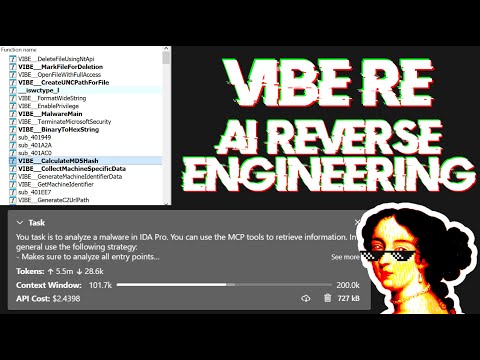
लाइव स्ट्रीम में प्रॉम्प्टिंग पर चर्चा और कुछ वास्तविक दुनिया के मैलवेयर विश्लेषण का प्रदर्शन:
बड़े भाषा मॉडल (LLMs) शक्तिशाली उपकरण हैं, लेकिन वे कभी-कभी जटिल गणितीय गणनाओं में संघर्ष कर सकते हैं या "भ्रम" (तथ्यों को गढ़ना) प्रदर्शित कर सकते हैं। सुनिश्चित करें कि आप LLM को int_convert MCP टूल का उपयोग करने के लिए कहें और कुछ ऑपरेशनों के लिए आपको math-mcp की भी आवश्यकता हो सकती है।
एक और बात ध्यान में रखें कि LLMs अस्पष्ट कोड पर अच्छा प्रदर्शन नहीं करेंगे। LLM का उपयोग समस्या को हल करने के लिए करने से पहले, बाइनरी के चारों ओर देखें और निम्नलिखित चीजों को (स्वचालित रूप से) हटाने में कुछ समय बिताएं: