 merbanan/rtl_433
ISM बैंड (और अन्य आवृत्तियों) पर उपकरणों से रेडियो संचरण को डिकोड करने का प्रोग्राम

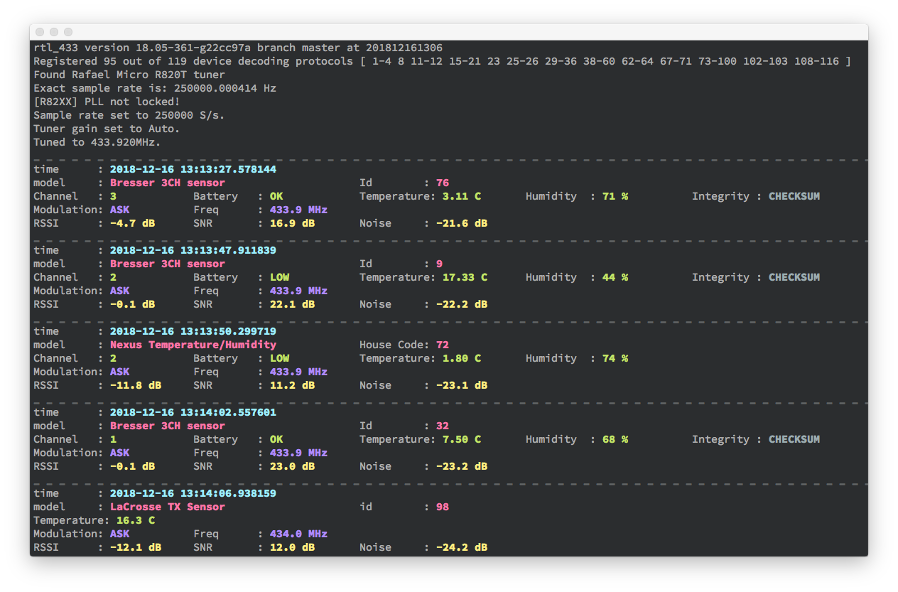
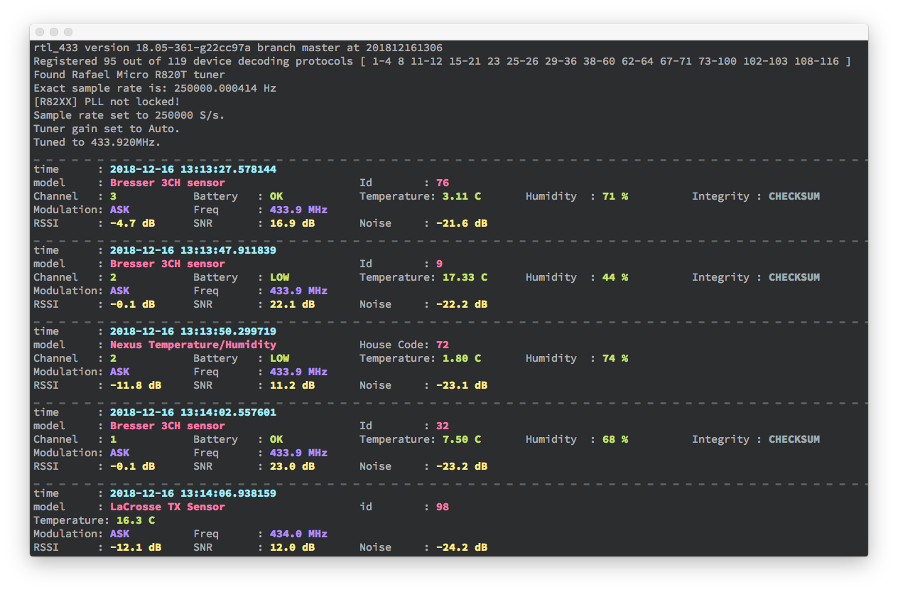
rtl_433 (नाम के बावजूद) एक सामान्य डेटा रिसीवर है, मुख्य रूप से 433.92 MHz, 868 MHz (SRD), 315 MHz, 345 MHz, और 915 MHz ISM बैंड के लिए।
आधिकारिक स्रोत कोड https://github.com/merbanan/rtl_433/ रिपॉजिटरी में है।
विकी में rtl_433 के साथ काम करने वाले सॉफ़्टवेयर की सूची भी देखें। अधिक दस्तावेज़ीकरण और संबंधित परियोजनाओं के लिए, विशेष रूप से वे जो rtl_433 विकास में सहायता करते हैं, https://triq.org/ साइट देखें।
यह RTL-SDR और/या SoapySDR के साथ काम करता है। सक्रिय रूप से परीक्षण और समर्थित हैं Realtek RTL2832 आधारित DVB डोंगल (RTL-SDR का उपयोग करके) और LimeSDR (LimeSDR USB और LimeSDR mini इंजीनियरिंग सैंपल जो कृपया MyriadRf द्वारा प्रदान किए गए), PlutoSDR, HackRF One (SoapySDR ड्राइवरों का उपयोग करके), साथ ही SoapyRemote।
rtl_433 पोर्टेबल C (C99 मानक) में लिखा गया है और Linux (एम्बेडेड भी), FreeBSD, MacOS, और Windows सिस्टम पर कंपाइल होने के लिए जाना जाता है। पुराने कंपाइलर और टूलचेन समर्थित हैं क्योंकि यह एक प्रमुख लक्ष्य है। कम संसाधन खपत और बहुत कम निर्भरताएँ rtl_433 को एम्बेडेड हार्डवेयर पर चलाने की अनुमति देती हैं। अधिकांश सामान्य 32-बिट और 64-बिट CPU आर्किटेक्चर जैसे amd64, arm64, armhf, i386, ppc64el, riscv64, s390x और अन्य अच्छी तरह से समर्थित हैं।
BUILDING.md देखें
Linux (Debian, Ubuntu): sudo apt install rtl-433। अन्य वितरणों के लिए repology या pkgs.org देखें।
FreeBSD: pkg install rtl-433।
MacOS: brew install rtl_433।
rtl_433 के साथ Docker इमेज hertzg के github पेज पर उपलब्ध हैं।
CONTRIBUTING.md देखें।
rtl_433 -h```
A "rtl_433.conf" file is searched in "./", XDG_CONFIG_HOME e.g. "$HOME/.config/rtl_433/",
SYSCONFDIR e.g. "/usr/local/etc/rtl_433/", then command line args will be parsed in order.
= General options =
[-V] Output the version string and exit
[-v] Increase verbosity (can be used multiple times).
-v : verbose notice, -vv : verbose info, -vvv : debug, -vvvv : trace.
[-c ] Read config options from a file
= Tuner options =
[-d | : | | rtl_tcp | help]
[-g | help] (default: auto)
[-t ] apply a list of keyword=value settings to the SDR device
e.g. for SoapySDR -t "antenna=A,bandwidth=4.5M,rfnotch_ctrl=false"
for RTL-SDR use "direct_samp[=1]", "offset_tune[=1]", "digital_agc[=1]", "biastee[=1]"
[-f ] Receive frequency(s) (default: 433920000 Hz)
[-H ] Hop interval for polling of multiple frequencies (default: 600 seconds)
[-p <ppm_error>] Correct rtl-sdr tuner frequency offset error (default: 0)
[-s ] Set sample rate (default: 250000 Hz)
[-D quit | restart | pause | manual] Input device run mode options (default: quit).
= Demodulator options =
[-R | help] Enable only the specified device decoding protocol (can be used multiple times)
Specify a negative number to disable a device decoding protocol (can be used multiple times)
[-X | help] Add a general purpose decoder (prepend -R 0 to disable all decoders)
[-Y auto | classic | minmax] FSK pulse detector mode.
[-Y level=] Manual detection level used to determine pulses (-1.0 to -30.0) (0=auto).
[-Y minlevel=] Manual minimum detection level used to determine pulses (-1.0 to -99.0).
[-Y minsnr=] Minimum SNR to determine pulses (1.0 to 99.0).
[-Y autolevel] Set minlevel automatically based on average estimated noise.
[-Y squelch] Skip frames below estimated noise level to reduce cpu load.
[-Y ampest | magest] Choose amplitude or magnitude level estimator.
[-Y filter=] Manual FM low-pass filter cutoff to separate simultaneous transmissions: us (1-9999, e.g. 20), Hz (10000+), or ratio of sample rate (0.0-1.0).
= Analyze/Debug options =
[-A] Pulse Analyzer. Enable pulse analysis and decode attempt.
Disable all decoders with -R 0 if you want analyzer output only.
[-y ] Verify decoding of demodulated test data (e.g. "{25}fb2dd58") with enabled devices
= File I/O options =
[-S none | all | unknown | known] Signal auto save. Creates one file per signal.
Note: Saves raw I/Q samples (uint8 pcm, 2 channel). Preferred mode for generating test files.
[-r | help] Read data from input file instead of a receiver
[-w | help] Save data stream to output file (a '-' dumps samples to stdout)
[-W | help] Save data stream to output file, overwrite existing file
= Data output options =
[-F log | kv | json | csv | mqtt | influx | syslog | trigger | rtl_tcp | http | null | help] Produce decoded output in given format.
Append output to file with : (e.g. -F csv:log.csv), defaults to stdout.
Specify host/port for syslog with e.g. -F syslog:127.0.0.1:1514
[-M time[:] | protocol | level | noise[:] | stats | bits | help] Add various meta data to each output.
[-K FILE | PATH | | =] Add an expanded token or fixed tag to every output line.
[-C native | si | customary] Convert units in decoded output.
[-n ] Specify number of samples to take (each sample is an I/Q pair)
[-T ] Specify number of seconds to run, also 12:34 or 1h23m45s
[-E hop | quit] Hop/Quit after outputting successful event(s)
[-h] Output this usage help and exit
Use -d, -g, -R, -X, -F, -M, -r, -w, or -W without argument for more help
