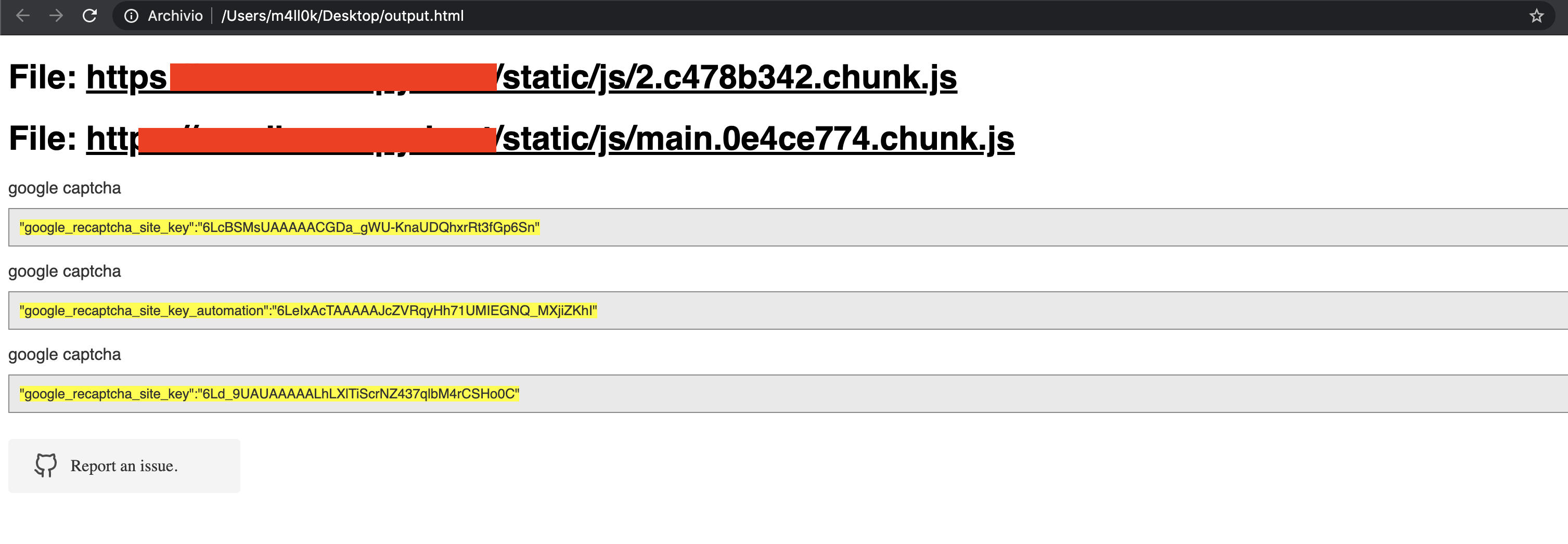
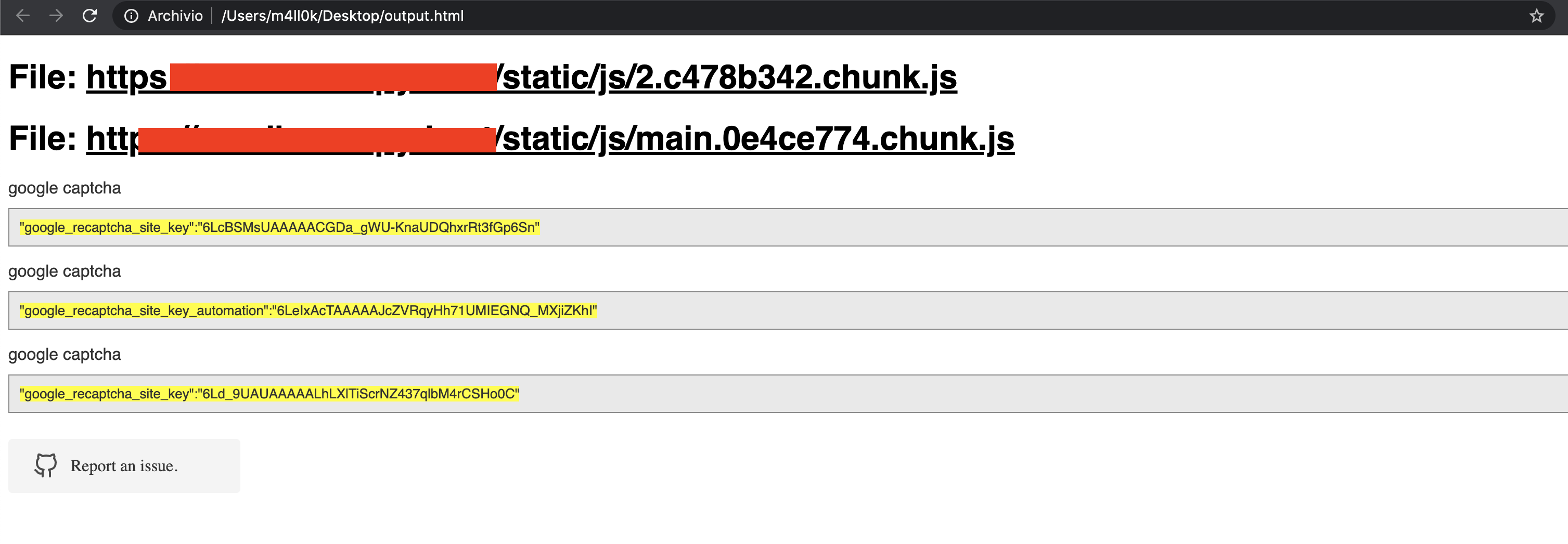
 m4ll0k/secretfinder
SecretFinder - संवेदनशील डेटा (apikeys, accesstoken, jwt, ..) खोजने और जावास्क्रिप्ट फ़ाइलों में कुछ भी खोजने के लिए एक पायथन स्क्रिप्ट

SecretFinder एक पायथन स्क्रिप्ट है जो LinkFinder पर आधारित है, जो JavaScript फ़ाइलों में apikeys, accesstoken, authorizations, jwt, आदि जैसे संवेदनशील डेटा का पता लगाने के लिए लिखी गई है। यह पायथन के लिए jsbeautifier के साथ एक बड़े नियमित अभिव्यक्ति के संयोजन का उपयोग करके ऐसा करता है। नियमित अभिव्यक्ति में चार छोटी नियमित अभिव्यक्तियाँ शामिल हैं। ये js फ़ाइलों में कुछ भी खोजने और खोजने के लिए जिम्मेदार हैं।
आउटपुट HTML या सादे पाठ में दिया जाता है।
usage: SecretFinder.py [-h] [-e] -i INPUT [-o OUTPUT] [-r REGEX] [-b]
                       [-c COOKIE] [-g IGNORE] [-n ONLY] [-H HEADERS]
                       [-p PROXY]

optional arguments:
  -h, --help            show this help message and exit
  -e, --extract         Extract all javascript links located in a page and
                        process it
  -i INPUT, --input INPUT
                        Input a: URL, file or folder
  -o OUTPUT, --output OUTPUT
                        Where to save the file, including file name. Default:
                        output.html
  -r REGEX, --regex REGEX
                        RegEx for filtering purposes against found endpoint
                        (e.g: ^/api/)
  -b, --burp            Support burp exported file
  -c COOKIE, --cookie COOKIE
                        Add cookies for authenticated JS files
  -g IGNORE, --ignore IGNORE
                        Ignore js url, if it contain the provided string
                        (string;string2..)
  -n ONLY, --only ONLY  Process js url, if it contain the provided string
                        (string;string2..)
  -H HEADERS, --headers HEADERS
                        Set headers ("Name:Value\nName:Value")
  -p PROXY, --proxy PROXY
                        Set proxy (host:port)
SecretFinder Python 3 का समर्थन करता है।
$ git clone https://github.com/m4ll0k/SecretFinder.git secretfinder
$ cd secretfinder
$ python -m pip install -r requirements.txt or pip install -r requirements.txt
$ python3 SecretFinder.py
python3 SecretFinder.py -i https://example.com/1.js -o results.html
python3 SecretFinder.py -i https://example.com/1.js -o cli
python3 SecretFinder.py -i https://example.com/ -e
-g --ignore द्वारा प्रदान की गई कुछ js फ़ाइल (जैसे बाहरी लाइब्रेरी) को अनदेखा करें:python3 SecretFinder.py -i https://example.com/ -e -g 'jquery;bootstrap;api.google.com'
-n --only द्वारा प्रदान की गई कुछ js फ़ाइल को प्रोसेस करें:python3 SecretFinder.py -i https://example.com/ -e -n 'd3i4yxtzktqr9n.cloudfront.net;www.myexternaljs.com'
python3 SecretFinder.py -i https://example.com/1.js -o cli -r 'apikey=my.api.key[a-zA-Z]+'
python3 SecretFinder.py -i https://example.com/ -e -o cli -c 'mysessionid=111234' -H 'x-header:value1\nx-header2:value2' -p 127.0.0.1:8080 -r 'apikey=my.api.key[a-zA-Z]+'
इनपुट ये सभी प्रविष्टियाँ स्वीकार करता है:
URL: जैसे https://www.google.com/ [-e] आवश्यक है
JS URL: जैसे https://www.google.com/1.js
फ़ोल्डर: जैसे myjsfiles/*
स्थानीय फ़ाइल: जैसे /js/myjs/file.js
SecretFinder.py खोलें और अपना regex जोड़ें:_regex = {
'google_api' : r'AIza[0-9A-Za-z-_]{35}',
'google_captcha' : r'6L[0-9A-Za-z-_]{38}|^6[0-9a-zA-Z_-]{39}$',
'google_oauth' : r'ya29\.[0-9A-Za-z\-_]+',
'amazon_aws_access_key_id' : r'A[SK]IA[0-9A-Z]{16}',
'amazon_mws_auth_toke' : r'amzn\\.mws\\.[0-9a-f]{8}-[0-9a-f]{4}-[0-9a-f]{4}-[0-9a-f]{4}-[0-9a-f]{12}',
'amazon_aws_url' : r's3\.amazonaws.com[/]+|[a-zA-Z0-9_-]*\.s3\.amazonaws.com',
'facebook_access_token' : r'EAACEdEose0cBA[0-9A-Za-z]+',
'authorization_basic' : r'basic\s*[a-zA-Z0-9=:_\+\/-]+',
'authorization_bearer' : r'bearer\s*[a-zA-Z0-9_\-\.=:_\+\/]+',
'authorization_api' : r'api[key|\s*]+[a-zA-Z0-9_\-]+',
'mailgun_api_key' : r'key-[0-9a-zA-Z]{32}',
'twilio_api_key' : r'SK[0-9a-fA-F]{32}',
'twilio_account_sid' : r'AC[a-zA-Z0-9_\-]{32}',
'twilio_app_sid' : r'AP[a-zA-Z0-9_\-]{32}',
'paypal_braintree_access_token' : r'access_token\$production\$[0-9a-z]{16}\$[0-9a-f]{32}',
'square_oauth_secret' : r'sq0csp-[ 0-9A-Za-z\-_]{43}|sq0[a-z]{3}-[0-9A-Za-z\-_]{22,43}',
'square_access_token' : r'sqOatp-[0-9A-Za-z\-_]{22}|EAAA[a-zA-Z0-9]{60}',
'stripe_standard_api' : r'sk_live_[0-9a-zA-Z]{24}',
'stripe_restricted_api' : r'rk_live_[0-9a-zA-Z]{24}',
'github_access_token' : r'[a-zA-Z0-9_-]*:[a-zA-Z0-9_\-]+@github\.com*',
'rsa_private_key' : r'-----BEGIN RSA PRIVATE KEY-----',
'ssh_dsa_private_key' : r'-----BEGIN DSA PRIVATE KEY-----',
'ssh_dc_private_key' : r'-----BEGIN EC PRIVATE KEY-----',
'pgp_private_block' : r'-----BEGIN PGP PRIVATE KEY BLOCK-----',
'json_web_token' : r'ey[A-Za-z0-9-_=]+\.[A-Za-z0-9-_=]+\.?[A-Za-z0-9-_.+/=]*$',
'name_for_my_regex' : r'my_regex',
# for example
'example_api_key' : r'^example\w+{10,50}'
}
