 hahwul/deadfinder
वेबसाइटों, साइटमैप और URL सूचियों में टूटे हुए लिंक खोजने के लिए तेज़ CLI टूल, जिसमें समवर्ती वर्कर्स, कवरेज रिपोर्टिंग और कई आउटपुट प्रारूप शामिल हैं।


मृत-लिंक (टूटे हुए लिंक) खोजें


दस्तावेज़ीकरण • स्थापना • गिटहब एक्शन • योगदान • परिवर्तन लॉग
डेड लिंक (टूटा हुआ लिंक) का अर्थ है वेब पेज के अंदर एक लिंक जो कनेक्ट नहीं हो सकता। ये लिंक SEO और सुरक्षा पर नकारात्मक प्रभाव डाल सकते हैं। यह उपकरण उन्हें पहचानना और संशोधित करना आसान बनाता है।
v1 (Ruby gem) खोज रहे हैं? यह अब
legacy/v1शाखा पर है और बग-फिक्स और सुरक्षा रिलीज़ के लिएdeadfindergem प्रकाशित करना जारी रखता है।mainशाखा Crystal पुनर्लेखन (v2+) को होस्ट करती है।
brew install deadfinder
# https://formulae.brew.sh/formula/deadfinder
docker run ghcr.io/hahwul/deadfinder:latest deadfinder url https://example.com
अपने प्लेटफ़ॉर्म के लिए आर्काइव को नवीनतम रिलीज़ से डाउनलोड करें, निकालें, और deadfinder को अपने PATH में रखें।
nix run github:hahwul/deadfinder
nix profile install github:hahwul/deadfinder
nix develop github:hahwul/deadfinder
Crystal >= 1.19.1 और cmake की आवश्यकता है (lexbor HTML parser के पोस्टइंस्टॉल के लिए — इसके बिना shards install 'cmake': No such file or directory त्रुटि के साथ विफल होता है)।
# macOS
brew install crystal cmake

# Debian / Ubuntu
sudo apt install crystal cmake
shards install
crystal build src/cli_main.cr -o deadfinder --release
# or: just build
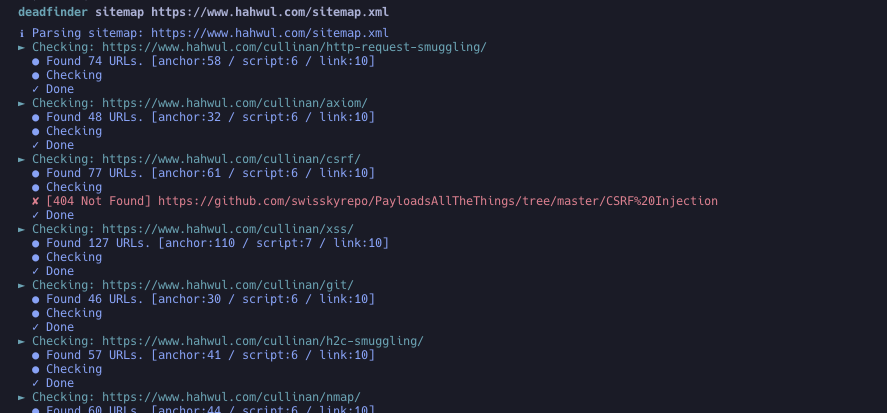
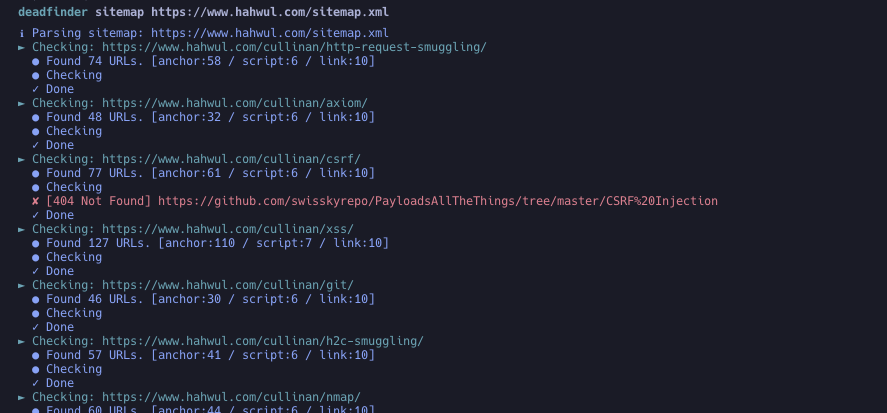
deadfinder sitemap https://www.hahwul.com/sitemap.xml
एक विशिष्ट रिलीज़ टैग पिन करें। @latest एक मान्य Actions संदर्भ नहीं है।
steps:
- name: Run DeadFinder
  uses: hahwul/deadfinder@v2       # tracks the latest 2.x — pin a specific tag (e.g. @2.0.2) for stricter reproducibility
  id: broken-link
  with:
    command: sitemap           # url / file / sitemap / pipe
    target: https://www.hahwul.com/sitemap.xml
    # timeout: 10
    # concurrency: 50
    # silent: false
    # headers: "X-API-Key: 123444"
    # worker_headers: "User-Agent: Deadfinder Bot"
    # include30x: false
    # user_agent: "Apple"
    # proxy: "http://localhost:8070"
    # proxy_auth: "id:pw"
    # match:  ""
    # ignore: ""
    # coverage: true
    # visualize: report.png

- name: Output Handling
  run: echo '${{ steps.broken-link.outputs.output }}'
यदि आपको एक डेड लिंक मिला है और इसे स्वचालित रूप से एक मुद्दे के रूप में जोड़ना चाहते हैं, तो कृपया "Automating Dead Link Detection" लेख देखें।
Usage: deadfinder <command> [options]

Commands:
  pipe                        STDIN से URL स्कैन करें
  file <FILE>                 फ़ाइल से URL स्कैन करें
  url <URL>                   एकल URL स्कैन करें
  sitemap <SITEMAP-URL>       साइटमैप से URL स्कैन करें
  completion <SHELL>          पूर्णता स्क्रिप्ट जनरेट करें (bash/zsh/fish)
  version                     संस्करण दिखाएं

Options:
  -r, --include30x                 30x रीडायरेक्शन को डेड लिंक के रूप में शामिल करें
  -c, --concurrency=N              समवर्ती कर्मचारियों की संख्या (डिफ़ॉल्ट: 50)
  -t, --timeout=N                  टाइमआउट सेकंड में (डिफ़ॉल्ट: 10)
  -o, --output=FILE                परिणाम लिखने के लिए फ़ाइल
  -f, --output_format=FORMAT       आउटपुट फॉर्मेट: json, yaml, toml, csv, sarif (डिफ़ॉल्ट: json)
  -H, --headers=HEADER             प्रारंभिक अनुरोध के लिए कस्टम HTTP हेडर
      --worker_headers=HEADER      कर्मचारी अनुरोधों के लिए कस्टम HTTP हेडर
      --user_agent=UA              User-Agent स्ट्रिंग
  -p, --proxy=PROXY                प्रॉक्सी सर्वर (HTTP और HTTPS CONNECT)
      --proxy_auth=USER:PASS       प्रॉक्सी प्रमाणीकरण
  -m, --match=PATTERN              URL पैटर्न मिलान (regex)
  -i, --ignore=PATTERN             URL पैटर्न अनदेखा करें (regex)
  -s, --silent                     मौन मोड
  -v, --verbose                    विस्तृत मोड
      --debug                      डीबग मोड
      --limit=N                    स्कैन करने के लिए URL की संख्या सीमित करें
      --coverage                   कवरेज ट्रैकिंग और रिपोर्टिंग सक्षम करें
      --visualize=PATH             विज़ुअलाइज़ेशन PNG जनरेट करें
# STDIN से URL स्कैन करें (एकाधिक URL)
cat urls.txt | deadfinder pipe

# फ़ाइल से URL स्कैन करें
deadfinder file urls.txt

# एकल URL स्कैन करें
deadfinder url https://www.hahwul.com

# साइटमैप से URL स्कैन करें
deadfinder sitemap https://www.hahwul.com/sitemap.xml
deadfinder sitemap https://www.hahwul.com/sitemap.xml -o output.json
cat output.json | jq
{
  "Target URL": [
    "DeadLink URL",
    "DeadLink URL",
    "DeadLink URL"
  ]
}
--coverage के साथ:
deadfinder sitemap https://www.hahwul.com/sitemap.xml --coverage -o output.json
{
  "dead_links": {
    "Target URL": ["DeadLink URL 1", "DeadLink URL 2"]
  },
  "coverage": {
    "targets": {
      "Target URL": {
        "total_tested": 14,
        "dead_links": 7,
        "coverage_percentage": 50.0
      }
    },
    "summary": {
      "total_tested": 14,
      "total_dead": 7,
      "overall_coverage_percentage": 50.0
    }
  }
}
deadfinder completion bash > /etc/bash_completion.d/deadfinder
deadfinder completion zsh  > ~/.zsh/completion/_deadfinder
deadfinder completion fish > ~/.config/fish/completions/deadfinder.fish
योगदान का स्वागत है! यदि आपके पास सुधार का विचार है या बग की रिपोर्ट करना चाहते हैं:
feature/awesome-feature या bugfix/annoying-bug)।main शाखा में पुल रिक्वेस्ट (PR) सबमिट करें।
