 evyatarmeged/raccoon
एक उच्च प्रदर्शन वाला आक्रामक सुरक्षा उपकरण जो टोह लेने और भेद्यता स्कैनिंग के लिए उपयोग किया जाता है।







Raccoon सरलता पर जोर देने के साथ पुनर्निरीक्षण और सूचना संग्रह के लिए बनाया गया एक उपकरण है।
यह DNS रिकॉर्ड प्राप्त करने, WHOIS जानकारी प्राप्त करने, TLS डेटा प्राप्त करने, WAF उपस्थिति का पता लगाने से लेकर थ्रेडेड डीआर बस्टिंग और उपडोमेन गणना तक सब कुछ करेगा। प्रत्येक स्कैन एक संबंधित फ़ाइल में आउटपुट करता है।
Raccoon के अधिकांश स्कैन स्वतंत्र होते हैं और एक-दूसरे के परिणामों पर निर्भर नहीं करते, इसलिए यह अधिकांश स्कैन को अतुल्यकालिक रूप से चलाने के लिए Python के asyncio का उपयोग करता है।
Raccoon गुमनाम रूटिंग के लिए Tor/प्रॉक्सी का समर्थन करता है। यह अद्भुत SecLists रिपॉजिटरी से डिफ़ॉल्ट शब्दसूचियों (URL फ़ज़िंग और उपडोमेन खोज के लिए) का उपयोग करता है, लेकिन विभिन्न सूचियों को तर्क के रूप में पारित किया जा सकता है।
अधिक विकल्पों के लिए - "उपयोग" देखें।
नवीनतम स्थिर संस्करण के लिए:
pip install raccoon-scanner
# चलाने के लिए:
raccoon [OPTIONS]
कृपया ध्यान दें कि Raccoon को Python 3.5+ की आवश्यकता है, इसलिए pip3 install raccoon-scanner का उपयोग करने की आवश्यकता हो सकती है।
आप नवीनतम सुविधाओं और बदलावों के लिए GitHub रिपॉजिटरी को भी क्लोन कर सकते हैं:
git clone https://github.com/evyatarmeged/Raccoon.git
cd Raccoon
python setup.py install # जब इसका उपयोग किया जाता है, तो स्रोत कोड में बाद के परिवर्तन raccoon कॉल में प्रतिबिंबित नहीं होंगे
# या
python setup.py develop # कोड में परिवर्तन raccoon कॉल में प्रतिबिंबित होंगे। इसे python setup.py develop --uninstall का उपयोग करके पूर्ववत किया जा सकता है
# अंत में
raccoon [OPTIONS] [TARGET]
macOS पर Raccoon को समर्थन देने के लिए आपको अपनी मशीन पर gtimeout की आवश्यकता है।
gtimeout को brew install coreutils चलाकर स्थापित किया जा सकता है।
# डॉकर इमेज बनाएं
docker build -t evyatarmeged/raccoon .
# एक स्कैन चलाएं, चूंकि यह एक गैर-रूट कंटेनर है, हमें आउटपुट को उपयोगकर्ता के होम यानि /home/raccoon के अंतर्गत सहेजना होगा
docker run --name raccoon evyatarmeged/raccoon:latest  example.com -o /home/raccoon
Raccoon पोर्ट स्कैन के लिए Nmap का उपयोग करता है और साथ ही कुछ अन्य Nmap स्क्रिप्ट और सुविधाओं का लाभ उठाता है। Raccoon चलाने से पहले इसे स्थापित करना अनिवार्य है।
TLS/SSL स्कैन के लिए OpenSSL का भी उपयोग किया जाता है और इसे भी स्थापित होना चाहिए।
Usage: raccoon [OPTIONS] TARGET

Options:
  --version                      Show the version and exit.
  -d, --dns-records TEXT         Comma separated DNS records to query.
                                 Defaults to: A,MX,NS,CNAME,SOA,TXT
  --tor-routing                  Route HTTP traffic through Tor (uses port
                                 9050). Slows total runtime significantly
  --proxy-list TEXT              Path to proxy list file that would be used
                                 for routing HTTP traffic. A proxy from the
                                 list will be chosen at random for each
                                 request. Slows total runtime
  -c, --cookies TEXT             Comma separated cookies to add to the
                                 requests. Should be in the form of key:value
                                 Example: PHPSESSID:12345,isMobile:false
  --proxy TEXT                   Proxy address to route HTTP traffic through.
                                 Slows total runtime
  -w, --wordlist TEXT            Path to wordlist that would be used for URL
                                 fuzzing
  -T, --threads INTEGER          Number of threads to use for URL
                                 Fuzzing/Subdomain enumeration. Default: 25
  --ignored-response-codes TEXT  Comma separated list of HTTP status code to
                                 ignore for fuzzing. Defaults to:
                                 302,400,401,402,403,404,503,504
  --subdomain-list TEXT          Path to subdomain list file that would be
                                 used for enumeration
  -sc, --scripts                 Run Nmap scan with -sC flag
  -sv, --services                Run Nmap scan with -sV flag
  -f, --full-scan                Run Nmap scan with both -sV and -sC
  -p, --port TEXT                Use this port range for Nmap scan instead of
                                 the default
  --vulners-nmap-scan            Perform an NmapVulners scan. Runs instead of
                                 the regular Nmap scan and is longer.
  --vulners-path TEXT            Path to the custom nmap_vulners.nse script.If
                                 not used, Raccoon uses the built-in script it
                                 ships with.
  -fr, --follow-redirects        Follow redirects when fuzzing. Default: False
                                 (will not follow redirects)
  --tls-port INTEGER             Use this port for TLS queries. Default: 443
  --skip-health-check            Do not test for target host availability
  --no-url-fuzzing               Do not fuzz URLs
  --no-sub-enum                  Do not bruteforce subdomains
  --skip-nmap-scan               Do not perform an Nmap scan
  -q, --quiet                    Do not output to stdout
  -o, --outdir TEXT              Directory destination for scan output
  --help                         Show this message and exit.
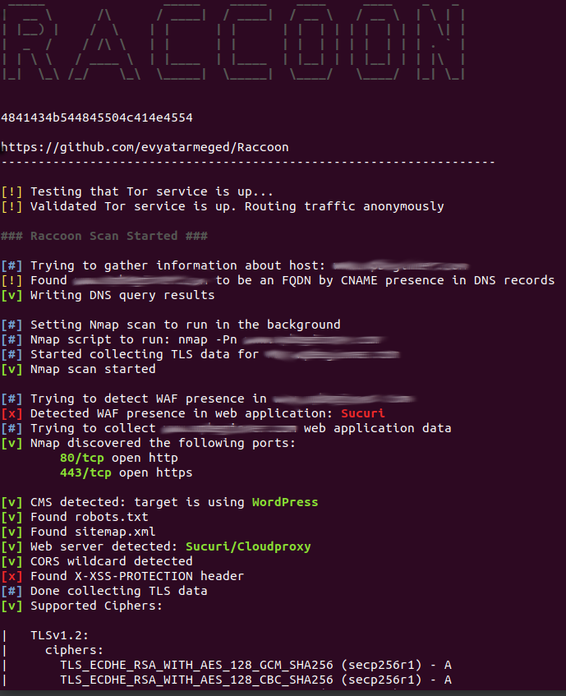
संवेदनशील S3 बकेट सहित वेब एप्लिकेशन डेटा:

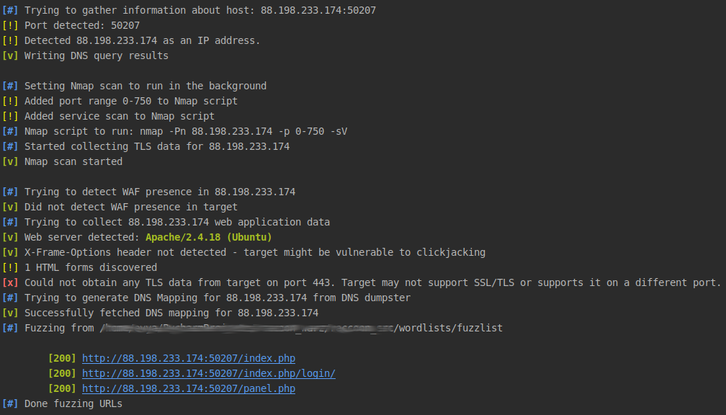
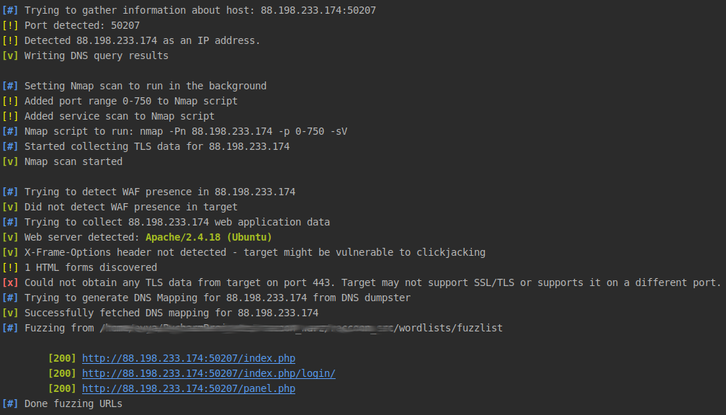
HTB चैलेंज उदाहरण स्कैन: