 epi052/feroxfuzz
Rust में संरचना-जागरूक ब्लैक-बॉक्स HTTP फ़ज़र विकसित करें, जिसमें कस्टम वेब और API परीक्षण के लिए कंपोज़ेबल म्यूटेटर, शेड्यूलर, ऑब्ज़र्वर, डिसाइडर और प्रोसेसर शामिल हों।







कोई बात नहीं, यह कोई और कमांड-लाइन टूल नहीं है, यह एक लाइब्रेरी है! 😁
अधिक विशेष रूप से, FeroxFuzz एक संरचना-जागरूक HTTP फ़ज़िंग लाइब्रेरी है।
FeroxFuzz लिखने का प्राथमिक लक्ष्य feroxbuster से कुछ मुख्य हिस्सों को निकालकर ऐसी जगह ले जाना था जहाँ वे अन्य लोगों के लिए सामान्य रूप से उपयोगी हो सकें। ऐसा करके, मेरी आशा है कि जो कोई भी Rust में वेब टूलिंग और/या एकमुश्त वेब फ़ज़र लिखना चाहता है, वह न्यूनतम प्रयास के साथ ऐसा कर सकता है।
FeroxFuzz का समग्र डिज़ाइन LibAFL से लिया गया है। FeroxFuzz LibAFL: A Framework to Build Modular and Reusable Fuzzers (pre-print) में सूचीबद्ध अधिकांश घटकों को लागू करता है। जब FeroxFuzz विचलित होता है, तो यह आमतौर पर async कोड का समर्थन करने के कारण होता है।
LibAFL के समान, FeroxFuzz एक संयोजनीय फ़ज़िंग लाइब्रेरी है। हालाँकि, LibAFL के विपरीत, FeroxFuzz पूरी तरह से ब्लैक बॉक्स HTTP फ़ज़िंग पर केंद्रित है।
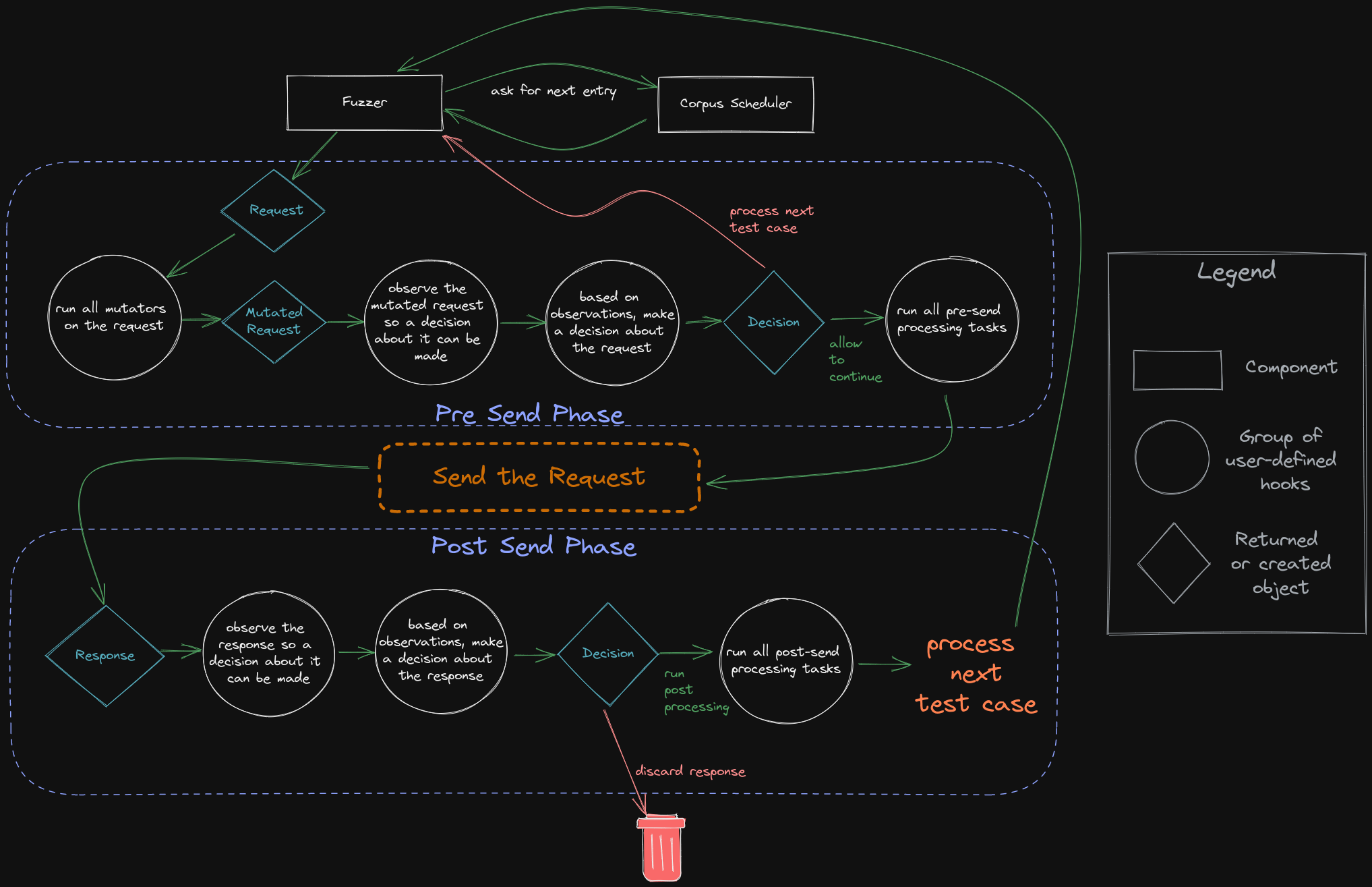
नीचे FeroxFuzz द्वारा उपयोग किए जाने वाले विभिन्न घटकों, हुकों और नियंत्रण प्रवाह का एक दृश्य चित्रण है।
FeroxFuzz बहुत सक्षम है, और इसे नए feroxbuster के लिए मेरी सभी नियोजित आवश्यकताओं को पूरा करने के लिए बनाया गया था। हालाँकि, मुझे अभी भी उम्मीद है कि feroxbuster के नए संस्करण पर काम शुरू होने पर FeroxFuzz का API, कम से कम थोड़ा बदल जाएगा।
जब तक API स्थिर नहीं हो जाता, breaking changes हो सकते हैं होंगे।
आरंभ करने का सबसे आसान तरीका है अपने प्रोजेक्ट के Cargo.toml में FeroxFuzz को शामिल करना।
[dependencies]
feroxfuzz = { version = "1.0.0-rc.13" }
examples/ फ़ोल्डर के अलावा, API दस्तावेज़ों में घटकों का व्यापक दस्तावेज़ीकरण और उनके उपयोग के उदाहरण हैं।
नीचे दिया गया उदाहरण (examples/async-simple.rs) FeroxFuzz का उपयोग करके fuzzer लिखने के लिए न्यूनतम आवश्यकता दिखाता है।
यदि सोर्स का उपयोग कर रहे हैं, तो उदाहरण को निम्न कमांड का उपयोग करके feroxfuzz/ निर्देशिका से चलाया जा सकता है:
नोट: जब तक आपकी मशीन पर पोर्ट 8000 पर एक वेबसर्वर नहीं चल रहा है, आपको
Request::from_urlमें पास किए गए लक्ष्य को बदलना होगा।
cargo run --example async-simple
#[tokio::main]
async fn main() -> Result<(), Box<dyn std::error::Error>> {
    // create a new corpus from the given list of words
    let words = Wordlist::from_file("./examples/words")?
        .name("words")
        .build();

    // pass the corpus to the state object, which will be shared between all of the fuzzers and processors
    let mut state = SharedState::with_corpus(words);

    // bring-your-own client, this example uses the reqwest library
    let req_client = reqwest::Client::builder().build()?;

    // with some client that can handle the actual http request/response stuff
    // we can build a feroxfuzz client, specifically an asynchronous client in this
    // instance.
    //
    // feroxfuzz provides both a blocking and an asynchronous client implementation
    // using reqwest.
    let client = AsyncClient::with_client(req_client);

    // ReplaceKeyword mutators operate similar to how ffuf/wfuzz work, in that they'll
    // put the current corpus item wherever the keyword is found, as long as its found
    // in data marked fuzzable (see ShouldFuzz directives below)
    let mutator = ReplaceKeyword::new(&"FUZZ", "words");

    // fuzz directives control which parts of the request should be fuzzed
    // anything not marked fuzzable is considered to be static and won't be mutated
    //
    // ShouldFuzz directives map to the various components of an HTTP request
    let request = Request::from_url(
        "http://localhost:8000/?admin=FUZZ",
        Some(&[ShouldFuzz::URLParameterValues]),
    )?;

    // a `StatusCodeDecider` provides a way to inspect each response's status code and decide upon some Action
    // based on the result of whatever comparison function (closure) is passed to the StatusCodeDecider's
    // constructor
    //
    // in plain english, the `StatusCodeDecider` below will check to see if the request's http response code
    // received is equal to 200/OK. If the response code is 200, then the decider will recommend the `Keep`
    // action be performed. If the response code is anything other than 200, then the recommendation will
    // be to `Discard` the response.
    //
    // `Keep`ing the response means that the response will be allowed to continue on for further processing
    // later in the fuzz loop.
    let decider = StatusCodeDecider::new(200, |status, observed, _state| {
        if status == observed {
            Action::Keep
        } else {
            Action::Discard
        }
    });

    // a `ResponseObserver` is responsible for gathering information from each response and providing
    // that information to later fuzzing components, like Processors. It knows things like the response's
    // status code, content length, the time it took to receive the response, and a bunch of other stuff.
    let response_observer: ResponseObserver<AsyncResponse> = ResponseObserver::new();
