 cobbr/c2bridge
C2Bridges डेवलपर्स को नई कस्टम संचार प्रोटोकॉल बनाने और उन्हें Covenant के भीतर तुरंत उपयोग करने की अनुमति देते हैं।

C2Bridges डेवलपर्स को नए कस्टम संचार प्रोटोकॉल बनाने और उन्हें Covenant के भीतर तेज़ी से उपयोग करने की सुविधा देते हैं।
C2Bridges का उपयोग कोवेनेंट कोड को संपादित किए बिना आउटबाउंड कमांड और कंट्रोल प्रोटोकॉल विकसित करने के लिए किया जाता है। उन डेवलपर्स के लिए जो नए लिसनर एकीकृत करने में सहज महसूस करते हैं, एक नया C2 प्रोटोकॉल को पूर्ण रूप से इंटरफ़ेस में एकीकृत एक प्रथम-श्रेणी नया लिसनर प्रकार के रूप में जोड़ा जाना चाहिए। हालाँकि, कुछ स्थितियों में Covenant के बाहर C2Bridge बनाना और इसे प्रूफ-ऑफ-कॉन्सेप्ट या नए प्रोटोकॉल का परीक्षण करने के लिए BridgeListener से जोड़ना तेज़ हो सकता है।
डेवलपर्स नए C2Bridges बनाने के लिए C2Bridge प्रोजेक्ट को टेम्पलेट के रूप में उपयोग कर सकते हैं। C2Bridge प्रोजेक्ट के भीतर, एक अमूर्त C2Bridge क्लास है। एक डेवलपर इस क्लास से इनहेरिट कर सकता है और नए चुने गए C2 प्रोटोकॉल का उपयोग करके इम्प्लांट से BridgeListener तक पढ़ने और लिखने के लिए आवश्यक फ़ंक्शन लागू कर सकता है।
using System.Threading;
using System.Threading.Tasks;

namespace C2Bridge
{
    /// <summary>
    /// IC2Bridge is an interface implemented by the C2Bridge class.
    /// </summary>
    public interface IC2Bridge
    {
        Task RunAsync(CancellationToken token);
    }

    /// <summary>
    /// C2Bridge is an abstract class that new C2Bridges should inherit from.
    /// </summary>
    public abstract class C2Bridge : IC2Bridge
    {
        // The BridgeConnector handles communication between the Covenant server and the C2Bridge
        protected BridgeConnector BridgeConnector { get; set; }
        // The BridgeProfile handles parsing and formatting data passed between the implant and Covenant
        protected BridgeProfile BridgeProfile { get; set; }

        /// <summary>
        /// The constructor for the C2Bridge. New C2Bridges should use their own constructor that accepts
        /// any command line arguments needed for the C2Bridge to function.
        /// </summary>
        /// <param name="Connector">The BridgeConnector that handles communication with the Covenant server.</param>
        /// <param name="Profile">The BridgeProfile that handles the parsing and formatting of data.</param>
        protected C2Bridge(BridgeConnector Connector, BridgeProfile Profile)
        {
            this.BridgeConnector = Connector;
            this.BridgeProfile = Profile;
            BridgeConnector.OnReadBridge += OnReadBridge;
        }

        /// <summary>
        /// The RunAsync function is the main function that should start the C2Bridge and continue to run until you
        /// are done with your operation. C2Bridge developers should implement the logic to start and run the listener
        /// within this function.
        /// </summary>
        /// <param name="Token">The CancellationToken that will cancel the C2Bridge if the source of the token is cancelled.</param>
        /// <returns></returns>
        public abstract Task RunAsync(CancellationToken Token);

        /// <summary>
        /// The OnReadBridge function is called each time data is read from the Covenant server meant for an implant.
        /// C2Bridge developers should implement the logic to determine which implant this data is meant for and write
        /// this data to the implant.
        /// </summary>
        /// <param name="sender">
        /// Sender is the object that called the OnReadBridge function. C2Bridge developers can safely ignore this parameter.
        /// </param>
        /// <param name="args">Args contains the data that should be written from the Covenant server to the implant.</param>
        protected abstract void OnReadBridge(object sender, BridgeConnector.ReadBridgeArgs args);

        /// <summary>
        /// The WriteToConnector function handles writing data from an implant to the Covenant server. This logic should be the
        /// same for all C2Bridge types, but can be overloaded by the C2Bridge developer if custom logic is needed.
        ///
        /// When calling this function, the returned GUID string should be used to track implant GUID values by the C2Bridge.
        /// </summary>
        /// <param name="Data">The data read from the implant that should be written to the Covenant server.</param>
        /// <returns>
        /// Returns the GUID value parsed out of the Data. This value should be used to track implant GUID values by the C2Bridge.
        /// </returns>
        protected virtual string WriteToConnector(string Data)
        {
            var parsed = this.BridgeProfile.ParseWrite(Data);
            if (parsed != null)
            {
                _ = this.BridgeConnector.Write(this.BridgeProfile.FormatRead(parsed));
                return parsed.Guid;
            }
            return null;
        }

        /// <summary>
        /// The GetBridgeMessengerCode function should contain the code to be embedded in the implant for communication with
        /// the C2Bridge. This function is not actually used anywhere within the project, but is here so that the necessary
        /// implant code can be found along with the C2Bridge. C2Bridge developers should place the code here for use within
        /// a BridgeProfile's BridgeMessengerCode property.
        /// </summary>
        /// <returns></returns>
        protected abstract string GetBridgeMessengerCode();
    }
}
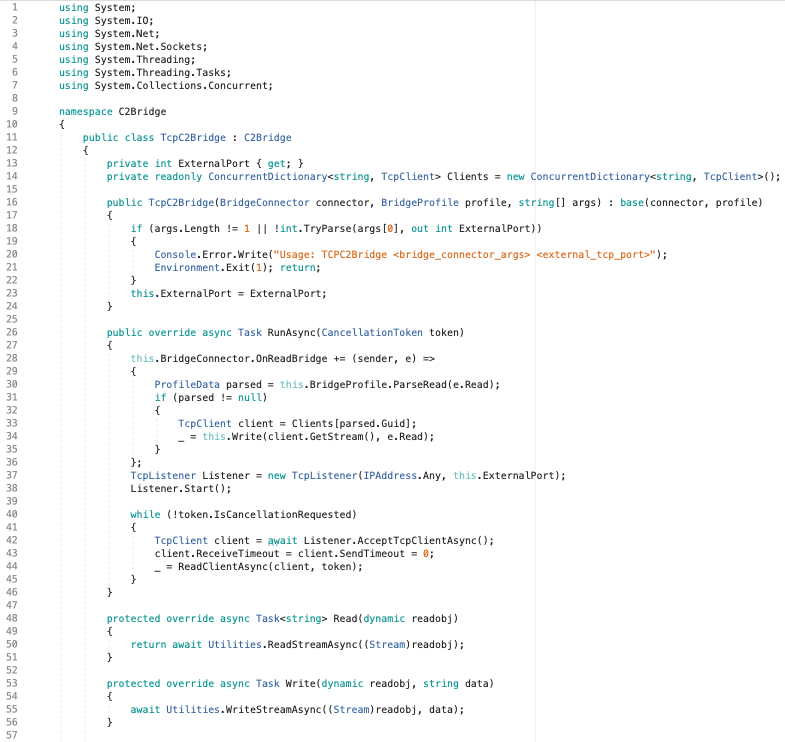
C2Bridge प्रोजेक्ट में एक उदाहरण TCPC2Bridge क्लास शामिल है जो इस इंटरफ़ेस से इनहेरिट करती है और इसे लागू करने के तरीके का एक उदाहरण प्रदान करती है।
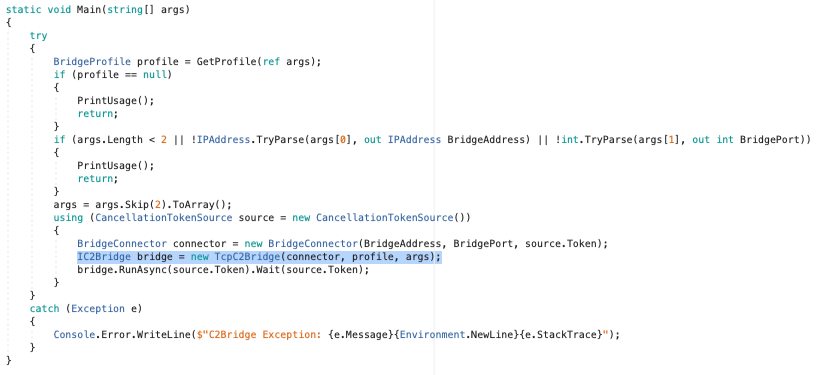
एक बार जब आप अपना नया C2Bridge लिख लेते हैं, तो Main() फ़ंक्शन के भीतर TCPC2Bridge के लिए कंस्ट्रक्टर कॉल को नए कंस्ट्रक्टर से बदला जा सकता है:
अमूर्त GetBridgeMessengerCode() विधि वास्तव में C2Bridge प्रोजेक्ट के भीतर कहीं भी उपयोग नहीं की जाती है, लेकिन इसका उपयोग C2Bridge को एक इम्प्लांट के साथ जोड़ने के लिए किया जाता है। एक इम्प्लांट को ऐसे कोड की आवश्यकता होती है जो आउटबाउंड C2Bridge को पढ़ और लिख सके। यह कोड किसी दिए गए C2Bridge के लिए विशिष्ट होता है, और इसे इनहेरिटेड GetBridgeMessengerCode() विधि के भीतर रखा जाना चाहिए। एक Covenant उपयोगकर्ता जो C2Bridge का उपयोग करता है, इस विधि से BridgeMessengerCode लेगा और इसे BridgeProfile के भीतर उपयोग करेगा।
C2Bridge का उपयोग करने वाले Covenant उपयोगकर्ताओं को C2Bridge के लिए विशिष्ट BridgeProfile कॉन्फ़िगर करने की आवश्यकता होगी। Grunt इम्प्लांट को यह जानने की आवश्यकता है कि आउटबाउंड C2Bridge को कैसे पढ़ा और लिखा जाए। BridgeProfile.BridgeMessengerCode प्रॉपर्टी उस कोड को दर्शाती है जो इम्प्लांट में रखा जाएगा और आउटबाउंड C2Bridge को पढ़ने और लिखने के लिए ज़िम्मेदार है। यह कोड C2Bridge की GetBridgeMessengerCode() विधि में मिलना चाहिए।
उपयोगकर्ता एक बिल्कुल नया BridgeProfile बना सकते हैं या सही BridgeMessengerCode के साथ DefaultBridgeProfile संपादित कर सकते हैं। ऐसा करने के लिए, आप लिसनर नेविगेशन पेज पर जाएँ और "Profiles" टैब चुनें:
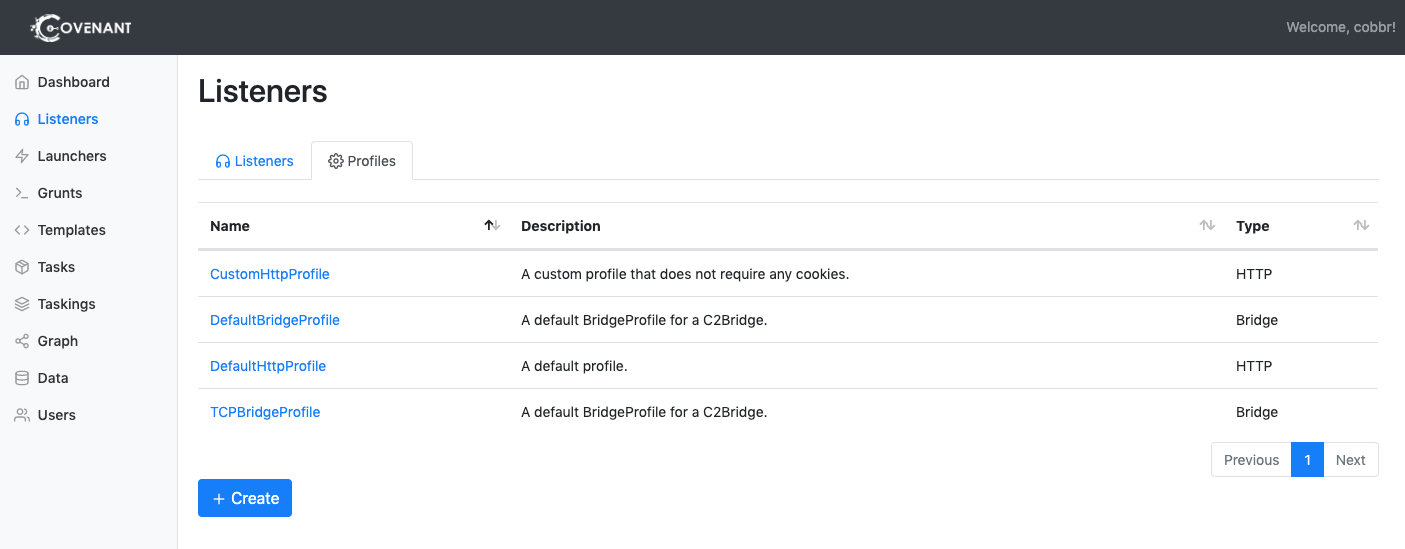
नया प्रोफ़ाइल बनाने के लिए, "Create" बटन पर क्लिक करें। किसी विशेष प्रोफ़ाइल को संपादित करने के लिए, प्रोफ़ाइल के नाम पर क्लिक करें। ध्यान रखें, कि आप सक्रिय लिसनर से जुड़े प्रोफ़ाइल को संपादित नहीं कर सकते।
"Create" पर क्लिक करने के बाद, "BridgeProfile" टैब चुनें:
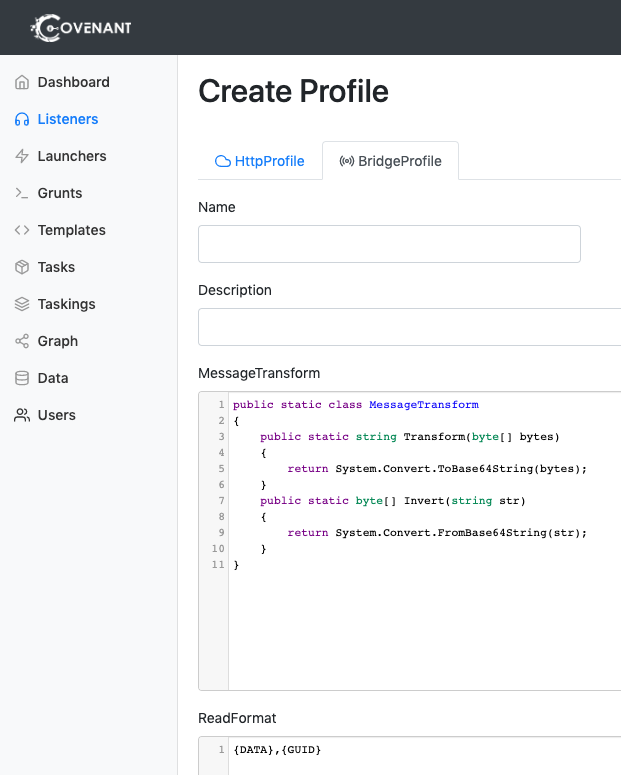
प्रोफ़ाइल को संपादित या बनाते समय निम्नलिखित विकल्पों को कॉन्फ़िगर करने की आवश्यकता होगी:
