

हैकर्स के लिए पुनरावर्ती इंटरनेट स्कैनर। 🧡
[](https://github.com/blacklanternsecurity/bbot)
[](https://www.python.org) [](https://github.com/blacklanternsecurity/bbot/blob/dev/LICENSE) [](https://pepy.tech/project/bbot) [](https://github.com/astral-sh/ruff) [](https://github.com/blacklanternsecurity/bbot/actions?query=workflow%3A"tests") [](https://codecov.io/gh/blacklanternsecurity/bbot) [](https://discord.com/invite/PZqkgxu5SA)
### **BEE·bot** एक बहुउद्देशीय स्कैनर है, जो [Spiderfoot](https://github.com/smicallef/spiderfoot) से प्रेरित है और आपके **Recon**, **Bug Bounties** और **ASM** को स्वचालित करने के लिए बनाया गया है!
https://github.com/blacklanternsecurity/bbot/assets/20261699/e539e89b-92ea-46fa-b893-9cde94eebf81
_BBOT स्कैन रियल-टाइम में - विज़ुअलाइज़ेशन [VivaGraphJS](https://github.com/blacklanternsecurity/bbot-vivagraphjs) के साथ_
## इंस्टॉलेशन
```bash
# stable version
pipx install bbot
# bleeding edge (dev branch)
pipx install --pip-args '\--pre' bbot
```
_अधिक इंस्टॉलेशन विधियों के लिए, जिनमें [Docker](https://hub.docker.com/r/blacklanternsecurity/bbot) शामिल है, [आरंभ करें](https://www.blacklanternsecurity.com/bbot/Stable/) देखें_
> **2.x से अपग्रेड कर रहे हैं?** BBOT 3.0 में CLI, प्रीसेट्स, मॉड्यूल्स, इवेंट्स और Python API में ब्रेकिंग बदलाव शामिल हैं। अपग्रेड करने से पहले [2.x → 3.0 माइग्रेशन गाइड](https://www.blacklanternsecurity.com/bbot/Stable/migration/3.0_breaking_changes/) ([स्रोत](https://github.com/blacklanternsecurity/bbot/blob/stable/docs/migration/3.0_breaking_changes.md)) देखें।
> **स्पीड टिप:** BBOT का DNS resolver ([blastdns](https://github.com/blacklanternsecurity/blastdns)) `/etc/resolv.conf` में प्रति रिज़ॉल्वर कई थ्रेड्स शुरू करता है। अधिक अनफ़िल्टर्ड रिज़ॉल्वर जोड़ने से स्कैन नाटकीय रूप से तेज़ हो जाते हैं। विवरण के लिए [नमूना resolv.conf](https://github.com/blacklanternsecurity/bbot/blob/stable/docs/data/resolv-sample.conf) और [टिप्स और ट्रिक्स](https://www.blacklanternsecurity.com/bbot/Stable/scanning/tips_and_tricks/#speed-up-scans-with-more-dns-resolvers) देखें।
## उदाहरण कमांड्स
### 1) सबडोमेन खोजक
पैसिव API स्रोत और टारगेट-विशिष्ट सबडोमेन म्यूटेशन के साथ एक रिकर्सिव DNS ब्रूट-फोर्स।
```bash
# find subdomains of evilcorp.com
bbot -t evilcorp.com -p subdomain-enum
# passive sources only
bbot -t evilcorp.com -p subdomain-enum -rf passive
```
<!-- BBOT SUBDOMAIN-ENUM PRESET EXPANDABLE -->
<details>
<summary><b><code>subdomain-enum.yml</code></b></summary>
```yaml
description: Enumerate subdomains via APIs, brute-force
flags:
# enable every module with the subdomain-enum flag
- subdomain-enum
output_modules:
# output unique subdomains to TXT file
- subdomains
config:
dns:
threads: 25
brute_threads: 1000
# put your API keys here
# modules:
# github:
# api_key: ""
# chaos:
# api_key: ""
# securitytrails:
# api_key: ""
```
</details>
<!-- END BBOT SUBDOMAIN-ENUM PRESET EXPANDABLE -->
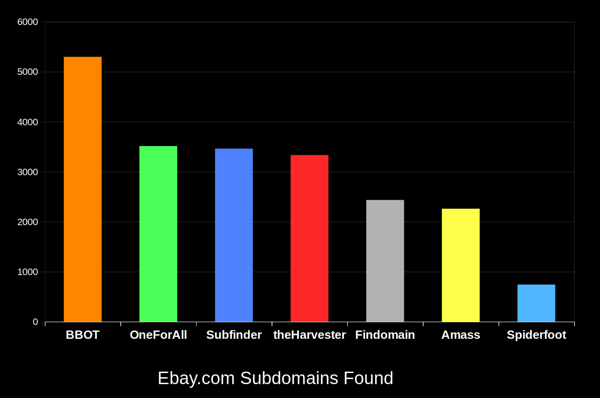
BBOT अन्य टूल्स की तुलना में लगातार 20-50% अधिक सबडोमेन ढूंढता है। डोमेन जितना बड़ा होता है, अंतर उतना ही अधिक होता है। यह कैसे संभव है, यह जानने के लिए [यह कैसे काम करता है](https://www.blacklanternsecurity.com/bbot/Stable/how_it_works/) देखें।
### 2) वेब स्पाइडर
```bash
# crawl evilcorp.com, extracting emails and other goodies
bbot -t evilcorp.com -p spider
```
<!-- BBOT SPIDER PRESET EXPANDABLE -->
<details>
<summary><b><code>spider.yml</code></b></summary>
```yaml
description: Recursive web spider
modules:
- http
blacklist:
# Prevent spider from invalidating sessions by logging out
- "RE:/.*(sign|log)[_-]?out"
config:
web:
# how many links to follow in a row
spider_distance: 2
# don't follow links whose directory depth is higher than 4
spider_depth: 4
# maximum number of links to follow per page
spider_links_per_page: 25
```
</details>
<!-- END BBOT SPIDER PRESET EXPANDABLE -->
### 3) ईमेल संग्राहक
```bash
# quick email enum with free APIs + scraping
bbot -t evilcorp.com -p email-enum
# pair with subdomain enum + web spider for maximum yield
bbot -t evilcorp.com -p email-enum subdomain-enum spider
```
<!-- BBOT EMAIL-ENUM PRESET EXPANDABLE -->
<details>
<summary><b><code>email-enum.yml</code></b></summary>
```yaml
description: Enumerate email addresses from APIs, web crawling, etc.
flags:
- email-enum
output_modules:
- emails
```
</details>
<!-- END BBOT EMAIL-ENUM PRESET EXPANDABLE -->
### 4) वेब स्कैनर
```bash
# run a light web scan against www.evilcorp.com
bbot -t www.evilcorp.com -p web
# run a heavy web scan against www.evilcorp.com
bbot -t www.evilcorp.com -p web-heavy
```
<!-- BBOT WEB PRESET EXPANDABLE -->
<details>
<summary><b><code>web.yml</code></b></summary>
```yaml
description: Quick web scan
include:
- iis-shortnames
flags:
- web
```
</details>
<!-- END BBOT WEB PRESET EXPANDABLE -->
<!-- BBOT WEB-HEAVY PRESET EXPANDABLE -->
<details>
<summary><b><code>web-heavy.yml</code></b></summary>
```yaml
description: Aggressive web scan
include:
# include the web preset
- web
flags:
- web-heavy
```
</details>
<!-- END BBOT WEB-HEAVY PRESET EXPANDABLE -->
### 5) सब कुछ हर जगह एक साथ
```bash
# everything everywhere all at once
bbot -t evilcorp.com -p kitchen-sink
# roughly equivalent to:
bbot -t evilcorp.com -p subdomain-enum cloud-enum code-enum email-enum spider web paramminer webbrute web-screenshots
```
<!-- BBOT KITCHEN-SINK PRESET EXPANDABLE -->
<details>
<summary><b><code>kitchen-sink.yml</code></b></summary>
```yaml
description: Everything everywhere all at once
include:
- subdomain-enum
- cloud-enum
- code-enum
- email-enum
- spider
- web
- paramminer
- webbrute
- web-screenshots
- baddns-heavy
config:
modules:
dnsbrute:
recursive_mutations: true
dnscommonsrv:
recursive_mutations: true
webbrute:
avoid_wafs: False
wayback:
urls: True
parameters: True
archive: True
```
</details>
<!-- END BBOT KITCHEN-SINK PRESET EXPANDABLE -->
## यह कैसे काम करता है
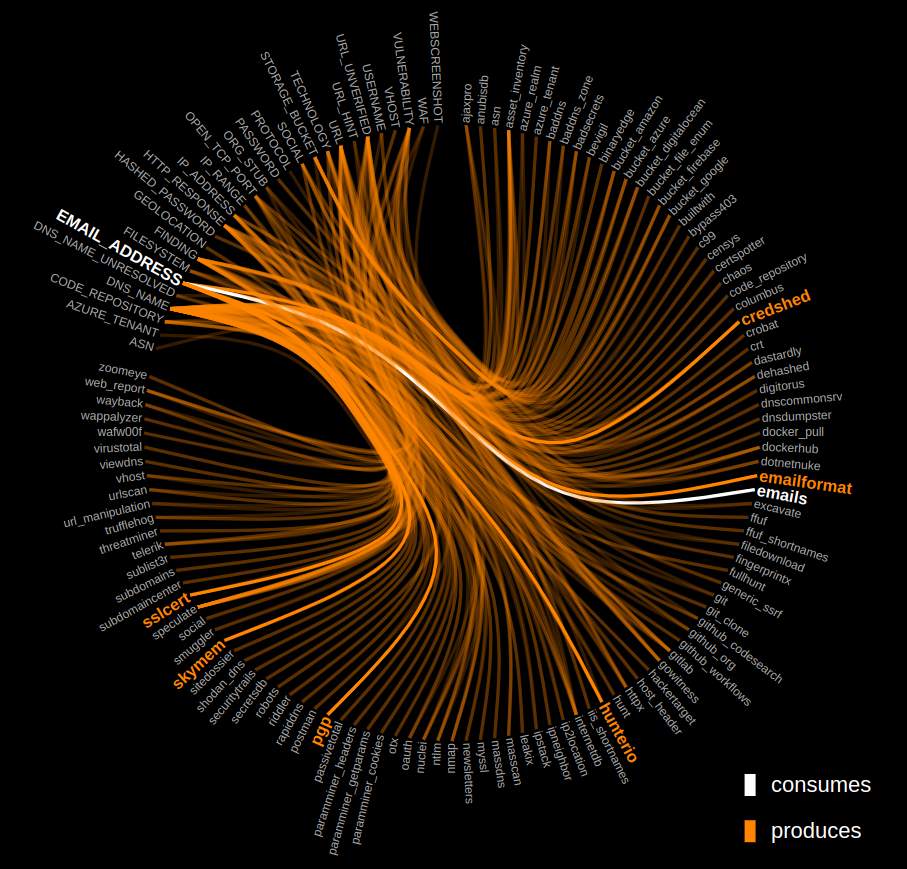
BBOT की [आंतरिक कार्यप्रणाली](https://www.blacklanternsecurity.com/bbot/Stable/how_it_works/) को जानने के लिए नीचे दिए गए ग्राफ़ पर क्लिक करें।
[](https://www.blacklanternsecurity.com/bbot/Stable/how_it_works/)
## आउटपुट मॉड्यूल्स
- [Neo4j](https://github.com/blacklanternsecurity/bbot/blob/stable/docs/scanning/output.md#neo4j)
- [Teams](https://github.com/blacklanternsecurity/bbot/blob/stable/docs/scanning/output.md#teams)
- [Discord](https://github.com/blacklanternsecurity/bbot/blob/stable/docs/scanning/output.md#discord)
- [Slack](https://github.com/blacklanternsecurity/bbot/blob/stable/docs/scanning/output.md#slack)
- [Postgres](https://github.com/blacklanternsecurity/bbot/blob/stable/docs/scanning/output.md#postgres)
- [MySQL](https://github.com/blacklanternsecurity/bbot/blob/stable/docs/scanning/output.md#mysql)
- [SQLite](https://github.com/blacklanternsecurity/bbot/blob/stable/docs/scanning/output.md#sqlite)
- [Splunk](https://github.com/blacklanternsecurity/bbot/blob/stable/docs/scanning/output.md#splunk)
- [Elasticsearch](https://github.com/blacklanternsecurity/bbot/blob/stable/docs/scanning/output.md#elasticsearch)
- [CSV](https://github.com/blacklanternsecurity/bbot/blob/stable/docs/scanning/output.md#csv)
- [JSON](https://github.com/blacklanternsecurity/bbot/blob/stable/docs/scanning/output.md#json)
- [HTTP](https://github.com/blacklanternsecurity/bbot/blob/stable/docs/scanning/output.md#http)
- [Websocket](https://github.com/blacklanternsecurity/bbot/blob/stable/docs/scanning/output.md#websocket)
...और [अधिक](https://github.com/blacklanternsecurity/bbot/blob/stable/docs/scanning/output.md)!
## Python लाइब्रेरी के रूप में BBOT
#### सिंक्रोनस
```python
from bbot.scanner import Scanner
if __name__ == "__main__":
scan = Scanner("evilcorp.com", presets=["subdomain-enum"])
for event in scan.start():
print(event)
```
#### एसिंक्रोनस
```python
from bbot.scanner import Scanner
async def main():
scan = Scanner("evilcorp.com", presets=["subdomain-enum"])
async for event in scan.async_start():
print(event.json())
if __name__ == "__main__":
import asyncio
asyncio.run(main())
```
<details>
<summary><b>देखें: यह शरारती Discord Bot</b></summary>
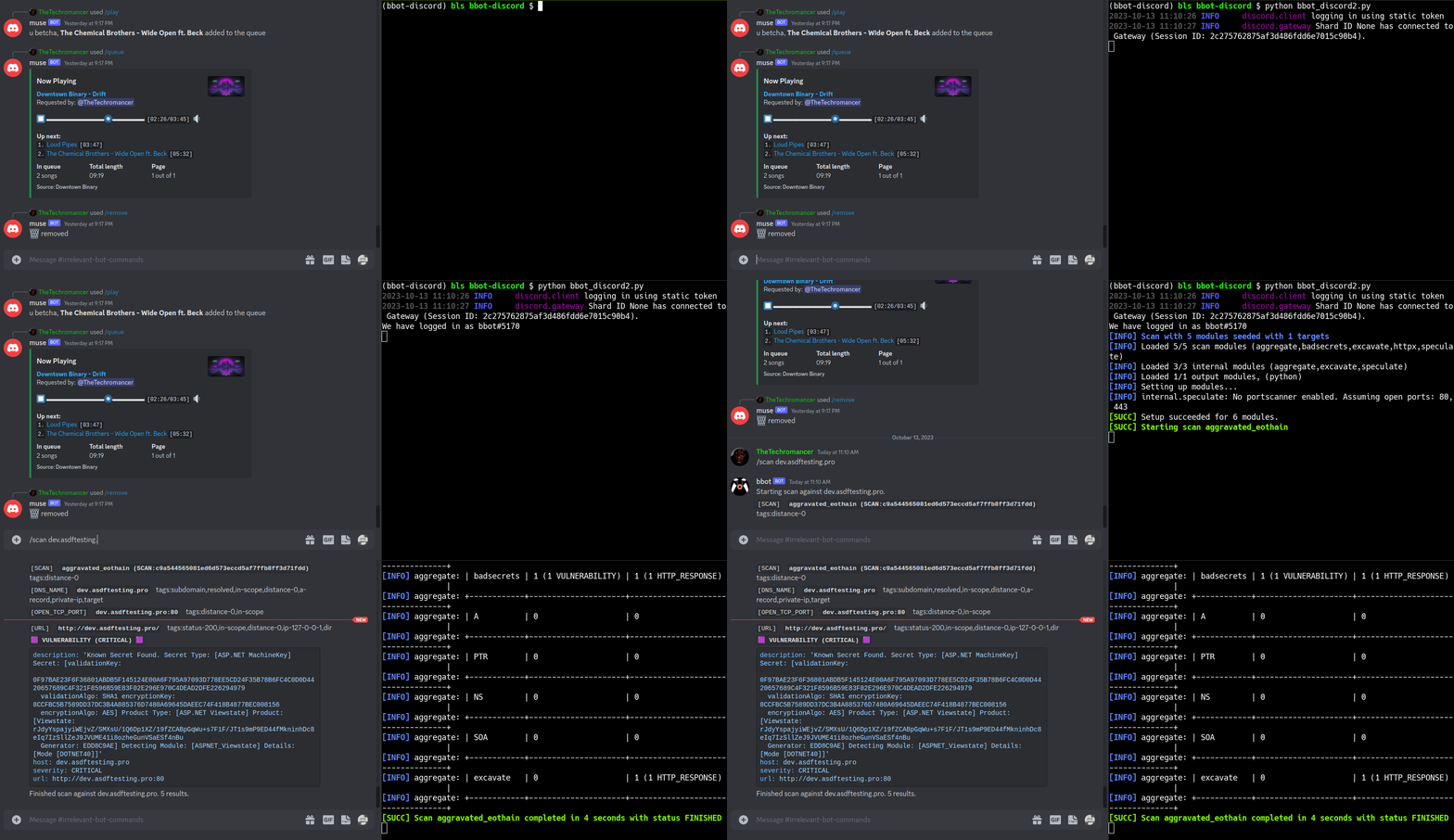
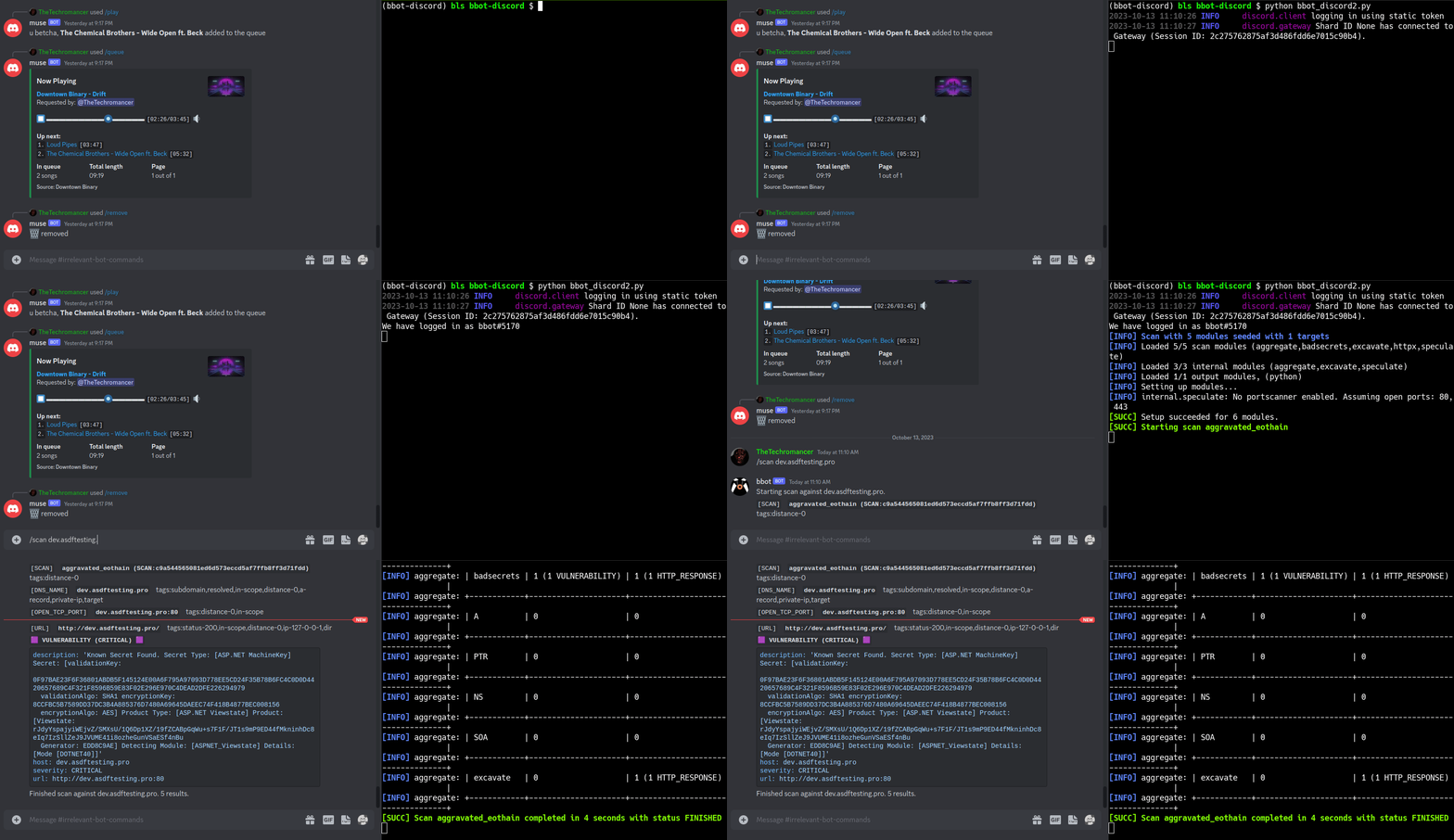
एक [BBOT Discord Bot](https://www.blacklanternsecurity.com/bbot/Stable/dev/#discord-bot-example) जो `/scan` कमांड पर प्रतिक्रिया देता है। अपने Discord सर्वर के आराम से इंटरनेट स्कैन करें!
</details>
## फीचर अवलोकन
- कई टारगेट्स के लिए समर्थन
- वेब स्क्रीनशॉट
- आक्रामक वेब मॉड्यूल्स का सूट
- NLP-संचालित सबडोमेन म्यूटेशन
- Neo4j के लिए नेटिव आउटपुट (और अधिक)
- Ansible के साथ स्वचालित डिपेंडेंसी इंस्टॉलेशन
- कस्टम YARA नियमों के साथ संपूर्ण अटैक सरफेस खोजें
- Python API + डेवलपर दस्तावेज़
## टारगेट्स
BBOT `-t` के माध्यम से असीमित संख्या में टारगेट्स स्वीकार करता है। आप टारगेट्स को सीधे कमांड लाइन पर या फ़ाइलों में निर्दिष्ट कर सकते हैं (या दोनों!):
```bash
bbot -t evilcorp.com evilcorp.org 1.2.3.0/24 -p subdomain-enum
```
टारगेट्स निम्नलिखित में से कोई भी हो सकते हैं:
- DNS नाम (`evilcorp.com`)
- IP पता (`1.2.3.4`)
- IP रेंज (`1.2.3.0/24`)
- खुला TCP पोर्ट (`192.168.0.1:80`)
- URL (`https://www.evilcorp.com`)
- ईमेल पता (`[email protected]`)
- संगठन (`ORG:evilcorp`)
- उपयोगकर्ता नाम (`USER:bobsmith`)
- फाइलसिस्टम (`FILESYSTEM:/tmp/asdf`)
- मोबाइल ऐप (`MOBILE_APP:https://play.google.com/store/apps/details?id=com.evilcorp.app`)
अधिक जानकारी के लिए, [टारगेट्स](https://www.blacklanternsecurity.com/bbot/Stable/scanning/#targets-t) देखें। यह जानने के लिए कि BBOT स्कोप को कैसे संभालता है, [स्कोप](https://www.blacklanternsecurity.com/bbot/Stable/scanning/#scope) देखें।
## API कुंजियाँ
Amass या Subfinder के समान, BBOT विभिन्न थर्ड-पार्टी सेवाओं जैसे SecurityTrails आदि के लिए API कुंजियों का समर्थन करता है।
ऐसा करने का मानक तरीका आपकी API कुंजियों को **`~/.config/bbot/secrets.yml`** में दर्ज करना है। ध्यान दें कि एक से अधिक API कुंजियों की अनुमति है:
```yaml
modules:
shodan_dns:
api_key: 4f41243847da693a4f356c0486114bc6
c99:
# multiple API keys
api_key:
- 21a270d5f59c9b05813a72bb41707266
- ea8f243d9885cf8ce9876a580224fd3c
- 5bc6ed268ab6488270e496d3183a1a27
virustotal:
api_key: dd5f0eee2e4a99b71a939bded450b246
securitytrails:
api_key: d9a05c3fd9a514497713c54b4455d0b0
```
यदि आप चाहें, तो आप उन्हें कमांड लाइन पर भी निर्दिष्ट कर सकते हैं:
```bash
bbot -c modules.virustotal.api_key=dd5f0eee2e4a99b71a939bded450b246
```
विवरण के लिए, [कॉन्फ़िगरेशन](https://www.blacklanternsecurity.com/bbot/Stable/scanning/configuration/) देखें।
## मॉड्यूल्स, फ्लैग्स आदि की पूरी सूचियाँ
- [मॉड्यूल्स](https://www.blacklanternsecurity.com/bbot/Stable/modules/list_of_modules/) की पूरी सूची.
- [फ्लैग्स](https://www.blacklanternsecurity.com/bbot/Stable/scanning/#list-of-flags) की पूरी सूची.
- [प्रीसेट्स](https://www.blacklanternsecurity.com/bbot/Stable/scanning/presets_list/) की पूरी सूची.
- [ग्लोबल कॉन्फ़िग विकल्पों](https://www.blacklanternsecurity.com/bbot/Stable/scanning/configuration/#global-config-options) की पूरी सूची.
- [मॉड्यूल कॉन्फ़िग विकल्पों](https://www.blacklanternsecurity.com/bbot/Stable/scanning/configuration/#module-config-options) की पूरी सूची.
## दस्तावेज़
<!-- BBOT DOCS TOC -->
- **उपयोगकर्ता मैनुअल**
- **मूल बातें**
- [आरंभ करें](https://www.blacklanternsecurity.com/bbot/Stable/)
- [यह कैसे काम करता है](https://www.blacklanternsecurity.com/bbot/Stable/how_it_works)
- [अन्य टूल्स से तुलना](https://www.blacklanternsecurity.com/bbot/Stable/comparison)
- **स्कैनिंग**
- [स्कैनिंग अवलोकन](https://www.blacklanternsecurity.com/bbot/Stable/scanning/)
- **प्रीसेट्स**
- [अवलोकन](https://www.blacklanternsecurity.com/bbot/Stable/scanning/presets)
- [प्रीसेट्स की सूची](https://www.blacklanternsecurity.com/bbot/Stable/scanning/presets_list)
- [इवेंट्स](https://www.blacklanternsecurity.com/bbot/Stable/scanning/events)
- [आउटपुट](https://www.blacklanternsecurity.com/bbot/Stable/scanning/output)
- [टिप्स और ट्रिक्स](https://www.blacklanternsecurity.com/bbot/Stable/scanning/tips_and_tricks)
- [उन्नत उपयोग](https://www.blacklanternsecurity.com/bbot/Stable/scanning/advanced)
- [कॉन्फ़िगरेशन](https://www.blacklanternsecurity.com/bbot/Stable/scanning/configuration)
- [स्कैन सैनिटी](https://www.blacklanternsecurity.com/bbot/Stable/scanning/scan_sanity)
- **मॉड्यूल्स**
- [मॉड्यूल्स की सूची](https://www.blacklanternsecurity.com/bbot/Stable/modules/list_of_modules)
- [आंतरिक मॉड्यूल्स](https://www.blacklanternsecurity.com/bbot/Stable/modules/internal_modules)
- [Nuclei](https://www.blacklanternsecurity.com/bbot/Stable/modules/nuclei)
- [Wayback](https://www.blacklanternsecurity.com/bbot/Stable/modules/wayback)
- [कस्टम YARA नियम](https://www.blacklanternsecurity.com/bbot/Stable/modules/custom_yara_rules)
- [Lightfuzz](https://www.blacklanternsecurity.com/bbot/Stable/modules/lightfuzz)
- [Webbrute](https://www.blacklanternsecurity.com/bbot/Stable/modules/webbrute)
- **माइग्रेशन**
- [2.x → 3.0 ब्रेकिंग बदलाव](https://www.blacklanternsecurity.com/bbot/Stable/migration/3.0_breaking_changes)
- **विविध**
- [योगदान](https://www.blacklanternsecurity.com/bbot/Stable/contribution)
- [रिलीज़ इतिहास](https://www.blacklanternsecurity.com/bbot/Stable/release_history)
- [समस्या निवारण](https://www.blacklanternsecurity.com/bbot/Stable/troubleshooting)
- **डेवलपर मैनुअल**
- [डेवलपमेंट अवलोकन](https://www.blacklanternsecurity.com/bbot/Stable/dev/)
- [डेवलपमेंट एनवायरनमेंट सेट अप करना](https://www.blacklanternsecurity.com/bbot/Stable/dev/dev_environment)
- [मुख्य डिपेंडेंसीज़](https://www.blacklanternsecurity.com/bbot/Stable/dev/core_dependencies)
- [BBOT आंतरिक आर्किटेक्चर](https://www.blacklanternsecurity.com/bbot/Stable/dev/architecture)
- [BBOT मॉड्यूल कैसे लिखें](https://www.blacklanternsecurity.com/bbot/Stable/dev/module_howto)
- [प्रीसेट्स का सत्यापन और निरीक्षण](https://www.blacklanternsecurity.com/bbot/Stable/dev/preset_validation)
- [यूनिट टेस्ट](https://www.blacklanternsecurity.com/bbot/Stable/dev/tests)
- [Discord Bot उदाहरण](https://www.blacklanternsecurity.com/bbot/Stable/dev/discord_bot)
- **कोड संदर्भ**
- [स्कैनर](https://www.blacklanternsecurity.com/bbot/Stable/dev/scanner)
- [प्रीसेट्स](https://www.blacklanternsecurity.com/bbot/Stable/dev/presets)
- [इवेंट](https://www.blacklanternsecurity.com/bbot/Stable/dev/event)
- [टारगेट](https://www.blacklanternsecurity.com/bbot/Stable/dev/target)
- [BaseModule](https://www.blacklanternsecurity.com/bbot/Stable/dev/basemodule)
- [BBOTCore](https://www.blacklanternsecurity.com/bbot/Stable/dev/core)
- **हेल्पर्स**
- [अवलोकन](https://www.blacklanternsecurity.com/bbot/Stable/dev/helpers/)
- [कमांड](https://www.blacklanternsecurity.com/bbot/Stable/dev/helpers/command)
- [DNS](https://www.blacklanternsecurity.com/bbot/Stable/dev/helpers/dns)
- [Interactsh](https://www.blacklanternsecurity.com/bbot/Stable/dev/helpers/interactsh)
- [विविध](https://www.blacklanternsecurity.com/bbot/Stable/dev/helpers/misc)
- [वेब](https://www.blacklanternsecurity.com/bbot/Stable/dev/helpers/web)
- [वर्ड क्लाउड](https://www.blacklanternsecurity.com/bbot/Stable/dev/helpers/wordcloud)
<!-- END BBOT DOCS TOC -->
## योगदान
BBOT के कुछ बेहतरीन मॉड्यूल समुदाय द्वारा लिखे गए हैं। BBOT में लगातार सुधार हो रहा है; हर दिन यह और अधिक शक्तिशाली होता जा रहा है!
हम योगदान का स्वागत करते हैं। केवल कोड ही नहीं, बल्कि विचार भी! यदि आपके पास किसी नई सुविधा के लिए विचार है, तो कृपया हमें [Discussions](https://github.com/blacklanternsecurity/bbot/discussions) में बताएं। यदि आप काम में हाथ डालना चाहते हैं, तो [योगदान](https://www.blacklanternsecurity.com/bbot/Stable/contribution/) देखें। वहां आपको सेटअप निर्देश और BBOT मॉड्यूल लिखने का एक सरल ट्यूटोरियल मिलेगा। हमारे पास व्यापक [डेवलपर दस्तावेज़](https://www.blacklanternsecurity.com/bbot/Stable/dev/) भी है।
BBOT में योगदान देने के लिए इन अद्भुत लोगों को धन्यवाद! :heart:
<p align="center">
<a href="https://github.com/blacklanternsecurity/bbot/graphs/contributors">
<img src="https://contrib.rocks/image?repo=blacklanternsecurity/bbot&max=500">
</a>
</p>
विशेष धन्यवाद:
- @TheTechromancer को BBOT बनाने के लिए
- @liquidsec को BBOT की वेब हैकिंग सुविधाओं पर उनके व्यापक कार्य के लिए, जिनमें [badsecrets](https://github.com/blacklanternsecurity/badsecrets) और [baddns](https://github.com/blacklanternsecurity/baddns) शामिल हैं
- Steve Micallef (@smicallef) को Spiderfoot बनाने के लिए
- @kerrymilan को उनकी Neo4j और Ansible विशेषज्ञता के लिए
- @domwhewell-sage को उनके धांसू code-looting मॉड्यूल्स के परिवार के लिए
- @aconite33 और @amiremami को उनके कठोर परीक्षण के लिए
- Aleksei Kornev (@alekseiko) को हमें bbot Pypi रिपॉजिटरी का स्वामित्व देने के लिए <3