

हैकर्स के लिए पुनरावर्ती इंटरनेट स्कैनर। 🧡






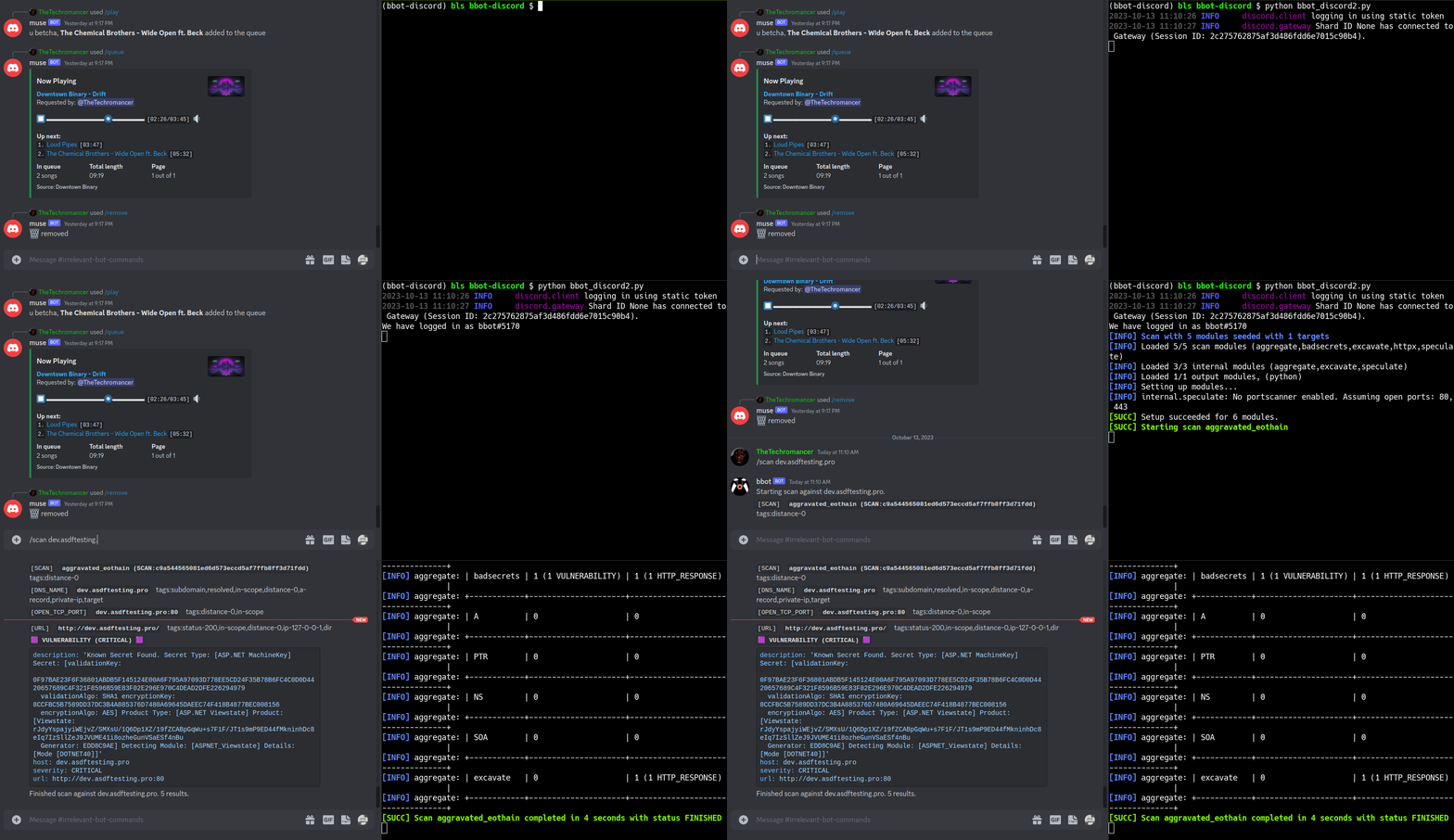
https://github.com/blacklanternsecurity/bbot/assets/20261699/e539e89b-92ea-46fa-b893-9cde94eebf81
BBOT स्कैन रियल-टाइम में - विज़ुअलाइज़ेशन VivaGraphJS के साथ
# stable version
pipx install bbot

# bleeding edge (dev branch)
pipx install --pip-args '\--pre' bbot
अधिक इंस्टॉलेशन विधियों के लिए, जिनमें Docker शामिल है, आरंभ करें देखें
2.x से अपग्रेड कर रहे हैं? BBOT 3.0 में CLI, प्रीसेट्स, मॉड्यूल्स, इवेंट्स और Python API में ब्रेकिंग बदलाव शामिल हैं। अपग्रेड करने से पहले 2.x → 3.0 माइग्रेशन गाइड (स्रोत) देखें।
स्पीड टिप: BBOT का DNS resolver (blastdns)
/etc/resolv.confमें प्रति रिज़ॉल्वर कई थ्रेड्स शुरू करता है। अधिक अनफ़िल्टर्ड रिज़ॉल्वर जोड़ने से स्कैन नाटकीय रूप से तेज़ हो जाते हैं। विवरण के लिए नमूना resolv.conf और टिप्स और ट्रिक्स देखें।
पैसिव API स्रोत और टारगेट-विशिष्ट सबडोमेन म्यूटेशन के साथ एक रिकर्सिव DNS ब्रूट-फोर्स।
# find subdomains of evilcorp.com
bbot -t evilcorp.com -p subdomain-enum

# passive sources only
bbot -t evilcorp.com -p subdomain-enum -rf passive
subdomain-enum.ymldescription: Enumerate subdomains via APIs, brute-force
flags:
# enable every module with the subdomain-enum flag
- subdomain-enum
output_modules:
# output unique subdomains to TXT file
- subdomains
config:
dns:
threads: 25
brute_threads: 1000
# put your API keys here
# modules:
# github:
# api_key: ""
# chaos:
# api_key: ""
# securitytrails:
# api_key: ""
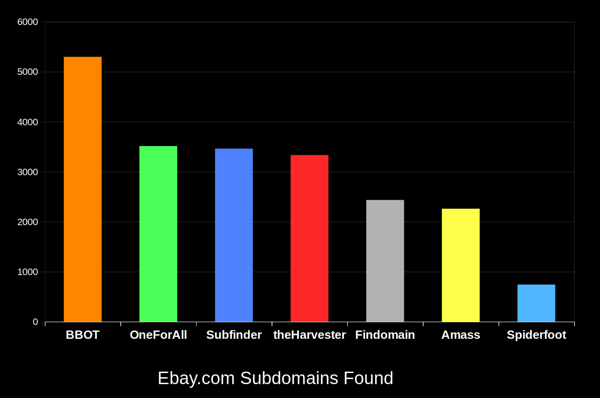
BBOT अन्य टूल्स की तुलना में लगातार 20-50% अधिक सबडोमेन ढूंढता है। डोमेन जितना बड़ा होता है, अंतर उतना ही अधिक होता है। यह कैसे संभव है, यह जानने के लिए यह कैसे काम करता है देखें।
# crawl evilcorp.com, extracting emails and other goodies
bbot -t evilcorp.com -p spider
spider.ymldescription: Recursive web spider
modules:
- http
blacklist:
# Prevent spider from invalidating sessions by logging out
- "RE:/.*(sign|log)[_-]?out"
config:
web:
# how many links to follow in a row
spider_distance: 2
# don't follow links whose directory depth is higher than 4
spider_depth: 4
# maximum number of links to follow per page
spider_links_per_page: 25
# quick email enum with free APIs + scraping
bbot -t evilcorp.com -p email-enum

# pair with subdomain enum + web spider for maximum yield
bbot -t evilcorp.com -p email-enum subdomain-enum spider
email-enum.ymldescription: Enumerate email addresses from APIs, web crawling, etc.
flags:
- email-enum
output_modules:
- emails
# run a light web scan against www.evilcorp.com
bbot -t www.evilcorp.com -p web

# run a heavy web scan against www.evilcorp.com
bbot -t www.evilcorp.com -p web-heavy
web.ymldescription: Quick web scan
include:
- iis-shortnames
flags:
- web
web-heavy.ymldescription: Aggressive web scan
include:
# include the web preset
- web
flags:
- web-heavy
# everything everywhere all at once
bbot -t evilcorp.com -p kitchen-sink

# roughly equivalent to:
bbot -t evilcorp.com -p subdomain-enum cloud-enum code-enum email-enum spider web paramminer webbrute web-screenshots
kitchen-sink.ymldescription: Everything everywhere all at once
include:
- subdomain-enum
- cloud-enum
- code-enum
- email-enum
- spider
- web
- paramminer
- webbrute
- web-screenshots
- baddns-heavy
config:
modules:
dnsbrute:
recursive_mutations: true
dnscommonsrv:
recursive_mutations: true
webbrute:
avoid_wafs: False
wayback:
urls: True
parameters: True
archive: True
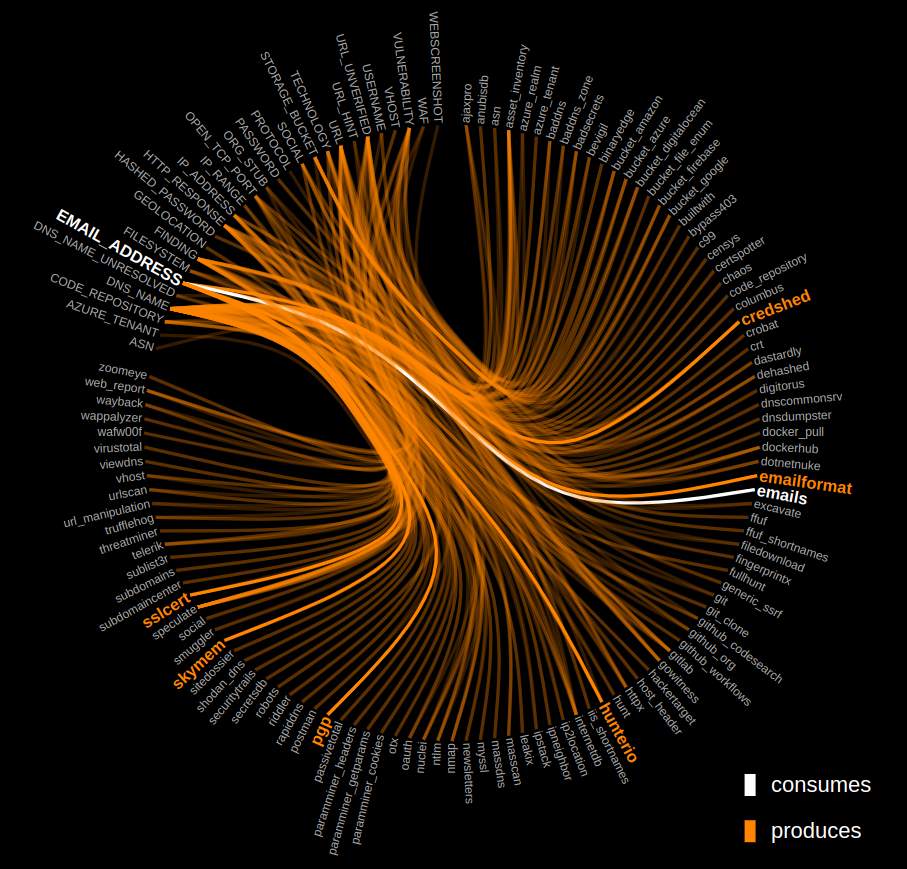
BBOT की आंतरिक कार्यप्रणाली को जानने के लिए नीचे दिए गए ग्राफ़ पर क्लिक करें।