 arinerron/heaptrace
pwn और डिबगिंग के लिए हीप संचालन को विज़ुअलाइज़ करने में मदद करता है।

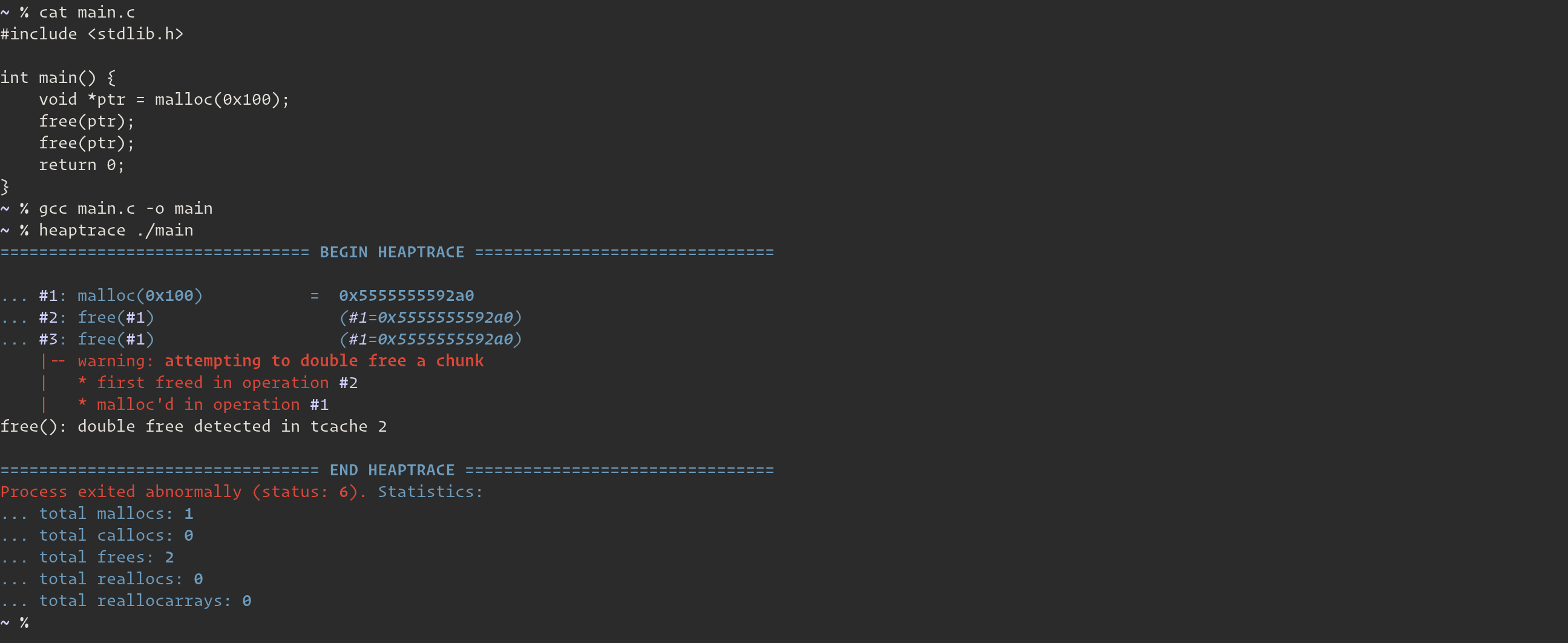
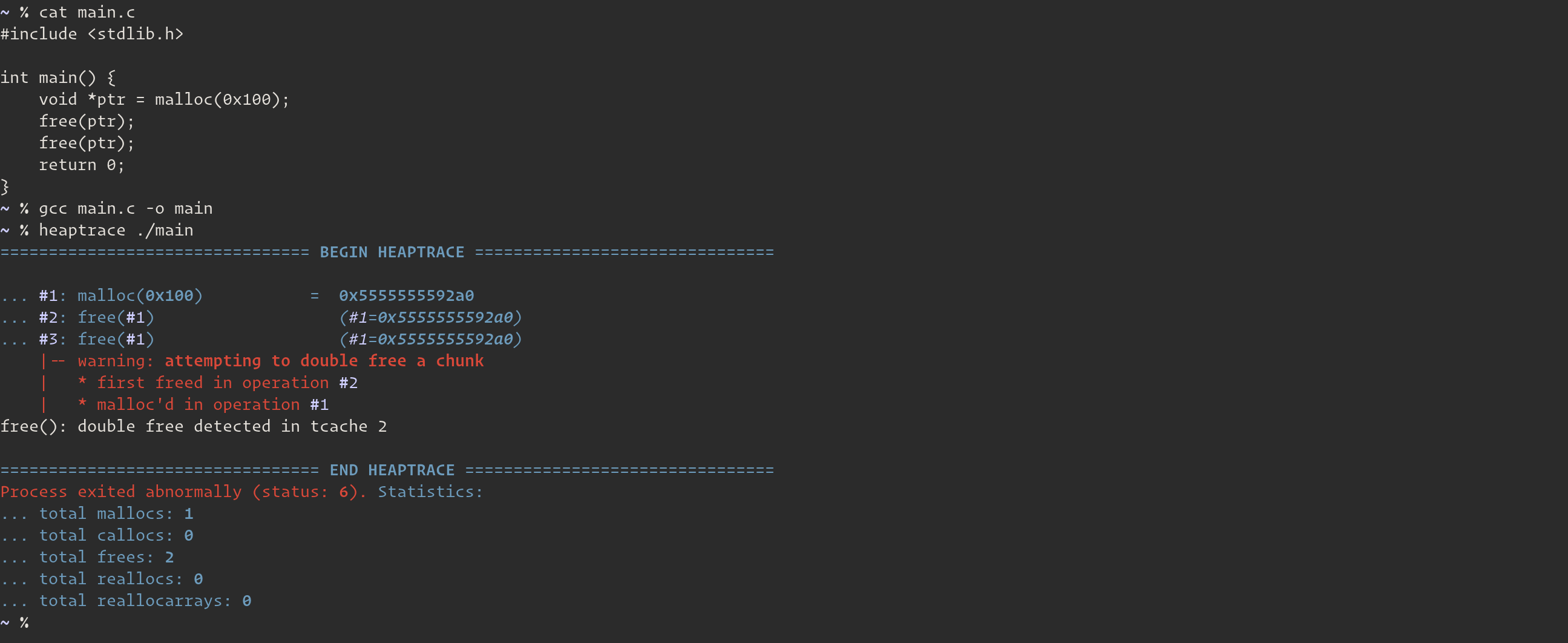
heaptrace एक हीप डीबगर है जो ELF64 (x86_64) बाइनरी में glibc हीप ऑपरेशनों को ट्रैक करता है। इसका उद्देश्य बाइनरी को डीबग करते समय या हीप पाउन करते समय हीप ऑपरेशनों को विज़ुअलाइज़ करने में मदद करना है।
--break)heaptrace और valgrind में क्या अंतर है?
.deb और .rpm रिलीज़ फाइलें और एक पूर्व-संकलित बाइनरी देखें रिलीज़ पेज पर।
$ sudo add-apt-repository ppa:arinerron/heaptrace
$ sudo apt-get update
$ sudo apt-get install heaptrace
अपने पसंदीदा AUR हेल्पर का उपयोग करके निम्नलिखित दो पैकेजों में से एक स्थापित करें:
heaptrace-git — स्रोत पैकेज (PKGBUILD)heaptrace — बाइनरी पैकेज (PKGBUILD)$ trizen -S heaptrace-git
... OR ...
$ trizen -S heaptrace
$ git clone https://github.com/Arinerron/heaptrace.git && cd heaptrace
$ make
$ sudo make install
...
$ heaptrace ./target
आप बाइनरी नाम निर्दिष्ट करने से पहले heaptrace को आर्गुमेंट निर्दिष्ट कर सकते हैं:
Usage:
  heaptrace [options...] <target> [args...]
  heaptrace [options...] --attach <pid>

Options:
  -p <pid>, --attach <pid>, --pid <pid>
	 Tells heaptrace to attach to the specified pid
	 instead of running the binary from the `target`
	 argument. Note that if you specify this argument
	 you do not have to specify `target`.


  -b <expression>, --break=<expression>, --break-at=<expression>
	 Send SIGSTOP to the process when the specified
	 `expression` is satisfied and attach the GNU debugger
	 (gdb) to the process.

	 This argument supports complex expressions. Please
	 See the documentation for more information:
	 https://github.com/Arinerron/heaptrace/wiki/How-to-Create-Breakpoints


  -B <expression>, --break-after=<expression>
	 Similar to `--break`. Replaces the tracer
	 process with gdb, but only after the heap function
	 returns. See the documentation for more information:
	 https://github.com/Arinerron/heaptrace/wiki/How-to-Create-Breakpoints


  -e <name=value>, --environ=<name=value>, --environment=<name=value>
	 Sets a single environmental variable. Useful for
	 setting runtime settings for the target such as
	 LD_PRELOAD=./libc.so.6 without having them affect
	 heaptrace's runtime configuration. This option can
	 be used multiple times.


  -s <sym_defs>, --symbols=<sym_defs>
	 Override the values heaptrace detects for the
	 malloc/calloc/free/realloc/reallocarray symbols.
	 Useful if heaptrace fails to automatically
	 identify heap functions in a stripped binary. See
	 the wiki for more info.


  -F, --follow-fork, --follow
	 Tells heaptrace to detach the parent and follow
	 the child if the target calls fork(), vfork(), or
	 clone().

	 The default behavior is to detach the child and
	 only trace the parent.


  -G <path>, --gdb-path <path>
	 Tells heaptrace to use the path to gdb specified
	 in `path` instead of /usr/bin/gdb (default).


  -w <width>, --width=<width>, --term-width=<width>
	 Force a certain terminal width.


  -o <file>, --output=<file>
	 Write the heaptrace output to `file` instead of
	 /dev/stderr (which is the default output path).


  -v, --verbose
	 Prints verbose information such as line numbers in
	 source code given the required debugging info is
	 stored in the ELF.


  -V, --version
	 Displays the current heaptrace version.


  -h, --help
	 Shows this help menu.
heaptrace --break=3 ./my-binary निष्पादित करेंगे। कृपया इस आर्गुमेंट का उपयोग करने के तरीके के बारे में अधिक जानकारी के लिए विकी दस्तावेज़ीकरण देखें।-s/--symbol आर्गुमेंट का उपयोग कैसे करें, जिसमें heaptrace स्वचालित रूप से फ़ंक्शन की पहचान करने में विफल रहा, इस बारे में अधिक जानकारी के लिए विकी दस्तावेज़ीकरण देखें।$NO_COLOR आर्गुमेंट सेट करें। यह विकल्प अभी भी विकास में है और जल्द ही एक आर्गुमेंट में परिवर्तित हो जाएगा।यदि आपको कोई बग अनुभव होता है या कोई प्रतिक्रिया है, तो मैं मदद करने में खुश हूँ। कृपया GitHub Issues पेज देखें।
