Guide pour construire un iPhone virtuel à l'aide des composants VPHONE600AP du firmware PCC d'Apple, avec patching du firmware, modification de la chaîne de boot et débogage du noyau pour la recherche en sécurité iOS.
Vers fin 2024, Apple a commencé à introduire Private Cloud Compute, affirmant ouvrir un nouvel horizon pour la confidentialité de l'IA basée sur le cloud. Puis, vers fin 2025, des nouvelles intéressantes sont apparues : Apple avait récemment ajouté des composants liés à vphone600ap au firmware PCC, à partir de cloudOS 26.

Source: https://x.com/matteyeux/status/2006339694783848660/photo/1
« iPhone Research Environment Virtual Machine » ?
Est-ce une initiative planifiée par Apple pour construire et distribuer un environnement d'iPhone virtuel à d'autres chercheurs en sécurité à l'avenir, ou était-ce simplement une erreur ? Étant donné qu'un noyau de construction DEVELOPMENT/KASAN a été découvert dans les OTA des bêta iOS 15.0 à 15.1 bêta3 en 2021, la possibilité d'un faux pas ne peut être exclue. À l'époque, le noyau est resté inclus pendant environ 4 mois, de juin à octobre 2021.
Puis, vers janvier de cette année, un tweet a été posté montrant un iPhone virtuel démarrant en utilisant ces composants liés à vphone600ap.

Source: https://x.com/_inside/status/2008951845725548783
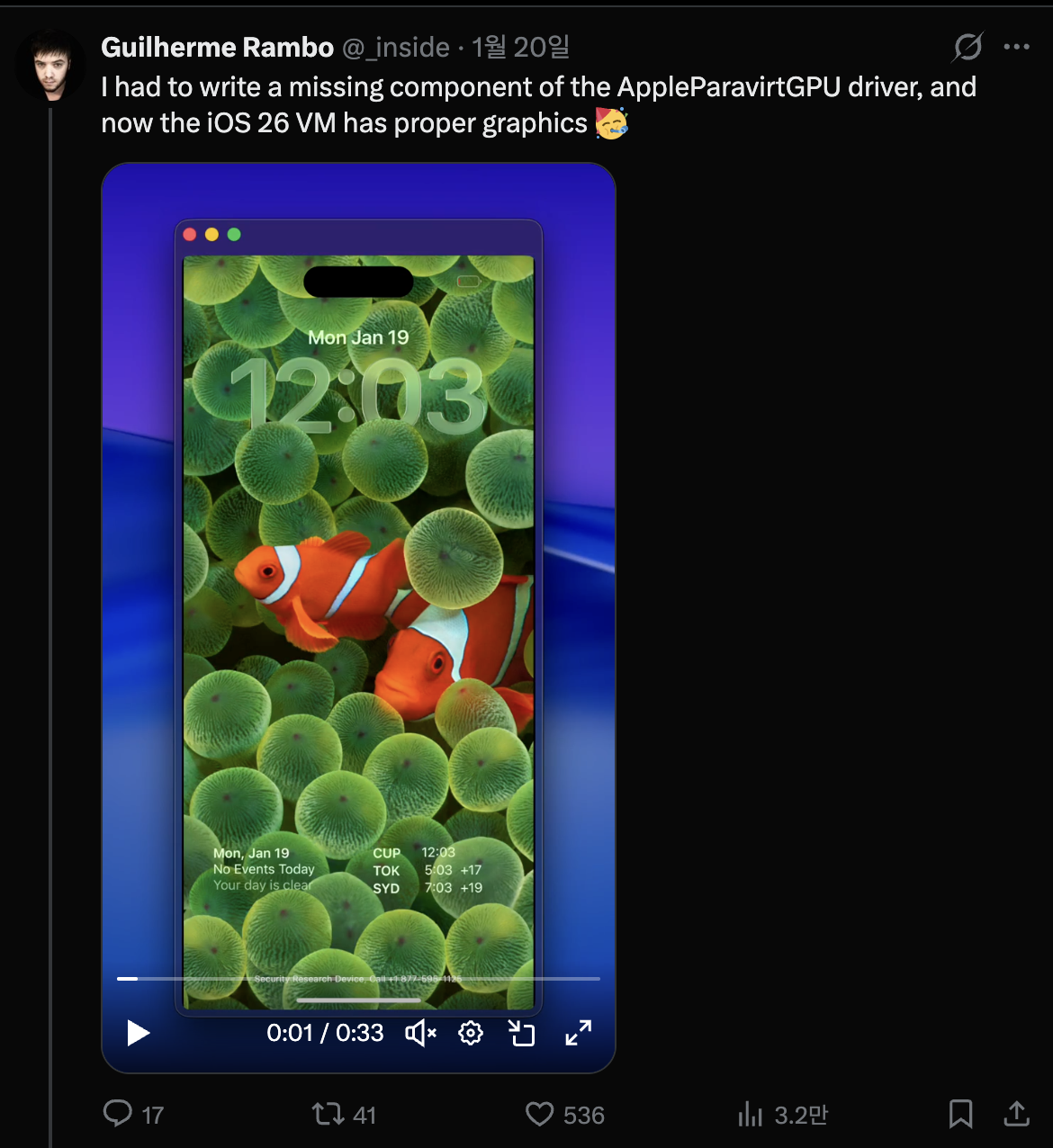
D'après ce que j'ai vu, presque tout fonctionnait vraiment avec élégance. Comparé au projet QEMUAppleSilicon(Inferno) que j'avais vu auparavant, cela tournait beaucoup plus vite et plus fluidement. De plus, cela semblait même prendre en charge l'accélération Metal. Finalement, complètement captivé par cela, je me suis lancé et j'ai commencé à construire mon propre iPhone virtuel le 31 janvier.

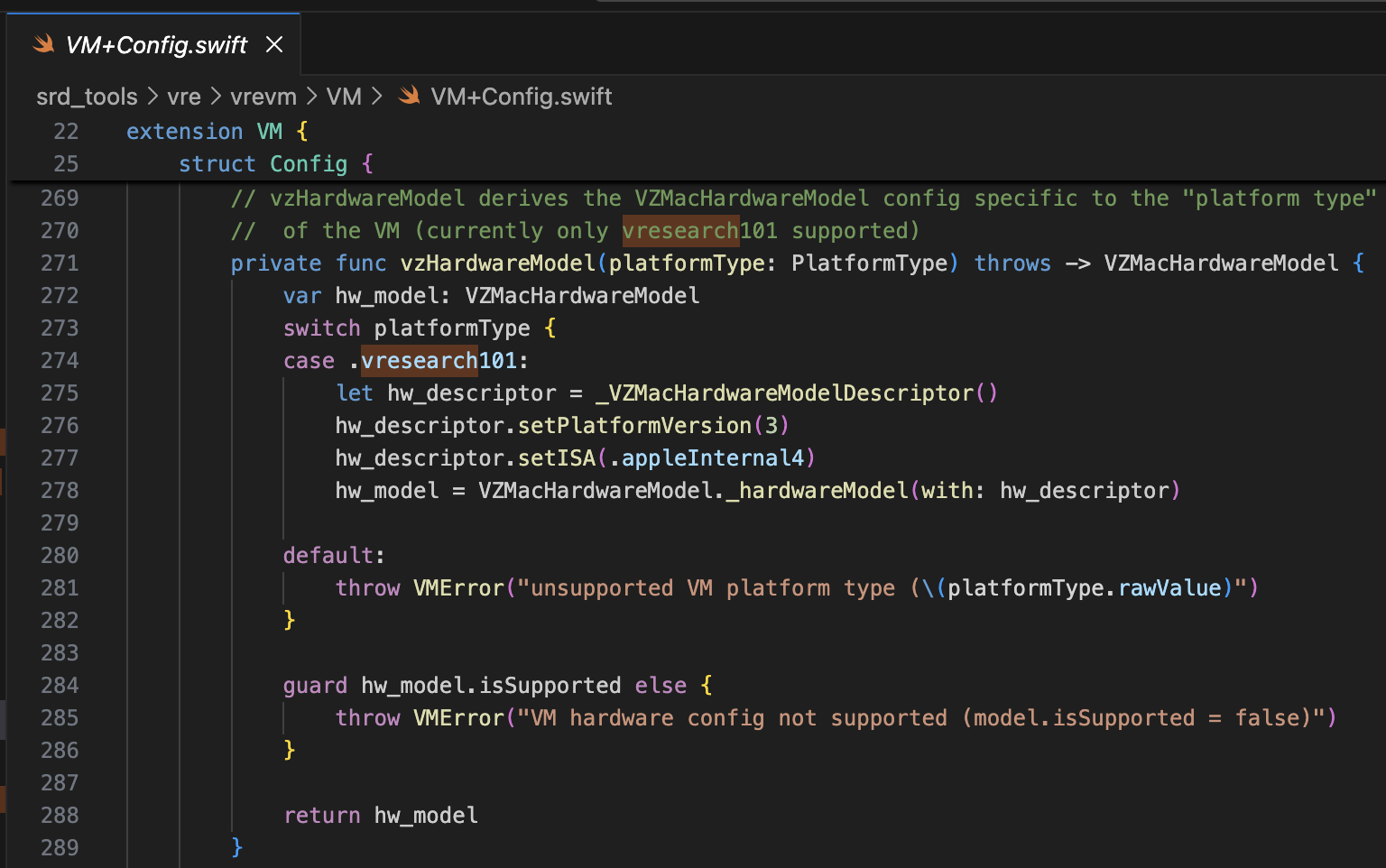
Le projet référencé est security-pcc. Il correspond au code source du binaire /System/Library/SecurityResearch/usr/bin/vrevm. Un point intéressant est qu'il utilise des méthodes privées fournies par Virtualization.framework. Dans la machine virtuelle utilisée pour la recherche PCC, on peut voir que l'ISA et PlatformVersion sont explicitement spécifiés lors du processus d'initialisation du modèle matériel.
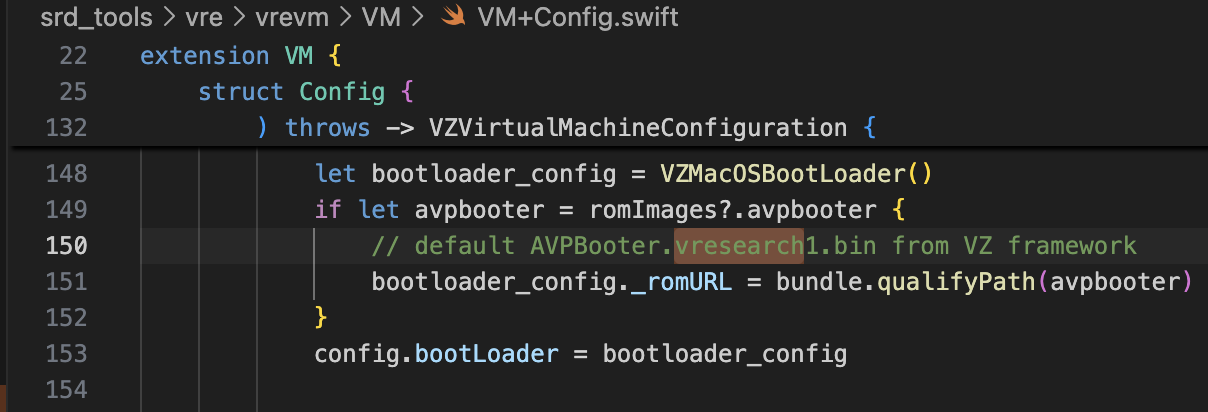
Pour le bootrom, AVPBooter.vresearch1.bin est utilisé (/System/Library/Frameworks/Virtualization.framework/Resources/AVPBooter.vresearch1.bin)
et pour le SEPROM (avpsepbooter), AVPSEPBooter.vresearch1.bin est utilisé, qui charge séparément un fichier SEPStorage fonctionnant de manière similaire à AuxiliaryStorage. (/System/Library/Frameworks/Virtualization.framework/Versions/A/Resources/AVPSEPBooter.vresearch1.bin)
Un autre point intéressant est que si l'on regarde le code pour définir la résolution, elle est réglée sur 1290x2796, ce qui correspond aux appareils iPhone 14 Pro Max, 15 Plus, 15 Pro Max et 16 Plus.
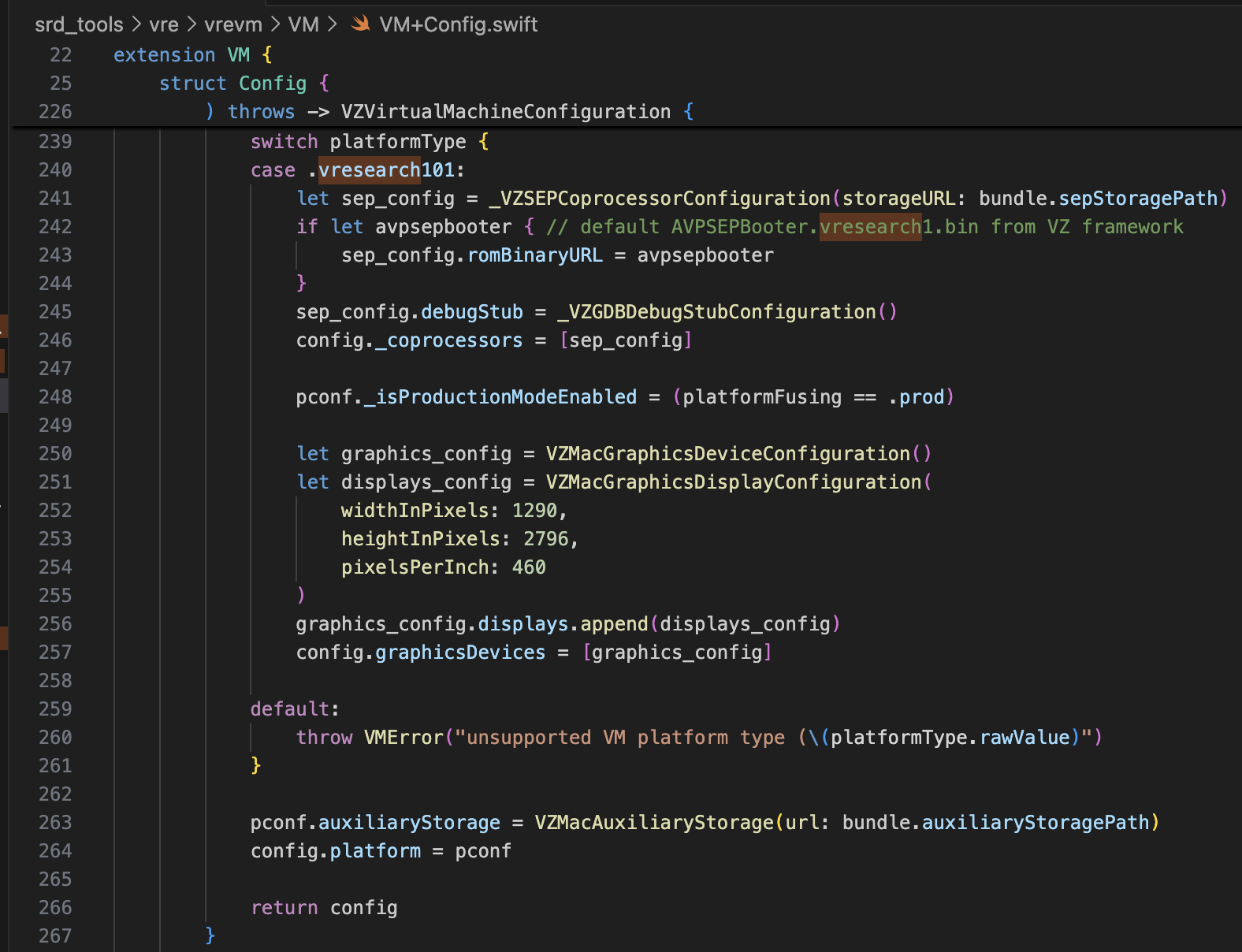
Avec seulement ces informations, cela devrait être largement suffisant pour modifier super-tart afin de démarrer l'iPhone virtuel. J'ai apporté les modifications comme indiqué ci-dessous.
/Sources/tart/VM.swift```swift ... class VM: NSObject, VZVirtualMachineDelegate, ObservableObject { ... // vzHardwareModel derives the VZMacHardwareModel config specific to the "platform type" // of the VM (currently only vresearch101 supported) static private func vzHardwareModel_VRESEARCH101() throws -> VZMacHardwareModel { var hw_model: VZMacHardwareModel
guard let hw_descriptor = _VZMacHardwareModelDescriptor() else { fatalError("Failed to create hardware descriptor") } hw_descriptor.setPlatformVersion(3) // .appleInternal4 = 3 hw_descriptor.setBoardID(0x90) hw_descriptor.setISA(2) hw_model = VZMacHardwareModel._hardwareModel(withDescriptor: hw_descriptor)
guard hw_model.isSupported else { fatalError("VM hardware config not supported (model.isSupported = false)") }
return hw_model }
static func craftConfiguration( diskURL: URL, nvramURL: URL, romURL: URL, sepromURL: URL? = nil, vmConfig: VMConfig, network: Network = NetworkShared(), additionalStorageDevices: [VZStorageDeviceConfiguration], directorySharingDevices: [VZDirectorySharingDeviceConfiguration], serialPorts: [VZSerialPortConfiguration], suspendable: Bool = false, nested: Bool = false, audio: Bool = true, clipboard: Bool = true, sync: VZDiskImageSynchronizationMode = .full, caching: VZDiskImageCachingMode? = nil ) throws -> VZVirtualMachineConfiguration { let configuration: VZVirtualMachineConfiguration = .init()
// Boot loader let bootloader = try vmConfig.platform.bootLoader(nvramURL: nvramURL) Dynamic(bootloader)._setROMURL(romURL) configuration.bootLoader = bootloader
// SEP ROM let homeURL = FileManager.default.homeDirectoryForCurrentUser var sepstoragePath = homeURL.appendingPathComponent(".tart/vms/vphone/SEPStorage").path let sepstorageURL = URL(fileURLWithPath: sepstoragePath) let sep_config = Dynamic._VZSEPCoprocessorConfiguration(storageURL: sepstorageURL) if let sepromURL { // default AVPSEPBooter.vresearch1.bin from VZ framework sep_config.romBinaryURL = sepromURL } sep_config.debugStub = Dynamic._VZGDBDebugStubConfiguration(port: 8001) configuration._setCoprocessors([sep_config.asObject])
// Some vresearch101 config let pconf = VZMacPlatformConfiguration() pconf.hardwareModel = try vzHardwareModel_VRESEARCH101()
let serial = Dynamic._VZMacSerialNumber.initWithString("AAAAAA1337") let identifier = Dynamic.VZMacMachineIdentifier._machineIdentifierWithECID(0x1111111111111111, serialNumber: serial.asObject) pconf.machineIdentifier = identifier.asObject as! VZMacMachineIdentifier
pconf._setProductionModeEnabled(true) var auxiliaryStoragePath = homeURL.appendingPathComponent(".tart/vms/vphone/nvram.bin").path let auxiliaryStorageURL = URL(fileURLWithPath: auxiliaryStoragePath) pconf.auxiliaryStorage = VZMacAuxiliaryStorage(url: auxiliaryStorageURL)
if #available(macOS 14, *) { let keyboard = VZUSBKeyboardConfiguration() configuration.keyboards = [keyboard] }
if #available(macOS 14, *) { let touch = _VZUSBTouchScreenConfiguration() configuration._setMultiTouchDevices([touch]) } ... configuration.platform = pconf
# Modification du Firmware
Le projet référencé est [vma2pwn](https://github.com/nick-botticelli/vma2pwn). Plus précisément pour la version 12.0.1, il démarre une machine virtuelle Mac avec presque toute la chaîne de démarrage modifiée.
Regardons d'abord le script [prepare.sh](https://github.com/nick-botticelli/vma2pwn/blob/main/prepare.sh). Il extrait les composants du firmware, tels que le chargeur de démarrage et le noyau compressé au format IM4P, au format RAW et corrige les instructions/données à des adresses spécifiques codées en dur. RestoreRamdisk est le système de fichiers racine utilisé lors de la restauration du firmware, et AVPBooter est le BootROM utilisé dans la machine virtuelle.
Pour résumer, il extrait les fichiers individuels inclus dans le firmware et corrige les contrôles d'intégrité pour permettre la restauration d'un firmware personnalisé, ou modifie les paramètres boot-args pour faciliter la visualisation des journaux liés au démarrage.
Enfin, [vma2pwn.sh](https://github.com/nick-botticelli/vma2pwn/blob/main/vma2pwn.sh) est responsable de la restauration du firmware personnalisé. Pour ce faire, il passe en mode DFU au préalable. Ici, la machine virtuelle utilise ce qu'on appelle super-tart. Il s'agit d'une version de la machine virtuelle tart existante avec des fonctionnalités ajoutées comme un bootrom personnalisé, une sortie série, le mode DFU et le débogage GDB. (Notez que SIP/AMFI doivent être désactivés pour que cela fonctionne.)
Je l'ai utilisé de manière très utile récemment pendant que j'[étudiais les vulnérabilités XNU kernel 1-day (CVE-2021-30937, CVE-2021-30955)](https://github.com/wh1te4ever/xnu_1day_practice). C'est fantastique car il prend en charge le débogage en direct du noyau.
## Construction d'un Firmware Personnalisé
J'ai mélangé les composants de cloudOS 26.1 (23B85) et iOS 26.1 (iPhone17,3 ; 23B85), euh,,, mais... je ne me rappelle plus des détails exacts. Pour être précis, j'ai dû mélanger correctement les composants liés à l'iPhone 16 et au vphone pour créer le firmware personnalisé, mais j'ai oublié exactement lesquels j'ai fini par mélanger. De ce dont je me souviens :
- BuildManifest.plist :
J'ai modifié les éléments du dictionnaire sous la clé Manifest. Je l'ai configuré pour que, pendant le processus de restauration, les SystemVolume, SystemVolumeCanonicalMetadata, OS, StaticTrustCache, RestoreTrustCache et RestoreRamDisk du modèle iPhone 16 (iOS 26.1) soient utilisés. Les autres ont été configurés pour utiliser des fichiers liés à vphone provenant du firmware PCC.
- Restore.plist :
Je pense avoir ajouté des propriétés liées à DeviceMap ou SupportedProductTypes, ou modifié l'élément SystemRestoreImageFileSystems.
Les fichiers ci-dessous sont le résultat final de mon mélange.
[Restore.plist](https://github.com/wh1te4ever/super-tart-vphone-writeup/blob/HEAD/contents/Restore.plist)
[BuildManifest.plist](https://github.com/wh1te4ever/super-tart-vphone-writeup/blob/HEAD/contents/BuildManifest.plist)
- get_fw.py (Partiel)```python
...
# 3. Import things from cloudOS
# kernelcache
os.system("cp 399b664dd623358c3de118ffc114e42dcd51c9309e751d43bc949b98f4e31349_extracted/kernelcache.* iPhone17,3_26.1_23B85_Restore")
# agx, all_flash, ane, dfu, pmp...
os.system("cp 399b664dd623358c3de118ffc114e42dcd51c9309e751d43bc949b98f4e31349_extracted/Firmware/agx/* iPhone17,3_26.1_23B85_Restore/Firmware/agx")
os.system("cp 399b664dd623358c3de118ffc114e42dcd51c9309e751d43bc949b98f4e31349_extracted/Firmware/all_flash/* iPhone17,3_26.1_23B85_Restore/Firmware/all_flash")
os.system("cp 399b664dd623358c3de118ffc114e42dcd51c9309e751d43bc949b98f4e31349_extracted/Firmware/ane/* iPhone17,3_26.1_23B85_Restore/Firmware/ane")
os.system("cp 399b664dd623358c3de118ffc114e42dcd51c9309e751d43bc949b98f4e31349_extracted/Firmware/dfu/* iPhone17,3_26.1_23B85_Restore/Firmware/dfu")
os.system("cp 399b664dd623358c3de118ffc114e42dcd51c9309e751d43bc949b98f4e31349_extracted/Firmware/pmp/* iPhone17,3_26.1_23B85_Restore/Firmware/pmp")
# sptm, txm, etc...
os.system("cp 399b664dd623358c3de118ffc114e42dcd51c9309e751d43bc949b98f4e31349_extracted/Firmware/*.im4p iPhone17,3_26.1_23B85_Restore/Firmware")
# 4. TODO: parse what things needed from BuildManifest.plist, Restore.plist in cloudOS 26.1
# It will be really complicated, so import things from already parse completed
os.system("sudo cp custom_26.1/BuildManifest.plist iPhone17,3_26.1_23B85_Restore")
os.system("sudo cp custom_26.1/Restore.plist iPhone17,3_26.1_23B85_Restore")
os.system("echo 'Done, grabbed all needed components for restoring'")
J'ai référencé ce post. Vous devez patcher image4_validate_property_callback afin de charger un bootloader personnalisé par la suite. Utilisez simplement la fonctionnalité « Recherche de texte (lent !) » dans IDA Pro pour chercher « 0x4447 », et patchez l'épilogue de la fonction correspondante pour qu'elle retourne toujours 0.

Avant de restaurer le firmware, quelques modifications étaient nécessaires pour supporter le modèle vresearch101ap. Une fois construit, la restauration du firmware devient possible en utilisant l'outil idevicerestore.
https://github.com/wh1te4ever/libirecovery

Similaire à AVPBooter, les bootloaders utilisés pour la restauration, iBSS et iBEC, ont été patchés pour contourner la vérification de signature. J'ai également activé la sortie du journal série afin que s'il y a des problèmes de démarrage, la cause puisse être identifiée immédiatement.
Comme vous le verrez plus tard, contourner la vérification SSV (Signed System Volume) est requis pour charger un Cryptex arbitraire. Cela est effectué dans le LLB, qui est chargé lors du démarrage en mode normal plutôt qu'en mode DFU, et la vérification est également parfois effectuée dans le noyau.
De plus, j'ai patché le TXM pour que même si un binaire/une bibliothèque n'est pas enregistré dans le Trustcache, il soit reconnu comme s'il l'était.
patch(0x9D10, 0xd503201f) #nop patch(0x9D14, 0xd2800000) #mov x0, #0
patch(0x122d4, 0xd0000082) #adrp x2, #0x12000 patch(0x122d8, 0x9101c042) #add x2, x2, #0x70 patch(0x24070, "serial=3 -v debug=0x2014e %s")
patch(0xA0D8, 0xd503201f) #nop patch(0xA0DC, 0xd2800000) #mov x0, #0
patch(0x12888, 0xD0000082) #adrp x2, #0x12000 patch(0x1288C, 0x91264042) #add x2, x2, #0x990 patch(0x24990, "serial=3 -v debug=0x2014e %s")
patch(0x2BFE8, 0x1400000b) patch(0x2bca0, 0xd503201f) patch(0x2C03C, 0x17ffff6a) patch(0x2fcec, 0xd503201f) patch(0x2FEE8, 0x14000009)
patch(0x1AEE4, 0xd503201f) #nop
patch(0x2c1f8, 0xd2800000) #FFFFFFF0170301F8 patch(0x2bef4, 0xd2800000) #FFFFFFF01702FEF4 patch(0x2c060, 0xd2800000) #FFFFFFF017030060
patch(0x2476964, 0xd503201f) #FFFFFE000947A964
patch(0x23cfde4, 0xd503201f) #FFFFFE00093D3DE4
patch(0xf6d960, 0xd503201f) #FFFFFE0007F71960 ...
Après conversion au format RAW et correction, vous devez le reconvertir en IM4P.
Dans le cas du noyau ou de TXM, une structure PAYP existe, il était donc nécessaire de préserver cette structure.
Voici le code qui convertit IM4P → RAW → IM4P à l'aide de l'outil [pyimg4](https://pypi.org/project/pyimg4/), [img4tool](https://github.com/tihmstar/img4tool), [img4](https://github.com/xerub/img4lib).
- patch_fw.py (Contenu partiel, Partie 2)```python
...
# Patch iBSS
if not os.path.exists("iPhone17,3_26.1_23B85_Restore/Firmware/dfu/iBSS.vresearch101.RELEASE.im4p.bak"):
os.system("cp iPhone17,3_26.1_23B85_Restore/Firmware/dfu/iBSS.vresearch101.RELEASE.im4p iPhone17,3_26.1_23B85_Restore/Firmware/dfu/iBSS.vresearch101.RELEASE.im4p.bak")
os.system("tools/img4 -i iPhone17,3_26.1_23B85_Restore/Firmware/dfu/iBSS.vresearch101.RELEASE.im4p.bak -o iBSS.vresearch101.RELEASE")
... # patch things from raw
os.system("tools/img4tool -c iPhone17,3_26.1_23B85_Restore/Firmware/dfu/iBSS.vresearch101.RELEASE.im4p -t ibss iBSS.vresearch101.RELEASE")
# Patch iBEC
if not os.path.exists("iPhone17,3_26.1_23B85_Restore/Firmware/dfu/iBEC.vresearch101.RELEASE.im4p.bak"):
os.system("cp iPhone17,3_26.1_23B85_Restore/Firmware/dfu/iBEC.vresearch101.RELEASE.im4p iPhone17,3_26.1_23B85_Restore/Firmware/dfu/iBEC.vresearch101.RELEASE.im4p.bak")
os.system("tools/img4 -i iPhone17,3_26.1_23B85_Restore/Firmware/dfu/iBEC.vresearch101.RELEASE.im4p.bak -o iBEC.vresearch101.RELEASE")
... # patch things from raw
os.system("tools/img4tool -c iPhone17,3_26.1_23B85_Restore/Firmware/dfu/iBEC.vresearch101.RELEASE.im4p -t ibec iBEC.vresearch101.RELEASE")
# Patch LLB
if not os.path.exists("iPhone17,3_26.1_23B85_Restore/Firmware/all_flash/LLB.vresearch101.RESEARCH_RELEASE.im4p.bak"):
os.system("cp iPhone17,3_26.1_23B85_Restore/Firmware/all_flash/LLB.vresearch101.RESEARCH_RELEASE.im4p iPhone17,3_26.1_23B85_Restore/Firmware/all_flash/LLB.vresearch101.RESEARCH_RELEASE.im4p.bak")
os.system("tools/img4 -i iPhone17,3_26.1_23B85_Restore/Firmware/all_flash/LLB.vresearch101.RESEARCH_RELEASE.im4p.bak -o LLB.vresearch101.RESEARCH_RELEASE")
... # patch things from raw
os.system("tools/img4tool -c iPhone17,3_26.1_23B85_Restore/Firmware/all_flash/LLB.vresearch101.RESEARCH_RELEASE.im4p -t illb LLB.vresearch101.RESEARCH_RELEASE")
# 6. Grab & Patch TXM
if not os.path.exists("iPhone17,3_26.1_23B85_Restore/Firmware/txm.iphoneos.research.im4p.bak"):
os.system("cp iPhone17,3_26.1_23B85_Restore/Firmware/txm.iphoneos.research.im4p iPhone17,3_26.1_23B85_Restore/Firmware/txm.iphoneos.research.im4p.bak")
os.system("pyimg4 im4p extract -i iPhone17,3_26.1_23B85_Restore/Firmware/txm.iphoneos.research.im4p.bak -o txm.raw")
... # patch things from raw
#create im4p
os.system("pyimg4 im4p create -i txm.raw -o txm.im4p -f trxm --lzfse")
# preserve payp structure
txm_im4p_data = Path('iPhone17,3_26.1_23B85_Restore/Firmware/txm.iphoneos.research.im4p.bak').read_bytes()
payp_offset = txm_im4p_data.rfind(b'PAYP')
if payp_offset == -1:
print("Couldn't find payp structure !!!")
sys.exit()
with open('txm.im4p', 'ab') as f:
f.write(txm_im4p_data[(payp_offset-10):])
payp_sz = len(txm_im4p_data[(payp_offset-10):])
print(f"payp sz: {payp_sz}")
txm_im4p_data = bytearray(open('txm.im4p', 'rb').read())
txm_im4p_data[2:5] = (int.from_bytes(txm_im4p_data[2:5], 'big') + payp_sz).to_bytes(3, 'big')
open('txm.im4p', 'wb').write(txm_im4p_data)
os.system("mv txm.im4p iPhone17,3_26.1_23B85_Restore/Firmware/txm.iphoneos.research.im4p")
# 7. Grab & patch kernelcache
if not os.path.exists("iPhone17,3_26.1_23B85_Restore/kernelcache.research.vphone600.bak"):
os.system("cp iPhone17,3_26.1_23B85_Restore/kernelcache.research.vphone600 iPhone17,3_26.1_23B85_Restore/kernelcache.research.vphone600.bak")
os.system("pyimg4 im4p extract -i iPhone17,3_26.1_23B85_Restore/kernelcache.research.vphone600.bak -o kcache.raw")
... # patch things from raw
#create im4p
os.system("pyimg4 im4p create -i kcache.raw -o krnl.im4p -f krnl --lzfse")
# preserve payp structure
kernel_im4p_data = Path('iPhone17,3_26.1_23B85_Restore/kernelcache.research.vphone600.bak').read_bytes()
payp_offset = kernel_im4p_data.rfind(b'PAYP')
if payp_offset == -1:
print("Couldn't find payp structure !!!")
sys.exit()
with open('krnl.im4p', 'ab') as f:
f.write(kernel_im4p_data[(payp_offset-10):])
payp_sz = len(kernel_im4p_data[(payp_offset-10):])
print(f"payp sz: {payp_sz}")
kernel_im4p_data = bytearray(open('krnl.im4p', 'rb').read())
kernel_im4p_data[2:5] = (int.from_bytes(kernel_im4p_data[2:5], 'big') + payp_sz).to_bytes(3, 'big')
open('krnl.im4p', 'wb').write(kernel_im4p_data)
os.system("mv krnl.im4p iPhone17,3_26.1_23B85_Restore/kernelcache.research.vphone600")
...
Une fois que tout est prêt, mettons la machine virtuelle en mode DFU et essayons de la restaurer.
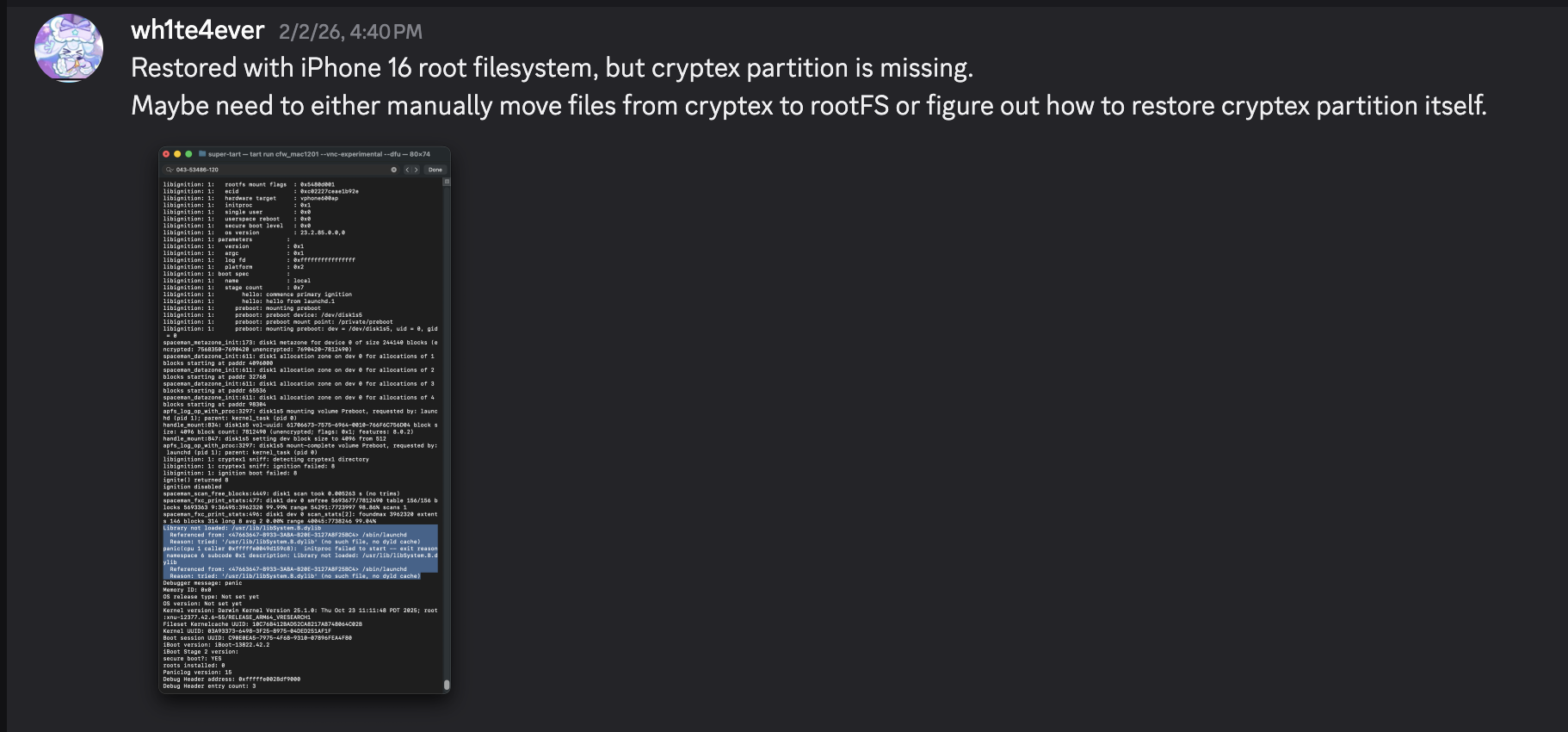
Ci-dessous, une capture d'écran du panic qui se produit si le SEP n'est pas configuré correctement. Si vous l'avez configuré correctement, il devrait passer ce point sans problème.

Une fois la restauration terminée, elle redémarre automatiquement. Cependant, un panic se produit dans le processus launchd car la bibliothèque /usr/lib/libSystem.B.dylib est manquante. Cette bibliothèque se trouve dans le dyld_shared_cache sur la partition Cryptex, et pour une raison inconnue, la partition Cryptex n'a pas pu être restaurée. Comme solution de contournement temporaire, vous devez créer un SSH Ramdisk pour modifier le système de fichiers racine et injecter les fichiers nécessaires. C'est exactement pour cela que le correctif lié à la vérification SSV était nécessaire.


Je vais essayer de résoudre le problème d'échec de démarrage en utilisant le ramdisk utilisé dans https://github.com/verygenericname/SSHRD_Script.
Pour télécharger et charger des composants comme le bootloader ou le noyau à l'aide de l'outil irecovery en mode DFU, une image IMG4 est nécessaire, qui nécessite un fichier IM4M. Par conséquent, j'ai d'abord récupéré le fichier shsh à l'aide de l'outil idevicerestore, puis je l'ai converti en un fichier IM4M.```bash idevicerestore -e -y ./iPhone17,3_26.1_23B85_Restore -t
mv shsh/[ECID]-iPhone99,11-26.1.shsh shsh/[ECID]-iPhone99,11-26.1.shsh.gz
gunzip shsh/[ECID]-iPhone99,11-26.1.shsh.gz
...
pyimg4 im4m extract -i shsh/[ECID]-iPhone99,11-26.1.shsh -o vphone.im4m
Ensuite, en utilisant ce fichier IM4M, j'ai généré plusieurs fichiers IMG4 pour chacun des composants du firmware utilisés, tels que iBSS, iBEC et le devicetree.```python
# 1. Grab & Patch iBSS
if not os.path.exists("iPhone17\\,3_26.1_23B85_Restore/Firmware/dfu/iBSS.vresearch101.RELEASE.im4p.bak"):
os.system("cp iPhone17\\,3_26.1_23B85_Restore/Firmware/dfu/iBSS.vresearch101.RELEASE.im4p iPhone17\\,3_26.1_23B85_Restore/Firmware/dfu/iBSS.vresearch101.RELEASE.im4p.bak")
os.system("tools/img4 -i iPhone17\\,3_26.1_23B85_Restore/Firmware/dfu/iBSS.vresearch101.RELEASE.im4p.bak -o iBSS.vresearch101.RELEASE")
... # patch things from raw
os.system("tools/img4tool -c iBSS.vresearch101.RELEASE.im4p -t ibss iBSS.vresearch101.RELEASE")
os.system("tools/img4 -i iBSS.vresearch101.RELEASE.im4p -o ./Ramdisk/iBSS.vresearch101.RELEASE.img4 -M ./vphone.im4m")
# 2. Grab & Patch iBEC
if not os.path.exists("iPhone17\\,3_26.1_23B85_Restore/Firmware/dfu/iBEC.vresearch101.RELEASE.im4p.bak"):
os.system("cp iPhone17\\,3_26.1_23B85_Restore/Firmware/dfu/iBEC.vresearch101.RELEASE.im4p iPhone17\\,3_26.1_23B85_Restore/Firmware/dfu/iBEC.vresearch101.RELEASE.im4p.bak")
os.system("tools/img4 -i iPhone17\\,3_26.1_23B85_Restore/Firmware/dfu/iBEC.vresearch101.RELEASE.im4p -o iBEC.vresearch101.RELEASE")
... # patch things from raw
os.system("tools/img4tool -c iBEC.vresearch101.RELEASE.im4p -t ibec iBEC.vresearch101.RELEASE")
os.system("tools/img4 -i iBEC.vresearch101.RELEASE.im4p -o Ramdisk/iBEC.vresearch101.RELEASE.img4 -M vphone.im4m")
# 3. Grab SPTM
os.system("tools/img4 -i iPhone17\\,3_26.1_23B85_Restore/Firmware/sptm.vresearch1.release.im4p -o Ramdisk/sptm.vresearch1.release.img4 -M vphone.im4m -T sptm")
# 4. Grab devicetree
os.system("tools/img4 -i iPhone17\\,3_26.1_23B85_Restore/Firmware/all_flash/DeviceTree.vphone600ap.im4p -o Ramdisk/DeviceTree.vphone600ap.img4 -M vphone.im4m -T rdtr")
# 5. Grab sep
os.system("tools/img4 -i iPhone17\\,3_26.1_23B85_Restore/Firmware/all_flash/sep-firmware.vresearch101.RELEASE.im4p -o Ramdisk/sep-firmware.vresearch101.RELEASE.img4 -M vphone.im4m -T rsep")
# 6. Grab & Patch TXM
if not os.path.exists("iPhone17\\,3_26.1_23B85_Restore/Firmware/txm.iphoneos.release.im4p.bak"):
os.system("cp iPhone17\\,3_26.1_23B85_Restore/Firmware/txm.iphoneos.release.im4p iPhone17\\,3_26.1_23B85_Restore/Firmware/txm.iphoneos.release.im4p.bak")
os.system("pyimg4 im4p extract -i iPhone17\\,3_26.1_23B85_Restore/Firmware/txm.iphoneos.release.im4p.bak -o txm.raw")
... # patch things from raw
#create im4p
os.system("pyimg4 im4p create -i txm.raw -o txm.im4p -f trxm --lzfse")
# preserve payp structure
txm_im4p_data = Path('iPhone17,3_26.1_23B85_Restore/Firmware/txm.iphoneos.release.im4p.bak').read_bytes()
payp_offset = txm_im4p_data.rfind(b'PAYP')
if payp_offset == -1:
print("Couldn't find payp structure !!!")
sys.exit()
with open('txm.im4p', 'ab') as f:
f.write(txm_im4p_data[(payp_offset-10):])
payp_sz = len(txm_im4p_data[(payp_offset-10):])
print(f"payp sz: {payp_sz}")
txm_im4p_data = bytearray(open('txm.im4p', 'rb').read())
txm_im4p_data[2:5] = (int.from_bytes(txm_im4p_data[2:5], 'big') + payp_sz).to_bytes(3, 'big')
open('txm.im4p', 'wb').write(txm_im4p_data)
# sign
os.system("pyimg4 img4 create -p txm.im4p -o Ramdisk/txm.img4 -m vphone.im4m")
# 7. Grab & patch kernelcache
if not os.path.exists("iPhone17\\,3_26.1_23B85_Restore/kernelcache.research.vphone600.bak"):
os.system("cp iPhone17\\,3_26.1_23B85_Restore/kernelcache.research.vphone600 iPhone17\\,3_26.1_23B85_Restore/kernelcache.research.vphone600.bak")
os.system("pyimg4 im4p extract -i iPhone17\\,3_26.1_23B85_Restore/kernelcache.research.vphone600.bak -o kcache.raw")
... # patch things from raw
#create im4p
os.system("pyimg4 im4p create -i kcache.raw -o krnl.im4p -f rkrn --lzfse")
# preserve payp structure
kernel_im4p_data = Path('iPhone17,3_26.1_23B85_Restore/kernelcache.research.vphone600.bak').read_bytes()
payp_offset = kernel_im4p_data.rfind(b'PAYP')
if payp_offset == -1:
print("Couldn't find payp structure !!!")
sys.exit()
with open('krnl.im4p', 'ab') as f:
f.write(kernel_im4p_data[(payp_offset-10):])
payp_sz = len(kernel_im4p_data[(payp_offset-10):])
print(f"payp sz: {payp_sz}")
kernel_im4p_data = bytearray(open('krnl.im4p', 'rb').read())
kernel_im4p_data[2:5] = (int.from_bytes(kernel_im4p_data[2:5], 'big') + payp_sz).to_bytes(3, 'big')
open('krnl.im4p', 'wb').write(kernel_im4p_data)
# sign
os.system("pyimg4 img4 create -p krnl.im4p -o Ramdisk/krnl.img4 -m vphone.im4m")
# 8. Grab ramdisk & build custom ramdisk
os.system("pyimg4 im4p extract -i iPhone17,3_26.1_23B85_Restore/043-53775-129.dmg -o ramdisk.dmg")
os.system("mkdir SSHRD")
os.system("sudo hdiutil attach -mountpoint SSHRD ramdisk.dmg -owners off")
os.system("sudo hdiutil create -size 254m -imagekey diskimage-class=CRawDiskImage -format UDZO -fs APFS -layout NONE -srcfolder SSHRD -copyuid root ramdisk1.dmg")
os.system("sudo hdiutil detach -force SSHRD")
os.system("sudo hdiutil attach -mountpoint SSHRD ramdisk1.dmg -owners off")
... #remove unneccessary files for expand space
#resign all things preserving ents
target_path= [
"SSHRD/usr/local/bin/*", "SSHRD/usr/local/lib/*",
"SSHRD/usr/bin/*", "SSHRD/bin/*",
"SSHRD/usr/lib/*", "SSHRD/sbin/*", "SSHRD/usr/sbin/*", "SSHRD/usr/libexec/*"
]
for pattern in target_path:
for path in glob.glob(pattern):
if os.path.isfile(path) and not os.path.islink(path):
if "Mach-O" in subprocess.getoutput(f"file \"{path}\""):
os.system(f"tools/ldid_macosx_arm64 -S -M -Cadhoc \"{path}\"")
#8-2. Grab & build custom ramdisk's trustcache while building custom ramdisk
os.system("pyimg4 im4p extract -i iPhone17,3_26.1_23B85_Restore/Firmware/043-53775-129.dmg.trustcache -o trustcache.raw")
os.system("tools/trustcache_macos_arm64 create sshrd.tc SSHRD")
os.system("pyimg4 im4p create -i sshrd.tc -o trustcache.im4p -f rtsc")
# sign
os.system("pyimg4 img4 create -p trustcache.im4p -o Ramdisk/trustcache.img4 -m vphone.im4m")
#8-2. end
os.system("sudo hdiutil detach -force SSHRD")
os.system("sudo hdiutil resize -sectors min ramdisk1.dmg")
# sign
os.system("pyimg4 im4p create -i ramdisk1.dmg -o ramdisk1.dmg.im4p -f rdsk")
os.system("pyimg4 img4 create -p ramdisk1.dmg.im4p -o Ramdisk/ramdisk.img4 -m vphone.im4m")
Une fois que toutes les images IMG4 sont créées, chargeons-les une par une et amorçons avec le Ramdisk.
sleep 1; irecovery -f Ramdisk/sptm.vresearch1.release.img4 irecovery -c firmware
irecovery -f Ramdisk/txm.img4 irecovery -c firmware
irecovery -f Ramdisk/trustcache.img4 irecovery -c firmware irecovery -f Ramdisk/ramdisk.img4 irecovery -c ramdisk irecovery -f Ramdisk/DeviceTree.vphone600ap.img4 irecovery -c devicetree irecovery -f Ramdisk/sep-firmware.vresearch101.RELEASE.img4 irecovery -c firmware irecovery -f Ramdisk/krnl.img4 irecovery -c bootx
Ensuite, vous verrez le visage de Creeper de Minecraft dans la troisième fenêtre à partir de la gauche, comme illustré ci-dessous.
Si vous vérifiez le menu USB dans l'application System Information et que vous voyez "iPhone Research...", vous pouvez maintenant accéder au shell virtuel de l'iPhone à l'aide de l'outil [iproxy](https://github.com/libimobiledevice/libusbmuxd/blob/master/tools/iproxy.c). (`iproxy 2222 22 &`)

Pour modifier le système de fichiers racine, renommez l'instantané.```python
ssh [email protected] -p2222
#pw: alpine
mount_apfs -o rw /dev/disk1s1 /mnt1
snaputil -l /mnt1
# (then will output will be printed with hash, result may be differ)
com.apple.os.update-8AAB8DBA5C8F1F756928411675F4A892087B04559CFB084B9E400E661ABAD119
snaputil -n <com.apple.os.update-hash> orig-fs /mnt1
umount /mnt1
exit
Décrypter le fichier AEA à l'aide de l'outil ipsw pour créer un fichier dmg, le monter, puis transférer les fichiers de la partition Cryptex vers la machine virtuelle. En plus du transfert de fichiers, des correctifs spécifiques étaient nécessaires. Pour plus de commodité, j'ai ajouté trois processus spécifiques à lancer au démarrage : bash, dropbear et trollvnc.
seputil avait un problème où il ne parvenait pas à trouver correctement le fichier gigalocker, je l'ai donc corrigé pour qu'il cherche toujours AA.gl. De plus, j'ai corrigé launchd_cache_loader pour garantir que le fichier /System/Library/xpc/launchd.plist modifié se charge correctement.```python ... ========= INSTALL CRYPTEX(SystemOS, AppOS) =========
key = subprocess.check_output("ipsw fw aea --key iPhone17,3_26.1_23B85_Restore/043-54303-126.dmg.aea", shell=True, text=True).strip() print(f"key: {key}") os.system(f"aea decrypt -i iPhone17,3_26.1_23B85_Restore/043-54303-126.dmg.aea -o CryptexSystemOS.dmg -key-value '{key}'")
os.system(f"cp iPhone17,3_26.1_23B85_Restore/043-54062-129.dmg CryptexAppOS.dmg")
os.system("mkdir CryptexSystemOS") os.system("sudo hdiutil attach -mountpoint CryptexSystemOS CryptexSystemOS.dmg -owners off")
os.system("mkdir CryptexAppOS") os.system("sudo hdiutil attach -mountpoint CryptexAppOS CryptexAppOS.dmg -owners off")
remote_cmd("/sbin/mount_apfs -o rw /dev/disk1s1 /mnt1")
remote_cmd("/bin/rm -rf /mnt1/System/Cryptexes/App") remote_cmd("/bin/rm -rf /mnt1/System/Cryptexes/OS")
remote_cmd("/bin/mkdir -p /mnt1/System/Cryptexes/App") remote_cmd("/bin/chmod 0755 /mnt1/System/Cryptexes/App") remote_cmd("/bin/mkdir -p /mnt1/System/Cryptexes/OS") remote_cmd("/bin/chmod 0755 /mnt1/System/Cryptexes/OS")
print("Copying cryptexs to vphone! Will take about 3 mintues...") os.system("tools/sshpass -p 'alpine' scp -q -r -ostricthostkeychecking=false -ouserknownhostsfile=/dev/null -o StrictHostKeyChecking=no -P 2222 CryptexSystemOS/. '[email protected]:/mnt1/System/Cryptexes/OS'") os.system("tools/sshpass -p 'alpine' scp -q -r -ostricthostkeychecking=false -ouserknownhostsfile=/dev/null -o StrictHostKeyChecking=no -P 2222 CryptexAppOS/. '[email protected]:/mnt1/System/Cryptexes/App'")
remote_cmd("/bin/ln -sf ../../../System/Cryptexes/OS/System/Library/Caches/com.apple.dyld /mnt1/System/Library/Caches/com.apple.dyld")
remote_cmd("/bin/ln -sf ../../../../System/Cryptexes/OS/System/DriverKit/System/Library/dyld /mnt1/System/DriverKit/System/Library/dyld")
os.system("rm custom_26.1/seputil 2>/dev/null") os.system("rm custom_26.1/seputil.bak 2>/dev/null")
file_path = "/mnt1/usr/libexec/seputil.bak" if not check_remote_file_exists(file_path): print(f"Created backup {file_path}") remote_cmd("/bin/cp /mnt1/usr/libexec/seputil /mnt1/usr/libexec/seputil.bak")
os.system("tools/sshpass -p 'alpine' scp -q -o StrictHostKeyChecking=no -o UserKnownHostsFile=/dev/null -P 2222 [email protected]:/mnt1/usr/libexec/seputil.bak ./custom_26.1") os.system("mv custom_26.1/seputil.bak custom_26.1/seputil")
fp = open("custom_26.1/seputil", "r+b") patch(0x1B3F1, "AA") fp.close()
os.system("tools/ldid_macosx_arm64 -S -M -Ksigncert.p12 -Icom.apple.seputil custom_26.1/seputil")
os.system("tools/sshpass -p 'alpine' scp -q -r -ostricthostkeychecking=false -ouserknownhostsfile=/dev/null -o StrictHostKeyChecking=no -P 2222 custom_26.1/seputil '[email protected]:/mnt1/usr/libexec/seputil'") remote_cmd("/bin/chmod 0755 /mnt1/usr/libexec/seputil")
os.system("rm custom_26.1/seputil 2>/dev/null")
remote_cmd("/sbin/mount_apfs -o rw /dev/disk1s3 /mnt3") remote_cmd("/bin/mv /mnt3/*.gl /mnt3/AA.gl")
... # ========= INSTALL AppleParavirtGPUMetalIOGPUFamily =========
os.system("tools/sshpass -p 'alpine' scp -q -r -ostricthostkeychecking=false -ouserknownhostsfile=/dev/null -o StrictHostKeyChecking=no -P 2222 jb/iosbinpack64.tar '[email protected]:/mnt1'")
remote_cmd("/usr/bin/tar --preserve-permissions --no-overwrite-dir -xvf /mnt1/iosbinpack64.tar -C /mnt1") remote_cmd("/bin/rm /mnt1/iosbinpack64.tar")
''' /iosbinpack64/bin/mkdir -p /var/dropbear /iosbinpack64/bin/cp /iosbinpack64/etc/profile /var/profile /iosbinpack64/bin/cp /iosbinpack64/etc/motd /var/motd '''
os.system("rm custom_26.1/launchd_cache_loader 2>/dev/null") os.system("rm custom_26.1/launchd_cache_loader.bak 2>/dev/null")
file_path = "/mnt1/usr/libexec/launchd_cache_loader.bak" if not check_remote_file_exists(file_path): print(f"Created backup {file_path}") remote_cmd("/bin/cp /mnt1/usr/libexec/launchd_cache_loader /mnt1/usr/libexec/launchd_cache_loader.bak")
os.system("tools/sshpass -p 'alpine' scp -q -o StrictHostKeyChecking=no -o UserKnownHostsFile=/dev/null -P 2222 [email protected]:/mnt1/usr/libexec/launchd_cache_loader.bak ./custom_26.1") os.system("mv custom_26.1/launchd_cache_loader.bak custom_26.1/launchd_cache_loader")
fp = open("custom_26.1/launchd_cache_loader", "r+b") patch(0xB58, 0xd503201f) fp.close()
os.system("tools/ldid_macosx_arm64 -S -M -Ksigncert.p12 -Icom.apple.launchd_cache_loader custom_26.1/launchd_cache_loader")
os.system("tools/sshpass -p 'alpine' scp -q -r -ostricthostkeychecking=false -ouserknownhostsfile=/dev/null -o StrictHostKeyChecking=no -P 2222 custom_26.1/launchd_cache_loader '[email protected]:/mnt1/usr/libexec/launchd_cache_loader'") remote_cmd("/bin/chmod 0755 /mnt1/usr/libexec/launchd_cache_loader")
os.system("rm custom_26.1/launchd_cache_loader 2>/dev/null")
os.system("tools/sshpass -p 'alpine' scp -q -r -ostricthostkeychecking=false -ouserknownhostsfile=/dev/null -o StrictHostKeyChecking=no -P 2222 jb/LaunchDaemons/bash.plist '[email protected]:/mnt1/System/Library/LaunchDaemons'") os.system("tools/sshpass -p 'alpine' scp -q -r -ostricthostkeychecking=false -ouserknownhostsfile=/dev/null -o StrictHostKeyChecking=no -P 2222 jb/LaunchDaemons/dropbear.plist '[email protected]:/mnt1/System/Library/LaunchDaemons'") os.system("tools/sshpass -p 'alpine' scp -q -r -ostricthostkeychecking=false -ouserknownhostsfile=/dev/null -o StrictHostKeyChecking=no -P 2222 jb/LaunchDaemons/trollvnc.plist '[email protected]:/mnt1/System/Library/LaunchDaemons'") remote_cmd("/bin/chmod 0644 /mnt1/System/Library/LaunchDaemons/bash.plist") remote_cmd("/bin/chmod 0644 /mnt1/System/Library/LaunchDaemons/dropbear.plist") remote_cmd("/bin/chmod 0644 /mnt1/System/Library/LaunchDaemons/trollvnc.plist")
os.system("rm custom_26.1/launchd.plist 2>/dev/null") os.system("rm custom_26.1/launchd.plist.bak 2>/dev/null")
file_path = "/mnt1/System/Library/xpc/launchd.plist.bak" if not check_remote_file_exists(file_path): print(f"Created backup {file_path}") remote_cmd("/bin/cp /mnt1/System/Library/xpc/launchd.plist /mnt1/System/Library/xpc/launchd.plist.bak")
os.system("tools/sshpass -p 'alpine' scp -q -o StrictHostKeyChecking=no -o UserKnownHostsFile=/dev/null -P 2222 [email protected]:/mnt1/System/Library/xpc/launchd.plist.bak ./custom_26.1") os.system("mv custom_26.1/launchd.plist.bak custom_26.1/launchd.plist")
os.system("plutil -convert xml1 custom_26.1/launchd.plist")
target_file = 'custom_26.1/launchd.plist' source_file = 'jb/LaunchDaemons/bash.plist' insert_key = '/System/Library/LaunchDaemons/bash.plist'
with open(target_file, 'rb') as ft, open(source_file, 'rb') as fs: target_data = plistlib.load(ft) source_data = plistlib.load(fs)
target_data.setdefault('LaunchDaemons', {})[insert_key] = source_data
with open(target_file, 'wb') as f: plistlib.dump(target_data, f, sort_keys=False)
source_file = 'jb/LaunchDaemons/dropbear.plist' insert_key = '/System/Library/LaunchDaemons/dropbear.plist'
with open(target_file, 'rb') as ft, open(source_file, 'rb') as fs: target_data = plistlib.load(ft) source_data = plistlib.load(fs)
target_data.setdefault('LaunchDaemons', {})[insert_key] = source_data
with open(target_file, 'wb') as f: plistlib.dump(target_data, f, sort_keys=False)
source_file = 'jb/LaunchDaemons/trollvnc.plist' insert_key = '/System/Library/LaunchDaemons/trollvnc.plist'
with open(target_file, 'rb') as ft, open(source_file, 'rb') as fs: target_data = plistlib.load(ft) source_data = plistlib.load(fs)
target_data.setdefault('LaunchDaemons', {})[insert_key] = source_data
with open(target_file, 'wb') as f: plistlib.dump(target_data, f, sort_keys=False)
os.system("tools/sshpass -p 'alpine' scp -q -r -ostricthostkeychecking=false -ouserknownhostsfile=/dev/null -o StrictHostKeyChecking=no -P 2222 custom_26.1/launchd.plist '[email protected]:/mnt1/System/Library/xpc'") remote_cmd("/bin/chmod 0644 /mnt1/System/Library/xpc/launchd.plist")
os.system("rm custom_26.1/launchd.plist 2>/dev/null")
... remote_cmd("/sbin/halt") ...
# Première tentative de démarrage
Le processus de démarrage devrait maintenant fonctionner correctement, mais lorsque vous essayez de passer l'écran noir de configuration, il redémarre et ne va pas plus loin.


# Implémentation de Metal
Lors de la vérification avec un programme personnalisé appelé MetalTest, il indique que Metal n'est pas pris en charge.```python
#import <stdio.h>
#import <Metal/Metal.h>
#import <Foundation/Foundation.h>
int main(int argc, char *argv[], char *envp[]) {
id<MTLDevice> device = MTLCreateSystemDefaultDevice();
NSLog(@"device: %@", device);
if (device) {
NSLog(@"Metal Device Create Success: %@", [device name]);
} else {
NSLog(@"Metal Not Supported!");
}
return 0;
}
Normalement, le résultat aurait dû ressembler à ce qui suit.```python
seo@seos-Virtual-Machine Desktop % sysctl kern.version
kern.version: Darwin Kernel Version 25.0.0: Mon Aug 25 21:17:21 PDT 2025; root:xnu-12377.1.9~3/RELEASE_ARM64_VMAPPLE
seo@seos-Virtual-Machine Desktop % ./MetalTest
2026-02-08 23:16:56.846 MetalTest[682:5810] device: <AppleParavirtDevice: 0x102c48fe0>
name = Apple Paravirtual device
2026-02-08 23:16:56.847 MetalTest[682:5810] Metal Device Create Success: Apple Paravirtual device
seo@seos-Virtual-Machine Desktop %
En vérifiant avec ioreg -l, comme vous pouvez le voir, le noyau reconnaissait effectivement AppleParavirtGPU.

En vérifiant sur un iPad 7e génération sous iOS 16.6.1, l'appel de la fonction MTLCreateSystemDefaultDevice accède en interne au pilote IOGPU via une bibliothèque spécifique appelée AGXMetalA10. Cette bibliothèque AGXMetalA10 se trouve dans /System/Library/Extensions.
Une pensée m'a soudain traversé l'esprit ici : n'y aurait-il pas aussi des bibliothèques liées au GPU/Metal utilisées pour l'iPhone virtuel ?

En vérifiant ce même chemin dans la machine virtuelle PCC, on découvre que 7 fichiers y existent.
J'ai pris le /System/Library/Extensions/AppleParavirtGPUMetalIOGPUFamily.bundle utilisé dans PCC et je l'ai placé directement dans l'iPhone virtuel. (J'ai utilisé le Ramdisk SSH pour cela.)

En vérifiant à nouveau MetalTest, la fonction MTLCreateSystemDefaultDevice fonctionne désormais correctement.

Cependant, comme un fichier dylib spécifique n'existe pas dans le dsc (cache partagé dyld) du modèle iPhone 16, j'ai dû le rétro-concevoir et l'implémenter séparément à partir du dsc du PCC.


Une fois implémenté, vous êtes maintenant accueilli par l'écran de configuration avec un fond d'écran. Comme je n'ai pas pu implémenter correctement le bouton d'accueil, j'ai résolu ce problème en utilisant une solution de contournement temporaire en le contrôlant via iproxy/VNC.

Il est uniquement compatible avec les Mac Apple Silicon, et les appareils/versions confirmés comme fonctionnant sont les suivants :
Je m'attends à ce que cela fonctionne probablement sur toute cible prenant en charge pccvre.

Source : https://security.apple.com/documentation/private-cloud-compute/vresetup
Contrairement à Tahoe version 26, l'interaction tactile n'est pas possible en utilisant uniquement l'objet VZVirtualMachineView, il a donc été nécessaire de remplacer les fonctions d'événements de souris.
// Display let graphics_config = VZMacGraphicsDeviceConfiguration() let displays_config = VZMacGraphicsDisplayConfiguration( widthInPixels: 1179, heightInPixels: 2556, pixelsPerInch: 460 ) graphics_config.displays.append(displays_config) configuration.graphicsDevices = [graphics_config] ...