 urbanadventurer/android-pin-bruteforce
Déverrouillez un téléphone Android (ou un appareil) en bruteforçant le code PIN de l'écran de verrouillage. Transformez votre téléphone Kali Nethunter en un crackeur de code PIN par force brute pour les appareils Android ! (pas de root, pas d'adb)

Déverrouillez un téléphone Android (ou tout appareil) en forçant brutalement le code PIN de l'écran de verrouillage.
Transformez votre téléphone Kali Nethunter en un outil de craquage de code PIN par force brute pour appareils Android !
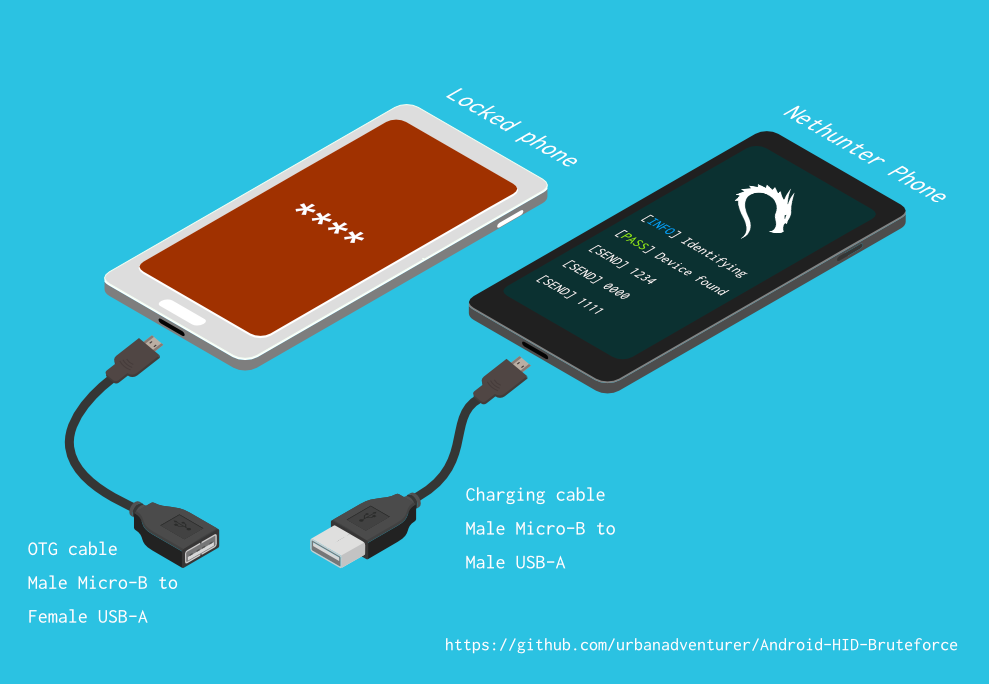
Il utilise un câble USB OTG pour connecter le téléphone verrouillé à l'appareil Nethunter. Il émule un clavier, essaie automatiquement des codes PIN et attend après avoir tenté trop de mauvaises suppositions.
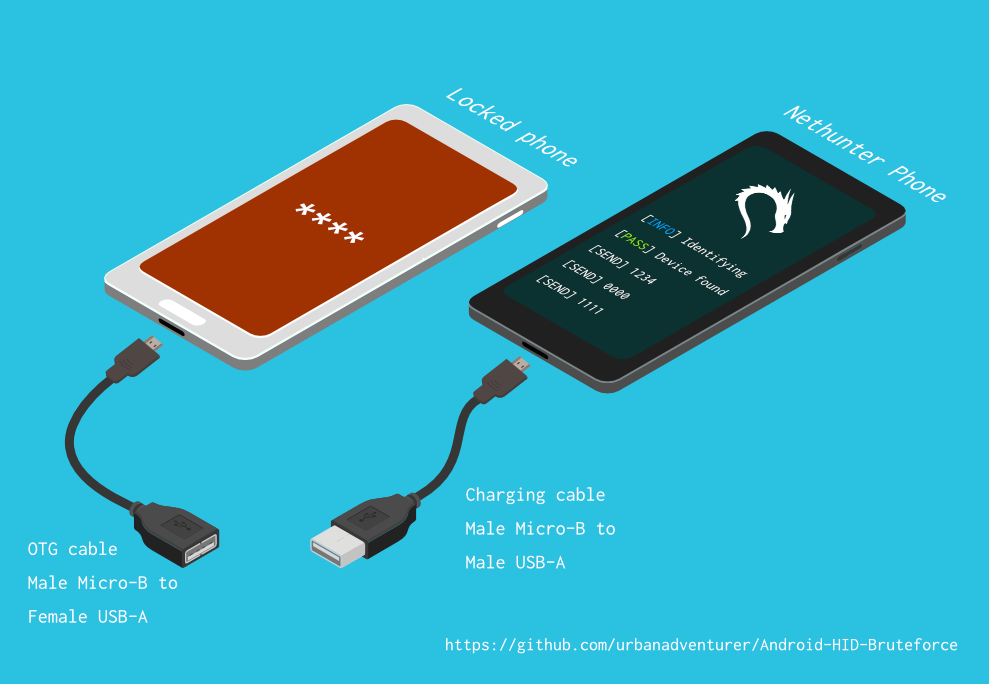
[Nethunter phone] <--> [USB cable] <--> [USB OTG adaptor] <--> [Locked Android phone]
Le pilote USB HID Gadget permet l'émulation des périphériques d'interface humaine USB (HID). Cela permet à un appareil Android Nethunter d'émuler une entrée clavier sur le téléphone verrouillé. C'est comme brancher un clavier sur le téléphone verrouillé et appuyer sur des touches.
⏱ Cela prend un peu plus de 16,6 heures avec un Samsung S5 pour essayer tous les codes PIN à 4 chiffres possibles, mais avec la liste de codes PIN optimisée, cela devrait vous prendre beaucoup moins de temps.
À déterminer
Si vous avez installé le script dans /sdcard/, vous pouvez l'exécuter avec la commande suivante.bash ./android-pin-bruteforce
Note that Android mounts /sdcard with the noexec flag. You can verify this with mount.
Android-PIN-Bruteforce (0.2) est utilisé pour déverrouiller un téléphone Android (ou appareil) en bruteforçant le code PIN de l'écran de verrouillage.
  Plus d'informations sur : https://github.com/urbanadventurer/Android-PIN-Bruteforce

Commandes :
  crack                Démarrer le cassage des codes PIN
  resume               Reprendre à partir d'un code PIN choisi
  rewind               Casser les codes PIN en sens inverse à partir d'un code PIN choisi
  diag                 Afficher les informations de diagnostic
  version              Afficher les informations de version et quitter

Options :
  -f, --from PIN       Reprendre à partir de ce code PIN
  -a, --attempts       Démarrer à partir de NUM tentatives incorrectes
  -m, --mask REGEX     Utiliser un masque pour les chiffres connus du code PIN
  -t, --type TYPE      Choisir le cassage de code PIN ou de MOTIF
  -l, --length NUM     Casser les codes PIN de longueur NUM
  -c, --config FILE    Spécifier le fichier de configuration à charger
  -p, --pinlist FILE   Spécifier une liste de codes PIN personnalisée
  -d, --dry-run        Simulation pour test. N'envoie aucune touche.
  -v, --verbose        Afficher les journaux détaillés

Utilisation :
  android-pin-bruteforce <commande> [options]```


## Supported Android Phones/Devices

This has been successfully tested with various phones including the Samsung S5, S7, Motorola G4 Plus and G5 Plus.

It can unlock Android versions 6.0.1 through to 10.0. The ability to perform a bruteforce attack doesn't depend on the Android version in use. It depends on how the device vendor developed their own lockscreen.

Check the Phone Database for more details
https://github.com/urbanadventurer/Android-PIN-Bruteforce/wiki/Phone-Database

## 🎳 PIN Lists

Optimised PIN lists are used by default unless the user selects a custom PIN list.

### Cracking PINs of different lengths

Use the `--length` commandline option.

Use this command to crack a 3 digit PIN,
`./android-pin-bruteforce crack --length 3`

Use this command to crack a 6 digit PIN
`./android-pin-bruteforce crack --length 6`

### Where did the optimised PIN lists come from?

The optimised PIN lists were generated by extracting numeric passwords from database leaks then sorting by frequency. All PINs that did not appear in the password leaks were appended to the list.

The optimised PIN lists were generated from *Ga$$Pacc DB Leak* (21GB decompressed, 688M Accounts, 243 Databases, 138920 numeric passwords).

#### The 4 digit PIN list

The reason that the 4 digit PIN list is used from a different source is because it gives better results than the generated list from *Ga$$Pacc DB Leak*.

`optimised-pin-length-4.txt` is an optimised list of all possible 4 digit PINs, sorted by order of likelihood.
It can be found with the filename `pinlist.txt` at https://github.com/mandatoryprogrammer/droidbrute

This list is used with permission from Justin Engler & Paul Vines from Senior Security Engineer, iSEC Partners,
and was used in their Defcon talk, [Electromechanical PIN Cracking with Robotic Reconfigurable Button Basher (and C3BO)](https://www.defcon.org/html/defcon-21/dc-21-speakers.html#Engler)

### Cracking with Masks

Masks use regular expressions with the standard grep extended format.

`./android-pin-bruteforce crack --mask "...[45]" --dry-run`

- To try all years from 1900 to 1999, use a mask of `19..`
- To try PINs that have a 1 in the first digit, and a 1 in the last digit, use a mask of `1..1`
- To try PINs that end in 4 or 5, use `...[45]`

## 📱 Configuration for different phones

Device manufacturers create their own lock screens that are different to the default or stock Android.
To find out what keys your phone needs, plug a keyboard into the phone and try out different combinations.

Load a different configuration file, with the `--config FILE` commandline parameter.

Example:
`./android-pin-bruteforce --config ./config.samsung.s5 crack`

You can also edit the `config` file by customising the timing and keys sent.

The following configuration variables can be used to support a different phone's lockscreen.
DELAY_BETWEEN_KEYS=0.25
PROGRESSIVE_ARRAY_ATTEMPT_COUNT__________=(1 11 41) PROGRESSIVE_ARRAY_ATTEMPTS_UNTIL_COOLDOWN=(5 1 1) PROGRESSIVE_ARRAY_COOLDOWN_IN_SECONDS____=(30 30 60)
