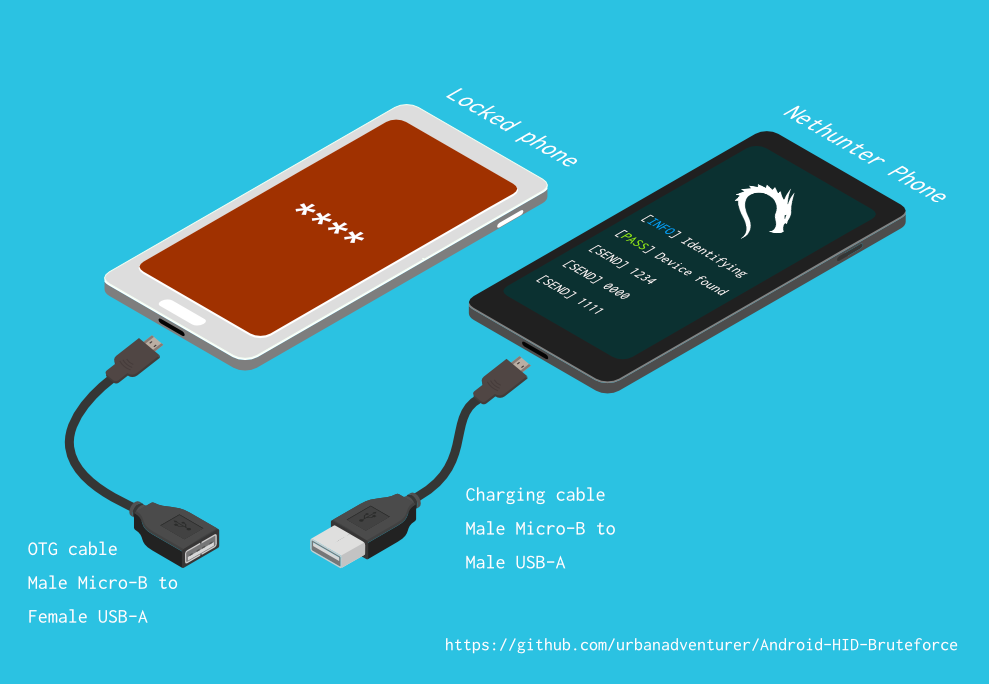

Déverrouillez un téléphone Android (ou un appareil) en bruteforçant le code PIN de l'écran de verrouillage. Transformez votre téléphone Kali Nethunter en un crackeur de code PIN par force brute pour les appareils Android ! (pas de root, pas d'adb)
Déverrouillez un téléphone Android (ou tout appareil) en forçant brutalement le code PIN de l'écran de verrouillage.
Transformez votre téléphone Kali Nethunter en un outil de craquage de code PIN par force brute pour appareils Android !
Il utilise un câble USB OTG pour connecter le téléphone verrouillé à l'appareil Nethunter. Il émule un clavier, essaie automatiquement des codes PIN et attend après avoir tenté trop de mauvaises suppositions.
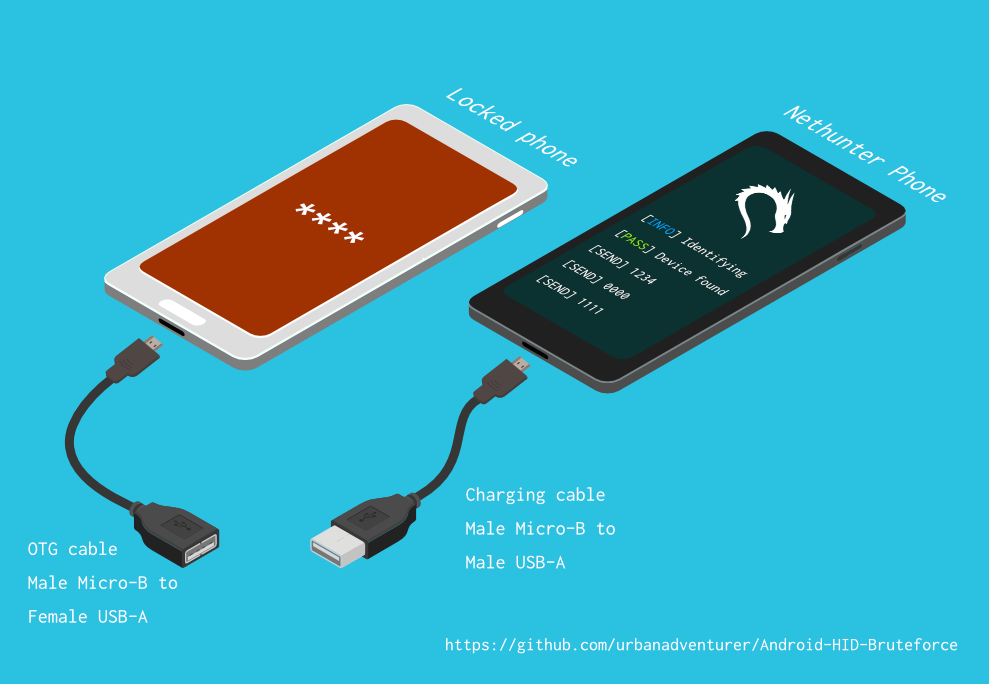
[Nethunter phone] <--> [USB cable] <--> [USB OTG adaptor] <--> [Locked Android phone]
Le pilote USB HID Gadget permet l'émulation des périphériques d'interface humaine USB (HID). Cela permet à un appareil Android Nethunter d'émuler une entrée clavier sur le téléphone verrouillé. C'est comme brancher un clavier sur le téléphone verrouillé et appuyer sur des touches.
⏱ Cela prend un peu plus de 16,6 heures avec un Samsung S5 pour essayer tous les codes PIN à 4 chiffres possibles, mais avec la liste de codes PIN optimisée, cela devrait vous prendre beaucoup moins de temps.
À déterminer
Si vous avez installé le script dans /sdcard/, vous pouvez l'exécuter avec la commande suivante.bash ./android-pin-bruteforce
Note that Android mounts /sdcard with the noexec flag. You can verify this with mount.
Android-PIN-Bruteforce (0.2) est utilisé pour déverrouiller un téléphone Android (ou appareil) en bruteforçant le code PIN de l'écran de verrouillage.
Plus d'informations sur : https://github.com/urbanadventurer/Android-PIN-Bruteforce
Commandes :
crack Démarrer le cassage des codes PIN
resume Reprendre à partir d'un code PIN choisi
rewind Casser les codes PIN en sens inverse à partir d'un code PIN choisi
diag Afficher les informations de diagnostic
version Afficher les informations de version et quitter
Options :
-f, --from PIN Reprendre à partir de ce code PIN
-a, --attempts Démarrer à partir de NUM tentatives incorrectes
-m, --mask REGEX Utiliser un masque pour les chiffres connus du code PIN
-t, --type TYPE Choisir le cassage de code PIN ou de MOTIF
-l, --length NUM Casser les codes PIN de longueur NUM
-c, --config FILE Spécifier le fichier de configuration à charger
-p, --pinlist FILE Spécifier une liste de codes PIN personnalisée
-d, --dry-run Simulation pour test. N'envoie aucune touche.
-v, --verbose Afficher les journaux détaillés
Utilisation :
android-pin-bruteforce <commande> [options]```
## Supported Android Phones/Devices
This has been successfully tested with various phones including the Samsung S5, S7, Motorola G4 Plus and G5 Plus.
It can unlock Android versions 6.0.1 through to 10.0. The ability to perform a bruteforce attack doesn't depend on the Android version in use. It depends on how the device vendor developed their own lockscreen.
Check the Phone Database for more details
https://github.com/urbanadventurer/Android-PIN-Bruteforce/wiki/Phone-Database
## 🎳 PIN Lists
Optimised PIN lists are used by default unless the user selects a custom PIN list.
### Cracking PINs of different lengths
Use the `--length` commandline option.
Use this command to crack a 3 digit PIN,
`./android-pin-bruteforce crack --length 3`
Use this command to crack a 6 digit PIN
`./android-pin-bruteforce crack --length 6`
### Where did the optimised PIN lists come from?
The optimised PIN lists were generated by extracting numeric passwords from database leaks then sorting by frequency. All PINs that did not appear in the password leaks were appended to the list.
The optimised PIN lists were generated from *Ga$$Pacc DB Leak* (21GB decompressed, 688M Accounts, 243 Databases, 138920 numeric passwords).
#### The 4 digit PIN list
The reason that the 4 digit PIN list is used from a different source is because it gives better results than the generated list from *Ga$$Pacc DB Leak*.
`optimised-pin-length-4.txt` is an optimised list of all possible 4 digit PINs, sorted by order of likelihood.
It can be found with the filename `pinlist.txt` at https://github.com/mandatoryprogrammer/droidbrute
This list is used with permission from Justin Engler & Paul Vines from Senior Security Engineer, iSEC Partners,
and was used in their Defcon talk, [Electromechanical PIN Cracking with Robotic Reconfigurable Button Basher (and C3BO)](https://www.defcon.org/html/defcon-21/dc-21-speakers.html#Engler)
### Cracking with Masks
Masks use regular expressions with the standard grep extended format.
`./android-pin-bruteforce crack --mask "...[45]" --dry-run`
- To try all years from 1900 to 1999, use a mask of `19..`
- To try PINs that have a 1 in the first digit, and a 1 in the last digit, use a mask of `1..1`
- To try PINs that end in 4 or 5, use `...[45]`
## 📱 Configuration for different phones
Device manufacturers create their own lock screens that are different to the default or stock Android.
To find out what keys your phone needs, plug a keyboard into the phone and try out different combinations.
Load a different configuration file, with the `--config FILE` commandline parameter.
Example:
`./android-pin-bruteforce --config ./config.samsung.s5 crack`
You can also edit the `config` file by customising the timing and keys sent.
The following configuration variables can be used to support a different phone's lockscreen.
DELAY_BETWEEN_KEYS=0.25
PROGRESSIVE_ARRAY_ATTEMPT_COUNT__________=(1 11 41) PROGRESSIVE_ARRAY_ATTEMPTS_UNTIL_COOLDOWN=(5 1 1) PROGRESSIVE_ARRAY_COOLDOWN_IN_SECONDS____=(30 30 60)
SEND_KEYS_DISMISS_POPUPS_N_SECONDS_BEFORE_COOLDOWN_END=5
SEND_KEYS_DISMISS_POPUPS_AT_COOLDOWN_END="enter enter enter"
KEYS_BEFORE_EACH_PIN="escape enter"
KEYS_STAY_AWAKE_DURING_COOLDOWN="enter"
SEND_KEYS_STAY_AWAKE_DURING_COOLDOWN_EVERY_N_SECONDS=5
DELAY_BEFORE_STARTING=2
KEYS_BEFORE_STARTING="enter"```
We send keys before the end of the cooldown period, or optionally during the cooldown period. This is to keep the lockscreen app active and to dismiss any popups about the number of incorrect PIN attempts or a low battery warning.
Use ssh from your laptop to the NetHunter phone, and use this command to test sending keys:
In this example, the enter key is sent.
echo "enter" | /system/xbin/hid-keyboard /dev/hidg0 keyboard
In this example, ctrl-escape is sent.
echo "left-ctrl escape" | /system/xbin/hid-keyboard /dev/hidg0 keyboard
Note: Sending combinations of keys in config file variables is different. Currently only ctrl_escape is supported.
In this example, keys a, b, c are sent.
echo a b c | /system/xbin/hid-keyboard /dev/hidg0 keyboard
This Android app is a virtual USB Keyboard that you can use to test sending keys.
https://store.nethunter.com/en/packages/remote.hid.keyboard.client/
Use this list for the following variables:
To send special keys use the following labels. This list can be found in the hid_gadget_test source code.
To send more than one key at the same time, use the following list:
If you need more key combinations please open a new issue in the GitHub issues list.
The following section of the config file controls the progressive cooldown.
## Les variables PROGRESSIVE_COOLDOWN_ARRAY agissent comme un tableau multidimensionnel pour personnaliser le refroidissement progressif
## PROGRESSIVE_ARRAY_ATTEMPT_COUNT__________ est le numéro de tentative
## PROGRESSIVE_ARRAY_ATTEMPTS_UNTIL_COOLDOWN est le nombre de tentatives avant le refroidissement
## PROGRESSIVE_ARRAY_COOLDOWN_IN_SECONDS____ est le délai de refroidissement en secondes
PROGRESSIVE_ARRAY_ATTEMPT_COUNT__________=(1 11 41)
PROGRESSIVE_ARRAY_ATTEMPTS_UNTIL_COOLDOWN=(5 1 1)
PROGRESSIVE_ARRAY_COOLDOWN_IN_SECONDS____=(30 30 60)```
The array is the same as this table.
| attempt number | attempts until cooldown | cooldown |
| ---------------- | ------------------------ | ---------- |
| 1 | 5 | 30 |
| 11 | 1 | 30 |
| 41 | 1 | 60 |
### Why can't you use a laptop, or is a Windows or Linux version coming soon?
This script works by emulating USB Human Interface Devices (HID), in this case it is keyboard and mouse input. Laptops have uni-directional USB ports and an Android mobile device/ phone has a bi-directional USB port. A bi-directional port is required to emulate a keyboard.
This might change in the future as USB-C is supposed to be uni-directional.
### How Android emulates a keyboard
Keys are sent using `/system/xbin/hid-keyboard`. To test this and send the key 1 you can use `echo 1 | /system/xbin/hid-keyboard dev/hidg0 keyboard`
In Kali Nethunter, `/system/xbin/hid-keyboard` is a compiled copy of `hid_gadget_test.c`. This is a small program for testing the HID gadget driver that is included in the Linux Kernel. The source code for this file can be found at https://www.kernel.org/doc/html/latest/usb/gadget_hid.html and https://github.com/aagallag/hid_gadget_test.
## 🔧 Troubleshooting
### If it is not bruteforcing PINs
#### Check the orientation of the cables
The Nethunter phone should have a regular USB cable attached, while the locked phone should have an OTG adaptor attached.
The OTG cable should be connected to the locked Android phone. The regular USB cable should be connected to the Nethunter phone.
Refer to the graphic on how to connect the phones.
#### Check it is emulating a keyboard
You can verify that the NetHunter phone is succesfully emulating a keyboard by connecting it to a computer using a regular charging/data USB cable. Open a text editor like Notepad while it is cracking and you should see it entering PIN numbers into the text editor.
Note that you will not need an OTG cable for this.
#### Try restarting the phones
Try powering off the phones and even taking out the batteries if that is possible.
#### Try new cables
Try using new cables/adaptors as you may have a faulty cable/adaptor.
### If it doesn't unlock the phone with a correct PIN
You might be sending keys too fast for the phone to process. Increase the DELAY_BETWEEN_KEYS variable in the config file.
💡 If you don't see 4 dots come up on the phone's screen then maybe it is not receiving 4 keys.
### 🔋 Managing Power Consumption
If your phone runs out of power too soon, follow these steps:
- Make sure both phones are fully charged to 100% before you begin
- Reduce the screen brightness on both the victim phone and NetHunter phone if possible
- Place both phones into Airplane mode, however you may want to enable WiFi to access the NetHunter phone via SSH.
- The locked phone will power the NetHunter phone, because it appears as a keyboard accessory
- Use a USB OTG cable with a Y splitter for an external power supply, to allow charging of the NetHunter phone while cracking
- Take breaks to charge your devices. Pause the script with CTRL-Z and resume with the `fg` shell command.
- Avoid the SEND_KEYS_STAY_AWAKE_DURING_COOLDOWN_EVERY_N_SECONDS configuration option. This will cause the locked phone to use more battery to keep the screen powered. Instead use the SEND_KEYS_DISMISS_POPUPS_N_SECONDS_BEFORE_COOLDOWN_END option (Default).
### Check the Diagnostics Report
Use the command `diag` display diagnostic information.
```bash ./android-pin-bruteforce diag```
Si vous recevez ce message lorsque le câble USB est branché, essayez de retirer la batterie du téléphone Android verrouillé et de le redémarrer.```[FAIL] HID USB device not ready. Return code from /system/xbin/hid-keyboard was 5.```
### How the usb-devices command works
The diagnostics command uses the `usb-devices` script but it is only necessary as part of determining whether the USB cables are incorrectly connected. This can be downloaded from
https://github.com/gregkh/usbutils/blob/master/usb-devices
### Use verbose output
Use the `--verbose` option to check the configuration is as expected. This is especially useful when you are modifying the configuration.
### Use the dry-run
Use the `--dry-run` option to check how it operates without sending any keys to a device. This is especially useful when you are modifying the configuration or during development.
Dry run will:
- Not send any keys
- Will continue instead of aborting if the `KEYBOARD_DEVICE` or `HID_KEYBOARD` is missing.
### HID USB Mode
Try this command in a shell on the NetHunter phone:
```/system/bin/setprop sys.usb.config hid```
## 💣 Problèmes connus
- Il n'est pas possible de détecter quand le bon code PIN est deviné et que le téléphone se déverrouille.
- Vos téléphones peuvent manquer de batterie 🔋 avant que le code PIN correct ne soit trouvé.
- Ne faites pas confiance aux fichiers de configuration téléphonique provenant de sources inconnues sans les avoir examinés au préalable. Les fichiers de configuration sont des scripts shell et peuvent contenir des commandes malveillantes.
## 🚀 Feuille de route
- [FAIT] Fonctionne
- [FAIT] Détecte les échecs USB HID
- [FAIT] Amélioration de l'utilisation et des options de ligne de commande/fichiers de configuration
- [FAIT] Ajout du bruteforce pour les codes PIN à n chiffres
- [FAIT] Masque pour les chiffres connus
- [FAIT] Crack de la liste PIN en ordre inverse (pour trouver quel code PIN récent a déverrouillé l'appareil)
- [FAIT] Implémentation d'une invite de verrouillage configurable
- [FAIT] Implémentation du changement de temps d'attente après 10 tentatives
- [EN COURS] Trouver/tester plus d'appareils à bruteforcer
- Ajouter une barre de progression
- Ajouter une estimation de temps restant
- Art ASCII
- Interface graphique plus agréable pour NetHunter
- Implémenter pour iPhone
- Détecter quand un téléphone est déverrouillé (Utiliser la caméra de Nethunter comme capteur ?)
- Crack des schémas Android (essayer d'abord les schémas courants)
## 🙋 Contribuer
Les demandes de fusion (pull requests) sont les bienvenues. Pour les changements majeurs, veuillez d'abord ouvrir une issue pour discuter de ce que vous souhaitez modifier.
N'oubliez pas de mettre à jour les tests en conséquence.
## 😎 Auteurs et remerciements
Développé par Andrew Horton (@urbanadventurer).
👏 Les personnes suivantes ont été très utiles :
- Vlad Filatov (@v1adf) : Test de nombreux téléphones pour la base de données de téléphones Wiki
### Motivation
Ma motivation initiale pour développer cet outil était de déverrouiller un téléphone Samsung S5 Android. Il avait appartenu à une personne décédée, et sa famille avait besoin d'accéder aux données qu'il contenait. Comme je n'avais pas de USB Rubber Ducky ni d'autre matériel sous la main, j'ai essayé diverses méthodes et j'ai fini par réaliser que je devais développer quelque chose de nouveau.
### Crédit
La liste de codes PIN optimisée provient de Justin Engler (@justinengler) et Paul Vines, ingénieurs seniors en sécurité chez iSEC Partners,
et a été utilisée dans leur présentation à Defcon, [Electromechanical PIN Cracking with Robotic Reconfigurable Button Basher (and C3BO).](https://www.defcon.org/html/defcon-21/dc-21-speakers.html#Engler).
### Graphismes
Conçus par Andrew Horton et utilisant avec gratitude ces packs vectoriels gratuits :
- [USB Ports Isometric Free Vector by VisionHeldup](https://www.vecteezy.com/vector-art/159576-usb-ports-isometric-free-vector)
- [HDMI and USB Vector Set by Mary Winkler](https://www.vecteezy.com/vector-art/107006-hdmi-and-usb-vector-set)
- [Isometric Data Security Illustration by Rizal.Medanguide](https://www.vecteezy.com/vector-art/661831-isometric-data-security-illustration)
- Logo Kali NetHunter
## 🗿 Comparaison avec d'autres projets et méthodes pour déverrouiller un téléphone Android verrouillé
### Qu'est-ce qui rend ce projet unique ?
On m'a demandé ce qui rend ce projet unique alors qu'il existe d'autres projets open-source de craquage de PIN Android.
Android-PIN-Bruteforce est unique car il craque le code PIN sur les téléphones Android à partir d'un téléphone NetHunter et ne nécessite pas que le téléphone verrouillé soit pré-piraté.
Il fonctionne :
- Sans avoir à acheter de matériel spécial, comme un Rubber Ducky, Celebrite ou XPIN Clip.
- Sans accès ADB ni root (le téléphone n'a pas besoin d'être pré-piraté).
| Project | Débogage ADB/USB | Nécessite root | Nécessite du matériel $ | Commercial |
------------------------------------------------------- | ------------------ | ------------- | ----------------------- | ----------- |
| ⭐ Android-PIN-Bruteforce | Non | Non | Téléphone NetHunter | Non |
| github.com/PentesterES/AndroidPINCrack | Oui | Oui | Non | Non |
| github.com/ByteRockstar1996/Cracking-Android-Pin-Lock | Oui | Oui | Non | Non |
| github.com/sch3m4/androidpatternlock | Oui | Oui | Non | Non |
| github.com/georgenicolaou/androidlockcracker | Oui | Oui | Non | Non |
| github.com/MGF15/P-Decode | Oui | Oui | Non | Non |
| github.com/BitesFor/ABL | Oui | Oui | Non | Non |
| github.com/wuseman/WBRUTER | Oui | Non | Non | Non |
| github.com/Gh005t/Android-BruteForce | Oui | Non | Non | Non |
| github.com/mandatoryprogrammer/droidbrute | Non | Non | Rubber Ducky $ | Non |
| github.com/hak5darren/USB-Rubber-Ducky | Non | Non | Rubber Ducky $ | Oui |
| github.com/bbrother/stm32f4androidbruteforce | Non | Non | Carte de développement STM32F4 $ | Non |
| hdb-team.com/product/hdbox/ | Non | Non | HDBOX $$ | Oui |
| xpinclip.com | Non | Non | XPINClip $$ | Oui |
| cellebrite.com/en/ufed/ | Non | Non | Cellebrite UFED $$$ | Oui |
Certains de ces projets/produits sont vraiment impressionnants mais ils poursuivent un objectif différent de celui d'Android-PIN-Bruteforce.
Si un projet nécessite un fichier gestures.key ou password.key, je l'ai listé comme nécessitant root.
Si un projet nécessite un bootloader personnalisé, je l'ai listé comme nécessitant à la fois ADB et root.
Si vous souhaitez voir votre projet listé dans ce tableau, veuillez ouvrir une nouvelle issue.
Des liens vers chacun de ces projets se trouvent dans la section 📚 Projets connexes & Lectures complémentaires.
### 😭 Utilisateurs de téléphone ordinaires
- Essayez les 20 codes PIN principaux de l'[analyse PIN de DataGenetics](https://datagenetics.com/blog/september32012/index.html) qui déverrouillent apparemment 26,83 % des téléphones.
- Utilisez une application de contournement de l'écran de verrouillage par SMS (nécessite l'installation de l'application avant que le téléphone ne soit verrouillé)
- Utilisez Samsung Find My Mobile (nécessite une configuration avant que le téléphone ne soit verrouillé)
- Faites planter l'interface de l'écran de verrouillage (Android 5.0 et 5.1)
- Utilisez la fonction Google Mot de passe oublié, Code PIN oublié ou Mot de passe oublié (Android 4.4 KitKat et versions antérieures)
- Réinitialisation d'usine (vous perdez toutes vos données 😭)
### 🤖 Utilisateurs ayant déjà remplacé leur ROM Android
Si le téléphone a déjà été rooté, que le débogage USB est activé ou qu'ADB est activé.
- Flasher le ZIP `Pattern Password Disable` via une recovery personnalisée (nécessite TWRP, CMW, Xrec, etc.)
- Supprimer `/data/system/gesture.key` ou `password.key` (nécessite root et adb sur l'appareil verrouillé)
- Crack de `/data/system/gesture.key` et `password.key` (nécessite root et adb sur l'appareil verrouillé)
- Mettre à jour la base de données sqlite3 `settings.db` (nécessite root et adb sur l'appareil verrouillé)
### 🔬 Enquêteurs judiciaires
Ces méthodes peuvent être coûteuses et ne sont généralement utilisées que par des enquêteurs judiciaires spécialisés dans les téléphones.
Par ordre de difficulté et de coût :
- Tirer parti du fait que le débogage USB est activé (Oxygen Forensic Suite)
- Attaque par force brute avec émulation de clavier (⭐ Android-PIN-Bruteforce, attaque RubberDucky, XPIN Clip, HBbox)
- JTAG (Interface avec les points d'accès de test (TAP) sur la carte de l'appareil)
- Programmation dans le système (ISP) (Connexion directe aux broches des puces de mémoire flash sur la carte de l'appareil)
- Désoudage de puce (Dessouder et retirer les puces de mémoire flash de l'appareil)
- Glitch d'horloge / Injection de défaut de tension (Attaques matérielles de temporisation du CPU pour contourner les restrictions de code PIN)
- Exploits du bootloader (Exploits zero-day qui attaquent le bootloader. GrayKey de Grayshift et Cellebrite)
Les techniques JTAG, ISP et désoudage de puce sont désormais moins utiles car la plupart des appareils sont chiffrés.
Je ne connais aucune attaque pratique sur les codes PIN de téléphone utilisant le glitch d'horloge ; si vous connaissez un produit utilisant cette technique, veuillez me le faire savoir afin que je puisse l'inclure.
### 🕵 Professionnels de la sécurité et utilisateurs techniques de téléphone
Utilisez l'attaque par force brute du clavier USB HID avec un matériel dédié.
- Un RubberDucky et le script de force brute de Darren Kitchen pour Hak5
- Écrire un script pour un Teensy USB
- Acheter du matériel judiciaire coûteux
- Ou vous pouvez utiliser Android-PIN-Bruteforce avec votre téléphone NetHunter !
Les tentatives d'utilisation du projet par ailleurs impressionnant Duck Hunter pour émuler une charge utile RubberDucky pour le craquage du code PIN Android n'ont pas fonctionné. Cela a fait planter le téléphone, probablement à cause de la longueur de la charge utile.
## 📚 Projets connexes & Lectures complémentaires
### Matériel USB HID sans NetHunter
hak5 12x17: Hack Any 4-digit Android PIN in 16 hours with a USB Rubber Ducky
https://archive.org/details/hak5_12x17
Hak5: USB Rubber Ducky
https://shop.hak5.org/products/usb-rubber-ducky-deluxe
USB-Rubber-Ducky Payloads
https://github.com/hak5darren/USB-Rubber-Ducky/wiki/Payloads
Teensy
https://www.pjrc.com/teensy/
Brute Forcing An Android Phone with a STM32F4Discovery Development Board
https://github.com/bbrother/stm32f4androidbruteforce
https://hackaday.com/2013/11/10/brute-forcing-an-android-phone/
Automated brute force attack against the Mac EFI PIN (Using a Teensy)
https://orvtech.com/atacar-efi-pin-macbook-pro-en.html
https://hackaday.io/project/2196-efi-bruteforcer
Droidbrute: An Android PIN cracking USB rubber ducky payload made efficient with a statistically generated wordlist.
https://github.com/mandatoryprogrammer/droidbrute
Discussion forum about the hak5 episode, and Android Brute Force 4-digit pin
https://forums.hak5.org/topic/28165-payload-android-brute-force-4-digit-pin/
### Attaques clavier HID NetHunter
NetHunter HID Keyboard Attacks
https://www.kali.org/docs/nethunter/nethunter-hid-attacks/
### Prise en charge HID du noyau Linux
Human Interface Devices (HID)
https://www.kernel.org/doc/html/latest/hid/index.html#
Linux USB HID gadget driver and hid-keyboard program
https://www.kernel.org/doc/html/latest/usb/gadget_hid.html
https://github.com/aagallag/hid_gadget_test
Le script usb-devices
https://github.com/gregkh/usbutils/blob/master/usb-devices
### Craquage des fichiers PIN et schémas Android
AndroidPINCrack - bruteforce the Android Passcode given the hash and salt (requires root on the phone)
https://github.com/PentesterES/AndroidPINCrack
Android Pattern Lock Cracker - bruteforce the Android Pattern given an SHA1 hash (requires root on the phone)
https://github.com/sch3m4/androidpatternlock
### Méthodes de récupération générales
[Android][Guide]Hacking And Bypassing Android Password/Pattern/Face/PI
https://forum.xda-developers.com/showthread.php?t=2620456
Android BruteForce using ADB & Shell Scripting
https://github.com/Gh005t/Android-BruteForce
### Méthodes et matériel judiciaires
PATCtech Digital Forensics: Getting Past the Android Passcode
http://patc.com/online/a/Portals/965/Android%20Passcode.pdf
XPIN Clip
https://xpinclip.com/
HDBox from HDB Team
https://hdb-team.com/product/hdbox/
Cellebrite UFED
https://www.cellebrite.com/en/ufed/
GrayKey from Grayshift
https://www.grayshift.com/graykey/
### Analyse des codes PIN
Electromechanical PIN Cracking with Robotic Reconfigurable Button Basher (and C3BO)
https://www.defcon.org/html/defcon-21/dc-21-speakers.html#Engler
DataGenetics PIN analysis https://datagenetics.com/blog/september32012/index.html
| Key label | Key label |
|---|
| left-ctrl | f6 |
| right-ctrl | f7 |
| left-shift | f8 |
| right-shift | f9 |
| left-alt | f10 |
| right-alt | f11 |
| left-meta | f12 |
| right-meta | insert |
| return | home |
| esc | pageup |
| bckspc | del |
| tab | end |
| spacebar | pagedown |
| caps-lock | right |
| f1 | left |
| f2 | down |
| f3 | kp-enter |
| f4 | up |
| f5 | num-lock |