
Auditeur de sécurité réseau et de domaine scannant Active Directory Windows, les systèmes Linux et l'infrastructure réseau avec des guides de renforcement alimentés par l'IA et des rapports professionnels.
Auditeur de sécurité réseau éthique — plus de 50 vérifications couvrant SMB, RDP, LDAP, SSH, Kerberos et bien plus, avec analyse CVE assistée par IA et mise en conformité OWASP/CIS/NIST.
Démarrage rapide · Documentation · Docker · Fonctionnalités IA · Star sur GitHub
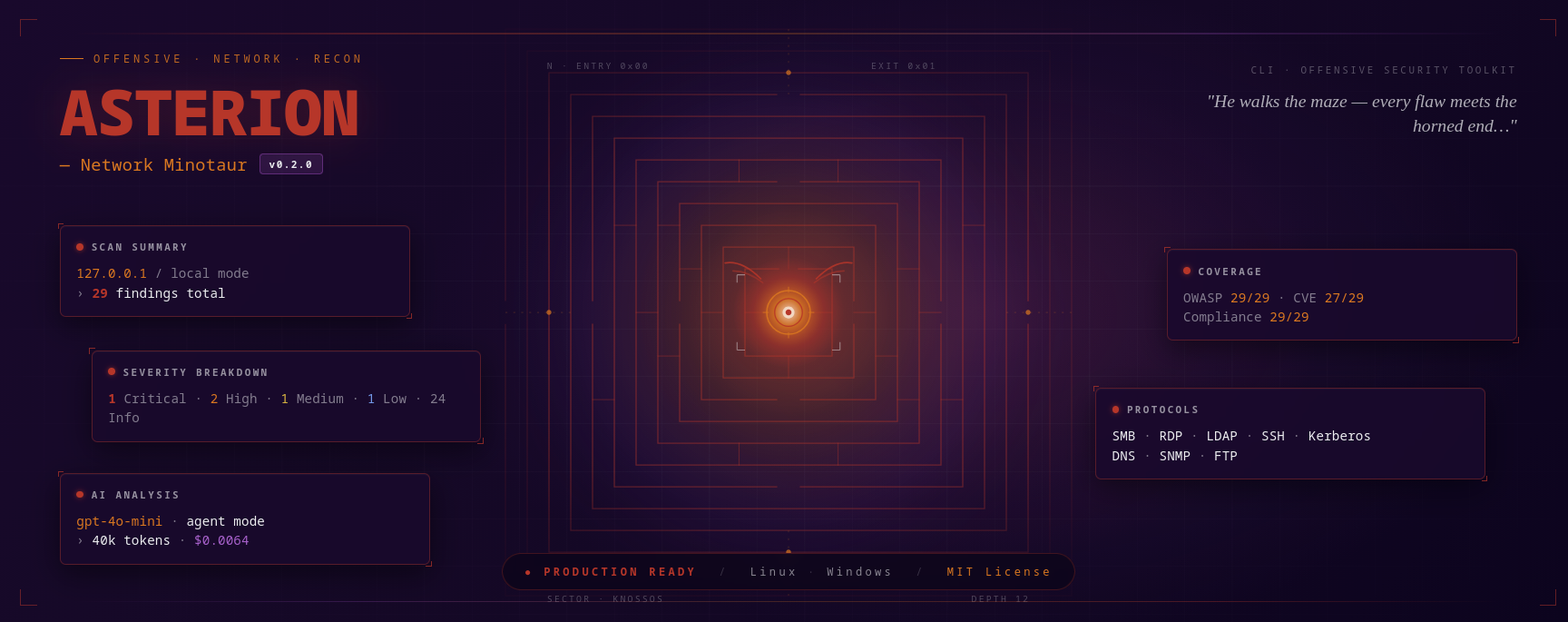
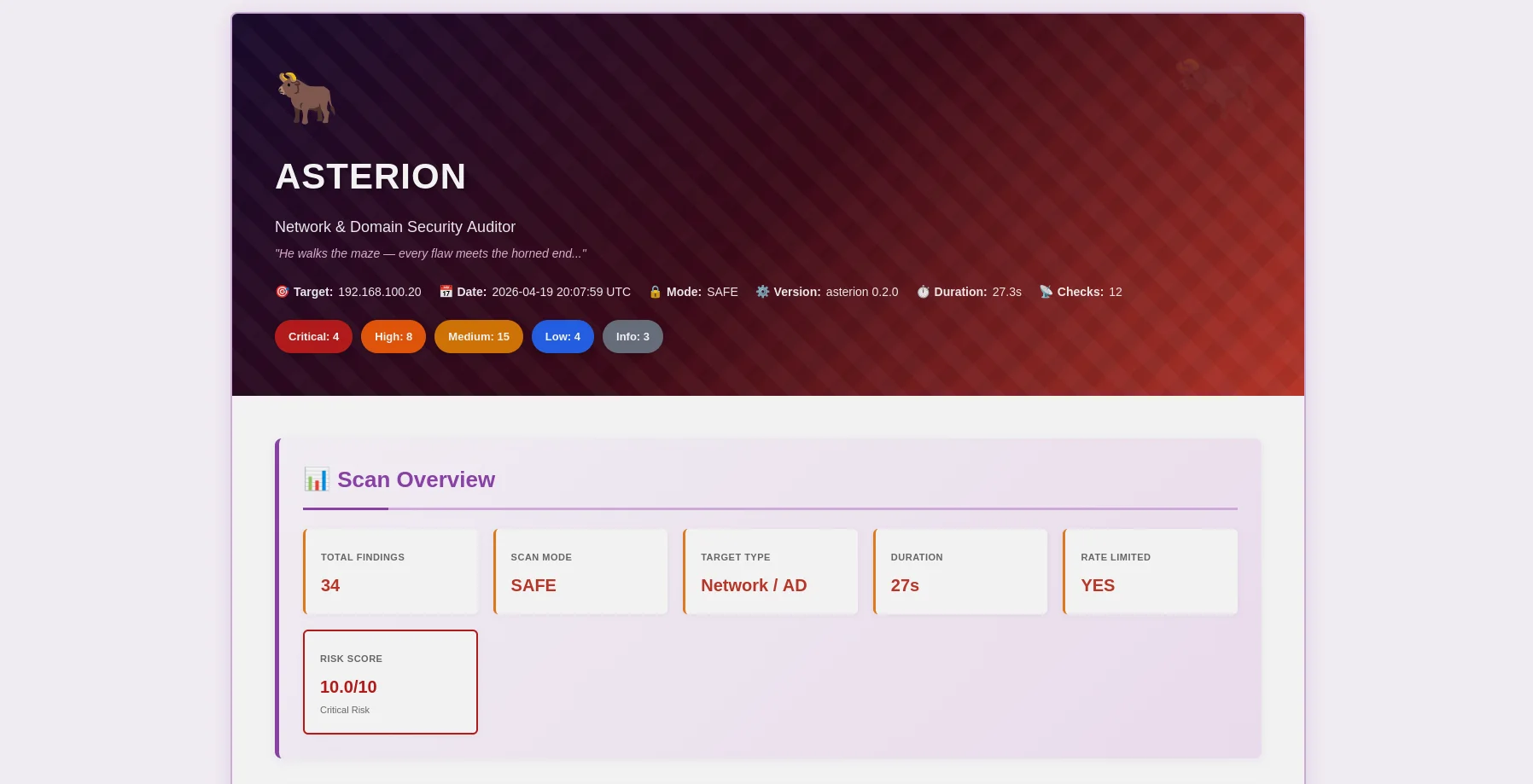
Rapport HTML thème Minotaure — badges de sévérité, preuves extensibles, correction IA |
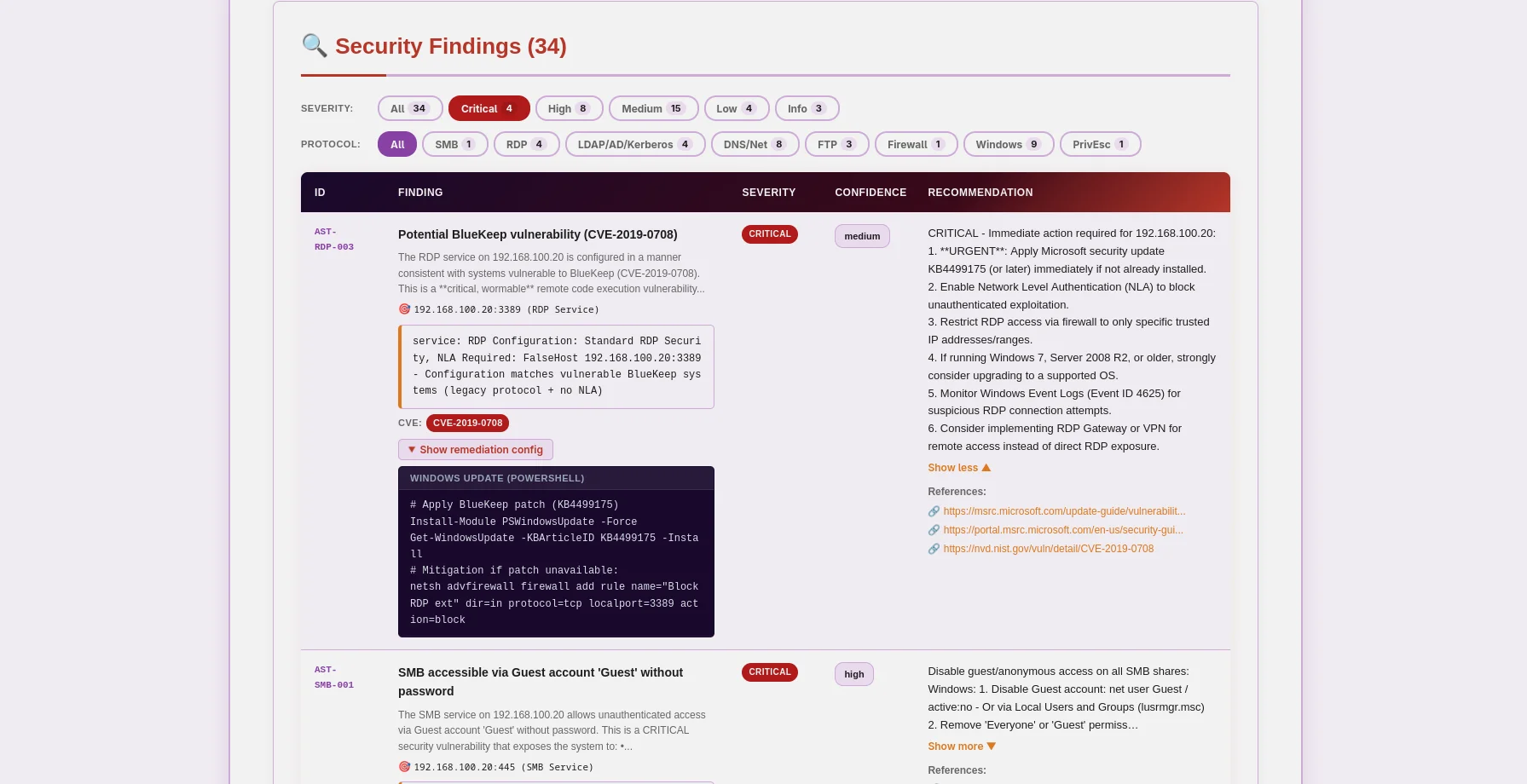
Rapport JSON — mapping OWASP/CIS/NIST/PCI, données CVE, lisible par machine |
Asterion est un auditeur de sécurité réseau et domaine prêt pour la production qui place l'éthique en premier. Conçu pour les testeurs d'intrusion, les chercheurs en sécurité et les équipes de sécurité d'entreprise, il combine l'analyse de vulnérabilités traditionnelle avec une analyse IA de pointe pour fournir des informations exploitables pour Windows Active Directory, les systèmes Linux et l'infrastructure réseau.
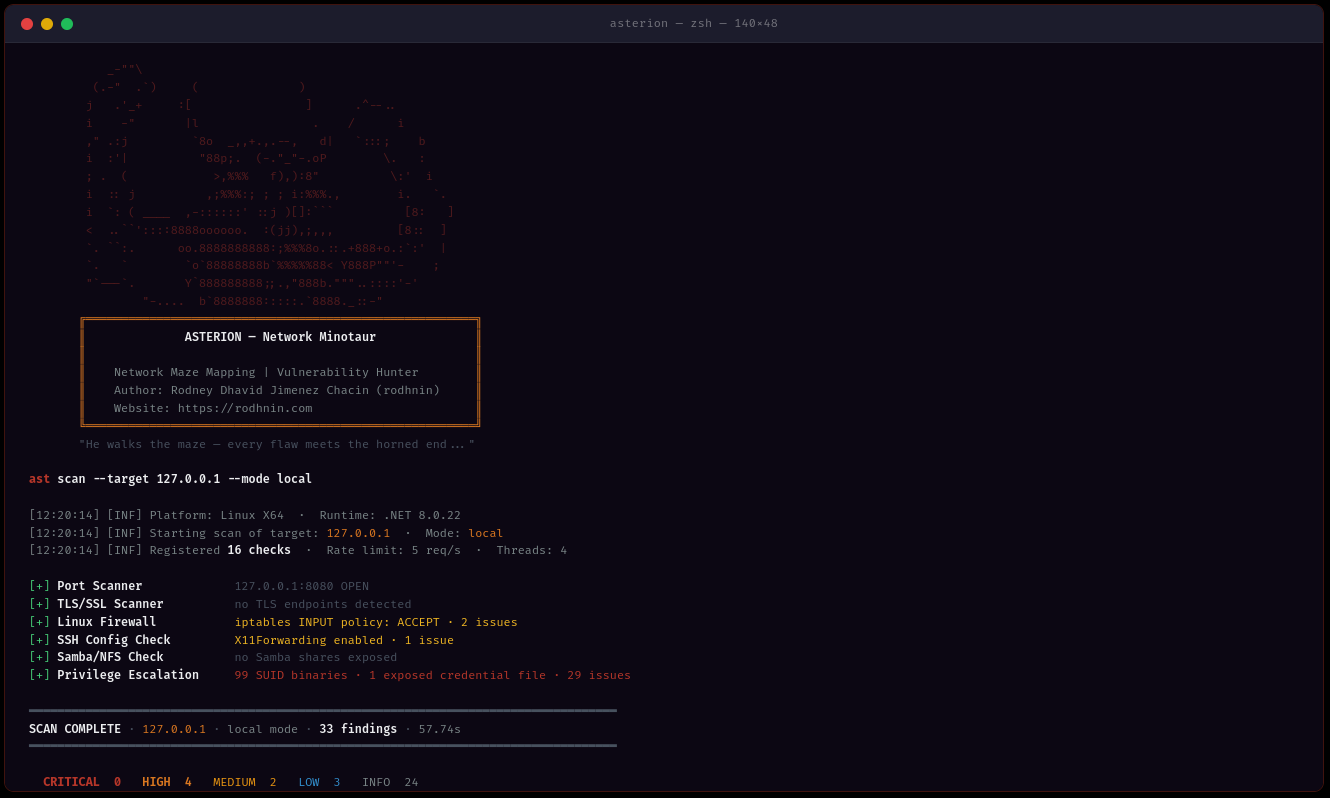
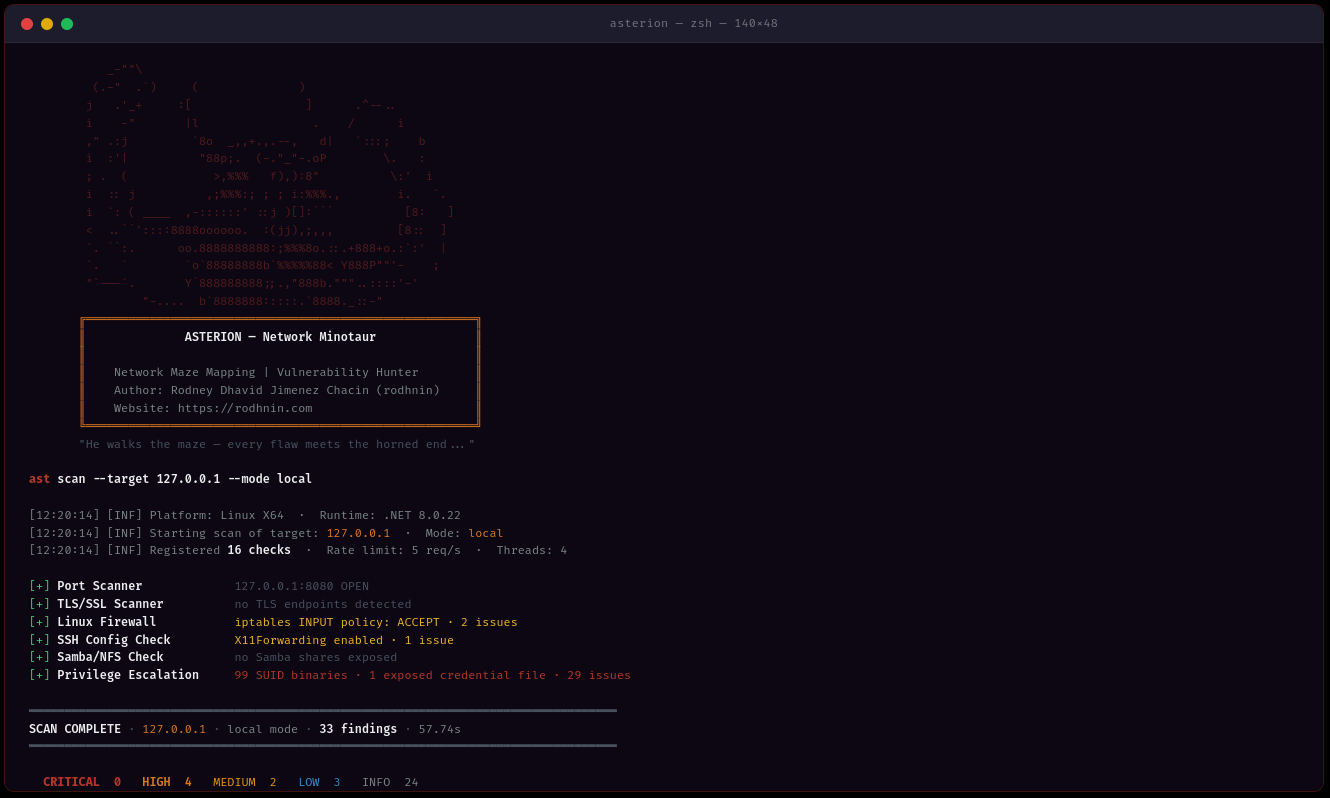
ast scan --target 10.0.0.0/24 --output html
- **Détection multi-méthodes** : Analyse des protocoles SMB, RDP, LDAP, Kerberos, SSH, FTP, DNS, SNMP
- **Multi-threading** : Scan simultané avec 1 à 20 threads de travail
- **Limitation intelligente du débit** : Limitation configurable des requêtes (1-20 req/s) pour éviter la détection
- **Collecte de preuves** : Partages SMB, requêtes LDAP, sortie PowerShell conservés
### 🤖 Analyse propulsée par l'IA
Choisissez votre fournisseur d'IA en fonction de vos besoins :
| Fournisseur | Meilleur pour | Vitesse | Coût | Confidentialité |
| ---------------------- | ---------------------- | ----------------- | --------------- | ----------------------- |
| **OpenAI GPT-4** | Qualité professionnelle | ⚡ Rapide (40s) | 💰 0,30 $/scan | 🔒 Standard |
| **Anthropic Claude** | Orienté confidentialité | ⚡ Rapide (50s) | 💰 0,35 $/scan | 🔒 Améliorée |
| **Ollama (Local)** | Confidentialité totale | 🐢 Lent (30min) | 💰 Gratuit | 🔐 100% Hors ligne |
**Deux modes d'analyse :**
- **Technique** : Correction étape par étape avec commandes PowerShell/GPO et extraits de configuration
- **Exécutif** : Résumés en langage clair pour les parties prenantes et la direction
### 📊 Rapports professionnels
**Rapports JSON** (lisibles par machine)```json
{
"tool": "asterion",
"version": "0.2.0",
"target": "192.168.1.10",
"riskScore": 10.0,
"summary": {
"critical": 3,
"high": 8,
"medium": 16,
"low": 5,
"info": 2
},
"findings": [
{
"id": "AST-SMB-003",
"title": "SMBv1 protocol enabled (EternalBlue vector)",
"severity": "high",
"owasp": { "id": "A06", "name": "Vulnerable and Outdated Components" },
"vulnerabilities": [
{
"cve_id": "CVE-2017-0143",
"cvss_score": 9.8,
"cwe_id": "CWE-119"
}
],
"cvss": 9.8
}
],
"attackChains": [...],
"diff": { "refScanId": 41, "new": [...], "fixed": [...], "persisting": [...] }
}
HTML Reports (Convivial)
Asterion fait respecter le hacking éthique par la technologie. Les analyses agressives et l'analyse IA nécessitent une preuve de propriété :```bash
ast consent generate --domain corp.local
ast consent verify --method http --domain corp.local --token verify-abc123
ast scan --target corp.local --mode aggressive --use-ai
### 💾 Persistance de la base de données
La base de données SQLite partagée avec Argos Suite suit tout :
- **Historique des analyses** : Date, durée, nombre de constats, répartition par sévérité
- **Référentiel des constats** : Base de données de vulnérabilités consultable dans tous les outils Argos
- **Domaines vérifiés** : Suivi des jetons de consentement avec expiration
- **Analyse des tendances** : Comparer les analyses dans le temps```bash
# Query recent scans (works for all Argos Suite tools)
sqlite3 ~/.argos/argos.db "SELECT * FROM scans WHERE tool='asterion' ORDER BY started_at DESC LIMIT 10"
# Find critical issues
sqlite3 ~/.argos/argos.db "SELECT * FROM v_critical_findings WHERE tool='asterion'"
Toutes les plateformes :
Facultatif :
git clone https://github.com/rodhnin/asterion-network-minotaur.git cd asterion-network-minotaur
chmod +x scripts/setup.py python3 scripts/setup.py
**Le script va :**
1. ✅ Vérifier les prérequis (.NET, Python)
2. ✅ Installer les dépendances Python
3. ✅ Configurer la base de données partagée Argos Suite
4. ✅ Compiler Asterion en mode Release
5. ✅ Créer les répertoires (~/.asterion, ~/.argos)
6. ✅ Créer le script d’encapsulation `/usr/local/bin/ast` (optionnel)
#### Windows (PowerShell)```powershell
# Clone repository
git clone https://github.com/rodhnin/asterion-network-minotaur.git
cd asterion-network-minotaur
# Run setup (right-click PowerShell > Run as Administrator)
.\scripts\setup.ps1
Le script va :
Si les scripts automatisés ne fonctionnent pas sur votre système, suivez ces étapes :
git clone https://github.com/rodhnin/asterion-network-minotaur.git cd asterion-network-minotaur
#### Étape 2 : Installer les dépendances
**Linux/macOS:**```bash
pip3 install -r scripts/requirements.txt
Windows (Invite de commandes) :```cmd pip install -r scripts\requirements.txt
#### Étape 3 : Configurer la base de données
**Linux/macOS:**```bash
python3 scripts/db_migrate.py
Windows:```cmd python scripts\db_migrate.py
#### Étape 4 : Construire Asterion
**Toutes les plateformes :**```bash
dotnet build -c Release
Linux/macOS:```bash mkdir -p ~/.asterion/reports mkdir -p ~/.asterion/consent-proofs mkdir -p ~/.argos
**Windows (PowerShell):**```powershell
New-Item -ItemType Directory -Force -Path "$env:USERPROFILE\.asterion\reports" | Out-Null
New-Item -ItemType Directory -Force -Path "$env:USERPROFILE\.asterion\consent-proofs" | Out-Null
New-Item -ItemType Directory -Force -Path "$env:USERPROFILE\.argos" | Out-Null
sudo nano /usr/local/bin/ast
#!/bin/bash exec dotnet "$(cd "$(dirname "${BASH_SOURCE[0]}")/.." && pwd)/src/Asterion/bin/Release/net8.0/Asterion.dll" "$@"
sudo chmod +x /usr/local/bin/ast
#### Étape 7 : Configurer la clé API (optionnel)
Une seule variable d'environnement fonctionne pour tous les fournisseurs d'IA (OpenAI, Anthropic) :
**Linux/macOS:**```bash
export AI_API_KEY="sk-proj-..." # OpenAI key
# or
export AI_API_KEY="sk-ant-..." # Anthropic key
# Add to ~/.bashrc or ~/.zshrc to make permanent
Windows (PowerShell):```powershell $env:AI_API_KEY = "sk-proj-..."
[Environment]::SetEnvironmentVariable("AI_API_KEY", "sk-proj-...", [System.EnvironmentVariableTarget]::User)
#### Étape 8 : Vérifier l'installation
**Linux/macOS (si un lien symbolique a été créé) :**```bash
ast version
Windows ou invocation directe:```cmd .\src\Asterion\bin\Release\net8.0\ast.exe version
dotnet .\src\Asterion\bin\Release\net8.0\Asterion.dll version
### Votre premier scan
#### Scan automatique du réseau local
**Asterion peut découvrir et scanner automatiquement votre réseau local !**
**Windows (PowerShell) — Après l'installation (Recommandé) :**```powershell
# Test on localhost (simple)
ast scan --target localhost --output html
# Scan local subnet with AI analysis
ast scan --target 192.168.1.0/24 --output both --threads 10 --rate 5 --use-ai --ai-tone both
# Domain scan with authentication
ast scan --target corp.local --auth "CORP\admin:Password123" --use-ai
Windows (PowerShell) — Sans configuration de PATH :```powershell
.\src\Asterion\bin\Release\net8.0\ast.exe scan --target localhost
--output html --use-ai
--ai-tone both
.\src\Asterion\bin\Release\net8.0\ast.exe scan --target 192.168.1.0/24
--output both --threads 10
--rate 5
**Linux/macOS:**```bash
# Scan localhost
ast scan --target localhost \
--output html \
--use-ai \
--ai-tone both
# Scan local subnet (e.g., 192.168.1.0/24)
ast scan --target 192.168.1.0/24 \
--output both \
--threads 10 \
--rate 5
# Scan domain
ast scan --target corp.local \
--auth "CORP\admin:Password123" \
--output html \
--use-ai
Asterion prend en charge trois formats de sortie via --output :
Contrôlez le formatage de l'analyse IA à l'aide de --ai-tone :
| Ton | Cas d'utilisation | Sortie |
|---|---|---|
| technical |
Scan réseau simple (sans authentification) :```bash ast scan --target 10.0.0.0/24
**Avec rapport HTML:**```bash
ast scan --target 192.168.1.0/24 --output html
Scan authentifié (domaine Windows) :```bash
ast scan --target dc01.corp.local
--auth "CORP\Administrator:P@ssw0rd"
--output html
**Avec analyse IA (technique + exécutif) :**```bash
ast scan --target 10.0.0.0/24 \
--use-ai \
--ai-tone both \
--output html
Scan rapide (10 threads, 10 req/s):```bash
ast scan --target 10.0.0.0/24
--threads 10
--rate 10
--output json
#### Emplacements des rapports
**Installation native :**
- Rapports : `~/.asterion/reports/`
- Base de données : `~/.argos/argos.db`
**Windows :**
- Rapports : `%USERPROFILE%\.asterion\reports\`
- Base de données : `%USERPROFILE%\.argos\argos.db`
**Déploiement Docker :**
- Rapports : `docker/reports/`
- Base de données : `docker/data/argos.db`
**🎉 Succès !** Vérifiez le répertoire des rapports pour les fichiers de sortie JSON et HTML.
---
### Exécution avec Docker
**Déploiement automatique :**```bash
cd docker
./deploy.sh # Linux/macOS
.\deploy.ps1 # Windows
Déploiement manuel de Docker:```bash
docker compose up -d
docker compose exec asterion dotnet /app/ast.dll scan
--target 192.168.1.0/24
--output html
docker compose logs -f asterion
docker compose down
---
## 📘 Guide d'utilisation
### Structure des commandes```bash
ast <command> [options]
Commandes disponibles :
scan — Exécuter une analyse de sécuritéconsent — Gérer les jetons de consentementversion — Afficher les informations de versionast scan --target 192.168.1.0/24
ast scan --target 192.168.1.0/24 --output html
ast scan --target 10.0.0.5 --output both
#### Ciblage réseau```bash
# CIDR notation
ast scan --target 10.0.0.0/24
# IP range
ast scan --target 192.168.1.10-50
# Domain name
ast scan --target corp.local
# Single host
ast scan --target 192.168.1.1
ast scan --target 10.0.0.0/24 --threads 3 --rate 2
ast scan --target 10.0.0.0/24 --threads 15 --rate 15
ast scan --target 10.0.0.0/24 --ports 445,3389,22,139
#### Scan de domaine Windows```bash
# Network + LDAP/Kerberos/AD checks
ast scan --target dc01.corp.local \
--auth "CORP\Administrator:P@ssw0rd"
# WinRM: remote firewall, registry, services, privesc
ast scan --target 192.168.1.10 \
--winrm "CORP\admin:P@ssw0rd"
# Full Windows audit: auth + WinRM + AI + HTML
ast scan --target 192.168.1.10 \
--auth "CORP\admin:P@ssw0rd" \
--winrm "CORP\admin:P@ssw0rd" \
--use-ai --ai-tone technical -o both -v
# With NTLM hash (Pass-the-Hash)
ast scan --target 10.0.0.5 \
--auth-ntlm "admin:aad3b435b51404eeaad3b435b51404ee:8846f7eaee8fb117ad06bdd830b7586c"
# Diff against last scan (track security changes)
ast scan --target 192.168.1.10 --winrm "CORP\admin:P@ssw0rd" --diff last -o both
ast scan --target 10.0.0.25 --ssh "admin:password"
ast scan --target 10.0.0.25 --ssh "admin:password" --sudo-password "sudopass"
ast scan --target 10.0.0.25 --ssh-key "admin:~/.ssh/id_rsa"
ast scan --target internal.corp.local
--bastion "bastion.corp.local:jumpuser:~/.ssh/bastion_key"
--ssh "admin:password"
ast scan --target 10.0.0.25
--ssh "root:toor"
--use-ai --ai-tone technical -o both -v
#### Analyse par IA```bash
# Technical remediation (default, for security teams)
ast scan --target 10.0.0.5 \
--ssh "root:pass" \
--use-ai --ai-tone technical -o html
# Executive summary (for management)
ast scan --target 10.0.0.5 \
--use-ai --ai-tone non_technical -o html
# Both formats + streaming output
ast scan --target 10.0.0.5 --use-ai --ai-tone both --ai-stream -o both
# Agent mode (NVD CVE lookup tool enabled)
ast scan --target 10.0.0.5 --ssh "root:pass" --use-ai --ai-agent -v
# Compare two models
ast scan --target 10.0.0.5 --use-ai \
--ai-compare "openai/gpt-4o-mini-2024-07-18,anthropic/claude-3-5-haiku-20241022"
# Enforce cost budget
ast scan --target 10.0.0.5 --winrm "admin:pass" --use-ai --ai-budget 0.05
ast scan --target 10.0.0.5 -v
ast scan --target 10.0.0.5 -v --timeout 20
ast scan --target 10.0.0.5 --timeout 5
### Gestion des jetons de consentement
#### Générer un jeton de consentement```bash
ast consent generate --domain corp.local

# Output: Token: verify-a3f9b2c1d8e4f5a6
Méthode HTTP (placer le fichier sur le serveur web) :```bash
ast consent verify
--method http
--domain corp.local
--token verify-a3f9b2c1d8e4f5a6
**Méthode DNS** (ajouter un enregistrement TXT) :```bash
# 1. Add DNS TXT record: corp.local = "asterion-verify=verify-a3f9b2c1d8e4f5a6"
# 2. Verify:
ast consent verify \
--method dns \
--domain corp.local \
--token verify-a3f9b2c1d8e4f5a6
Méthode SSH (créer un fichier sur le système) :```bash
ast consent verify
--method ssh
--domain corp.local
--token verify-a3f9b2c1d8e4f5a6
--ssh "user:password"
#### Exécuter le mode agressif```bash
# After verifying consent token:
ast scan --target corp.local --mode aggressive
ast scan --target 192.168.1.0/24 --output html --threads 10 --rate 10
#### Scénario 2 : Audit complet du domaine```bash
# Complete Windows AD assessment with AI analysis
ast scan --target corp.local \
--auth "CORP\admin:P@ssw0rd" \
--use-ai \
--ai-tone both \
--output both \
--threads 8 \
--rate 8
ast scan --target 10.0.0.0/24
--threads 2
--rate 1
--timeout 20
--output json
#### Scenario 4: Test de pénétration```bash
# Generate consent first
ast consent generate --domain internal.corp
# Place token and verify
ast consent verify --method http --domain internal.corp --token <token>
# Run aggressive assessment
ast scan --target internal.corp \
--mode aggressive \
--auth "CORP\pentest:P@ssw0rd" \
--use-ai \
--output both
Asterion utilise LangChain 1.0.0 avec le support de plusieurs fournisseurs d'IA via le pont Python, vous offrant une flexibilité selon vos exigences de sécurité, confidentialité et budget.
Idéal pour : utilisation en production
#### Anthropic Claude
**Idéal pour : Confidentialité renforcée**
- ⭐ Qualité : Excellent (5/5)
- ⚡ Vitesse : ~50–70 secondes
- 💰 Coût : ~$0.007–0.015 par scan (claude-3-5-haiku)
- 🔒 Confidentialité : Renforcée (approche d'Anthropic priorisant la confidentialité)```bash
export AI_API_KEY="sk-ant-..." # Same variable, Anthropic key format
Meilleur pour : Confidentialité totale
ollama pull llama3.2
### Confidentialité et Sécurité
**Nettoyage automatique**
Avant d'envoyer des données aux fournisseurs d'IA, Asterion supprime automatiquement :
- ✅ Jetons de consentement
- ✅ Identifiants de domaine (mots de passe, hashs NTLM)
- ✅ Informations personnelles identifiables (PII)
- ✅ Adresses IP internes (sur demande)
- ✅ Chemins de partage SMB contenant des données sensibles
**Uniquement sur adhésion**
- L'analyse IA nécessite l'option explicite `--use-ai`
- Le scan agressif nécessite un jeton de consentement vérifié
- Vous contrôlez quel fournisseur voit vos données
**Pour une confidentialité maximale**
Utilisez Ollama localement. Bien que plus lent et moins précis, vos données de scan ne quittent jamais votre machine.
### Changer de fournisseur
**Méthode actuelle (v0.2.0) :** Modifiez `config/defaults.yaml````yaml
ai:
langchain:
provider: "ollama" # Changed from "openai"
model: "llama3.2" # Ollama model
ollama_base_url: "http://localhost:11434"
À venir dans v0.3.0: Menu de configuration interactif (style Metasploit)```bash
ast --show-options ast --set ai.provider=anthropic ast --save-profile privacy-mode
---
## 🧪 Laboratoire de Test Sécurisé
**⚠️ NE JAMAIS scanner les réseaux de production sans autorisation écrite !**
Utilisez notre laboratoire Docker pour vous entraîner en toute sécurité :
### Configurer l'environnement de test```bash
# Navigate to docker directory
cd docker
# Deploy vulnerable network lab
docker-compose -f compose.testing.yml up -d
# Wait for services to start (~60 seconds)
docker-compose -f compose.testing.yml logs -f
# Create vulnerable conditions
docker-compose -f compose.testing.yml exec windows-target powershell -c "Disable-NetFirewallProfile -All"
cd ..
ast scan --target 172.20.0.0/24 --output html
ast scan --target 172.20.0.2 --auth "LAB\admin:P@ssw0rd123" --output both
ast scan --target 172.20.0.0/24 --use-ai --output html
### Nettoyage```bash
cd docker
docker-compose -f compose.testing.yml down -v # -v removes all data
Pour des scénarios de test détaillés, voir docs/TESTING_GUIDE.md
Scannez uniquement les réseaux et systèmes dont vous êtes propriétaire ou pour lesquels vous avez une autorisation écrite explicite de tester.
Asterion met en œuvre des contrôles techniques pour empêcher toute utilisation abusive :
L'accès non autorisé aux systèmes informatiques est illégal dans la plupart des juridictions :
Pour des directives éthiques complètes, voir docs/ETHICS.md
Asterion fournit des scripts de déploiement multiplateformes :
Linux/macOS:```bash cd docker ./deploy.sh
**Windows (PowerShell):**```powershell
cd docker
.\deploy.ps1
Options de déploiement :
Linux/macOS :```bash cd docker docker compose up -d
docker compose exec asterion dotnet /app/ast.dll scan --target 10.0.0.0/24
docker compose logs -f asterion
docker compose down
**Windows (PowerShell):**```powershell
cd docker
docker compose up -d
# Execute scans (note the dotnet wrapper)
docker compose exec asterion dotnet /app/ast.dll scan --target 10.0.0.0/24
# View logs
docker compose logs -f asterion
# Stop service
docker compose down
Données persistantes :
./reports/ → répertoire hôte docker/reports/./data/argos.db → répertoire hôte docker/data/argos.db (base de données partagée Argos Suite)./logs/asterion.log → répertoire hôte docker/logs/asterion.logNote : Asterion détecte automatiquement l'environnement Docker via la variable d'environnement ASTERION_IN_DOCKER.
Pour la documentation Docker complète (Linux/Windows), voir : docker/README.md
Installation native :``` ~/.asterion/ ├── reports/ │ ├── asterion_report_10_0_0_0_24_20260419_143000.json # Machine-readable │ └── asterion_report_10_0_0_0_24_20260419_143000.html # Human-friendly (Minotaur-themed) └── consent-proofs/ └── corp_local_verify-abc123_20260419.txt
~/.argos/ ├── argos.db # Shared Argos Suite database └── logs/ └── argos.log # Shared log file
**Déploiement Docker:**```
asterion-network-minotaur/
├── docker/
│ ├── reports/
│ │ ├── asterion_report_10_0_0_0_24_20260419_143000.json
│ │ └── asterion_report_10_0_0_0_24_20260419_143000.html
│ ├── data/
│ │ └── argos.db # Shared Argos Suite database (Docker)
│ ├── logs/
│ │ └── asterion.log
│ └── workspace/
│ └── consent-proofs/
Note : L'environnement Docker est automatiquement détecté via la variable d'environnement ASTERION_IN_DOCKER.
{ "tool": "asterion", "version": "0.2.0", "target": "10.0.0.0/24", "date": "2026-04-13T14:30:00Z", "mode": "safe", "summary": { "critical": 12, "high": 8, "medium": 15, "low": 5, "info": 20 }, "findings": [ { "id": "AST-SMB-003", "title": "SMBv1 enabled (EternalBlue vulnerability)", "severity": "critical", "confidence": "high", "description": "SMBv1 is enabled on this system. This protocol is vulnerable to EternalBlue (CVE-2017-0143), a critical remote code execution vulnerability exploited by WannaCry ransomware.", "evidence": { "type": "smb", "value": "SMBv1 negotiated successfully", "context": "Port 445/tcp open, SMB signing not required" }, "recommendation": "URGENT - Disable SMBv1 immediately:\n\nPowerShell:\nDisable-WindowsOptionalFeature -Online -FeatureName SMB1Protocol -NoRestart\n\nGroup Policy:\nComputer Configuration → Administrative Templates → MS Security Guide\n→ Configure SMBv1 client driver startup = Disabled\n→ Configure SMBv1 server = Disabled\n\nVerify:\nGet-SmbServerConfiguration | Select EnableSMB1Protocol", "references": [ "https://docs.microsoft.com/en-us/windows-server/storage/file-server/troubleshoot/detect-enable-and-disable-smbv1-v2-v3", "https://nvd.nist.gov/vuln/detail/CVE-2017-0143" ], "affected_component": "SMB Server" }, { "id": "AST-LDAP-001", "title": "LDAP anonymous bind allowed", "severity": "high", "confidence": "high", "description": "LDAP server allows anonymous bind, permitting unauthenticated enumeration of domain users, groups, and configuration.", "evidence": { "type": "ldap", "value": "Anonymous bind successful to port 389/tcp", "context": "Retrieved domain base DN: DC=corp,DC=local" }, "recommendation": "Disable LDAP anonymous bind:\n\nGroup Policy:\nComputer Configuration → Policies → Windows Settings → Security Settings → Local Policies → Security Options\n→ Network access: Allow anonymous SID/Name translation = Disabled\n→ Network access: Do not allow anonymous enumeration of SAM accounts = Enabled\n→ Network access: Do not allow anonymous enumeration of SAM accounts and shares = Enabled\n\nRegistry:\nreg add "HKLM\SYSTEM\CurrentControlSet\Control\Lsa" /v RestrictAnonymous /t REG_DWORD /d 1 /f", "affected_component": "LDAP Server" }, { "id": "AST-RDP-001", "title": "RDP without Network Level Authentication (NLA)", "severity": "high", "confidence": "high", "description": "Remote Desktop Protocol (RDP) is configured without Network Level Authentication (NLA). This allows unauthenticated attackers to reach the login screen and attempt brute-force attacks.", "evidence": { "type": "rdp", "value": "RDP port 3389/tcp open, NLA not required", "context": "Encryption level: High" }, "recommendation": "Enable Network Level Authentication:\n\nPowerShell:\n(Get-WmiObject -class Win32_TSGeneralSetting -Namespace root\cimv2\terminalservices -Filter "TerminalName='RDP-tcp'").SetUserAuthenticationRequired(1)\n\nGroup Policy:\nComputer Configuration → Administrative Templates → Windows Components → Remote Desktop Services → Remote Desktop Session Host → Security\n→ Require user authentication for remote connections by using Network Level Authentication = Enabled", "affected_component": "RDP Server" } ], "notes": { "scan_duration_seconds": 67.5, "targets_scanned": 12, "rate_limit_applied": true, "scope_limitations": "Scan limited to network services. Local system checks require SSH/WinRM credentials.", "false_positive_disclaimer": "Manual verification recommended for all findings before remediation." }, "aiAnalysis": { "executiveSummary": "The network scan identified 12 critical security vulnerabilities requiring immediate attention...", "technicalRemediation": "### Critical Issues\n\n1. \n - Affected systems: 10.0.0.5, 10.0.0.10\n - Remediation: Disable SMBv1...", "generatedAt": "2026-04-19T14:35:00Z", "modelUsed": "gpt-4o-mini-2024-07-18", "provider": "openai" } }
### Fonctionnalités du rapport HTML
- **📊 Tableau de bord exécutif**: Cartes récapitulatives avec comptes de sévérité et marque Minotaur
- **🤖 Analyse IA**: Sections extensibles pour les informations exécutives et techniques
- **🔍 Résultats détaillés**: Organisés par sévérité avec commandes de remédiation PowerShell/GPO
- **📋 Preuves**: Partages SMB, requêtes LDAP, configurations RDP, sortie PowerShell
- **🔗 Références externes**: Liens vers CVE, documentation Microsoft, guides OWASP
- **📱 Responsive mobile**: Fonctionne sur tous les appareils
- **🎨 Thème Minotaur**: Schéma de couleurs rouge/orange/violet
---
## 📁 Structure du projet```
asterion-network-minotaur/
│
├── src/
│ ├── Asterion/ # Main C# application
│ │ ├── Asterion.csproj # .NET project file
│ │ │
│ │ ├── Checks/ # Security check modules
│ │ │ ├── ICheck.cs # Check interface
│ │ │ ├── BaseCheck.cs # Abstract base class (350 lines)
│ │ │ ├── CheckCategory.cs # Check category enum
│ │ │ │
│ │ │ ├── CrossPlatform/ # Network service scanners (work from any OS)
│ │ │ │ ├── PortScanner.cs # TCP port scanning
│ │ │ │ ├── SmbScanner.cs # SMB/CIFS security (42KB)
│ │ │ │ ├── RdpScanner.cs # RDP configuration (24KB)
│ │ │ │ ├── LdapScanner.cs # LDAP/AD security (38KB)
│ │ │ │ ├── KerberosScanner.cs # Kerberos security (22KB)
│ │ │ │ ├── SnmpScanner.cs # SNMP vulnerabilities (21KB)
│ │ │ │ ├── DnsScanner.cs # DNS misconfigurations (14KB)
│ │ │ │ ├── FtpScanner.cs # FTP security (27KB)
│ │ │ │ ├── TlsScanner.cs # TLS/SSL certificate checks
│ │ │ │ ├── SysvolCheck.cs # SYSVOL/GPP password exposure
│ │ │ │ ├── AdAggressiveCheck.cs # AS-REP roasting, delegation, weak ACLs
│ │ │ │ └── WinRmChecks.cs # Remote Windows audit via WS-Man
│ │ │ │
│ │ │ ├── Windows/ # Local Windows system checks
│ │ │ │ ├── WinFirewallCheck.cs # Firewall configuration
│ │ │ │ ├── WinRegistryCheck.cs # Registry security
│ │ │ │ ├── AdPolicyCheck.cs # Active Directory policies
│ │ │ │ ├── WinServicesCheck.cs # Service misconfigurations
│ │ │ │ └── PrivEscCheckWin.cs # Windows privilege escalation
│ │ │ │
│ │ │ └── Linux/ # Local/remote Linux checks (via SSH)
│ │ │ ├── LinuxFirewallCheck.cs # iptables/nftables/ufw
│ │ │ ├── SshConfigCheck.cs # SSH hardening
│ │ │ ├── SambaNfsCheck.cs # Samba/NFS security
│ │ │ └── PrivEscCheckLinux.cs # SUID, sudo misconfig
│ │ │
│ │ ├── Core/ # Core infrastructure
│ │ │ ├── Orchestrator.cs # Main execution engine (1,243 lines)
│ │ │ ├── Config.cs # YAML configuration loader
│ │ │ ├── ScanOptions.cs # Scan configuration
│ │ │ ├── Database.cs # SQLite operations
│ │ │ ├── ConsentValidator.cs # Consent token verification
│ │ │ ├── SshConnectionManager.cs # SSH.NET wrapper (password/key/bastion)
│ │ │ ├── WinRmConnectionManager.cs # WS-Man HTTP/NTLM (Linux → Windows)
│ │ │ ├── AttackChainAnalyzer.cs # Multi-step attack chain correlation
│ │ │ ├── NtlmSpnego.cs # NTLM/SPNEGO auth implementation
│ │ │ ├── NtlmV2Auth.cs # NTLMv2 auth implementation
│ │ │ │
│ │ │ ├── Output/
│ │ │ │ └── ReportBuilder.cs # Report generation (risk score, labels)
│ │ │ │
│ │ │ └── Utils/
│ │ │ ├── NetworkUtils.cs # Network operations
│ │ │ ├── CidrParser.cs # CIDR/IP range parsing
│ │ │ ├── AuthenticationManager.cs # Credential handling
│ │ │ └── OsDetector.cs # Per-target OS detection (SSH/SMB/TTL)
│ │ │
│ │ ├── Models/ # Data models
│ │ │ ├── Report.cs # Main report structure
│ │ │ ├── Finding.cs # Security finding (OWASP/CVE/Compliance)
│ │ │ ├── Evidence.cs # Finding proof
│ │ │ ├── ConsentInfo.cs # Consent verification
│ │ │ └── AiAnalysis.cs # AI-generated content (cost tracking)
│ │ │
│ │ ├── Program.cs # Application entry point
│ │ └── Cli.cs # CLI argument parser (all flags)
│ │
│ └── Asterion.sln # Visual Studio solution
│
├── scripts/ # Python bridge scripts
│ ├── ai_analyzer.py # LangChain AI integration (stream/agent/compare)
│ ├── cve_lookup.py # NVD API v2 CVE enrichment
│ ├── owasp.py # OWASP Top 10 mapping (139 entries)
│ ├── compliance.py # CIS/NIST/PCI mapping (95 entries)
│ ├── db_migrate.py # Database setup
│ ├── render_html.py # HTML report generation (Jinja2)
│ ├── setup.sh # Linux/macOS installation script
│ ├── setup.ps1 # Windows PowerShell setup
│ └── requirements.txt # Python dependencies
│
├── config/ # Configuration files
│ ├── defaults.yaml # Default settings
│ └── prompts/ # AI prompt templates
│ ├── technical.txt # Technical remediation prompts
│ └── non_technical.txt # Executive summary prompts
│
├── db/
│ └── migrate.sql # Database schema (shared with Argos Suite)
│
├── docker/ # Docker deployment
│ ├── Dockerfile # Production image
│ ├── docker-compose.yml # Production deployment
│ ├── compose.testing.yml # Vulnerable lab environment
│ ├── .dockerignore
│ ├── .env.example
│ └── README.md # Docker instructions
│
├── docs/ # Documentation
│ ├── AI_INTEGRATION.md # AI setup guide
│ ├── CONSENT.md # Consent token system
│ ├── DATABASE_GUIDE.md # SQLite schema and queries
│ ├── ETHICS.md # Ethical guidelines
│ ├── NETWORK_CHECKS.md # Complete check catalog (50+ checks)
│ └── ROADMAP.md # Development roadmap
│
├── schema/
│ └── report.schema.json # Argos Suite unified schema
│
├── templates/
│ └── report.html.j2 # HTML report template (35KB, Minotaur-themed)
│
├── assets/
│ └── ascii.txt # Minotaur ASCII art banner
│
├── CHANGELOG.md # Version history
├── README_PATTERN.md # README visual branding guide
├── LICENSE # MIT License
└── README.md # This file
Statistiques:
Statut: 🎉 Publié
--winrm)--ssh-key, --bastion, --sudo-password)--diff last / --diff <id> — suivi des régressions de sécurité--creds-file credentials.yaml--ai-budget, coûts sauvegardés dans la base de données + costs.jsonFocus: Utilisabilité, échelle, IA interactive
--show-options, --set)ast db scans list, ast db findings search)Focus: Remédiation automatisée, détection ML, scan distribué
Pour des descriptions détaillées des fonctionnalités, voir docs/ROADMAP.md
Nous accueillons les contributions ! Que ce soit :
git checkout -b feature/amazing-feature)git commit -m 'Add amazing feature')git push origin feature/amazing-feature)git clone https://github.com/YOUR-USERNAME/asterion-network-minotaur.git cd asterion-network-minotaur
pip install -r scripts/requirements.txt dotnet restore
dotnet build
dotnet run --project src/Asterion -- scan --target 192.168.1.1 -v
### Code Style
- **Formatage C#** : Suivre les conventions de codage C# de Microsoft
- **Formatage Python** : Nous utilisons [Black](https://github.com/psf/black) (longueur de ligne : 88)
- **Documentation XML** : Obligatoire pour toutes les classes/méthodes publiques
- **Commentaires de code** : Utiliser `//` pour les commentaires en ligne, `///` pour les docs XML
### Reporting Issues
Vous avez trouvé un bug ? Une demande de fonctionnalité ?
**Ouvrez un ticket** : https://github.com/rodhnin/asterion-network-minotaur/issues
Veuillez inclure :
- Version d'Asterion (`ast version`)
- Version .NET (`dotnet --version`)
- Version Python (`python --version`)
- Système d'exploitation
- Étapes pour reproduire (pour les bugs)
- Comportement attendu vs réel
---
## 📚 Documentation
Documentation complète disponible dans le répertoire `docs/` :
| Document | Description |
| ------------------------------------------- | ----------------------------------------- |
| [AI_INTEGRATION.md](https://github.com/rodhnin/asterion-network-minotaur/blob/HEAD/docs/AI_INTEGRATION.md) | Guide complet de configuration de l'IA (les 3 fournisseurs) |
| [CONSENT.md](https://github.com/rodhnin/asterion-network-minotaur/blob/HEAD/docs/CONSENT.md) | Détails techniques du système de jetons de consentement |
| [DATABASE_GUIDE.md](https://github.com/rodhnin/asterion-network-minotaur/blob/HEAD/docs/DATABASE_GUIDE.md) | Schéma SQLite, requêtes, gestion |
| [ETHICS.md](https://github.com/rodhnin/asterion-network-minotaur/blob/HEAD/docs/ETHICS.md) | Cadre légal et directives éthiques |
| [NETWORK_CHECKS.md](https://github.com/rodhnin/asterion-network-minotaur/blob/HEAD/docs/NETWORK_CHECKS.md) | Catalogue complet de 50+ vérifications de sécurité |
| [ROADMAP.md](https://github.com/rodhnin/asterion-network-minotaur/blob/HEAD/docs/ROADMAP.md) | Fonctionnalités futures et plans de développement |
### Liens rapides
- **Journal des modifications** : [CHANGELOG.md](https://github.com/rodhnin/asterion-network-minotaur/blob/HEAD/CHANGELOG.md)
- **Licence** : [LICENSE](https://github.com/rodhnin/asterion-network-minotaur/blob/HEAD/LICENSE)
- **Art ASCII** : [assets/ascii.txt](https://github.com/rodhnin/asterion-network-minotaur/blob/HEAD/assets/ascii.txt)
---
## 🤝 Partie de la Suite Argos
Asterion est le quatrième composant de l'**Argos Security Suite** :
| Outil | Langage | Cible | Statut |
| -------------- | ----------- | ----------------------- | ----------- |
| **Argus** | Python | WordPress | ✅ Stable |
| **Hephaestus** | Python | Serveurs (Linux/Windows) | ✅ Stable |
| **Pythia** | Python | SQL Injection | ✅ Stable |
| **Asterion** | C# + Python | Réseaux/Domaines/AD | 🎉 Publié |
**Infrastructure partagée :**
- Base de données SQLite (`~/.argos/argos.db`)
- Schéma de rapport JSON unifié
- Système de jetons de consentement
- Analyse IA via LangChain
---
## ⚖️ Licence
Ce projet est sous licence **MIT** - voir le fichier [LICENSE](https://github.com/rodhnin/asterion-network-minotaur/blob/HEAD/LICENSE) pour plus de détails.```
MIT License
Copyright (c) 2025-2026 Rodney Dhavid Jimenez Chacin
Permission is hereby granted, free of charge, to any person obtaining a copy
of this software and associated documentation files (the "Software"), to deal
in the Software without restriction, including without limitation the rights
to use, copy, modify, merge, publish, distribute, sublicense, and/or sell
copies of the Software, and to permit persons to whom the Software is
furnished to do so, subject to the following conditions:
The above copyright notice and this permission notice shall be included in all
copies or substantial portions of the Software.
THE SOFTWARE IS PROVIDED "AS IS", WITHOUT WARRANTY OF ANY KIND, EXPRESS OR
IMPLIED, INCLUDING BUT NOT LIMITED TO THE WARRANTIES OF MERCHANTABILITY,
FITNESS FOR A PARTICULAR PURPOSE AND NONINFRINGEMENT.
IMPORTANT : Cet outil est réservé aux tests de sécurité autorisés.
En utilisant Asterion, vous reconnaissez et acceptez que :
Si vous découvrez des vulnérabilités en utilisant Asterion :
Ne scannez pas. Si vous n'êtes pas sûr d'avoir la permission, c'est probablement que vous ne l'avez pas.
Asterion se tient sur les épaules de géants :
Un merci spécial à tous les chercheurs en sécurité qui pratiquent et promeuvent le hacking éthique.
Rodney Dhavid Jimenez Chacin (rodhnin)
Pour toute question, retour ou demande de collaboration, veuillez consulter rodhnin.com
Construit avec ❤️ pour les professionnels de la sécurité et les administrateurs réseau d'entreprise du monde entier
⭐ Mettez une ⭐ à ce dépôt si vous le trouvez utile ! ⭐
Signaler un bug • Demander une fonctionnalité • Documentation
🐂 Asterion — Naviguer dans le Labyrinthe du Réseau 🐂
Asterion v0.2.0 — Mai 2026
Fait avec ❤️ par rodhnin | Faisant partie de la Suite de Sécurité Argos
| Catégorie de vérification | Détails |
|---|
| Sécurité SMB/CIFS | Partages anonymes, signature SMB, SMBv1 (EternalBlue), NTLMv1, partages accessibles en écriture |
| Sécurité RDP | Authentification au niveau réseau (NLA), niveaux de chiffrement, RDP exposé |
| LDAP/Active Directory | Liaison anonyme, signature LDAP, stratégies de mot de passe, pré-authentification Kerberos |
| Sécurité Kerberos | AS-REP roasting, Kerberoasting, durée de vie excessive des tickets |
| SNMP | Chaînes de communauté par défaut, SNMPv1/v2c, accès en écriture |
| DNS/NetBIOS | Transferts de zone (AXFR), empoisonnement LLMNR/NetBIOS, mDNS |
| Systèmes Windows | Pare-feu, Registre (UAC, LSA), services, élévation de privilèges |
| Systèmes Linux | iptables/nftables, SSH, Samba/NFS, binaires SUID, mauvaise configuration sudo |
| Format | Commande | Sortie |
|---|
| JSON | --output json | Rapports lisibles par machine (par défaut) |
| HTML | --output html | Rapports élégants thème Minotaure |
| Both | --output both | Génère à la fois JSON et HTML |
| Équipes de sécurité |
| Remédiation pas à pas avec commandes PowerShell/GPO |
| non_technical | Résumé exécutif | Descriptions en langage simple pour la direction |
| both | Analyse complète | Formats technique et exécutif |
| Option | Valeurs | Par défaut | Description |
|---|
--target, -t | IP/CIDR/domaine | Requis | Cible(s) : 192.168.1.0/24, 10.0.0.1, corp.local, liste séparée par des virgules |
--mode, -m | safe, aggressive | safe | Mode d'analyse (agressif nécessite un jeton de consentement) |
--output, -o | json, html, both | json | Format de sortie |
--ports, -p | liste de ports | Auto-détect | Ports à analyser (ex. : 22,80,443 ou 8000-9000) |
--threads | 1-20 | 5 | Nombre de threads concurrents |
--rate | 1-20 | 5 | Limite de taux de requêtes (req/s) |
--timeout | secondes | 10 | Délai d'attente de connexion |
--verify-ssl | indicateur | true | Vérifier les certificats SSL/TLS (désactiver pour les certificats auto-signés) |
--verbose, -v | indicateur | false | Activer la journalisation verbose |
--diff | last / scan_id | - | Comparer avec une analyse précédente (--diff last ou --diff 42) |
--creds-file | chemin vers YAML | - | Charger toutes les informations d'identification à partir du fichier YAML |
| Option | Valeurs | Description |
|---|
--auth | DOMAIN\user:pass | Informations d'identification de domaine pour les vérifications LDAP/Kerberos/SMB/AD |
--auth-ntlm | user:hash | Authentification NTLM par passage de hachage |
--kerberos | user:pass@REALM | Informations d'identification Kerberos |
--winrm | DOMAIN\user:pass | Vérifications Windows à distance WinRM (pare-feu, registre, services, AD) |
--ssh | user:pass | Authentification par mot de passe SSH pour les vérifications Linux à distance |
--ssh-key | user:/path/key | Authentification par clé SSH |
--sudo-password | pass | Mot de passe d'élévation sudo pour les vérifications Linux privilégiées |
--bastion | host:user:key | Hôte de saut/passerelle pour SSH multi-saut |
| Option | Valeurs | Par défaut | Description |
|---|
--use-ai | indicateur | false | Activer l'analyse basée sur l'IA |
--ai-tone | technical, non_technical, both | technical | Format d'analyse de l'IA |
--ai-provider | openai, anthropic, ollama | openai | Fournisseur d'IA |
--ai-model | nom du modèle | gpt-4o-mini-2024-07-18 | Modèle d'IA à utiliser |
--ai-budget | montant en USD | - | Abandonner l'IA si le coût estimé dépasse cette valeur |
--ai-stream | indicateur | false | Diffuser les jetons d'IA vers stdout en temps réel |
--ai-agent | indicateur | false | Mode agent LangChain avec outil de recherche de CVE NVD |
--ai-compare | prov/model,prov/model | - | Comparaison multi-modèle |
| Mode | Vérifications | Consentement requis | Limite de taux |
|---|
| Sécurisé | Vérifications réseau non intrusives | ❌ Non | 5 req/s |
| Agressif | Tests AD/système approfondis | ✅ Oui | 10 req/s |
| Analyse IA | Analyse de vulnérabilités | ✅ Oui | N/A |
--ai-stream--ai-agent--ai-compare