 pvharmo2/gha-lab-6c3094af9e
# Laboratoire de recherche en sécurité autorisé reproduisant CVE-2026-27941 (requête pwn dans les workflows pull_request_target) — instantané de openlit/openlit

Artefact de recherche automatisé — pas le projet en amont.
Ce dépôt est un laboratoire jetable construit par un harnais automatisé pour un mémoire de maîtrise à l'Université Laval sur la reproduction de vulnérabilités publiées dans des workflows GitHub Actions. Il s'agit d'un instantané verbatim de
openlit/openlitau commit8529a7746ce2cae946bd2346cb3792c22f86cbee(2026-02-24), redistribué sous la licence propre de ce projet, dont le fichier est inclus inchangé dans cet instantané.Le projet en amont n'est pas impliqué, n'est jamais ciblé, et la vulnérabilité étudiée ici est déjà publique. Chaque secret et variable de ce dépôt est une valeur factice générée aléatoirement — aucun identifiant réel n'est présent. Les références d'actions et les images d'exécuteurs sont épinglées à ce qu'elles résolvaient au 2026-02-24 ; voir
pinning.mddans la sortie du harnais pour chaque modification apportée à l'instantané.Questions ou objections : [email protected]

❤️ Parrainez ce projet ❤️





OpenLIT vous permet de simplifier votre flux de travail de développement d'IA, en particulier pour l'IA générative et les LLM. Il rationalise les tâches essentielles comme l'expérimentation avec les LLM, l'organisation et le versionnage des prompts, et la gestion sécurisée des clés API. Avec une seule ligne de code, vous pouvez activer une observabilité native OpenTelemetry, offrant une surveillance full-stack qui inclut les LLM, les bases de données vectorielles et les GPU. Cela permet aux développeurs de créer en toute confiance des fonctionnalités et applications d'IA, en passant en douceur des tests à la production.
Ce projet suit et maintient fièrement les Conventions sémantiques avec la communauté OpenTelemetry, en se mettant constamment à jour pour s'aligner sur les dernières normes en matière d'observabilité.
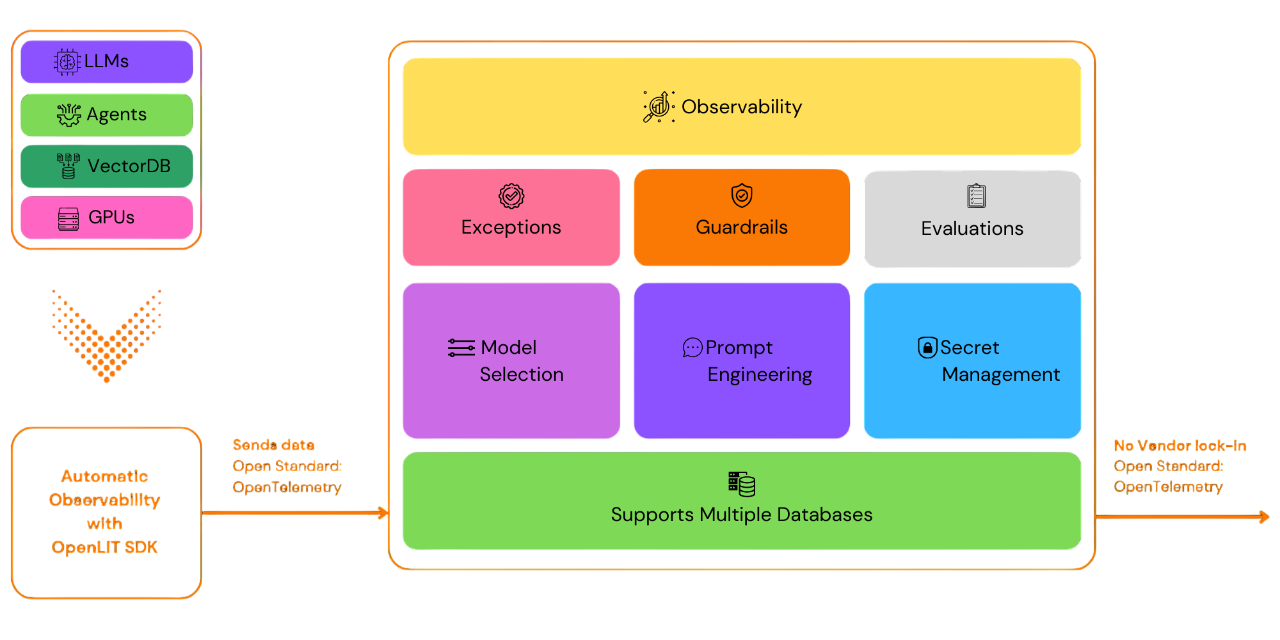
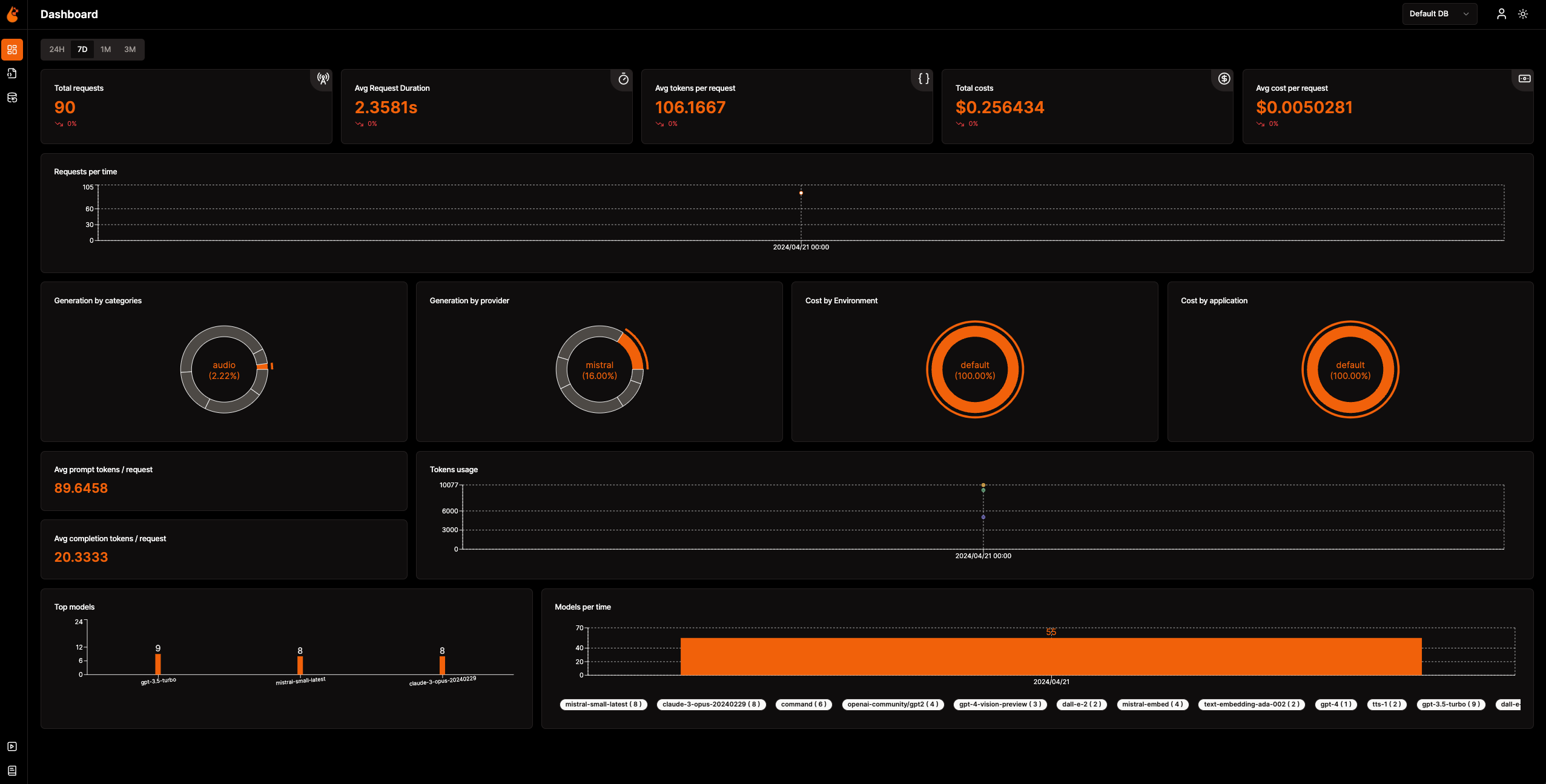
📈 Tableau de bord analytique : Surveillez la santé et les performances de votre application d'IA avec des tableaux de bord détaillés qui suivent les métriques, les coûts et les interactions utilisateurs, offrant une vue claire de l'efficacité globale.
🔌 SDK d'observabilité natifs OpenTelemetry : Des SDK neutres vis-à-vis des fournisseurs pour envoyer des traces et des métriques à vos outils d'observabilité existants.
💲 Suivi des coûts pour les modèles personnalisés et affinés : Adaptez les estimations de coûts pour des modèles spécifiques à l'aide de fichiers de tarification personnalisés pour une budgétisation précise.
🐛 Tableau de bord de surveillance des exceptions : Repérez et résolvez rapidement les problèmes en suivant les exceptions et erreurs courantes grâce à un tableau de bord de surveillance dédié.
💭 Gestion des prompts : Gérez et versionnez les prompts à l'aide de Prompt Hub pour un accès cohérent et facile dans toutes les applications.
🔑 Gestion des clés API et des secrets : Gérez vos clés API et secrets de manière centralisée et sécurisée, en évitant les pratiques non sécurisées.
🎮 Expérimentez avec différents LLM : Utilisez OpenGround pour explorer, tester et comparer différents LLM côte à côte.
🚀 Fleet Hub pour la gestion OpAMP : Gérez et surveillez de manière centralisée les collecteurs OpenTelemetry sur toute votre infrastructure à l'aide du protocole OpAMP (Open Agent Management Protocol) avec une communication TLS sécurisée.
flowchart TB; subgraph " " direction LR; subgraph " " direction LR; OpenLIT_SDK[OpenLIT SDK] -->|Sends Traces & Metrics| OTC[OpenTelemetry Collector]; OTC -->|Stores Data| ClickHouseDB[ClickHouse]; end subgraph " " direction RL; OpenLIT_UI[OpenLIT] -->|Pulls Data| ClickHouseDB; end end
### Étape 1 : Déployer la pile OpenLIT

1. Cloner le dépôt OpenLIT via Git

   Ouvrez votre ligne de commande ou votre terminal et exécutez :   ```shell
   git clone [email protected]:openlit/openlit.git
Auto-hébergement avec Docker
Déployez et exécutez OpenLIT avec la commande suivante : ```shell docker compose up -d
Pour les instructions d'installation dans Kubernetes à l'aide de Helm, consultez le guide d'installation Kubernetes Helm.
Ouvrez votre ligne de commande ou votre terminal et exécutez :```bash pip install openlit
> Pour les instructions d'utilisation du SDK TypeScript, consultez le [guide d'installation du SDK TypeScript](https://github.com/openlit/openlit/tree/main/sdk/typescript#-installation).

### Étape 3 : Initialiser OpenLIT dans votre application

Intégrez OpenLIT dans vos applications IA en ajoutant les lignes suivantes à votre code.```python
import openlit

openlit.init()
Configurez la destination des données de télémétrie comme suit :
| Objectif | Paramètre/Variable d'environnement | Pour l'envoi vers OpenLIT |
|---|---|---|
| Envoyer des données vers un endpoint OTLP HTTP | otlp_endpoint ou OTEL_EXPORTER_OTLP_ENDPOINT | "http://127.0.0.1:4318" |
| Authentifier les backends de télémétrie | otlp_headers ou OTEL_EXPORTER_OTLP_HEADERS | Non requis par défaut |
💡 Info : Si
otlp_endpointouOTEL_EXPORTER_OTLP_ENDPOINTn'est pas fourni, le SDK OpenLIT affichera les traces directement dans votre console, ce qui est recommandé pendant la phase de développement.
Ajoutez les deux lignes suivantes à votre code applicatif : ```python import openlit
openlit.init( otlp_endpoint="http://127.0.0.1:4318", )
</details>

---

<details>

---

<summary>Initialisation à l'aide de variables d'environnement</summary>

Ajoutez les deux lignes suivantes à votre code d'application :  ```python
import openlit

openlit.init()
Alors, configurez votre endpoint OTLP à l'aide de la variable d'environnement : ```env export OTEL_EXPORTER_OTLP_ENDPOINT = "http://127.0.0.1:4318"
</details>
---
### Étape 4 : Visualiser et optimiser
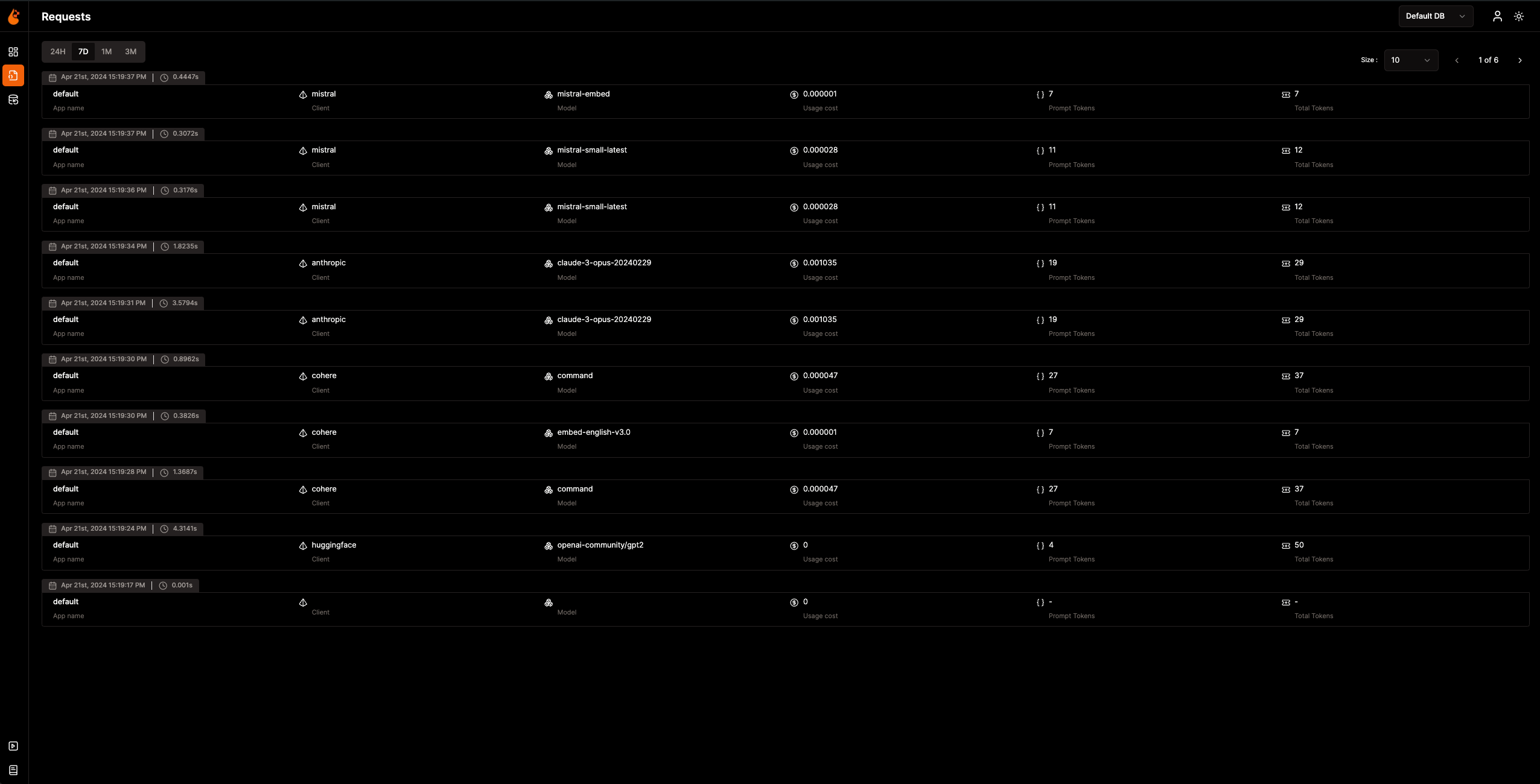
Maintenant que les données d'observabilité sont collectées et envoyées à OpenLIT, l'étape suivante consiste à visualiser et analyser ces données pour obtenir des informations sur les performances de votre application IA, son comportement et identifier les axes d'amélioration.
Rendez-vous simplement sur OpenLIT à l'adresse `127.0.0.1:3000` dans votre navigateur pour commencer à explorer. Vous pouvez vous connecter en utilisant les identifiants par défaut :
- **Email** : `[email protected]`
- **Mot de passe** : `openlituser`
## 📦 Intégrations prises en charge
OpenLIT auto-instrumente **plus de 44 fournisseurs de LLM, frameworks IA et bases de données vectorielles** avec une seule ligne de code. Chaque intégration produit des traces et métriques [natives OpenTelemetry](https://opentelemetry.io/). Cliquez sur n'importe quelle carte pour consulter la documentation de l'intégration.
<sub>
<img src="https://img.shields.io/badge/Python-3776AB?logo=python&logoColor=white&style=flat-square" height="16"> SDK Python
<img src="https://img.shields.io/badge/TypeScript-3178C6?logo=typescript&logoColor=white&style=flat-square" height="16"> SDK TypeScript
</sub>
### Fournisseurs de LLM
<table>
<tr>
<td align="center" width="160"><a href="https://docs.openlit.io/latest/sdk/integrations/openai"><b>OpenAI</b></a><br/><img src="https://img.shields.io/badge/Python-3776AB?logo=python&logoColor=white&style=flat-square" height="18"> <img src="https://img.shields.io/badge/TypeScript-3178C6?logo=typescript&logoColor=white&style=flat-square" height="18"></td>
<td align="center" width="160"><a href="https://docs.openlit.io/latest/sdk/integrations/anthropic"><b>Anthropic</b></a><br/><img src="https://img.shields.io/badge/Python-3776AB?logo=python&logoColor=white&style=flat-square" height="18"> <img src="https://img.shields.io/badge/TypeScript-3178C6?logo=typescript&logoColor=white&style=flat-square" height="18"></td>
<td align="center" width="160"><a href="https://docs.openlit.io/latest/sdk/integrations/cohere"><b>Cohere</b></a><br/><img src="https://img.shields.io/badge/Python-3776AB?logo=python&logoColor=white&style=flat-square" height="18"> <img src="https://img.shields.io/badge/TypeScript-3178C6?logo=typescript&logoColor=white&style=flat-square" height="18"></td>
<td align="center" width="160"><a href="https://docs.openlit.io/latest/sdk/integrations/mistral"><b>Mistral AI</b></a><br/><img src="https://img.shields.io/badge/Python-3776AB?logo=python&logoColor=white&style=flat-square" height="18"> <img src="https://img.shields.io/badge/TypeScript-3178C6?logo=typescript&logoColor=white&style=flat-square" height="18"></td>
</tr>
<tr>
<td align="center" width="160"><a href="https://docs.openlit.io/latest/sdk/integrations/groq"><b>Groq</b></a><br/><img src="https://img.shields.io/badge/Python-3776AB?logo=python&logoColor=white&style=flat-square" height="18"> <img src="https://img.shields.io/badge/TypeScript-3178C6?logo=typescript&logoColor=white&style=flat-square" height="18"></td>
<td align="center" width="160"><a href="https://docs.openlit.io/latest/sdk/integrations/google-ai-studio"><b>Google AI Studio</b></a><br/><img src="https://img.shields.io/badge/Python-3776AB?logo=python&logoColor=white&style=flat-square" height="18"> <img src="https://img.shields.io/badge/TypeScript-3178C6?logo=typescript&logoColor=white&style=flat-square" height="18"></td>
<td align="center" width="160"><a href="https://docs.openlit.io/latest/sdk/integrations/together"><b>Together AI</b></a><br/><img src="https://img.shields.io/badge/Python-3776AB?logo=python&logoColor=white&style=flat-square" height="18"> <img src="https://img.shields.io/badge/TypeScript-3178C6?logo=typescript&logoColor=white&style=flat-square" height="18"></td>
<td align="center" width="160"><a href="https://docs.openlit.io/latest/sdk/integrations/ollama"><b>Ollama</b></a><br/><img src="https://img.shields.io/badge/Python-3776AB?logo=python&logoColor=white&style=flat-square" height="18"> <img src="https://img.shields.io/badge/TypeScript-3178C6?logo=typescript&logoColor=white&style=flat-square" height="18"></td>
</tr>
<tr>
<td align="center" width="160"><a href="https://docs.openlit.io/latest/sdk/integrations/bedrock"><b>AWS Bedrock</b></a><br/><img src="https://img.shields.io/badge/Python-3776AB?logo=python&logoColor=white&style=flat-square" height="18"> <img src="https://img.shields.io/badge/TypeScript-3178C6?logo=typescript&logoColor=white&style=flat-square" height="18"></td>
<td align="center" width="160"><a href="https://docs.openlit.io/latest/sdk/integrations/azure-ai-inference"><b>Azure AI Inference</b></a><br/><img src="https://img.shields.io/badge/Python-3776AB?logo=python&logoColor=white&style=flat-square" height="18"></td>
<td align="center" width="160"><a href="https://docs.openlit.io/latest/sdk/integrations/vertexai"><b>Vertex AI</b></a><br/><img src="https://img.shields.io/badge/Python-3776AB?logo=python&logoColor=white&style=flat-square" height="18"></td>
<td align="center" width="160"><a href="https://docs.openlit.io/latest/sdk/integrations/vllm"><b>vLLM</b></a><br/><img src="https://img.shields.io/badge/Python-3776AB?logo=python&logoColor=white&style=flat-square" height="18"></td>
</tr>
<tr>
<td align="center" width="160"><a href="https://docs.openlit.io/latest/sdk/integrations/reka"><b>Reka</b></a><br/><img src="https://img.shields.io/badge/Python-3776AB?logo=python&logoColor=white&style=flat-square" height="18"></td>
<td align="center" width="160"><a href="https://docs.openlit.io/latest/sdk/integrations/litellm"><b>LiteLLM</b></a><br/><img src="https://img.shields.io/badge/Python-3776AB?logo=python&logoColor=white&style=flat-square" height="18"></td>
<td align="center" width="160"><a href="https://docs.openlit.io/latest/sdk/integrations/huggingface"><b>Hugging Face</b></a><br/><img src="https://img.shields.io/badge/Python-3776AB?logo=python&logoColor=white&style=flat-square" height="18"></td>
<td align="center" width="160"><a href="https://docs.openlit.io/latest/sdk/integrations/ai21"><b>AI21</b></a><br/><img src="https://img.shields.io/badge/Python-3776AB?logo=python&logoColor=white&style=flat-square" height="18"></td>
</tr>
<tr>
<td align="center" width="160"><a href="https://docs.openlit.io/latest/sdk/integrations/gpt4all"><b>GPT4All</b></a><br/><img src="https://img.shields.io/badge/Python-3776AB?logo=python&logoColor=white&style=flat-square" height="18"></td>
<td align="center" width="160"><a href="https://docs.openlit.io/latest/sdk/integrations/premai"><b>PremAI</b></a><br/><img src="https://img.shields.io/badge/Python-3776AB?logo=python&logoColor=white&style=flat-square" height="18"></td>
<td align="center" width="160"><a href="https://docs.openlit.io/latest/sdk/integrations/sarvam"><b>Sarvam AI</b></a><br/><img src="https://img.shields.io/badge/Python-3776AB?logo=python&logoColor=white&style=flat-square" height="18"></td>
<td align="center" width="160"><a href="https://docs.openlit.io/latest/sdk/integrations/julep-ai"><b>Julep</b></a><br/><img src="https://img.shields.io/badge/Python-3776AB?logo=python&logoColor=white&style=flat-square" height="18"></td>
</tr>
<tr>
<td align="center" width="160"><a href="https://docs.openlit.io/latest/sdk/integrations/multion"><b>MultiOn</b></a><br/><img src="https://img.shields.io/badge/Python-3776AB?logo=python&logoColor=white&style=flat-square" height="18"></td>
</tr>
</table>
### Frameworks IA
<table>
<tr>
<td align="center" width="160"><a href="https://docs.openlit.io/latest/sdk/integrations/langchain"><b>LangChain</b></a><br/><img src="https://img.shields.io/badge/Python-3776AB?logo=python&logoColor=white&style=flat-square" height="18"> <img src="https://img.shields.io/badge/TypeScript-3178C6?logo=typescript&logoColor=white&style=flat-square" height="18"></td>
<td align="center" width="160"><a href="https://docs.openlit.io/latest/sdk/integrations/llama-index"><b>LlamaIndex</b></a><br/><img src="https://img.shields.io/badge/Python-3776AB?logo=python&logoColor=white&style=flat-square" height="18"> <img src="https://img.shields.io/badge/TypeScript-3178C6?logo=typescript&logoColor=white&style=flat-square" height="18"></td>
<td align="center" width="160"><a href="https://docs.openlit.io/latest/sdk/integrations/crewai"><b>CrewAI</b></a><br/><img src="https://img.shields.io/badge/Python-3776AB?logo=python&logoColor=white&style=flat-square" height="18"></td>
<td align="center" width="160"><a href="https://docs.openlit.io/latest/sdk/integrations/pydantic"><b>Pydantic AI</b></a><br/><img src="https://img.shields.io/badge/Python-3776AB?logo=python&logoColor=white&style=flat-square" height="18"></td>
</tr>
<tr>
<td align="center" width="160"><a href="https://docs.openlit.io/latest/sdk/integrations/phidata"><b>Agno</b></a><br/><img src="https://img.shields.io/badge/Python-3776AB?logo=python&logoColor=white&style=flat-square" height="18"></td>
<td align="center" width="160"><a href="https://docs.openlit.io/latest/sdk/integrations/browser-use"><b>Browser Use</b></a><br/><img src="https://img.shields.io/badge/Python-3776AB?logo=python&logoColor=white&style=flat-square" height="18"></td>
<td align="center" width="160"><a href="https://docs.openlit.io/latest/sdk/integrations/haystack"><b>Haystack</b></a><br/><img src="https://img.shields.io/badge/Python-3776AB?logo=python&logoColor=white&style=flat-square" height="18"></td>
<td align="center" width="160"><a href="https://docs.openlit.io/latest/sdk/integrations/letta"><b>Letta</b></a><br/><img src="https://img.shields.io/badge/Python-3776AB?logo=python&logoColor=white&style=flat-square" height="18"></td>
</tr>
<tr>
<td align="center" width="160"><a href="https://docs.openlit.io/latest/sdk/integrations/mem0"><b>Mem0</b></a><br/><img src="https://img.shields.io/badge/Python-3776AB?logo=python&logoColor=white&style=flat-square" height="18"></td>
<td align="center" width="160"><a href="https://docs.openlit.io/latest/sdk/integrations/ag2"><b>AG2 (AutoGen)</b></a><br/><img src="https://img.shields.io/badge/Python-3776AB?logo=python&logoColor=white&style=flat-square" height="18"></td>
<td align="center" width="160"><a href="https://docs.openlit.io/latest/sdk/integrations/controlflow"><b>Controlflow</b></a><br/><img src="https://img.shields.io/badge/Python-3776AB?logo=python&logoColor=white&style=flat-square" height="18"></td>
<td align="center" width="160"><a href="https://docs.openlit.io/latest/sdk/integrations/crawl4ai"><b>Crawl4AI</b></a><br/><img src="https://img.shields.io/badge/Python-3776AB?logo=python&logoColor=white&style=flat-square" height="18"></td>
</tr>
<tr>
<td align="center" width="160"><a href="https://docs.openlit.io/latest/sdk/integrations/dynamiq"><b>Dynamiq</b></a><br/><img src="https://img.shields.io/badge/Python-3776AB?logo=python&logoColor=white&style=flat-square" height="18"></td>
<td align="center" width="160"><a href="https://docs.openlit.io/latest/sdk/integrations/openai-agents"><b>OpenAI Agents</b></a><br/><img src="https://img.shields.io/badge/Python-3776AB?logo=python&logoColor=white&style=flat-square" height="18"></td>
<td align="center" width="160"><a href="https://docs.openlit.io/latest/sdk/integrations/firecrawl"><b>Firecrawl</b></a><br/><img src="https://img.shields.io/badge/Python-3776AB?logo=python&logoColor=white&style=flat-square" height="18"></td>
</tr>
</table>
### Bases de données vectorielles
<table>
<tr>
<td align="center" width="160"><a href="https://docs.openlit.io/latest/sdk/integrations/pinecone"><b>Pinecone</b></a><br/><img src="https://img.shields.io/badge/Python-3776AB?logo=python&logoColor=white&style=flat-square" height="18"> <img src="https://img.shields.io/badge/TypeScript-3178C6?logo=typescript&logoColor=white&style=flat-square" height="18"></td>
<td align="center" width="160"><a href="https://docs.openlit.io/latest/sdk/integrations/chromadb"><b>ChromaDB</b></a><br/><img src="https://img.shields.io/badge/Python-3776AB?logo=python&logoColor=white&style=flat-square" height="18"></td>
<td align="center" width="160"><a href="https://docs.openlit.io/latest/sdk/integrations/qdrant"><b>Qdrant</b></a><br/><img src="https://img.shields.io/badge/Python-3776AB?logo=python&logoColor=white&style=flat-square" height="18"></td>
<td align="center" width="160"><a href="https://docs.openlit.io/latest/sdk/integrations/milvus"><b>Milvus</b></a><br/><img src="https://img.shields.io/badge/Python-3776AB?logo=python&logoColor=white&style=flat-square" height="18"></td>
</tr>
<tr>
<td align="center" width="160"><a href="https://docs.openlit.io/latest/sdk/integrations/astradb"><b>Astra DB</b></a><br/><img src="https://img.shields.io/badge/Python-3776AB?logo=python&logoColor=white&style=flat-square" height="18"></td>
<td align="center" width="160"><a href="https://docs.openlit.io/latest/sdk/integrations/psycopg"><b>PostgreSQL</b></a><br/><img src="https://img.shields.io/badge/Python-3776AB?logo=python&logoColor=white&style=flat-square" height="18"></td>
</tr>
</table>
### Outils spécialisés
<table>
<tr>
<td align="center" width="160"><a href="https://docs.openlit.io/latest/sdk/integrations/elevenlabs"><b>ElevenLabs</b></a><br/><img src="https://img.shields.io/badge/Python-3776AB?logo=python&logoColor=white&style=flat-square" height="18"></td>
<td align="center" width="160"><a href="https://docs.openlit.io/latest/sdk/integrations/assemblyai"><b>AssemblyAI</b></a><br/><img src="https://img.shields.io/badge/Python-3776AB?logo=python&logoColor=white&style=flat-square" height="18"></td>
</tr>
</table>
## 🛣️ Feuille de route
Nous nous engageons à améliorer continuellement OpenLIT. Voici un aperçu de ce qui a été accompli et de ce qui est à venir :
| Fonctionnalité | Statut |
| --------------------------------------------------------------------------------------------------------------------------------- | ------------- |
| [SDK d'observabilité natif OpenTelemetry pour le tracing et les métriques](https://github.com/openlit/openlit/tree/text-upgrade/sdk/python) | ✅ Terminé |
| [Surveillance GPU native OpenTelemetry](https://docs.openlit.io/latest/features/gpu) | ✅ Terminé |
| [Surveillance des exceptions et des erreurs](https://docs.openlit.io/latest/features/exceptions) | ✅ Terminé |
| [Prompt Hub pour gérer et versionner les prompts](https://docs.openlit.io/latest/features/prompt-hub) | ✅ Terminé |
| [OpenGround pour tester et comparer les LLM](https://docs.openlit.io/latest/features/openground) | ✅ Terminé |
| [Vault pour la gestion centralisée des clés API et secrets LLM](https://docs.openlit.io/latest/features/vault) | ✅ Terminé |
| [Suivi des coûts pour les modèles personnalisés](https://docs.openlit.io/latest/features/pricing) | ✅ Terminé |
| [Implémentation des garde-fous en temps réel](https://docs.openlit.io/latest/features/guardrails) | ✅ Terminé |
| [Évaluation programmatique des réponses LLM](https://docs.openlit.io/latest/features/evaluations) | ✅ Terminé |
| [Fleet Hub pour la gestion OpAMP](https://docs.openlit.io/latest/openlit/observability/fleet-hub) | ✅ Terminé |
| [Métriques d'auto-évaluation basées sur l'utilisation](https://github.com/openlit/openlit/issues/470) | 🔜 Bientôt disponible |
| [Retour humain sur les événements LLM](https://github.com/openlit/openlit/issues/471) | 🔜 Bientôt disponible |
| [Génération de jeux de données basés sur les événements LLM](https://github.com/openlit/openlit/issues/472) | 🔜 Bientôt disponible |
| [Recherche dans les traces]() | 🔜 Bientôt disponible |
## 🌱 Contribuer
Que ce soit grand ou petit, nous adorons les contributions 💚. Consultez notre [guide de contribution](https://github.com/pvharmo2/gha-lab-6c3094af9e/blob/main/CONTRIBUTING.md) pour commencer
Vous ne savez pas par où commencer ? Voici quelques façons de vous impliquer :
- Rejoignez notre communauté [Slack](https://join.slack.com/t/openlit/shared_invite/zt-2etnfttwg-TjP_7BZXfYg84oAukY8QRQ) ou [Discord](https://discord.gg/rjvTm6zd) pour discuter d'idées, partager des retours et échanger avec notre équipe ainsi qu'avec la communauté OpenLIT au sens large.
Votre contribution nous aide à grandir et à nous améliorer, et nous sommes là pour vous accompagner à chaque étape.
[](https://www.producthunt.com/posts/openlit?embed=true&utm_source=badge-featured&utm_medium=badge&utm_souce=badge-openlit)
<a href="https://fazier.com/launches/openlit-2" target="_blank" rel="noopener noreferrer"><img src="https://fazier.com/api/v1/public/badges/embed_image.svg?launch_id=779&badge_type=daily" width="270" alt="Example Image" class="d-inline-block mt-3 p-3 rounded img-fluid" /></a>
## 💚 Communauté et support
Connectez-vous avec la communauté OpenLIT et les mainteneurs pour obtenir du support, des discussions et des mises à jour :
- 🌟 Si vous aimez le projet, laissez une étoile sur notre [GitHub](https://github.com/openlit/openlit/).
- 🌍 Rejoignez notre communauté [Slack](https://join.slack.com/t/openlit/shared_invite/zt-2etnfttwg-TjP_7BZXfYg84oAukY8QRQ) ou [Discord](https://discord.gg/CQnXwNT3) pour des interactions en direct et des questions.
- 🐞 Signalez des bugs sur nos [GitHub Issues](https://github.com/openlit/openlit/issues) pour nous aider à améliorer OpenLIT.
- 𝕏 Suivez-nous sur [X](https://twitter.com/openlit_io) pour les dernières mises à jour et actualités.
## Licence
OpenLIT est disponible sous la licence [Apache-2.0](https://github.com/pvharmo2/gha-lab-6c3094af9e/blob/main/LICENSE).
## 🙇♂️ Remerciements
<p>Ce projet est fièrement soutenu par :</p>
<p>
<a href="https://www.testmuai.com/?utm_medium=sponsor&utm_source=openlit" target="_blank">
<img src="https://assets.kitploit.com/production/public/readmes/54232/59e406ce9676e24c2e228a1804d1810579038817584ead02e904e630264533c7/3ca662f501e7be9fcc4af3ff06d2755ca0712b463591ada282d81325365618bb-display-v1.webp" style={{ verticalAlign: 'middle' }} height="80" />
</a>
<a href="https://www.digitalocean.com/">
<img src="https://opensource.nyc3.cdn.digitaloceanspaces.com/attribution/assets/SVG/DO_Logo_horizontal_blue.svg" height="80px" width="200px">
</a>
</p>