 p0dalirius/extractbitlockerkeys
Un script d'administration système ou de post-exploitation pour extraire automatiquement les clés de récupération BitLocker d'un domaine.


Un script d'administration système ou de post-exploitation pour extraire automatiquement les clés de récupération Bitlocker d'un domaine.



[!WARNING] Veuillez ne pas stocker cette sauvegarde dans un partage SMB en ligne du domaine. Il est préférable de l'imprimer et de la stocker physiquement dans un coffre verrouillé.
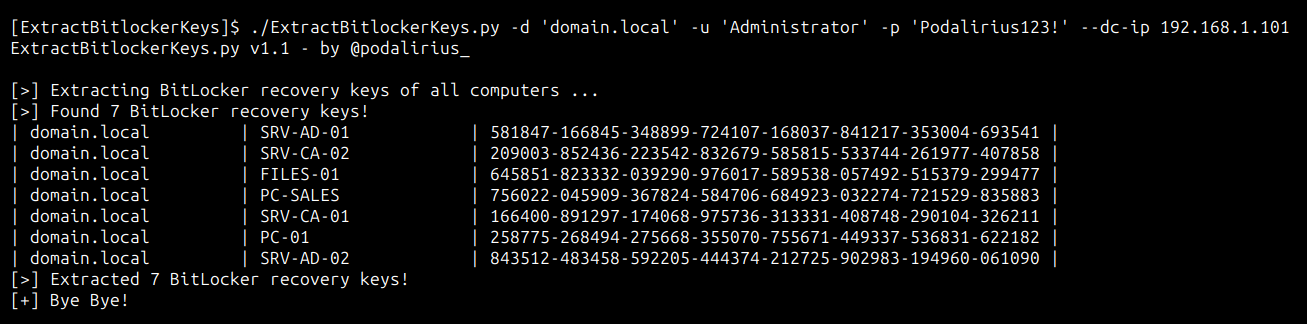
Pour extraire les clés de récupération Bitlocker de tous les ordinateurs du domaine domain.local, vous pouvez utiliser cette commande :
./ExtractBitlockerKeys.py -d 'domain.local' -u 'Administrator' -p 'Podalirius123!' --dc-ip 192.168.1.101
Vous obtiendrez la sortie suivante :
Pour extraire les clés de récupération Bitlocker de tous les ordinateurs du domaine domain.local, vous pouvez utiliser cette commande :
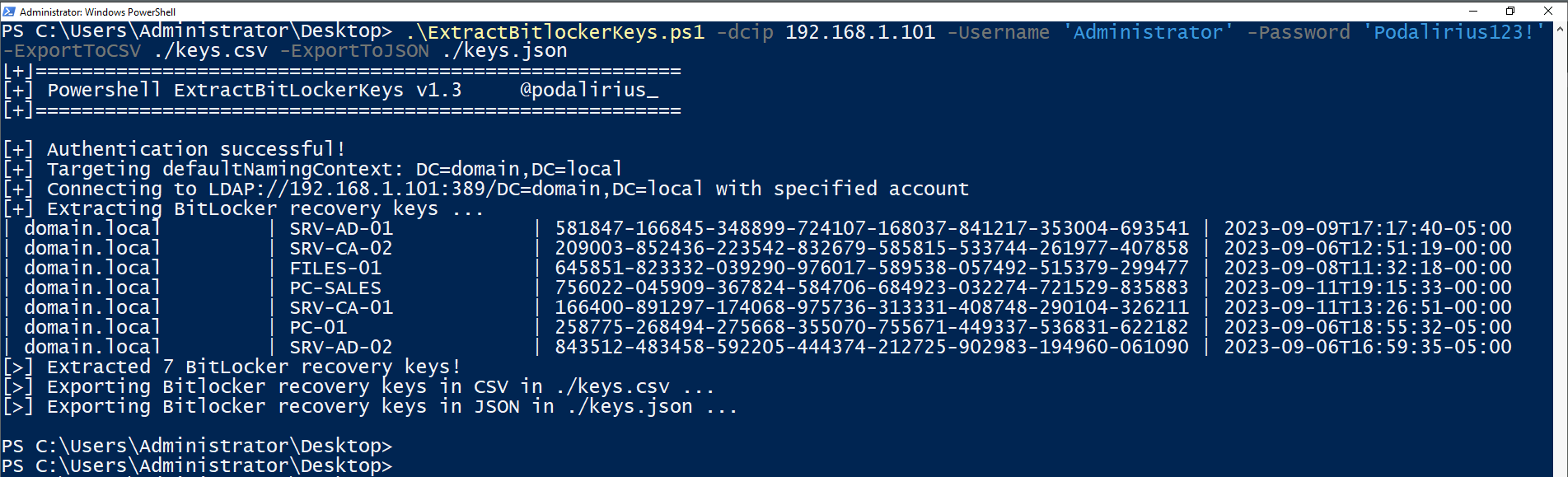
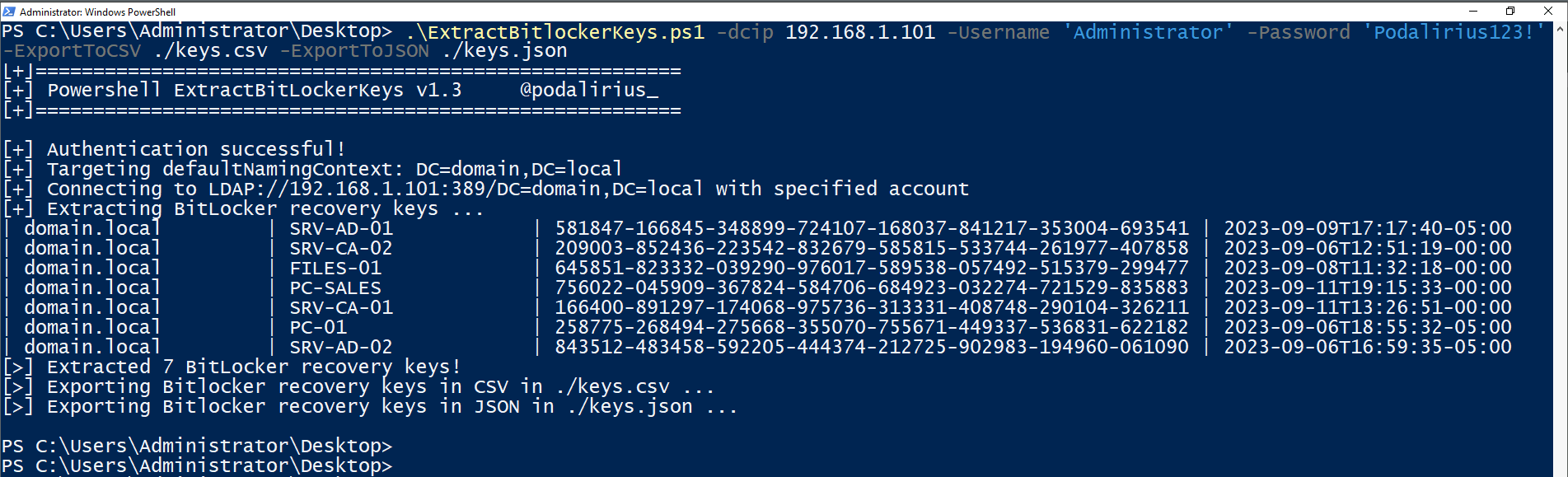
.\ExtractBitlockerKeys.ps1 -dcip 192.168.1.101 -ExportToCSV ./keys.csv -ExportToJSON ./keys.json
Vous obtiendrez la sortie suivante :
$ ./ExtractBitlockerKeys.py -h
ExtractBitlockerKeys.py v1.1 - by Remi GASCOU (Podalirius)

usage: ExtractBitlockerKeys.py [-h] [-v] [-q] [-t THREADS] [--export-xlsx EXPORT_XLSX] [--export-json EXPORT_JSON] [--export-sqlite EXPORT_SQLITE] --dc-ip ip address [-d DOMAIN] [-u USER]
                               [--no-pass | -p PASSWORD | -H [LMHASH:]NTHASH | --aes-key hex key] [-k]

options:
  -h, --help            show this help message and exit
  -v, --verbose         Verbose mode. (default: False)
  -q, --quiet           Show no information at all.
  -t THREADS, --threads THREADS
                        Number of threads (default: 4).

Output files:
  --export-xlsx EXPORT_XLSX
                        Output XLSX file to store the results in.
  --export-json EXPORT_JSON
                        Output JSON file to store the results in.
  --export-sqlite EXPORT_SQLITE
                        Output SQLITE3 file to store the results in.

Authentication & connection:
  --dc-ip ip address    IP Address of the domain controller or KDC (Key Distribution Center) for Kerberos. If omitted it will use the domain part (FQDN) specified in the identity parameter
  -d DOMAIN, --domain DOMAIN
                        (FQDN) domain to authenticate to
  -u USER, --user USER  user to authenticate with

Credentials:
  --no-pass             Don't ask for password (useful for -k)
  -p PASSWORD, --password PASSWORD
                        Password to authenticate with
  -H [LMHASH:]NTHASH, --hashes [LMHASH:]NTHASH
                        NT/LM hashes, format is LMhash:NThash
  --aes-key hex key     AES key to use for Kerberos Authentication (128 or 256 bits)
  -k, --kerberos        Use Kerberos authentication. Grabs credentials from .ccache file (KRB5CCNAME) based on target parameters. If valid credentials cannot be found, it will use the ones specified in the command line.
Les pull requests sont les bienvenues. N'hésitez pas à ouvrir un ticket si vous souhaitez ajouter d'autres fonctionnalités.
