 oros42/imsi-catcher
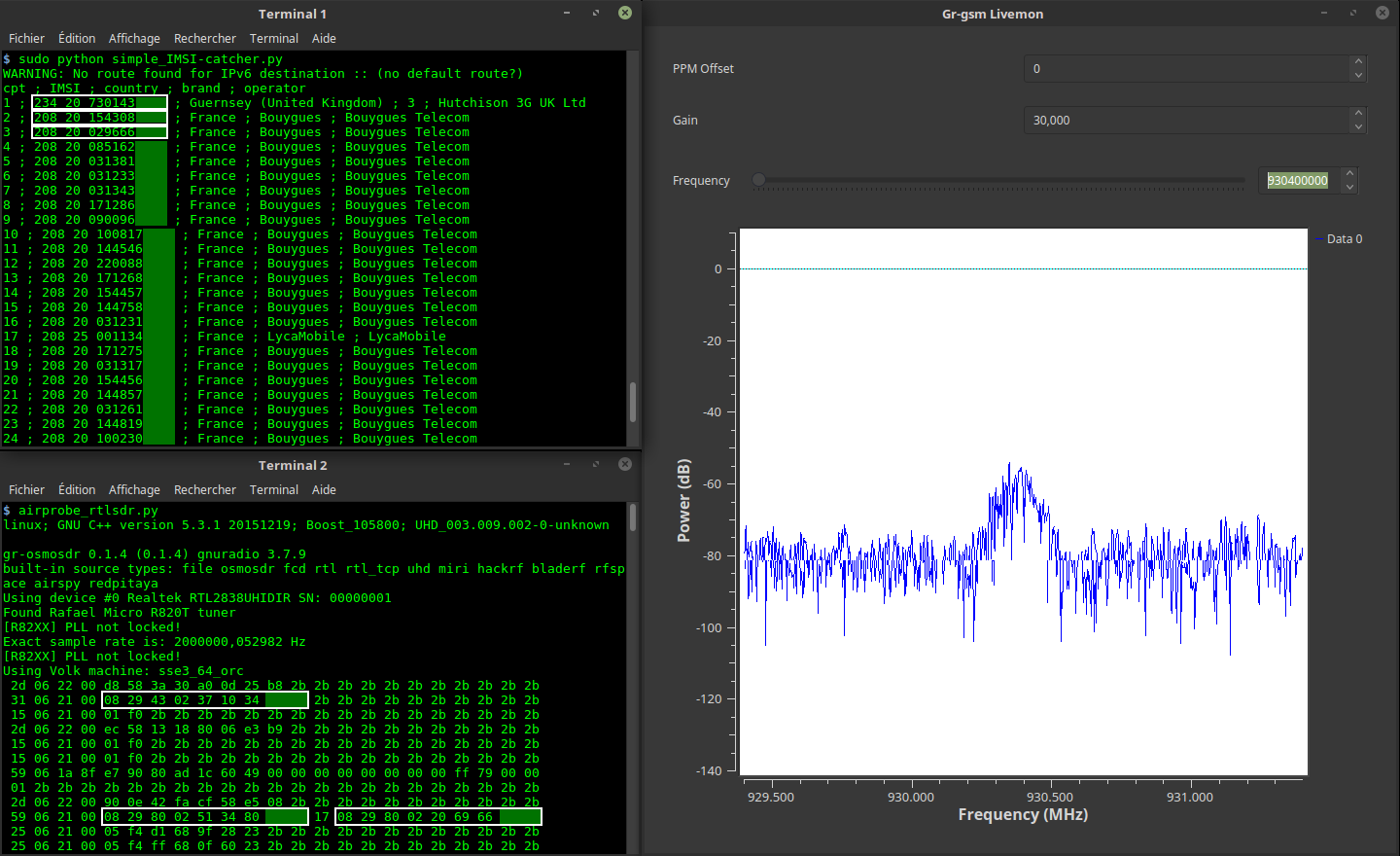
Ce programme vous montre les numéros IMSI des téléphones portables autour de vous.

Ce programme vous montre les numéros IMSI, le pays, la marque et l'opérateur des téléphones portables autour de vous.
/!\ Ce programme a été conçu pour comprendre le fonctionnement du réseau GSM. Pas pour du piratage malveillant !
1 PC avec Gnu/Linux. Testé avec :
1 récepteur SDR. Testé avec :
git clone https://github.com/Oros42/IMSI-catcher.git
cd IMSI-catcher
ou
wget https://github.com/Oros42/IMSI-catcher/archive/master.zip && unzip -q master.zip
cd IMSI-catcher-master
sudo apt install python3-numpy python3-scipy python3-scapy gr-gsm
Attention : n'utilisez pas Python 3.9 (bug ctypes) !
À partir de Python 3.1, Imp est remplacé par importlib. Imp est obsolète dans Python 3.11, les nouvelles exigences sont satisfaites comme suit.
apt install python3-pip
pip install importlib
sudo xhost +local:docker
docker pull atomicpowerman/imsi-catcher
docker run -ti --net=host -e DISPLAY=$DISPLAY --privileged -v /dev/bus/usb:/dev/bus/usb  atomicpowerman/imsi-catcher bash
Exécutez tous les grgsm_* dans ce docker.
Nous utilisons grgsm_livemon pour décoder les signaux GSM et simple_IMSI-catcher.py pour trouver les IMSI.
python3 simple_IMSI-catcher.py -h
Usage: simple_IMSI-catcher.py: [options]

Options:
  -h, --help            show this help message and exit
  -a, --alltmsi         Show TMSI who haven't got IMSI (default  : false)
  -i IFACE, --iface=IFACE
                        Interface (default : lo)
  -m IMSI, --imsi=IMSI  IMSI to track (default : None, Example:
                        123456789101112 or "123 45 6789101112")
  -p PORT, --port=PORT  Port (default : 4729)
  -s, --sniff           sniff on interface instead of listening on port
                        (require root/suid access)
  -w SQLITE, --sqlite=SQLITE
                        Save observed IMSI values to specified SQLite file
  -t TXT, --txt=TXT     Save observed IMSI values to specified TXT file
  -z, --mysql           Save observed IMSI values to specified MYSQL DB (copy
                        .env.dist to .env and edit it)
Ouvrez 2 terminaux.
Dans le terminal 1
sudo python3 simple_IMSI-catcher.py -s
Dans le terminal 2
grgsm_livemon
Maintenant, changez la fréquence jusqu'à ce qu'elle affiche, dans le terminal, quelque chose comme ceci :
15 06 21 00 01 f0 2b 2b 2b 2b 2b 2b 2b 2b 2b 2b 2b 2b 2b 2b 2b 2b 2b
25 06 21 00 05 f4 f8 68 03 26 23 2b 2b 2b 2b 2b 2b 2b 2b 2b 2b 2b 2b
49 06 1b 95 cc 02 f8 02 01 9c c8 03 1e 57 a5 01 79 00 00 1c 13 2b 2b
Vous pouvez observer les paquets GSM avec Wireshark.
sudo apt install wireshark
sudo wireshark -k -Y '!icmp && gsmtap' -i lo
grgsm_scanner
ARFCN:  974, Freq:  925.0M, CID:     2, LAC:   1337, MCC: 208, MNC:  20, Pwr: -41
ARFCN:  976, Freq:  925.4M, CID:  4242, LAC:   1007, MCC: 208, MNC:  20, Pwr: -45
Maintenant, vous pouvez régler la fréquence pour grgsm_livemon :
grgsm_livemon -f 925.4M
Ou, pour hackrf, récupérez l'outil kalibrate-hackrf comme ceci :
sudo apt-get install automake autoconf libhackrf-dev
git clone https://github.com/scateu/kalibrate-hackrf
cd kalibrate-hackrf/
./bootstrap
./configure
make
sudo make install
Exécutez
kal -s GSM900
kal: Scanning for GSM-900 base stations.
GSM-900:
	chan:   14 (937.8MHz + 10.449kHz)	power: 3327428.82
	chan:   15 (938.0MHz + 4.662kHz)	power: 3190712.41
...
Utilisez db-example.sql pour créer votre base de données.
cp .env.dist .env
nano .env
# set your config
sudo apt install python-decouple python3-mysqldb
sudo python3 simple_IMSI-catcher.py -s --mysql
Scanne les fréquences et écoute la première trouvée :
Dans le terminal 1
python3 scan-and-livemon
Dans le terminal 2
python3 simple_IMSI-catcher.py
Installation de Gr-Gsm : https://osmocom.org/projects/gr-gsm/wiki/Installation et https://github.com/velichkov/gr-gsm
Fréquence : http://www.worldtimezone.com/gsm.html et https://fr.wikipedia.org/wiki/Global_System_for_Mobile_Communications
Code de réseau mobile : https://en.wikipedia.org/wiki/Mobile_Network_Code
Scapy : http://secdev.org/projects/scapy/doc/usage.html
IMSI : https://fr.wikipedia.org/wiki/IMSI
Realtek RTL2832U : https://osmocom.org/projects/sdr/wiki/rtl-sdr et http://doc.ubuntu-fr.org/rtl2832u et http://doc.ubuntu-fr.org/rtl-sdr
Pour soutenir mon travail, un pourboire serait sympa ;-)
https://liberapay.com/Oros/
