 nimaarek/cve-2026-8932-poc
Proof-of-concept reproducing CVE-2026-8932, an incomplete mTLS configuration matching flaw in libcurl connection reuse, with a local lab server and C PoC.

Proof-of-concept reproduction of CVE-2026-8932, an incomplete mTLS configuration matching issue in libcurl connection reuse.
CVE-2026-8932 affects libcurl's connection reuse logic when mutual TLS (mTLS) configuration changes between requests.
Under vulnerable conditions, libcurl can reuse an existing TLS connection even though an mTLS-related configuration option has changed and should have prevented that connection from being reused.
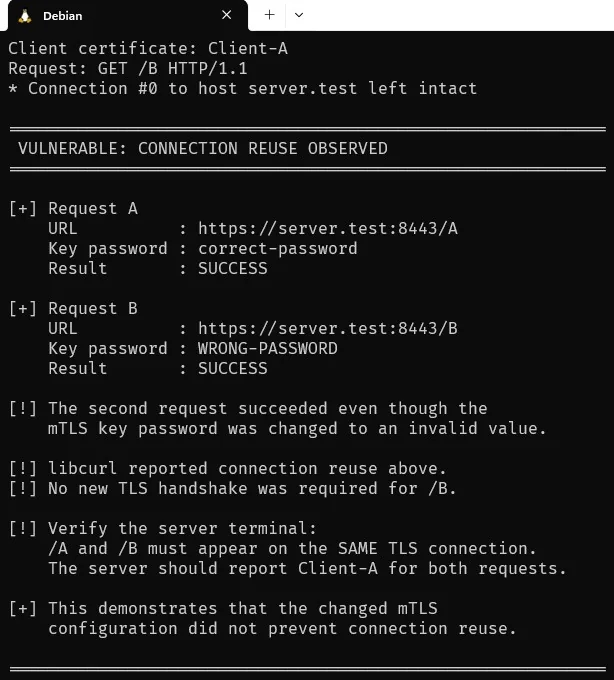
This PoC demonstrates the issue by changing the private-key password between two requests while using the same client certificate and private key.
The first request uses the correct password:
correct-password
The second request intentionally uses an invalid password:
WRONG-PASSWORD
If libcurl incorrectly reuses the existing TLS connection, the second request does not require another TLS handshake. Consequently, the invalid private-key password is never needed to establish a new TLS connection and the request succeeds.
The PoC therefore demonstrates the connection-reuse condition associated with CVE-2026-8932.
| Property | Value |
|---|---|
| CVE | CVE-2026-8932 |
| Component | libcurl |
| Vulnerability Type | Incomplete mTLS configuration matching |
| CWE | CWE-305 — Authentication Bypass by Primary Weakness |
| Affected Area | TLS connection reuse |
| Protocol | HTTPS / mTLS |
| Client | libcurl API |
| curl CLI | Not affected |
| PoC Scope | Local laboratory environment |
The vulnerability is a logic/configuration matching issue, rather than a traditional memory-safety vulnerability such as a buffer overflow or use-after-free.
libcurl maintains connection information and can reuse an existing connection when a subsequent request is considered compatible with the connection's configuration.
For TLS connections, the connection configuration must therefore be compared carefully before reuse.
The vulnerable implementation did not include all relevant mTLS configuration fields in the connection matching logic.
Among the affected settings are:
cert_type
key
key_type
key_passwd
key_blob
The important setting used by this PoC is:
key_passwd
The PoC establishes a TLS connection using an encrypted client private key and the correct password:
correct-password
It then performs another request using the same certificate and key but changes the password to:
WRONG-PASSWORD
A vulnerable connection-matching implementation may still consider the existing connection reusable.
The test consists of two HTTP requests.
The first request establishes the TLS connection:
URL:
https://server.test:8443/A

Client certificate:
client.crt

Private key:
client.key

Key password:
correct-password
The TLS connection remains persistent because the server supports HTTP keep-alive.
The second request uses the same certificate and private key but changes the key password:
URL:
https://server.test:8443/B

Client certificate:
client.crt

Private key:
client.key

Key password:
WRONG-PASSWORD
If libcurl creates a new TLS connection, loading the encrypted private key with the wrong password should fail.
However, if libcurl incorrectly reuses the existing connection, no new TLS handshake is required.
The invalid password therefore does not prevent the HTTP request from succeeding.
The laboratory setup consists of:
                         localhost
                            |
                            v
                  +---------------------+
                  | Python mTLS Server  |
                  |   127.0.0.1:8443   |
                  +----------+----------+
                             |
                             | HTTPS / TLS 1.3
                             |
                    +--------+--------+
                    |                 |
                  /A                 /B
                    \                 /
                     \               /
                      v             v
                  Same TLS Connection
                         |
                         v
                     libcurl
                     PoC (C)
The important observation is that /A and /B must arrive on the same TLS connection.
CVE-2026-8932-PoC/
├── README.md
├── LICENSE
├── .gitignore
│
├── certs/
│   └── .gitkeep
│
├── poc/
│   └── poc.c
│
├── server/
│   └── server.py
│
└── docs/
    ├── CVE-2026-8932-POC.jpg
    ├── CVE-2026-8932-server-POC.jpg
    ├── poc-output.txt
    └── server-output.txt
The certs/ directory is intentionally kept empty in the repository. Certificates and private keys should be generated locally.
The PoC was tested in the following environment:
OS:
Debian GNU/Linux 13 (trixie)

Architecture:
x86_64

libcurl:
8.14.1

OpenSSL:
3.5.7

GCC:
14.2.0
The vulnerable libcurl installation used for the reproduction was:
libcurl/8.14.1
Verify the installed version:
curl --version
and:
pkg-config --modversion libcurl
mkdir -p ~/cve-2026-8932-lab/{certs,poc,server,docs}

cd ~/cve-2026-8932-lab
cd ~/cve-2026-8932-lab/certs

openssl genrsa -out ca.key 2048

openssl req -x509 -new -nodes \
  -key ca.key \
  -sha256 \
  -days 3650 \
  -subj "/CN=CVE-2026-8932-CA" \
  -out ca.crt
Generate the server private key:
openssl genrsa -out server.key 2048
Generate the CSR:
openssl req -new \
  -key server.key \
  -subj "/CN=server.test" \
  -out server.csr
Create the certificate extensions:
printf "subjectAltName=DNS:server.test\nextendedKeyUsage=serverAuth\n" \
  > server.ext
Sign the certificate using the test CA:
openssl x509 -req \
  -in server.csr \
  -CA ca.crt \
  -CAkey ca.key \
  -CAcreateserial \
  -out server.crt \
  -days 3650 \
  -sha256 \
  -extfile server.ext
Generate the client private key:
openssl genrsa -out client.key.tmp 2048
Generate the CSR:
openssl req -new \
  -key client.key.tmp \
  -subj "/CN=Client-A" \
  -out client.csr
Convert the private key into encrypted PKCS#8 format:
openssl pkcs8 \
  -topk8 \
  -in client.key.tmp \
  -out client.key \
  -v2 aes-256-cbc \
  -passout pass:correct-password
The resulting private key is encrypted with:
correct-password
Create the client certificate extensions:
printf "extendedKeyUsage=clientAuth\n" \
  > client.ext
Sign the client certificate:
openssl x509 -req \
  -in client.csr \
  -CA ca.crt \
  -CAkey ca.key \
  -CAcreateserial \
  -out client.crt \
  -days 3650 \
  -sha256 \
  -extfile client.ext
At this point the required files should exist:
certs/
├── ca.crt
├── ca.key
├── client.crt
├── client.key
├── server.crt
└── server.key
Move into the server directory:
cd ~/cve-2026-8932-lab/server
Start the server:
python3 server.py
The server listens on:
0.0.0.0:8443
Client certificate authentication is required.
