 mozilla/cipherscan
Un moyen très simple de savoir quelles suites de chiffrement SSL sont supportées par une cible.


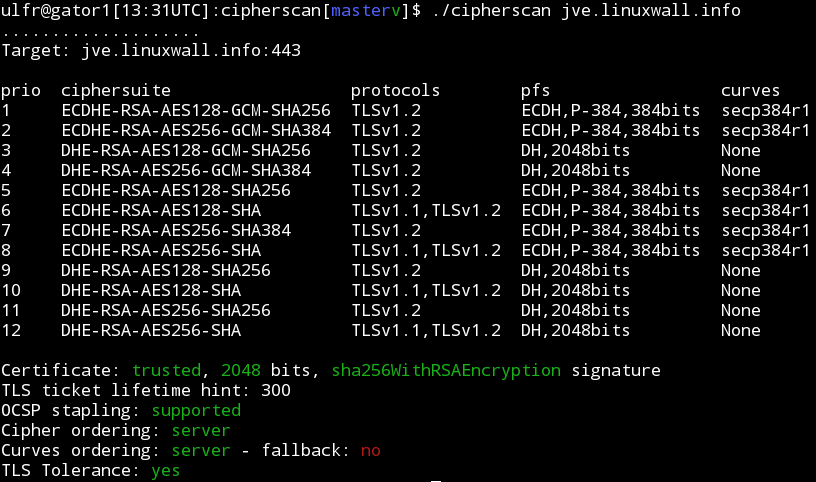
Cipherscan teste l'ordre des chiffrements SSL/TLS sur une cible donnée, pour toutes les versions majeures de SSL et TLS. Il extrait également certaines informations sur les certificats, les options TLS, l'OCSP stapling et plus encore. Cipherscan est un wrapper autour de la commande openssl s_client.
Cipherscan est conçu pour fonctionner sur toutes les variantes d'Unix. Il est livré avec sa propre version d'OpenSSL pour Linux/64 et Darwin/64. Sur d'autres plateformes, il utilisera la version d'openssl fournie par le système d'exploitation (qui peut avoir un support de chiffrements limité), ou votre propre version spécifiée via l'option -o en ligne de commande.
Test de base :
$ ./cipherscan google.com
...................
Target: google.com:443

prio  ciphersuite                  protocols                    pfs                 curves
1     ECDHE-RSA-CHACHA20-POLY1305  TLSv1.2                      ECDH,P-256,256bits  prime256v1
2     ECDHE-RSA-AES128-GCM-SHA256  TLSv1.2                      ECDH,P-256,256bits  prime256v1
3     ECDHE-RSA-AES128-SHA         TLSv1.1,TLSv1.2              ECDH,P-256,256bits  prime256v1
4     ECDHE-RSA-RC4-SHA            SSLv3,TLSv1,TLSv1.1,TLSv1.2  ECDH,P-256,256bits  prime256v1
5     AES128-GCM-SHA256            TLSv1.2                      None                None
6     AES128-SHA256                TLSv1.2                      None                None
7     AES128-SHA                   TLSv1.1,TLSv1.2              None                None
8     RC4-SHA                      SSLv3,TLSv1,TLSv1.1,TLSv1.2  None                None
9     RC4-MD5                      SSLv3,TLSv1,TLSv1.1,TLSv1.2  None                None
10    ECDHE-RSA-AES256-GCM-SHA384  TLSv1.2                      ECDH,P-256,256bits  prime256v1
11    ECDHE-RSA-AES256-SHA384      TLSv1.2                      ECDH,P-256,256bits  prime256v1
12    ECDHE-RSA-AES256-SHA         SSLv3,TLSv1,TLSv1.1,TLSv1.2  ECDH,P-256,256bits  prime256v1
13    AES256-GCM-SHA384            TLSv1.2                      None                None
14    AES256-SHA256                TLSv1.2                      None                None
15    AES256-SHA                   SSLv3,TLSv1,TLSv1.1,TLSv1.2  None                None
16    ECDHE-RSA-AES128-SHA256      TLSv1.2                      ECDH,P-256,256bits  prime256v1
17    ECDHE-RSA-DES-CBC3-SHA       SSLv3,TLSv1,TLSv1.1,TLSv1.2  ECDH,P-256,256bits  prime256v1
18    DES-CBC3-SHA                 SSLv3,TLSv1,TLSv1.1,TLSv1.2  None                None

Certificate: trusted, 2048 bit, sha1WithRSAEncryption signature
TLS ticket lifetime hint: 100800
OCSP stapling: not supported
Cipher ordering: server
Test STARTTLS :
darwin$ $ ./cipherscan --curves -starttls xmpp jabber.ccc.de:5222
................................
Target: jabber.ccc.de:5222

prio  ciphersuite                  protocols              pfs                 curves
1     ECDHE-RSA-AES256-GCM-SHA384  TLSv1.2                ECDH,P-256,256bits  prime256v1
2     ECDHE-RSA-AES256-SHA384      TLSv1.2                ECDH,P-256,256bits  prime256v1
3     ECDHE-RSA-AES256-SHA         TLSv1,TLSv1.1,TLSv1.2  ECDH,P-256,256bits  prime256v1
4     DHE-RSA-AES256-GCM-SHA384    TLSv1.2                DH,1024bits         None
5     DHE-RSA-AES256-SHA256        TLSv1.2                DH,1024bits         None
6     DHE-RSA-AES256-SHA           TLSv1,TLSv1.1,TLSv1.2  DH,1024bits         None
7     DHE-RSA-CAMELLIA256-SHA      TLSv1,TLSv1.1,TLSv1.2  DH,1024bits         None
8     AES256-GCM-SHA384            TLSv1.2                None                None
9     AES256-SHA256                TLSv1.2                None                None
10    AES256-SHA                   TLSv1,TLSv1.1,TLSv1.2  None                None
11    CAMELLIA256-SHA              TLSv1,TLSv1.1,TLSv1.2  None                None
12    ECDHE-RSA-AES128-GCM-SHA256  TLSv1.2                ECDH,P-256,256bits  prime256v1
13    ECDHE-RSA-AES128-SHA256      TLSv1.2                ECDH,P-256,256bits  prime256v1
14    ECDHE-RSA-AES128-SHA         TLSv1,TLSv1.1,TLSv1.2  ECDH,P-256,256bits  prime256v1
15    DHE-RSA-AES128-GCM-SHA256    TLSv1.2                DH,1024bits         None
16    DHE-RSA-AES128-SHA256        TLSv1.2                DH,1024bits         None
17    DHE-RSA-AES128-SHA           TLSv1,TLSv1.1,TLSv1.2  DH,1024bits         None
18    DHE-RSA-SEED-SHA             TLSv1,TLSv1.1,TLSv1.2  DH,1024bits         None
19    DHE-RSA-CAMELLIA128-SHA      TLSv1,TLSv1.1,TLSv1.2  DH,1024bits         None
20    AES128-GCM-SHA256            TLSv1.2                None                None
21    AES128-SHA256                TLSv1.2                None                None
22    AES128-SHA                   TLSv1,TLSv1.1,TLSv1.2  None                None
23    SEED-SHA                     TLSv1,TLSv1.1,TLSv1.2  None                None
24    CAMELLIA128-SHA              TLSv1,TLSv1.1,TLSv1.2  None                None

Certificate: UNTRUSTED, 2048 bit, sha1WithRSAEncryption signature
TLS ticket lifetime hint: None
OCSP stapling: not supported
Cipher ordering: client
Curves ordering: server
Curves fallback: False
Exportation en JSON avec l'option -j en ligne de commande :
$ ./cipherscan --curves -j www.ebay.com | j
{
    "curves_fallback": "False",
    "serverside": "True",
    "target": "www.ebay.com:443",
    "utctimestamp": "2015-04-03T14:54:31.0Z",
    "ciphersuite": [
        {
            "cipher": "AES256-SHA",
            "ocsp_stapling": "False",
            "pfs": "None",
            "protocols": [
                "TLSv1",
                "TLSv1.1",
                "TLSv1.2"
            ],
            "pubkey": [
                "2048"
            ],
            "sigalg": [
                "sha1WithRSAEncryption"
            ],
            "ticket_hint": "None",
            "trusted": "True"
        },
        {
            "cipher": "ECDHE-RSA-DES-CBC3-SHA",
            "curves": [
                "prime256v1",
                "secp384r1",
                "secp224r1",
                "secp521r1"
            ],
            "curves_ordering": "server",
            "ocsp_stapling": "False",
            "pfs": "ECDH,P-256,256bits",
            "protocols": [
                "TLSv1",
                "TLSv1.1",
                "TLSv1.2"
            ],
            "pubkey": [
                "2048"
            ],
            "sigalg": [
                "sha1WithRSAEncryption"
            ],
            "ticket_hint": "None",
            "trusted": "True"
        }
    ]
}
La motivation derrière cipherscan est d'aider les opérateurs à configurer un TLS correct sur leurs points de terminaison. Pour aller plus loin, le script analyze.py compare les résultats d'un cipherscan avec les directives TLS de https://wiki.mozilla.org/Security/Server_Side_TLS et produit un niveau ainsi que des recommandations.
$ ./analyze.py -t jve.linuxwall.info
jve.linuxwall.info:443 has intermediate tls

Changes needed to match the old level:
* consider enabling SSLv3
* add cipher DES-CBC3-SHA
* use a certificate with sha1WithRSAEncryption signature
* consider enabling OCSP Stapling

Changes needed to match the intermediate level:
* consider enabling OCSP Stapling

Changes needed to match the modern level:
* remove cipher AES128-GCM-SHA256
* remove cipher AES256-GCM-SHA384
* remove cipher AES128-SHA256
* remove cipher AES128-SHA
* remove cipher AES256-SHA256
* remove cipher AES256-SHA
* disable TLSv1
* consider enabling OCSP Stapling
