
Utilise les API ChatGPT, Bard API et Llama2, Python-Nmap, DNS Recon, PCAP et modules JWT recon et utilise le modèle GPT3 pour créer des rapports de vulnérabilités basés sur les données de scan Nmap et les informations de scan DNS. Il peut également effectuer une énumération de sous-domaines dans une large mesure.
Ceci est une application Proof Of Concept qui démontre comment l'IA peut être utilisée pour générer des résultats précis pour l'analyse de vulnérabilités et permet également une utilisation plus poussée du déjà super utile ChatGPT, réalisée avec les modules Python openai-api, python-nmap, dnsresolver et utilise également customtkinter et tkinter pour la version GUI du code. Ce projet possède aussi une interface CLI et GUI, il est capable de faire de l'analyse de vulnérabilité réseau, de l'énumération DNS ainsi que de l'énumération de sous-domaines.
cd package && pip3/pip install .
Importez simplement l'un des 3 paquets, puis définissez les variables en conséquence.```python
from GVA.scanner import NetworkScanner
from GVA.dns_recon import DNSRecon
from GVA.geo import geo_ip_recon
from GVA.jwt import JWTAnalyzer
from GVA.menus import Menus
from GVA.packet_analysis import PacketAnalysis
from GVA.ai_models import NMAP_AI_MODEL
from GVA.ai_models import DNS_AI_MODEL
from GVA.ai_models import JWT_AI_MODEL
from GVA.assets import Assets
from GVA.subdomain import sub_enum
from GVA import gui
# The components defined
dns_enum = DNSRecon()
geo_ip = geo_ip_recon()
p_ai_models = NMAP_AI_MODEL()
dns_ai_models = DNS_AI_MODEL()
port_scanner = NetworkScanner()
jwt_analizer = JWTAnalyzer()
sub_recon = sub_enum()
asset_codes = Assets()
packet_analysis = PacketAnalysis()
# KEEP IT BLANK IF YOU HAVE NO CLUE THE MENU WILL ASK TO FILL IT ONCE ACTIVE
lkey = "LLAMA API KEY"
lendpoint = "LLAMA ENDPOINT"
keyset = "AI API KEY"
output_loc = "OUTPUT LOCATION FOR PCAP"
threads = 200 # Default INT 200 but can be increased.
target_ip_hostname_or_token = "TARGET IP, HOSTNAME OR TOKEN"
profile_num = "PROFILE FOR NMAP SCAN"
ai_set = "AI OF CHOICE"
akey_set = "OPENAI API KEY"
bkey_set = "BARD API KEY"
ai_set_args = "" # Keep it blank at any cost
llamakey = "LLAMA RUNPOD API KEY"
llamaendpoint = "LLAMA RUNPOD ENDPOINT"
Menus(
lamma_key=lkey,
llama_api_endpoint=lendpoint,
initial_keyset=keyset,
threads=threads,
output_loc=output_loc,
target=target_ip_hostname,
profile_num=profile_num,
ai_set=ai_set,
openai_akey_set=akey_set,
bard_key_set=bkey_set,
ai_set_args=ai_set_args,
llama_runpod_key=llamakey,
llama_endpoint=llamaendpoint
)
gui.application()
La mise à jour pour passcracker dans le package et l'interface graphique est toujours en cours.
.envllama-api ou spécifiquement l'option de déploiement d'endpoint serverless llama runpod, vous devez entrer l'serverless endpoint ID de runpod ainsi que votre `RUNPOD API KEY````python
GEOIP_API_KEY = ''
OPENAI_API_KEY = ''
BARD_API_KEY = ''
RUNPOD_ENDPOINT_ID = ''
RUNPOD_API_KEY = ''- Ensuite, installez les paquets```bash
pip3 install -r requirements.txt
or
pip install -r requirements.txt
python gpt_vuln.py --help
python gpt_vuln.py --r help
python gpt_vuln.py --target <IP/hostname/token> --attack dns/nmap/jwt
python gpt_vuln.py --target <IP/hostname/token> --attack nmap --profile <1-13> (Default:1)
python gpt_vuln.py --target <IP/hostname/token> --attack dns
python gpt_vuln.py --target --attack sub
python gpt_vuln.py --target --attack sub --sub_list
python gpt_vuln.py --target --attack geo
python gpt_vuln.py --target --attack pcap --output --thread NUM of threads <200:default>
python gpt_vuln.py --target --attack nmap --profile <1-5> --ai llama /llama-api /bard / openai
python gpt_vuln.py --target --attack dns --ai llama /llama-api /bard / openai
python gpt_vuln.py --target --attack jwt --ai llama /llama-api /bard / openai
python gpt_vuln.py --password_hash --wordlist_file --algorithm --parallel --complexity
python gpt_vuln.py --menu True
#### Option d'interface CLI```bash
________________________
| GVA Usage in progress... |
========================
\
\
^__^
(oo)\_______
(__)\ )\/\
||----w |
|| ||
┏━━━━━━━━━┳━━━━━━━━━━━━━━━━┓
┃ Options ┃ Utility ┃
┡━━━━━━━━━╇━━━━━━━━━━━━━━━━┩
│ 1 │ Nmap Enum │
│ 2 │ DNS Enum │
│ 3 │ Subdomain Enum │
│ 4 │ GEO-IP Enum │
| 5 | JWT Analysis |
| 6 | PCAP Analysis |
| 6 | Hash Cracker |
│ q │ Quit │
└─────────┴────────────────┘
Enter your choice:
L'interface CLI a quelques points à noter.
.env fonctionnent avec les options des arguments.C'est la même chose que Openai GPT3.5 mais plus rapide. Il peut générer la même réponse en deux fois moins de temps.
| Preview | Code | Nom | Statut de fonctionnement | Statut OpenAI | Statut Bard | Statut LLama2 |
|---|---|---|---|---|---|---|
![]() | LIN | GNU/Linux | ✅ | ✅ | ✅ | ❌ [pas testé] |
![]() | WIN | Windows | ✅ | ✅ | ✅ | ✅ |
Profils :
| Paramètre | Donnée retournée | Description | Commande Nmap |
|---|---|---|---|
p1 | json | Scan efficace | -Pn -sV -T4 -O -F |
p2 | json | Scan simple | -Pn -T4 -A -v |
p3 | json | Scan basse consommation | -Pn -sS -sU -T4 -A -v |
p4 | json | Scan intense partiel | -Pn -p- -T4 -A -v |
p5 | json | Scan intense complet | -Pn -sS -sU -T4 -A -PE -PP -PY -g 53 --script=vuln |
p6 | json | Détection complète de version de service | -Pn -sV -p- -A |
p7 | json | Scan agressif avec détection d'OS | -Pn -sS -sV -O -T4 -A |
p8 | json | Scan de scripts pour vulnérabilités courantes | -Pn -sC |
p9 | json | Scan intense, tous les ports TCP | -Pn -p 1-65535 -T4 -A -v |
p10 | json | Scan UDP | -Pn -sU -T4 |
Le profil est le type de scan qui sera exécuté par le sous-processus nmap. L'adresse IP ou la cible sera fournie via argparse. Dans un premier temps, le scan nmap personnalisé est exécuté, qui contient tous les arguments cruciaux pour que le scan continue. Ensuite, les données de scan sont extraites de l'énorme quantité de données produites par nmap. L'objet "scan" contient une liste de sous-données sous "tcp", chacune étiquetée selon les ports ouverts. Une fois les données extraites, elles sont envoyées au modèle Davinci de l'API OpenAI via une invite. L'invite demande spécifiquement une sortie JSON et que les données soient utilisées d'une certaine manière.
L'ensemble de la structure de la requête qui doit être envoyée à l'API OpenAI est conçu dans la section completion du programme.```python class NetworkScanner(): profile_arguments = { 1: '-Pn -sV -T4 -O -F', 2: '-Pn -T4 -A -v', 3: '-Pn -sS -sU -T4 -A -v', 4: '-Pn -p- -T4 -A -v', 5: '-Pn -sS -sU -T4 -A -PE -PP -PY -g 53 --script=vuln', 6: '-Pn -sV -p- -A', 7: '-Pn -sS -sV -O -T4 -A', 8: '-Pn -sC', 9: '-Pn -p 1-65535 -T4 -A -v', 10: '-Pn -sU -T4', 11: '-Pn -sV --top-ports 100', 12: '-Pn -sS -sV -T4 --script=default,discovery,vuln', 13: '-Pn -F' }
def scanner(self, ip: Optional[str], profile: int, akey: Optional[str],
bkey: Optional[str], lkey, lendpoint, AI: str) -> str:
nm.scan(ip, arguments=self.profile_arguments.get(profile))
json_data = nm.analyse_nmap_xml_scan()
analyze = json_data["scan"]
try:
ai_methods = {
'openai': lambda: AIModels.GPT_AI(akey, analyze),
'bard': lambda: AIModels.BardAI(bkey, analyze),
'llama': lambda: AIModels.Llama_AI(analyze, "local", lkey, lendpoint),
'llama-api': lambda: AIModels.Llama_AI(analyze, "runpod", lkey, lendpoint)
}
if AI in ai_methods and (akey or bkey):
response = ai_methods[AI]()
else:
raise ValueError("Invalid AI type or missing keys")
except KeyboardInterrupt:
print("Bye")
quit()
return str(response)
# Regex
Nous utilisons Regex pour extraire uniquement les informations importantes du prompt personnalisé fourni, cela réduit la quantité totale de données indésirables.
Le code de l'IA définit un format de sortie et commande à l'IA de suivre quelques règles prédéterminées pour augmenter la précision. Le code d'extraction regex effectue l'extraction et ensuite la fonction principale les organise en tableaux.
## Utilisation de Bard AI
Pour utiliser Bard AI, vous devez vous inscrire à l'API MakerSuit Palm pour un accès développeur et générer votre clé API à partir de là. Pour les liens et le fonctionnement, vous pouvez utiliser cette vidéo [MakerSuit](https://www.youtube.com/watch?v=Ce1AOchQMzA&t=128s)
Une fois l'API acquise, ajoutez-la simplement au fichier `.env` et vous êtes prêt.
## Ancienne implémentation de LLama2
Utiliser LLama2 est l'une des meilleures options hors ligne et gratuites disponibles. Il est actuellement en cours d'amélioration, je travaille sur un prompt qui intégrera mieux la perspective de la cybersécurité dans l'IA.
Je dois remercier **@thisserand** et son dépôt [llama2_local](https://github.com/thisserand/llama2_local) ainsi que sa vidéo YT [YT_Video](https://youtu.be/WzCS8z9GqHw). Ce furent d'excellentes ressources. Pour être honnête, le code llama2 est à 95% le sien, j'ai juste récupéré le code et ajouté une fonctionnalité d'API Flask.
La précision de l'IA hors ligne et en dehors des tests de code était excellente et avait une précision égale à celle d'openai ou de bard, mais une fois dans le code, elle rencontrait quelques problèmes à cause du prompt et autres. J'essaierai de le corriger.
La vitesse dépend de votre système et des configurations GPU et CPU que vous avez. Actuellement, il utilise le modèle `TheBloke/Llama-2-7B-Chat-GGML` et peut être modifié via les fichiers `portscanner` et `dnsrecon`.
Pour l'instant, le code llama et les scans sont traités différemment. Après quelques tests, j'ai découvert que llama a besoin d'être un peu entraîné pour fonctionner comme je le souhaitais, donc cela prend du temps. Toute suggestion sur la façon de procéder peut être ajoutée aux discussions de ce dépôt [Lien des discussions](https://github.com/morpheuslord/GPT_Vuln-analyzer/discussions). Pour l'instant, la sortie ne sera pas une liste divisée de toutes les données, mais plutôt une explication de la vulnérabilité ou des problèmes découverts par l'IA.
Le prompt pour l'utilisation du modèle ressemble à ceci :```prompt
[INST] <<SYS>> {user_instruction}<</SYS>> NMAP Data to be analyzed: {user_message} [/INST]
Les instructions ressemblent à ceci :```prompt Do a NMAP scan analysis on the provided NMAP scan information. The NMAP output must return in a asked format accorging to the provided output format. The data must be accurate in regards towards a pentest report. The data must follow the following rules: 1) The NMAP scans must be done from a pentester point of view 2) The final output must be minimal according to the format given. 3) The final output must be kept to a minimal. 4) If a value not found in the scan just mention an empty string. 5) Analyze everything even the smallest of data. 6) Completely analyze the data provided and give a confirm answer using the output format. 7) mention all the data you found in the output format provided so that regex can be used on it. 8) avoid unnecessary explaination. 9) the critical score must be calculated based on the CVE if present or by the nature of the services open 10) the os information must contain the OS used my the target. 11) the open ports must include all the open ports listed in the data[tcp] and varifying if it by checking its states value. you should not negect even one open port. 12) the vulnerable services can be determined via speculation of the service nature or by analyzing the CVE's found. The output format: critical score: - Give info on the criticality "os information": - List out the OS information "open ports and services": - List open ports - List open ports services "vulnerable service": - Based on CVEs or nature of the ports opened list the vulnerable services "found cve": - List the CVE's found and list the main issues.
Using the instruction set and the data provided via the prompt the llama AI generates its output.
For the most usage I suggest you create a runpod serverless endpoint deployment of llama you can refer to this tutorial for that [tutorial](https://www.youtube.com/watch?v=Ftb4vbGUr7U). You can follow the tutorial for better use.
### Llama2 Ollama
This latest update uses an ollama docker image to implement the localized llama system and this increases the accuracy of the output for some reason maybe due to better configuration or something. I won't go into much detail about this but I will be working on the GPU integration part of the code for this so that we can add GPU power to the processing and make it more efficient. Thanks to @andr6 for starting the discussion, if anyone has a better understanding of this implementation feel free to improvise and create a PR.
### Output
#### JWT Output:```
GVA Report for JWT
┏━━━━━━━━━━━━━━━━━━━━━┳━━━━━━━━━━━━━━━━━━━━━━━━━━━━━━━━━━━━━━━━━━━━━━━━━━━━━━━━━━━━━━━━━━━━━━━━━━━━━━━━━━┓
┃ Variables ┃ Results ┃
┡━━━━━━━━━━━━━━━━━━━━━╇━━━━━━━━━━━━━━━━━━━━━━━━━━━━━━━━━━━━━━━━━━━━━━━━━━━━━━━━━━━━━━━━━━━━━━━━━━━━━━━━━━┩
│ Algorithm Used │ HS256 │
│ Header │ eyJhbGciOiAiSFMyNTYiLCAidHlwIjogIkpXVCJ9 │
│ Payload │ eyJzdWIiOiAiMTIzNDU2Nzg5MCIsICJuYW1lIjogIkpvaG4gRG9lIiwgImlhdCI6IDE1MTYyMzkwMjJ9 │
│ Signature │ │
│ PossibleAttacks │ None identified │
│ VulnerableEndpoints │ Unable to determine without additional information │
└─────────────────────┴──────────────────────────────────────────────────────────────────────────────────┘
┏━━━━━━━━━━━━━━━━━━━━┳━━━━━━━━━━━━━━━━━━━━━━━━━━━━━━━━━━━━━━━━━━━━━━━━━━━━━┓ ┃ Elements ┃ Results ┃ ┡━━━━━━━━━━━━━━━━━━━━╇━━━━━━━━━━━━━━━━━━━━━━━━━━━━━━━━━━━━━━━━━━━━━━━━━━━━━┩ │ critical score │ High │ │ os information │ Microsoft Windows 11 21H2 │ │ open ports │ 80, 22, 445, 902, 912 │ │ open services │ http, ssh, microsoft-ds, vmware-auth, vmware-auth │ │ vulnerable service │ OpenSSH │ │ found cve │ CVE-2023-28531 │ └────────────────────┴─────────────────────────────────────────────────────┘
##### LLama2```table
╭───────────────────────────────────────────── The GVA LLama2 ──────────────────────────────────────────────╮
│ │
│ │
│ │
│ Based on the provided NMAP data, I have conducted a thorough analysis of the target system's open ports │
│ and services, vulnerabilities, and operating system information. Here is my findings: Critical Score: │
│ The critical score for this target system is 7 out of 10. The system has several open ports that could │
│ potentially be exploited, including port 80 (HTTP), port 135 (RPC), and port 445 (Microsoft DS). While │
│ These ports are not necessarily vulnerable, they do indicate that the system is running services that │
│ could be targeted by attackers. Additionally, the system has an outdated version of Microsoft IIS │
│ running on port 80, which could be a potential vulnerability. OS Information: The target system is │
│ running Microsoft Windows 10 1607. Open Ports and Services: The target system has the following open │
│ ports: │
│ │
│ • Port 80: HTTP (Microsoft IIS httpd) │
│ • Port 135: RPC (Microsoft Windows RPC) │
│ • Port 445: Microsoft DS │
│ • Port 8000: Splunkd httpd All of these ports are currently open and have a state of "open". │
│ Vulnerable Services: Based on the CVEs found in the NMAP data, there are several potential │
│ vulnerabilities in the target system's services. These include: │
│ • CVE-2019-1489: An elevation of privilege vulnerability in Microsoft IIS that could be exploited by │
│ an attacker to gain control of the system. This vulnerability is related to the outdated version of │
│ Microsoft IIS running on port 80. │
│ • CVE-2017-0143: A remote code execution vulnerability in Microsoft Windows RPC that could be │
│ exploited by an attacker to execute arbitrary code on the target system. This vulnerability is │
│ related to the outdated version of Microsoft Windows RPC running on port 135. │
│ • CVE-2020-1362: A remote code execution vulnerability in Microsoft DS that could be exploited by an │
│ attacker to execute arbitrary code on the target system. This vulnerability is related to the │
│ outdated version of Microsoft DS running on port 445. Found CVEs: The following C │
│ │
╰───────────────────────────────────────────────────────────────────────────────────────────────────────────╯
la cible est jainuniversity.ac.in```table ┏━━━━━━━━━━┳━━━━━━━━━━━━━━━━━━━━━━━━━━━━━━━━━━━━━━━━━━━━━━━━━━━━━━━━━━━━━━━━━━━━━━━━━━━━━━━━━━━━━━━━━━━━━━━━━━━━━━━━━━━━━━━━━━━┓ ┃ Elements ┃ Results ┃ ┡━━━━━━━━━━╇━━━━━━━━━━━━━━━━━━━━━━━━━━━━━━━━━━━━━━━━━━━━━━━━━━━━━━━━━━━━━━━━━━━━━━━━━━━━━━━━━━━━━━━━━━━━━━━━━━━━━━━━━━━━━━━━━━━┩ │ A │ 172.67.147.95", "104.21.41.132 │ │ AAA │ │ │ NS │ mia.ns.cloudflare.com.","paul.ns.cloudflare.com. │ │ MX │ 30 aspmx5.googlemail.com.","30 aspmx4.googlemail.com.","20 alt2.aspmx.l.google.com.","30 │ │ │ aspmx3.googlemail.com.","30 aspmx2.googlemail.com.","20 alt1.aspmx.l.google.com.","10 aspmx.l.google.com. │ │ PTR │ │ │ SOA │ mia.ns.cloudflare.com. dns.cloudflare.com. 2309618668 10000 2400 604800 3600 │ │ TXT │ atlassian-sending-domain-verification=5b358ce4-5ad3-404d-b4b4-005bf933603b","include:_spf.atlassian.net │ └──────────┴───────────────────────────────────────────────────────────────────────────────────────────────────────────────────┘
#### Sortie de géolocalisation :```table
┏━━━━━━━━━━━━━━━━━━━━━━━━━━━━━┳━━━━━━━━━━━━━━━━━━━━━━━━━━━━━━━━━━━━━━━━━━━━━━━━━━━━━━━━━━━━━━━━━━━━━━━━━┓
┃ Identifiers ┃ Data ┃
┡━━━━━━━━━━━━━━━━━━━━━━━━━━━━━╇━━━━━━━━━━━━━━━━━━━━━━━━━━━━━━━━━━━━━━━━━━━━━━━━━━━━━━━━━━━━━━━━━━━━━━━━━┩
│ ip │ █████████████ │
│ continent_code │ AS │
│ continent_name │ Asia │
│ country_code2 │ IN │
│ country_code3 │ IND │
│ country_name │ India │
│ country_capital │ New Delhi │
│ state_prov │ Haryana │
│ state_code │ IN-HR │
│ district │ │
│ city │ Gurugram │
│ zipcode │ 122003 │
│ latitude │ 28.44324 │
│ longitude │ 77.05501 │
│ is_eu │ False │
│ calling_code │ +91 │
│ country_tld │ .in │
│ languages │ en-IN,hi,bn,te,mr,ta,ur,gu,kn,ml,or,pa,as,bh,sat,ks,ne,sd,kok,doi,mni,… │
│ country_flag │ https://ipgeolocation.io/static/flags/in_64.png │
│ geoname_id │ 9148991 │
│ isp │ Bharti Airtel Limited │
│ connection_type │ │
│ organization │ Bharti Airtel Limited │
│ currency.code │ INR │
│ currency.name │ Indian Rupee │
│ currency.symbol │ ₹ │
│ time_zone.name │ Asia/Kolkata │
│ time_zone.offset │ 5.5 │
│ time_zone.current_time │ 2023-07-11 17:08:35.057+0530 │
│ time_zone.current_time_unix │ 1689075515.057 │
│ time_zone.is_dst │ False │
│ time_zone.dst_savings │ 0 │
└─────────────────────────────┴─────────────────────────────────────────────────────────────────────────┘
Collecting Json Data Extracting IP details... Extracting DNS details... Extracting EAPOL details... Extracting TCP STREAMS details... TCP streams can take some time.. Total Streams combination: 252 Number of workers in progress: 250 Completed GVA Report for PCAP ┏━━━━━━━━━━━━━━━━━━━━━━━━━━━━━━━━━━━━┳━━━━━━━━━━━━━━━━━━━━━━━━━━━━━━━━━━━━━━━━━━━━━━━━━━━━━━━━━━━━━━━━━━━━━━━━━━━━━━━━━━━━━━━━━━━━━━━━━━━━┓ ┃ Identifiers ┃ Data ┃ ┡━━━━━━━━━━━━━━━━━━━━━━━━━━━━━━━━━━━━╇━━━━━━━━━━━━━━━━━━━━━━━━━━━━━━━━━━━━━━━━━━━━━━━━━━━━━━━━━━━━━━━━━━━━━━━━━━━━━━━━━━━━━━━━━━━━━━━━━━━━┩ │ PacketAnalysis.Services │ ['49943', '49958', '49934', '49944', '49931', '443', '49957'] │ │ PacketAnalysis.TCP Streams │ ['1', '4', '5', '2', '0', '3'] │ │ PacketAnalysis.Sources Address │ ['█████████████', '1.1.1.1', '█████████████', '█████████████', '█████████████', '█████████████'] │ │ PacketAnalysis.Destination Address │ ['█████████████', '1.1.1.1', '█████████████', '█████████████', '█████████████', '█████████████'] │ │ PacketAnalysis.DNS Resolved │ [] │ │ PacketAnalysis.DNS Query │ ['oneclient.sfx.ms'] │ │ PacketAnalysis.DNS Response │ ['oneclient.sfx.ms.edgekey.net', 'e9659.dspg.akamaiedge.net', 'oneclient.sfx.ms'] │ │ PacketAnalysis.EAPOL Data │ [] │ │ PacketAnalysis. Total Streams Data │ 126 │ └────────────────────────────────────┴────────────────────────────────────────────────────────────────────────────────────────────────────┘
#### Sortie du casseur de mots de passe```
________________________
| GVA Usage in progress... |
========================
\
\
^__^
(oo)\_______
(__)\ )\/\
||----w |
|| ||
Cracking... ━━━━━━━━━━━━━━━━━━━━━━━━━━━━━━━━━━━━━━━━ 100% 0:00:00
╭────────────────────────────────────────────── The GVA Password Cracker ──────────────────────────────────────────────╮ │ │ │ │
│ Password Cracked! Password: legion │
│ │
╰───────────────────────────────────────────────────────────────────────────────────────────────────────────────────────╯
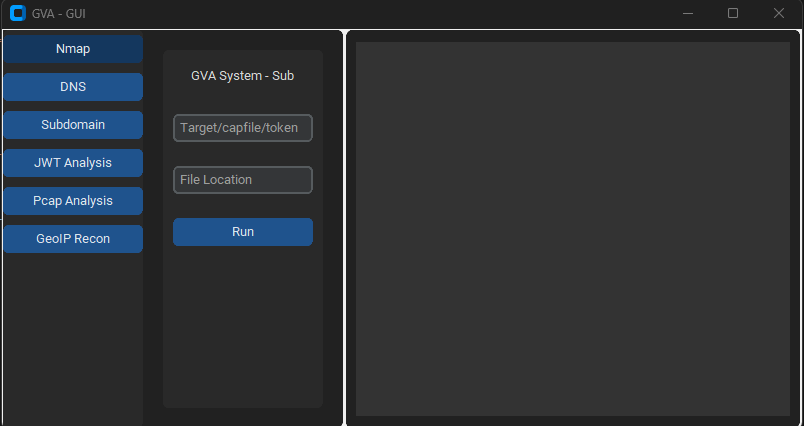
L'interface graphique utilise customtkinter pour l'exécution du code. L'interface est simple ; la seule chose à retenir est :
### Fenêtre initiale

### Fenêtre NMAP

### Fenêtre DNS

### Fenêtre GEOIP

### Fenêtre PCAP

### Fenêtre SUBDOMAIN

### Fenêtre JWT

p11 | json | Détection de service et de version pour les ports principaux | -Pn -sV --top-ports 100 |
p12 | json | Scan agressif avec scripts NSE pour vulnérabilités | -Pn -sS -sV -T4 --script=default,discovery,vuln |
p13 | json | Scan rapide pour les ports courants | -Pn -F |